CPU utilization 99% on visiting wordpress site url & open redirect found
The report describes two issues on wordpress.com: a denial-of-service condition where visiting a URL with an extremely long numeric ID causes the browser to send unlimited requests to a tracking pixel, driving CPU usage to 99%, and an open redirect where the login page's redirect_to parameter allows redirection to an external site after authentication.
 Originally disclosed on HackerOne
- Triaged in 11 hours
- Fixed in 4 days
- Paid in 4 days
- Disclosed after 15 months
Working POC for making CPU 99% for wordpress user
- Login to wordpress account
- Visit any of the below url's which are sent by attacker to victim (since these are wordpress url so victim will accept & open)
1.https://wordpress.com/post/20000000000000000000000000000000000000000000000000000000000000000000000000000000000000000000000000000000000 2.https://wordpress.com/design/1000000000000000000000 3.https://wordpress.com/pages/anurag.wordpress.com/-10000000000000000000000000000000000000000000000
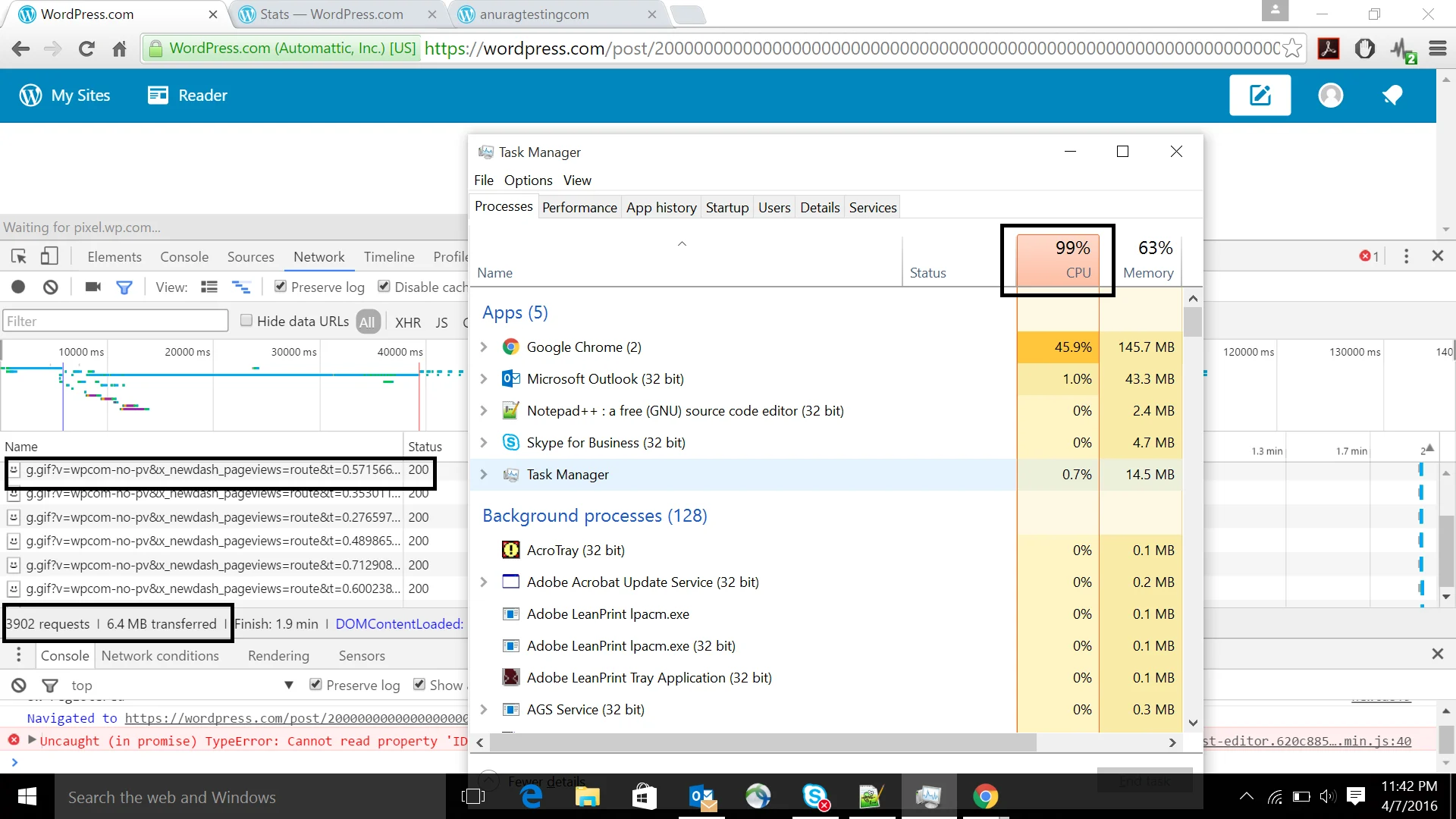
- Check your CPU usage in task manager. It would go to 99% as shown in attached.
- This happens since these pages continues to send unlimited requests to https://pixel.wp.com/g.gif?v=wpcom-no-pv&x_newdash_pageviews=route&t=0.1642450245826501
- Unlimited request are send since I think the variable holding the Post id cannot hold a value as long as 20000000000000000000000000000000000000000000000000000000000000000000000000000000000000000000000000000000000 which throws an exception.
- Problem: User CPU goes 99% causing the browser to go very very slow & unresponsive. Negative impact on customer.
Working POC for open redirect
- Access wordpress using url https://wordpress.com/wp-login.php?redirect_to=https%3A%2F%2Fgoogle.com%2Fsearch?q=myFakeSite&reauth=1
- After login you will be redirected to https://www.google.co.in/search?q=myFakeSite&gws_rd=cr&ei=WLYGV8fUHIq8uATj56uIBA which is incorrect. Wordpress should not allow redirecting to external websites like google,yahoo.
- Problem: In future if there is any bug in these external site then this open redirect from wordpress could cause harm to users.
Attachments
Not written yet. The AI write-up for this report has not been written yet. The Original tab links to the source.
How it worked
Root cause
Likely the application fails to properly validate or limit the length of numeric parameters, leading to an exception that triggers a request loop, and it also fails to restrict the redirect_to parameter to trusted domains.
Impact
The CPU exhaustion could make the victim's browser unresponsive, and the open redirect could be used in phishing or to leverage bugs on external sites, though the report only claims these as potential issues.
What the attacker needed
A WordPress account; victim clicks a crafted link
How it was found
- Log in to a WordPress account.
- Visit a URL containing an extremely long numeric ID, such as the provided post, design, or pages URLs.
- Observe CPU usage in task manager rising to 99%.
- For the open redirect, access the login URL with a redirect_to parameter pointing to an external site.
- After logging in, you are redirected to the external site.
Explained by bugbounty.wiki with AI from the original and checked against quotes from it; it can still be wrong. Read the original before relying on a detail.
Not written yet. The AI write-up for this report has not been written yet. The Original tab links to the source.
This report shows two problems on a WordPress site. First, a specially crafted web address with a very long number makes the browser repeatedly request a tiny image, which maxes out the computer's processor and makes it sluggish. Second, after logging in, the site can be tricked into sending you to a different website, which could be abused by attackers.
What is Open redirect?
A trusted site forwards users to any address an attacker picks; rarely paid alone, often the missing link in a chain.