IDOR when moving contents at CrowdSignal
The dashboard's move-content feature accepted a content ID from the request without checking ownership, so an attacker could move another user's content into their own account. With a team account, this allowed full takeover of the victim's content.

- Triaged in 4 days
- Fixed in 10 days
- Paid in 11 days
- Disclosed after 5 months
Summary:
Hi team,
You can move your contents via Move to button at https://app.crowdsignal.com/dashboard
And when you click to Move to > My Content you will send a POST request to /dashboard like that :
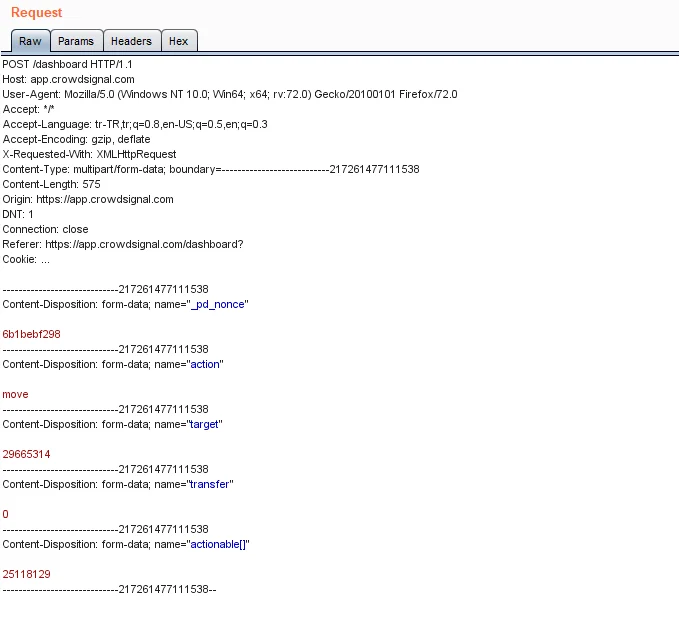
actionable[] parameter's value is the content's ID. And if you change this ID to victim's content ID, you will see victim's content at My Content page. But you can't see responses or edit it. You can only change status etc if you have a free account.
So I found another way to takeover victim's content completely via team account.
In team accounts, you have another move option that named Move to another user. Basically, you can move your contents to users (in your team) .
And if you follow same steps again but with Move to another user option, you can see victim's content in your team user's account.
Please note, content IDs are sequential, so attacker can takeover any content.
Steps To Reproduce:
- With Free account (limited access to victim's content)
- Go to https://app.crowdsignal.com/dashboard
- Click to checkbox on your any content and turn on Intercept at Burp Suite
- Click to
Move to > My Content - And change
actionable[]parameter's value with victim's content ID. - Go to
My Content.
- With Team account (full access to victim's content)
- Add your second email on https://app.crowdsignal.com/users/list-users.php and confirm it
- Go to https://app.crowdsignal.com/dashboard
- Click to checkbox on your any content and turn on Intercept at Burp Suite
- Click to
Move to > Move to another user - Select your second account, click
Move - Change
actionable[]parameter's value with victim's content ID. - Go to your second account and check dashboard
PoC video for full access to victim's content:
Impact
IDOR leads to takeover victim's content
Thanks, Bugra
Not written yet. The AI write-up for this report has not been written yet. The Original tab links to the source.
How it worked
Root cause
Likely the server did not verify that the content ID in the move request belonged to the requesting user before performing the move.
Impact
An attacker could take over any victim's content by moving it to their own account, especially with a team account.
What the attacker needed
A free account; a team account with a second confirmed email; knowledge of the victim's content ID
How it was found
- Go to the dashboard and select any of your content.
- Intercept the request when clicking 'Move to > My Content'.
- Change the actionable[] parameter to the victim's content ID.
- Go to 'My Content' to see the victim's content.
- For full takeover, add a second email to your team account and confirm it.
- Select 'Move to another user', choose your second account, and change the actionable[] parameter to the victim's content ID.
Explained by bugbounty.wiki with AI from the original and checked against quotes from it; it can still be wrong. Read the original before relying on a detail.
Not written yet. The AI write-up for this report has not been written yet. The Original tab links to the source.
When you move your own content, the website trusts the ID number you send. An attacker can change that number to someone else's content ID and move it into their own account. Because IDs are sequential, they can try many numbers to find and steal other people's content.
What is IDOR?
One user can read or change another user's data, usually by changing an identifier the server trusts without checking who is asking. One of the most paid bug classes on web programs.