Denial of Service in the protection service provided by Avast Security Premium.
An unprivileged user could configure all Avast protection binaries to always run inside the Avast Sandbox, and after a restart the sandbox tried to virtualise the entire security suite, raising an exception and stopping all protection services. This allowed a denial of service against the antivirus protection.
 Published on medium.com
That’s my first blog post in Stolabs, and I would like to share with you a bug that I found in the Avast Sandbox, allowing a denial of service (DoS) attack against the protection service.
The full write-up lives on its author's site
It belongs to its author, so we link to it rather than copy it. The other two tabs are our own rewrites, checked against it.
Context
Avast Premium Security is a security suite that includes a Sandbox feature. The Sandbox is meant to run binaries in a virtual environment and to prevent any changes, including malicious ones, from being made on the host machine. The report looks at what happens when the suite's own protection binaries are run inside that Sandbox.
The author frames the work with a line from Koret and Bachaalany in The Antivirus Hacker's Handbook:
[…]A typical computer user may view the AV software as a simple software suite, but an attacker must be able to view the AV on a deeper level.[2015]
The point being that an attacker should look beyond normal antivirus operation and search for all the exploitation possibilities. The bug described is a corner case, a software operating condition not predicted by the developer, and it results in a denial of service across all the protection applications offered by the suite.
Setup
The precondition is an unprivileged user session on a machine running Avast Premium Security with the Sandbox feature. In normal conditions, an unprivileged user has no permission to stop or interrupt the service, or to end the process through Windows Task Manager. The researcher needed a way to get the protection binaries into the Sandbox without those privileges, which the product itself provides through a right-click option.
Finding it
While analysing the Sandbox and confirming that it can virtualise any software execution, the researcher asked a simple question: what would happen if all the protection service binaries were executed in the sandbox itself?
Doing exactly that and then restarting the computer, the sandbox attempted to insert the entire security system into the sandbox itself. That raised an exception and stopped all services. In normal conditions an unprivileged user cannot stop or interrupt the service, yet here the product's own option brings the services down.
Exploitation
Step 1: Confirm the manual path
The Sandbox can be told to always run a given binary inside it. The option is reached from the Windows context menu by right-clicking any .EXE binary, as shown below:
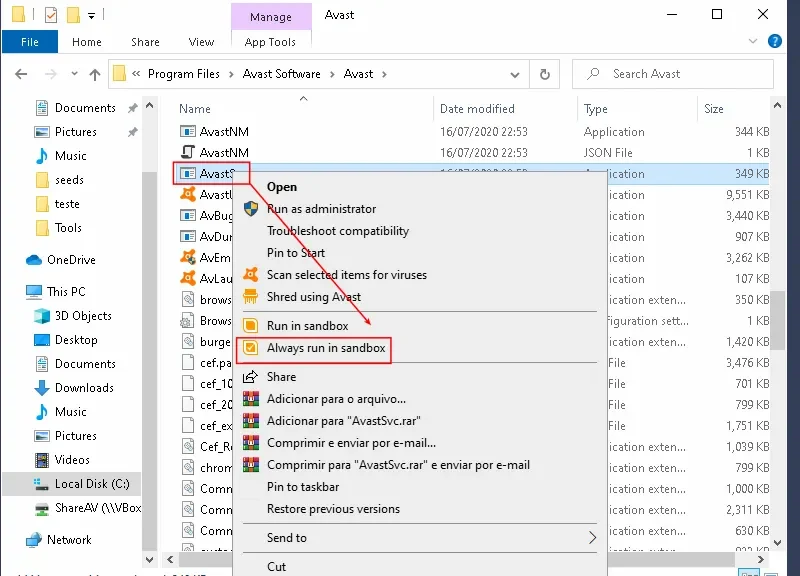
Image 1. Check menu functionality to include executable in Sandbox
This is the building block: any executable, including Avast's own protection binaries, can be marked to run in the Sandbox.
Step 2: Automate the inclusion
Marking binaries one by one by hand is slow, so the researcher wrote a Powershell script that enables the Always run in sandbox option for all the Avast executables. The script is shown in the following image:
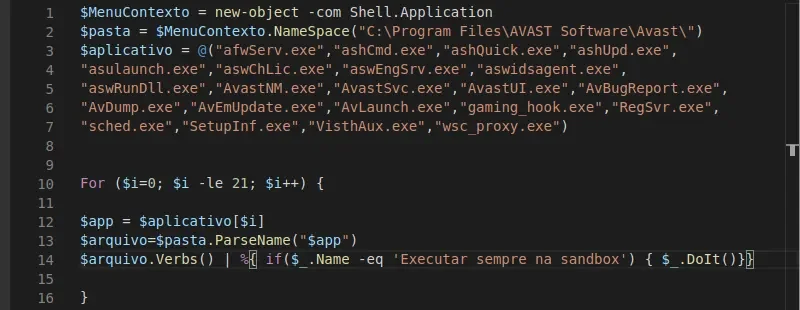
Image 2. Powershell script allowing to include all Avast protection binaries in the Sandbox
Step 3: Run it as an unprivileged user and restart
Executing the script in an unprivileged user session successfully included all Avast protection binaries in the Sandbox. After restarting the computer, the service was no longer started. The researcher notes that the script could easily be incorporated into malware, causing a denial of service to the entire Avast protection system.
Root cause
The Sandbox can virtualise any software execution, and the suite's own protection binaries can be marked to run inside it. When the whole security system is placed inside the sandbox, the sandbox tries to insert itself into itself, raises an exception and stops all services. In normal conditions an unprivileged user has no permission to stop or interrupt the service or end the process, but the product's own option can still put the binaries in the Sandbox. The report does not describe the internal code path that raises the exception.
Impact
An unprivileged local user can cause all protection applications to stop; after restarting the computer, the service was no longer started. The script could easily be incorporated into malware causing denial of service to the entire Avast protection system. The report does not give a CVSS score or a severity rating.
Fix
The vulnerability was responsibly disclosed to Avast, which accepted the bug, requested some time to create a fix, and offered a reward.
Variants to test
- Other sandbox or virtualisation features in security products: try marking the product's own service binaries to run inside the sandbox and reboot. A positive result is that the protection service fails to start.
- Context-menu or policy options that let an unprivileged user change how a binary is executed: check whether the product's own executables are excluded from the option. A positive result is that they are not excluded and the setting persists across restarts.
- Scripted mass configuration of per-binary settings: check whether the setting can be applied to every executable in the product's install directory from a low-privilege session. A positive result is that the whole set is accepted without an elevation prompt.
- Self-referential execution paths in other suites: look for any feature that runs a program in an isolated environment and ask what happens when the isolated environment is asked to isolate its own components. A positive result is an exception, a crash or a service that no longer starts after a reboot.
What happened, in plain words
Avast Premium Security is a security suite: a package of programs that work together to protect a Windows computer from viruses and other threats. One of its features is called the Sandbox. A sandbox is an isolated space, like a playpen for programs: anything that runs inside it is supposed to be kept away from the rest of the computer, so even if the program is malicious, it cannot change files or settings on the real machine.
The researcher found that if you tell the Sandbox to run Avast's own protection programs inside itself, and then restart the computer, the whole protection system fails to start. The Sandbox tries to put the entire security suite inside the sandbox, which is like asking a box to contain itself. That causes an error, and all the protection services stop. This is a denial of service (DoS): an attack that does not steal data or break into accounts, but makes a service unavailable. Here, the service is your antivirus protection.
The interesting part is that a normal, non-administrator user is not allowed to stop Avast's services directly. Windows has permissions that prevent that. But the product itself offers a right-click option to always run a chosen program in the Sandbox, and that option can be applied to Avast's own programs. The user never stops the service; the product does it to itself.
The researcher reported the bug to Avast, which accepted it, asked for time to fix it, and offered a reward.
Background: what the Sandbox is and why it matters
Avast Premium Security includes a Sandbox that promises to run programs in a virtual environment and to prevent any changes, including malicious ones, from being made on the host machine. The host machine is your real computer. A virtual environment is a simulated computer inside your computer: programs running there see a fake disk, fake registry and so on, so their changes do not reach the real system.
The report quotes Koret and Bachaalany in The Antivirus Hacker's Handbook:
[…]A typical computer user may view the AV software as a simple software suite, but an attacker must be able to view the AV on a deeper level.[2015]
In plain words: a normal user sees antivirus as one simple product, but someone looking for weaknesses has to study how its parts interact. The bug here is a corner case: a situation the developer did not predict. It results in a denial of service across all the protection applications offered by the suite.
What you need before trying this
You need a Windows computer with Avast Premium Security installed, including the Sandbox feature, and you need to be logged in as an unprivileged user, meaning an account that is not an administrator. In normal conditions, an unprivileged user has no permission to stop or interrupt the service, or to end the process through Windows Task Manager. Task Manager is the built-in Windows tool that lists running programs and lets you end them; ending a process means forcing a running program to stop.
The researcher needed a way to get the protection programs into the Sandbox without those administrator rights. The product itself provides that way through a right-click option, which is the next step.
Finding the bug
While analysing the Sandbox and confirming that it can virtualise any software execution, the researcher asked a simple question: what would happen if all the protection service binaries were executed in the sandbox itself?
A binary is a program file that the computer can run, usually ending in .EXE on Windows. Executing a binary means starting it.
Doing exactly that and then restarting the computer, the sandbox attempted to insert the entire security system into the sandbox itself. That raised an exception and stopped all services. An exception is an error signal a program raises when it cannot continue; here it led to the protection services stopping. In normal conditions an unprivileged user cannot stop or interrupt the service, yet here the product's own option brings the services down.
Step by step
Step 1: Confirm the manual path
The Sandbox can be told to always run a given binary inside it. The option is reached from the Windows context menu by right-clicking any .EXE binary, as shown below:
Image 1. Check menu functionality to include executable in Sandbox
A context menu is the small list of actions that appears when you right-click something. This is the building block: any executable, including Avast's own protection binaries, can be marked to run in the Sandbox.
Step 2: Automate the inclusion
Marking binaries one by one by hand is slow, so the researcher wrote a Powershell script that enables the Always run in sandbox option for all the Avast executables. Powershell is a scripting tool built into Windows: you type commands, or put them in a file, and Windows runs them. The script is shown in the following image:
Image 2. Powershell script allowing to include all Avast protection binaries in the Sandbox
The report does not include the script text, only this image. The purpose is automation: instead of right-clicking every Avast program, the script applies the same setting to all of them.
Step 3: Run it as an unprivileged user and restart
Executing the script in an unprivileged user session successfully included all Avast protection binaries in the Sandbox. After restarting the computer, the service was no longer started. The researcher notes that the script could easily be incorporated into malware, causing a denial of service to the entire Avast protection system. Malware is malicious software; folding the script into malware means the attack could run without a person clicking anything.
Why it works
The Sandbox can virtualise any software execution, and the suite's own protection binaries can be marked to run inside it. When the whole security system is placed inside the sandbox, the sandbox tries to insert itself into itself, raises an exception and stops all services. In normal conditions an unprivileged user has no permission to stop or interrupt the service or end the process, but the product's own option can still put the binaries in the Sandbox. The report does not describe the internal code path that raises the exception.
What an attacker can do with it
An unprivileged local user can cause all protection applications to stop; after restarting the computer, the service was no longer started. The script could easily be incorporated into malware causing denial of service to the entire Avast protection system. The report does not give a CVSS score or a severity rating. CVSS is a standard way of scoring how serious a vulnerability is; here it was not provided.
The fix
The vulnerability was responsibly disclosed to Avast, which accepted the bug, requested some time to create a fix, and offered a reward. Responsible disclosure means telling the vendor privately first, giving them time to fix it before you publish details.
Similar things to test
- Other sandbox or virtualisation features in security products: try marking the product's own service binaries to run inside the sandbox and reboot. A positive result is that the protection service fails to start.
- Context-menu or policy options that let an unprivileged user change how a binary is executed: check whether the product's own executables are excluded from the option. A positive result is that they are not excluded and the setting persists across restarts.
- Scripted mass configuration of per-binary settings: check whether the setting can be applied to every executable in the product's install directory from a low-privilege session. A positive result is that the whole set is accepted without an elevation prompt. An elevation prompt is the Windows box asking for administrator approval.
- Self-referential execution paths in other suites: look for any feature that runs a program in an isolated environment and ask what happens when the isolated environment is asked to isolate its own components. A positive result is an exception, a crash or a service that no longer starts after a reboot.
Glossary
- Sandbox: an isolated space where programs run without affecting the real computer.
- Host machine: the real computer, as opposed to a virtual environment inside it.
- Virtual environment: a simulated computer that programs run inside, separated from the real system.
- Binary / executable: a program file the computer can run, usually ending in .EXE on Windows.
- Denial of service (DoS): an attack that makes a service unavailable rather than stealing data.
- Unprivileged user: a normal account without administrator rights.
- Administrator: an account allowed to change system settings and stop services.
- Service: a background program that runs without a visible window, such as antivirus protection.
- Process: a running instance of a program.
- Task Manager: the built-in Windows tool that lists running programs and lets you end them.
- Context menu: the list of actions that appears when you right-click something.
- Powershell: a scripting tool built into Windows for running commands and scripts.
- Script: a text file of commands that a tool like Powershell runs in order.
- Exception: an error signal a program raises when it cannot continue.
- Corner case: a situation the developer did not predict.
- Malware: malicious software.
- Responsible disclosure: telling the vendor privately first and giving them time to fix the issue before publishing details.
- CVSS: a standard scoring system for the severity of a vulnerability.
- Elevation prompt: the Windows dialog asking for administrator approval.


