From Recon via Censys and DNSdumpster, to Getting P1 by Login Using Weak Password – “password”
The author found an origin server IP behind Cloudflare using Censys and DNSdumpster, discovered a GitLab instance with a publicly accessible groups page that listed usernames, and then logged in as an admin account that used the weak password 'password'. This gave access to many private projects.

Bug Report / Web Apps / Write-Up
The full write-up lives on its author's site
It belongs to its author, so we link to it rather than copy it. The other two tabs are our own rewrites, checked against it.
Context
This is a write-up of a bug bounty finding on a program with a broad scope of *.target.tld domains. The researcher, YoKo Kho (@YokoAcc), combined several separate weaknesses into a single chain: origin IP discovery behind Cloudflare, a GitLab instance found on one of those origin IPs, a GitLab misconfiguration that exposed group membership, and finally a weak password on an administrator account. The report was published on 14 March 2022 and the program awarded a P1 bounty for the find.
The product involved is GitLab Community Edition, reached directly on an origin server rather than through the Cloudflare-protected hostname. The feature that mattered most is GitLab's /explore area, specifically the groups listing, which in the affected configuration was reachable without authentication and revealed the members of a group.
Setup
The researcher had an invitation to a program whose scope covered many domains under a single wildcard. No special accounts were provided. The tools used were:
- Censys (
https://search.censys.io/) to look up the target's Autonomous System and the IP blocks assigned to the organisation. - DNSDumpster to validate the IP segments and to look for other live hosts in the same segment.
- The Chrome extension "Open Multiple URLs" to open many IPs at once over HTTP and HTTPS.
- Aquatone (xlarge option) and httprobe as alternatives for broad HTTP/HTTPS port checks.
- The GitLab program's hacktivity page on HackerOne as a reference for known GitLab issues.
No credentials were held at the start. The only precondition was that the in-scope assets were behind Cloudflare and returned "Access Denied" on direct access.
Finding it
After enumerating subdomains of the in-scope targets, the researcher found that most publicly accessible assets were protected by Cloudflare and returned the familiar "Access Denied" page on many HTTP/HTTPS ports. The reasoning was that a company implementing a WAF may have missed the configuration needed to actually hide the origin server IP. Knowing the origin IP lets a tester reach the application without the WAF's rate limiting, injection filtering and similar protections.
The researcher cites the Secjuice article on finding real origin IPs behind Cloudflare or Tor as the technique that prompted this approach.
Step 1: Find the origin IP block through Censys
The target domain was entered into Censys and the "Autonomous System" section was examined. An Autonomous System Number identifies a connected group of one or more blocks of IP addresses assigned to an organisation, so this section can show IP space specifically assigned to the target.
For illustration the report uses T*sl* and T*sl*.com as a stand-in name, making clear that the real target is not Tsl. Entering the domain into Censys shows the Autonomous Systems section with output using that organisation name.
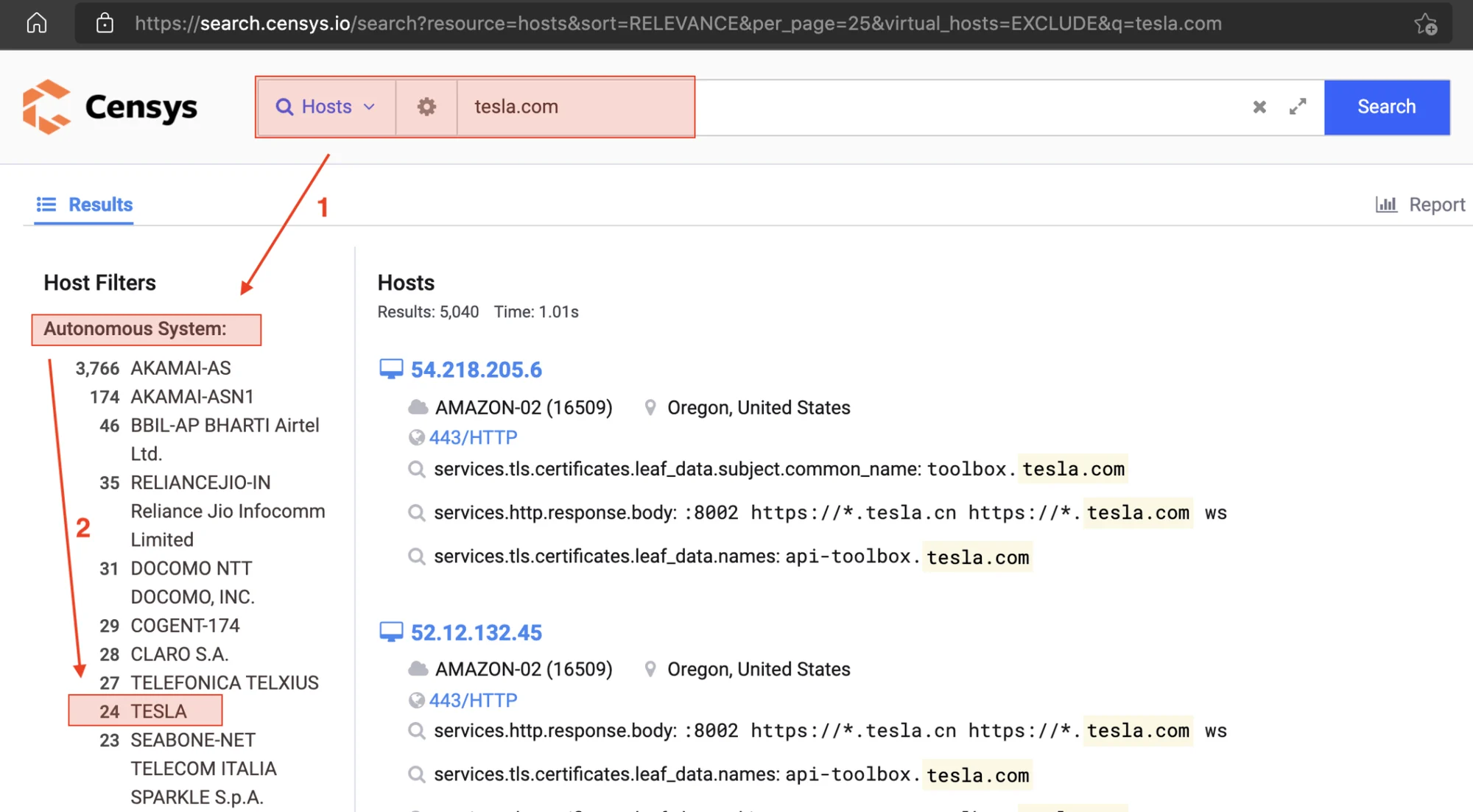
Clicking the organisation name makes Censys display the block of IP addresses used by that organisation.
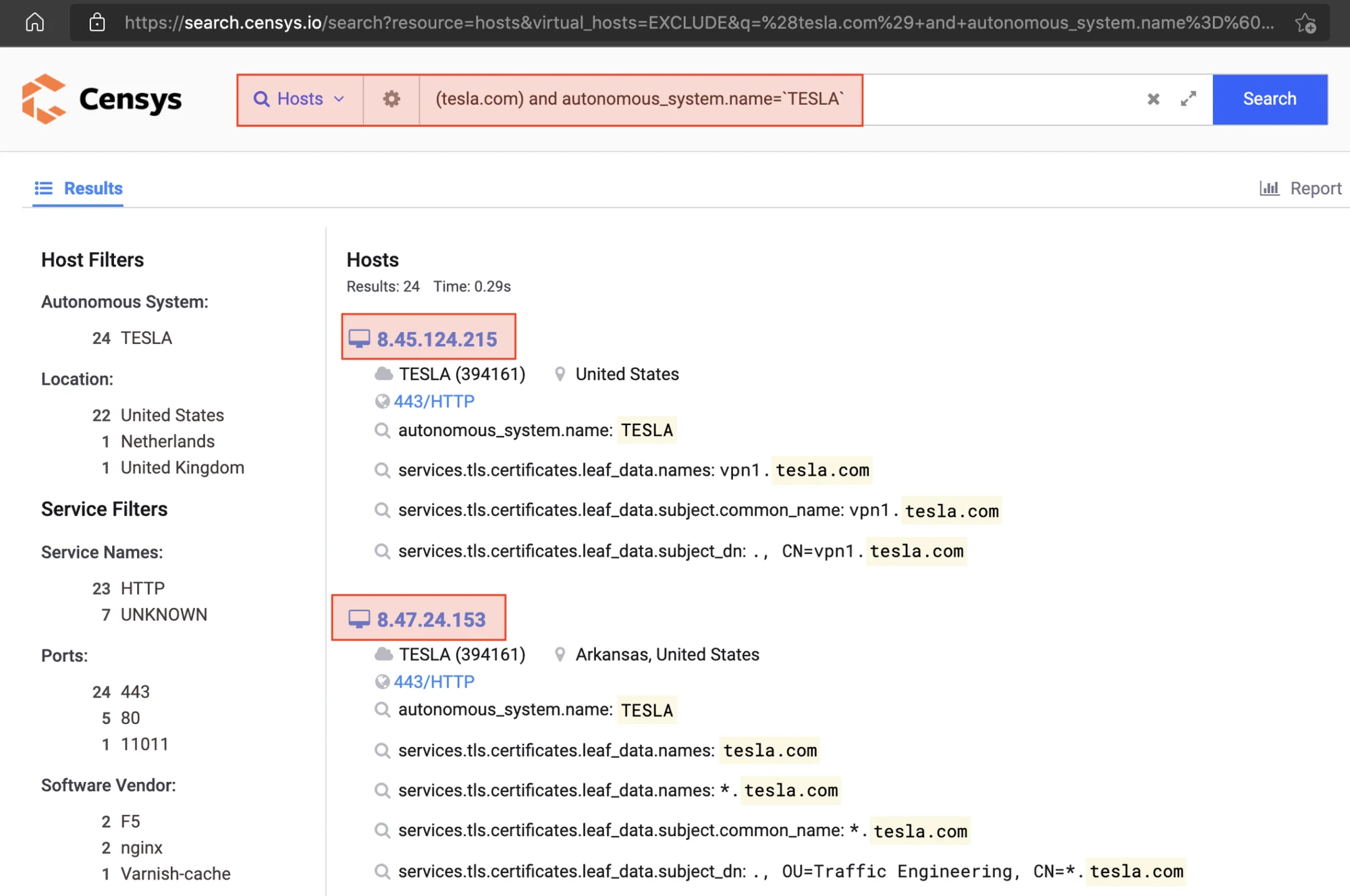
The second search returned 24 results, but the researcher notes that the search can be expanded by looking at the /24 subnet of every host identified. For example, two results gave IPs 8.**.124.215 and 8.**.24.153, which imply the broader segments 8.**.124.0/24 and 8.**.24.0/24. Two octets are masked in the report to avoid attracting visitors searching for those numbers.
Step 2: Validate the segments with DNSDumpster
The candidate segments were taken to DNSDumpster. This serves two purposes: confirming whether the segment really belongs to the target organisation, and identifying possible other live hosts in the same segment.
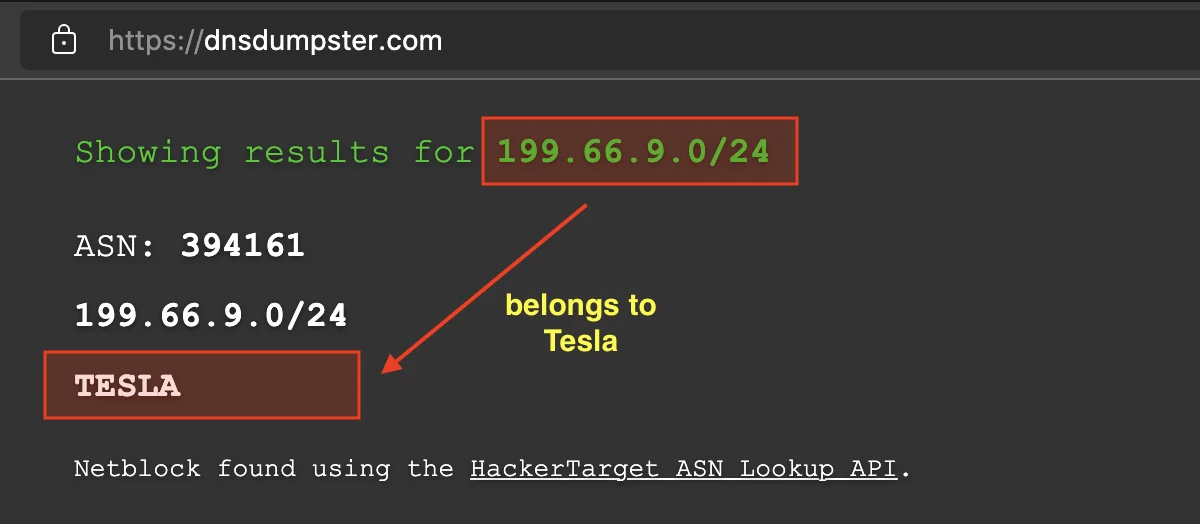
Several segments were tried one by one until one was found that contained quite a lot of IPs.
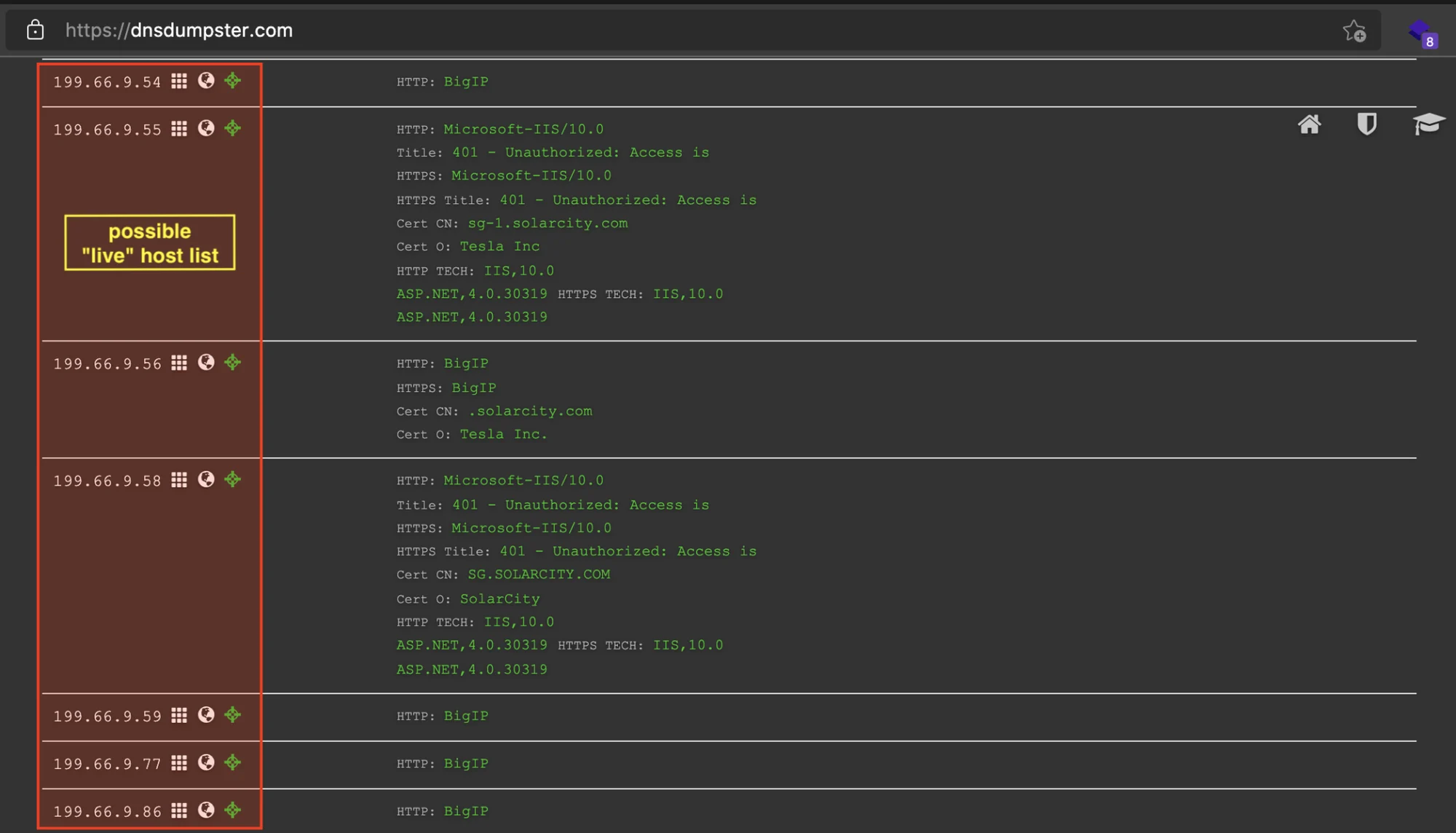
Step 3: Look for open HTTP/HTTPS services
With a large public target, the researcher chose to check for HTTP/HTTPS services on the IPs collected from DNSDumpster. The report contrasts this with an intranet engagement, where the focus would instead be on used accounts and passwords, unpatched or outdated versions, and configuration mistakes.
For the public case, the options given are accessing default ports 80 and 443, or doing a broad check of other ports such as 8080 and 8443 with tools like aquatone or httprobe. Here the first option was used: all IPs from DNSDumpster were entered into the "Open Multiple URLs" extension with http and https prefixed to each one.
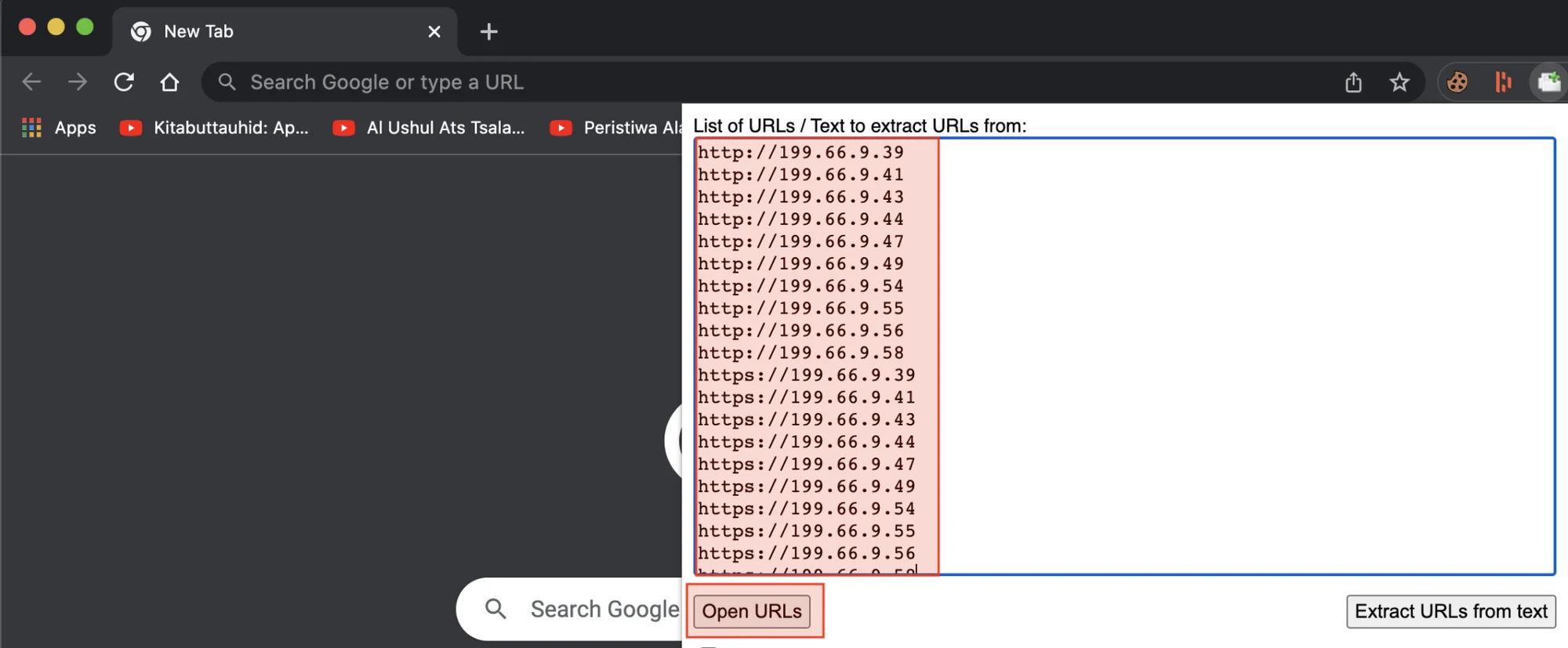
Clicking "Open URL" opens every URL in the list at once.
Step 4: Find GitLab on one of the IPs
Among the many IPs checked, one showed a GitLab Community Edition instance. Checking the certificate showed it referred to one of the subdomains, a subdomain that returns "Access Denied" when accessed directly without going through the origin server IP.
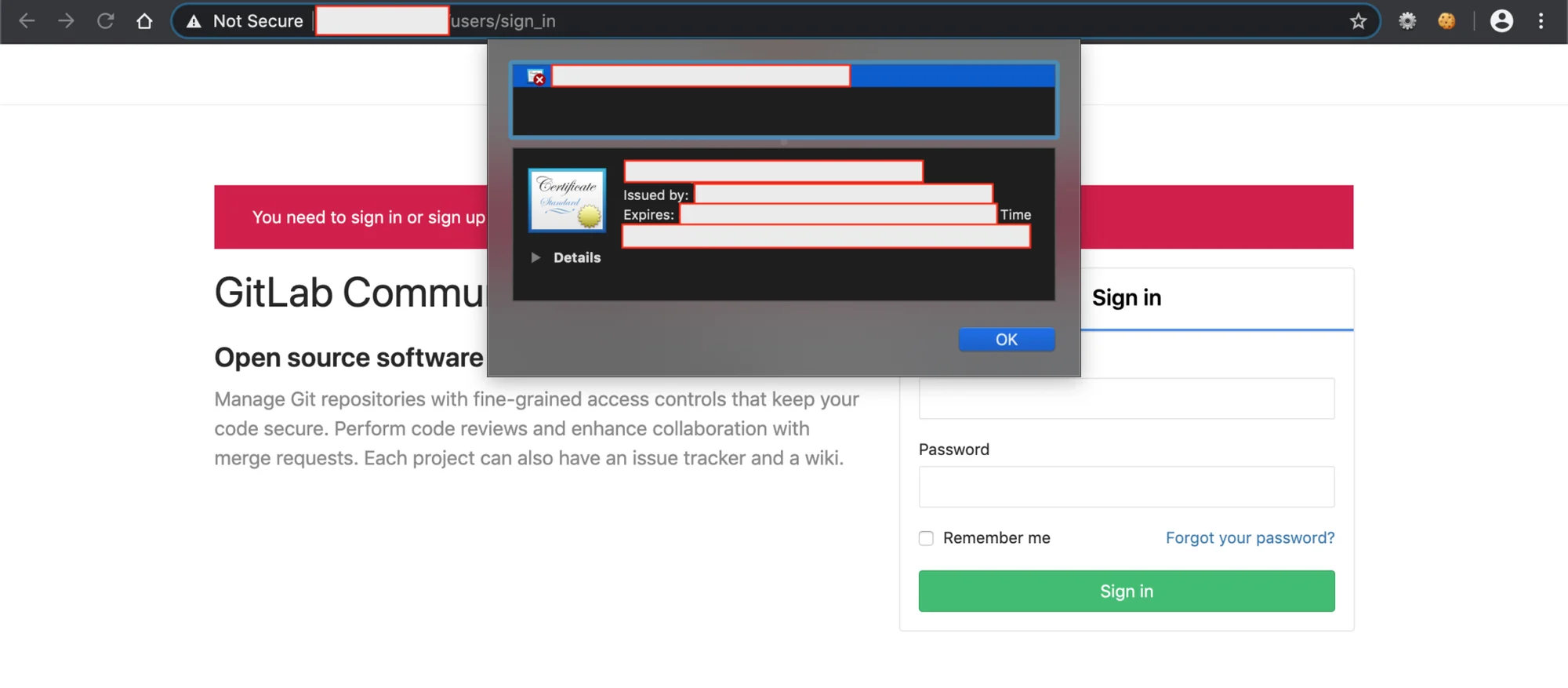
The researcher also noted an oddity: accessing the subdomain with the full path, adding /user/sign_in so that it becomes subtarget.target.tld/user/sign_in, was not blocked by Cloudflare, while accessing only subtarget.target.tld returned "Access Denied" again.
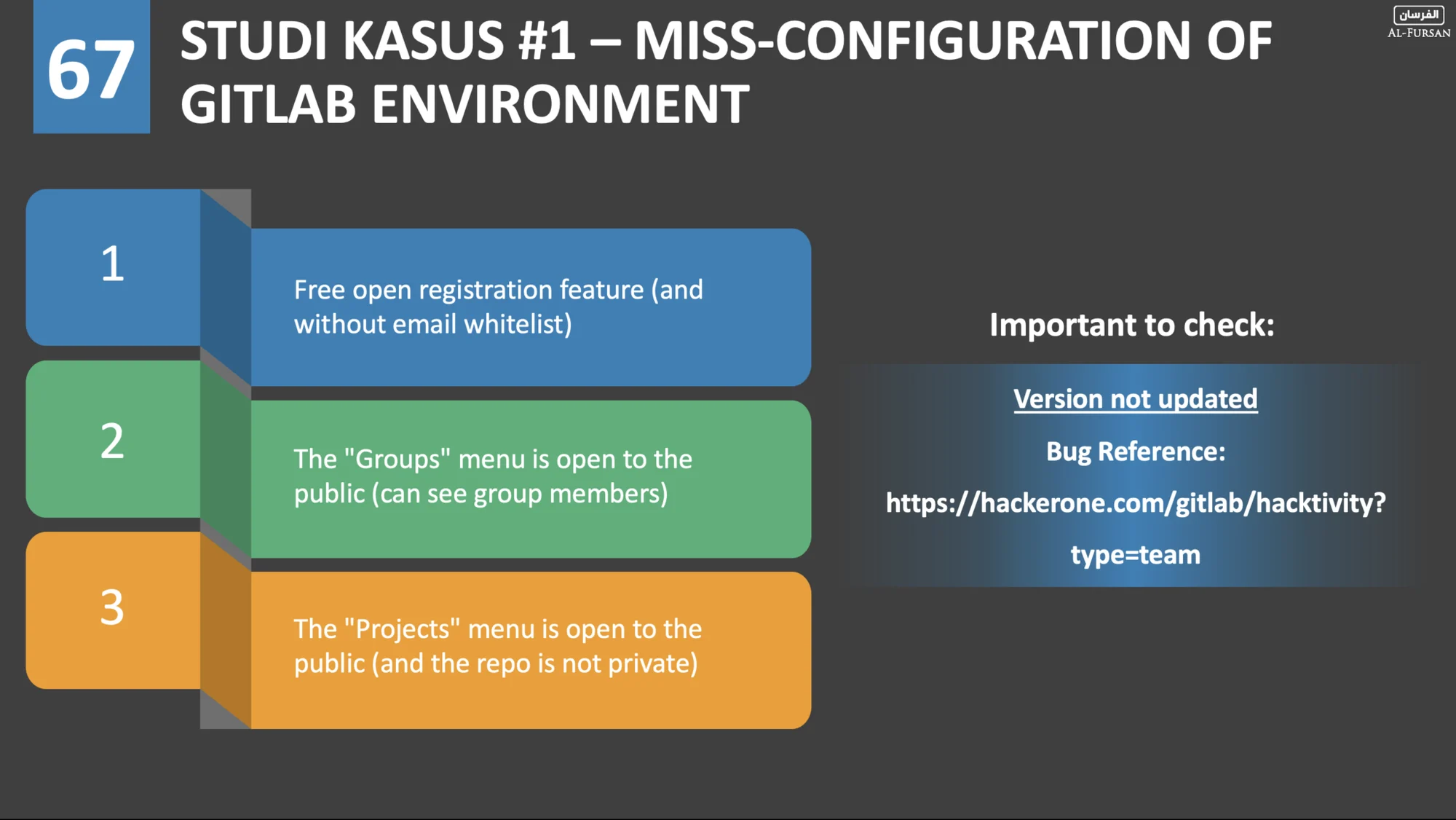
With GitLab identified, the researcher listed three common implementation mistakes to check:
- Free signup with no email whitelist, letting an attacker register and view projects that are not private, potentially including sensitive material such as unprotected database connection strings.
- A groups menu accessible to the public without logging in, which reveals the usernames in use.
- A projects menu also accessible without logging in, which can expose source code and possibly unprotected credentials.
Beyond these, the report recommends checking for known vulnerabilities in GitLab itself that the maintainer may not have patched, using the GitLab program's hacktivity page on HackerOne as a reference.
Exploitation
Step 1: Reach the public groups listing
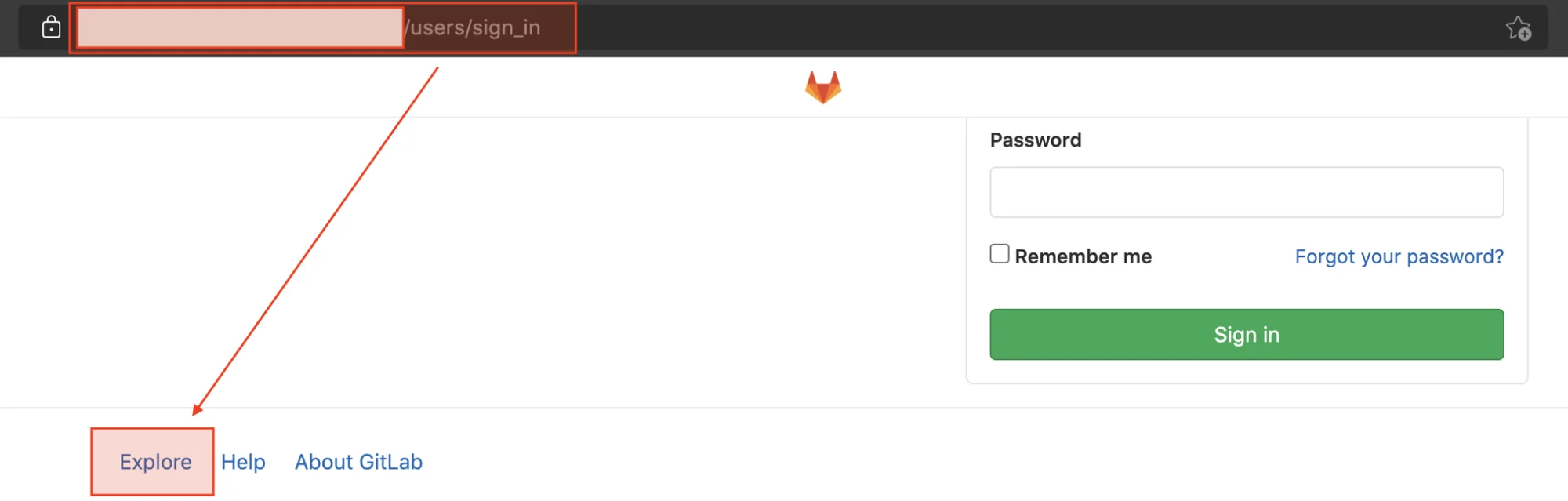
The groups menu was reachable without authentication. The route is the "explore" menu, generally found in the footer, or the /explore endpoint directly, followed by selecting "groups" in the header menu. The report notes there is no screenshot of the explore target menu itself, but shows how it looks.

After some analysis, one group turned out not to be protected, so visitors could see the list of members in that group.
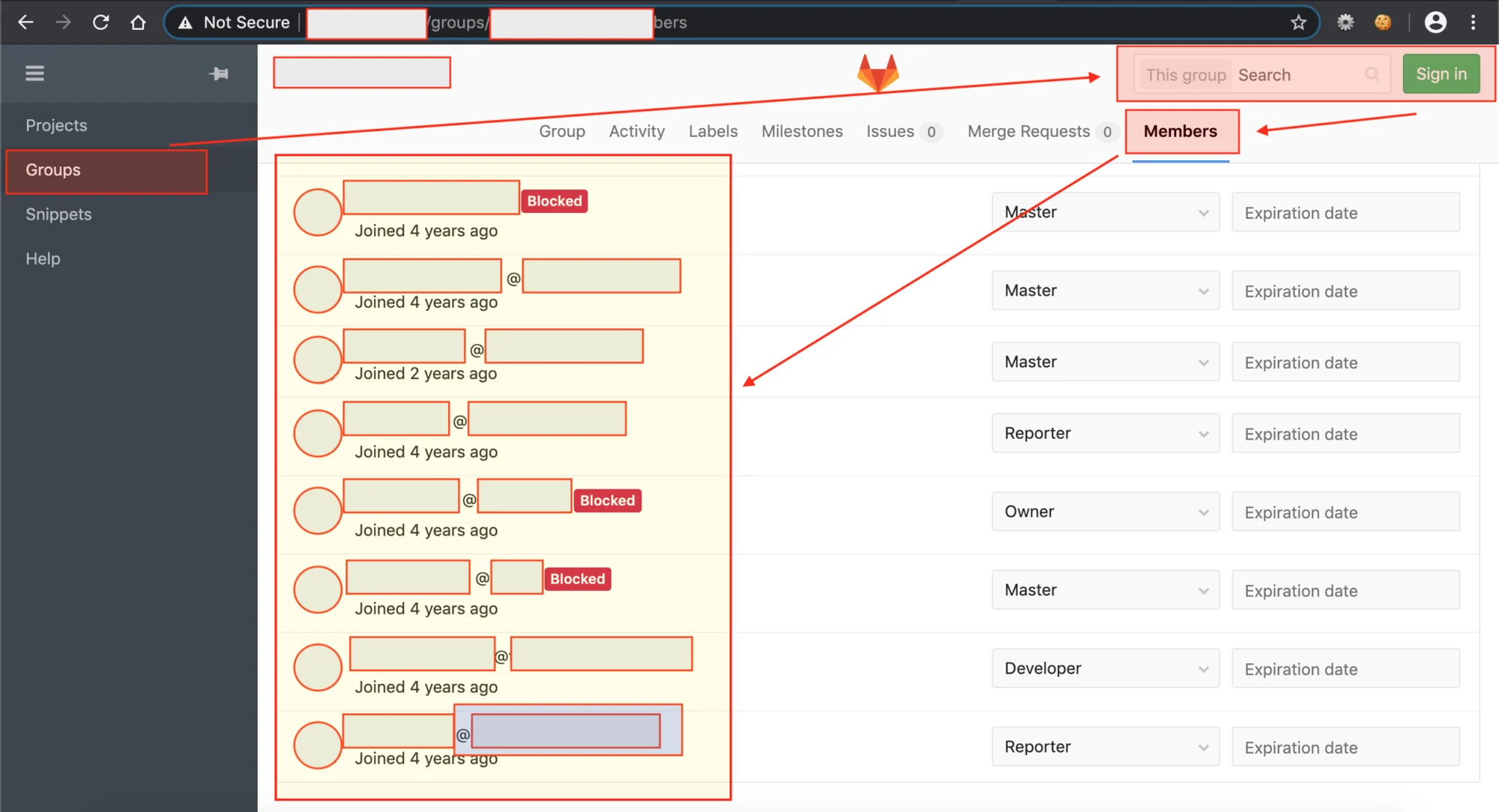
This corresponds to the GitLab issue about disabling "explore" and "help" in GitLab, which the report links as the underlying misconfiguration.
Step 2: Try weak passwords against the discovered usernames
With part of the username list in hand, the researcher tried logging in with a series of common weak passwords: password, Password, passw0rd, Passw0rd, p@ssw0rd, and so on. The report also suggests finding password patterns used by a company through recon of GitHub, Trello and other collaboration platforms, referring to an earlier post on collecting credentials and finding patterns.
On the username at the very bottom of the list, the login succeeded with the password password. The account turned out to be an administrator, and the researcher could see many private projects in it.
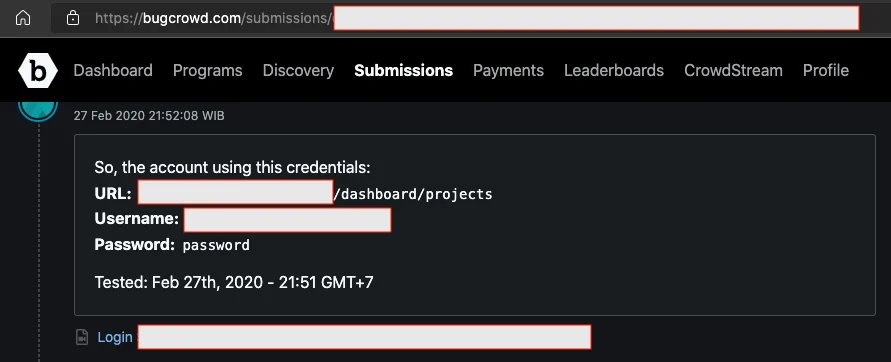
The researcher did not believe it at first and assumed the wrong password had been used, but repeated experiments confirmed that the password was indeed password.
Step 3: Report
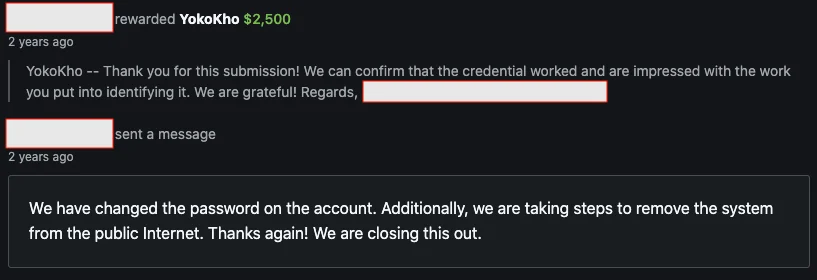
The finding was reported immediately. Not long after, the program owner awarded a bounty worth P1 for the find. The TL;DR notes that it was triaged in one day and rewarded the next day.
Root cause
The chain depends on two separate mistakes.
First, the origin server IP was not properly hidden behind Cloudflare, so the GitLab instance could be reached directly, bypassing the WAF. The report frames this as a common perimeter misconfiguration: the WAF is deployed but the environment settings that should hide the origin IP were missed. The report also notes the odd behaviour where subtarget.target.tld/user/sign_in was not blocked while the bare hostname was.
Second, the GitLab instance exposed the groups listing to unauthenticated visitors, revealing group membership and therefore usernames. The report links this to the GitLab issue about disabling "explore" and "help".
Neither mistake alone gives access. The weak password on the administrator account is what turns the leaked username into a login. The report does not state why that account used password; it only notes that such a choice can happen when a user forgets an old password and replaces it with a weak one, or believes nobody will know the username is registered.
Impact
Under the conditions seen here, an unauthenticated attacker who finds the origin IP can reach the GitLab instance without the WAF's rate limiting and filtering, enumerate group members without logging in, and then attempt weak passwords against those usernames. A successful login as an administrator gives access to private projects, which the researcher could view. The report does not enumerate what those private projects contained beyond stating that many were visible.
The report also stresses that a username alone is useful: it is one step closer to logging into the system, and it is an ingredient for social engineering in real engagements, even though social engineering is normally out of scope for bug bounty and VDP programs. The researcher advises keeping any valid username information found, because the account owner may later change the password to a weak value.
Fix
The report does not describe a specific fix applied by the program. The measures it points to are:
- Properly hide origin server IPs so that the WAF cannot be bypassed, following the Secjuice guidance on finding and therefore protecting real origin IPs.
- Disable the "explore" and "help" features in GitLab, as described in the linked GitLab issue, so that group membership is not exposed to unauthenticated visitors.
- Review GitLab for known unpatched vulnerabilities using the GitLab hacktivity page.
- Check for free signup without an email whitelist, publicly accessible projects, and weak passwords such as
password.
Variants to test
- Origin IP discovery on other Cloudflare-fronted scopes. Look up the target in Censys, take the Autonomous System, expand each host to its /24, and validate the segments in DNSDumpster. A positive result is a segment that clearly belongs to the organisation and contains live hosts.
- Direct access to origin IPs on ports 80 and 443. Open every IP from DNSDumpster with
httpandhttpsprefixes, for example with the "Open Multiple URLs" extension, or scan more broadly with aquatone or httprobe on ports such as 8080 and 8443. A positive result is an application responding directly, with a certificate naming an in-scope subdomain. - Path-based WAF gaps. On a host that returns "Access Denied" at the root, try known application paths such as
/user/sign_in. A positive result is a path that is served while the bare hostname is blocked. - Unauthenticated GitLab explore pages. Visit
/exploreand the groups listing without logging in. A positive result is a group whose member list is visible to visitors. - Weak passwords against leaked usernames. Try
password,Password,passw0rd,Passw0rd,p@ssw0rdand similar values, and look for company password patterns on GitHub, Trello and other collaboration platforms. A positive result is a successful login, especially on an account with administrative rights. - GitLab signup and project exposure. Check whether signup is open without an email whitelist and whether projects are publicly visible. A positive result is registration without approval, or project content including credentials such as database connection strings.
What happened, in plain words
A security researcher was invited to a bug bounty program. A bug bounty program is a scheme where a company says: "if you find a security problem in our systems and tell us about it responsibly, we will pay you a reward." The company in this story owned many websites, all under one family name (a wildcard like *.target.tld, meaning every address ending in target.tld).
The researcher wanted to reach the company's real web servers. Most of the company's websites sat behind Cloudflare. Cloudflare is a protective service that sits between visitors and the real server, like a receptionist in front of an office: it checks who is coming in, blocks suspicious visitors, and hides the office's real address. When you visit a Cloudflare-protected site that does not want you, you get a page saying "Access Denied".
But the receptionist is only useful if nobody knows the office's real address. The researcher used a search engine for internet devices called Censys to work out which blocks of internet addresses belonged to the company, then used a tool called DNSDumpster to confirm those addresses and find other live machines in the same block. Then he opened every one of those addresses in a browser, all at once, using a Chrome extension.
One of those addresses turned out to be a GitLab server. GitLab is a website where software teams store their code and manage projects; think of it as a shared online filing cabinet for programmers, with user accounts, groups and projects. Because the researcher reached it by its real address rather than through Cloudflare, the protective receptionist was not in the way.
On that GitLab, a menu called "explore" was open to anyone, even people who had not logged in. Through it, the researcher could see the members of a group, which gave him a list of usernames. He then tried a handful of very common passwords against those usernames. One account, which turned out to be an administrator, used the password password. He logged in, saw many private projects, reported it, and the program awarded a P1 bounty. P1 is the highest priority level a bug bounty program uses for a report.
The report was published on 14 March 2022. The researcher is YoKo Kho (@YokoAcc).
The story, step by step
The starting point
The researcher had an invitation to a program whose scope covered many domains under a single wildcard. No accounts were given to him. The tools he used were:
- Censys (
https://search.censys.io/), a search engine that indexes machines connected to the internet, to look up the company's address blocks. - DNSDumpster, a website that maps out which machines and addresses belong to a domain, to confirm those blocks and find other live machines.
- The Chrome extension "Open Multiple URLs", to open many addresses at once.
- Aquatone (with the xlarge option) and httprobe, two command-line tools that check many addresses for web servers, mentioned as alternatives.
- The GitLab program's hacktivity page on HackerOne, a public list of previously reported GitLab security issues, used as a reference.
At the start he held no credentials. The only precondition was that the in-scope websites were behind Cloudflare and answered "Access Denied" when visited directly.
Why bother finding the real server address?
After listing the subdomains of the in-scope targets, the researcher found that most publicly reachable websites were protected by Cloudflare and returned the familiar "Access Denied" page on many web ports. A port is a numbered door on a machine; web traffic normally uses door 80 for plain HTTP and door 443 for encrypted HTTPS.
The reasoning was simple: a company that installs a protective service may forget to actually hide the real server address behind it. If you know the real address, you can knock on the office's back door and skip the receptionist entirely. That means the protections Cloudflare normally provides, such as rate limiting (slowing down someone who sends too many requests), filtering of malicious input, and similar defences, no longer apply. A WAF, or Web Application Firewall, is the general name for that kind of protective filtering layer.
The researcher credits a Secjuice article, "Finding The Real Origin IPs Hiding Behind CloudFlare or Tor", as the technique that prompted this approach. "Origin server" simply means the real machine that runs the website, as opposed to the protective layer in front of it.
Step 1: Find the company's address block through Censys
He entered the target domain into Censys and looked at the "Autonomous System" section. An Autonomous System Number, or ASN, is a number that identifies a connected group of one or more blocks of internet addresses assigned to one organisation. Think of it as a postal district number: it tells you which streets belong to which organisation. Because of this, the section can show address space specifically assigned to the target.
For illustration the report uses T*sl* and T*sl*.com as a stand-in name, and makes clear that the real target is not Tsl. Entering the domain into Censys shows the Autonomous Systems section with output using that organisation name.
Clicking the organisation name makes Censys display the block of addresses used by that organisation.
The second search returned 24 results, but the researcher notes the search can be widened by looking at the /24 subnet of every host found. A subnet is a range of addresses that share the same first part; a /24 covers 256 addresses, from .0 to .255 in the last position. For example, two results gave the addresses 8.**.124.215 and 8.**.24.153, which imply the broader ranges 8.**.124.0/24 and 8.**.24.0/24. Two numbers in each address are masked in the report so that people searching for those numbers do not end up on the blog.
Step 2: Confirm the ranges with DNSDumpster
The candidate ranges were taken to DNSDumpster. This serves two purposes: confirming whether the range really belongs to the target organisation, and spotting other live machines in the same range. A live machine is one that answers on the network, for example by serving a web page.
Several ranges were tried one by one until one was found that contained quite a lot of addresses.
Step 3: Look for open web services
With a large public target, the researcher chose to check for web services on the addresses collected from DNSDumpster. The report contrasts this with an internal network engagement (a job inside a company's private network), where the focus would instead be on accounts and passwords in use, unpatched or outdated software versions, and configuration mistakes.
For the public case, the options given are visiting the default ports 80 and 443, or doing a broad check of other ports such as 8080 and 8443 with tools like aquatone or httprobe. Here the first option was used: all addresses from DNSDumpster were entered into the "Open Multiple URLs" extension with http and https prefixed to each one.
Clicking "Open URL" opens every address in the list at once, each in its own browser tab. This is a quick way to see which addresses answer with a web page, without typing each one by hand.
Step 4: Find GitLab on one of the addresses
Among the many addresses checked, one showed a GitLab Community Edition instance. GitLab Community Edition is the free version of GitLab. Checking the certificate showed it referred to one of the subdomains, a subdomain that returns "Access Denied" when visited directly without going through the origin server address. A certificate is the digital identity document a website presents to prove which name it belongs to; browsers show it when you click the padlock icon.
The researcher also noticed an oddity: visiting the subdomain with the full path, adding /user/sign_in so that it becomes subtarget.target.tld/user/sign_in, was not blocked by Cloudflare, while visiting only subtarget.target.tld returned "Access Denied" again. A path is the part of a web address after the domain name that points to a specific page; /user/sign_in is GitLab's login page. The report notes this oddity without explaining why it happened.
With GitLab identified, the researcher listed three common implementation mistakes to check:
- Free signup with no email whitelist. A whitelist is a list of allowed things; here, a list of email domains allowed to register. Without one, anyone can create an account and view projects that are not set to private, potentially including sensitive material such as unprotected database connection strings. A database connection string is the text a program uses to log in to its database, including the address and credentials.
- A groups menu accessible to the public without logging in, which reveals the usernames in use.
- A projects menu also accessible without logging in, which can expose source code and possibly unprotected credentials.
Beyond these, the report recommends checking for known vulnerabilities in GitLab itself that the maintainer may not have patched, using the GitLab program's hacktivity page on HackerOne as a reference. A vulnerability is a weakness that can be abused; a patch is the fix for it.
Getting in
Step 1: Reach the public groups listing
The groups menu was reachable without authentication. Authentication means proving who you are, normally by logging in. The route is the "explore" menu, generally found in the footer of the page, or the /explore address directly, followed by selecting "groups" in the header menu. The report notes there is no screenshot of the explore target menu itself, but shows how it looks.
After some analysis, one group turned out not to be protected, so visitors could see the list of members in that group.
This corresponds to the GitLab issue about disabling "explore" and "help" in GitLab, which the report links as the underlying misconfiguration. A misconfiguration is a setting that was left in a state that exposes more than intended.
Step 2: Try weak passwords against the discovered usernames
With part of the username list in hand, the researcher tried logging in with a series of common weak passwords: password, Password, passw0rd, Passw0rd, p@ssw0rd, and so on. These are variations on the same word, with capital letters, a zero in place of the letter o, or an @ in place of the letter a. They are popular because they are easy to remember, and that is exactly why they are dangerous.
The report also suggests finding password patterns used by a company through recon of GitHub, Trello and other collaboration platforms. Recon, short for reconnaissance, means gathering information about a target before attacking. GitHub and Trello are websites where teams share code and tasks, and people sometimes leave hints about their habits there. The report refers to an earlier post of his on collecting credentials and finding patterns.
On the username at the very bottom of the list, the login succeeded with the password password. The account turned out to be an administrator, and the researcher could see many private projects in it.
The researcher did not believe it at first and assumed he had used the wrong password, but repeated experiments confirmed that the password was indeed password.
Step 3: Report
The finding was reported immediately. Not long after, the program owner awarded a bounty worth P1 for the find. The summary at the top of the report notes that it was triaged in one day and rewarded the next day. Triaged means the program's team reviewed the report and confirmed it was valid.
Why it worked
The chain depends on two separate mistakes.
First, the origin server address was not properly hidden behind Cloudflare, so the GitLab instance could be reached directly, bypassing the WAF. The report frames this as a common perimeter misconfiguration: the protective layer is deployed, but the environment settings that should hide the real address were missed. The odd behaviour where subtarget.target.tld/user/sign_in was not blocked while the bare hostname was also points to a gap in the Cloudflare rules. The perimeter is the outer boundary of a company's systems, the equivalent of the fence around a building.
Second, the GitLab instance exposed the groups listing to unauthenticated visitors, revealing group membership and therefore usernames. The report links this to the GitLab issue about disabling "explore" and "help".
Neither mistake alone gives access. The weak password on the administrator account is what turns the leaked username into a login. The report does not state why that account used password; it only notes that such a choice can happen when a user forgets an old password and replaces it with a weak one, or believes nobody will know the username is registered.
What the impact was
Under the conditions seen here, an unauthenticated attacker who finds the origin address can reach the GitLab instance without the WAF's rate limiting and filtering, list group members without logging in, and then try weak passwords against those usernames. A successful login as an administrator gives access to private projects, which the researcher could view. The report does not say what those private projects contained beyond stating that many were visible.
The report also stresses that a username alone is useful: it is one step closer to logging into the system, and it is an ingredient for social engineering in real engagements, even though social engineering is normally out of scope for bug bounty and VDP programs. Social engineering means tricking people into giving up information or access, for example by pretending to be a colleague. A VDP, or Vulnerability Disclosure Program, is like a bug bounty program but usually without payment. The researcher advises keeping any valid username information found, because the account owner may later change the password to a weak value.
How to prevent it
The measures it points to are:
- Properly hide origin server addresses so that the WAF cannot be bypassed, following the Secjuice guidance on finding, and therefore protecting, real origin addresses.
- Disable the "explore" and "help" features in GitLab, as described in the linked GitLab issue, so that group membership is not exposed to unauthenticated visitors.
- Review GitLab for known unpatched vulnerabilities using the GitLab hacktivity page.
- Check for free signup without an email whitelist, publicly accessible projects, and weak passwords such as
password.
Things you can try yourself
- Look for origin addresses on other Cloudflare-fronted scopes. Look up the target in Censys, take the Autonomous System, expand each host to its /24, and confirm the ranges in DNSDumpster. A positive result is a range that clearly belongs to the organisation and contains live machines.
- Visit origin addresses directly on ports 80 and 443. Open every address from DNSDumpster with
httpandhttpsprefixes, for example with the "Open Multiple URLs" extension, or scan more broadly with aquatone or httprobe on ports such as 8080 and 8443. A positive result is an application answering directly, with a certificate naming an in-scope subdomain. - Look for path-based WAF gaps. On a host that returns "Access Denied" at the root, try known application paths such as
/user/sign_in. A positive result is a path that is served while the bare hostname is blocked. - Check unauthenticated GitLab explore pages. Visit
/exploreand the groups listing without logging in. A positive result is a group whose member list is visible to visitors. - Try weak passwords against leaked usernames. Try
password,Password,passw0rd,Passw0rd,p@ssw0rdand similar values, and look for company password patterns on GitHub, Trello and other collaboration platforms. A positive result is a successful login, especially on an account with administrative rights. - Check GitLab signup and project exposure. Check whether signup is open without an email whitelist and whether projects are publicly visible. A positive result is registration without approval, or project content including credentials such as database connection strings.
Glossary
- Bug bounty program: a scheme where a company pays a reward to people who find and responsibly report security problems in its systems.
- Wildcard scope: a scope written with a star, such as
*.target.tld, meaning every address ending intarget.tld. - Cloudflare: a protective service that sits between visitors and a website's real server, filtering traffic and hiding the server's real address.
- WAF (Web Application Firewall): a protective filtering layer that inspects web traffic and blocks malicious requests.
- Origin server: the real machine that runs a website, as opposed to the protective layer in front of it.
- Origin IP: the internet address of the origin server.
- Access Denied: the page a protective service shows when it blocks a visitor.
- Censys: a search engine that indexes machines connected to the internet.
- Autonomous System Number (ASN): a number identifying a connected group of address blocks assigned to one organisation.
- Subnet: a range of internet addresses that share the same first part; a /24 covers 256 addresses.
- DNSDumpster: a website that maps out which machines and addresses belong to a domain.
- Port: a numbered door on a machine; web traffic normally uses 80 for HTTP and 443 for HTTPS.
- HTTP / HTTPS: the languages browsers and web servers use to talk; HTTPS is the encrypted version.
- Aquatone / httprobe: command-line tools that check many addresses for web servers.
- Open Multiple URLs: a Chrome extension that opens a list of addresses at once.
- GitLab: a website where software teams store code and manage projects, with accounts, groups and projects.
- GitLab Community Edition: the free version of GitLab.
- Certificate: the digital identity document a website presents to prove which name it belongs to.
- Path: the part of a web address after the domain name that points to a specific page, such as
/user/sign_in. - Authentication: proving who you are, normally by logging in.
- Unauthenticated: without logging in.
- Misconfiguration: a setting left in a state that exposes more than intended.
- Vulnerability: a weakness that can be abused.
- Patch: the fix for a vulnerability.
- Recon (reconnaissance): gathering information about a target before attacking.
- Rate limiting: slowing down someone who sends too many requests.
- Perimeter: the outer boundary of a company's systems.
- Social engineering: tricking people into giving up information or access.
- VDP (Vulnerability Disclosure Program): like a bug bounty program but usually without payment.
- Triaged: reviewed and confirmed as valid by the program's team.
- P1: the highest priority level a bug bounty program uses for a report.
- Bounty: the reward paid for a valid report.