The Unexpected “0” Master ID for Account Data Manipulation
The update feature accepted a POST request with an ID parameter set to 0 and an empty UUID, which acted as a master ID allowing modification of any user's data by specifying their email. An attacker could change arbitrary account data without authorisation.

Bug Report / Web Apps / Write-Up
The full write-up lives on its author's site
It belongs to its author, so we link to it rather than copy it. The other two tabs are our own rewrites, checked against it.
Context
This is a broken access control story that ended in a P1 and a 2,500 USD bounty. The target was an API used by an application's data update feature. The API had been added to the scope of a bounty program the researcher was already participating in, but it arrived with no documentation, and hitting the API URL directly returned nothing useful.
The feature itself is ordinary: a logged-in user updates their own account data. The application sends a POST request carrying an id, a uuid, an email and a set of data parameters. The researcher's earlier attempts to abuse that request failed until a single unexpected value, 0 in the id parameter, turned it into a way to modify any account.
Setup
The researcher had two things to work with:
- A bounty program whose scope had recently gained an API, with no documentation and no visible content at the API URL.
- A separate VDP target that the researcher had tested months earlier and then set aside.
The tools were Burp Suite for observing and replaying traffic, plus the usual reconnaissance tooling: directory and file crawling with dirsearch or ffuf, Google Dork, Wayback Machine and urlscan. The researcher also created a second account to test access control logic between two identities.
No versions, endpoints or hostnames beyond the target domain are given in the report.
Finding it
The first pass on the newly scoped API went nowhere. Crawling for files and directories, Google Dork, Wayback Machine and urlscan produced no visible endpoints and no sensitive files. The researcher abandoned the target for a while.
Months later, while revisiting the VDP target and logging in with Burp Suite recording traffic, the researcher noticed that the application's data update feature was now calling the very API that had been added to the bounty program's scope. That integration had not existed before, and it is what made the API worth testing.
Looking at the update request, the researcher saw that it carried both an id and a uuid that appeared tied to an account. The request looked roughly like this:
id=<number_here>&uuid=<uuid_here>&email=<email_here>&Parameter1=<data1_here>&Parameter2=<date2_here> and so on
Parameter1, Parameter2 and so on are the data values associated with the user being updated. The UUID is the long unique identifier commonly used to give an entity a unique identity inside an application. The researcher notes the usual reason for using one: it makes the id harder to guess and is meant to reduce the chance of broken access control in the application. The report gives e40011c0-fa88-4e6e-8e3e-205dacc594c1, generated on uuidgenerator.net (version 4), purely as an example of the format.
Three identities in one request, id, uuid and email, is what made the request interesting.
Exploitation
Step 1: Test the obvious access control cases
With a second account created, the researcher tried the standard manipulations against the update request:
- Change the
idfrom one account to another while leaving theuuidalone. This failed, as expected, because the request carries three identities:id,uuidandemail. - Change the
uuid, theemailand the target'sid, and send the request with the attacker's session. The idea was that theidanduuidfor an email might be obtainable from another endpoint. This also failed, because all of these values were tied to the active user session. - Delete both the
idand theuuid, leaving only theemail. The application did not indicate success. - Switch the method from POST to GET and repeat the scenarios. The application only accepted POST for this update feature.
None of these worked, so the researcher took another break.
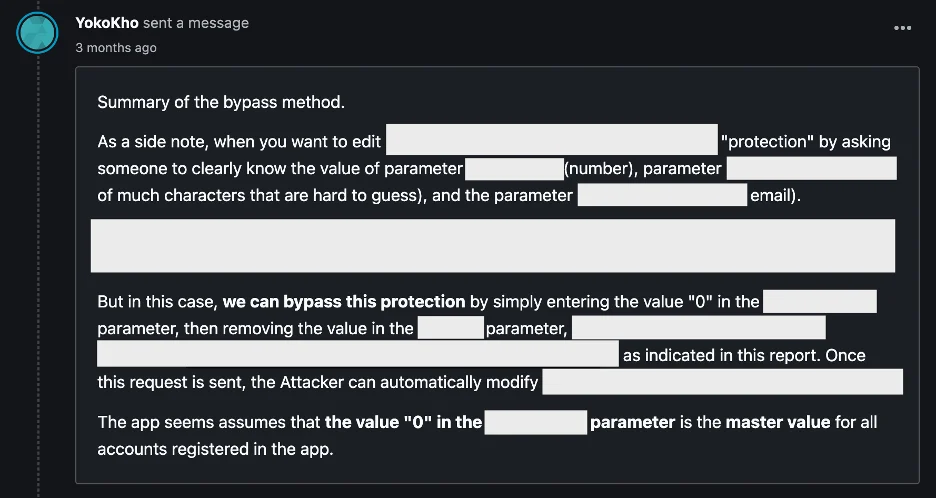
Step 2: Put 0 in the id and blank the uuid
Deleting the id and uuid had failed. The variation that worked was to set the id to 0 and leave the uuid empty:
id=0&uuid=&email=<email_target_here>&Parameter1=<data1_here>&Parameter2=<date2_here> and so on
The request still names the target through the email parameter, and the id of 0 with an empty uuid was accepted, modifying another user's data. The value 0 in the id parameter appeared to act as a master ID that could be used to modify the data of all users.
Step 3: Report
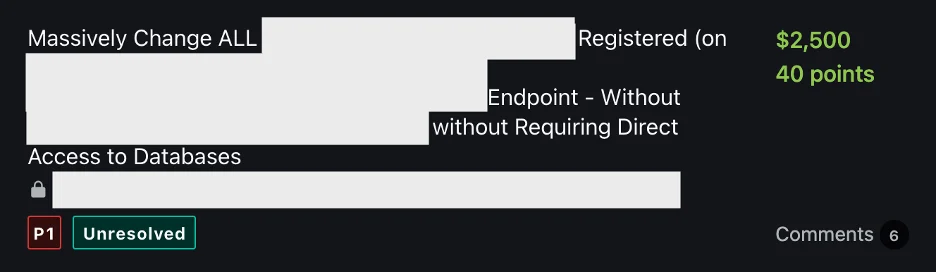
The researcher reported the issue immediately. The program owner awarded a P1 and a bounty of 2,500 USD.
Root cause
The report does not include the server-side code, so the exact mistake is not shown. What the behaviour implies is that the update handler resolved the account to modify from the id parameter, and that 0 was treated as a special or default value rather than rejected. With the uuid empty, the request no longer had to match the session's own identity, and the email parameter selected the victim. In other words, the authorisation check that should have tied the update to the authenticated user was either skipped or satisfied by the 0 value.
The defences that should have stopped this did not. The UUID was presumably there to make IDs unguessable, but it was not enforced: an empty value was accepted. The session binding that defeated the earlier attempts, where changing id, uuid and email together failed because the values were tied to the active session, did not apply once id was 0.
Impact
An authenticated attacker who knows a victim's email address can change that victim's account data to whatever the attacker chooses, by sending the update request with id=0, an empty uuid and the victim's email. The report describes this as modifying the data of all users, so the condition is simply a valid session on the attacker's side and the target's email. The report does not say which fields could be changed or whether the change could lead to account takeover; it only states that the target's data changes according to the attacker's will.
Fix
The report does not describe the fix that was applied. Based on the behaviour, the update handler should reject 0 and any other value that is not a real account identifier, require a non-empty uuid that matches the account, and derive the account to update from the authenticated session rather than from client-supplied id or email. Any mismatch between the session identity and the submitted identifiers should fail the request.
Variants to test
- Send
0,-1,nullor an empty value in an identifier field while leaving the companion identifier blank. A positive result is a successful update to another account's data. - Keep the victim's email but drop the UUID entirely, rather than sending it empty. A positive result is the same unauthorised update.
- Try the same pattern on other endpoints that take an
idand auuid, such as profile, settings or password change. A positive result is any state change on an account other than the session's own. - Test whether the
emailparameter alone selects the target when theidis a valid but foreign number. A positive result is an update that succeeds despite theidbelonging to someone else. - Try changing the HTTP method from POST to GET or PUT on the same endpoint. A positive result is the update being processed through a method the application was not expected to accept.
- Look for the same master-value pattern in other parameters, such as an OTP or verification code of
000000, as the researcher notes was done in a 2018 Tokopedia account takeover write-up. A positive result is bypassing verification with the placeholder value.
What happened, in plain words
A security researcher found a way to change any user's account data on a website, using nothing more than a normal update request that the site itself sends when you edit your own profile. The trick was to put the number 0 where the account's ID normally goes, and to leave the account's unique code (the UUID) empty. The site accepted this and changed the data of whichever account the researcher named by email. The researcher reported it, and the program paid a P1 and 2,500 USD.
This article walks through the same story for someone who has never done security testing. Every technical idea is explained from scratch, and every request is shown exactly as it appeared, with a plain-words explanation underneath.
Background: what the pieces are
Before the story, a few everyday ideas. If you already know them, skip ahead.
- A web application is a program you use through your browser. When you click "save" on a profile page, your browser sends a message to a computer somewhere (the server), and the server does the work and sends back a reply.
- A request is that message. It has a method (usually
GETwhen you are just loading a page,POSTwhen you are submitting something), a URL, and often a body containing data. The body is where form fields live. - An API (Application Programming Interface) is a way for one program to talk to another, or for a page to talk to a server, without a human clicking through screens. Think of it as a service counter: you hand over a form with specific fields, and you get back a result. The page you see in your browser is often just a front end that calls an API behind the scenes.
- A parameter is one named field in a request. In
id=0&email=someone,idandemailare parameters, and0andsomeoneare their values. The&symbol separates them. - An ID is a number that identifies a record, such as your account. It is usually short and easy to guess: 1, 2, 3 and so on.
- A UUID (Universally Unique Identifier) is a long random-looking string used as an alternative identifier. The idea is that nobody can guess it. A typical example, which the report gives purely to show the format, is
e40011c0-fa88-4e6e-8e3e-205dacc594c1. - A session is how a website remembers that you are logged in. After you log in, the server gives your browser a small piece of data (often a cookie) that it sends with every request. The server uses it to know who you are. If someone else's request carries your session, the server thinks the request is from you.
- Broken access control is the name for a whole family of bugs where the server does not properly check whether you are allowed to do what you are asking. A simple example: you change the number in a URL from your order number to someone else's, and the site shows you their order. The site checked that you were logged in, but not that the order belonged to you.
- IDOR (Insecure Direct Object Reference) is a common type of broken access control where the request names an object directly by its ID, and the server trusts that ID without checking ownership.
- Burp Suite is a tool that sits between your browser and the server and records every request and reply. It also lets you edit a request and send it again. Security testers use it to see what the site is really sending, which is often more than the page shows.
- Reconnaissance means looking around a target before testing: finding pages, files, and hidden parts of the site.
- A VDP (Vulnerability Disclosure Program) is like a bounty program but usually without money: you report bugs, and the organisation thanks you. A bounty program pays for valid reports.
- P1 is a priority label some programs use for their most serious findings.
The setup
The researcher had two things going on:
- A bounty program they were already taking part in had recently added an API to its scope (the list of things you are allowed to test). The API came with no documentation, and opening the API's address directly in a browser showed nothing useful.
- A separate VDP target that the researcher had tested months earlier and then set aside.
The tools were Burp Suite to watch and replay traffic, plus the usual reconnaissance tools: directory and file crawling with dirsearch or ffuf, Google Dork (using search engines to find exposed pages), the Wayback Machine (an archive of old web pages), and urlscan (a site that records what other people's scans have seen). The researcher also made a second account, so they could test whether one account could touch another's data.
The report does not give the exact endpoints, hostnames or software versions involved.
Finding it
The first pass on the newly added API went nowhere. Crawling for files and directories, Google Dork, the Wayback Machine and urlscan turned up no visible endpoints and no sensitive files. The researcher left the target alone for a while.
Months later, while revisiting the VDP target and logging in with Burp Suite recording the traffic, the researcher noticed something: the application's data update feature was now calling the very API that had been added to the bounty program's scope. That connection had not existed before. This is why the API suddenly became worth testing: it was no longer a mystery address, it was a real feature the site used.
Looking at the update request, the researcher saw it carried both an id and a uuid that seemed tied to an account. The request looked roughly like this:
id=<number_here>&uuid=<uuid_here>&email=<email_here>&Parameter1=<data1_here>&Parameter2=<date2_here> and so on
Line by line, in plain words:
id=<number_here>is the account's short numeric identifier. The angle brackets are placeholders: in a real request, a number would sit there.uuid=<uuid_here>is the account's long unique code, the one meant to be impossible to guess.email=<email_here>is the account's email address.Parameter1=<data1_here>&Parameter2=<date2_here> and so onare the actual profile fields being updated, such as a name or a setting. The report uses generic names because the real field names are not given.
The researcher notes the usual reason for using a UUID: it makes the id harder to guess and is meant to reduce the chance of broken access control. In other words, even if an attacker guesses that your account is number 42, they should still need the long random code to do anything with it.
Three identities in one request, id, uuid and email, is what made the request interesting. If the server trusts any one of them, there may be a way to make it act on an account that is not yours.
Exploitation
Step 1: Test the obvious access control cases
With a second account created, the researcher tried the standard manipulations against the update request. The reasoning behind each one is worth spelling out, because the failures are what point to the answer.
- Change the
idfrom one account to another while leaving theuuidalone. The idea: if the server only checks theid, swapping it should let you edit someone else. It failed, as expected, because the request carries three identities:id,uuidandemail. - Change the
uuid, theemailand the target'sid, and send the request with the attacker's session. The idea: if you could learn a victim'sidanduuidfrom some other part of the site, you could fill in all three fields to match the victim and send the request from your own logged-in session. It also failed, because all of these values were tied to the active user session. - Delete both the
idand theuuid, leaving only theemail. The idea: maybe the server only needs the email to know who to update. The application did not indicate success. - Switch the method from POST to GET and repeat the scenarios. The idea: some servers handle the same action through more than one method, and one of them might skip a check. The application only accepted POST for this update feature.
None of these worked, so the researcher took another break. This is normal in testing: a series of negative results tells you where the checks are, and therefore where they might not be.
Step 2: Put 0 in the id and blank the uuid
Deleting the id and uuid had failed. The variation that worked was to set the id to 0 and leave the uuid empty:
id=0&uuid=&email=<email_target_here>&Parameter1=<data1_here>&Parameter2=<date2_here> and so on
Line by line:
id=0puts the number zero where the account's ID normally goes. Zero is not a real account number, which is exactly why it is interesting: it may be treated as a special or default value.uuid=leaves the unique code empty. The parameter is still there, but it has no value. The server accepted this instead of rejecting it.email=<email_target_here>is the target's email address, placed in the request alongside the zero ID and empty UUID.Parameter1=<data1_here>&Parameter2=<date2_here> and so onare the new values the attacker wants to write into the victim's account.
The request still names the target through the email parameter, but the id of 0 with an empty uuid was accepted, and it modified another user's data. The value 0 in the id parameter appeared to act as a master ID that could be used to modify the data of all users.
Step 3: Report
The researcher reported the issue immediately. The program owner awarded a P1 and a bounty of 2,500 USD.
Why it worked
The report does not include the server-side code, so the exact mistake is not shown. What the behaviour implies is that the update handler decided which account to modify from the id parameter, and that 0 was treated as a special or default value rather than rejected. With the uuid empty, the request no longer had to match the session's own identity, and the email parameter selected the victim. In other words, the authorisation check that should have tied the update to the logged-in user was either skipped or satisfied by the 0 value.
The defences that should have stopped this did not:
- The UUID was presumably there to make IDs unguessable, but it was not enforced: an empty value was accepted.
- The session binding that defeated the earlier attempts, where changing
id,uuidandemailtogether failed because the values were tied to the active session, did not apply onceidwas0.
Impact
An authenticated attacker who knows a victim's email address can change that victim's account data to whatever the attacker chooses, by sending the update request with id=0, an empty uuid and the victim's email. The report describes this as modifying the data of all users, so the only conditions are a valid session on the attacker's side and the target's email. The report does not say which fields could be changed or whether the change could lead to account takeover; it only states that the target's data changes according to the attacker's will.
Fix
Based on the behaviour, the update handler should reject 0 and any other value that is not a real account identifier, require a non-empty uuid that matches the account, and derive the account to update from the authenticated session rather than from client-supplied id or email. Any mismatch between the session identity and the submitted identifiers should fail the request.
Variants to test
If you want to look for the same pattern on a site you are allowed to test, these are the variations worth trying. Each one is a small change to the same request.
- Send
0,-1,nullor an empty value in an identifier field while leaving the companion identifier blank. A positive result is a successful update to another account's data. - Keep the victim's email but drop the UUID entirely, rather than sending it empty. A positive result is the same unauthorised update.
- Try the same pattern on other endpoints that take an
idand auuid, such as profile, settings or password change. A positive result is any state change on an account other than the session's own. - Test whether the
emailparameter alone selects the target when theidis a valid but foreign number. A positive result is an update that succeeds despite theidbelonging to someone else. - Try changing the HTTP method from POST to GET or PUT on the same endpoint. A positive result is the update being processed through a method the application was not expected to accept.
- Look for the same master-value pattern in other parameters, such as an OTP or verification code of
000000, as the researcher notes was done in a 2018 Tokopedia account takeover write-up. A positive result is bypassing verification with the placeholder value.
Glossary
- API: a way for programs to talk to each other, usually by sending requests with named fields and getting structured replies.
- Authorisation: the check that decides whether a logged-in user is allowed to perform a particular action on a particular object.
- Bounty program: an organised scheme that pays researchers for reporting valid security bugs.
- Broken access control: a bug class where the server fails to check that the user is allowed to do what they are asking.
- Burp Suite: a tool that records, edits and replays the traffic between a browser and a server.
- Cookie: a small piece of data a site stores in your browser, often used to remember your session.
- Directory crawling: automatically requesting many possible file and folder names to discover what exists on a server.
- Endpoint: a specific address on a server that accepts requests, such as the one handling profile updates.
- GET: an HTTP method used mainly for retrieving data.
- Google Dork: using search-engine queries to find pages or files that were not meant to be public.
- ID: a short identifier for a record, such as an account number.
- IDOR: Insecure Direct Object Reference, a type of broken access control where a request names an object by ID and the server trusts it without checking ownership.
- OTP: a one-time password, a short code used to verify identity.
- P1: a priority label some programs use for their most serious findings.
- Parameter: a named field in a request, such as
idoremail. - POST: an HTTP method used for submitting data that changes something on the server.
- PUT: an HTTP method used to replace or update a resource.
- Reconnaissance: the information-gathering phase of testing, before trying to exploit anything.
- Request: the message a browser or tool sends to a server.
- Session: the server's memory of who is logged in, usually carried by a cookie or token sent with each request.
- URLScan: a service that records and shares scans of websites, useful for seeing what others have found.
- UUID: a long, random-looking identifier meant to be impossible to guess.
- VDP: Vulnerability Disclosure Program, a scheme for receiving bug reports, usually without payment.
- Wayback Machine: an archive of old versions of web pages, useful for finding endpoints that once existed.