Optimizing Hunting Results in VDP for use in Bug Bounty Programs - From Sensitive Information Disclosure to Accessing Hidden APIs which can be used to Retrieve Customer Data
An internal API endpoint used to look up customer data by email address could be reached without a valid logged-in account, by reusing the session token and cookie issued to an anonymous visitor. An attacker could therefore retrieve customer personal information without authenticating.

Bug Report / Web Apps / Write-Up
The full write-up lives on its author's site
It belongs to its author, so we link to it rather than copy it. The other two tabs are our own rewrites, checked against it.
Context
This is a story about turning points-only findings into paid P1 reports on a bug bounty program. The main asset discussed is referred to as mainredacted.target.tld, which is in scope for the bounty program. The same organisation also runs a points-only program covering a wider set of subdomains, and the write-up shows how information collected there was later used against the in-scope asset.
The site at the centre of it is a portal on mainredacted.target.tld that shows an "Internal Resources" menu to internal users. Accounts with access to that menu also have access to a feature that, given an email address, returns customer data. The feature is backed by an API endpoint, and the whole chain ends with an unprotected direct API access issue plus a rate limit problem that lets an attacker work out which internal accounts have customer personal information attached to them.
The author's summary of the timeline is shown below.
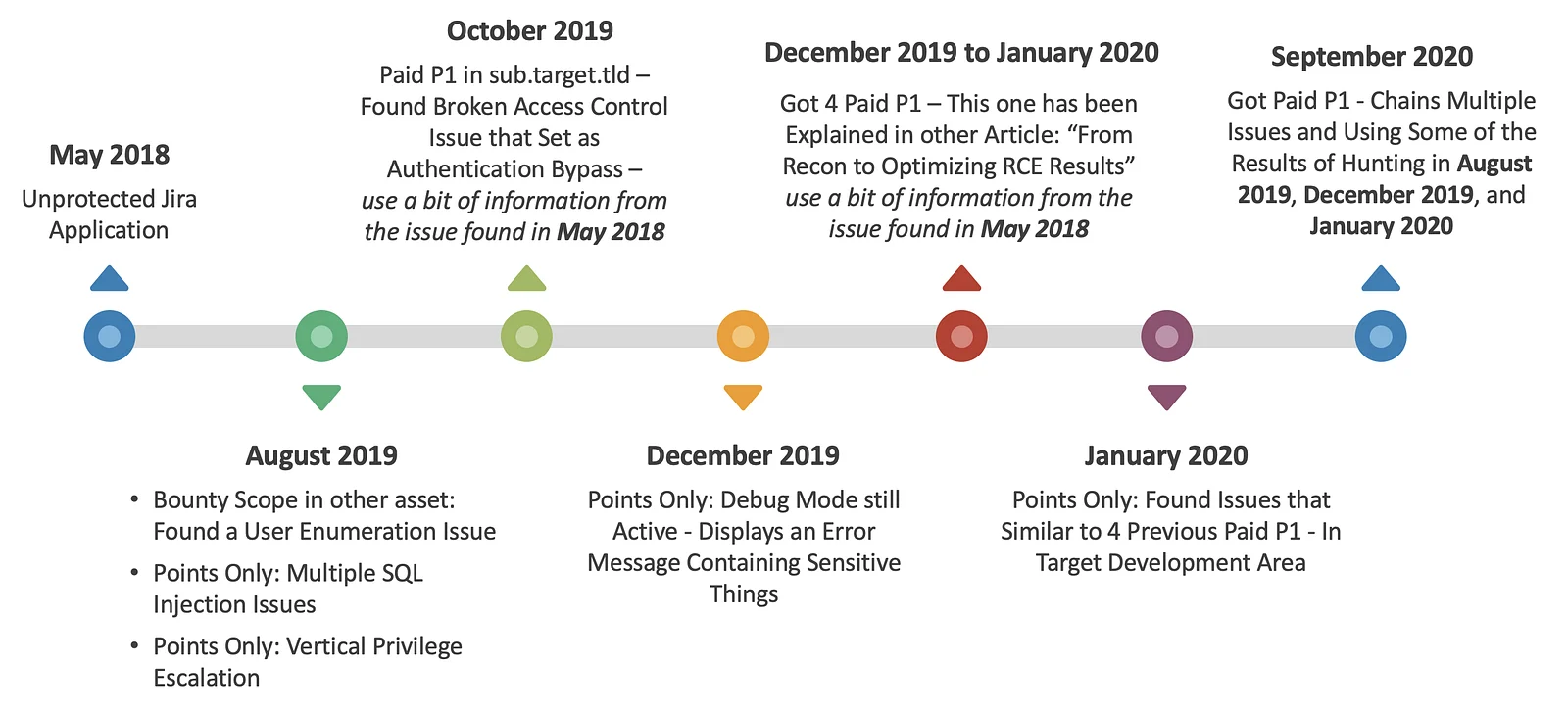
Simple "Timeframe"
Setup
The preconditions are unusual because they were built up over more than two years:
- An unprotected Jira application on sub1.target.tld (points-only program), found in May 2018, which exposed tickets containing credentials, screenshots of endpoints and some customer data.
- A user enumeration issue on sub2.target.tld (bounty program, but not mainredacted.target.tld), found in August 2019, which produced a list of email addresses.
- Multiple SQL injection issues on sub3.target.tld (points-only program), found in August 2019, which allowed enumeration of all registered email addresses.
- A simple IDOR on sub4.target.tld (points-only program), found in August 2019, which gave access to an administrator dashboard and a large list of registered email addresses.
- A sensitive information disclosure via debug mode on targetXYZ.tld (points-only program, belonging to target.tld), found in December 2019, where an active Laravel debug mode exposed a database password and the administrator dashboard password. Logging in with those gave a CSV file containing internal employee email addresses.
All of these results were kept. The author notes there is no provision to delete test results, as is generally done in formal penetration testing jobs.
The tools credited are Aquatone for screenshotting and Sudomy for subdomain enumeration, plus a talk on GitHub recon and sensitive data exposure. The credential pattern used later came from GitHub recon, where the author checked which passwords were valid or invalid and found a pattern that showed up frequently, assumed to be the default credentials the administrator gives each user.
Finding it
The 2018 Jira finding
The starting point was a subdomain named "Jira" that did not require authentication to read a good number of tickets. Most tickets dated from the end of 2016. Searching ticket content for keywords such as password, admin, root, email and database turned up a few credentials for one of the portals, a few screenshots showing an endpoint together with a little customer data, and endpoint information that could not be reached, either because it was internal only or because it was no longer valid.
The report was accepted as P2 and the program owner stated it was fixed five months later.

P2 for Unprotected Jira Application
At the time the author tried logging into several of the accounts found but did not get anything useful out of them, which may be why the severity was set to P2.
Reopening it in October 2019
Returning to the saved material, the author mapped the credentials to the endpoints they had been seen with.
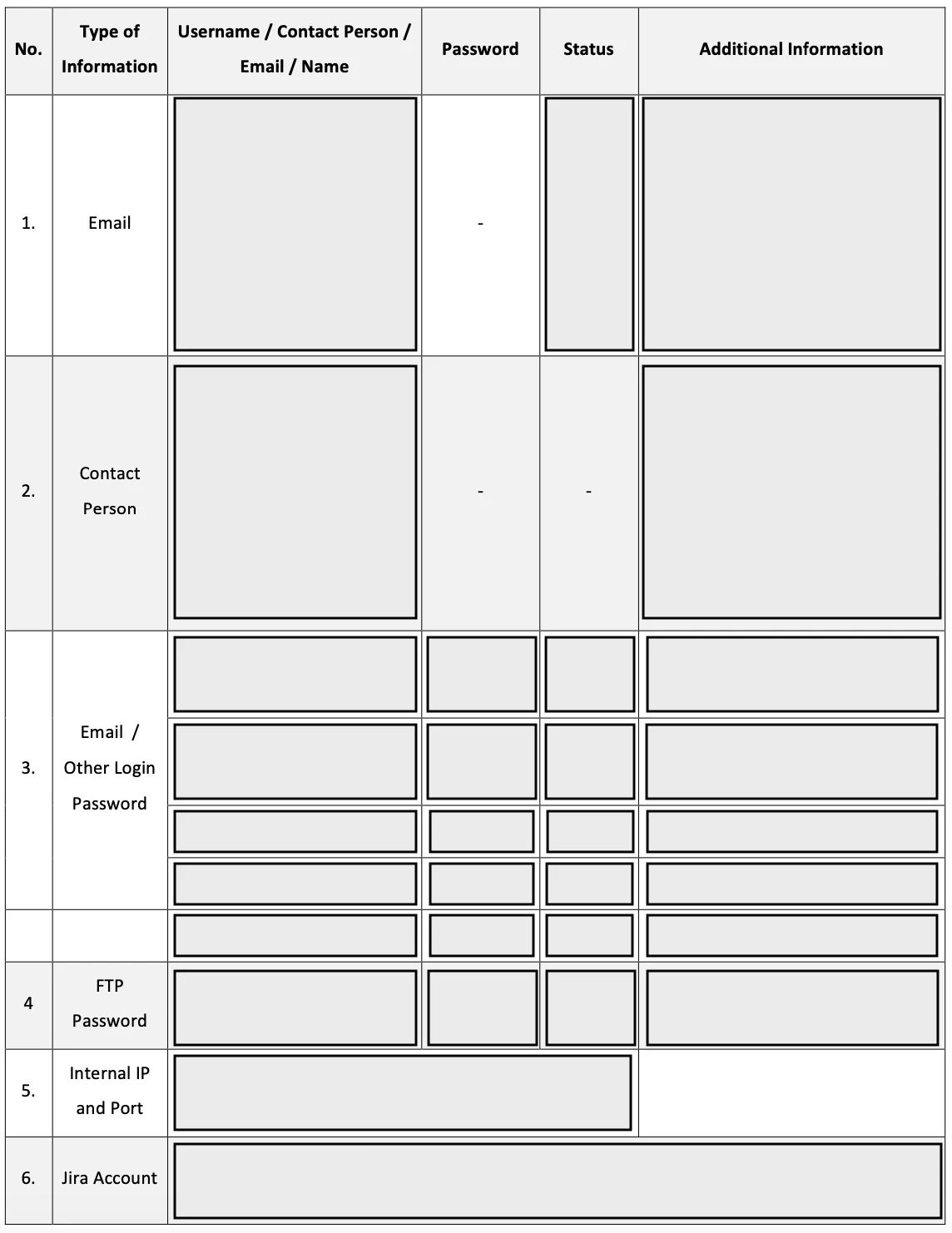
Simple Mapping
Of the five credentials obtained (excluding FTP), only one was still valid, and it did not use the organisation's official domain: it looked like a normal user email address. Playing with that account showed it was connected to the organisation's SSO service.
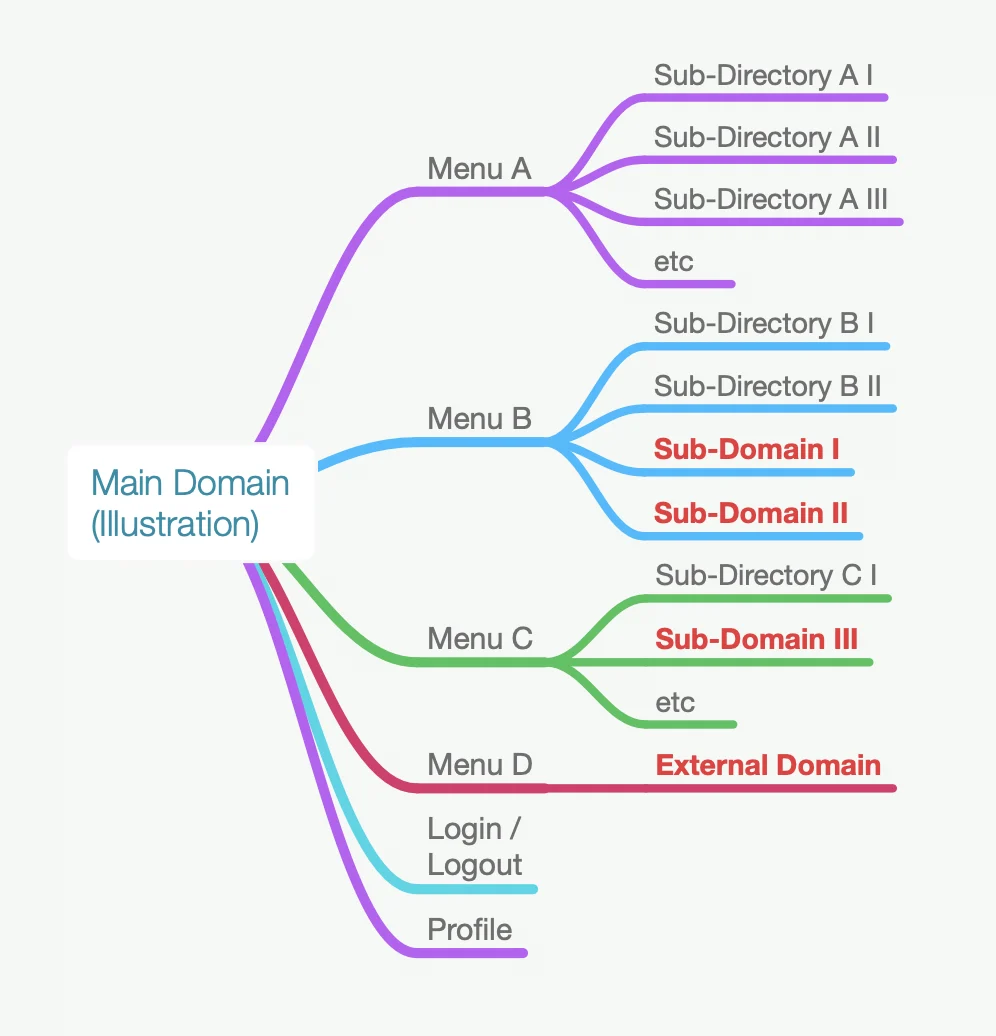
Site Illustration
Walking the menus and subdomains reachable through that account led to a subdomain with a menu labelled "Internal Resources" on mainredacted.target.tld. Since the account looked like an ordinary user, this was unexpected. The author considered three explanations: the menu was meant for all registered users (unlikely, given the word "internal"), it appeared by mistake, or an internal user had registered a personal email address and so gained the special access.
Comparing with a personal account confirmed the third: internal users had registered personal email addresses to reach the "Internal Resources" menu. The program owner decided this did not qualify for a bounty and was points only, since the documents in the menu were general operational manuals with nothing sensitive such as user data.
The screenshot with the customer data endpoint
Of about 16 screenshots saved from the Jira tickets, one showed mainredacted.target.tld with an endpoint containing customer data.
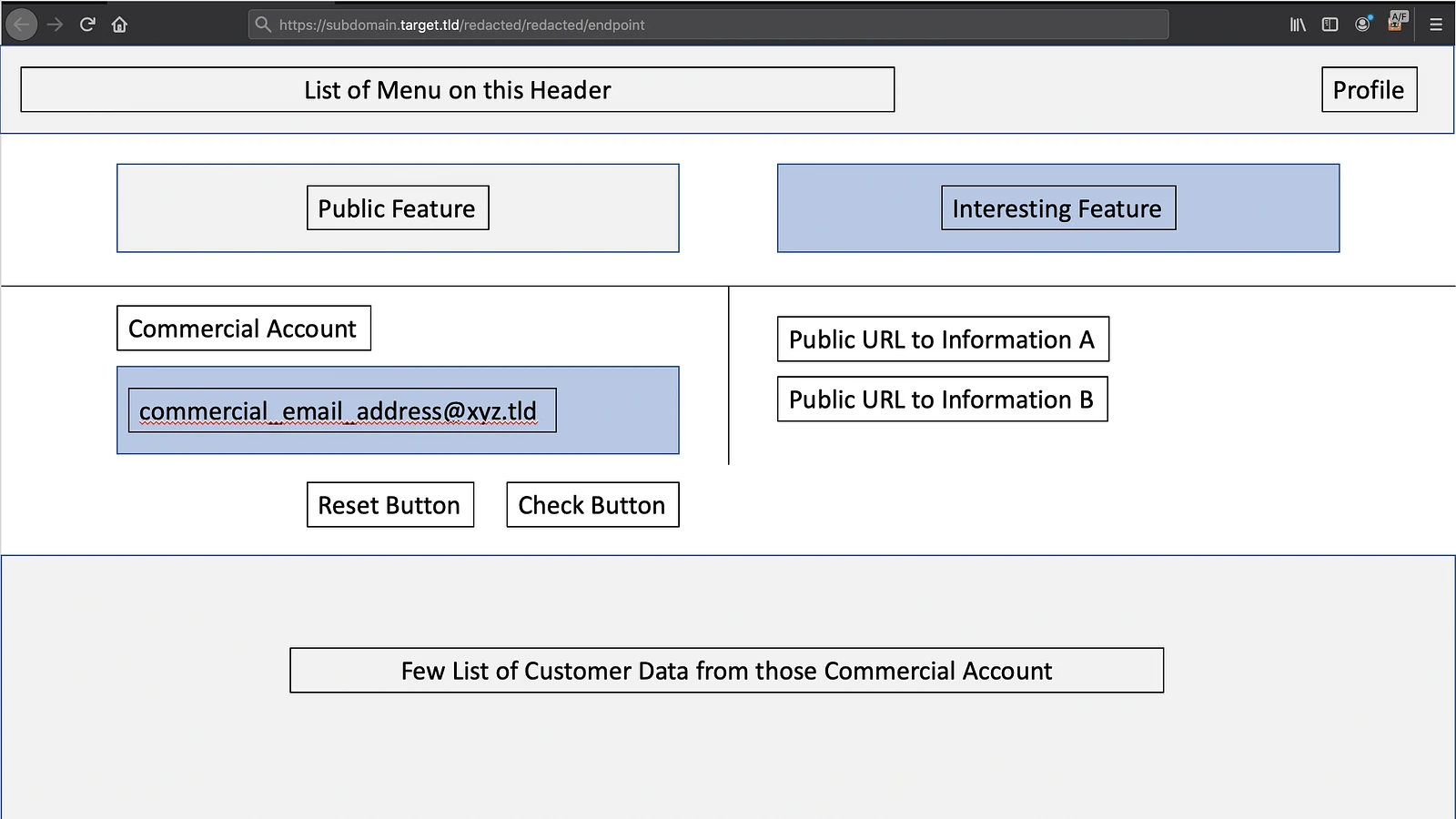
Feature Illustration
Comparing the author's account with the account in the screenshot showed that the author's account did not have the feature that displays a "commercial accounts" column. Accounts with access to the internal resource also have access to that feature. Entering the email address from the screenshot returned customer data belonging to the company's email address. Executing the feature generates a request to the endpoint via the API.
Three follow-ups were tried:
- Injecting into the email field (SQL injection, XSS and similar). A WAF blocked the attempts, possibly because the author lacked a good bypass.
- Using the rate limit to harvest customer data. This did not go well because there was not much data to work with beyond the Jira tickets, and the August 2019 results were not considered at that point.
- Accessing the feature with a general account, or with no account at all. This worked: the feature could be reached without authentication.
Exploitation
Step 1: the October 2019 broken access control
The first attempt was to reach the feature with no account at all, since the impact is different when customer data can be retrieved without a valid account. The request looked like this, with the author's censoring:
POST /api/1stRedacted/2ndRedacted/1stendpoint HTTP/1.1
Host: mainredacted.target.tld
X-CSRF-Token: unique_token_of_valid_session_here
Cookie: valid_user_cookies_here

[email protected]
The simplest step is to strip everything tied to the session, such as cookies and the unique token header. That did not work. Looking at how the application sends requests for other menus while not logged in showed that it still sends a unique token in the header in the non-login state. Retrieving that token and the cookie from the non-login state and reusing them against the endpoint worked:
POST /api/1stRedacted/2ndRedacted/1stendpoint HTTP/1.1
Host: subdomain.target.tld
X-CSRF-Token: unique_token_in_non-login_state
Cookie: user_cookies_in_non-login_state

[email protected]
Bugcrowd ASE and the program owner rated this P1 and placed it in the "authentication bypass" category, although the author had selected Broken Access Control without a severity.
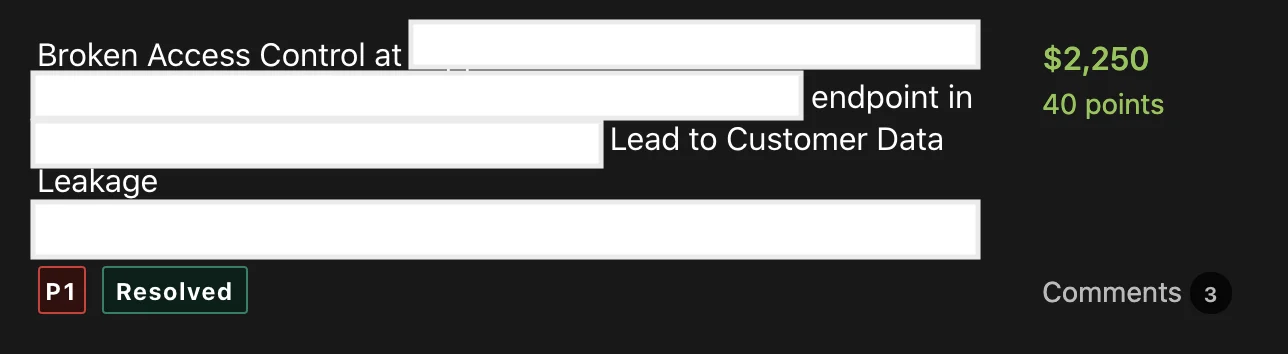
Broken Access Control, Determined as Authentication Bypass
This was the first paid P1 in the program. Hunting then stopped for about two months.
Step 2: December 2019 to January 2020, internal accounts
Four more paid P1 issues were found at mainredacted.target.tld in this period, mostly described in a separate article. Three followed the same flow as before: logging in with internal company accounts, no longer public-email accounts, that used the credential pattern found and had access to the feature. The program treats this as an issue because the account uses a company email and has access to the API that retrieves customer data.
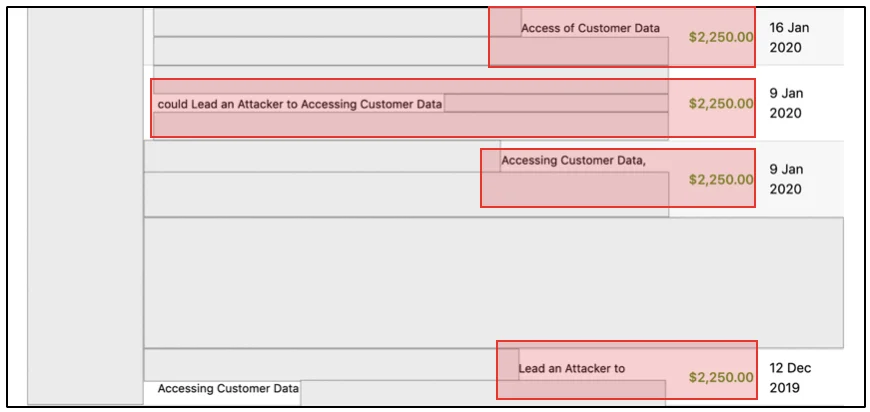
4 Paid P1s
The fourth came from another dashboard, critical but not yet in the scoped bounty assets, where an email address following a pattern of letters and numbers was found. Logging in with that email on mainredacted.target.tld using the password pattern worked, and the account had access to the same feature. About 20 test accounts were found in total.
Mitigation at the time focused on the problem accounts: passwords were changed or accounts deactivated. The author recommended blacklisting the password patterns found, but as far as the author knows this was not done, at least until September 2020. The reason this is visible is that one of the applications connected to the SSO distinguishes between a wrong password and a disabled account in its login failure message.
Step 3: the development area
With production accounts closed off, the author repeated subdomain enumeration and looked for test versions of the application, subdomains containing names such as test, stg and uat, then tried logging in there. Accounts deactivated in production could be reused in the development area. This was reported and rated P1, but the subdomain was considered outside the in-scope assets of the bounty program, so it was points only. The report included a Burp Suite screenshot of the HTTP request, to show the issue was not reproducible in production but was reproducible in development.

Issue in the Development Area
That screenshot becomes important later.
Step 4: September 2020, the changed API
In September 2020 another account using the credential pattern was found, and the same interface from October 2019 was reached. This time, entering an email address known to have user data returned no customer data. The request had changed:
Previous API request:
POST /api/1stRedacted/2ndRedacted/1stendpoint HTTP/1.1
Host: mainredacted.target.tld
X-CSRF-Token: unique_token_of_valid_session_here
Cookie: valid_user_cookies_here

[email protected]
Current API request:
The new version uses a different path and endpoint, and the flow prevents users with special access rights from extracting customer data. The old endpoint from October 2019 no longer works.
The way around it came from the development-area report. The Burp screenshot in that report showed a different API request being made for the same data:
POST /api/vx/6thRedacted/3rdEndpoint HTTP/1.1
Host: mainredacted.target.tld
X-CSRF-Token: unique_token_of_valid_session_here
Cookie: valid_user_cookies_here

[email protected]
Putting this endpoint into the request with the email in the POST body returned customer details again. The author calls this a "bypass" in quotes because it is not a pure bypass: it reuses the old API from the development area that the developers had hidden in production.
Step 5: the rate limit and the account list
The old API accepts an email address in the body:
POST /api/vx/6thRedacted/3rdEndpoint HTTP/1.1
Host: mainredacted.target.tld
X-CSRF-Token: unique_token_of_valid_session_here
Cookie: valid_user_cookies_here

[email protected]
Changing the value of the parameter that contains the user email is all that is needed. The values came from the lists gathered earlier: sub2.target.tld, sub3.target.tld, sub4.target.tld, targetXYZ.tld and GitHub recon, around 10,000 unique email addresses in total. Sending them took about 10 minutes and identified several accounts that have personal customer information. Proof of this was included in the report.
Step 6: submission and reward
The report went in with recommendations and was answered quickly, with the issue followed up immediately.

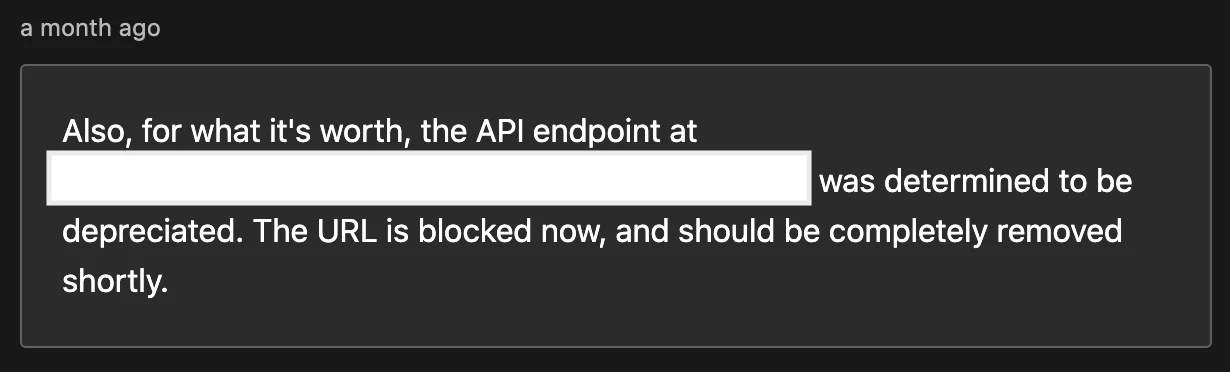
Response from Program Owner
The bounty was the maximum value of the P1 range the program had defined.

6th Paid P1
The author obtained permission to publish the write-up with the company name censored.
Root cause
The chain relies on several separate weaknesses:
- Weak login implementation on weaksub.target.tld, a portal connected to the SSO. Most endpoints found were CAPTCHA protected, which rules out automated brute force, but this portal was not, and only enforced a limit of 6 login attempts. That makes it possible to determine which accounts use a weak password.
- Weak passwords still in use by some employees, following a default pattern set by the administrator.
- Unprotected direct API access on mainredacted.target.tld. The developers changed the application flow to stop customer data extraction through the current endpoint, but the older API used in the development area remained reachable in production and still returned customer details.
- A rate limit issue on that API endpoint, which allows an attacker to test a large list of email addresses and find which internal accounts have customer personal information.
The existing defences did not stop the chain: most endpoints had CAPTCHA, but one portal did not, the login attempt limit was small enough to work within, and the change to the application flow only covered the current endpoint, not the older one. The author also notes that, as far as he knows, the recommended blacklist of password patterns was not applied, at least until September 2020.
Impact
With a valid account that has the special access, and with the old API endpoint, an attacker can retrieve customer personal information for multiple customers by supplying their email addresses. The rate limit issue extends this to determining which internal accounts have customer personal information, by testing around 10,000 addresses in about 10 minutes. The October 2019 issue was rated P1 as an authentication bypass because customer data could be retrieved without a valid account at all. The program treats the account-based variants as issues because the accounts use company email and have access to the API that retrieves customer data. The development-area issue had the same impact but was outside the bounty scope.
Fix
What the program did, as far as the write-up shows, was change the passwords of the affected accounts and deactivate the test accounts. The author recommended blacklisting the password patterns found, but it appears this was not done, at least until September 2020. The write-up does not describe any fix for the old API endpoint or for the rate limit issue; the recommendations submitted with the September 2020 report are not reproduced.
Variants to test
- Non-login state tokens. On any application that issues a CSRF token or cookie before login, capture the pair from the non-login state and replay it against API endpoints that require a session. A positive result is a response containing data that should require authentication.
- Old API versions. When a feature's request changes, keep the previous endpoint and try it with the new session. A positive result is the old endpoint still returning the data the new one no longer shows.
- Development-area requests in production. Screenshots or reports from test, stg or uat environments often show endpoints that also exist in production. Replaying them with a production session and checking for the same data is the concrete test.
- SSO portals without CAPTCHA. Enumerate the portals connected to an SSO and check which ones lack CAPTCHA and enforce only a small attempt limit. A positive result is a portal where a handful of password guesses per account can be made without being blocked for long.
- Default credential patterns. Use GitHub recon to find password patterns that recur, then test them against accounts gathered from other sources. A positive result is a valid login on an account with access to sensitive features.
- Rate limits on data lookup APIs. Take an endpoint that accepts an email address or identifier and send a large list of values. A positive result is thousands of lookups completing in minutes without blocking, revealing which identifiers have data attached.
- Deactivated accounts in non-production. After an account is disabled in production, try the same credentials on test, stg and uat subdomains. A positive result is a successful login where production refuses it.
What happened, in plain words
This is the story of how one researcher turned findings from points-only programs into six paid P1 reports on a bug bounty program. A bug bounty program is an arrangement where a company invites people to test its systems and pays for the problems they find. A P1 is the highest severity level a program uses, so a paid P1 is a serious finding that earns real money.
The company in this story runs two kinds of program. One is a bounty program, which pays cash. The other is a points-only program, which covers a wider set of subdomains but pays only points, not money. A subdomain is a part of a website, like shop.example.com next to www.example.com. The main asset in this story is called mainredacted.target.tld, and it is in scope for the bounty program. "In scope" means the program's rules allow testing it.
The site at the centre of everything is a portal on mainredacted.target.tld. A portal is just a website that acts as a gateway to other services. Internal users of the company see a menu called "Internal Resources" there. Accounts that can see that menu also get access to a feature that takes an email address and returns customer data. That feature is backed by an API endpoint. An API is the part of a website that the page talks to behind the scenes to fetch or send data; an endpoint is one specific address on that API, like a counter window you hand a request to. The whole chain ends with two problems: the API could be reached directly without proper protection, and it had no meaningful rate limit. A rate limit is a cap on how many requests you can make in a period of time, like a shop that only serves you ten times an hour. Without one, an attacker can work out which internal accounts have customer personal information attached to them.
The author's summary of the timeline is shown below.
Simple "Timeframe"
Setup
The starting conditions are unusual because they were built up over more than two years. Think of it as a person who keeps every receipt, ticket stub and note from every trip, and years later uses them to solve a puzzle.
- An unprotected Jira application on sub1.target.tld (points-only program), found in May 2018. Jira is a ticket-tracking tool that teams use to record tasks and discussions. "Unprotected" means it let anyone read tickets without logging in. Those tickets contained credentials, screenshots of endpoints and some customer data. Credentials are a username and password pair.
- A user enumeration issue on sub2.target.tld (bounty program, but not mainredacted.target.tld), found in August 2019. User enumeration means the site lets you discover which email addresses have accounts, for example by answering differently for a real address and a fake one. It produced a list of email addresses.
- Multiple SQL injection issues on sub3.target.tld (points-only program), found in August 2019. SQL injection is when a website builds a database query out of whatever you typed, so clever input can make the database reveal things it should not. Here it allowed enumeration of all registered email addresses.
- A simple IDOR on sub4.target.tld (points-only program), found in August 2019. IDOR stands for Insecure Direct Object Reference: the site uses a simple identifier, like a number, to decide what you can see, and changing that number shows you someone else's data. This one gave access to an administrator dashboard and a large list of registered email addresses.
- A sensitive information disclosure via debug mode on targetXYZ.tld (points-only program, belonging to target.tld), found in December 2019. Debug mode is a developer setting that shows detailed error messages; when it is left on in a live site, those messages can leak secrets. Here an active Laravel debug mode exposed a database password and the administrator dashboard password. Laravel is a framework, a toolkit developers use to build web applications. Logging in with those gave a CSV file, a plain spreadsheet-style text file, containing internal employee email addresses.
All of these results were kept. The author notes there is no provision to delete test results, as is generally done in formal penetration testing jobs. A penetration test is a paid, scheduled security assessment; in those, test data is usually cleaned up afterwards.
The tools credited are Aquatone for screenshotting and Sudomy for subdomain enumeration, plus a talk on GitHub recon and sensitive data exposure. GitHub is a website where developers store and share code; recon means reconnaissance, the information-gathering phase before testing. The credential pattern used later came from GitHub recon, where the author checked which passwords were valid or invalid and found a pattern that showed up frequently. The author assumed this was the default credentials the administrator gives each user, and that assumption turned out to be correct.
Finding it
The 2018 Jira finding
The starting point was a subdomain named "Jira" that did not require authentication to read a good number of tickets. Authentication is the act of proving who you are, usually by logging in. Most tickets dated from the end of 2016. Searching ticket content for keywords such as password, admin, root, email and database turned up a few credentials for one of the portals, a few screenshots showing an endpoint together with a little customer data, and endpoint information that could not be reached, either because it was internal only or because it was no longer valid.
The report was accepted as P2 and the program owner stated it was fixed five months later. P2 is one severity level below P1.
P2 for Unprotected Jira Application
At the time the author tried logging into several of the accounts found but did not get anything useful out of them, which may be why the severity was set to P2.
Reopening it in October 2019
Returning to the saved material, the author mapped the credentials to the endpoints they had been seen with. A mapping here just means a list that pairs each account with the places it was seen being used.
Simple Mapping
Of the five credentials obtained (excluding FTP), only one was still valid, and it did not use the organisation's official domain: it looked like a normal user email address. FTP is an old file-transfer protocol, not relevant to the web testing here. Playing with that account showed it was connected to the organisation's SSO service. SSO stands for Single Sign-On: one login lets you into many separate sites, like one key card that opens several doors in a building.
Site Illustration
Walking the menus and subdomains reachable through that account led to a subdomain with a menu labelled "Internal Resources" on mainredacted.target.tld. Since the account looked like an ordinary user, this was unexpected. The author considered three explanations: the menu was meant for all registered users (unlikely, given the word "internal"), it appeared by mistake, or an internal user had registered a personal email address and so gained the special access.
Comparing with a personal account confirmed the third: internal users had registered personal email addresses to reach the "Internal Resources" menu. The program owner decided this did not qualify for a bounty and was points only, since the documents in the menu were general operational manuals with nothing sensitive such as user data.
The screenshot with the customer data endpoint
Of about 16 screenshots saved from the Jira tickets, one showed mainredacted.target.tld with an endpoint containing customer data.
Feature Illustration
Comparing the author's account with the account in the screenshot showed that the author's account did not have the feature that displays a "commercial accounts" column. Accounts with access to the internal resource also have access to that feature. Entering the email address from the screenshot returned customer data belonging to the company's email address. Executing the feature generates a request to the endpoint via the API.
Three follow-ups were tried:
- Injecting into the email field (SQL injection, XSS and similar). XSS, cross-site scripting, is when input you type ends up being run as code in someone else's browser. A WAF, web application firewall, is a filter that inspects incoming requests and blocks ones that look malicious. It blocked the attempts, possibly because the author lacked a good bypass.
- Using the rate limit to harvest customer data. This did not go well because there was not much data to work with beyond the Jira tickets, and the August 2019 results were not considered at that point.
- Accessing the feature with a general account, or with no account at all. This worked: the feature could be reached without authentication.
Exploitation
Step 1: the October 2019 broken access control
The first attempt was to reach the feature with no account at all, since the impact is different when customer data can be retrieved without a valid account. Broken access control is the general name for a site failing to check whether you are allowed to do what you are asking. The request looked like this, with the author's censoring:
POST /api/1stRedacted/2ndRedacted/1stendpoint HTTP/1.1
Host: mainredacted.target.tld
X-CSRF-Token: unique_token_of_valid_session_here
Cookie: valid_user_cookies_here

[email protected]
Line by line:
POST /api/1stRedacted/2ndRedacted/1stendpoint HTTP/1.1is the request line. POST means "send data to the server". The path after it is the endpoint being called. HTTP/1.1 is the version of the web protocol being spoken.Host: mainredacted.target.tldtells the server which site the request is for. One server can host many sites, so this line picks the right one.X-CSRF-Token: unique_token_of_valid_session_hereis a custom header carrying a CSRF token. CSRF, cross-site request forgery, is an attack where another site tricks your browser into sending a request you did not intend. A CSRF token is a random value the site gives your browser and expects back, so a request from elsewhere cannot guess it. A header is a labelled line of extra information attached to a request.Cookie: valid_user_cookies_herecarries the cookie. A cookie is a small piece of data the site stores in your browser and your browser sends back on every request, which is how the site recognises your session. A session is the site's memory of you being logged in.- The blank line separates headers from the body.
[email protected]is the body: the email address being looked up.
The simplest step is to strip everything tied to the session, such as cookies and the unique token header. That did not work. Looking at how the application sends requests for other menus while not logged in showed that it still sends a unique token in the header in the non-login state. Retrieving that token and the cookie from the non-login state and reusing them against the endpoint worked:
POST /api/1stRedacted/2ndRedacted/1stendpoint HTTP/1.1
Host: subdomain.target.tld
X-CSRF-Token: unique_token_in_non-login_state
Cookie: user_cookies_in_non-login_state

[email protected]
Line by line:
- The request line is the same endpoint and method as before.
Host: subdomain.target.tldis the host the author used in this replay.X-CSRF-Token: unique_token_in_non-login_stateis the token taken from a visit where nobody was logged in.Cookie: user_cookies_in_non-login_stateis the matching cookie from that same anonymous visit.- The body is still the email address to look up.
The point is that the endpoint accepted the anonymous pair as if it were a real session, so customer data came back without a valid account.
Bugcrowd ASE and the program owner rated this P1 and placed it in the "authentication bypass" category, although the author had selected Broken Access Control without a severity. Bugcrowd is the platform hosting the program, and ASE is the role on that platform that triages submissions. Authentication bypass means getting past the login check without logging in.
Broken Access Control, Determined as Authentication Bypass
This was the first paid P1 in the program. Hunting then stopped for about two months.
Step 2: December 2019 to January 2020, internal accounts
Four more paid P1 issues were found at mainredacted.target.tld in this period, mostly described in a separate article. Three followed the same flow as before: logging in with internal company accounts, no longer public-email accounts, that used the credential pattern found and had access to the feature. The program treats this as an issue because the account uses a company email and has access to the API that retrieves customer data.
4 Paid P1s
The fourth came from another dashboard, critical but not yet in the scoped bounty assets, where an email address following a pattern of letters and numbers was found. Logging in with that email on mainredacted.target.tld using the password pattern worked, and the account had access to the same feature. About 20 test accounts were found in total.
Mitigation at the time focused on the problem accounts: passwords were changed or accounts deactivated. The author recommended blacklisting the password patterns found, but as far as the author knows this was not done, at least until September 2020. The reason this is visible is that one of the applications connected to the SSO distinguishes between a wrong password and a disabled account in its login failure message.
Step 3: the development area
With production accounts closed off, the author repeated subdomain enumeration and looked for test versions of the application, subdomains containing names such as test, stg and uat, then tried logging in there. Production means the live site real users see; stg is staging and uat is user acceptance testing, both non-production copies used before changes go live. Accounts deactivated in production could be reused in the development area. This was reported and rated P1, but the subdomain was considered outside the in-scope assets of the bounty program, so it was points only. The report included a Burp Suite screenshot of the HTTP request, to show the issue was not reproducible in production but was reproducible in development. Burp Suite is a tool that sits between your browser and the site and lets you read and edit every request.
Issue in the Development Area
That screenshot becomes important later.
Step 4: September 2020, the changed API
In September 2020 another account using the credential pattern was found, and the same interface from October 2019 was reached. This time, entering an email address known to have user data returned no customer data. The request had changed:
Previous API request:
POST /api/1stRedacted/2ndRedacted/1stendpoint HTTP/1.1
Host: mainredacted.target.tld
X-CSRF-Token: unique_token_of_valid_session_here
Cookie: valid_user_cookies_here

[email protected]
Line by line:
POST /api/1stRedacted/2ndRedacted/1stendpoint HTTP/1.1is the old endpoint, called with POST.Host: mainredacted.target.tldis the site.X-CSRF-Token: unique_token_of_valid_session_hereis the CSRF token from a logged-in session.Cookie: valid_user_cookies_hereis the logged-in session cookie.- The body is the email address to look up.
Current API request:
Line by line, noting that this block is shown as one run-together line in the report:
GET /api/vx/3rdRedacted/4thRedacted/5thRedacted/2ndEndpoint?ParametercontainUserEmail= [email protected] HTTP/1.1is the new request line. GET means "fetch this". The path is different and now includesvx, a version marker. The email is passed in the URL after a question mark as a query parameter, rather than in the body. A query parameter is a name and value pair appended to a URL.X-CSRF-Token: unique_token_of_valid_session_hereis the CSRF token from the logged-in session.
The new version uses a different path and endpoint, and the flow prevents users with special access rights from extracting customer data. The old endpoint from October 2019 no longer works.
The way around it came from the development-area report. The Burp screenshot in that report showed a different API request being made for the same data:
POST /api/vx/6thRedacted/3rdEndpoint HTTP/1.1
Host: mainredacted.target.tld
X-CSRF-Token: unique_token_of_valid_session_here
Cookie: valid_user_cookies_here

[email protected]
Line by line:
POST /api/vx/6thRedacted/3rdEndpoint HTTP/1.1is a third endpoint, again under thevxversion, called with POST.
Putting this endpoint into the request with the email in the POST body returned customer details again. The author calls this a "bypass" in quotes because it is not a pure bypass: it reuses the old API from the development area that the developers had hidden in production. In other words, the developers changed the front door but left an old side door open.
Step 5: the rate limit and the account list
The old API accepts an email address in the body:
POST /api/vx/6thRedacted/3rdEndpoint HTTP/1.1
Host: mainredacted.target.tld
X-CSRF-Token: unique_token_of_valid_session_here
Cookie: valid_user_cookies_here

[email protected]
Line by line:
POST /api/vx/6thRedacted/3rdEndpoint HTTP/1.1is the old development-area endpoint.
Changing the value of the parameter that contains the user email is all that is needed. The values came from the lists gathered earlier: sub2.target.tld, sub3.target.tld, sub4.target.tld, targetXYZ.tld and GitHub recon, around 10,000 unique email addresses in total. Sending them took about 10 minutes and identified several accounts that have personal customer information. Proof of this was included in the report. The absence of a rate limit is what made this practical: a site that blocked or slowed repeated lookups would have made 10,000 attempts in 10 minutes impossible.
Step 6: submission and reward
The report went in with recommendations and was answered quickly, with the issue followed up immediately.
Response from Program Owner
The bounty was the maximum value of the P1 range the program had defined.
6th Paid P1
The author obtained permission to publish the write-up with the company name censored.
Root cause
The chain relies on several separate weaknesses:
- Weak login implementation on weaksub.target.tld, a portal connected to the SSO. Most endpoints found were CAPTCHA protected, which rules out automated brute force. A CAPTCHA is the puzzle that asks you to prove you are human. Brute force means trying many passwords automatically until one works. But this portal was not protected, and only enforced a limit of 6 login attempts. That makes it possible to determine which accounts use a weak password.
- Weak passwords still in use by some employees, following a default pattern set by the administrator.
- Unprotected direct API access on mainredacted.target.tld. The developers changed the application flow to stop customer data extraction through the current endpoint, but the older API used in the development area remained reachable in production and still returned customer details.
- A rate limit issue on that API endpoint, which allows an attacker to test a large list of email addresses and find which internal accounts have customer personal information.
The existing defences did not stop the chain: most endpoints had CAPTCHA, but one portal did not, the login attempt limit was small enough to work within, and the change to the application flow only covered the current endpoint, not the older one. The author also notes that, as far as he knows, the recommended blacklist of password patterns was not applied, at least until September 2020.
Impact
With a valid account that has the special access, and with the old API endpoint, an attacker can retrieve customer personal information for multiple customers by supplying their email addresses. The rate limit issue extends this to determining which internal accounts have customer personal information, by testing around 10,000 addresses in about 10 minutes. The October 2019 issue was rated P1 as an authentication bypass because customer data could be retrieved without a valid account at all. The program treats the account-based variants as issues because the accounts use company email and have access to the API that retrieves customer data. The development-area issue had the same impact but was outside the bounty scope.
Fix
What the program did, as far as the write-up shows, was change the passwords of the affected accounts and deactivate the test accounts. The author recommended blacklisting the password patterns found, but it appears this was not done, at least until September 2020. The write-up does not describe any fix for the old API endpoint or for the rate limit issue; the recommendations submitted with the September 2020 report are not reproduced.
Variants to test
- Non-login state tokens. On any application that issues a CSRF token or cookie before login, capture the pair from the non-login state and replay it against API endpoints that require a session. A positive result is a response containing data that should require authentication.
- Old API versions. When a feature's request changes, keep the previous endpoint and try it with the new session. A positive result is the old endpoint still returning the data the new one no longer shows.
- Development-area requests in production. Screenshots or reports from test, stg or uat environments often show endpoints that also exist in production. Replaying them with a production session and checking for the same data is the concrete test.
- SSO portals without CAPTCHA. Enumerate the portals connected to an SSO and check which ones lack CAPTCHA and enforce only a small attempt limit. A positive result is a portal where a handful of password guesses per account can be made without being blocked for long.
- Default credential patterns. Use GitHub recon to find password patterns that recur, then test them against accounts gathered from other sources. A positive result is a valid login on an account with access to sensitive features.
- Rate limits on data lookup APIs. Take an endpoint that accepts an email address or identifier and send a large list of values. A positive result is thousands of lookups completing in minutes without blocking, revealing which identifiers have data attached.
- Deactivated accounts in non-production. After an account is disabled in production, try the same credentials on test, stg and uat subdomains. A positive result is a successful login where production refuses it.
Glossary
- API: the part of a website that pages talk to behind the scenes to fetch or send data.
- Endpoint: one specific address on an API that accepts a particular kind of request.
- Subdomain: a named part of a website, like shop.example.com next to www.example.com.
- In scope: allowed to be tested under a program's rules.
- Bug bounty program: an arrangement where a company invites people to test its systems and pays for problems found.
- Points-only program: a program that rewards findings with points rather than money.
- P1 / P2: severity levels used by programs, P1 being the highest.
- Jira: a ticket-tracking tool teams use to record tasks and discussions.
- Credentials: a username and password pair.
- User enumeration: a site revealing which email addresses have accounts.
- SQL injection: making a database run unintended queries by putting crafted input into a field the site uses to build queries.
- IDOR: Insecure Direct Object Reference, where changing a simple identifier like a number shows you someone else's data.
- Debug mode: a developer setting that shows detailed error messages, which can leak secrets if left on in a live site.
- Laravel: a framework, a toolkit developers use to build web applications.
- CSV: a plain text file with values separated by commas, like a simple spreadsheet.
- Penetration test: a paid, scheduled security assessment, usually with test data cleaned up afterwards.
- Recon: reconnaissance, the information-gathering phase before testing.
- GitHub: a website where developers store and share code.
- Authentication: proving who you are, usually by logging in.
- Authentication bypass: getting past the login check without logging in.
- SSO: Single Sign-On, one login that lets you into many separate sites.
- FTP: an old file-transfer protocol.
- Broken access control: a site failing to check whether you are allowed to do what you are asking.
- CSRF: cross-site request forgery, an attack where another site tricks your browser into sending a request you did not intend.
- CSRF token: a random value the site gives your browser and expects back, so requests from elsewhere cannot guess it.
- Header: a labelled line of extra information attached to a request.
- Cookie: a small piece of data the site stores in your browser and your browser sends back on every request.
- Session: the site's memory of you being logged in.
- POST / GET: HTTP methods; POST sends data to the server, GET fetches something.
- Query parameter: a name and value pair appended to a URL after a question mark.
- XSS: cross-site scripting, when input you type ends up being run as code in someone else's browser.
- WAF: web application firewall, a filter that inspects incoming requests and blocks ones that look malicious.
- CAPTCHA: a puzzle that asks you to prove you are human.
- Brute force: trying many passwords automatically until one works.
- Rate limit: a cap on how many requests you can make in a period of time.
- Burp Suite: a tool that sits between your browser and the site and lets you read and edit every request.
- Production: the live site real users see.
- Staging (stg) / UAT: non-production copies of a site used before changes go live; UAT is user acceptance testing.
- Bugcrowd ASE: Bugcrowd is the platform hosting the program, and ASE is the role on that platform that triages submissions.
- Blacklist: a list of values a system refuses to accept.