A Peculiar Case of XSS and my first bug
A reflected cross-site scripting vulnerability existed in a login page's notification message parameter, which was protected by an MD5 checksum that could be bypassed by adding a greater-than character before the payload. An attacker could execute arbitrary JavaScript in a victim's browser.
 Published on systemweakness.com
System Weakness
The full write-up lives on its author's site
It belongs to its author, so we link to it rather than copy it. The other two tabs are our own rewrites, checked against it.
Context
The researcher was unsure which target to hunt and decided on bentley.com. The subdomain in question was:
http://bip01.assetwiseonline.bentley.com/
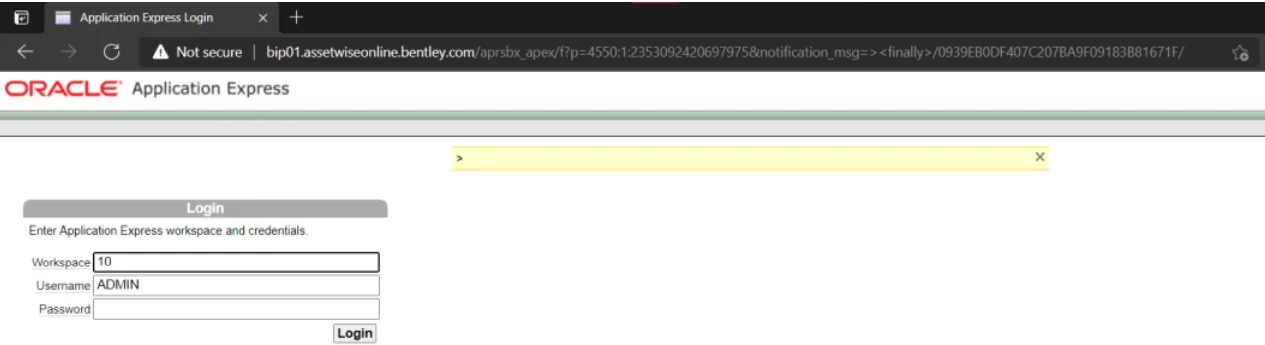
On that host, while reading the page source, the researcher found an endpoint that served a login page. The endpoint is no longer present, so the behaviour described below is historical. After submitting arbitrary values in the form, the page displayed text taken from the notification_msg URL parameter. The URL also carried a second value at the end, described in the report as an md5_checksum that uniquely identifies the value of the notification.
Setup
No accounts, roles or special tooling beyond subdomain enumeration and screenshotting are described. The workflow was:
- Gather all possible subdomains of
bentley.com, around 3000 of them. - Run aquatone over the list to capture screenshots.
- Review the screenshots for subdomains that looked different from the rest.
The researcher describes themselves as new to security, and this was their first bug.
Finding it
Among the screenshots, a group of similarly named subdomains stood out.
One of them was bip01.assetwiseonline.bentley.com. Reading the source of that page led to an endpoint that rendered a login page.
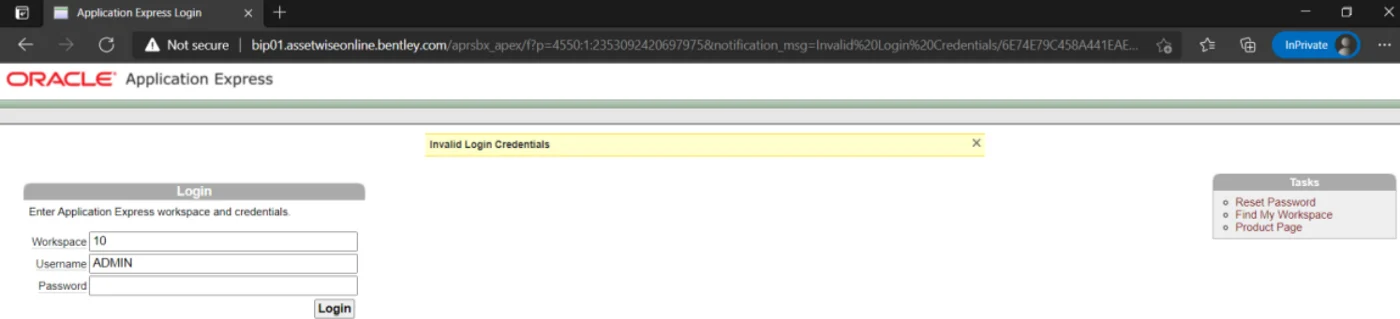
Submitting arbitrary values in the form caused text to appear on screen, and that text came from the notification_msg URL parameter. The URL additionally ended with a value the report calls md5_checksum, which uniquely identifies the notification value. The URL carried a checksum alongside the reflected parameter, which made the case unusual.
Exploitation
Step 1: confirm the reflection and the checksum gate
Sending an arbitrary value such as finally in notification_msg produced a checksum error.

The error is captioned checksum_error. The string at the end of the URL is the MD5 checksum of the entered text, so replacing it with the correct checksum for finally made the value reflect on the page.
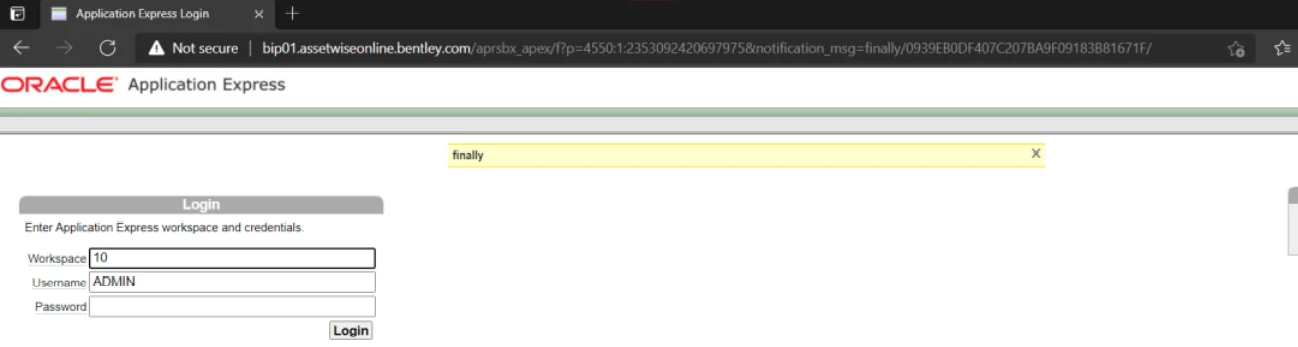
The caption notes that the text passed to the URL parameter is now reflected. At this point the reflection is plain text, and the parameter has a filter that blocks normal payloads.
Step 2: bypass the filter with a leading angle bracket
Normal payloads were rejected. Adding > immediately before the entered text, so that the parameter becomes notification_msg= >finally, made the value reflect directly, without the checksum error.
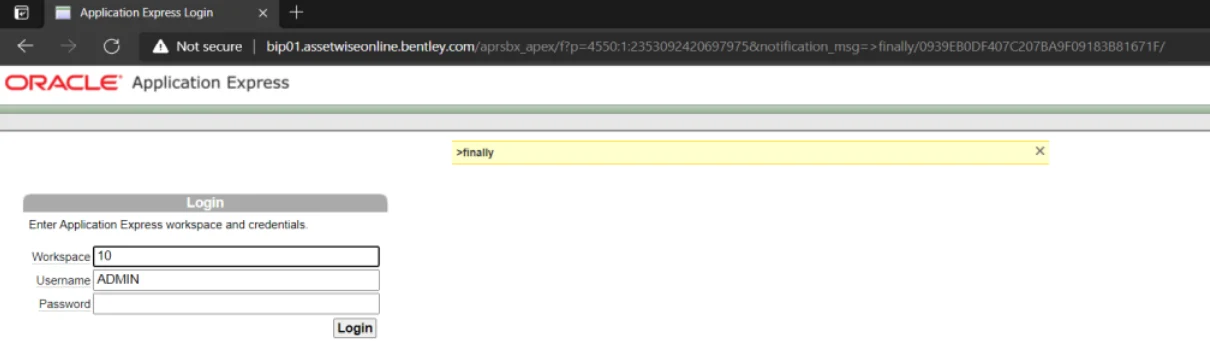
Step 3: wrap the value in angle brackets
Changing the parameter to ><finally> produced a different rendering.
Something still looked wrong, so the next move was to read the source of the resulting page.

The explanation in the report is that HTML5 treats finally as a tag and completes it. In other words, the injected angle brackets turned the reflected string into an element, and the parser closed it for us.
Step 4: build a self-closing payload and compute its checksum
The plan was to use a self-closing HTML tag that triggers XSS, but to generate its MD5 checksum first. The payload entered into notification_msg was:
img src=1 onerror=alert(document.cookie)
Its checksum was computed and kept for later use.
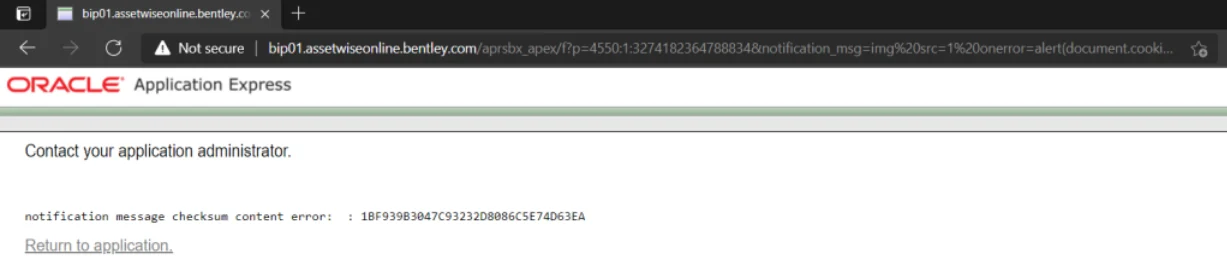
The screenshot is captioned checksum for payload.
Step 5: deliver the payload
With the checksum in hand, the researcher added >< before the value of notification_msg and > after it in the URL. The popup fired.
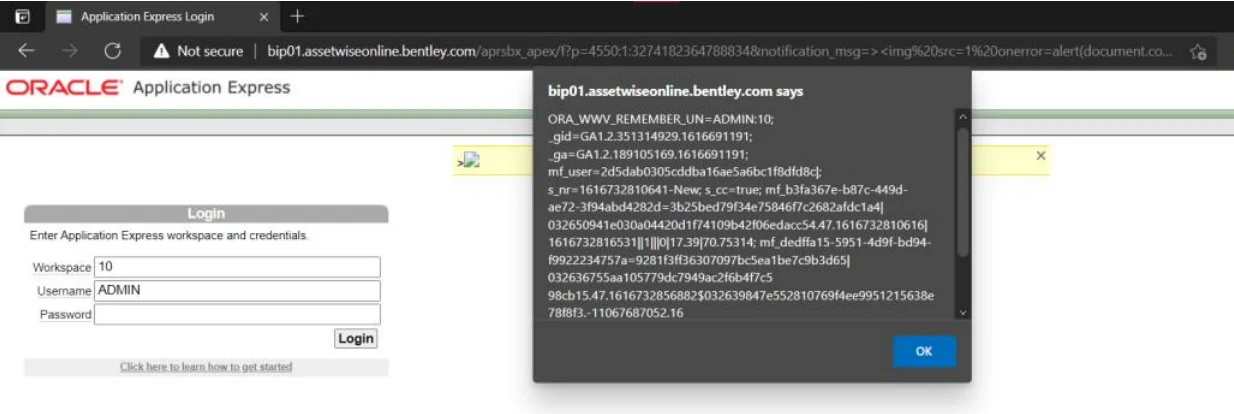
The screenshot is captioned XSS triggered. The onerror handler on the broken image ran alert(document.cookie), confirming script execution in the context of the AssetWise host.
Root cause
The page reflected the notification_msg parameter into its HTML. The only defence in front of the reflection was a checksum: the URL had to carry the MD5 of the parameter value, which stops a casual attacker from simply typing a payload into the URL. That control is not a security boundary, because anyone can compute an MD5 of their own payload. The report also mentions a filter that blocked normal payloads, and the > prefix plus the ><...> wrapping got around it. The report notes that HTML5 treats finally as a tag and completes it.
Impact
The report does not analyse impact beyond demonstrating alert(document.cookie). The popup shows that attacker-controlled JavaScript executes on the AssetWise host when a crafted URL is loaded. The endpoint has since been removed.
Fix
The report does not describe a fix or a vendor response. The only change it records is that the endpoint is gone. The general remedy for this pattern is to HTML-encode the reflected value on output, and to treat the checksum as an integrity check rather than an access control, since it can be computed by anyone.
Variants to test
- Reflected parameter with a checksum companion. Look for URLs where a message parameter is paired with a hash of its value. Recompute the hash for your own payload and resend. A positive result is the payload reflected with the checksum accepted.
- Bare-word reflection. Send a plain word such as
finallyand inspect the rendered source. If the word becomes an element, the parser is completing tags for you, and a self-closing tag with an event handler is worth trying. - Leading
>to skip a filter. Where a filter blocks payloads, prefix the value with>and observe whether the reflection changes. A positive result is the value appearing unmodified in the response. - Wrapping with
><and>. Combine the prefix with a trailing>around the payload. A positive result is a working element with an event handler firing, for example anonerroron a broken image. - Screenshot-driven subdomain triage. Enumerate subdomains, screenshot them with aquatone, and prioritise hosts that look unlike the rest. A positive result is an unusual login or status page whose source contains reflected parameters.
What happened, in plain words
A security researcher who describes themselves as new to the field found a cross-site scripting (XSS) bug on a Bentley Systems website. XSS means that a website can be tricked into running JavaScript that an attacker wrote, inside a victim's browser, as if the site itself had written it. The researcher found it on a host called bip01.assetwiseonline.bentley.com.
The interesting part is how the bug was hidden. The page showed a message taken from the URL, but only if the URL also carried a matching checksum, a short fingerprint of the message text. Most people would stop when they saw the checksum error. The researcher worked out that the checksum could simply be recomputed for any text, then found a way around a filter that blocked ordinary attack payloads, and finally got the browser to run alert(document.cookie), a small script that pops up a box showing the site's cookies. Cookies are small pieces of data a site stores in your browser, often to keep you logged in, so showing them proves that script is running with the site's trust.
This was the researcher's first bug. The endpoint involved has since been removed, so the behaviour described here is historical.
How the hunt started
Bentley Systems runs a family of asset management products under the AssetWise brand. The researcher was unsure which target to hunt and eventually decided on bentley.com.
The first job was to find as many of the company's web hosts as possible. A large company usually has one main domain, such as bentley.com, and many subdomains underneath it, such as mail.bentley.com or shop.bentley.com. Each subdomain can be a separate server running separate software, so each one is a separate thing to test. The researcher gathered all possible subdomains of bentley.com, around 3000 of them.
Reading 3000 pages by hand is not practical, so the researcher ran a tool called aquatone over the list. Aquatone visits each host and saves a screenshot of what it sees. The researcher then flicked through the screenshots looking for hosts that looked different from the rest.
Finding the unusual host
Among the screenshots, a group of similarly named subdomains stood out.
One of them was:
http://bip01.assetwiseonline.bentley.com/
This is a URL. http:// is the protocol, the set of rules the browser uses to fetch the page. bip01.assetwiseonline.bentley.com is the host name, read right to left: bentley.com is the company's domain, assetwiseonline is a subdomain for the AssetWise online product, and bip01 is one particular server inside it. The trailing / means the root page of that server.
While reading the source of that page, the researcher found an endpoint that served a login page. An endpoint is a specific address on a server that does one job, for example showing a login form or accepting a submitted form. The source is the raw HTML the browser receives before it draws anything on screen; you can see it in most browsers with a right-click and "View page source".
The screenshot shows that login page. The report notes that this endpoint is removed now, so it cannot be visited any more.
The feature that mattered
When the researcher typed arbitrary values into the form and submitted it, some text appeared on screen. That text came from a URL parameter called notification_msg. A URL parameter is a name and value pair stuck on the end of a URL after a question mark, like ?name=value. Websites read these values and often use them to decide what to show. When a site takes a value from the URL and prints it straight into the page, security people call that reflection, because your input is bounced back to you.
The URL also ended with a second value, which the report calls md5_checksum and describes as something that uniquely identifies the value of the notification. An MD5 checksum is a fingerprint of some data: you feed text in and get a short fixed-length string out, and the same text always gives the same string. It is easy to compute but hard to reverse, so it is often used to check that data has not been changed. The URL carried this checksum alongside the message value.
That pairing, a reflected parameter plus a checksum that has to agree with it, is what made this case unusual. The parameter was reflected, but only when the accompanying checksum was correct.
Step 1: confirm the reflection and the checksum gate
The researcher first sent an arbitrary value, finally, in notification_msg. The page responded with a checksum error.
The screenshot is captioned checksum_error. This is the seal doing its job: the message finally did not match the checksum in the URL, so the page refused to display it. The string at the end of the URL is the MD5 checksum of the entered text. The researcher replaced it with the correct checksum for finally, and the value then appeared on the page.
The caption notes that the text passed to the URL parameter is now reflected. At this point the reflection is plain text, and the parameter has a filter that blocks normal payloads. A filter here means code on the server that inspects the input and rejects or alters anything that looks like an attack.
Step 2: bypass the filter with a leading angle bracket
Normal payloads were rejected. A payload is the piece of input an attacker sends to try to trigger the bug. Adding > immediately before the entered text, so that the parameter becomes:
notification_msg= >finally
made the value reflect directly, without the checksum error. The > is a greater-than sign, which in HTML marks the end of a tag. Adding > immediately before the entered text made the value reflect directly, without the checksum error.
Step 3: wrap the value in angle brackets
Changing the parameter to:
><finally>
produced a different rendering.
Something still looked wrong, so the next move was to read the source of the resulting page.
The explanation in the report is that HTML5 treats finally as a tag and completes it. HTML is the language pages are written in, and it is built from tags such as <p> for a paragraph or <img> for an image. A browser reads the page as a stream of tags and text. When it sees <finally> it does not know that word, but it still treats it as the start of an element, and when it reaches the end of the input it closes the element for you. In other words, the injected angle brackets turned the reflected string into an element, and the parser, the part of the browser that reads HTML, supplied the closing bracket. That is useful to an attacker, because it means the payload does not need to look like a complete tag to become one.
Step 4: build a self-closing payload and compute its checksum
The plan was to use a self-closing HTML tag that triggers XSS, but to generate its MD5 checksum first. A self-closing tag is one that opens and closes in a single piece, such as <img ... />, which is handy when you cannot rely on the parser to close it for you. The payload entered into notification_msg was:
img src=1 onerror=alert(document.cookie)
Line by line, in plain words:
imgis the name of the image tag. It tells the browser to load a picture.src=1is the address of the picture.1is not a real image, so the load will fail.onerror=...is an event handler: a piece of JavaScript the browser runs when something goes wrong. Here it runs when the image fails to load.alert(document.cookie)is the JavaScript itself.document.cookiereads the cookies the site has stored for the current page, andalertshows them in a popup box.
The trick is that the image is deliberately broken, so the error handler fires immediately. Its checksum was computed and kept for later use.
The screenshot is captioned checksum for payload. This step matters because of the seal from step 1: the page will only show the message if the checksum in the URL matches the message text, and the researcher has just produced the matching checksum for the attack payload.
Step 5: deliver the payload
With the checksum in hand, the researcher added >< before the value of notification_msg and > after it in the URL. The popup fired.
The screenshot is captioned XSS triggered. Putting it together: the leading >< closes whatever element the page was in and opens a new one, the payload becomes the body of that element, and the trailing > closes it. The onerror handler on the broken image then ran alert(document.cookie), confirming script execution in the context of the AssetWise host. In other words, the browser believed the script came from Bentley's own site, so it ran with that site's trust.
Why it worked
The page reflected the notification_msg parameter into its HTML. Encoding means converting characters that have special meaning in HTML, such as < and >, into harmless codes such as < and >, so the browser shows them as text instead of treating them as tags. Without encoding, any < in the input becomes a real tag.
The only defence in front of the reflection was a checksum: the URL had to carry the MD5 of the parameter value, which stops a casual attacker from simply typing a payload into the URL. That control is not a security boundary, because anyone can compute an MD5 of their own payload. The report also mentions a filter that blocked normal payloads, and the > prefix plus the ><...> wrapping got around it. The report notes that HTML5 treats finally as a tag and completes it.
What it means for users
The report does not analyse impact beyond demonstrating alert(document.cookie). What the popup shows is that attacker-controlled JavaScript executes on the AssetWise host when a victim loads a crafted URL. The popup shows that attacker-controlled JavaScript executes on the AssetWise host when a crafted URL is loaded. The endpoint has since been removed.
How it should be fixed
The report does not describe a fix or a vendor response. The only change it records is that the endpoint is gone. The general remedy for this pattern is to HTML-encode the reflected value on output, and to treat the checksum as an integrity check rather than an access control, since it can be computed by anyone.
Variants to test
- Reflected parameter with a checksum companion. Look for URLs where a message parameter is paired with a hash of its value. Recompute the hash for your own payload and resend. A positive result is the payload reflected with the checksum accepted.
- Bare-word reflection. Send a plain word such as
finallyand inspect the rendered source. If the word becomes an element, the parser is completing tags for you, and a self-closing tag with an event handler is worth trying. - Leading
>to skip a filter. Where a filter blocks payloads, prefix the value with>and observe whether the reflection changes. A positive result is the value appearing unmodified in the response. - Wrapping with
><and>. Combine the prefix with a trailing>around the payload. A positive result is a working element with an event handler firing, for example anonerroron a broken image. - Screenshot-driven subdomain triage. Enumerate subdomains, screenshot them with aquatone, and prioritise hosts that look unlike the rest. A positive result is an unusual login or status page whose source contains reflected parameters.
Glossary
- XSS (cross-site scripting): a bug where a site runs JavaScript written by an attacker, inside a victim's browser, as if the site itself had written it.
- Bug bounty programme: a scheme where a company invites people to test its systems and report security problems, usually with a reward.
- Subdomain: a named host underneath a main domain, such as
shop.example.comunderexample.com; each one can be a separate server. - Aquatone: a tool that visits a list of hosts and saves screenshots of what it sees, so you can review many hosts quickly.
- URL: the address of a page or resource, made of a protocol, a host name and a path.
- Protocol: the set of rules used to fetch something, such as
http://orhttps://. - Host name: the part of a URL that names the server, such as
bip01.assetwiseonline.bentley.com. - Endpoint: a specific address on a server that does one job, such as showing a login form.
- Source (page source): the raw HTML the browser receives before it draws anything on screen.
- URL parameter: a name and value pair on the end of a URL after a question mark, such as
?name=value. - Reflection: when a site takes a value from the request and prints it straight back into the page.
- MD5 checksum: a short fixed-length fingerprint of some data; the same data always gives the same fingerprint, and it is easy to compute but hard to reverse.
- Filter: code on the server that inspects input and rejects or alters anything that looks like an attack.
- Payload: the piece of input an attacker sends to try to trigger a bug.
- HTML: the language pages are written in, built from tags such as
<p>and<img>. - Tag: a piece of HTML that marks the start or end of an element, written with angle brackets.
- Element: a piece of a page built from a tag, such as a paragraph or an image.
- Parser: the part of the browser that reads HTML and turns it into a page.
- Self-closing tag: a tag that opens and closes in a single piece, such as
<img ... />. - Event handler: a piece of JavaScript the browser runs when something happens, such as an image failing to load.
- Cookie: a small piece of data a site stores in your browser, often to keep you logged in.
- Encoding (HTML-encoding): converting characters with special meaning, such as
<and>, into harmless codes so they show as text instead of being treated as tags. - Origin: the combination of protocol, host and port that a browser uses to decide which site a page belongs to and what it is allowed to do.
- Session: the period during which a site remembers who you are, usually carried by a cookie.
- Integrity check: a check that data has not been changed, as opposed to a check of who is allowed to do something.
- Access control: a check of who is allowed to do something.