Urgent: attacker can access every data source on Bime
The `/cube_models.json` endpoint accepted a `datasource_id` belonging to another customer, and a subsequent request to `/datasources.json` returned that customer's data source details, including database hostnames, logins and passwords. An attacker with a normal account could therefore read every data source on the platform.

- Triaged in 37 hours
- Fixed in 8 days
- Paid in 37 hours
- Disclosed after 19 days
Vulnerability details
I don't include words like "urgent" in my title very often, but I thought you might want to get onto this right away. An attacker can access the data source of any other customer on the BIME platform through the /cube_models.json endpoint. This leaks, for example, the login information of Postgres backends (including hostname, login, and passwords). I haven't verified whether the passwords are encrypted, but this seems pretty bad nevertheless.
Proof of concept
Sign in as a normal user - I used my personal email address on the https://h1-bugbounty.bime.io domain. I added a CSV as data source to set up a new dashboard. During this flow, the following request is sent to the server:
POST /cube_models.json HTTP/1.1
Host: h1-bugbounty.bime.io
...

{"import_strategy":"replace","configuration":"{\"bimeDb\":{\"arrayVarcharLength\":500,\"numberOfDecimals\":2},\"queryBlender\":{\"pushdown\":true,\"raiseWarnings\":true},\"infiniteCache\":{},\"timeZone\":\"\",\"mergeFields\":\"\",\"schedule\":{\"cronExp\":\"0 0 0 * * ?\",\"cronText\":\"Every day at 00 : 00\",\"emailOnSuccess\":false,\"emailOnFailure\":false,\"refreshRate\":\"importNow\"},\"bundle\":{},\"sortWeekdayFromMonday\":true}","model_category_id":527921,"name":"CSV Connection 1","cache_type":"dejaVu","use_cache":true,"datasource_id":723592,"technical_type":"filePicker","in_memory_cache_time_to_live":15,"cube_schema":"PE9MQVBTY2hlbWEgZm9sZGVycz0iZXlKaGRIUnlhV0oxZEdWelJtOXNaR1Z5Y3lJNlcxMHNJbTFsWVhOMWNtVnpSbTlzWkdWeWN5STZXMTBzSW0xbFlYTjFjbVZ6Um05c1pHVnljMFJwYzNCc1lYbEdiM0p0WVhSeklqcGJYWDA9IiBsYWJlbD0iY3N2Y29ubmVjdGlvbjEtYmU2ODgiIGlzTGFyZ2VNb2RlbD0iZmFsc2UiIGFycmF5Q29sdW1ucz0iVzEwPSIgPjxEaW1lbnNpb25zPjxEaW1lbnNpb24gbGFiZWw9IkF4aXMgb2YgYW5hbHlzaXMiIGRpc3BsYXlOYW1lPSJBeGlzIG9mIGFuYWx5c2lzIiBpZD0iQXhpcyBvZiBhbmFseXNpcyI+PEF0dHJpYnV0ZXM+PEF0dHJpYnV0ZSBsYWJlbD0iSUQiIGRlc2NyaXB0aW9uPSJJRCIgZGlzcGxheU5hbWU9IklEIiBmb2xkZXJJbmRleD0iMCIgb3JpZ2luYWxEaXNwbGF5TmFtZT0iSUQiIHJlYWxUeXBlPSJtZWFzdXJlIiBjdXN0b209ImUzMD0iIGZvbGRlck5hbWU9IkF4aXMgb2YgYW5hbHlzaXMiIGdlb0xldmVsPSJhdXRvIiAvPjxBdHRyaWJ1dGUgbGFiZWw9InRpdGxlIiBkZXNjcmlwdGlvbj0idGl0bGUiIGRpc3BsYXlOYW1lPSJ0aXRsZSIgZm9sZGVySW5kZXg9IjAiIG9yaWdpbmFsRGlzcGxheU5hbWU9InRpdGxlIiByZWFsVHlwZT0iY3VzdG9tIiBjdXN0b209ImUzMD0iIGZvbGRlck5hbWU9IkF4aXMgb2YgYW5hbHlzaXMiIGdlb0xldmVsPSJhdXRvIiAvPjwvQXR0cmlidXRlcz48L0RpbWVuc2lvbj48L0RpbWVuc2lvbnM+PE1lYXN1cmVzIGRpc3BsYXlGb3JtYXQ9InN0YW5kYXJkX1dBQ18wX1dBQ18xMDAwX1dBQ19fV0FDX19XQUNfLl9XQUNfIF9XQUNfMV9XQUNfIj48L01lYXN1cmVzPjxDYWxjdWxhdGVkRmllbGRzPjxDYWxjdWxhdGVkTWVhc3VyZXM+PC9DYWxjdWxhdGVkTWVhc3VyZXM+PENhbGN1bGF0ZWRBdHRyaWJ1dGVzPjwvQ2FsY3VsYXRlZEF0dHJpYnV0ZXM+PC9DYWxjdWxhdGVkRmllbGRzPjwvT0xBUFNjaGVtYT4="}
Notice the datasource_id in this request. Send this request to the server again, but this time, change the ID to the data source that you want to access. You don't need to know the actual type of the datasource. After this, send a GET request to the /datasources.json endpoint, like shown below.
GET /datasources.json HTTP/1.1
Host: h1-bugbounty.bime.io
...
HTTP/1.1 200 OK
...

[...
{
  "id": 723591,
  "technical_type": "Relational Databases",
  "external_id": "█████████.db.databaselabs.io",
  "login": "bot",
  "email": null,
  "tocken": "true",
  "url": "█████████",
  "public_key": "customSQL",
  "private_key": "true",
  "extra_param1_name": "dbPort",
  "extra_param1_value": "5432",
  "extra_param2_name": null,
  "extra_param2_value": "postgreSQL",
  "extra_param3_name": null,
  "extra_param3_value": "██████████",
  "created_at": "2016-07-08T03:09:29.000Z",
  "updated_at": "2016-07-08T03:35:36.000Z",
  "datasource_version": 2,
  "configuration": "{\"invalidDateAs\":\"null\",\"meta\":{\"useReusableToken\":true},\"cloudStorage\":{\"bigQuery\":{},\"redshift\":{\"useEscapingV2\":true},\"useEscapingV2\":true},\"sqlServerLocale\":\"english\",\"union\":{},\"useBifeV2\":true,\"sqlVersion\":2,\"joinCulling\":true,\"usePushDown\":true,\"jdbcParameters\":[],\"useCache\":false}",
  "final_type": "postgresql",
  "pwd": "██████████"
},
...]
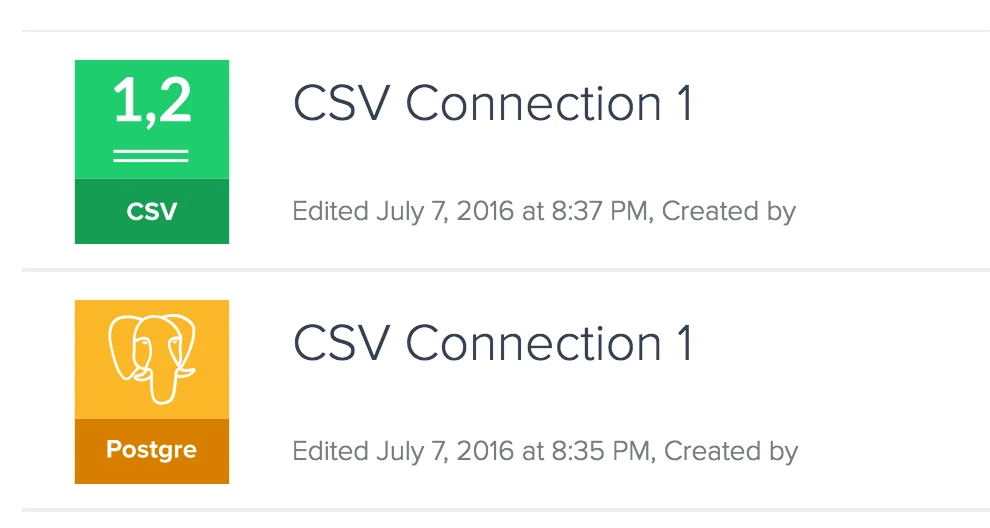
This will give the attacker access to every datasource on the BIME platform. It'll also be reflected on the datasources page, when signed in to the platform:
Let me know if you need more information.
Context
Bime is a business intelligence platform where customers build dashboards on top of data sources. A data source is a connection definition: for a relational database it holds the host, the login and the password that Bime uses to reach the customer's backend. The report concerns the /cube_models.json endpoint, which is called while a user sets up a new dashboard from a data source, and the /datasources.json endpoint, which lists the data sources belonging to the signed-in user.
The researcher's title calls the issue urgent because the data source of any other customer on the platform could be reached through /cube_models.json, leaking, for example, the login information of Postgres backends, including hostname, login and passwords. The researcher had not verified whether the passwords are encrypted.
Setup
The only precondition is a normal user account. The researcher signed in with a personal email address on the https://h1-bugbounty.bime.io domain and added a CSV as a data source to set up a new dashboard. No special role, tool or version is mentioned.
Finding it
While adding the CSV data source, the researcher watched the request that the dashboard flow sends to the server. That request carries a datasource_id identifying which data source the new cube model is built on. The identifier is supplied by the client, and changing it to another customer's data source ID still worked.
Exploitation
Step 1: capture the legitimate request
Adding the CSV data source produces the following request:
POST /cube_models.json HTTP/1.1
Host: h1-bugbounty.bime.io
...

{"import_strategy":"replace","configuration":"{\"bimeDb\":{\"arrayVarcharLength\":500,\"numberOfDecimals\":2},\"queryBlender\":{\"pushdown\":true,\"raiseWarnings\":true},\"infiniteCache\":{},\"timeZone\":\"\",\"mergeFields\":\"\",\"schedule\":{\"cronExp\":\"0 0 0 * * ?\",\"cronText\":\"Every day at 00 : 00\",\"emailOnSuccess\":false,\"emailOnFailure\":false,\"refreshRate\":\"importNow\"},\"bundle\":{},\"sortWeekdayFromMonday\":true}","model_category_id":527921,"name":"CSV Connection 1","cache_type":"dejaVu","use_cache":true,"datasource_id":723592,"technical_type":"filePicker","in_memory_cache_time_to_live":15,"cube_schema":"[redacted]+PEF0dHJpYnV0ZXM+[redacted]+[redacted]+PC9DYWxjdWxhdGVkTWVhc3VyZXM+[redacted]+[redacted]="}
The body is JSON. datasource_id is the field of interest: here it is 723592, the CSV source the researcher had just created. The rest of the body describes the cube model: the import strategy, a configuration blob, the model category, the name CSV Connection 1, cache settings, the technical type filePicker and a base64-encoded cube_schema describing the dimensions and measures of the model.
Step 2: replay with another customer's data source ID
The researcher sent the same request again, changing the ID to the data source to be accessed. The report notes that the actual type of the data source does not need to be known.
Step 3: read the data sources list
After the modified POST, a GET request to /datasources.json returns the data source definitions:
GET /datasources.json HTTP/1.1
Host: h1-bugbounty.bime.io
...
HTTP/1.1 200 OK
...

[...
{
  "id": 723591,
  "technical_type": "Relational Databases",
  "external_id": "█████████.db.databaselabs.io",
  "login": "bot",
  "email": null,
  "tocken": "true",
  "url": "█████████",
  "public_key": "customSQL",
  "private_key": "true",
  "extra_param1_name": "dbPort",
  "extra_param1_value": "5432",
  "extra_param2_name": null,
  "extra_param2_value": "postgreSQL",
  "extra_param3_name": null,
  "extra_param3_value": "██████████",
  "created_at": "2016-07-08T03:09:29.000Z",
  "updated_at": "2016-07-08T03:35:36.000Z",
  "datasource_version": 2,
  "configuration": "{\"invalidDateAs\":\"null\",\"meta\":{\"useReusableToken\":true},\"cloudStorage\":{\"bigQuery\":{},\"redshift\":{\"useEscapingV2\":true,\"useEscapingV2\":true},\"sqlServerLocale\":\"english\",\"union\":{},\"useBifeV2\":true,\"sqlVersion\":2,\"joinCulling\":true,\"usePushDown\":true,\"jdbcParameters\":[],\"useCache\":false}",
  "final_type": "postgresql",
  "pwd": "██████████"
},
...]
The response is a JSON array of data source objects. Each object carries the connection details: external_id (the database host), login, url, the port in extra_param1_value (5432), the database type in extra_param2_value (postgreSQL), final_type (postgresql), a configuration blob and pwd. The values that identify the customer's backend have been redacted in the published report.
The same data is reflected on the datasources page of the platform when signed in:
The screenshot shows the data sources page with the connection information visible in the interface.
Root cause
The POST /cube_models.json handler takes datasource_id from the request body and builds a cube model on that data source without checking that the data source belongs to the authenticated user. Because the identifier is client-supplied and the server trusts it, a user can attach a model to any other customer's data source. The /datasources.json listing then returns the full definition, including credentials. The report does not describe the server-side code, so the exact check that was missing is likely an ownership or authorisation check on the referenced data source.
Impact
Any authenticated user, with a normal account, can access the data source of any other customer on the BIME platform. The leaked material includes the login information of Postgres backends: hostname, login and passwords. The same information is displayed on the datasources page in the product.
Fix
The report does not describe a fix.
Variants to test
- Create or update endpoints that take an object ID in the body (
datasource_id,model_category_id,connection_idand similar). Replay with an ID belonging to another account and then list your own objects: a positive result is the other account's object appearing in your listing with its configuration. - Listing endpoints such as
/datasources.json. After any cross-tenant reference succeeds, request the listing: a positive result is connection details (host, login, password) for objects you never created. - Type mismatch between the request and the target. Keep the
technical_typeof your own object while pointing at a different kind of source, as the researcher did: a positive result is the server accepting the mismatch and returning the target's definition. - Sequential or predictable identifiers. If IDs are small integers, try neighbouring values on the same endpoints: a positive result is any object you do not own being returned or attached.
Hunting notes
This kind of bug hides in the flow that links one object to another: creating a dashboard, a model or a report from a data source, where the client sends the identifier of the object to attach. The signal during recon is an identifier in a request body that is not derived from your own session, especially when a later listing endpoint returns full configuration for whatever was attached. The researcher showed impact by going all the way from the write request to the read response containing credentials, and by noting that the same data appears in the product's own datasources page, which makes the leak concrete rather than theoretical.
What happened, in plain words
Bime is a business intelligence platform: a website where companies build dashboards (charts and tables) on top of their own data. To do that, a customer first tells Bime where the data lives, for example in a database. That description is called a data source, and for a database it contains the address of the machine, the username and the password that Bime uses to connect to it. In other words, a data source is a small record of credentials, and credentials are the keys to a customer's data.
The researcher found that a normal user could reach the data source of any other customer on the platform. The trick was a single request that the website sends while a user sets up a new dashboard. That request contains a number identifying which data source to use. The server accepted a number for another customer's data source. By changing the number, the researcher could reach another customer's data source, and a second request listed it back to him, including the hostname, login and password of the Postgres database behind it.
Postgres (also written PostgreSQL) is a popular database program. The researcher had not checked whether the passwords were stored encrypted, but either way the report calls the issue urgent.
Background you need
A few ideas come up again and again below, so here they are from zero.
Website and server. Your browser is the client. The server is the computer that holds the data and answers requests. When you click something, your browser sends a message to the server and shows you the reply.
HTTP request. That message is an HTTP request. It has a method (a verb such as GET, which asks for something, or POST, which sends something), a path (the part of the site being addressed, such as /datasources.json), a Host line saying which site it is for, and often a body carrying data. The server answers with a status line such as HTTP/1.1 200 OK, where 200 means success.
API and endpoint. An API is the set of doors a website offers to programs rather than to people clicking buttons. Each door is an endpoint: a specific path that accepts a specific kind of request. Think of a restaurant: the menu is the API, and each dish on it is an endpoint. The web page you see is the dining room; the endpoints are the kitchen door where orders go in.
JSON. A common text format for structured data, built from names and values in curly braces, like a labelled form. {"name":"CSV Connection 1"} says the field name has the value CSV Connection 1. Lists are written in square brackets.
Identifier (ID). A number the platform gives each object so it can be referred to later, like a customer number on a file. Data sources have IDs, dashboards have IDs, and so on.
Session and authentication. When you sign in, the server needs to recognise you on every later request. It does that with a session, usually tracked by a cookie or token, which is a small piece of data your browser stores and sends back with each request, like a wristband at an event. Authentication means proving who you are; authorisation means deciding what you are allowed to touch once you are known. The bug here is an authorisation problem: the server knew who the researcher was, yet another customer's data source was reachable.
Vulnerability class: information disclosure. This is the umbrella name for bugs where data that should stay private is handed to someone who should not see it. The report is filed under that class.
Cross-tenant access. A tenant is one customer in a shared system, like one flat in an apartment block. Cross-tenant access means one flat's key opens another flat's door. That is what happened here.
CSV. A plain text file where each line is a row of values separated by commas. It is a simple way to bring a table of data into a tool, and it is what the researcher used to create a data source of his own.
Base64. A way of writing arbitrary data using only ordinary letters and digits, so it can travel inside text. It is not encryption; anyone can decode it. The long cube_schema string in the request below is base64.
Redaction. In the published report, some values are replaced with black blocks (████) so that real customer details are not made public. That is why some fields below look censored.
Setting up
The only thing needed was an ordinary account. The researcher signed in with a personal email address on the https://h1-bugbounty.bime.io domain, then added a CSV file as a data source in order to set up a new dashboard. No special role, tool or software version is mentioned. The point of this step is that the researcher needed a legitimate data source of his own, so he could watch what the website does when it uses one.
Finding the problem
While adding the CSV data source, the researcher watched the request the dashboard flow sends to the server. Watching requests is normally done with the browser's developer tools, the panel that shows every message the page exchanges with the server. That request carries a datasource_id, the number saying which data source the new dashboard model is built on. The number is supplied by the browser, and as the next steps show, another customer's data source could be reached through it.
Exploiting it
Step 1: capture the normal request
Adding the CSV data source produced this request:
POST /cube_models.json HTTP/1.1
Host: h1-bugbounty.bime.io
...

{"import_strategy":"replace","configuration":"{\"bimeDb\":{\"arrayVarcharLength\":500,\"numberOfDecimals\":2},\"queryBlender\":{\"pushdown\":true,\"raiseWarnings\":true},\"infiniteCache\":{},\"timeZone\":\"\",\"mergeFields\":\"\",\"schedule\":{\"cronExp\":\"0 0 0 * * ?\",\"cronText\":\"Every day at 00 : 00\",\"emailOnSuccess\":false,\"emailOnFailure\":false,\"refreshRate\":\"importNow\"},\"bundle\":{},\"sortWeekdayFromMonday\":true}","model_category_id":527921,"name":"CSV Connection 1","cache_type":"dejaVu","use_cache":true,"datasource_id":723592,"technical_type":"filePicker","in_memory_cache_time_to_live":15,"cube_schema":"[redacted]+PEF0dHJpYnV0ZXM+[redacted]+[redacted]+PC9DYWxjdWxhdGVkTWVhc3VyZXM+[redacted]+[redacted]="}
Line by line:
POST /cube_models.json HTTP/1.1is the request line.POSTmeans data is being sent to the server,/cube_models.jsonis the endpoint, andHTTP/1.1is the version of the protocol. A cube model is Bime's internal description of a dataset prepared for dashboards.Host: h1-bugbounty.bime.ionames the site the request is addressed to. The...stands for headers the report leaves out, such as the session cookie that identifies the signed-in user.- The blank line separates the headers from the body.
- The body is one JSON object.
import_strategyisreplace, meaning the data is replaced rather than appended.configurationis a nested JSON string holding settings such as the schedule (Every day at 00 : 00) and cache behaviour.model_category_idis527921, the folder-like category the model goes into.nameisCSV Connection 1, the name the researcher gave it.cache_type,use_cacheandin_memory_cache_time_to_livecontrol how results are cached. datasource_idis723592: the CSV data source the researcher had just created. This is the field that matters. It is the only thing that decides which data source the model is built on, and it is chosen by the browser.technical_typeisfilePicker, saying the source is a file upload.cube_schemais a long base64 string. Decoded, it describes the dimensions and measures of the model, that is, which columns exist and how they are grouped and summed.
Why this step: the researcher needed a real, working example of the request so he could change one value and resend it. Capturing the normal traffic is how you learn the shape of a request before tampering with it.
Step 2: resend it with someone else's data source ID
The researcher sent the same request again, but changed the ID to the data source he wanted to reach. The report notes that the actual type of the target does not need to be known: technical_type can stay as it is even though the target is a different kind of source. In everyday terms, he kept the label saying "this is a CSV file" while pointing the number at a database belonging to someone else, and the server did not object.
Why this step: this is the heart of the bug. The request with another customer's data source ID was accepted, so the other customer's data source could be reached.
Step 3: read the list of data sources
After the modified POST, a GET request to /datasources.json returned the data source definitions:
GET /datasources.json HTTP/1.1
Host: h1-bugbounty.bime.io
...
Line by line:
GETasks the server to return something rather than change it./datasources.jsonis the endpoint that lists the data sources belonging to the signed-in user.Hostagain names the site, and...stands for the headers the report leaves out, including the session cookie.
Why this step: the POST attached the other customer's data source to the researcher's account. The GET then asked the platform, in effect, "show me my data sources". The platform handed back the full definition of the foreign data source. The write request made the leak possible; the read request delivered it.
The server answered:
HTTP/1.1 200 OK
...

[...
{
  "id": 723591,
  "technical_type": "Relational Databases",
  "external_id": "█████████.db.databaselabs.io",
  "login": "bot",
  "email": null,
  "tocken": "true",
  "url": "█████████",
  "public_key": "customSQL",
  "private_key": "true",
  "extra_param1_name": "dbPort",
  "extra_param1_value": "5432",
  "extra_param2_name": null,
  "extra_param2_value": "postgreSQL",
  "extra_param3_name": null,
  "extra_param3_value": "██████████",
  "created_at": "2016-07-08T03:09:29.000Z",
  "updated_at": "2016-07-08T03:35:36.000Z",
  "datasource_version": 2,
  "configuration": "{\"invalidDateAs\":\"null\",\"meta\":{\"useReusableToken\":true},\"cloudStorage\":{\"bigQuery\":{},\"redshift\":{\"useEscapingV2\":true},\"useEscapingV2\":true},\"sqlServerLocale\":\"english\",\"union\":{},\"useBifeV2\":true,\"sqlVersion\":2,\"joinCulling\":true,\"usePushDown\":true,\"jdbcParameters\":[],\"useCache\":false}",
  "final_type": "postgresql",
  "pwd": "██████████"
},
...]
Line by line:
HTTP/1.1 200 OKmeans the request succeeded. The...stands for response headers the report leaves out.- The body is a JSON array, written with square brackets, of data source objects. The
...before and after the shown object mean the list contained more entries. idis723591, the data source's own number. Note it is one less than the researcher's723592.technical_typeisRelational Databases, so this is a database connection, not a file.external_idis the database host, redacted in the published report. A host is the address of the machine the database runs on.loginisbot, the username used to connect.emailisnull, meaning empty.tocken(spelled that way in the response) is"true".public_keyiscustomSQLandprivate_keyis"true". These are fields of the connection record; the report does not explain them further.urlis redacted.extra_param1_nameisdbPortwithextra_param1_value5432, the standard port number for Postgres. A port is like a numbered door on a machine, so the network knows which service to talk to.extra_param2_nameis empty, andextra_param2_valueispostgreSQL, the database type.extra_param3_nameis empty andextra_param3_valueis redacted.created_atandupdated_atare timestamps showing when the record was made and last changed.datasource_versionis2.configurationis a nested JSON string of connection settings, such as SQL dialect options and cache behaviour.final_typeispostgresql, confirming the database type.pwdis the password, redacted in the published report. This is the field that turns a leak into a serious one: with host, login and password, someone can connect to the customer's database directly.
The same information was also shown on the datasources page of the platform when signed in:
The screenshot shows the data sources page with the connection information visible in the interface. The report says the same information is reflected on the datasources page when signed in.
Why it worked
The POST /cube_models.json request takes datasource_id from the body, and changing it reached another customer's data source. Because the number comes from the client, any user could reach any other customer's data source. The /datasources.json listing then returns the full definition, credentials included. The report does not describe the server-side code, so the exact check that was missing is most likely an ownership or authorisation check on the referenced data source.
A useful comparison: a hotel receptionist who hands out a room key whenever a guest reads out a room number, without checking that the number matches the guest's booking. The number is real and the key works; the missing step is the check.
What it means
Any signed-in user with a normal account could access the data source of any other customer on the BIME platform. The leaked material includes the login information of Postgres backends: hostname, login and passwords. The researcher had not verified whether the passwords are encrypted. The same information is displayed on the datasources page in the product.
How it should be fixed
Other places to look for the same mistake
- Create or update endpoints that take an object ID in the body (
datasource_id,model_category_id,connection_idand similar). Replay with an ID belonging to another account and then list your own objects: a positive result is the other account's object appearing in your listing with its configuration. - Listing endpoints such as
/datasources.json. After any cross-tenant reference succeeds, request the listing: a positive result is connection details (host, login, password) for objects you never created. - Type mismatch between the request and the target. Keep the
technical_typeof your own object while pointing at a different kind of source, as the researcher did: a positive result is the server accepting the mismatch and returning the target's definition. - Sequential or predictable identifiers. If IDs are small integers, try neighbouring values on the same endpoints: a positive result is any object you do not own being returned or attached.
How to spot this kind of bug
This kind of bug hides in the flow that links one object to another: creating a dashboard, a model or a report from a data source, where the browser sends the identifier of the object to attach. The signal to watch for is an identifier in a request body that is not derived from your own session, especially when a later listing endpoint returns full configuration for whatever was attached. The researcher showed the impact by going all the way from the write request to the read response containing credentials, and by noting that the same data appears in the product's own datasources page, which makes the leak concrete rather than theoretical.
Glossary
- API: the set of endpoints a website offers to programs, as opposed to the pages a person clicks through.
- Authentication: proving who you are, usually by signing in.
- Authorisation: deciding what a known user is allowed to access.
- Base64: a text encoding that lets arbitrary data travel inside text; it is not encryption and anyone can decode it.
- Body: the part of an HTTP request or response that carries the actual data, after the headers.
- Cookie: a small piece of data a browser stores for a site and sends back with each request, often used to carry a session.
- Cross-tenant access: one customer in a shared system reaching another customer's data.
- CSV: a plain text file of rows and comma-separated values.
- Cube model: Bime's internal description of a dataset prepared for dashboards, including its dimensions and measures.
- Data source: a stored connection definition, including host, login and password, that the platform uses to reach a customer's data.
- Endpoint: a specific path on a server that accepts a specific kind of request.
- GET: an HTTP method that asks the server to return something.
- Host: the address of a machine on a network.
- HTTP: the protocol browsers and servers use to exchange requests and responses.
- Identifier (ID): a number or string that uniquely refers to an object, such as a data source.
- Information disclosure: a vulnerability class where private data is shown to someone who should not see it.
- JSON: a text format for structured data made of names and values, with lists in square brackets.
- Port: a numbered door on a machine that identifies which service to talk to; 5432 is the usual Postgres port.
- POST: an HTTP method that sends data to the server, often to create or change something.
- Postgres (PostgreSQL): a popular relational database program.
- Redaction: replacing sensitive values with blocks or placeholders before publishing.
- Request: a message from a client to a server asking for something or sending something.
- Response: the server's reply to a request, with a status code and usually a body.
- Session: the server's record of a signed-in user, usually tracked by a cookie or token.
- Status code: the number in a response saying how it went, such as 200 for success.
- Tenant: one customer in a shared system.
- Token: a piece of data used to prove identity or permission, similar in role to a cookie.
- Vulnerability: a weakness in software that lets someone do something they should not be able to do.


