Project Template functionality can be used to copy private project data, such as repository, confidential issues, snippets, and merge requests
A validation bypass in project creation allowed a user to specify a custom template from a public project they could not fully access, causing the server to export that project and import it into a new project they controlled. An attacker could thereby copy private repositories, confidential issues, snippets, merge requests, and other data from public projects with restricted features.

- Triaged in 6 hours
- Fixed in 5 days
- Paid in 5 days
- Disclosed after 3 months
I've found a three minor vulnerabilities which, when combined, allow an attacker to copy private repositories, confidential issues, private snippets, and then some. I'll go through the code path to explain the vulnerabilities and how they are combined. See the Proof of Concept section if you want to reproduce it immediately.
Let's start at the ProjectsController of EE, which is prepended to app/controllers/projects_controller.rb in an EE instance.
ee/app/controllers/ee/projects_controller.rb
override :project_params_attributes
    def project_params_attributes
      super + project_params_ee
    end

def project_params_ee
  attrs = %i[
    # ...
    use_custom_template
    # ...
    group_with_project_templates_id
  ]

  # ...

  attrs
end
This method defines what parameters can be passed by the user. The two notable parameters here are use_custom_template and group_with_project_templates_id. This method appends the result value of project_params_attributes method in app/controllers/projects_controller.rb on line 351, which specifies all the CE attributes a user can provide when creating a project. The CE controller allows the template_name parameter to be passed, too. This means that these three parameters can be passed to the Projects::CreateService in the create method:
app/controllers/projects_controller.rb
def create
  @project = ::Projects::CreateService.new(current_user, project_params(attributes: project_params_create_attributes)).execute

  # ...
end

# ...

def project_params_attributes
  [
    # ...
    :template_name,
    # ...
  ]
In EE, the EE:Projects::CreateService is prepended to the Projects::CreateService. The prepended EE code contains logic to validate the use_custom_template and group_with_project_templates_id parameters.
ee/app/services/ee/projects/create_service.rb
def execute
  # ...

  group_with_project_templates_id = params.delete(:group_with_project_templates_id) if params[:template_name].blank?

  # ...

    validate_namespace_used_with_template(project, group_with_project_templates_id)
end

# ...

def validate_namespace_used_with_template(project, group_with_project_templates_id)
  return unless project.group

  subgroup_with_templates_id = group_with_project_templates_id || params[:group_with_project_templates_id]
  return if subgroup_with_templates_id.blank?

  templates_owner = ::Group.find(subgroup_with_templates_id).parent

  unless templates_owner.self_and_descendants.exists?(id: project.namespace_id)
    project.errors.add(:namespace, _("is not a descendant of the Group owning the template"))
  end
end
The code above is where the first vulnerability can be found. In a normal situation, a Project Template can only be copied to a namespace (group) that is a descendant of the project template. However, the validate_namespace_used_with_template method returns a nil value when the project is not being created for a group (return unless project.group). This means that if a group_with_project_templates_id is given for a project that is created in a User namespace, the authorization / validation logic is never executed. This means that the use_custom_template and group_with_project_templates_id parameters remain to be set on the instance variable params.
Because the EE code is prepended, the execute method is executed before the Projects::CreateService is called. Because the EE class its validation logic is bypassed, the execute method of the Projects::CreateService class is called:
app/services/projects/create_service.rb
def execute
  if @params[:template_name].present?
    return ::Projects::CreateFromTemplateService.new(current_user, params).execute
  end

  # ...
end
When a template_name is given, instead of executing the normal execution flow, the result of Projects::CreateFromTemplateService is returned. The CE code for this class isn't very important. The EE class contains the logic that is worth checking out:
ee/app/services/ee/projects/create_from_template_service.rb
def execute
  return super unless use_custom_template?

  override_params = params.dup
  params[:custom_template] = template_project if template_project

  ::Projects::GitlabProjectsImportService.new(current_user, params, override_params).execute
end

private

def use_custom_template?
  # ...
    template_name &&
      ::Gitlab::Utils.to_boolean(params.delete(:use_custom_template)) &&
      ::Gitlab::CurrentSettings.custom_project_templates_enabled?
  # ...
end

def template_project
  # ...
    current_user.available_custom_project_templates(search: template_name, subgroup_id: subgroup_id)
                .first
  # ...
end

def subgroup_id
  params[:group_with_project_templates_id].presence
end
This class does a couple of things: it makes sure a custom template name is given, that it should use the given template name, and that the GitLab instance has custom project templates enabled. For what it's worth: gitlab.com has this setting enabled. When it passes those checks, the template_project method is invoked. Here is the definition of the available_custom_project_templates method:
ee/app/models/ee/user.rb
def available_custom_project_templates(search: nil, subgroup_id: nil)
  templates = ::Gitlab::CurrentSettings.available_custom_project_templates(subgroup_id)

  ::ProjectsFinder.new(current_user: self,
                       project_ids_relation: templates,
                       params: { search: search, sort: 'name_asc' })
                  .execute
end
This method requires two parameters: search and subgroup_id. The first one is the template_name the user passes, the second one group_with_project_templates_id. The templates variable gets its value based on the following method definition:
ee/app/models/ee/application_setting.rb
def available_custom_project_templates(subgroup_id = nil)
  group_id = subgroup_id || custom_project_templates_group_id

  return ::Project.none unless group_id

  ::Project.where(namespace_id: group_id)
end
This method will return all Project models based on the namespace_id that is provided in the subgroup_id parameter. This is then passed to the ProjectsFinder in the available_custom_project_templates method on the User model. This is where the second vulnerability can be found. The ProjectsFinder uses an initial collection, which consists of the projects the authenticated user can access. However, it does not check the access level of the user. This means that any project that is public, but has Repository, Issue, Snippets (etc.) access disabled for Guests, will be returned by the available_custom_project_templates method on the User model. In a perfect world, it seems that this method would limit the projects that can be returned based on the user's permissions for said projects.
If we go back to the EE:Projects::CreateFromTemplateService file, you can see that the template_project will return the first project that is returned by the available_custom_project_templates method. This means that params[:custom_template] may contain a Project model that the user is not authorized to see everything for. The EE::Projects::CreateFromTemplateService class then calls the Projects::GitlabProjectsImportService class with the updated parameters.
ee/app/services/ee/projects/gitlab_projects_import_service.rb
def execute
  super.tap do |project|
    if project.saved? && custom_template
      custom_template.add_export_job(current_user: current_user,
                                     after_export_strategy: export_strategy(project))
    end
  end
end

private

override :prepare_import_params
def prepare_import_params
  super

  if custom_template
    params[:import_type] = 'gitlab_custom_project_template'
  end
end

def custom_template
  strong_memoize(:custom_template) do
    params.delete(:custom_template)
  end
end

def export_strategy(project)
 Gitlab::ImportExport::AfterExportStrategies::CustomTemplateExportImportStrategy.new(export_into_project_id: project.id)
end
This EE class is prepended, but uses super.tap to call the CE code (super) and then taps into the result of the CE code. If params[:custom_template] has been set and the project was successfully saved by the super call, an export job is scheduled for the custom_template that was returned by the ProjectsFinder. It's worth nothing that at this point the user may not be authorized to see the code, issues, etc., of the project. Additionally, an export strategy is passed that imports the export file in the newly created project.
This is where the third vulnerability can be found. When an export job is scheduled, it assumes the user is authorized to make the export. Ideally, the Sidekiq job (ProjectExportWorker) that is scheduled would do an authorization check to make sure that the user is authorized to export the project. This would also avoid a TOCTOU issue where the user schedules a job when the queue is clogged / Sidekiq workers are paused and would leave the project before the job is executed. When the export is created, it'll automatically be imported in the project that the user has full access to.
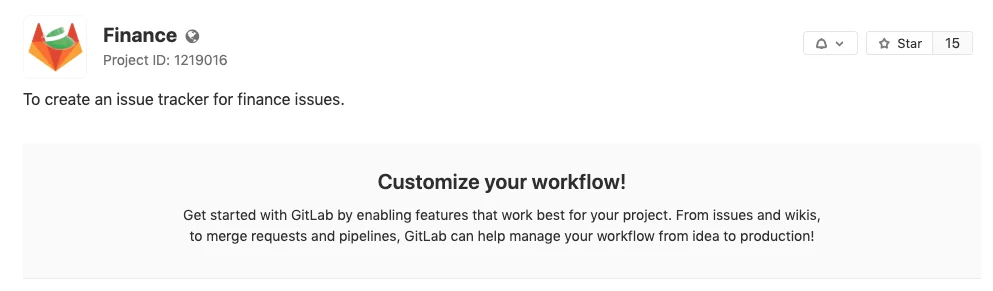
Combined, these vulnerabilities results in an attacker being able to obtain any confidential information that is included in a project export. This vulnerability only works for public projects with limited access levels for repositories, issues, pipelines, merge requests (and more) that belong to a group. A good example of this would be gitlab-org, gitlab-data, gitlab-com, on gitlab.com. There are plenty of repositories, such as https://gitlab.com/gitlab-com/finance (see below), that are public but don't expose the repository, issues, and merge requests.
Proof of Concept
To reproduce this vulnerability:
- sign in as a normal user and create a group, let's assume this is group ID 1
- within this group, create a public project named
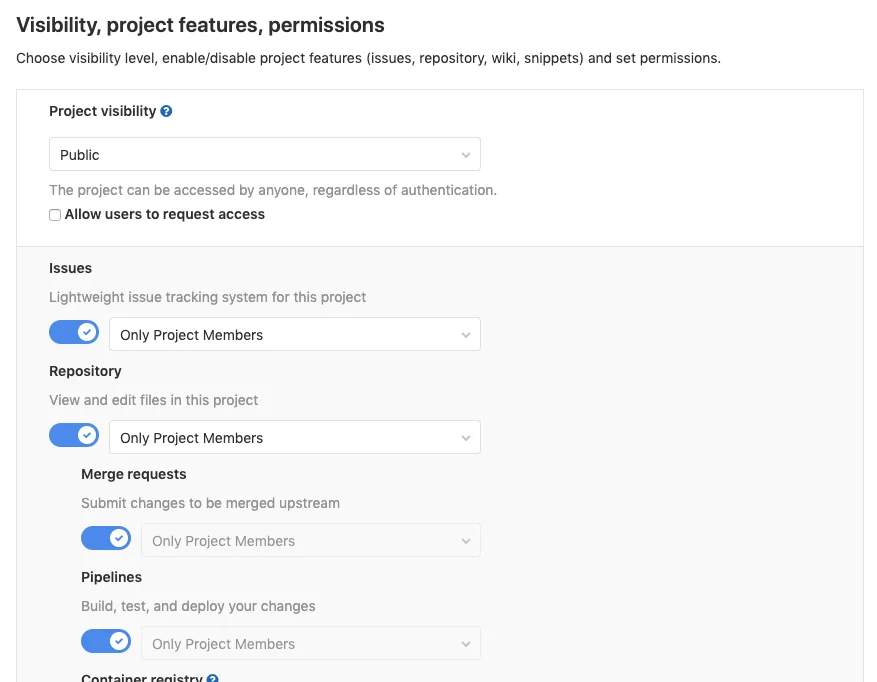
test_project - under Settings > General update the Visibility, project features, permissions to only allow Issues, Repository, Wiki, and Snippets to be seen by Only Project Members:
- sign into another account and go to http://instance/projects/new
- create a new project and intercept the request, it'll look something like this (I've left out unimportant parameters):
POST /projects HTTP/1.1
Host: instance
...

----------506740453
Content-Disposition: form-data; name="project[use_custom_template]"

false
----------506740453
Content-Disposition: form-data; name="project[template_name]"

----------506740453
Content-Disposition: form-data; name="project[group_with_project_templates_id]"

----------506740453
Content-Disposition: form-data; name="project[name]"

project_name
----------506740453
Content-Disposition: form-data; name="project[namespace_id]"

1
----------506740453
Content-Disposition: form-data; name="project[path]"

project_name
----------506740453--
- in this request, change
use_custom_templatetotrue, thetemplate_nameto the name the victim gave to the project (test_project), andgroup_with_project_templates_idto the group ID of the public group the victim created (1). When forwarded, the server will respond with a redirect and, when followed, show a page indicating that the project is being imported:

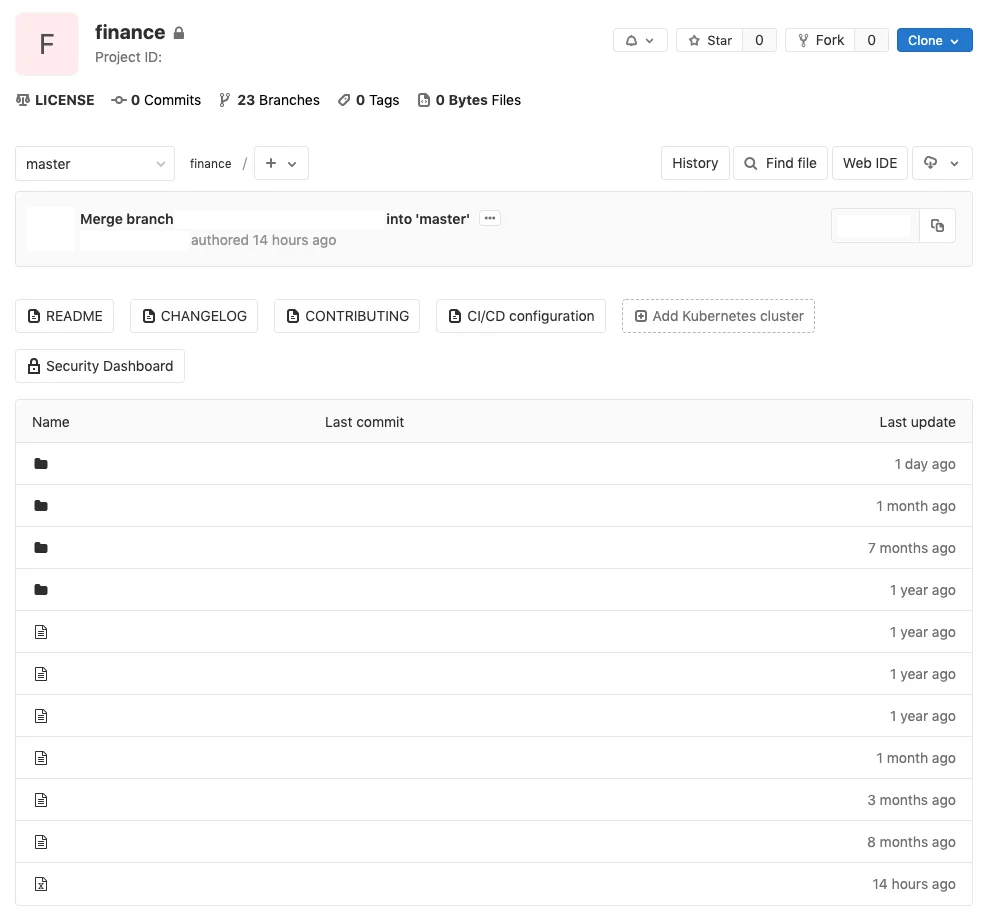
Depending on the size of the project and how busy the queues are, it can take a couple of minutes to generate the export of the project and then import it to the new project. Come back in a couple minutes and find the repository, confidential issues, private snippets, merge requests, CI pipelines, and more being copied to the attacker's project.
Redacted copy of gitlab-com/finance
Impact
Any access level that has been put in place for projects the user can access can be bypassed using this vulnerability. According to the documentation, this means that the following information can be obtained:
- Project and wiki repositories
- Project uploads
- Project configuration, including services
- Issues with comments, merge requests with diffs and comments, labels, milestones, snippets, and other project entities
- LFS objects
- Issue Boards

Context
GitLab lets a user create a new project from a template. On gitlab.com, the instance also has custom project templates enabled, which means a group can be designated as the owner of templates and users can create projects from those templates. The feature is meant to copy a template project into a namespace that is a descendant of the group that owns the template.
The report describes three minor vulnerabilities that, combined, let an attacker copy private repositories, confidential issues, private snippets, merge requests and more out of a public project whose features are restricted to project members. The affected asset is gitlab.com, and the weakness is classified as privilege escalation.
Setup
The proof of concept needs two accounts and one group:
- Sign in as a normal user and create a group. In the example this is group ID
1. - Within that group, create a public project named
test_project. - Under Settings > General, update Visibility, project features, permissions so that Issues, Repository, Wiki and Snippets are visible to Only Project Members.
- Sign in with a second account, which plays the attacker.
The attacker only needs the ability to create a project and to intercept the create request. The victim project must be public, must belong to a group, and must have restricted access levels for repositories, issues, pipelines, merge requests and similar features. The report names gitlab-org, gitlab-data and gitlab-com on gitlab.com as examples of groups containing such projects, and points to https://gitlab.com/gitlab-com/finance as one where the repository, issues and merge requests are not exposed.
The screenshot shows the gitlab-com/finance project page as an example of a public project whose repository, issues and merge requests are not exposed.
Finding it
The researcher followed the code path from the controller that accepts project creation parameters down to the service that schedules the export. Three separate gaps appear along that path.
First gap: validation skipped for user namespaces
The EE ProjectsController is prepended to app/controllers/projects_controller.rb. It extends the permitted parameters with use_custom_template and group_with_project_templates_id:
override :project_params_attributes
    def project_params_attributes
      super + project_params_ee
    end

def project_params_ee
  attrs = %i[
    # ...
    use_custom_template
    # ...
    group_with_project_templates_id
  ]

  # ...

  attrs
end
The CE controller additionally allows template_name, so all three parameters reach Projects::CreateService in the create method:
def create
  @project = ::Projects::CreateService.new(current_user, project_params(attributes: project_params_create_attributes)).execute

  # ...
end

# ...

def project_params_attributes
  [
    # ...
    :template_name,
    # ...
  ]
The EE Projects::CreateService validates use_custom_template and group_with_project_templates_id:
def execute
  # ...

  group_with_project_templates_id = params.delete(:group_with_project_templates_id) if params[:template_name].blank?

  # ...

    validate_namespace_used_with_template(project, group_with_project_templates_id)
end

# ...

def validate_namespace_used_with_template(project, group_with_project_templates_id)
  return unless project.group

  subgroup_with_templates_id = group_with_project_templates_id || params[:group_with_project_templates_id]
  return if subgroup_with_templates_id.blank?

  templates_owner = ::Group.find(subgroup_with_templates_id).parent

  unless templates_owner.self_and_descendants.exists?(id: project.namespace_id)
    project.errors.add(:namespace, _("is not a descendant of the Group owning the template"))
  end
end
Normally a template can only be copied into a namespace that is a descendant of the group owning the template. But validate_namespace_used_with_template returns nil when the project is not being created for a group (return unless project.group). If group_with_project_templates_id is supplied for a project created in a User namespace, the authorisation and validation logic never runs, and use_custom_template and group_with_project_templates_id stay set on params.
Because the EE code is prepended, its execute runs before the CE Projects::CreateService. With the EE validation bypassed, the CE execute runs:
def execute
  if @params[:template_name].present?
    return ::Projects::CreateFromTemplateService.new(current_user, params).execute
  end

  # ...
end
When template_name is present, the normal flow is replaced by Projects::CreateFromTemplateService. The EE version of that class is where the interesting logic sits:
def execute
  return super unless use_custom_template?

  override_params = params.dup
  params[:custom_template] = template_project if template_project

  ::Projects::GitlabProjectsImportService.new(current_user, params, override_params).execute
end

private

def use_custom_template?
  # ...
    template_name &&
      ::Gitlab::Utils.to_boolean(params.delete(:use_custom_template)) &&
      ::Gitlab::CurrentSettings.custom_project_templates_enabled?
  # ...
end

def template_project
  # ...
    current_user.available_custom_project_templates(search: template_name, subgroup_id: subgroup_id)
                .first
  # ...
end

def subgroup_id
  params[:group_with_project_templates_id].presence
end
It checks that a custom template name is given, that the custom template flag is true, and that the instance has custom project templates enabled. The report notes that gitlab.com has this setting enabled. When the checks pass, template_project is called.
Second gap: no access level check on the template lookup
template_project calls available_custom_project_templates on the user model:
def available_custom_project_templates(search: nil, subgroup_id: nil)
  templates = ::Gitlab::CurrentSettings.available_custom_project_templates(subgroup_id)

  ::ProjectsFinder.new(current_user: self,
                       project_ids_relation: templates,
                       params: { search: search, sort: 'name_asc' })
                  .execute
end
The search parameter is the template_name supplied by the user, and subgroup_id is group_with_project_templates_id. The templates collection comes from:
def available_custom_project_templates(subgroup_id = nil)
  group_id = subgroup_id || custom_project_templates_group_id

  return ::Project.none unless group_id

  ::Project.where(namespace_id: group_id)
end
This returns every Project whose namespace_id matches the supplied subgroup_id, and that collection is passed to ProjectsFinder. The ProjectsFinder starts from the projects the authenticated user can access but does not check the user's access level. Any project that is public but has Repository, Issue, Snippets and similar access disabled for Guests is therefore returned. The researcher notes that, ideally, this method would limit the returned projects based on the user's permissions on each project.
Back in EE::Projects::CreateFromTemplateService, template_project takes the first project returned by available_custom_project_templates. So params[:custom_template] can hold a Project the user is not authorised to see everything for. The class then calls Projects::GitlabProjectsImportService with the updated parameters.
Third gap: export job without an authorisation check
The EE import service is prepended and uses super.tap to run the CE code and then act on its result:
def execute
  super.tap do |project|
    if project.saved? && custom_template
      custom_template.add_export_job(current_user: current_user,
                                     after_export_strategy: export_strategy(project))
    end
  end
end

private

override :prepare_import_params
def prepare_import_params
  super

  if custom_template
    params[:import_type] = 'gitlab_custom_project_template'
  end
end

def custom_template
  strong_memoize(:custom_template) do
    params.delete(:custom_template)
  end
end

def export_strategy(project)
 Gitlab::ImportExport::AfterExportStrategies::CustomTemplateExportImportStrategy.new(export_into_project_id: project.id)
end
If params[:custom_template] is set and the CE code saved the project, an export job is scheduled for the custom_template returned by ProjectsFinder. At that point the user may not be authorised to see the code, issues and other data of that project. An export strategy is also passed that imports the export file into the newly created project.
The third gap is that scheduling an export job assumes the user is authorised to make the export. The ProjectExportWorker Sidekiq job that is scheduled does not perform an authorisation check. The researcher notes that such a check would also avoid a TOCTOU issue: a user could schedule the job while the queue is clogged or Sidekiq workers are paused, leave the project, and the job would still run. When the export is created, it is automatically imported into the project the attacker fully controls.
Exploitation
Step 1: prepare the victim project
Create a group (group ID 1 in the example) and inside it a public project named test_project. Under Settings > General, set Visibility, project features, permissions so that Issues, Repository, Wiki and Snippets are visible to Only Project Members.
The screenshot shows the project feature permissions set so that Issues, Repository, Wiki and Snippets are restricted to project members only.
Step 2: start a project creation as the attacker
Sign in with the second account and go to http://instance/projects/new. Create a new project and intercept the request. It looks roughly like this, with unimportant parameters left out:
POST /projects HTTP/1.1
Host: instance
...

----------506740453
Content-Disposition: form-data; name="project[use_custom_template]"

false
----------506740453
Content-Disposition: form-data; name="project[template_name]"

----------506740453
Content-Disposition: form-data; name="project[group_with_project_templates_id]"

----------506740453
Content-Disposition: form-data; name="project[name]"

project_name
----------506740453
Content-Disposition: form-data; name="project[namespace_id]"

1
----------506740453
Content-Disposition: form-data; name="project[path]"

project_name
----------506740453--
The three parameters of interest are project[use_custom_template], project[template_name] and project[group_with_project_templates_id]. project[namespace_id] is 1, which places the new project in the attacker's user namespace rather than in a group, which is what triggers the skipped validation.
Step 3: tamper with the request
Change use_custom_template to true, set template_name to the name the victim gave the project (test_project), and set group_with_project_templates_id to the ID of the public group the victim created (1). Forward the request. The server responds with a redirect, and following it shows a page indicating that the project is being imported.
The screenshot shows the page indicating that the new project is being imported.
Step 4: wait for the export and import
Depending on the size of the project and how busy the queues are, generating the export and importing it can take a couple of minutes. When it finishes, the repository, confidential issues, private snippets, merge requests, CI pipelines and more are copied into the attacker's project.
The screenshot shows a redacted copy of gitlab-com/finance.
Root cause
Three separate mistakes line up:
validate_namespace_used_with_templatereturns early when the project is not created for a group, so the descendant check never runs for projects created in a user namespace. The template parameters survive into the CE service.available_custom_project_templatesbuilds its collection fromnamespace_idalone and passes it toProjectsFinder, which does not check the user's access level. Public projects with restricted features are returned even though the user cannot see their repository, issues or snippets.- The export job scheduled by
add_export_jobdoes not verify that the user is authorised to export the project, and theProjectExportWorkerdoes not check either. The export is then imported into a project the attacker controls.
Existing defences did not stop the chain because each check was either scoped to group namespaces, based on visibility rather than access level, or missing at job execution time.
Impact
Any access level put in place for projects the user can access can be bypassed. According to the documentation cited in the report, the following can be obtained:
- Project and wiki repositories
- Project uploads
- Project configuration, including services
- Issues with comments, merge requests with diffs and comments, labels, milestones, snippets, and other project entities
- LFS objects
- Issue Boards
The vulnerability only works for public projects with limited access levels for repositories, issues, pipelines, merge requests and similar features that belong to a group. The report gives gitlab-org, gitlab-data and gitlab-com on gitlab.com as examples of groups containing such projects.
Fix
The report does not describe the fix that was applied. Based on the three gaps, the changes needed are: run the namespace descendant validation regardless of whether the project is created for a group, restrict available_custom_project_templates to projects the user is actually authorised to export, and perform an authorisation check when the export job runs so that a user who has left the project cannot export it.
Variants to test
- Create a project in a user namespace while supplying a template group ID, and check whether the descendant validation error appears. A positive result is a project created without the error and an import starting.
- Look for other code paths that call
ProjectsFinderwith a collection built from a namespace ID rather than from the user's authorised projects. A positive result is a project the user cannot fully see being returned. - Look for background jobs that act on user-supplied project IDs without re-checking permissions at execution time. A positive result is a job that completes after the user's access has been removed.
- Try the same parameter tampering against other template or import features that accept a group or namespace identifier. A positive result is data from a restricted project appearing in a project the attacker controls.
Hunting notes
This kind of bug tends to hide where a feature accepts an identifier for a group or namespace and then looks up projects by that identifier without checking the caller's access level. During recon, look for public projects in groups where the repository, issues or merge requests are not visible, and for features that copy or import project data. The report showed impact by reproducing the full chain end to end: a restricted public project, a tampered create request, and the resulting copy in the attacker's project.
What happened, in plain words
GitLab is a website where teams keep their code, their bug reports (called issues), their notes (snippets) and their proposed code changes (merge requests) in one place. Each of those things lives inside a project. A project can be set to public, which means anyone can find it, but the team can still hide the interesting parts: the code, the issues, the merge requests. Only the people the team has added as members can see those parts.
GitLab also has a feature called project templates. A template is a ready-made project that you can copy when you start a new project, so you do not begin from an empty page. On gitlab.com, a special version of this feature is switched on: a group can be named as the owner of templates, and users can create new projects by copying one of those templates.
The rule the feature is supposed to follow is simple: you may only copy a template into a place that belongs inside the group that owns the template. Think of it like a photocopier in a company that only lets you copy documents from your own department's filing cabinet into your own department's folders.
The researcher found three small mistakes in that feature. None of them is dramatic on its own. Put together, they let a normal user copy a project they are not allowed to read, including its code, confidential issues, private snippets and merge requests, into a project they fully control. The report calls this a privilege escalation, which simply means doing something with more power than your account is supposed to have.
The affected site is gitlab.com.
The pieces you need to know first
Before following the steps, here are the ideas the report leans on, explained from scratch.
- Server and client. Your browser (the client) asks a website's computer (the server) for pages and sends it information. Everything you type into a form eventually travels to the server as a request.
- HTTP request. The message your browser sends to the server. It has a method (such as
POST, meaning "here is data, please create something"), a path (such as/projects, meaning "the projects area"), and a body (the data itself). - Form data. When a form contains a file or is sent in a particular way, the browser packs the fields into a format called
multipart/form-data. Each field is separated by a boundary line, a long string of dashes and digits that marks where one field ends and the next begins. You will see boundaries like----------506740453in the captured request below. - Parameter. One named value in a request, for example
project[name]with the valueproject_name. The server reads these names to decide what to do. - Intercepting a request. A proxy tool sits between your browser and the server and pauses the request so you can edit it before it is sent. This is how the attacker changes values the web page would never let them change through the normal form.
- Namespace. A container that owns projects. A namespace can be a user's personal space or a group. The report cares a lot about the difference between the two.
- Group and subgroup. A group is a shared space for projects and people. Groups can contain other groups (subgroups). The template feature only allows copying into a namespace that is a descendant of the group owning the template, meaning the group itself or something nested inside it.
- Visibility versus access level. Visibility is whether a project can be found at all (public, internal, private). Access level is what a particular person is allowed to do inside it. A project can be public and still hide its repository, issues and merge requests from everyone except its members. That combination is the heart of this report.
- Guest. A GitLab role with very limited rights. A project can be public while features such as the repository, issues, snippets and wiki are restricted so that even Guests cannot see them.
- Service object. In the GitLab codebase, a class whose job is to carry out one action, such as creating a project. Controllers receive the request and hand the work to a service.
- Prepended code. GitLab has a free edition (CE) and a paid edition (EE). The EE code is "prepended", meaning it runs before the CE code of the same method, and can then call the CE version with
super. This layering matters because a check in the EE layer can be skipped while the CE layer still runs. - Background job and queue. Some work is too slow to do while you wait, so the server puts it in a queue and a separate worker process picks it up later. GitLab uses a system called Sidekiq for this. The queue can be busy, so a job may run minutes after it was scheduled.
- Export and import. GitLab can package a whole project into an export file and later import that file into another project. The template feature works by exporting the template and importing it into your new project.
- TOCTOU. "Time of check to time of use": a gap between the moment permission is checked and the moment the action happens. If permission is checked when a job is queued but the job runs much later, the situation may have changed in between.
Setting up the victim project
The proof of concept needs two accounts and one group. The first account plays the victim, the second plays the attacker.
- Sign in as a normal user and create a group. In the example this group has ID
1. - Inside that group, create a public project named
test_project. - Under Settings > General, open Visibility, project features, permissions and set Issues, Repository, Wiki and Snippets so they are visible to Only Project Members.
- Sign in with the second account. This is the attacker.
The attacker needs only two abilities: creating a project, and intercepting the request that creating a project sends. The victim project must be public, must belong to a group, and must have restricted access levels for repositories, issues, pipelines, merge requests and similar features. The report names gitlab-org, gitlab-data and gitlab-com on gitlab.com as groups that contain such projects, and points to https://gitlab.com/gitlab-com/finance as an example where the repository, issues and merge requests are not exposed.
The screenshot shows the gitlab-com/finance project page: a public project whose repository, issues and merge requests are not exposed.
Following the code path
The researcher walked through the code from the point where a project creation request arrives to the point where an export job is scheduled. Three separate gaps appear along that path. Each gap is small; the danger is that they line up.
First gap: the check is skipped when the project is not in a group
When you submit the new project form, the request lands in a controller, the part of the application that handles incoming requests. GitLab's EE controller is prepended to the CE controller at app/controllers/projects_controller.rb. It adds two extra parameters to the list of things a user is allowed to send: use_custom_template and group_with_project_templates_id.
override :project_params_attributes
    def project_params_attributes
      super + project_params_ee
    end

def project_params_ee
  attrs = %i[
    # ...
    use_custom_template
    # ...
    group_with_project_templates_id
  ]

  # ...

  attrs
end
Line by line: override :project_params_attributes says this method replaces the CE version. def project_params_attributes defines it, and super + project_params_ee means "take the CE list and add the EE list to it". def project_params_ee defines the EE list. attrs = %i[...] builds a list of allowed parameter names, and the two that matter here are use_custom_template (a yes/no flag saying "I want to use a custom template") and group_with_project_templates_id (which group owns the template). The final attrs returns the list. In plain terms: the form is now allowed to carry these two extra fields.
The CE controller also allows a third parameter, template_name, so all three reach the service that creates projects, Projects::CreateService, inside its create method:
def create
  @project = ::Projects::CreateService.new(current_user, project_params(attributes: project_params_create_attributes)).execute

  # ...
end

# ...

def project_params_attributes
  [
    # ...
    :template_name,
    # ...
  ]
Line by line: def create is the method that runs when a project creation request arrives. The long line builds a new Projects::CreateService, passing the current user and the filtered parameters, and calls execute on it, which actually creates the project. The second block, def project_params_attributes, lists the parameters the CE side accepts, and :template_name is one of them. In plain terms: the name of the template the user wants is accepted alongside the two EE fields.
The EE version of the create service is where the first check lives. It validates use_custom_template and group_with_project_templates_id:
def execute
  # ...

  group_with_project_templates_id = params.delete(:group_with_project_templates_id) if params[:template_name].blank?

  # ...

    validate_namespace_used_with_template(project, group_with_project_templates_id)
end

# ...

def validate_namespace_used_with_template(project, group_with_project_templates_id)
  return unless project.group

  subgroup_with_templates_id = group_with_project_templates_id || params[:group_with_project_templates_id]
  return if subgroup_with_templates_id.blank?

  templates_owner = ::Group.find(subgroup_with_templates_id).parent

  unless templates_owner.self_and_descendants.exists?(id: project.namespace_id)
    project.errors.add(:namespace, _("is not a descendant of the Group owning the template"))
  end
end
Line by line: def execute is the EE method that runs before the CE one. The params.delete(...) line removes group_with_project_templates_id from the parameters when no template_name was given, because without a template name the field is meaningless. Then validate_namespace_used_with_template is called with the project being built and the group ID. Inside that method, return unless project.group is the crucial line: if the project is not being created inside a group, the method stops immediately and returns nothing. The next lines would find the group that owns the template, look at it and everything nested inside it, and add an error if the new project's namespace is not among them. But those lines never run for a project created in a personal user namespace.
Normally a template can only be copied into a namespace that is a descendant of the group owning the template. Because of that early return, if group_with_project_templates_id is supplied for a project created in a User namespace, the authorisation and validation logic never runs, and use_custom_template and group_with_project_templates_id stay set on params.
Because the EE code is prepended, its execute runs before the CE Projects::CreateService. With the EE validation bypassed, the CE execute runs:
def execute
  if @params[:template_name].present?
    return ::Projects::CreateFromTemplateService.new(current_user, params).execute
  end

  # ...
end
Line by line: def execute is the CE method. if @params[:template_name].present? asks whether a template name was supplied. If it was, the method returns the result of a different service, Projects::CreateFromTemplateService, instead of continuing with the normal creation flow. In plain terms: the presence of a template name switches the server onto the template-copying path.
The EE version of that template service is where the interesting logic sits:
def execute
  return super unless use_custom_template?

  override_params = params.dup
  params[:custom_template] = template_project if template_project

  ::Projects::GitlabProjectsImportService.new(current_user, params, override_params).execute
end

private

def use_custom_template?
  # ...
    template_name &&
      ::Gitlab::Utils.to_boolean(params.delete(:use_custom_template)) &&
      ::Gitlab::CurrentSettings.custom_project_templates_enabled?
  # ...
end

def template_project
  # ...
    current_user.available_custom_project_templates(search: template_name, subgroup_id: subgroup_id)
                .first
  # ...
end

def subgroup_id
  params[:group_with_project_templates_id].presence
end
Line by line: def execute starts with return super unless use_custom_template?, meaning "if this is not a custom template request, just do the normal CE thing". override_params = params.dup makes a copy of the parameters. params[:custom_template] = template_project if template_project looks up the template project and stores it in the parameters, but only if the lookup found something. The last line hands everything to Projects::GitlabProjectsImportService, which performs the import. The private method use_custom_template? checks three things joined by && ("and"): a template name was given, the use_custom_template flag converts to true, and the instance has custom project templates enabled. The report notes that gitlab.com has this setting enabled. template_project asks the current user for available custom templates, searching by the template name and filtering by the subgroup ID, and takes .first, the first result. subgroup_id simply reads group_with_project_templates_id from the parameters.
Second gap: the template lookup does not check what you are allowed to see
template_project calls available_custom_project_templates on the user model:
def available_custom_project_templates(search: nil, subgroup_id: nil)
  templates = ::Gitlab::CurrentSettings.available_custom_project_templates(subgroup_id)

  ::ProjectsFinder.new(current_user: self,
                       project_ids_relation: templates,
                       params: { search: search, sort: 'name_asc' })
                  .execute
end
Line by line: def available_custom_project_templates(search: nil, subgroup_id: nil) defines a method that takes an optional search term and an optional subgroup ID. The first line asks the instance settings for the templates belonging to that subgroup and stores them in templates. The rest builds a ProjectsFinder, a helper whose job is to find projects, giving it the current user, the candidate projects and a search and sort instruction, then calls execute to run the search. In plain terms: "find projects among this group's templates whose name matches what the user typed".
The search value is the template_name supplied by the user, and subgroup_id is group_with_project_templates_id. The templates collection comes from:
def available_custom_project_templates(subgroup_id = nil)
  group_id = subgroup_id || custom_project_templates_group_id

  return ::Project.none unless group_id

  ::Project.where(namespace_id: group_id)
end
Line by line: def available_custom_project_templates(subgroup_id = nil) defines the settings-side lookup. group_id = subgroup_id || custom_project_templates_group_id uses the supplied subgroup ID, or falls back to the instance's configured template group if none was supplied. return ::Project.none unless group_id returns an empty result when there is no group at all. The last line returns every project whose namespace_id equals that group ID. In plain terms: "give me all projects that live in this group", with no mention of who is asking.
That collection is passed to ProjectsFinder. The finder starts from the projects the authenticated user can access but does not check the user's access level. Any project that is public but has Repository, Issue, Snippets and similar access disabled for Guests is therefore returned. The researcher notes that, ideally, this method would limit the returned projects based on the user's permissions on each project. The everyday comparison: a library catalogue that lists every book in the building, including the ones kept behind the counter, because it only checks that the building is open to the public.
Back in EE::Projects::CreateFromTemplateService, template_project takes the first project returned by available_custom_project_templates. So params[:custom_template] can hold a Project the user is not authorised to see everything for. The class then calls Projects::GitlabProjectsImportService with the updated parameters.
Third gap: the export job never asks whether you are allowed to export
The EE import service is prepended and uses super.tap to run the CE code and then act on its result:
def execute
  super.tap do |project|
    if project.saved? && custom_template
      custom_template.add_export_job(current_user: current_user,
                                     after_export_strategy: export_strategy(project))
    end
  end
end

private

override :prepare_import_params
def prepare_import_params
  super

  if custom_template
    params[:import_type] = 'gitlab_custom_project_template'
  end
end

def custom_template
  strong_memoize(:custom_template) do
    params.delete(:custom_template)
  end
end

def export_strategy(project)
 Gitlab::ImportExport::AfterExportStrategies::CustomTemplateExportImportStrategy.new(export_into_project_id: project.id)
end
Line by line: def execute calls super, the CE import code, and .tap do |project| lets the EE code look at the result (the newly created project) without changing it. Inside, if project.saved? && custom_template checks that the new project was saved and that a custom template was set. If both are true, custom_template.add_export_job(...) schedules an export of the template project, passing the current user and an export strategy. prepare_import_params first runs the CE version with super, then, if a custom template is present, sets the import type to gitlab_custom_project_template. custom_template reads the template from the parameters and removes it, remembering the value so it is only computed once. export_strategy builds the object that will import the finished export file into the new project, identified by export_into_project_id: project.id.
If params[:custom_template] is set and the CE code saved the project, an export job is scheduled for the custom_template returned by ProjectsFinder. At that point the user may not be authorised to see the code, issues and other data of that project. An export strategy is also passed that imports the export file into the newly created project.
The third gap is that scheduling an export job assumes the user is authorised to make the export. The ProjectExportWorker Sidekiq job that is scheduled does not perform an authorisation check. The researcher notes that such a check would also avoid a TOCTOU issue: a user could schedule the job while the queue is clogged or Sidekiq workers are paused, leave the project, and the job would still run. When the export is created, it is automatically imported into the project the attacker fully controls. The everyday comparison: a photocopier that checks your badge when you press the button, but not when the copy is actually made, so you can press the button and walk out of the building before the copy appears.
Carrying out the attack
Step 1: prepare the victim project
Create a group (group ID 1 in the example) and inside it a public project named test_project. Under Settings > General, set Visibility, project features, permissions so that Issues, Repository, Wiki and Snippets are visible to Only Project Members.
The screenshot shows the project feature permissions set so that Issues, Repository, Wiki and Snippets are restricted to project members only.
Step 2: start creating a project as the attacker
Sign in with the second account and go to http://instance/projects/new. Create a new project and intercept the request. It looks roughly like this, with unimportant parameters left out:
POST /projects HTTP/1.1
Host: instance
...

----------506740453
Content-Disposition: form-data; name="project[use_custom_template]"

false
----------506740453
Content-Disposition: form-data; name="project[template_name]"

----------506740453
Content-Disposition: form-data; name="project[group_with_project_templates_id]"

----------506740453
Content-Disposition: form-data; name="project[name]"

project_name
----------506740453
Content-Disposition: form-data; name="project[namespace_id]"

1
----------506740453
Content-Disposition: form-data; name="project[path]"

project_name
----------506740453--
Line by line: POST /projects HTTP/1.1 says "create something in the projects area" using version 1.1 of the HTTP protocol. Host: instance names the server. The ... stands for headers the report left out. Each block between boundary lines is one form field: Content-Disposition: form-data; name="..." names the field, a blank line follows, then the value. project[use_custom_template] is false, project[template_name] is empty, and project[group_with_project_templates_id] is empty, because the attacker is using the ordinary form and has not touched these fields yet. project[name] and project[path] are both project_name, the name and URL path of the new project. project[namespace_id] is 1, which places the new project in the attacker's user namespace rather than in a group. That last detail is what triggers the skipped validation from the first gap. The final boundary ends with two extra dashes, marking the end of the body.
Step 3: tamper with the request
Change use_custom_template to true, set template_name to the name the victim gave the project (test_project), and set group_with_project_templates_id to the ID of the public group the victim created (1). Forward the request. The server responds with a redirect, and following it shows a page indicating that the project is being imported.
The screenshot shows the page indicating that the new project is being imported.
Step 4: wait for the export and import
Depending on the size of the project and how busy the queues are, generating the export and importing it can take a couple of minutes. When it finishes, the repository, confidential issues, private snippets, merge requests, CI pipelines and more are copied into the attacker's project.
The screenshot shows a redacted copy of gitlab-com/finance.
Why the three gaps together are enough
Three separate mistakes line up:
validate_namespace_used_with_templatereturns early when the project is not created for a group, so the descendant check never runs for projects created in a user namespace. The template parameters survive into the CE service.available_custom_project_templatesbuilds its collection fromnamespace_idalone and passes it toProjectsFinder, which does not check the user's access level. Public projects with restricted features are returned even though the user cannot see their repository, issues or snippets.- The export job scheduled by
add_export_jobdoes not verify that the user is authorised to export the project, and theProjectExportWorkerdoes not check either. The export is then imported into a project the attacker controls.
Existing defences did not stop the chain because each check was either scoped to group namespaces, based on visibility rather than access level, or missing at job execution time.
What an attacker gets
Any access level put in place for projects the user can access can be bypassed. According to the documentation cited in the report, the following can be obtained:
- Project and wiki repositories
- Project uploads
- Project configuration, including services
- Issues with comments, merge requests with diffs and comments, labels, milestones, snippets, and other project entities
- LFS objects
- Issue Boards
The vulnerability only works for public projects with limited access levels for repositories, issues, pipelines, merge requests and similar features that belong to a group. The report gives gitlab-org, gitlab-data and gitlab-com on gitlab.com as examples of groups containing such projects.
What would have stopped it
The report does not describe the fix that was applied. Based on the three gaps, the changes needed are: run the namespace descendant validation regardless of whether the project is created for a group, restrict available_custom_project_templates to projects the user is actually authorised to export, and perform an authorisation check when the export job runs so that a user who has left the project cannot export it.
Things worth trying on a similar feature
- Create a project in a user namespace while supplying a template group ID, and check whether the descendant validation error appears. A positive result is a project created without the error and an import starting.
- Look for other code paths that call
ProjectsFinderwith a collection built from a namespace ID rather than from the user's authorised projects. A positive result is a project the user cannot fully see being returned. - Look for background jobs that act on user-supplied project IDs without re-checking permissions at execution time. A positive result is a job that completes after the user's access has been removed.
- Try the same parameter tampering against other template or import features that accept a group or namespace identifier. A positive result is data from a restricted project appearing in a project the attacker controls.
Where this kind of bug hides
This kind of bug tends to hide where a feature accepts an identifier for a group or namespace and then looks up projects by that identifier without checking the caller's access level. During recon, look for public projects in groups where the repository, issues or merge requests are not visible, and for features that copy or import project data. The report showed impact by reproducing the full chain end to end: a restricted public project, a tampered create request, and the resulting copy in the attacker's project.
Glossary
- Access level: what a particular account is allowed to do inside a project or group, as opposed to whether the project can be found at all.
- Background job: work the server performs later, outside the request you are waiting on, usually through a queue.
- Boundary: the separator line in a multipart form body that marks where one field ends and the next begins.
- CE (Community Edition): the free edition of GitLab.
- Confidential issue: an issue visible only to selected people rather than to everyone who can see the project.
- Controller: the part of a web application that receives an incoming request and decides what to do with it.
- Descendant: a group itself, or any group nested inside it.
- EE (Enterprise Edition): the paid edition of GitLab, whose code is layered on top of the CE code.
- Export: a packaged file containing a project's data, used for backup or for copying.
- Form data (multipart/form-data): the format browsers use to send form fields, especially when files are involved.
- Group: a shared space in GitLab that contains projects and people, and can contain other groups.
- Guest: a limited GitLab role that can see only what a project explicitly allows.
- HTTP request: the message a browser sends to a server asking it to do something.
- Import: loading an export file into a project to recreate its contents.
- Intercepting a request: pausing a request in a proxy tool so it can be inspected and edited before it reaches the server.
- Issue: a tracked task, bug or discussion item inside a project.
- LFS object: a large file stored outside the main repository through Git Large File Storage.
- Merge request: a proposed change to the code, with discussion and diffs attached.
- Namespace: the container that owns a project, either a user's personal space or a group.
- Parameter: a named value sent in a request, such as
project[name]. - Prepended code: code from one layer of the application that runs before the code of the same method in another layer, then calls it with
super. - Privilege escalation: doing something with more power than your account is supposed to have.
- Project: the container in GitLab for a repository and its related issues, merge requests, snippets and settings.
- Project template: a ready-made project that can be copied when starting a new project.
- Proxy tool: software that sits between your browser and a server and can pause and edit traffic.
- Queue: the waiting line where background jobs sit until a worker picks them up.
- Redirect: a server response that tells the browser to go to a different page.
- Repository: the stored code and its history.
- Service object: a class whose job is to carry out one action, such as creating a project.
- Sidekiq: the system GitLab uses to run background jobs.
- Snippet: a small piece of shared code or text stored in a project.
- Subgroup: a group nested inside another group.
- Super: in code, a call from a layered method to the version of the same method in the layer beneath it.
- TOCTOU (time of check to time of use): a gap between when permission is checked and when the action happens, during which the situation can change.
- Visibility: whether a project can be found at all (public, internal or private).
- Wiki: a set of documentation pages attached to a project.
- Worker: the process that takes jobs from a queue and runs them.


