How I Found Three Credentials Leak on One Google Dork on Bugcrowd program
The author used a Google dork to find PDF files on a target site that contained keywords such as password, username, ID and email, and found three documents exposing credentials. The text does not describe the contents or confirm whether the credentials were live, so the practical impact is unclear.
 Published on medium.com
The original lives on medium.com
We do not hold its text, so we link to it rather than copy it. The other two tabs are our own rewrites, checked against it.
What the report shows
The report describes work on a Bugcrowd program. The researcher used a single tool, Google Dork, and describes the whole exercise in a few lines.

The starting query was a plain file-type dork:
site:example.com ext:pdf
To narrow the results, the researcher appended a keyword in quotes, so the query took this shape:
site:example.com ext:pdf "{keyword}"
The keywords chosen were terms that tend to appear next to sensitive data inside documents:
- password
- username
- ID
The stated goal was to find those specific words inside PDF files. Running the keyword-scoped dorks, the researcher found three credential leaks. The report presents the findings as screenshots rather than as text, so the exact documents, hosts and values are not reproduced here.
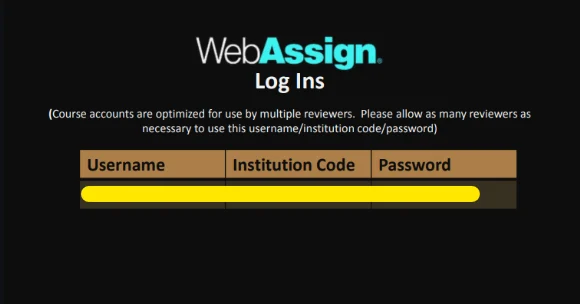
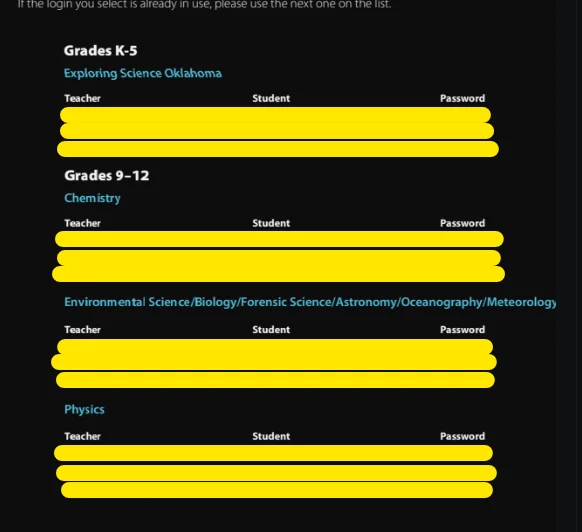
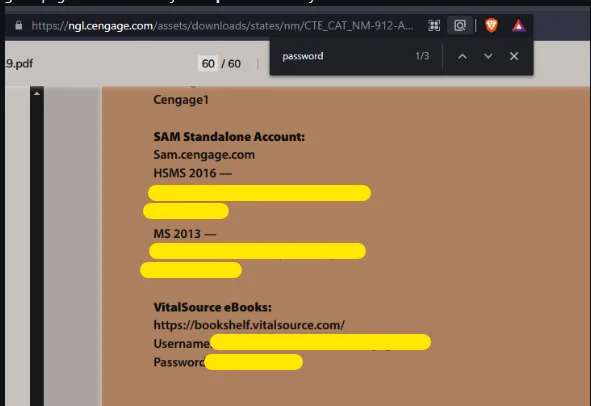
The write-up ends at that point. It gives no bounty amount, no severity rating, no CVSS score, no weakness classification and no description of how the program responded or whether anything was fixed.
Root cause
Nothing in the report suggests an application flaw in the usual sense: the exposure comes from content placement and indexing rather than from a broken access control check or an injection point. A PDF that lists usernames, IDs, email addresses or passwords, sitting on a public path and crawlable, is enough for a search engine to surface it to anyone who knows which words to search for.
Impact
The researcher describes the result as three credential leaks. Where leaked values are live, an attacker could use them to authenticate or to enumerate valid accounts. The report does not state which of the three findings contained which kind of data, whether the credentials were still valid, or what access they granted, so the practical impact beyond disclosure of the documents themselves is not established in the text.
How this kind of bug works
Search engines build an index of everything they are allowed to crawl. If a PDF, spreadsheet or text file is served from a public URL and nothing blocks crawlers, its contents become searchable, including strings that were never meant to leave the organisation. Dorks exploit that index: the site: operator restricts results to one domain, ext: restricts them to a file type, and a quoted term requires that literal string to appear in the document. Combining the three turns a general web index into a targeted search over a single organisation's published files.
The failure is usually organisational rather than technical. Documents get uploaded to marketing, support or documentation areas, old files are never removed, directory listings stay enabled, and robots.txt or meta robots directives are either absent or treated as a security control when they are only a crawling hint. Defences that actually work are removing the files, requiring authentication in front of them, and responding to crawler requests with a denial rather than serving the content.
How to test for it
- Enumerate the scope. Collect the domains and subdomains in scope and confirm which ones the program authorises you to test.
- Build dorks per file type. Restrict by site and by extension for the formats that commonly carry data: PDF, DOC and DOCX, XLS and XLSX, CSV, TXT, and log files.
- Add keyword terms. Pair the site and extension operators with quoted words that appear near sensitive data, such as password, username, credential, API key, internal, confidential, and the organisation's own naming conventions.
- Review results manually. Open each hit and confirm whether the document genuinely contains secrets, and whether those secrets are live. A positive result is a document reachable without authentication that holds real, usable values.
- Check the same content outside the search index. A file found through a dork is often also reachable by direct URL, by guessing filenames, or through an open directory listing, which strengthens the report.
Common false positives: placeholder or example credentials in templates and sample documents, test data that was never valid, values that are already public by design, and documents that are indexed but return an authentication prompt when opened. Verify reachability before reporting.
How it is fixed
The standard fixes are to remove or relocate the exposed documents, to place authentication and authorisation in front of any path that serves them, and to disable directory listings. Where files must stay public, strip secrets from them before publication. Crawler controls such as robots.txt and noindex headers reduce future indexing but do not protect content that is already reachable, so they belong alongside access control, not instead of it. Rotating any credentials that appeared in the documents closes the exposure.
Hunting notes
This class of finding hides in the parts of an estate that teams forget: legacy documentation portals, support centres, press and investor pages, recruitment material, and file shares exposed through a web front end. Recon signals worth watching are large numbers of indexed documents on a subdomain, open directory listings, and file paths that follow predictable naming patterns. Because the raw finding is often just a document, the report is strongest when you show that the values inside are live and what they unlock, or that the document exposes internal detail the organisation clearly did not intend to publish. Keep the evidence minimal and redact secrets in the submission itself.
What happened, in plain words
This report describes a search on a Bugcrowd program. The researcher used one tool, Google Dork, and found three credential leaks with it.
A Google Dork is simply a search query written in a special way so that Google searches more precisely than it does for ordinary words. Think of a library catalogue: typing a title finds books, but asking for "only PDFs, only from this one publisher, and only ones containing the word password" is a much sharper request. A dork is that sharper request, typed into Google.
The researcher started with a basic file-type dork:
site:example.com ext:pdf
Read it piece by piece:
site:example.comtells Google to return only results from that one domain. It keeps the search inside the organisation's own website instead of the whole internet.ext:pdftells Google to return only PDF files. PDF is a common document format, and documents often contain things that were never meant to be public.
That query alone returns every PDF Google knows about on the site. To narrow it further, the researcher added a keyword in quotes, so the query took this shape:
site:example.com ext:pdf "{keyword}"
The quotes matter. A word in quotes must appear in the document exactly as written, so Google only returns PDFs that actually contain that word. The {keyword} part is a placeholder: it is where the researcher swaps in the word being hunted for.
The keywords chosen were terms that tend to sit next to sensitive data inside documents:
- password
- username
- ID
The goal was to find those specific words inside PDF files. Running the keyword-scoped dorks, the researcher found three credential leaks. The report shows the findings as screenshots rather than as text, so the exact documents, hosts and values are not reproduced here.
Why does each step matter? The site: part keeps the search relevant to the organisation being tested. The ext:pdf part cuts out web pages and leaves documents, which are often uploaded once and forgotten. The quoted keyword part is the real filter: without it, the results are just a pile of PDFs; with it, the results are the small set of PDFs that mention passwords, usernames, IDs or email addresses. That is the difference between browsing a shelf and pulling out the few folders that say "confidential" on the cover.
The write-up ends at that point. It gives no bounty amount, no severity rating, no CVSS score, no weakness classification and no description of how the program responded or whether anything was fixed.
In general, how this kind of bug works
Search engines build an index of everything they are allowed to crawl. Crawling means a search engine's automated program visits a page or file and reads it, the way a person would, so it can be found later. If a PDF, spreadsheet or text file sits at a public web address and nothing blocks those programs, its contents become searchable, including strings that were never meant to leave the organisation.
Dorks exploit that index. The site: operator restricts results to one domain, ext: restricts them to a file type, and a quoted term requires that literal string to appear in the document. Combining the three turns a general web index into a targeted search over a single organisation's published files.
The failure is usually organisational rather than technical. Documents get uploaded to marketing, support or documentation areas, old files are never removed, directory listings stay enabled, and robots.txt or meta robots directives are either absent or treated as a security control when they are only a crawling hint. A robots.txt file is a plain text file at the root of a site that politely asks crawlers to stay away from certain paths; it is a request, not a lock. Defences that actually work are removing the files, requiring authentication in front of them, and responding to crawler requests with a denial rather than serving the content.
How to test for it
- Enumerate the scope. Collect the domains and subdomains in scope and confirm which ones the program authorises you to test.
- Build dorks per file type. Restrict by site and by extension for the formats that commonly carry data: PDF, DOC and DOCX, XLS and XLSX, CSV, TXT, and log files.
- Add keyword terms. Pair the site and extension operators with quoted words that appear near sensitive data, such as password, username, credential, API key, internal, confidential, and the organisation's own naming conventions.
- Review results manually. Open each hit and confirm whether the document genuinely contains secrets, and whether those secrets are live. A positive result is a document reachable without authentication that holds real, usable values.
- Check the same content outside the search index. A file found through a dork is often also reachable by direct URL, by guessing filenames, or through an open directory listing, which strengthens the report.
Common false positives: placeholder or example credentials in templates and sample documents, test data that was never valid, values that are already public by design, and documents that are indexed but return an authentication prompt when opened. Verify reachability before reporting.
How it is fixed
The standard fixes are to remove or relocate the exposed documents, to place authentication and authorisation in front of any path that serves them, and to disable directory listings. Where files must stay public, strip secrets from them before publication. Crawler controls such as robots.txt and noindex headers reduce future indexing but do not protect content that is already reachable, so they belong alongside access control, not instead of it. Rotating any credentials that appeared in the documents closes the exposure.
Hunting notes
This class of finding hides in the parts of an estate that teams forget: legacy documentation portals, support centres, press and investor pages, recruitment material, and file shares exposed through a web front end. Recon signals worth watching are large numbers of indexed documents on a subdomain, open directory listings, and file paths that follow predictable naming patterns. Because the raw finding is often just a document, the report is strongest when you show that the values inside are live and what they unlock, or that the document exposes internal detail the organisation clearly did not intend to publish. Keep the evidence minimal and redact secrets in the submission itself.
Glossary
- Google Dork: a search query written with special operators so that Google searches more precisely than it does for ordinary words.
- Operator: a special word or symbol in a search query, such as
site:orext:, that changes how the search behaves. site:: a search operator that limits results to one domain.ext:: a search operator that limits results to one file type, such as PDF.- Quoted term: a word or phrase in double quotes, which Google must find exactly as written in the document.
- PDF: a document file format commonly used for reports, manuals and forms.
- Crawler: an automated program run by a search engine that visits pages and files and reads them so they can be indexed.
- Index: the search engine's stored catalogue of everything it has crawled.
- Credential: a piece of information used to prove identity, such as a username, an ID, an email address or a password.
- Credential leak: a situation where credentials are exposed to people who should not have them.
- Bugcrowd program: a bug bounty programme run on the Bugcrowd platform, where an organisation invites researchers to test its systems within agreed rules.
- Scope: the set of domains and systems a program authorises a researcher to test.
- Authentication: the check that proves who someone is, usually with a username and password.
- Authorisation: the check that decides what an authenticated person is allowed to do.
- Directory listing: a web page that shows the files in a folder, letting anyone browse them.
robots.txt: a plain text file at a site's root that asks crawlers to avoid certain paths; it is a request, not a security control.- Noindex header: an instruction telling search engines not to include a page or file in their index.
- False positive: a finding that looks like a problem but is not one, for example placeholder credentials in a sample document.
- Rotating credentials: replacing passwords or keys with new ones, so the old exposed values stop working.
- CVSS: a standard scoring system for rating the severity of a security issue.
- Recon: short for reconnaissance, the early stage of gathering information about a target before testing it.



