Rate limit missing at room login
The room login endpoint lacks rate limiting, allowing an attacker to brute-force the password protecting a private broadcast room. An attacker could gain unauthorised access to someone else's private room.

- Triaged in 10 hours
- Fixed in 11 hours
- Paid in 10 hours
- Disclosed after 2 months
Hello there,
User are able to protect there broadcasting with password, so only password granted visitor can login to broadcast room. I notice that rate limit are missing at the endpoint /roomlogin/user/ which enable me to brute force on password field.
I made 1k+ request but still server not block my request.
##Steps to reproduce:-
- Create two account A and B. protect A's room with password.
- Login to B's account and access A's room with random password.
- Send the request to intruder and run till you get right password
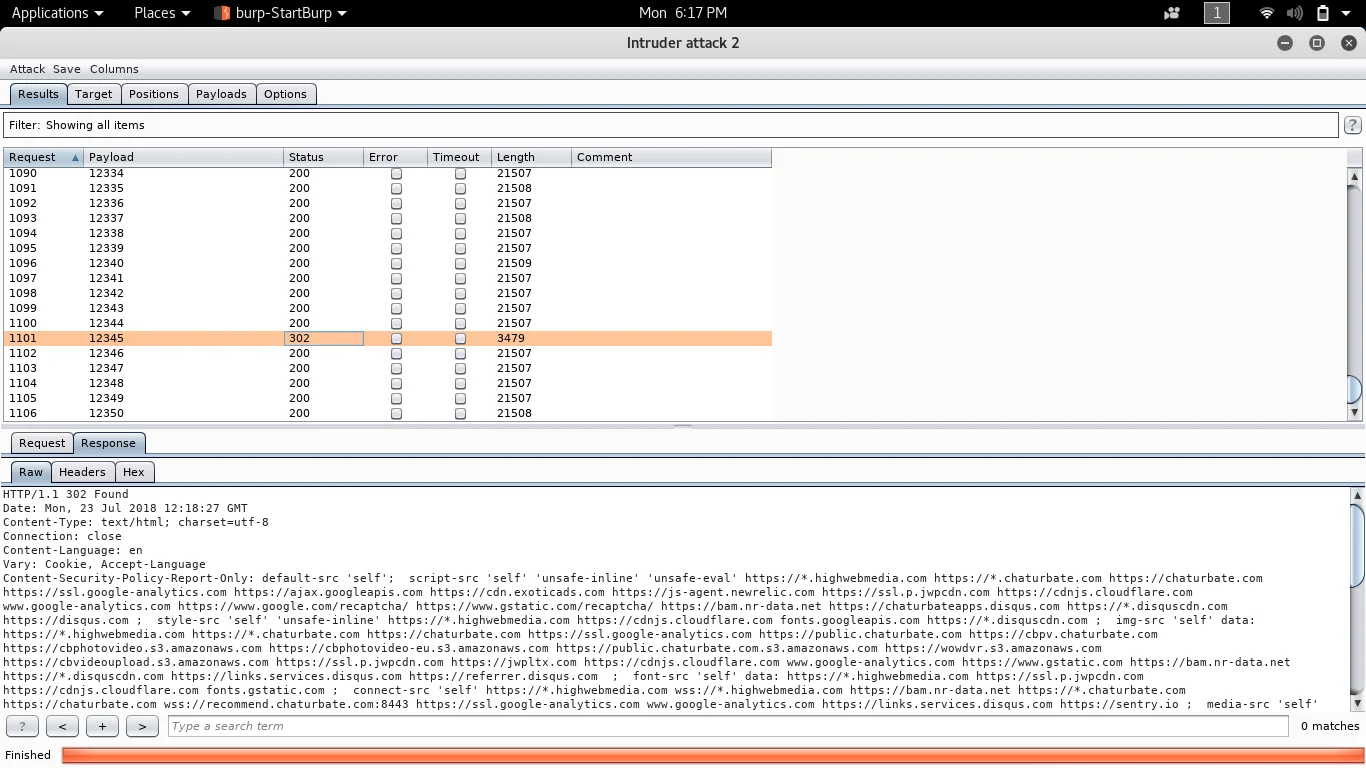
Screenshot_from_2018-07-23_18-17-18.png From the original on HackerOne
Impact
Attacker are able to access some one private room.
Thanks!
What the report shows
Chaturbate lets a broadcaster protect a room with a password, so that only visitors who supply the correct password can enter the broadcast room. The researcher noticed that the endpoint that handles this check, /roomlogin/user/, had no rate limit, which made it possible to brute force the password field. In the researcher's words, they made "1k+ request but still server not block my request".
The reproduction steps are short:
- Create two accounts, A and B, and protect A's room with a password.
- Log in to B's account and try to access A's room with a random password.
- Send the request to an intruder tool and run it until the correct password is found.
The report was filed on HackerOne against chaturbate.com, rated medium severity with a CVSS score of 4.3, and classified as improper restriction of authentication attempts. A bounty of 500.00 USD was paid, and the report was disclosed on 2018-09-30. The report does not describe the fix.
Root cause
The report points only at the missing rate limit on the endpoint; it does not describe the server-side implementation. Because nothing counts or throttles repeated failures, an attacker can submit guesses as fast as the server will answer them.
Impact
An attacker who can guess or brute force the password gains access to someone else's private room, which the report states as "Attacker are able to access some one private room". The report states the impact as access to someone else's private room and does not quantify it further.
How this kind of bug works
Password-protected resources are only as strong as the number of guesses an attacker is allowed to make. If a login or unlock endpoint accepts unlimited attempts, the search space shrinks to whatever the password policy allows: short or common passwords fall quickly, and even longer ones become feasible when the endpoint answers fast and in parallel. The bug class, improper restriction of authentication attempts, covers any authentication check that lacks throttling, lockout, CAPTCHA or equivalent friction.
It happens for mundane reasons: the check is written as a simple comparison in a controller, and rate limiting is assumed to live in a gateway or middleware that never actually covers this route. Endpoints added later, such as a room unlock separate from the main login, often miss protections that were applied to the primary authentication flow.
Defences work at several layers: counting failures per account and per client, adding delays or lockouts after a threshold, requiring a CAPTCHA once failures accumulate, and alerting on bursts of failures against a single resource.
How to test for it
- Identify every endpoint that verifies a secret: main login, password reset, room or share unlock, PIN entry, API token checks. Look for routes that sit beside the main login but are handled separately.
- Capture one legitimate request for the check, including any CSRF token, session cookie or anti-automation header, and note how the server signals failure (status code, body text, redirect).
- Replay the request with a wrong secret a modest number of times, for example 20 to 50, and watch for any change: 429 responses, increasing delays, lockout messages, CAPTCHA challenges or connection resets.
- If nothing changes, scale up gradually and in a controlled way, keeping the volume low enough not to disrupt the service, and confirm that failures are still processed normally.
- Verify that a correct secret still works after the failed attempts, which shows the endpoint is genuinely unthrottled rather than silently rejecting everything.
A positive result is a long run of failed attempts with consistent responses and no friction, followed by a successful attempt. Common false positives: a generic error page that hides a lockout, throttling applied only per IP that your test traffic happens to avoid, client-side limits that a direct request bypasses (which is itself a finding, but a different one), and WAF blocks that look like application responses. Also check whether the endpoint is protected by an account-level lockout that only triggers on the main login, since that does not cover a separate unlock route.
How it is fixed
The standard fixes are to count failed attempts per account and per client address, apply exponential backoff or temporary lockout after a threshold, require a CAPTCHA or similar challenge once failures accumulate, and log and alert on repeated failures against one resource. Where the protected resource is a room password, a longer minimum length and a check against common passwords reduce the value of guessing. Rate limiting should be enforced server-side on the specific route, not assumed from a shared middleware layer.
Hunting notes
This bug class tends to hide on secondary authentication surfaces: room or document unlock pages, share-link passwords, PIN codes, voucher redemption, API key validation and password reset confirmation. Recon signals include routes with names like unlock, login, verify, check or validate that are not the main login, parameters carrying a secret in the body, and features that advertise privacy or password protection. When you report, show the request, the number of attempts made, the absence of any throttling signal, and a successful unlock after the failed attempts, using your own test accounts and a resource you control. That evidence, rather than the raw request count, is what makes the impact concrete.
Difficulty: beginner. The method is a straightforward replay of a single request, and the report itself needed only two accounts and an intruder run.
What happened, in plain words
Chaturbate is a live streaming site. A broadcaster can put a password on their room, so that only people who know the password can watch the broadcast. When a visitor types the password, the site sends it to a specific address on the server, /roomlogin/user/, and the server checks whether it is correct.
The researcher found that this check had no rate limit. A rate limit is a cap on how often you may do something in a given time, like a shop that only lets you try on three pairs of shoes per visit. Without it, a computer can send guess after guess as fast as the server will answer. The researcher wrote that they made "1k+ request but still server not block my request", meaning more than a thousand attempts went through without the server stepping in.
Guessing passwords this way is called brute force: trying many combinations until one works, like spinning the dial of a combination lock through every number instead of thinking about which one the owner would pick.
The reproduction steps in the report are short:
- Create two accounts, A and B, and protect A's room with a password.
- Log in to B's account and try to access A's room with a random password.
- Send the request to an intruder tool and run it until the correct password is found.
Step 3 is the actual attack: an intruder tool is a feature in some security testing programs that takes one captured request and resends it many times, swapping in a different password on each run.
The report was filed on HackerOne against chaturbate.com. It was rated medium severity with a CVSS score of 4.3, and classified as improper restriction of authentication attempts. A bounty of 500.00 USD was paid, and the report was disclosed on 2018-09-30. The report does not describe how the issue was fixed.
In general, how this kind of bug works
A password is only as strong as the number of guesses someone is allowed to make. If a lock accepts unlimited attempts, then a short or common password falls quickly, and even a longer one becomes reachable when the server answers fast and the guesses can run in parallel. The bug class here, improper restriction of authentication attempts, covers any password check that lacks throttling, lockout, a CAPTCHA or similar friction. A CAPTCHA is the puzzle that asks you to tick boxes with traffic lights, designed to be easy for a person and hard for a program.
These gaps appear for ordinary reasons. The check is often written as a simple comparison in one part of the code, and rate limiting is assumed to be handled somewhere else, such as a shared gateway or middleware layer, that never actually covers this particular route. A room unlock page added later, separate from the main login, can easily miss protections that were applied to the primary login flow.
Defences work at several layers: counting failures per account and per client, adding delays or lockouts after a threshold, requiring a CAPTCHA once failures pile up, and alerting on bursts of failures against a single resource.
How to test for it
- Identify every place that verifies a secret: the main login, password reset, room or share unlock, PIN entry, API token checks. Look for routes that sit beside the main login but are handled separately.
- Capture one legitimate request for the check, including any CSRF token, session cookie or anti-automation header, and note how the server signals failure (status code, body text, redirect). A cookie is a small piece of data the browser stores and sends back with each request so the server recognises your session; a CSRF token is a hidden value in a form that proves the request came from the site's own page.
- Replay the request with a wrong secret a modest number of times, for example 20 to 50, and watch for any change: 429 responses, increasing delays, lockout messages, CAPTCHA challenges or connection resets. A 429 is the HTTP status code for "too many requests".
- If nothing changes, scale up gradually and in a controlled way, keeping the volume low enough not to disrupt the service, and confirm that failures are still processed normally.
- Verify that a correct secret still works after the failed attempts, which shows the endpoint is genuinely unthrottled rather than silently rejecting everything.
A positive result is a long run of failed attempts with consistent responses and no friction, followed by a successful attempt. Common false positives: a generic error page that hides a lockout, throttling applied only per IP address that your test traffic happens to avoid, client-side limits that a direct request bypasses (which is itself a finding, but a different one), and WAF blocks that look like application responses. A WAF, or web application firewall, is a filter in front of a site that can block suspicious traffic. Also check whether the endpoint is protected by an account-level lockout that only triggers on the main login, since that does not cover a separate unlock route.
How it is fixed
The standard fixes are to count failed attempts per account and per client address, apply exponential backoff or temporary lockout after a threshold, require a CAPTCHA or similar challenge once failures accumulate, and log and alert on repeated failures against one resource. Exponential backoff means each failure makes the next attempt wait longer. Where the protected resource is a room password, a longer minimum length and a check against common passwords reduce the value of guessing. Rate limiting should be enforced server-side on the specific route, not assumed from a shared middleware layer.
Hunting notes
This bug class tends to hide on secondary authentication surfaces: room or document unlock pages, share-link passwords, PIN codes, voucher redemption, API key validation and password reset confirmation. Recon signals include routes with names like unlock, login, verify, check or validate that are not the main login, parameters carrying a secret in the body, and features that advertise privacy or password protection. When you report, show the request, the number of attempts made, the absence of any throttling signal, and a successful unlock after the failed attempts, using your own test accounts and a resource you control. That evidence, rather than the raw request count, is what makes the impact concrete.
Glossary
- Endpoint: a specific address on a server that handles one kind of request, such as
/roomlogin/user/. - Request: the message a browser sends to a server asking for something, for example to check a password.
- Rate limit: a cap on how many times an action may be performed in a period of time.
- Brute force: trying many password guesses automatically until one is correct.
- Intruder tool: a feature in security testing software that resends one captured request many times with different values.
- Authentication: the process of proving who you are, usually with a password.
- Improper restriction of authentication attempts: a bug where a password check accepts unlimited tries.
- Throttling: deliberately slowing down or limiting repeated actions.
- Lockout: temporarily blocking an account or address after too many failures.
- CAPTCHA: a puzzle meant to be easy for a person and hard for a program.
- Cookie: a small piece of data stored by the browser and sent with requests so the server recognises your session.
- Session: the period during which a server remembers you as logged in.
- CSRF token: a hidden value in a form that proves the request came from the site's own page.
- Header: extra information attached to a request or response, such as the browser type.
- Status code: a number in the response saying how the request went, such as 429 for too many requests.
- 429: the HTTP status code meaning too many requests.
- WAF: a web application firewall, a filter in front of a site that can block suspicious traffic.
- False positive: a test result that looks like a bug but is not one.
- Exponential backoff: making each retry wait longer than the last after a failure.
- CVSS: a standard scoring system for rating the severity of a security issue.
- HackerOne: a platform where security researchers report bugs to companies and may receive a bounty.
- Bounty: a payment made to a researcher for a valid report.




