Better Make Sure Your Password Manager Is Secure
The password manager Passwordstate used a hardcoded XOR key to encrypt API tokens that only contained a username, allowing an unauthenticated attacker to forge tokens for any known user. Attackers could then add password entries with a JavaScript URL to other users' lists, leading to stored XSS and, if an administrator clicked the link, privilege escalation to run PowerShell scripts and dump all stored passwords.

As part of a security analysis, our colleagues kuekerino (T / M), ubahnverleih (T / M) and parzel (B / M) examined the password management solution Passwordstate of Click Studios and identified multiple high severity vulnerabilities (CVE-2022-3875, CVE-2022-3876, CVE-2022-3877). Successful exploitation allows an…
The full write-up lives on its author's site
It belongs to its author, so we link to it rather than copy it. The other two tabs are our own rewrites, checked against it.
Context
Passwordstate by Click Studios is an on-premise enterprise password management solution. Users store, access and share sensitive password material through it, and the product supports a large feature set, different access control systems and connectors to enterprise identity management solutions. Click Studios reports over 29,000 customers, spanning from large enterprises to small IT shops, so the deployment base is wide.
The analysis covered the web application, its browser extension API and the way the server stores and decrypts passwords. The browser extension API is the part that stores, modifies and retrieves passwords on behalf of a user, and it authenticates with a token rather than a session. The web interface is a website with a role based access system; administrator roles get a menu with administrative features, including backing up the database, adding users and running arbitrary Powershell scripts on the host machine.
The researchers identified multiple high severity vulnerabilities, tracked as CVE-2022-3875, CVE-2022-3876 and CVE-2022-3877. Chained together, they take an unauthenticated attacker who knows nothing more than a valid username to a shell on the Passwordstate host and a cleartext dump of every stored password.
Setup
The team started by setting up their own Passwordstate instance behind a machine-in-the-middle setup, which made testing more transparent and dynamic. They then used the whole application for a few hours to map as many features as possible.
Their first observation was that the core of the application uses a framework, but the various API parts felt more custom tailored. Some API components used a different authentication mechanism, and the team suspected they had been developed without the framework. Custom written code is more often prone to errors, so this looked like a promising place to start. The first API they looked into was the browser extension API.
The software is written in C#, so decompilation should have been easy, but the vendor used code obfuscators. These cannot hide code completely, only make it more time-consuming to understand. Since time is limited in a pentest, the team took another route: the changelogs showed that code obfuscation was introduced a few major versions earlier. Those versions were no longer downloadable from Click Studios' website, but the Internet Archive had some older versions available.
Finding it
The token is not a secret
The decompiled older version contained a surprise. The API token is not a randomly generated string or secret, and it is not cryptographically signed. Instead it contains concatenated user information, XOR encrypted with a hardcoded key. A decrypted example is shown in the report:

Generated encryption key
Even more surprising was the validation code: the only field from the string used for authentication and authorisation was the username. That has three consequences:
- Tokens cannot be invalidated when they are compromised.
- Tokens are not changed when a user changes their password.
- Anyone can create their own token for a known username.
The last point is the crucial one. Knowing an existing username is enough to craft a valid API token with the hardcoded XOR key. With it, an attacker can access and modify all data the browser extension can access, which includes every password of that user that has a URL entry attached. That is the default for any password stored through the browser extension.
Passwords come back in cleartext
Some passwords in the instance were still out of reach, so the team dug deeper. The fact that the API returned requested passwords in cleartext got them thinking: either the passwords are not stored encrypted on the server, or they are stored with only server-side encryption inside the database. Inspecting the database on their installation showed the latter.
The server-side decryption had already been reversed by Northwave Security a few years earlier. Their published proof of concept extracts the obfuscated AES key used for encrypting the database from different files on the system and snippets from the database, then dumps all passwords stored in it. The team considers this architecture a fundamental design flaw: any attacker with access to the host system can dump all stored passwords.
The linked code only works for builds up to version 8903; afterwards it was mitigated with an update. There was no major announcement about a change of cryptographic implementation in Click Studios' changelog or release notes. That led the team to believe the fix did not address the root cause but only changed and subsequently obfuscated the decryption process enough to break the proof of concept tool.
To verify the suspicion, they generated the previously working encryption key with the tool:
Memory Scan
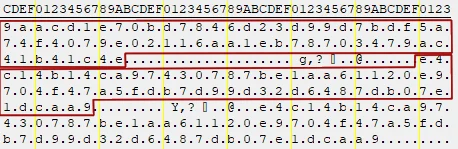
They then performed in-memory searches to see whether the key was still in use by the application in its previous form. It was, and right next to it was something that looked very similar to a key as well. Decrypting the database with that second value worked. The image shows the two keys next to each other. A simple one-line patch is sufficient to make the password decryptor work again.
Code execution as a service
Getting to the encrypted passwords requires access to the database, or better, a reverse shell. The administrator roles in Passwordstate have a menu with administrative features, and one of them allows running arbitrary Powershell scripts on the host machine. If the team could elevate their privileges within Passwordstate to an administrator user, they could reach the host system and dump all passwords. The browser extension API access so far did not give them a session within the web instance.
XSS in the URL field
Because the user interface is a website, it offers a large surface for cross-site scripting. The team did not have to dig deep: URLs can be assigned to passwords and visited quickly from within the password manager. The link validation was insufficient and allowed the JavaScript protocol handler, which makes an XSS attack a single click away. The actual URL is mostly hidden in the interface, which increases the probability that an unsuspecting user clicks the link.
Getting a click is easy for an authenticated user, because Passwordstate allows sharing password lists. Inviting a colleague to the password list for the next project is common, and if the only place where the URLs are shared is the shared list, a click is not unlikely. But a link in a user's private password list looks even more authentic, and that is where an IDOR comes in.
Writing into other users' lists
One of the first things the team checked with their unauthenticated API access was whether they could access other users' passwords. They had no luck with that, but they discovered that new password entries can be stored within other people's password lists when the list's ID is known, using this request:
POST /api/browserextension/addpassword/ HTTP/2
Host: XXX
Cookie: session-id=XXX
Content-Length: XXX
Content-Type: application/x-www-form-urlencoded; charset=UTF-8

auth_key=XXX&PasswordList=anything&PasswordListID=1&Title=please+open+me&UserName=username&D
description=please+open+me&URL=any_url&[redacted]&WebsiteFavicon=anything
This even worked for private password lists. Inspecting the request, the team noticed that the IDs used are numerical and incremental. By simply iterating, an attacker can add the XSS payload to every single password list in the system, which is exactly what is needed to spray the payload.
Exploitation
With all the pieces together, the chain takes a remote attacker who knows only a valid username to all passwords stored on the Passwordstate instance. The reverse shell on the instance is the cherry on top, because it lets an attacker keep access even when these vulnerabilities are fixed.
The individual vulnerabilities combine as follows.
Step 1: Forge an API token for a valid username
Using the hardcoded XOR key and the known username, the attacker builds a token that the browser extension API accepts. Only the username inside the token is checked, so no password or other secret is needed.

Forge an API token for a valid username
Step 2: Iterate through all public and private password lists
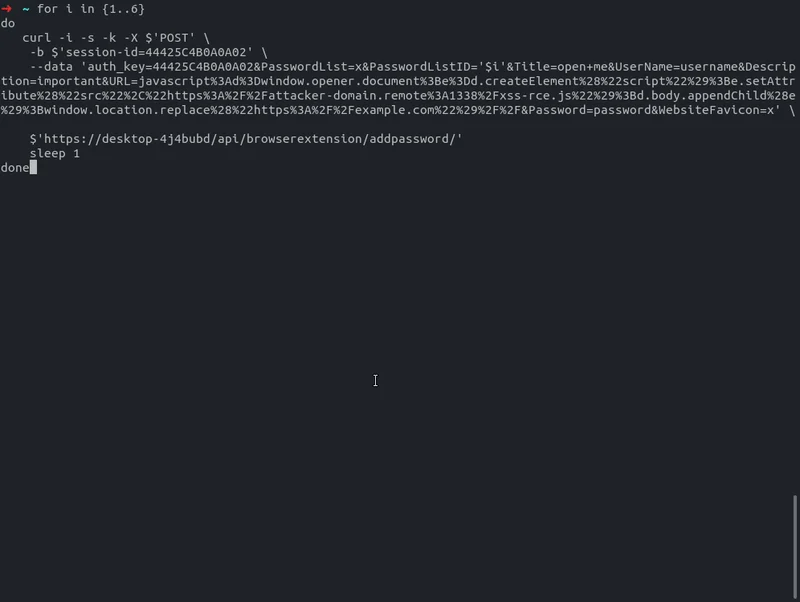
With the forged token, the attacker walks the incremental PasswordListID values and adds malicious password entries whose URL field holds the XSS payload.
Iterate through lists
Step 3: Wait until an administrator opens the entry
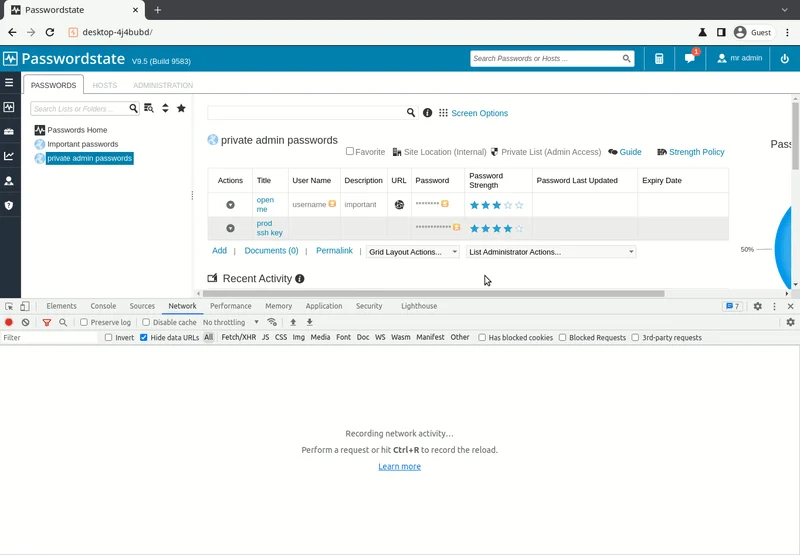
The payload fires when an administrator opens the prepared password entry. The attacker covers it by opening a benign URL, so the click looks ordinary.
Wait until an administrator opens the entry
Step 4: Get a reverse shell
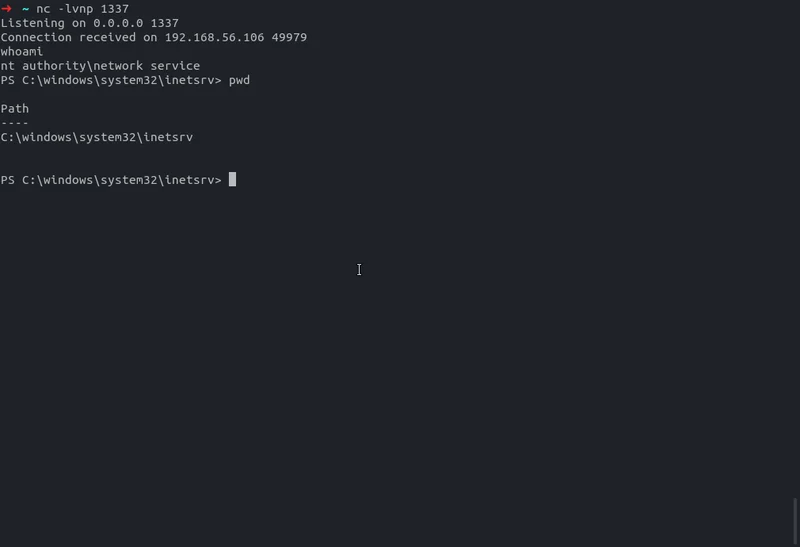
Once the XSS runs in an administrator's session, the attacker uses the administrative feature that runs arbitrary Powershell scripts on the host machine to obtain a reverse shell.

RUN CMD
Step 5: Decrypt and dump
On the host, the attacker recovers the key material and decrypts the database, dumping all passwords stored within the Passwordstate instance.
Decrypt and dump
Root cause
Several design and implementation mistakes combine here.
The API token is not a random secret and is not cryptographically signed. It is concatenated user information XOR encrypted with a hardcoded key, and validation uses only the username from the string. A hardcoded key in shipped code is not a secret, and an authentication token whose only checked field is a username can be minted by anyone who knows that username. Because the token carries no server-side state that can be revoked, it cannot be invalidated when compromised and does not change when the user's password changes.
The addpassword endpoint accepted writes into other users' password lists, including private ones, when the list ID was known. It trusts the PasswordListID supplied in the request, and the IDs are numerical and incremental, so every list, including private ones, can be enumerated and written to.
URL validation is insufficient and permits the JavaScript protocol handler, so a stored URL becomes script that runs in the context of whoever opens the entry. The URL is mostly hidden in the interface, which makes the click more likely.
On the storage side, passwords are protected only by server-side encryption whose key material sits on the same host. The mitigation after build 8903 did not change the architecture; it changed and obfuscated the decryption process enough to break the existing proof of concept tool, while the old key remained in use in memory alongside a related value that also decrypts the database. The team believed the fix addressed the tool rather than the design flaw.
Finally, the administrator feature that runs arbitrary Powershell scripts on the host turns any administrator session compromise into code execution on the server.
Impact
An unauthenticated attacker who knows a valid username can forge an API token and access and modify all data the browser extension can access for that user, including every password of that user that has a URL entry attached, which is the default for passwords stored through the extension. The attacker can also write new entries into any public or private password list whose ID is known, and the IDs are enumerable.
By spraying an XSS payload through those entries, the attacker waits for an administrator to open one. A successful hit gives a reverse shell on the Passwordstate host through the Powershell feature, and from there all passwords stored in the database can be dumped in cleartext. The shell also lets the attacker keep access even when the vulnerabilities are fixed.
Fix
Click Studios states that all vulnerabilities are fixed since Passwordstate 9.6, Build 9653. The architectural point stands on its own: a password manager that stores all secrets centrally is only as secure as the host that holds the decryption key, so the key material and the database should not be reachable together by a single compromised session.
Variants to test
- Token formats that encode identity instead of signing it. Decode tokens issued by an application and look for concatenated user fields, XOR layers or other reversible encodings. A positive result is a token you can rebuild for a different username and that the API accepts.
- Authorisation checks on object IDs in write endpoints. Take an endpoint that creates or modifies an object and change the object ID to one belonging to another user, as with
PasswordListIDhere. A positive result is a successful write into a list or object you do not own, including private ones. - Incremental identifiers. Where IDs are numerical and sequential, iterate them and record which ones accept writes. A positive result is a contiguous range of writable objects belonging to other users.
- URL and link fields that accept the JavaScript protocol handler. Submit
javascript:URLs wherever the application stores links that users can click, then open the entry as another user. A positive result is script execution in the victim's session. - Key material left in memory after a crypto change. When a vendor replaces a decryption routine, search process memory for the old key and for values that resemble it. A positive result is a value that still decrypts the database.
- Administrative features that execute code. Look for admin-only features that run scripts or commands on the host. A positive result is command execution reachable from a hijacked administrator session.
What happened, in plain words
A team of security researchers tested a product called Passwordstate, made by a company called Click Studios. Passwordstate is a password manager for companies: instead of everyone writing passwords on sticky notes, the company keeps them in one central place, and staff look them up when they need them. The researchers found several serious weaknesses in it. Put together, those weaknesses let someone who is not logged in at all, and who knows only one valid username, end up with full control of the server and a readable copy of every password stored in it.
The weaknesses are tracked as CVE-2022-3875, CVE-2022-3876 and CVE-2022-3877. A CVE is a public catalogue number for a known security flaw, so people can talk about the same bug without confusion. Click Studios says all of them are fixed since Passwordstate 9.6, Build 9653.
This article walks through the same steps the researchers took, in the same order, and explains each idea from scratch. If you can use a browser, you can follow it.
Why a password manager matters so much
Many companies struggle to keep track of passwords. A password manager solves that by generating, storing and managing them in one place. That is normally the safest approach available. But the more secrets sit in one central location, the more valuable that location becomes to a criminal. If the central vault is weak, one break-in exposes everything at once.
The researchers saw this first hand during a penetration test for a customer. A penetration test (pentest) is an authorised, paid attempt to break into a system, done so the owner can fix problems before a real attacker finds them. The customer was planning to move their password management to Passwordstate and wanted proof that the passwords would be stored safely and only reachable by authorised users.
Passwordstate runs on the customer's own servers rather than in someone else's cloud; that is what "on-premise" means. It supports many features, several different access control systems, and connectors to company identity systems. Click Studios reports over 29,000 customers, from the largest enterprises to the smallest IT shops, so a flaw here reaches a lot of organisations.
Setting up a test lab
The team began by installing their own copy of Passwordstate and placing it behind a machine-in-the-middle setup. A machine-in-the-middle setup here means the researchers put themselves between the browser and the server so they could watch and alter every message going back and forth. That makes testing more transparent and dynamic: you see exactly what the application sends, and you can change it before it arrives.
They then spent a few hours simply using the whole application, to map as many features as possible. This is normal practice: before attacking anything you learn what it does, the way you would walk around a building before looking for weak doors.
Their first observation was that the core of the application uses a framework, but the various API parts felt more custom tailored. An API (application programming interface) is the set of addresses a program offers so other programs can talk to it, rather than a human clicking buttons. Think of a restaurant: the dining room is the web page you see, and the kitchen hatch where orders are passed is the API. A framework is a ready-made building kit that many developers use; code written with it tends to follow the same safe patterns. Some API components used a different authentication mechanism, and the team suspected they had been written without the framework. Hand-written code is more often prone to errors, so this looked like a promising place to start. The first API they examined was the browser extension API.
A browser extension is a small add-on installed in the browser. Passwordstate's extension can store, modify and retrieve passwords for a user, so its API handles confidential credentials directly. That is why it drew attention.
The software is written in C#, a programming language. Compiled C# can usually be turned back into readable source code, a process called decompilation, so the team expected an easy look inside. To prevent that, the vendor used code obfuscators: tools that rename and scramble code so it is hard to read. Obfuscation cannot hide code completely; it only makes understanding it more time-consuming. Time is limited in a pentest, so the team took another route. The changelogs (the lists of what changed in each release) showed that obfuscation was introduced a few major versions earlier. Those older versions were no longer downloadable from Click Studios' website, but the Internet Archive had some of them available.
Finding it
The token is not a secret
When you log in to a website, the server usually gives your browser a small piece of data to carry on later requests, so it knows who you are. That is called a token or a session cookie. Think of a cloakroom ticket: you hand it over and get your coat, and the attendant trusts the ticket rather than your face. A good ticket is impossible to guess and is signed, meaning the attendant can verify it was really issued by them.
The decompiled older version contained a surprise. The API token is not a randomly generated string or secret, and it is not cryptographically signed. Instead it contains concatenated user information, meaning several pieces of information about the user glued together in a row, XOR encrypted with a hardcoded key. XOR is a simple mathematical mixing operation used in cryptography: combine data with a key and you get scrambled data, combine it with the same key again and you get the original back. "Hardcoded" means the key is written directly into the program itself, so anyone who has the program has the key. A decrypted example is shown in the report:
Generated encryption key
Even more surprising was the validation code, the part that checks a token when it arrives. The only field from the string used for authentication and authorisation was the username. Authentication means proving who you are; authorisation means deciding what you are allowed to do. If only the username is checked, then the rest of the token does not matter. That has three consequences:
- Tokens cannot be invalidated when they are compromised. There is nothing stored on the server to switch off, so a stolen or leaked token keeps working.
- Tokens are not changed when a user changes their password. Changing a password normally locks out anyone holding an old session; here it does not.
- Anyone can create their own token for a known username.
The last point is the crucial one. Knowing an existing username is enough to craft a valid API token with the hardcoded XOR key. With it, an attacker can access and modify all data the browser extension can access, which includes every password of that user that has a URL entry attached. That is the default for any password stored through the browser extension.
Passwords come back in cleartext
Some passwords in the instance were still out of reach, so the team dug deeper. The fact that the API returned requested passwords in cleartext got them thinking. Cleartext means readable text, not scrambled. Either the passwords are not stored encrypted on the server at all, or they are stored with only server-side encryption inside the database. Encryption is scrambling data with a key so that only someone with the key can read it; server-side means the server does the unscrambling, so the server must hold the key. Inspecting the database on their own installation showed the latter: the passwords were encrypted, but the server held what was needed to decrypt them.
The server-side decryption had already been reversed by Northwave Security a few years earlier. Reversing here means working out exactly how the scrambling is done, so it can be undone without permission. Their published proof of concept extracts the obfuscated AES key used for encrypting the database from different files on the system and snippets from the database, then dumps all passwords stored in it. A proof of concept is a small demonstration program showing that an attack works. AES is a widely used standard encryption method. Dumping means copying data out in bulk.
The team considers this architecture a fundamental design flaw: any attacker with access to the host system can dump all stored passwords. The host system is the actual server machine the product runs on.
The linked code only works for builds up to version 8903; afterwards it was mitigated with an update. Mitigated means the problem was made harder to exploit, not necessarily removed. There was no major announcement about a change of cryptographic implementation in Click Studios' changelog or release notes. That led the team to believe the fix did not address the root cause but only changed and subsequently obfuscated the decryption process enough to break the proof of concept tool. Root cause is the underlying reason a problem exists; fixing only the symptom leaves the cause in place.
To verify the suspicion, they generated the previously working encryption key with the tool:
Memory Scan
They then performed in-memory searches to see whether the key was still in use by the application in its previous form. Memory is the working space a running program uses; searching it means looking through what the program currently holds. The key was still there, and right next to it was something that looked very similar to a key as well. Decrypting the database with that second value worked. The image shows the two keys next to each other. A simple one-line patch is sufficient to make the password decryptor work again.
Code execution as a service
Getting to the encrypted passwords requires access to the database, or better, a reverse shell. A shell is a way to type commands into a machine and see the results. A reverse shell is one where the victim machine connects back out to the attacker, which often slips past network defences because outgoing connections look ordinary.
The administrator roles in Passwordstate have a menu with administrative features, and one of them allows running arbitrary Powershell scripts on the host machine. Powershell is a scripting tool built into Windows for automating tasks; "arbitrary" means any script at all, not a fixed list. If the team could elevate their privileges within Passwordstate to an administrator user, they could reach the host system and dump all passwords. Elevating privileges means going from a low-level account to a more powerful one. The browser extension API access so far did not give them a session within the web instance: they could talk to the API, but they had no logged-in browser session in the web interface.
XSS in the URL field
Because the user interface is a website, it offers a large surface for cross-site scripting. Cross-site scripting, usually shortened to XSS, is a class of bug where an attacker gets their own code to run inside someone else's browser session on a trusted site. The everyday comparison is a noticeboard where anyone may pin a note: if the board does not check what is written, someone can pin a note that, when read, quietly does something on the reader's behalf.
The team did not have to dig deep. URLs can be assigned to passwords and visited quickly from within the password manager. A URL is a web address. The link validation was insufficient and allowed the JavaScript protocol handler, which makes an XSS attack a single click away. A protocol handler is the part of a link before the colon, such as http: or https:, that tells the browser what kind of address follows. javascript: tells the browser that what follows is code to run, so a stored link beginning with it becomes a small program. The actual URL is mostly hidden in the interface, which increases the probability that an unsuspecting user clicks the link.
Getting a click is easy for an authenticated user, because Passwordstate allows sharing password lists. A password list is a folder of entries that can be shared with colleagues. Inviting a colleague to the password list for the next project is common, and if the only place where the URLs are shared is the shared list, a click is not unlikely. But a link in a user's private password list looks even more authentic, and that is where an IDOR comes in. IDOR stands for Insecure Direct Object Reference: the application lets you name an object by its internal identifier and forgets to check that the object belongs to you. It is like a hotel where room keys are numbered and the front desk hands you any key you ask for by number.
Writing into other users' lists
One of the first things the team checked with their unauthenticated API access was whether they could access other users' passwords. They had no luck with that, but they discovered that new password entries can be stored within other people's password lists when the list's ID is known, using this request:
POST /api/browserextension/addpassword/ HTTP/2
Host: XXX
Cookie: session-id=XXX
Content-Length: XXX
Content-Type: application/x-www-form-urlencoded; charset=UTF-8

auth_key=XXX&PasswordList=anything&PasswordListID=1&Title=please+open+me&UserName=username&D
description=please+open+me&URL=any_url&[redacted]&WebsiteFavicon=anything
Line by line:
POST /api/browserextension/addpassword/ HTTP/2is the request line.POSTis the method used when you send data to create something; the path points at the browser extension API's "add password" action;HTTP/2is the version of the web protocol used.Host: XXXnames the server being contacted. The real value is replaced withXXXin the report.Cookie: session-id=XXXcarries the browser's session identifier, again replaced withXXX.Content-Length: XXXstates how many bytes of data follow.Content-Type: application/x-www-form-urlencoded; charset=UTF-8says the data is formatted as a list of field names and values, the same format a web form produces, encoded in UTF-8 characters.- The blank line separates the headers from the body.
- The body is one long line of field pairs joined by
&.auth_key=XXXcarries the forged token.PasswordList=anythingandPasswordListID=1say which list to write into, with1being the target list's number.Title=please+open+meis the entry's title, with+standing for a space.UserName=usernameis the user the entry belongs to.URL=any_urlis the web address attached to the entry, which is where the XSS payload would go.[redacted] is the stored password.WebsiteFavicon=anything` is the little site icon shown next to the entry.
This even worked for private password lists. Inspecting the request, the team noticed that the IDs used are numerical and incremental. By simply iterating, an attacker can add the XSS payload to every single password list in the system, which is exactly what is needed to spray the payload. Iterating means trying 1, then 2, then 3, and so on; spraying means placing the payload in many places at once so the chance of someone triggering it goes up.
Exploitation
With all the pieces together, the chain takes a remote attacker who knows only a valid username to all passwords stored on the Passwordstate instance. Remote means working over the network from somewhere else, not sitting at the machine. The reverse shell on the instance is the cherry on top, because it lets an attacker keep access even when these vulnerabilities are fixed.
The individual vulnerabilities combine as follows.
Step 1: Forge an API token for a valid username
Using the hardcoded XOR key and the known username, the attacker builds a token that the browser extension API accepts. Only the username inside the token is checked, so no password or other secret is needed. Forging here means making a valid-looking item yourself rather than receiving it from the server.
Forge an API token for a valid username
Step 2: Iterate through all public and private password lists
With the forged token, the attacker walks the incremental PasswordListID values and adds malicious password entries whose URL field holds the XSS payload. Walking the values means trying each number in turn.
Iterate through lists
Step 3: Wait until an administrator opens the entry
The payload fires when an administrator opens the prepared password entry. The attacker covers it by opening a benign URL, so the click looks ordinary. Benign means harmless: a normal-looking link that does nothing suspicious.
Wait until an administrator opens the entry
Step 4: Get a reverse shell
Once the XSS runs in an administrator's session, the attacker uses the administrative feature that runs arbitrary Powershell scripts on the host machine to obtain a reverse shell.
RUN CMD
Step 5: Decrypt and dump
On the host, the attacker recovers the key material and decrypts the database, dumping all passwords stored within the Passwordstate instance. Key material means the values needed to unscramble the data.
Decrypt and dump
Root cause
Several design and implementation mistakes combine here.
The API token is not a random secret and is not cryptographically signed. It is concatenated user information XOR encrypted with a hardcoded key, and validation uses only the username from the string. A hardcoded key in shipped code is not a secret, and an authentication token whose only checked field is a username can be minted by anyone who knows that username. Because the token carries no server-side state that can be revoked, it cannot be invalidated when compromised and does not change when the user's password changes.
The addpassword endpoint accepted writes into other users' password lists, including private ones, when the list ID was known. An endpoint is one specific address in an API. It trusts the PasswordListID supplied in the request, and the IDs are numerical and incremental, so every list, including private ones, can be enumerated and written to. Enumerated means listed out one by one.
URL validation is insufficient and permits the JavaScript protocol handler, so a stored URL becomes script that runs in the context of whoever opens the entry. The URL is mostly hidden in the interface, which makes the click more likely.
On the storage side, passwords are protected only by server-side encryption whose key material sits on the same host. The mitigation after build 8903 did not change the architecture; it changed and obfuscated the decryption process enough to break the existing proof of concept tool, while the old key remained in use in memory alongside a related value that also decrypts the database. The team believed the fix addressed the tool rather than the design flaw.
Finally, the administrator feature that runs arbitrary Powershell scripts on the host turns any administrator session compromise into code execution on the server.
Impact
An unauthenticated attacker who knows a valid username can forge an API token and access and modify all data the browser extension can access for that user, including every password of that user that has a URL entry attached, which is the default for passwords stored through the extension. Unauthenticated means not logged in. The attacker can also write new entries into any public or private password list whose ID is known, and the IDs are enumerable.
By spraying an XSS payload through those entries, the attacker waits for an administrator to open one. A successful hit gives a reverse shell on the Passwordstate host through the Powershell feature, and from there all passwords stored in the database can be dumped in cleartext. The shell also lets the attacker keep access even when the vulnerabilities are fixed.
Fix
Click Studios states that all vulnerabilities are fixed since Passwordstate 9.6, Build 9653. The architectural point stands on its own: a password manager that stores all secrets centrally is only as secure as the host that holds the decryption key, so the key material and the database should not be reachable together by a single compromised session.
Variants to test
These are the general lessons a tester can carry to other products.
- Token formats that encode identity instead of signing it. Decode tokens issued by an application and look for concatenated user fields, XOR layers or other reversible encodings. A positive result is a token you can rebuild for a different username and that the API accepts.
- Authorisation checks on object IDs in write endpoints. Take an endpoint that creates or modifies an object and change the object ID to one belonging to another user, as with
PasswordListIDhere. A positive result is a successful write into a list or object you do not own, including private ones. - Incremental identifiers. Where IDs are numerical and sequential, iterate them and record which ones accept writes. A positive result is a contiguous range of writable objects belonging to other users.
- URL and link fields that accept the JavaScript protocol handler. Submit
javascript:URLs wherever the application stores links that users can click, then open the entry as another user. A positive result is script execution in the victim's session. - Key material left in memory after a crypto change. When a vendor replaces a decryption routine, search process memory for the old key and for values that resemble it. A positive result is a value that still decrypts the database.
- Administrative features that execute code. Look for admin-only features that run scripts or commands on the host. A positive result is command execution reachable from a hijacked administrator session.
Glossary
- API: the set of addresses a program offers so other programs can talk to it, instead of a human clicking buttons.
- Authentication: proving who you are.
- Authorisation: deciding what a proven identity is allowed to do.
- Token: a small piece of data a server gives a client so later requests can be recognised, like a cloakroom ticket.
- Session cookie: a token stored by the browser and sent with each request to identify a logged-in session.
- Hardcoded key: a secret written directly into a program's code, so anyone with the program has it.
- XOR: a simple mixing operation; applying it twice with the same key restores the original data.
- Encryption: scrambling data with a key so only someone with the key can read it.
- Decryption: turning scrambled data back into readable data.
- Cleartext: readable, unscrambled data.
- AES: a widely used standard encryption method.
- Server-side encryption: encryption where the server holds the key and does the unscrambling.
- Proof of concept: a small demonstration program showing that an attack works.
- Dump: to copy data out in bulk.
- Host system: the actual server machine a product runs on.
- Memory: the working space a running program uses.
- Shell: a way to type commands into a machine and see the results.
- Reverse shell: a shell where the victim machine connects back out to the attacker.
- Powershell: a Windows scripting tool for automating tasks.
- Privilege escalation: going from a low-level account to a more powerful one.
- XSS (cross-site scripting): a bug where an attacker's code runs inside someone else's browser session on a trusted site.
- URL: a web address.
- Protocol handler: the part of a link before the colon, such as
http:orjavascript:, telling the browser what kind of address follows. - IDOR (Insecure Direct Object Reference): a bug where an application lets you name an object by its internal identifier without checking that it belongs to you.
- Endpoint: one specific address in an API.
- Enumeration: listing items out one by one, often by trying sequential numbers.
- Iterating: trying values in turn, such as 1, then 2, then 3.
- Spraying: placing a payload in many places at once to raise the chance of it being triggered.
- Payload: the piece of code or data an attacker wants the victim system to run.
- Forging: making a valid-looking item yourself rather than receiving it from the server.
- Unauthenticated: not logged in.
- Remote: working over the network from somewhere else, not sitting at the machine.
- Pentest (penetration test): an authorised, paid attempt to break into a system so the owner can fix problems first.
- Machine-in-the-middle: placing yourself between browser and server to watch and alter messages.
- Framework: a ready-made building kit many developers use, which tends to follow the same safe patterns.
- C#: a programming language.
- Decompilation: turning compiled software back into readable source code.
- Obfuscation: renaming and scrambling code so it is hard to read, without truly hiding it.
- Changelog: the list of what changed in each release of software.
- CVE: a public catalogue number for a known security flaw.
- Mitigation: making a problem harder to exploit, not necessarily removing it.
- Root cause: the underlying reason a problem exists.
- Architecture: the overall way a system is designed and put together.
- Key material: the values needed to unscramble encrypted data.
- Benign: harmless, doing nothing suspicious.
- Code execution: getting a machine to run commands or code of your choosing.



