Take over subdomains of r2.dev using R2 custom domains
The R2 custom domain feature did not verify that a zone was active or owned before adding a domain as an SSL for SaaS custom hostname, so an attacker could claim any subdomain of r2.dev and serve their own bucket contents from it. The same flaw could also block a legitimate owner from using their domain as a custom domain.
 Originally disclosed on HackerOne
- Triaged in 2 hours
- Fixed in 21 hours
- Paid in 22 hours
- Disclosed after 14 days
Summary by the program
The Cloudflare R2 Custom Domain feature could be used to take over any subdomain of r2.dev without being verified. The Cloudflare Custom Domain feature allows the customer to configure a CNAME pointing to the r2.dev bucket URL. This attack was possible due to lack of domain validation when the user adds a domain to the account. A control has been implemented to verify that the R2 Custom Domain added has been verified and belongs to the same Cloudflare account. After investigation, it was concluded that there is no evidence of abuse of this issue by anyone other than the researcher and there was no impact to any customer.
The report
███████ ████ [████ █████████]██████████████████ ███ ██████████
It is possible to take over any subdomain of r2.dev (possible also the base domain) and have it serve the contents of an R2 bucket in your account.
Requirements
Access to R2 public buckets in the dashboard is currently behind a flag. The server-side check for access to R2 public buckets was recently removed, so you can just use an mitmproxy script to toggle the flag client-side.
import json
import mitmproxy
import re


class R2PublicBuckets:
	async def response(self, flow: mitmproxy.http.HTTPFlow):
		if re.match(r'https?://dash\.cloudflare\.com/api/v4/accounts/[0-9a-f]{32}/flags', flow.request.url):
			data = json.loads(flow.response.text)
			data['result']['workers']['r2_publicbuckets'] = True
			flow.response.text = json.dumps(data, separators=(',', ':'))

addons = [
	R2PublicBuckets()
]
Steps
-
Add
r2.devto your Cloudflare account and follow the steps until you're asked to complete zone ownership verification. -
Create an R2 bucket if you don't already have one and add e.g.
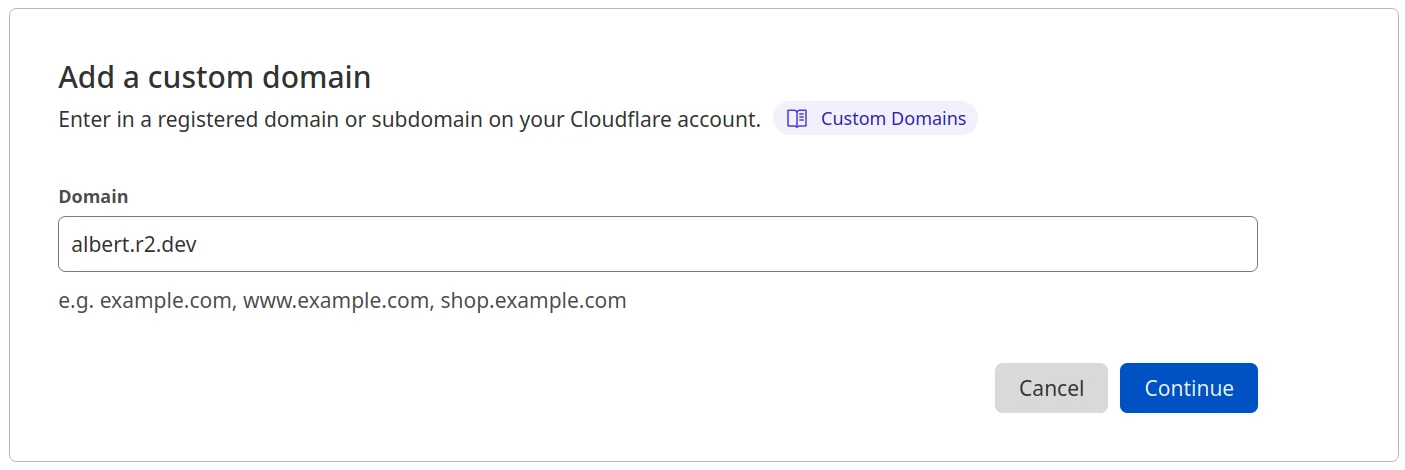
albert.r2.devas a custom domain in the "Domain Access" section.
- Wait a few seconds and then refresh the page. The custom domain should now show "Status: Active". In case "Access to Bucket" is "Not allowed", click the three dots besides the domain and then "Enable domain".

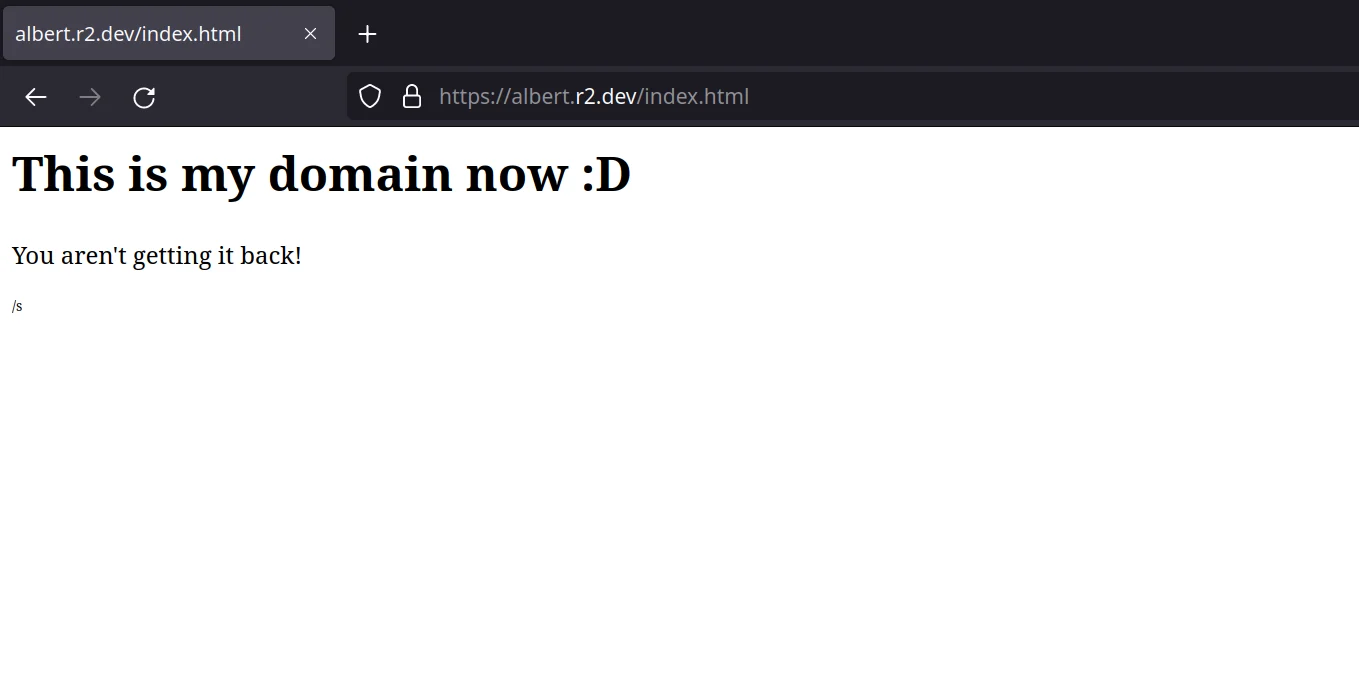
- Visit the custom domain and notice how it serves content from your R2 bucket.
Additionally, this vulnerability can also be used to block another domain from being used as an R2 custom domain. Simply repeat step one and two for the target zone/domain. If the user tries to add the domain as a custom domain for their R2 bucket, the API will throw an error and the custom domain will be activated in your account. The target domain will then serve the contents of your bucket until the user deletes the custom domain (which will show "Status: Error") on their end. An example of this is https://r2.walshy.dev/.
Cause
This vulnerability exists because the API does not check if the zone is active before adding the specified domain as an SSL for SaaS custom hostname. I presume taking over subdomains of r2.dev is only possible because they're in the same zone as the fallback origin, and/or there's already a CNAME record on *.r2.dev pointing to the fallback origin (public.r2.dev).
Impact
Every R2 bucket has a pub-<public_id>.r2.dev subdomain which, when public bucket access is enabled, will serve the contents of the bucket. This vulnerability can be used to take over those subdomains and instead have them serve content from your bucket.
Context
Cloudflare R2 is Cloudflare's object storage product. R2 buckets can be exposed publicly, and every bucket gets a pub-<public_id>.r2.dev subdomain which, when public bucket access is enabled, serves the contents of the bucket. R2 also offers a Custom Domain feature: a customer configures a CNAME pointing to the r2.dev bucket URL so that their own domain name serves bucket content.
The report concerns that Custom Domain feature. The researcher found that the feature could be used to take over any subdomain of r2.dev (and possibly the base domain) and have it serve the contents of an R2 bucket in the attacker's account, without any verification of ownership of the domain being added.
The program's summary states the attack was possible due to a lack of domain validation when a user adds a domain to the account. A control was later implemented to verify that the R2 Custom Domain added has been verified and belongs to the same Cloudflare account. After investigation the program concluded there was no evidence of abuse by anyone other than the researcher and no impact to any customer.
Setup
Access to R2 public buckets in the dashboard was, at the time, behind a flag. The server-side check for access to R2 public buckets had recently been removed, so the flag could be toggled client-side with an mitmproxy script:
import json
import mitmproxy
import re

class R2PublicBuckets:
	async def response(self, flow: mitmproxy.http.HTTPFlow):
		if re.match(r'https?://dash\.cloudflare\.com/api/v4/accounts/[0-9a-f]{32}/flags', flow.request.url):
			data = json.loads(flow.response.text)
			data['result']['workers']['r2_publicbuckets'] = True
			flow.response.text = json.dumps(data, separators=(',', ':'))

addons = [
	R2PublicBuckets()
]
The script matches responses from the dashboard flags endpoint for an account and sets result.workers.r2_publicbuckets to true in the JSON body before it reaches the browser. Because the server-side check had been removed, the client-side flag was enough to expose the public bucket functionality in the dashboard.
Finding it
The API does not check if the zone is active before adding the specified domain as an SSL for SaaS custom hostname. Adding a domain to an account and pointing it at an R2 bucket was enough for the domain to become active and serve the bucket's content. The researcher presumes taking over subdomains of r2.dev is only possible because they are in the same zone as the fallback origin, and/or there is already a CNAME record on *.r2.dev pointing to the fallback origin (public.r2.dev).
Exploitation
Step 1: Add r2.dev to the account
Add r2.dev to your Cloudflare account and follow the steps until you are asked to complete zone ownership verification.
Step 2: Create a bucket and add the custom domain
Create an R2 bucket if you do not already have one and add e.g. albert.r2.dev as a custom domain in the "Domain Access" section.
The screenshot shows the custom domain being added in the Domain Access section of the bucket.
Step 3: Refresh and activate
Wait a few seconds and then refresh the page. The custom domain should now show "Status: Active". In case "Access to Bucket" is "Not allowed", click the three dots besides the domain and then "Enable domain".
The screenshot shows the custom domain listed with status Active.
Step 4: Visit the custom domain
Visit the custom domain and notice how it serves content from your R2 bucket.
The screenshot shows the taken-over subdomain serving content from the researcher's bucket.
Blocking a domain
The same flaw can be used to block another domain from being used as an R2 custom domain. Repeat steps one and two for the target zone or domain. If the user tries to add the domain as a custom domain for their R2 bucket, the API will throw an error and the custom domain will be activated in your account. The target domain will then serve the contents of your bucket until the user deletes the custom domain (which will show "Status: Error") on their end. The researcher gives https://r2.walshy.dev/ as an example.
Root cause
The researcher presumes that taking over subdomains of r2.dev is only possible because they are in the same zone as the fallback origin, and/or because there is already a CNAME record on *.r2.dev pointing to the fallback origin (public.r2.dev).
Impact
Every R2 bucket has a pub-<public_id>.r2.dev subdomain which, when public bucket access is enabled, serves the contents of the bucket. The vulnerability could be used to take over those subdomains and instead have them serve content from the attacker's bucket. The same mechanism could also prevent a legitimate owner from using a domain as an R2 custom domain, with the domain serving the attacker's bucket content until the owner deletes the custom domain on their end. The program's summary records that there was no evidence of abuse by anyone other than the researcher and no impact to any customer.
Fix
A control was implemented to verify that the R2 Custom Domain added has been verified and belongs to the same Cloudflare account. That is the change the program describes; the report itself does not detail the implementation.
Variants to test
- Add a domain you do not control to a product that creates SSL for SaaS custom hostnames, and check whether it becomes Active without completing ownership verification. A positive result is the domain serving your content.
- Try names in the provider's own zones (for example subdomains of the fallback origin's zone) where a wildcard CNAME to the fallback origin may already exist. A positive result is a provider-owned name resolving to your bucket.
- Try the same flow on a target zone to see whether the API rejects the legitimate owner's later attempt to add the domain. A positive result is an error for the owner while the domain is active in your account.
Hunting notes
This kind of bug tends to hide in features that create custom hostnames or domains on shared infrastructure, especially where a wildcard record already points at a fallback origin. During recon, look for products that let customers attach their own domains and for provider-owned zones with wildcard DNS. The researcher showed impact by taking over a subdomain of r2.dev and serving bucket content from it, and by demonstrating the blocking effect on another domain.
What happened, in plain words
Cloudflare is a company that runs a large part of the internet's plumbing: it hosts websites, speeds them up and protects them. One of its products is called R2, which is a place to store files (photos, videos, backups, anything) in the cloud. Think of R2 as a very large online cupboard: you put files in a "bucket" and, if you want, you can let anyone on the internet fetch them.
To make files easy to reach, Cloudflare gives every bucket a web address that looks like pub-<public_id>.r2.dev. When public access is switched on for a bucket, anyone who visits that address gets the files inside. R2 also has a feature called Custom Domain: instead of using the long r2.dev address, a customer can point their own domain name at the bucket, so their visitors see a nicer address while the files still come from R2.
The program's summary says the attack worked because there was no domain validation when a user added a domain to the account. That meant any subdomain of r2.dev (and possibly the base domain) could be taken over and made to serve files from the attacker's bucket. In security language this is called a subdomain takeover: taking control of a name that should belong to someone else.
A control was later added to check that the R2 Custom Domain has been verified and belongs to the same Cloudflare account. After investigating, the program concluded that nobody other than the researcher had abused the issue and that no customer was affected.
The pieces you need to know
Before walking through the steps, here are the ideas that come up, explained from scratch.
- Domain and subdomain: a domain is a name on the internet, like
example.com. A subdomain is a name placed in front of it, likeshop.example.comoralbert.r2.dev. The part on the right (r2.dev) is the parent; the part on the left (albert) is the subdomain. Think of a domain as a street and a subdomain as a house number on that street. - DNS and CNAME: DNS is the internet's phone book: it turns names into the addresses of the computers that answer for them. A CNAME is a DNS entry that says "this name is really just another name, go look there instead". It is like a note on a door saying "I have moved, please go to this other address".
- Bucket: a container in cloud storage that holds files. In R2, each bucket can be made public so its files can be downloaded by anyone.
- API: the set of web addresses a website's own pages talk to behind the scenes. When you click a button in a dashboard, your browser usually sends a request to an API address and the server replies with data, often in a format called JSON (a way of writing structured data as text). Think of the dashboard as a waiter and the API as the kitchen: you never walk into the kitchen yourself, you tell the waiter what you want.
- Dashboard: the web page where a customer manages their Cloudflare account, buckets and domains.
- Flag: a setting, usually a true/false switch, that turns a feature on or off for an account. Companies often hide new features behind flags while they are being tested.
- Client-side and server-side: client-side means the work happens in your own browser; server-side means it happens on the company's computers. A check done only in the browser can be changed by the person using the browser, which is why important checks must happen on the server.
- mitmproxy: a tool that sits between your browser and the internet and lets you read and change the traffic going both ways. "Mitm" stands for man in the middle. It is like a postal worker who opens your letters, edits them and puts them back in the envelope.
- Zone: Cloudflare's word for a domain that has been added to an account and is managed by Cloudflare.
- Zone ownership verification: the step where Cloudflare asks you to prove that a domain is really yours, usually by adding a special DNS record. It is the equivalent of a bouncer asking for ID before letting you in.
- SSL for SaaS: a Cloudflare service that lets a company offer HTTPS (the padlock in the browser) for domain names belonging to its own customers. It creates what is called a custom hostname for each such name.
- Fallback origin: the default destination that SSL for SaaS sends traffic to when a custom hostname is set up. If a name is pointed at the fallback origin, requests for that name end up at whatever sits behind it.
- Wildcard record: a DNS entry that matches many names at once. A record on
*.r2.devanswers for every subdomain ofr2.dev, the same way a rule for "all apartments in the building" covers every flat without listing them one by one.
Setup: turning on the hidden feature
At the time of the report, access to R2 public buckets in the dashboard was behind a flag. The server-side check for access to that feature had recently been removed, which meant the flag was only enforced in the browser. The researcher could therefore flip the flag locally with an mitmproxy script, without needing any special permission from Cloudflare.
import json
import mitmproxy
import re

class R2PublicBuckets:
	async def response(self, flow: mitmproxy.http.HTTPFlow):
		if re.match(r'https?://dash\.cloudflare\.com/api/v4/accounts/[0-9a-f]{32}/flags', flow.request.url):
			data = json.loads(flow.response.text)
			data['result']['workers']['r2_publicbuckets'] = True
			flow.response.text = json.dumps(data, separators=(',', ':'))

addons = [
	R2PublicBuckets()
]
Line by line:
import json,import mitmproxyandimport reload three toolkits: one for reading and writing JSON text, one for mitmproxy itself, and one for pattern matching on text.class R2PublicBuckets:defines a small piece of code, called a class, that mitmproxy will use as an add-on.async def response(self, flow: mitmproxy.http.HTTPFlow):defines a function that mitmproxy calls every time a response comes back from a server. Theflowobject holds both the request that was sent and the response that came back.if re.match(r'https?://dash\.cloudflare\.com/api/v4/accounts/[0-9a-f]{32}/flags', flow.request.url):checks whether the request went to the dashboard's flags address for an account. The[0-9a-f]{32}part matches a 32-character account identifier made of digits and the letters a to f. Only replies from that address are touched; everything else passes through untouched.data = json.loads(flow.response.text)turns the reply body from text into a structured object the script can edit.data['result']['workers']['r2_publicbuckets'] = Truewalks into that object and sets the public buckets flag to true.flow.response.text = json.dumps(data, separators=(',', ':'))turns the edited object back into text and puts it into the response, so the browser receives the modified version.addons = [R2PublicBuckets()]registers the class with mitmproxy so it actually runs.
Because the server no longer checked the flag, the browser believed the feature was enabled and showed the public bucket options in the dashboard. This step was only preparation: it gave the researcher access to the part of the product where the real flaw lived.
Finding it
The API does not check if the zone is active before adding the specified domain as an SSL for SaaS custom hostname. Adding a domain to an account and pointing it at an R2 bucket was enough for the domain to become active and serve the bucket's files. The researcher presumes taking over subdomains of r2.dev is only possible because they are in the same zone as the fallback origin, and/or there is already a CNAME record on *.r2.dev pointing to the fallback origin (public.r2.dev). That meant an attacker could claim names such as albert.r2.dev and have them serve an attacker-controlled bucket.
Exploitation, step by step
Step 1: Add r2.dev to the account
Add r2.dev to your Cloudflare account and follow the steps until you are asked to complete zone ownership verification.
Step 2: Create a bucket and add the custom domain
Create an R2 bucket if you do not already have one and add e.g. albert.r2.dev as a custom domain in the "Domain Access" section.
The screenshot shows the custom domain being added in the Domain Access section of the bucket.
Step 3: Refresh and activate
Wait a few seconds and then refresh the page. The custom domain should now show "Status: Active". In case "Access to Bucket" is "Not allowed", click the three dots besides the domain and then "Enable domain".
The screenshot shows the custom domain listed with status Active. "Active" means Cloudflare has set up the name and is ready to answer requests for it. The extra click on "Enable domain" is only needed when the bucket access setting is off.
Step 4: Visit the custom domain
Visit the custom domain and notice how it serves content from your R2 bucket.
The screenshot shows the taken-over subdomain serving content from the researcher's bucket.
Blocking a domain
The same flaw can be used to block another domain from being used as an R2 custom domain. Repeat steps one and two for the target zone or domain. If the user tries to add the domain as a custom domain for their R2 bucket, the API will throw an error and the custom domain will be activated in your account. The target domain will then serve the contents of your bucket until the user deletes the custom domain (which will show "Status: Error") on their end. The researcher gives https://r2.walshy.dev/ as an example.
In plain words: the real owner's attempt to add the domain fails with an error, while the custom domain is active in the attacker's account and serves the attacker's bucket contents until the owner deletes the custom domain on their end, which shows "Status: Error".
Root cause
The researcher presumes that taking over subdomains of r2.dev is only possible because they are in the same zone as the fallback origin, and/or because there is already a CNAME record on *.r2.dev pointing to the fallback origin (public.r2.dev).
To unpack that: the product that creates custom hostnames (SSL for SaaS) was happy to create one for a name whose zone was not yet verified. The researcher's guess is that r2.dev subdomains were especially easy to claim because they live in the same zone as the fallback origin, and because a wildcard CNAME on *.r2.dev already points at public.r2.dev. The researcher presumes a CNAME record on *.r2.dev already points at public.r2.dev.
Impact
Every R2 bucket has a pub-<public_id>.r2.dev subdomain which, when public bucket access is enabled, serves the contents of the bucket. The vulnerability could be used to take over those subdomains and instead have them serve content from the attacker's bucket. The same mechanism could also prevent a legitimate owner from using a domain as an R2 custom domain, with the domain serving the attacker's bucket content until the owner deletes the custom domain on their end. The program's summary records that there was no evidence of abuse by anyone other than the researcher and no impact to any customer.
Fix
A control was implemented to verify that the R2 Custom Domain added has been verified and belongs to the same Cloudflare account. That is the change the program describes; the report itself does not detail the implementation.
Variants to test
These are ideas for looking for the same kind of mistake elsewhere. Each one describes what you would do and what a positive result looks like.
- Add a domain you do not control to a product that creates SSL for SaaS custom hostnames, and check whether it becomes Active without completing ownership verification. A positive result is the domain serving your content.
- Try names in the provider's own zones (for example subdomains of the fallback origin's zone) where a wildcard CNAME to the fallback origin may already exist. A positive result is a provider-owned name resolving to your bucket.
- Try the same flow on a target zone to see whether the API rejects the legitimate owner's later attempt to add the domain. A positive result is an error for the owner while the domain is active in your account.
Hunting notes
This kind of bug tends to hide in features that create custom hostnames or domains on shared infrastructure, especially where a wildcard record already points at a fallback origin. During recon, look for products that let customers attach their own domains and for provider-owned zones with wildcard DNS. The researcher showed impact by taking over a subdomain of r2.dev and serving bucket content from it, and by demonstrating the blocking effect on another domain.
Glossary
- API: the set of web addresses a website's pages talk to behind the scenes, usually exchanging data in JSON.
- Bucket: a container in cloud storage that holds files; in R2 it can be made public so anyone can download from it.
- Client-side: work done in your own browser, which the person using the browser can change.
- CNAME: a DNS entry that says one name is really another name, and requests should go there instead.
- Custom Domain: an R2 feature that lets a customer's own domain name serve the contents of a bucket.
- Custom hostname: a name that SSL for SaaS sets up so a company's customers can use HTTPS on their own domains.
- Dashboard: the web page where a Cloudflare customer manages their account, buckets and domains.
- DNS: the internet's phone book, turning names into the addresses of the computers that answer for them.
- Domain: a name on the internet, such as
example.com. - Fallback origin: the default destination SSL for SaaS sends traffic to when a custom hostname is set up.
- Flag: a true/false setting that turns a feature on or off for an account.
- HTTPS: the encrypted version of web traffic, shown by the padlock in the browser.
- JSON: a way of writing structured data as text, commonly used between browsers and APIs.
- mitmproxy: a tool that sits between your browser and the internet and lets you read and change the traffic in both directions.
- R2: Cloudflare's object storage product, used to store files in the cloud.
- Server-side: work done on the company's computers, which the person using the browser cannot change.
- SSL for SaaS: a Cloudflare service that provides HTTPS for domain names belonging to a company's own customers.
- Subdomain: a name placed in front of a domain, such as
albert.r2.devin front ofr2.dev. - Subdomain takeover: taking control of a name that should belong to someone else and serving your own content from it.
- Wildcard record: a DNS entry that matches many names at once, such as
*.r2.devmatching every subdomain ofr2.dev. - Zone ownership verification: the step where Cloudflare asks you to prove a domain is really yours, usually by adding a special DNS record.





