Captcha Bypass in Coinbase SignUp Form
The signup form's reCAPTCHA response was not validated on the server, so an attacker could submit the form with any value or none at all. This allowed creation of fake accounts and username enumeration.

- Triaged in 4 days
- Fixed in 57 days
- Paid in 4 days
- Disclosed after 2 months
Vulnerability description:
The g-recaptcha-response is not validated on the server-side when submitting a Signup form to the endpoint. Any or no value can be provided for this header
Step to reproduce:
- https://www.coinbase.com/signup
- Fill the input field and Validate the captcha.
- Trun on Brurp submit form and capture the request.
- Remove the g-recaptcha-response( response value) and foreword it.
Impact. Fake accounts can be created. Also username enumeration can be performed because no application will allow two email to choose same email.
Attachments
What the report shows
The target is the Coinbase signup form at https://www.coinbase.com/signup. The researcher found that the g-recaptcha-response value submitted with the form is not validated on the server side. The report states that any value, or no value at all, can be supplied for this field.
The reproduction steps are short:
- Open
https://www.coinbase.com/signup. - Fill in the input fields and validate the captcha.
- Turn on Burp, submit the form and capture the request.
- Remove the
g-recaptcha-responsevalue and forward the request.
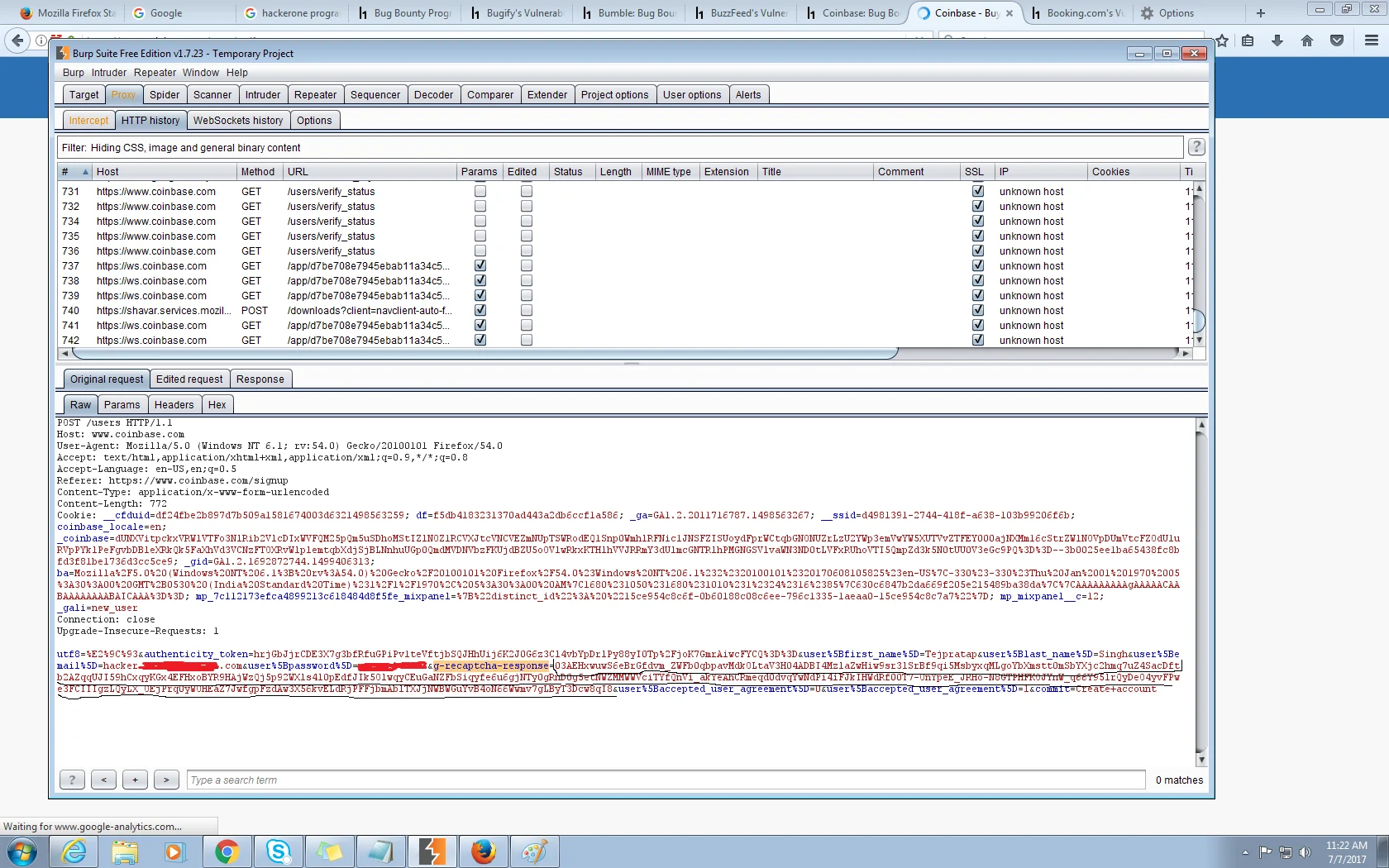
The two attachments show the request before and after the edit. The first is the original submission with the captcha response present.
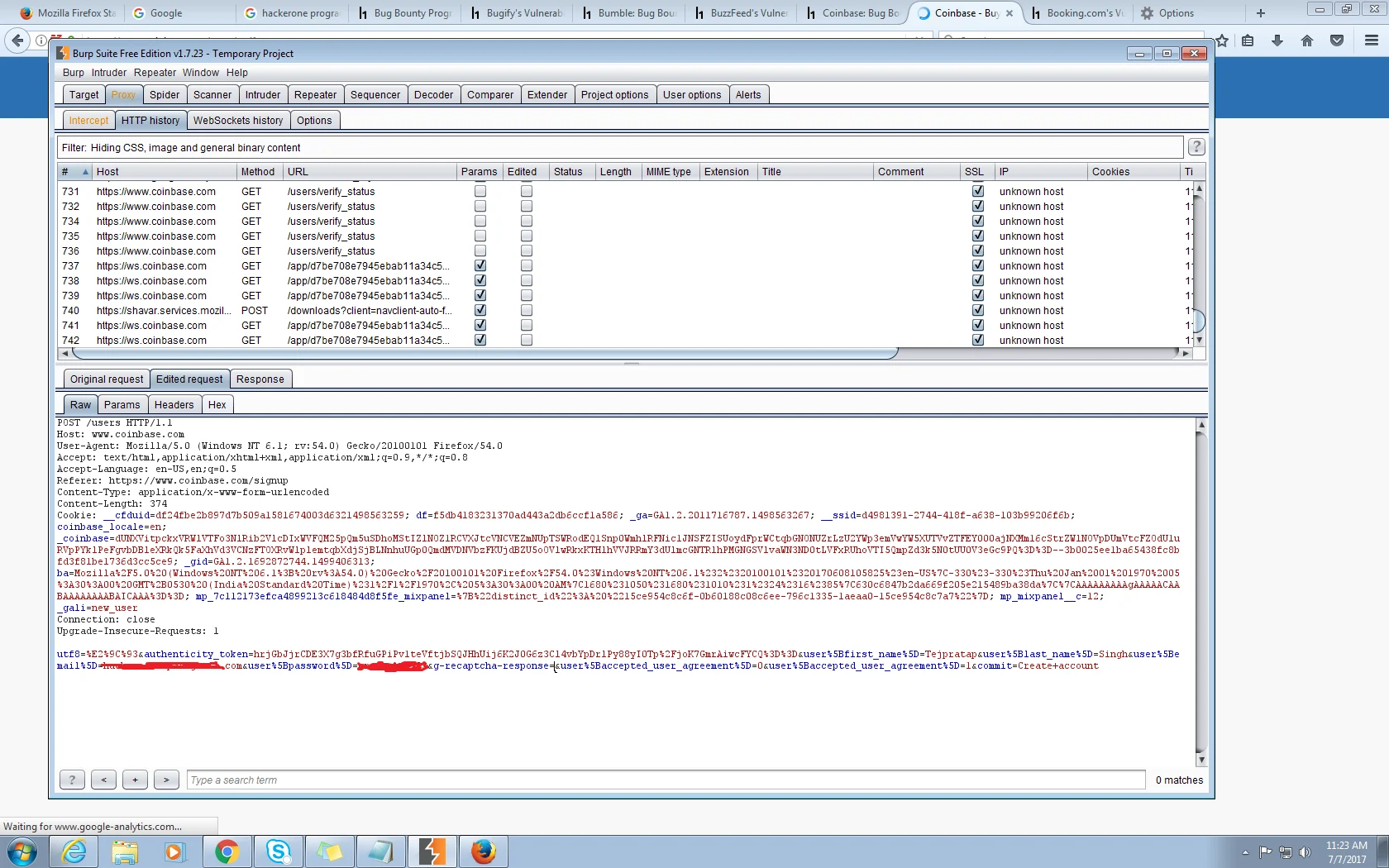
The second is the same request with the g-recaptcha-response value removed.
The report was disclosed on 5 September 2017 with a low severity, classified as a violation of secure design principles, and a bounty of 100.00 USD. The report does not describe a fix.
Root cause
The report says the g-recaptcha-response value is not validated on the server side. The signup page runs the captcha widget, but the backend that processes the form submission does not take the g-recaptcha-response token and verify it against the captcha provider's verification endpoint. Without that server-side check, the token is just another form field that the client controls, so deleting it or replacing it with arbitrary content changes nothing about whether the account is created.
Impact
As the report puts it, fake accounts can be created, because the captcha no longer limits automated signups. The researcher also notes that username enumeration can be performed, on the reasoning that no application will allow two accounts to choose the same email address. The researcher's reasoning is that no application will allow two accounts to choose the same email address.
How this kind of bug works
Captcha systems such as reCAPTCHA are designed around a token. The client-side widget produces a token after the user solves the challenge, and the server is supposed to send that token, together with the secret key, to the provider's verification endpoint. Only if the provider confirms the token as valid should the protected action proceed.
The bug class appears when the second half of that exchange is missing. The front end still renders the widget and still includes the token in the form, so the page looks protected, but the backend never asks the provider whether the token is genuine. Common variants include checking only that the field is non-empty, checking the token's format rather than its validity, verifying the token but ignoring the verification result, or verifying it only on some code paths (for example, the web form but not the underlying API endpoint that the form calls).
Because the token is generated on the client, an attacker who can skip the widget entirely, or who can replay a token, is not constrained by the challenge. The defence is always the same: a server-side verification call to the captcha provider on every request that the captcha is meant to protect, with the result enforced before any state change, and with the token treated as single-use where the provider supports it.
How to test for it
- Identify endpoints protected by a captcha: signup, login, password reset, contact forms, voucher or coupon redemption, and any public API that mirrors a protected form.
- Submit the form normally with a valid captcha and capture the request in an intercepting proxy.
- Replay the request with the captcha field removed entirely, with an empty value, and with a random or malformed value. Observe whether the server still performs the action.
- Replay the same token a second time. A token that is accepted twice suggests the server is not verifying it, or is verifying it without enforcing single use.
- Look for the API behind the form. Mobile apps and JavaScript front ends often call a JSON endpoint directly; test that endpoint with the captcha field omitted, since the check may exist only on the HTML route.
- A positive result is a successful action (account created, message sent, reset email triggered) with no valid captcha token, or with a token that the provider would reject.
Common false positives: the server may reject the request for an unrelated reason (validation error, rate limit, CSRF failure) and the tester may read that as a captcha bypass; the action may succeed but be queued for later review; or the endpoint may be protected by a different mechanism, such as device fingerprinting or a risk score, that happens to block the automated attempt. Confirm the bypass by completing the full flow end to end, ideally more than once, and check that the resulting account or action is real.
How it is fixed
The standard fix is to verify the g-recaptcha-response token server-side on every submission, by calling the captcha provider's verification endpoint with the secret key and the token, and to proceed only when the response confirms success. The verification must run before any account is created or any other state change, and must cover every route that reaches the same logic, including JSON APIs used by mobile clients. Tokens should be treated as single-use, and failures should return a generic error rather than a detailed one. Where enumeration is a concern, signup and reset flows should respond identically whether or not an address is already registered.
Hunting notes
Captcha checks are most often missing on the paths that were added later: the JSON API behind a web form, mobile app endpoints, password reset and email change flows, and older or internal-looking routes that share the same backend. Recon signals include a captcha widget on the HTML page but no corresponding verification call visible in the JavaScript, a form that posts to an API host different from the page, and endpoints that accept the same parameters as the form without the captcha field.
Pair the bypass with a concrete consequence, such as automated account creation or enumeration through differential responses, rather than reporting the missing check in isolation.
What happened, in plain words
Coinbase is a service where people buy, sell and hold cryptocurrency. Its signup page at https://www.coinbase.com/signup is where a new person creates an account. Like many public forms, it is protected by a captcha: a small challenge (ticking a box, picking images) meant to prove a human is filling in the form rather than an automated script.
A captcha works in two halves. The first half happens in your browser: the widget shows the challenge, you solve it, and the widget produces a long string of characters called a token. That token is placed into the form under the field name g-recaptcha-response and travels to the server with everything else you typed. The second half is supposed to happen on the server: the server takes that token, asks the captcha provider (Google, in the case of reCAPTCHA) whether it is genuine, and only creates the account if the answer is yes.
The researcher found that the second half was missing. The server accepted the signup form without ever checking the token. The report puts it simply: any value, or no value at all, can be supplied for this field.
Think of it like a nightclub with a bouncer at the door who checks your ticket, and a second door round the back with nobody standing there. The ticket check looks real from the street, but it protects nothing.
How the researcher proved it
The reproduction steps are short and need only a browser plus a tool that can pause and edit web traffic. The researcher used Burp, an intercepting proxy: software that sits between your browser and the website, so you can look at each request before it is sent and change it if you like.
- Open
https://www.coinbase.com/signup. - Fill in the input fields and validate the captcha.
- Turn on Burp, submit the form and capture the request.
- Remove the
g-recaptcha-responsevalue and forward the request.
Step 2 matters because it produces a normal, legitimate submission: the researcher first behaved like an ordinary user, so the captured request is exactly what the site expects. Step 3 matters because it freezes that request mid-flight. Step 4 is the actual test: the researcher removed the value and forwarded the request.
The two attachments show the request before and after the edit. The first is the original submission with the captcha response present.
The second is the same request with the g-recaptcha-response value removed.
The report does not include the raw request text, so the exact headers and parameters are not reproduced here. What it does tell us is that the value is not validated on the server side.
Why it matters
Two consequences are named in the report.
First, fake accounts can be created. The whole point of a captcha on a signup form is to make mass registration expensive: a script can fill in a form thousands of times a minute, but it cannot easily solve thousands of challenges. Remove the check and that cost disappears, so automated signups become practical.
Second, username enumeration can be performed. Enumeration means finding out which accounts exist on a service. The researcher's reasoning is that no application will let two people register the same email address, so the signup form must react differently when an address is already taken. The researcher's reasoning is that no application will let two people register the same email address, so the form must react differently when an address is already taken.
The report was disclosed on 5 September 2017, rated low severity, classified as a violation of secure design principles, with a bounty of 100.00 USD. It does not describe a fix.
In general, how this kind of bug works
Captcha systems such as reCAPTCHA are built around the token. The widget in the browser produces it after the challenge is solved, and the server is meant to send that token, together with a secret key that only the server knows, to the provider's verification endpoint. Only if the provider confirms the token should the protected action go ahead.
This bug class appears when that second half is missing. The page still shows the widget and still sends the token, so everything looks protected from the outside, but the backend never asks the provider whether the token is real. Common variants include checking only that the field is not empty, checking the token's shape rather than its validity, verifying the token but ignoring the answer, or verifying it on some routes but not others, for example the web form but not the JSON API the form calls behind the scenes.
Because the token is produced on the client, anyone who can skip the widget, or reuse a token, is not held back by the challenge. The defence is always the same: a server-side verification call to the provider on every request the captcha is meant to protect, with the result enforced before anything changes, and the token treated as single-use where the provider supports it.
In general, how to test for it
- Find endpoints protected by a captcha: signup, login, password reset, contact forms, voucher redemption, and any public API that mirrors a protected form.
- Submit the form normally with a valid captcha and capture the request in an intercepting proxy.
- Replay the request with the captcha field removed entirely, with an empty value, and with a random or malformed value. Watch whether the server still performs the action.
- Replay the same token a second time. A token accepted twice suggests the server is not verifying it, or not enforcing single use.
- Look for the API behind the form. Mobile apps and JavaScript front ends often call a JSON endpoint directly; test it with the captcha field omitted, since the check may exist only on the HTML route.
- A positive result is a successful action (account created, message sent, reset email triggered) with no valid token, or with a token the provider would reject.
Watch for false positives. The server may reject the request for an unrelated reason, such as a validation error, a rate limit or a CSRF failure, and that can look like a captcha block. The action may succeed but be queued for review. Or a different mechanism, such as device fingerprinting or a risk score, may be stopping the automated attempt. Confirm the bypass by completing the full flow end to end, ideally more than once, and check that the resulting account or action is real.
In general, how it is fixed
The standard fix is to verify the g-recaptcha-response token on the server for every submission, by calling the provider's verification endpoint with the secret key and the token, and to continue only when the answer confirms success. The check must run before any account is created or any other change happens, and must cover every route that reaches the same logic, including JSON APIs used by mobile clients. Tokens should be single-use, and failures should return a generic error rather than a detailed one. Where enumeration is a concern, signup and reset flows should respond identically whether or not an address is already registered.
Glossary
- Captcha: a challenge on a web form meant to prove a human is filling it in rather than a script.
- reCAPTCHA: Google's captcha service, which issues a token after the challenge is solved.
- Token: a string of characters produced by one system and checked by another to prove something, here that a captcha was solved.
g-recaptcha-response: the form field name that carries the reCAPTCHA token from the browser to the server.- Server-side validation: checking a value on the server, where the user cannot change the checking code, rather than only in the browser.
- Client-side: anything that happens in the user's browser, and can therefore be inspected and altered by the user.
- Request: the message a browser sends to a website asking for a page or submitting data.
- Intercepting proxy: software, such as Burp, that sits between browser and website so requests can be viewed and edited before they are sent.
- Forward: to send a captured request on to the server after viewing or editing it.
- Endpoint: a specific address on a server that accepts requests, such as a signup form handler or an API route.
- API: an interface through which software talks to a service, often returning data in JSON rather than web pages.
- JSON: a text format for structured data, widely used by APIs.
- Enumeration: discovering which accounts or items exist on a service, often by observing different responses.
- CSRF: cross-site request forgery, an attack where another site makes your browser send a request you did not intend; CSRF protections can also cause requests to be rejected.
- Rate limit: a cap on how many requests a client may make in a period of time.
- False positive: a test result that looks like a finding but is caused by something else.
- Severity: a rating of how serious a vulnerability is, here low.
- Bounty: a payment made by a programme to a researcher who reports a valid vulnerability.





