Bypass Filter on link of build
The build sync endpoint accepted a user-supplied link in a custom format, bypassing the intended link format check.

- Triaged in 7 hours
- Fixed in 3 days
- Paid in 3 days
- Disclosed after 3 days
Summary:
Hello team, I found that a valid build will have a link with the following format
https://3d.cs.money/item/0UkWN8vh2R
If you save a build with /api/build/save. It will return a link to sync with your save builds
The bug occurs when web app sync, you can custom the link of build with whatever you want with the format
//YOUR_LINK/item/WHAT_EVER_YOU_WANT
Steps To Reproduce:
[add details for how we can reproduce the issue]
- Make a build. Save build. Intercept request sync
- Edit request sync. For example:
POST /sync HTTP/1.1
Host: 3d.cs.money
User-Agent: Mozilla/5.0 (Windows NT 10.0; Win64; x64; rv:80.0) Gecko/20100101 Firefox/80.0
Accept: application/json, text/plain, */*
Accept-Language: vi-VN,vi;q=0.8,en-US;q=0.5,en;q=0.3
Content-Type: application/json;charset=utf-8
Content-Length: 3455
Origin: https://3d.cs.money
Connection: close
Referer: https://3d.cs.money/item/0UkWN8vh2R
Cookie: __cfduid=dd4a5ae822200c2e5a6622942c8e9b5c61600828055; TEST_GROUP=6; UUID3D=z8yNnunP7rEULv4; _ga=GA1.1.123687832.1600828067; _ga_HY7CCPCD7H=GS1.1.1600999331.12.1.1600999740.56; _gid=GA1.2.745101638.1600828070; language=en; sellerid=2351662; theme=darkTheme; pro_version=false; tmr_reqNum=84; tmr_lvid=a86af86a1e546621ee998805dedf795e; tmr_lvidTS=1600829462593; _ym_uid=1600829464576681153; _ym_d=1600829464; prism_89846284=886529b3-1b72-491d-8e3e-fb061941ce6b; amplitude_id_222f15bd4f15cdfaee99c07bcc641e5fcs.money=eyJkZXZpY2VJZCI6ImJlNWM1YjhmLWE3OTQtNDZiNC1iMzg5LWU2MzljYThkZTNiNlIiLCJ1c2VySWQiOiI3NjU2MTE5ODM4OTQwODM5MiIsIm9wdE91dCI6ZmFsc2UsInNlc3Npb25JZCI6MTYwMDk1MzY5NTUyOCwibGFzdEV2ZW50VGltZSI6MTYwMDk1Mzc5MzEyNywiZXZlbnRJZCI6NDAsImlkZW50aWZ5SWQiOjE4LCJzZXF1ZW5jZU51bWJlciI6NTh9; _fbp=fb.1.1600829468046.1736484188; csmoney_ga=GA1.2.348732095.1600829528; csmoney_ga_gid=GA1.2.929098124.1600829528; type_device=desktop; support_token=6f4a7515e3000799c5b9ffc20b3bdb808e065ec4a7d77c557bf14b72922136d9; amplitude_id_c14fa5162b6e034d1c3b12854f3a26f5cs.money=eyJkZXZpY2VJZCI6IjU0MTdhZjg4LTE0NDgtNDg3NC05YmNkLTFmMjczOGIwY2EyZFIiLCJ1c2VySWQiOiI3NjU2MTE5ODM4OTQwODM5MiIsIm9wdE91dCI6ZmFsc2UsInNlc3Npb25JZCI6MTYwMDk1MzYyMjg4MSwibGFzdEV2ZW50VGltZSI6MTYwMDk1MzYyMjg4MywiZXZlbnRJZCI6Mjk5LCJpZGVudGlmeUlkIjo0LCJzZXF1ZW5jZU51bWJlciI6MzAzfQ==; amp_d77dd0=nCXsKPRaEaZ_9OrPDjz6cM...1ej04bc91.1ej04d4lf.0.1.1; amp_d77dd0_cs.money=nCXsKPRaEaZ_9OrPDjz6cM...1ej04bc98.1ej04frr7.1p.2.1q; steamid=76561198389408392; avatar=https://steamcdn-a.akamaihd.net/steamcommunity/public/images/avatars/9e/9e972864d883f1b2e12cde94c8f83ef005c22438_medium.jpg; username=khoadeptrai; thirdparty_token=83a3e70e33f5a91ced64ee3a0fd005d80e119cb762c2d82449707c0eba6efcf1; trade_link=https%3A%2F%2Fsteamcommunity.com%2Ftradeoffer%2Fnew%2F%3Fpartner%3D429142664%26token%3DI1hTESVQ; _privy_undefined=%7B%22uuid%22%3A%22aa550b56-d1d7-425a-a4f8-28b3b53d6a71%22%7D; _privy_0A13181283E3DE28238D8AB1=%7B%22uuid%22%3A%22aa550b56-d1d7-425a-a4f8-28b3b53d6a71%22%2C%22variations%22%3A%7B%7D%2C%22country_code%22%3A%22VN%22%2C%22region_code%22%3A%22VN_35%22%2C%22postal_code%22%3A%22%22%7D

{"backgrounds":["/assets/images/back3.jpeg"],"builds":[{"href":"//asd.com/item1/cc","name":"AK-47 | Redline (Minimal Wear)\"","date":1601000408019}],"edition":1}
PoC
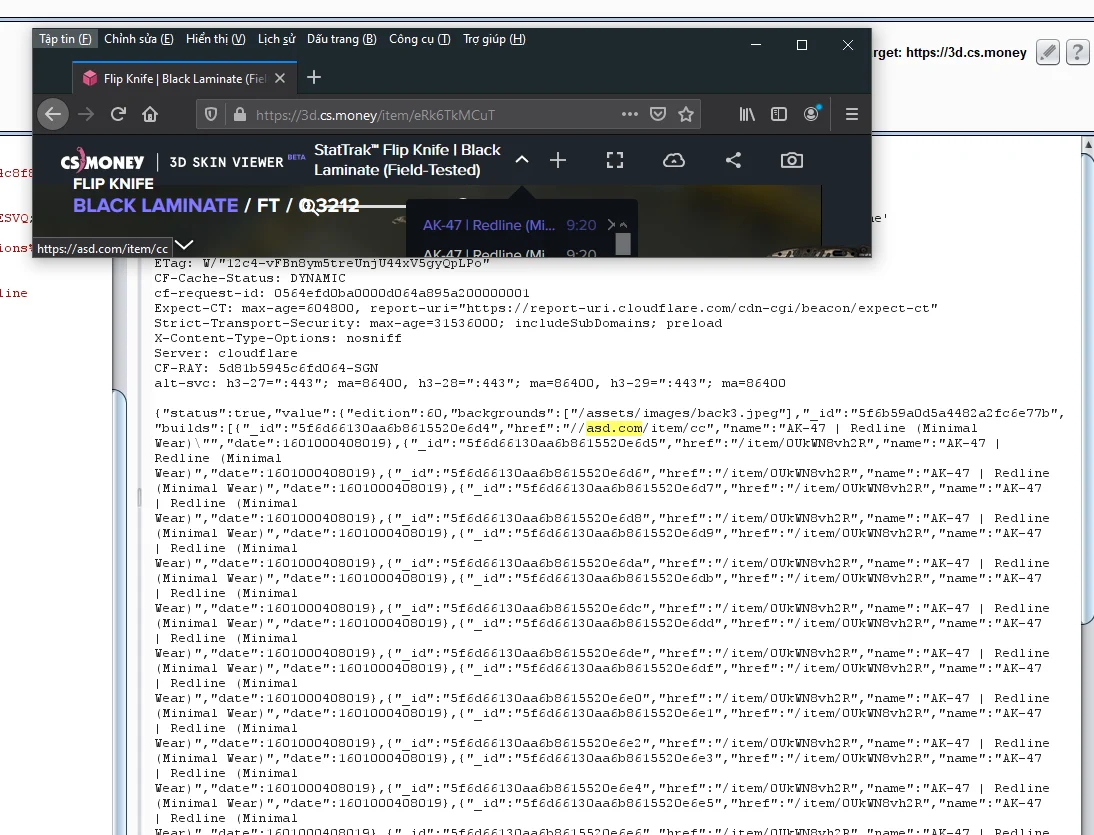
Impact
Bypass the format (regex?) on the link of a build
What the report shows
The target is the 3D build feature on 3d.cs.money. A saved build is reachable through a link of the form:
https://3d.cs.money/item/0UkWN8vh2R
Saving a build through /api/build/save returns a link that is used to sync the saved build. The researcher found that the sync step lets the client supply the link of the build, and that the value is not restricted to the expected format. The claimed bypass is that a build link can be set to:
//YOUR_LINK/item/WHAT_EVER_YOU_WANT
The reproduction is short:
- Make a build and save it.
- Intercept the sync request.
- Edit the sync request so that the build's
hrefpoints at an arbitrary host, for example:
POST /sync HTTP/1.1
Host: 3d.cs.money
User-Agent: Mozilla/5.0 (Windows NT 10.0; Win64; x64; rv:80.0) Gecko/20100101 Firefox/80.0
Accept: application/json, text/plain, */*
Accept-Language: vi-VN,vi;q=0.8,en-US;q=0.5,en;q=0.3
Content-Type: application/json;charset=utf-8
Content-Length: 3455
Origin: https://3d.cs.money
Connection: close
Referer: https://3d.cs.money/item/0UkWN8vh2R
Cookie: [redacted]

{"backgrounds":["/assets/images/back3.jpeg"],"builds":[{"href":"//asd.com/item1/cc","name":"AK-47 | Redline (Minimal Wear)\"","date":1601000408019}],"edition":1}
The body is JSON. The builds array holds objects with href, name and date fields, plus a top-level backgrounds array and an edition number. The edited href is //asd.com/item1/cc, a protocol-relative URL pointing at a different host. The proof of concept screenshot shows the result of the sync with that value in place.
The report records the impact as bypassing the format check (the researcher guesses a regex) on the link of a build. It gives no bounty, no CVSS score and no fix details.
Root cause
The report does not show the server-side code, so the exact validation mistake is not established. The report only states that the format check is bypassed and guesses a regex is involved. The report only states that the format check is bypassed; it does not show the server-side code.
Impact
The report frames the impact as bypassing the format restriction on a build link. What an attacker can do with a stored off-origin link depends on where that link is rendered: if it is used as an anchor or redirect target, a victim following a shared build could be sent to an attacker-controlled host. The report does not demonstrate that rendering step, so the practical consequence beyond the bypass itself is not established here.
How this kind of bug works
URL validation bugs appear wherever an application takes a URL from user input and later trusts it: stored links, redirect parameters, webhook callbacks, avatar or image URLs, and share links. The failure is usually one of these:
- The validator checks for a substring or a loose pattern rather than parsing the URL and comparing the parsed host against an allowlist.
- The validator assumes an absolute URL with a scheme, so protocol-relative values (
//host/path), backslash variants, userinfo tricks (https://expected@evil), or encoded characters slip through. - Validation happens on input but the value is later normalised differently by the browser or by a second component, so the checked string and the used string differ.
Because browsers resolve relative and protocol-relative references against the current page, a stored value like //evil.example/x becomes a link to another origin when rendered. The defence is to parse the value with a real URL parser, require an explicit scheme from an allowlist, and compare the host exactly against expected values, rejecting anything that does not match.
How to test for it
Look for features where the client sends a URL or link that the server stores and later returns or renders: save/sync endpoints, profile fields, share links, redirect parameters.
- Capture the request that saves the object and note every field that looks like a URL or path.
- Replace the value with a protocol-relative reference to a host you control, keeping any expected path segment so loose checks still pass.
- Also try an absolute URL to your host, a URL with the expected host in the userinfo position, and encoded variants of each.
- Re-fetch the object and check whether the stored value is returned unchanged and, more importantly, whether it is rendered as a link or used in a redirect.
A positive result is a stored value that points at your host and is used as a navigable link or redirect target when a victim views the object. A value that is stored but only ever displayed as inert text is a much weaker finding. Common false positives: the server normalises the value back to the expected host on read, the link is rendered with rel="nofollow" and no navigation, or the field is only used server-side in a context where the host is irrelevant. Confirm the rendering step before reporting.
How it is fixed
- Parse the submitted URL server-side and require an explicit scheme from an allowlist.
- Compare the parsed host exactly against the expected origin, rejecting protocol-relative and userinfo forms.
- Rebuild the stored link from trusted components (fixed origin plus a validated identifier) instead of storing the raw client value.
- Apply the same validation on read, so previously stored bad values cannot be rendered.
Hunting notes
These bugs cluster around save and sync endpoints for user-generated content, share features, and anything that produces a link a user can send to someone else. Recon signals include JSON bodies with href, url, link or redirect fields, and responses that echo a client-supplied path back. To make the report land, show the full chain: the edited request, the stored value coming back, and the rendered link or redirect that a victim would follow. Without that last step the finding reads as a validation gap rather than an exploitable issue.
What happened, in plain words
CS Money is a website where people trade and show off in-game items. One of its features, on the site 3d.cs.money, lets you build a small 3D scene (a "build") and save it. Each saved build gets its own web address, so you can share it with other people. A normal build link looks like this:
https://3d.cs.money/item/0UkWN8vh2R
When you save a build through /api/build/save, the answer includes a link used to sync (keep in step) your saved builds. The researcher found that during this sync step the link of the build can be customised, and the value is not restricted to the expected format. In theory the link should always point back at 3d.cs.money, but the researcher was able to put a completely different website in there, in this shape:
//YOUR_LINK/item/WHAT_EVER_YOU_WANT
A link starting with // and no https: in front is called protocol-relative: the browser fills in the same scheme as the page you are on, but uses whatever host follows the //. So //asd.com/item1/cc means "go to asd.com", not to CS Money. The report calls this a bypass of the format check on the build link, and guesses that a regex (a text pattern used to check input) is what was bypassed. The report gives no bounty, no CVSS score and no fix details.
The steps, line by line
The reproduction is short:
- Make a build and save it. This gives you a real, working build with a normal link.
- Intercept the sync request. "Intercept" means using a tool that sits between your browser and the server and lets you pause and edit traffic before it is sent. This matters because to change the link you have to catch the request in flight.
- Edit the sync request so the build's
href(the field that holds the link) points at another host. The researcher's example request looks like this:
POST /sync HTTP/1.1
Host: 3d.cs.money
User-Agent: Mozilla/5.0 (Windows NT 10.0; Win64; x64; rv:80.0) Gecko/20100101 Firefox/80.0
Accept: application/json, text/plain, */*
Accept-Language: vi-VN,vi;q=0.8,en-US;q=0.5,en;q=0.3
Content-Type: application/json;charset=utf-8
Content-Length: 3455
Origin: https://3d.cs.money
Connection: close
Referer: https://3d.cs.money/item/0UkWN8vh2R
Cookie: [redacted]

{"backgrounds":["/assets/images/back3.jpeg"],"builds":[{"href":"//asd.com/item1/cc","name":"AK-47 | Redline (Minimal Wear)\"","date":1601000408019}],"edition":1}
What each part means:
POST /sync HTTP/1.1is the request line: it asks the server at path/syncto accept some data.POSTis the method used when you send data to a server.Host: 3d.cs.moneysays which website the request is for.User-Agent,AcceptandAccept-Languagedescribe the browser and what kind of answer it can handle. They are normal browser headers (extra labels attached to a request).Content-Type: application/json;charset=utf-8says the body is JSON, a common text format for structured data.Content-Length: 3455is the size of the body in bytes.OriginandReferertell the server which page the request came from. Here both point at CS Money, which is what a real browser would send.Cookie: [redacted]is the block of cookies. A cookie is a small piece of data the site stored in your browser earlier, often used to recognise your logged-in session. It is sensitive, so it is hidden here.- The blank line separates the headers from the body.
- The body is the JSON.
backgroundsis a list of background images,editionis a number, andbuildsis a list of build objects. Each build hashref(the link),name(the title) anddate(a timestamp). The edited part is"href":"//asd.com/item1/cc", which now points atasd.cominstead of CS Money.
The screenshot shows the result of the sync with that edited value in place.
Why this matters
A link is something a person clicks. If a site lets a user store a link to a different website under the site's own name, then a shared build can quietly send a visitor somewhere else. That is the worry behind this class of bug. The report itself only shows that the format check was bypassed; it does not show the stored link being displayed as a clickable link or used to redirect anyone, so how far the problem goes is not established here.
In general, how this kind of bug works
URL validation bugs appear wherever a site takes a web address from the user and later trusts it: saved links, redirect parameters, webhook callbacks, avatar or image addresses, share links. The usual mistakes are:
- The check looks for a piece of text or a loose pattern instead of properly reading the address and comparing the host (the domain part) against a list of allowed ones.
- The check assumes the address starts with something like
https://, so a protocol-relative value such as//host/pathslips past. Other tricks include backslashes, putting the expected host before an@(as inhttps://expected@evil), and encoded characters. - The value is checked when it comes in but handled differently later by the browser or another part of the system, so the checked text and the used text are not the same.
Browsers resolve relative and protocol-relative addresses against the current page, so a stored //evil.example/x becomes a link to another site when it is shown. The fix is to read the value with a real URL parser, require an explicit scheme from an allowlist, and compare the host exactly, rejecting anything that does not match.
In general, how to test for it
Look for features where the browser sends a link or address that the server stores and later returns or displays: save and sync endpoints, profile fields, share links, redirect parameters.
- Capture the request that saves the object and note every field that looks like a URL or path.
- Replace the value with a protocol-relative reference to a host you control, keeping any expected path segment so loose checks still pass.
- Also try a full address to your host, an address with the expected host before an
@, and encoded versions of each. - Fetch the object again and check whether the stored value comes back unchanged and, more importantly, whether it is shown as a link or used in a redirect.
A positive result is a stored value that points at your host and is used as a clickable link or redirect when a victim views the object. A value that is stored but only ever shown as plain text is a much weaker finding. Common false positives: the server turns the value back into the expected host when reading it, the link is shown without being clickable, or the field is only used on the server where the host does not matter. Confirm the display step before reporting.
In general, how it is fixed
- Read the submitted address on the server and require an explicit scheme from an allowlist.
- Compare the host exactly against the expected origin, rejecting protocol-relative and
@forms. - Rebuild the stored link from trusted parts (a fixed origin plus a checked identifier) instead of storing the raw value from the browser.
- Apply the same check when reading, so bad values stored earlier cannot be shown.
Glossary
- Build: a saved 3D scene on the site, with its own shareable link.
- Endpoint: a specific address on a server that accepts a particular kind of request, such as
/sync. - Request: the message a browser sends to a server asking it to do something.
- Header: an extra label attached to a request or response, such as
HostorContent-Type. - Cookie: a small piece of data a site stores in your browser, often to recognise your logged-in session.
- Token: a value used to prove identity or permission, similar in role to a cookie.
- JSON: a text format for structured data, built from lists and named fields.
- Intercept: pause and edit traffic between browser and server using a tool.
- Protocol-relative URL: an address starting with
//that borrows the current page's scheme but uses the host that follows. - Host: the domain part of an address, such as
3d.cs.moneyorasd.com. - Origin: the combination of scheme, host and port that identifies a website.
- Regex: a text pattern used to check whether input has an expected shape.
- Allowlist: a list of values that are explicitly permitted.
- URL validation: checking that a supplied address is one the site is willing to trust.
- Redirect: sending a visitor automatically from one address to another.
- CVSS: a standard score for how serious a security issue is.
- Severity: a simple label, such as low, for how serious an issue is.