Pixel Flood Attack leads to Application level DoS

- Triaged in 8 days
- Fixed in 2 months
- Paid in 9 days
- Disclosed after 2 months
Summary:
Hello Team, I had gone through your policy and I saw that DoS is out of scope but I am not sure about Application level DoS. The another reason to report this attack because it affects real customers who want to chat with your support team. I had tested this with two accounts
- From Account 1 I had tried to send 64K * 64K resolution image
- Simultaneously from Account 2 I had tried to send normal image (with different Internet Connection).
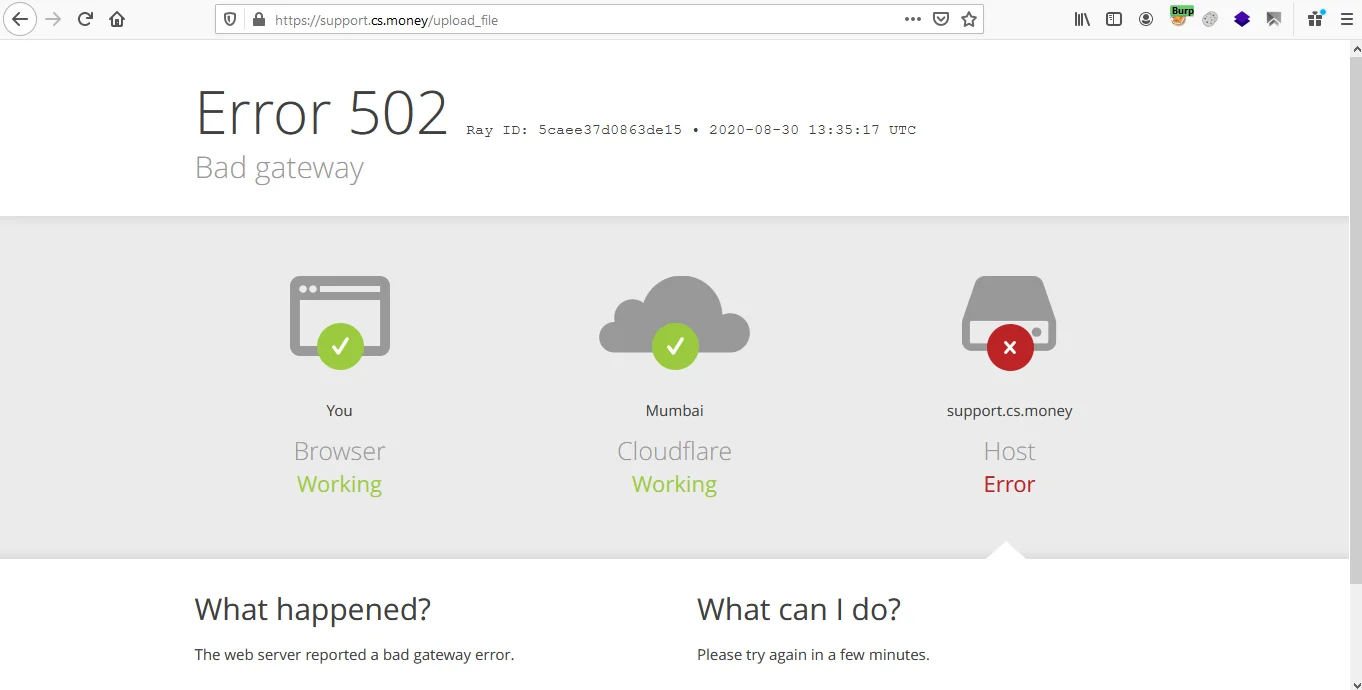
- The response was 502 for both images.
Steps To Reproduce:
- Go to cs.money and login with Account1, Login Account2 on different device with different Internet Connection.
- Now Find Support symbol.
- Click on attachments and upload "lottapixel.jpg" from Account1.
- Simultaneously upload normal image from Account2.
Supporting Material/References:
https://hackerone.com/reports/752073 https://hackerone.com/reports/752010 If you need more information please let me know.
- [attachment / reference]
From: Device 1, Account1 Image "lottapixel.jpg" is Payload Image "502.PNG" is proof of attack is successful.
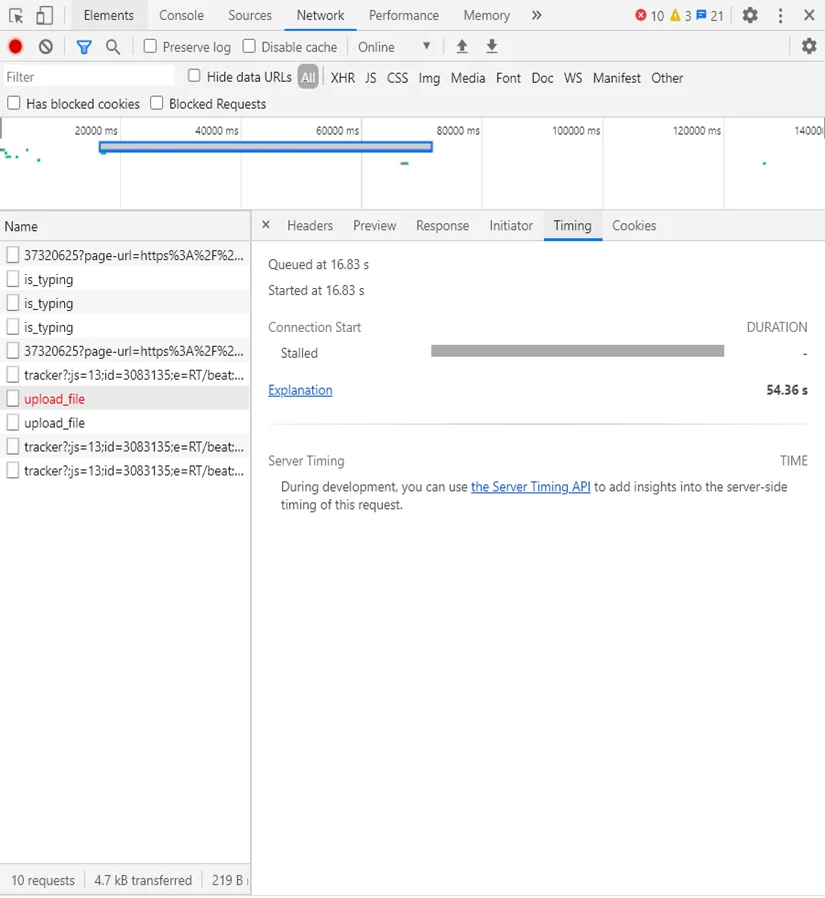
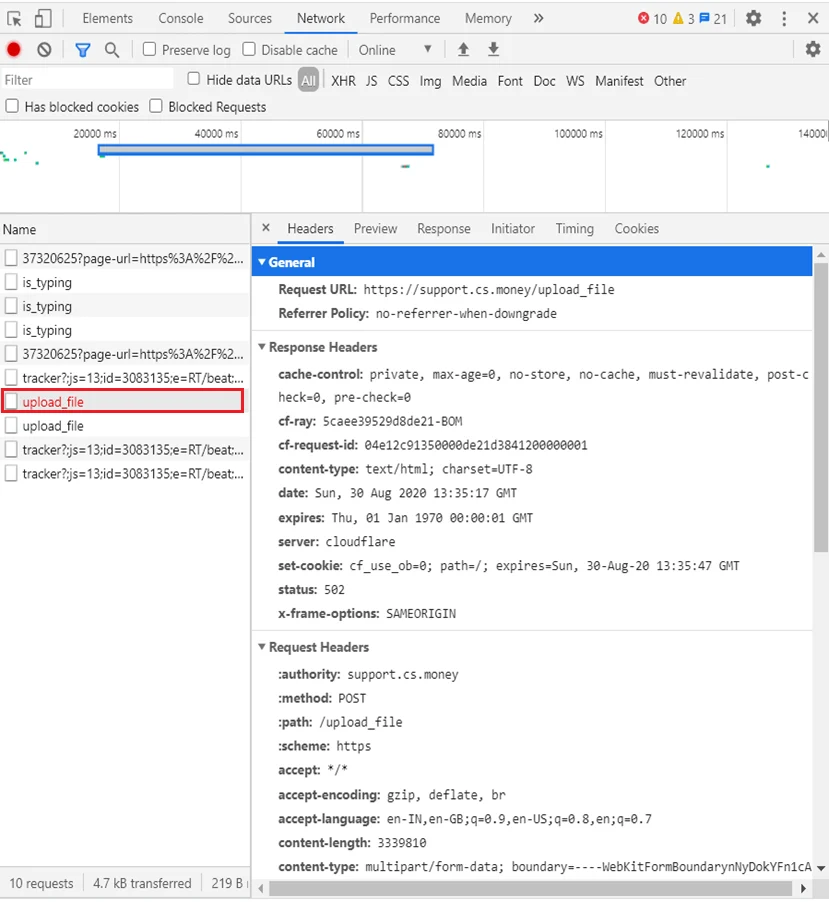
From: Device 2, Account2 Image "upload timing from account2.png" and "Account2.png" is proof that real users are also affected.
Impact
Real User are not able to send images to the support team. It affects to the availability of resource. I had recorded 1.2 min downtime. Thanks
Attachments
Context
The target is the CS Money platform, and the specific asset is support.cs.money, the support chat where customers talk to the support team and can attach images to their messages. The feature under test is the attachment upload in that support chat: a logged-in user picks an image and sends it to support. The report is filed under Uncontrolled Resource Consumption and was rated low severity, with a 200.00 USD bounty, disclosed on 2020-11-05.
The researcher opens by noting that the program's policy puts DoS out of scope, but that it was not clear whether application level DoS was covered. The second reason given for reporting is that the attack affects real customers who want to chat with the support team.
Setup
The test needs two accounts and two separate devices on two different Internet connections:
- Account 1 on Device 1, used to send the oversized image.
- Account 2 on Device 2, used to send a normal image at the same time.
The payload is an image named lottapixel.jpg with a resolution of 64K * 64K. The report does not describe how that file was produced.
Finding it
The researcher sent an image with a resolution of 64K * 64K through the support chat attachment feature. The researcher noted that DoS is out of scope in the policy but was not sure whether application level DoS was covered.
Exploitation
Step 1: Prepare both sessions
Go to cs.money and log in with Account 1. Log in with Account 2 on a different device with a different Internet connection.
Step 2: Open the support chat
Find the support symbol on the site and open the chat. This is the feature that carries the attachment upload.
Step 3: Send the oversized image from Account 1
Click on attachments and upload lottapixel.jpg from Account 1. The file is the payload: a 64K * 64K resolution image.
Step 4: Send a normal image from Account 2 at the same time
Simultaneously upload a normal image from Account 2.
Result
The response was 502 for both images. Account 1's payload upload failed, and so did Account 2's ordinary upload, which is the evidence that the effect is not limited to the attacker's own request.
The screenshot 502.PNG is the proof, from Device 1 and Account 1, that the attack succeeded. The payload image lottapixel.jpg itself is included as an attachment in the report.
From Device 2 and Account 2, upload timing from account2.png and Account2.png are the proof that real users are also affected.
Root cause
The report does not analyse the server-side code. What it establishes is behavioural: submitting a 64K * 64K image through the support chat attachment upload causes the application to return 502, and a concurrent ordinary upload from a different account and a different connection also gets 502. The report does not say which component processes the image, whether there is a size or dimension limit, or whether any limit was bypassed.
Impact
Real users are not able to send images to the support team. The attack affects the availability of the resource. The researcher recorded 1.2 min of downtime.
Fix
Variants to test
- Try other extreme dimensions, for example a very wide but short image or a very tall but narrow one, to see whether the limit is on total pixels or on one axis. A positive result is a 502, a timeout, or a stalled upload for a concurrent ordinary request.
- Try other image formats that the upload accepts, since decoders differ in how they allocate memory. A positive result is the same cross-account failure with a different file type.
- Try the same oversized image on other attachment points in the product, such as profile pictures or dispute evidence, if they exist. A positive result is the same 502 for a concurrent ordinary upload on that path.
- Try a smaller but still large image to find the threshold at which the failure starts. A positive result is a reproducible boundary between images that upload normally and images that break the path.
Hunting notes
This kind of bug hides in any feature that accepts user-supplied images and processes them server-side: support chats, avatars, KYC document uploads, marketplace item photos. During recon, look for upload endpoints that accept images and check whether the client or the server enforces dimension limits, not just file size. The signal is an upload that is accepted by the client with no complaint about resolution.
The report includes a second account on a second device and a second Internet connection sending an ordinary image at the same time, plus a screenshot of the 502 and a recorded downtime of 1.2 min. That turns a single failed upload into evidence that other users are affected, which is what the report needed given that DoS was nominally out of scope.
What happened, in plain words
CS Money is a website where people trade in-game items. It has a support chat, a place where customers can write to the support team and attach pictures to their messages. That chat lives at support.cs.money.
The researcher found that while one account uploaded a picture with a resolution of 64K * 64K through the chat's attachment feature, a normal upload from a second account also failed. While the huge picture was being sent from one account, a second account on a second device and a second Internet connection tried to send an ordinary picture, and both uploads came back with a 502 error. A 502 is the error a web server shows when something behind it is not answering properly, a bit like a shop assistant telling you the stockroom is not responding.
The report is filed under a category called Uncontrolled Resource Consumption, which simply means software using more memory or processing power than it should because nobody put a limit on it. It was rated low severity, paid a 200.00 USD bounty, and was disclosed on 2020-11-05.
The researcher starts by saying that the program's policy puts DoS out of scope, but that it was not clear whether application level DoS was covered. DoS means denial of service: making a service unavailable to the people who need it. The second reason given for reporting is that the attack affects real customers who want to chat with the support team.
The setup
The test needs two accounts and two separate devices on two different Internet connections:
- Account 1 on Device 1, used to send the oversized image.
- Account 2 on Device 2, used to send a normal image at the same time.
The payload, meaning the file that does the damage, is an image named lottapixel.jpg with a resolution of 64K * 64K. Resolution is the number of pixels across and down; 64K means 65,536, so this is an image of 65,536 by 65,536 pixels. The report does not describe how that file was produced.
Why two connections? If both uploads came from the same laptop on the same home Internet, a failure could just mean the tester's own connection was busy. Two separate connections rule that out.
Finding it
The researcher sent an image with a resolution of 64K * 64K through the support chat attachment feature. A server is the computer that runs the website and answers the browser's requests. The researcher noted that DoS is out of scope in the policy but was not sure whether application level DoS was covered.
Exploitation
Step 1: Prepare both sessions
Go to cs.money and log in with Account 1. Log in with Account 2 on a different device with a different Internet connection. A session is simply the state of being logged in: the site remembers who you are, usually by storing a small piece of data in your browser, often called a cookie.
Step 2: Open the support chat
Find the support symbol on the site and open the chat. This is the feature that carries the attachment upload. An attachment is a file, here an image, sent along with a message.
Step 3: Send the oversized image from Account 1
Click on attachments and upload lottapixel.jpg from Account 1. The file is the payload: a 64K * 64K resolution image.
Step 4: Send a normal image from Account 2 at the same time
Simultaneously upload a normal image from Account 2.
Result
The response was 502 for both images. Account 1's payload upload failed, and so did Account 2's ordinary upload, which is the evidence that the effect is not limited to the attacker's own request.
The screenshot 502.PNG is the proof, from Device 1 and Account 1, that the attack succeeded. The payload image lottapixel.jpg itself is included as an attachment in the report.
From Device 2 and Account 2, upload timing from account2.png and Account2.png are the proof that real users are also affected.
Root cause
The report does not analyse the server-side code. What it establishes is behavioural: submitting a 64K * 64K image through the support chat attachment upload causes the application to return 502, and a concurrent ordinary upload from a different account and a different connection also gets 502. The application tier is the part of the system that runs the website's own logic, as opposed to the front end that first receives the request. The report does not say which component processes the image, whether there is a size or dimension limit, or whether any limit was bypassed.
Impact
Real users are not able to send images to the support team. The attack affects the availability of the resource. The researcher recorded 1.2 min of downtime. Downtime is the period during which the service is not working.
Fix
In everyday terms, the site should refuse pictures that are absurdly large before it tries to open them, the way a photo shop might refuse a print order that is bigger than its machine can handle.
Variants to test
- Try other extreme dimensions, for example a very wide but short image or a very tall but narrow one, to see whether the limit is on total pixels or on one axis. A positive result is a 502, a timeout, or a stalled upload for a concurrent ordinary request. A timeout is when a request waits so long for an answer that it is given up on.
- Try other image formats that the upload accepts, since decoders differ in how they allocate memory. A decoder is the part of the software that reads a particular file format and turns it into a picture. A positive result is the same cross-account failure with a different file type.
- Try the same oversized image on other attachment points in the product, such as profile pictures or dispute evidence, if they exist. A positive result is the same 502 for a concurrent ordinary upload on that path.
- Try a smaller but still large image to find the threshold at which the failure starts. A positive result is a reproducible boundary between images that upload normally and images that break the path.
Hunting notes
This kind of bug hides in any feature that accepts user-supplied images and processes them server-side: support chats, avatars, KYC document uploads, marketplace item photos. KYC means know your customer, the identity checks financial and trading sites run on their users. During recon, meaning the early exploration of a target to map out what it does, look for upload endpoints that accept images and check whether the client or the server enforces dimension limits, not just file size. An endpoint is a specific address on a site that performs an action, such as receiving an upload. The signal is an upload that is accepted by the client with no complaint about resolution.
The report includes a second account on a second device and a second Internet connection sending an ordinary image at the same time, plus a screenshot of the 502 and a recorded downtime of 1.2 min. That turns a single failed upload into evidence that other users are affected, which is what the report needed given that DoS was nominally out of scope.
Glossary
- 502: an HTTP status code meaning a server acting as a gateway got an invalid response from the server behind it; in practice, the site is not working properly.
- Application level DoS: a denial of service caused by the website's own code handling a request badly, rather than by a flood of network traffic.
- Application tier: the part of a system that runs the website's own logic, behind the front end that first receives requests.
- Attachment: a file sent along with a message, here an image in a support chat.
- Availability: whether a service is working and reachable for the people who need it.
- Bounty: a payment made by a company to a researcher who reports a valid security problem.
- Client: the software on the user's side, usually the browser, as opposed to the server.
- Control: in testing, the ordinary case you compare against, so you can tell whether a failure came from your special input.
- Cookie: a small piece of data a site stores in your browser to remember things about you, such as that you are logged in.
- CPU: the processor of a computer; processing power is how much work it can do per second.
- Decoder: the part of software that reads a particular file format and turns it into something usable, such as a picture.
- Denial of service (DoS): making a service unavailable to the people who need it.
- Disclosure: the point at which a bug report is made public.
- Downtime: the period during which a service is not working.
- Endpoint: a specific address on a site that performs an action, such as receiving an upload.
- KYC: know your customer, identity checks that trading and financial sites run on users.
- Out of scope: excluded from what a bug bounty program will accept and pay for.
- Payload: the file or input that triggers the problem.
- Policy: the rules a bug bounty program publishes about what it accepts.
- Recon: the early exploration of a target to map out what it does and where its features are.
- Resolution: the number of pixels across and down in an image; 64K means 65,536.
- Server: the computer that runs a website and answers requests from browsers.
- Session: the state of being logged in, usually tracked by a cookie.
- Severity: how serious a bug is judged to be, often low, medium, high or critical.
- Timeout: when a request waits so long for an answer that it is given up on.
- Uncontrolled Resource Consumption: a weakness where software uses more memory or processing power than it should because no limit is enforced.
- Vulnerability class: the general category a security weakness belongs to.