Identity Crisis: The Curious Case of a Delinea Local Privilege Escalation Vulnerability
Delinea Privilege Manager's agent service loaded a DLL from a world-writable temp directory before the system directory, allowing an unprivileged user to plant a malicious DLL and execute code as SYSTEM after forcing a service restart.
 Published on cyberark.com
During a recent customer engagement, the CyberArk Red Team discovered and exploited an Elevation of Privilege (EoP) vulnerability (CVE-2024-39708) in Delinea Privilege Manager (formerly Thycotic Privilege Manager). This vulnerability allowed an unprivileged user to execute arbitrary code as SYSTEM.
The full write-up lives on its author's site
It belongs to its author, so we link to it rather than copy it. The other two tabs are our own rewrites, checked against it.
Context
Delinea Privilege Manager for Windows (formerly Thycotic Privilege Manager) ships an agent service that runs with high privileges on managed endpoints. During a customer engagement, the CyberArk Red Team found that the agent's DLL loading behaviour could be turned into local privilege escalation: an unprivileged user could get arbitrary code executed as SYSTEM. The issue was tracked as CVE-2024-39708 and affects Delinea Privilege Manager for Windows prior to version 12.0.1096.

The class of bug is DLL search order hijacking. Windows resolves a DLL name by walking a defined set of directories in order, and the first match wins. If any directory earlier in that order is writable by a low-privileged user, that user can place a file with the expected name there and have a privileged process load it.
Setup
The work was carried out on a Windows host with the Delinea agent installed, from the perspective of an unprivileged user. The report does not list the specific Windows build, the tooling used to inspect the service, or the account names involved. The only version detail given is the affected range: Privilege Manager for Windows before 12.0.1096. The fixed agent is 12.0.1096.
Finding it
After the agent service starts, it tries to load httpapi.dll, searching the following paths in order:
- *C:\Windows\Temp\Arellia\AmsAgent\Cache\ArelliaAgent\assembly\dl3\7f9cbee9\00bbcf35_70d5d901*
- *C:\Program Files\Thycotic\Agents\Agent*
- *C:\Windows\System32*
In the observed run, the DLL was not present in the Windows temp directory or the application installation directory, so the service loaded it from System32.

That search order is the problem. Windows grants unprivileged users permission to write files and folders in C:\Windows\Temp by default, and unless otherwise specified, that default discretionary access control list (DACL) is inherited by subdirectories. The agent's cache path under C:\Windows\Temp\Arellia... inherits it, so the Users group can write files and folders inside C:\Windows\Temp\Arellia\AmsAgent\Cache\ArelliaAgent\assembly\dl3\7f9cbee9\00bbcf35_70d5d901.
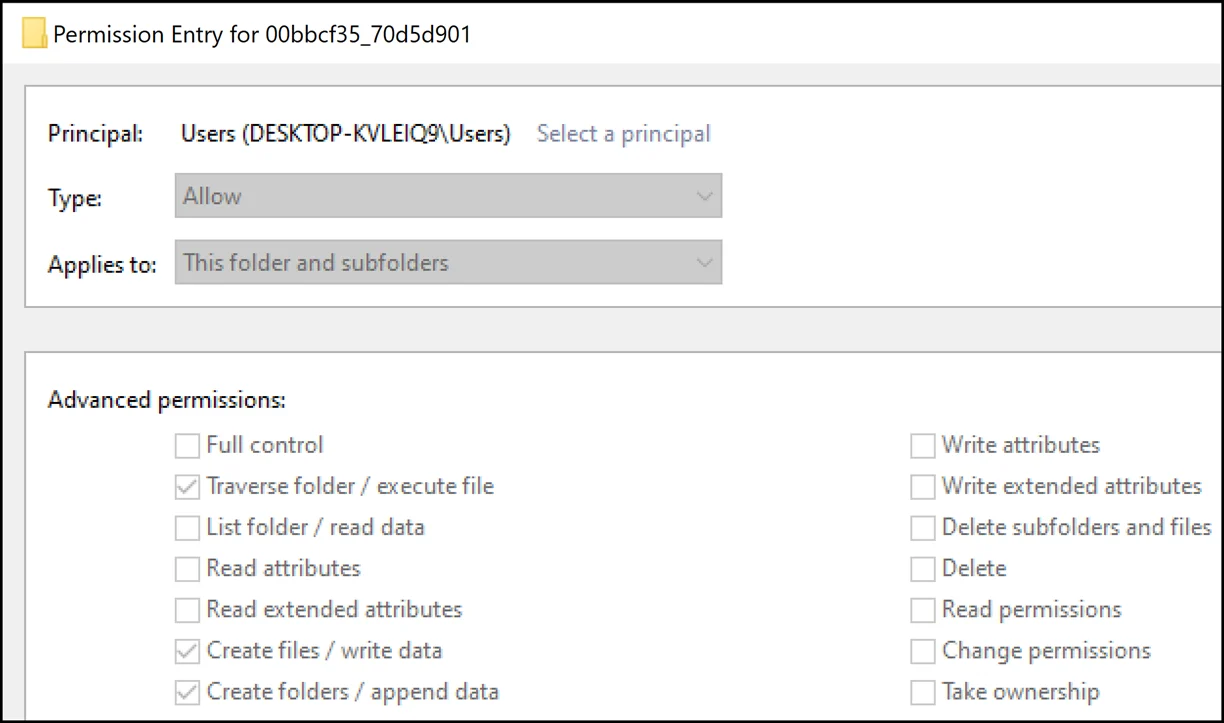
A user-writable directory sitting ahead of System32 in the search order for a DLL loaded by a SYSTEM service is exactly the precondition for hijacking.
Exploitation
Step 1: plant the DLL
Because of the weak DACL, an unprivileged user can drop a custom httpapi.dll binary into the cache directory. When the service restarts, the DLL is found there first and loaded, which results in the execution of arbitrary code as SYSTEM.

The report does not include the source or contents of the planted DLL; it only states that a custom httpapi.dll binary is placed in the directory.
Step 2: force the service to restart
The agent service does not permit unprivileged users to restart it manually. Two routes remain: reboot the system, or use a trick with some MSI installations. The MSI route works even when the NoModify setting is configured, which disables installation modification through the Apps & Features Windows settings. The installation repair action can still be executed using either the cached installation package or the installation product code.
When software is installed from an MSI package, Windows caches the package in the C:\Windows\Installer directory under an alphanumeric file name chosen by the Windows Installer. The cached package for the target installation can be identified on the command line, for example by its Author and Subject file attributes.


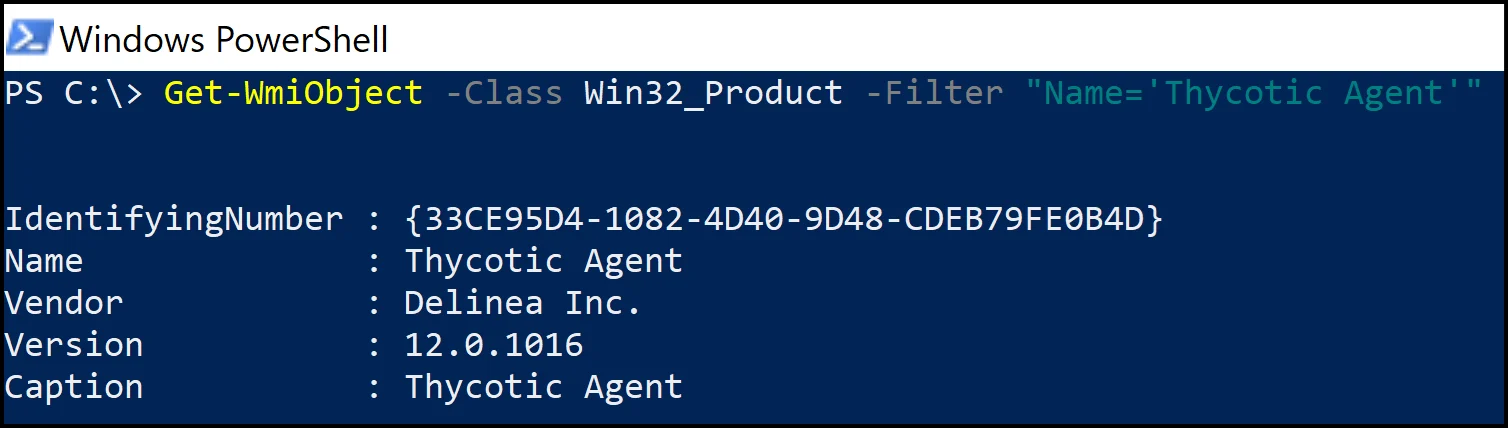
Alternatively, the installation product code can be retrieved from the WMI database or the Windows registry, and the repair action can be executed either via the command line or the Application Installation and Servicing Win32 API.

Step 3: code runs as SYSTEM
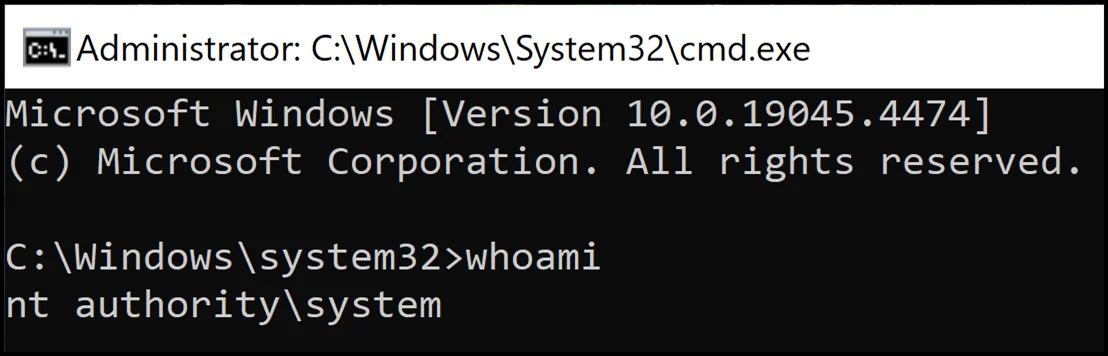
Once the service restarts, it loads the planted httpapi.dll from the writable cache directory instead of the legitimate copy in System32, and the attacker's code executes in the service's security context, SYSTEM.
Root cause
The agent service loads httpapi.dll by name and allows the Windows temp cache directory to precede the application and System32 directories in the search order. That directory inherits the default C:\Windows\Temp DACL, which lets the Users group write to it. The combination means an unprivileged user controls a file that a SYSTEM service will load.
Existing defences did not stop it. The service blocks manual restarts by unprivileged users, but that only raises the cost of triggering the load: a reboot or an MSI repair action restarts it anyway, and the NoModify setting does not prevent the repair action.
Impact
An unprivileged local user can execute arbitrary code as SYSTEM on a host running an affected agent. The conditions are that the agent is installed at a vulnerable version, the attacker can write to the cache directory (which the inherited DACL permits for the Users group), and the service is restarted, either by rebooting the system or by triggering an MSI repair action. The report does not describe any remote exploitation path or any impact beyond the local host.
Fix
Delinea released fixed agent version 12.0.1096 on July 1, 2024. The report does not describe the code change behind the fix. Upgrading to the fixed agent version 12.0.1096 is the remediation.
Disclosure timeline
| Date | Event |
|---|---|
| May 29, 2024 | CyberArk reported the vulnerability to Delinea and asked for a CVE to be assigned. |
| May 29, 2024 | Delinea acknowledged receiving the disclosure. |
| June 5, 2024 | CyberArk followed up, confirming successful reproduction using the provided POC. |
| June 5, 2024 | Delinea confirmed the fix was being tested internally. |
| June 11, 2024 | CyberArk received confirmation from Delinea that a CVE had been assigned. |
| July 1, 2024 | Delinea released fixed agent version 12.0.1096. |
Variants to test
- Other DLL names loaded by privileged services. Enumerate DLLs a service loads at start-up and check whether any resolve from a user-writable directory before the application or System32 path. A positive result is a service that loads your file from the writable path, visible in a process monitor trace or by the code executing in the service's context.
- Inherited DACLs under C:\Windows\Temp. Look for service cache or working directories beneath C:\Windows\Temp and inspect their ACLs for write access by the Users group. A positive result is a directory where an unprivileged account can create files that a privileged process later reads or loads.
- MSI repair as a restart primitive. On hosts where a service cannot be restarted directly, identify cached packages in C:\Windows\Installer by Author and Subject, or pull product codes from WMI or the registry, and run a repair action. A positive result is the target service restarting despite NoModify being set.
- Installation directories with weak permissions. Check whether the application installation directory itself (here C:\Program Files\Thycotic\Agents\Agent) is writable by non-administrators on any deployment. A positive result is a writable path earlier in the search order than System32.
What happened, in plain words
A security team at CyberArk was hired by a customer to try to break into their systems, the way a real attacker would. During that work they found a flaw in a piece of software called Delinea Privilege Manager for Windows (it used to be called Thycotic Privilege Manager). The flaw let an ordinary user on a Windows computer, someone with no special rights at all, run their own code with the highest level of permission on that machine. That highest level is called SYSTEM, a built-in Windows account with very high privileges.
The flaw was given an official tracking number, CVE-2024-39708. A CVE is like a reference number in a public catalogue of known security bugs, so that everyone can talk about the same issue unambiguously. CyberArk told Delinea about the problem, shared the proof-of-concept code that demonstrated it, and Delinea released a fixed version. This article walks through what they found, step by step, assuming you have never read a security report before.
The software involved, and why it matters
Delinea Privilege Manager is a tool that companies install on their employees' Windows computers to control which programs are allowed to run with extra permissions. To do that job it installs a small program called an agent that runs in the background all the time. Because the agent has to enforce rules, it runs with very high privileges, the SYSTEM level mentioned above. Anything that can make the agent run your code is therefore very valuable to an attacker: your code inherits the agent's power.
The bug class here is called DLL search order hijacking. To understand it, you need two ideas.
A DLL (dynamic-link library) is a file full of reusable code that programs load when they need it, a bit like a shared toolbox that many programs borrow from instead of each carrying their own copy of every tool. When a program starts, it often asks Windows to load a particular DLL by name, for example httpapi.dll.
Windows does not search the whole disk for that name. It walks through a fixed list of folders in a set order, and the first match wins. Think of it like looking for a lost glove: you check the coat pocket first, then the hallway, then the car. If someone slips a glove into your coat pocket, you will pick that one up and never reach the car.
So if any folder earlier in that search order can be written to by an ordinary user, that user can put a file with the expected name there. The privileged program then picks up the planted file and runs it. That is the whole trick.
Setting the scene
The work was done on a Windows computer with the Delinea agent installed, from the point of view of an ordinary, unprivileged user. The report does not list the exact Windows version, the tools used to watch the service, or the account names involved. The only version detail it gives is the affected range: Privilege Manager for Windows before version 12.0.1096. The fixed agent is 12.0.1096.
Finding the flaw
When the agent service starts, it tries to load httpapi.dll, looking in these folders in this order:
- *C:\Windows\Temp\Arellia\AmsAgent\Cache\ArelliaAgent\assembly\dl3\7f9cbee9\00bbcf35_70d5d901*
- *C:\Program Files\Thycotic\Agents\Agent*
- *C:\Windows\System32*
In the run the team observed, the DLL was not present in the Windows temp folder or in the application installation folder, so the service loaded it from System32.
That screenshot shows the service loading httpapi.dll from the System32 directory after failing to find it in the Windows temp and application installation directories. In other words, the first two folders were checked and came up empty, and the third one supplied the file.
That search order is the problem. By default, Windows lets ordinary users write files and folders in C:\Windows\Temp, and unless someone says otherwise, that default permission list is passed down to subfolders. The technical name for a permission list of this kind is a DACL, short for discretionary access control list: a table attached to a file or folder saying who may do what with it. "Inherited" means a subfolder automatically copies the table from its parent rather than having its own.
The agent's cache folder under C:\Windows\Temp\Arellia... inherits that permissive table, so the Users group (the built-in group that every ordinary account belongs to) can write files and folders inside C:\Windows\Temp\Arellia\AmsAgent\Cache\ArelliaAgent\assembly\dl3\7f9cbee9\00bbcf35_70d5d901.
This screenshot shows the permissions on that cache folder: because of the inherited DACL, the Users group can write files and folders there.
Put the two facts together. A folder that ordinary users can write to sits ahead of System32 in the search order for a DLL that a SYSTEM-level service loads. That is exactly the setup needed for a hijack.
Exploiting it
Step 1: plant the DLL
Because the permission table is too loose, an ordinary user can drop a custom httpapi.dll binary into the cache folder. When the service restarts, it finds that file first and loads it, which results in the execution of arbitrary code as SYSTEM.
The first screenshot illustrates the hijack in the search order; the second shows code executing as SYSTEM. The report does not include the source or contents of the planted DLL; it only says that a custom httpapi.dll binary is placed in the folder.
Why does this work? The service trusts the name httpapi.dll and trusts the folder order. It has no way to tell that the file in the temp cache is not the real one from System32. Because the service runs as SYSTEM, the planted code runs as SYSTEM too.
Step 2: force the service to restart
Planting the file is not enough on its own: the service is already running and has already loaded the real DLL. The planted file only takes effect the next time the service starts. The agent service does not let ordinary users restart it by hand, so the team needed another way to make it start again.
Two routes remain: reboot the computer, or use a trick with some MSI installations.
An MSI is the standard Windows installer package format, the kind of file you double-click to install software. Windows keeps a copy of each installed package in a hidden folder, C:\Windows\Installer, so it can repair or change the installation later. The repair action is a built-in installer feature that re-checks an installation and puts back anything missing or broken. Running a repair can force the agent service to restart.
The MSI route matters because it does not need a reboot, and it works even when the NoModify setting is configured. NoModify is an installer option that greys out the change and repair buttons in the Apps & Features section of Windows Settings, so a user cannot modify the installation from the normal interface. It does not, however, stop the repair action from being run another way.
When software is installed from an MSI package, Windows caches the package in the C:\Windows\Installer directory under an alphanumeric file name chosen by the Windows Installer. The cached package for the target installation can be identified on the command line, for example by its Author and Subject file attributes. Those attributes are pieces of information stored inside the file, a little like the label on a jar telling you what is in it and who made it.
The first screenshot shows the contents of C:\Windows\Installer; the second shows an MSI repair installation being run. The report does not reproduce the exact command lines used for the repair action in either variant.
Alternatively, the installation product code can be retrieved from the WMI database or the Windows registry, and the repair action can be executed either via the command line or the Application Installation and Servicing Win32 API.
A few of those terms deserve a plain explanation. A product code is a unique identifier that Windows assigns to each installed MSI package, so the installer can refer to that installation without needing the file name. WMI (Windows Management Instrumentation) is Windows' built-in database of information about the machine and the software on it; you can query it like a catalogue. The Windows registry is the central settings store where Windows and installed programs keep configuration. An API (application programming interface) is a defined way for one piece of software to ask another to do something, like a service counter where you fill in a form and hand it over rather than walking into the back room yourself. The Application Installation and Servicing Win32 API is the official Windows interface for installing, repairing and removing software, and it can trigger a repair just as the command line can.
The first screenshot shows a product code being retrieved through WMI; the second shows an MSI repair installation being run by product code.
Why go to this trouble? Because the goal is simply to make the service start again. A reboot would do it, but a repair action is another way to restart the service. The NoModify setting disables installation modification through Apps & Features, but it does not block the repair action.
Step 3: code runs as SYSTEM
Once the service restarts, it loads the planted httpapi.dll from the writable cache folder instead of the legitimate copy in System32, and the attacker's code executes in the service's security context, SYSTEM. "Security context" simply means the identity and permissions the running program has; code running inside the service inherits the service's identity, which here is the most powerful one on the machine.
Why it happened
The agent service loads httpapi.dll by name and lets the Windows temp cache folder come before the application folder and System32 in the search order. That folder inherits the default C:\Windows\Temp DACL, which lets the Users group write to it. Together, that means an ordinary user controls a file that a SYSTEM service will load.
The defences that were in place did not stop it. The service blocks manual restarts by ordinary users, but that only makes triggering the load slightly harder: a reboot or an MSI repair action restarts it anyway, and the NoModify setting does not prevent the repair action. A fully qualified path would mean telling Windows the exact folder to load from, rather than letting it search.
What an attacker could do
An ordinary local user can execute arbitrary code as SYSTEM on a computer running an affected agent. The conditions are that the agent is installed at a vulnerable version, the attacker can write to the cache folder (which the inherited DACL permits for the Users group), and the service is restarted, either by rebooting the computer or by triggering an MSI repair action. The report does not describe any remote exploitation path or any impact beyond the local computer.
The fix
Delinea released fixed agent version 12.0.1096 on July 1, 2024. The report does not describe the code change behind the fix. Upgrading to the fixed agent version 12.0.1096 is the remediation.
Disclosure timeline
| Date | Event |
|---|---|
| May 29, 2024 | CyberArk reported the vulnerability to Delinea and asked for a CVE to be assigned. |
| May 29, 2024 | Delinea acknowledged receiving the disclosure. |
| June 5, 2024 | CyberArk followed up, confirming successful reproduction using the provided POC. |
| June 5, 2024 | Delinea confirmed the fix was being tested internally. |
| June 11, 2024 | CyberArk received confirmation from Delinea that a CVE had been assigned. |
| July 1, 2024 | Delinea released fixed agent version 12.0.1096. |
Variants to test
If you are testing systems yourself, these are the same ideas applied more broadly. Each one describes what to look for and what a positive result looks like.
- Other DLL names loaded by privileged services. List the DLLs a service loads at start-up and check whether any of them resolve from a folder an ordinary user can write to, before the application folder or System32. A positive result is a service that loads your file from the writable path, which you can see in a process monitor trace or by your code running in the service's context.
- Inherited DACLs under C:\Windows\Temp. Look for service cache or working folders beneath C:\Windows\Temp and inspect their permission lists for write access by the Users group. A positive result is a folder where an ordinary account can create files that a privileged process later reads or loads.
- MSI repair as a restart primitive. On computers where a service cannot be restarted directly, find cached packages in C:\Windows\Installer by Author and Subject, or pull product codes from WMI or the registry, and run a repair action. A positive result is the target service restarting despite NoModify being set.
- Installation folders with weak permissions. Check whether the application installation folder itself (here C:\Program Files\Thycotic\Agents\Agent) is writable by non-administrators on any deployment. A positive result is a writable path earlier in the search order than System32.
Glossary
- Agent: a small program installed on a computer that runs in the background to enforce a company's rules, here the Delinea Privilege Manager agent.
- API (application programming interface): a defined way for one piece of software to ask another to do something, like a service counter with a form to fill in.
- Application Installation and Servicing Win32 API: the official Windows interface for installing, repairing and removing software.
- Arbitrary code execution: getting a computer to run code of your choosing rather than the code it was meant to run.
- CVE: a public catalogue number for a known security vulnerability, so everyone can refer to the same issue.
- DACL (discretionary access control list): the permission table attached to a file or folder saying who may do what with it.
- DLL (dynamic-link library): a file of reusable code that programs load when they need it, shared like a toolbox.
- DLL search order hijacking: planting a file with an expected DLL name in a folder that Windows checks before the legitimate one, so a privileged program loads the planted file.
- Elevation of Privilege (EoP): a flaw that lets someone gain more permission than they should have.
- Inherited (permissions): a subfolder automatically copying the permission table of its parent folder.
- Local privilege escalation (LPE): gaining higher permission on the same computer, as opposed to breaking in from elsewhere.
- MSI: the standard Windows installer package format.
- NoModify: an installer option that greys out change and repair buttons in Apps & Features; it does not stop a repair run another way.
- Product code: a unique identifier Windows assigns to an installed MSI package.
- Proof of concept (POC): code that demonstrates a vulnerability really works.
- Registry: the central settings store where Windows and installed programs keep configuration.
- Repair action: a built-in installer feature that re-checks an installation and puts back anything missing or broken, which can restart services.
- Security context: the identity and permissions a running program has; code running inside a service inherits the service's identity.
- SYSTEM: the most powerful built-in Windows account, more powerful than a normal administrator.
- Users group: the built-in Windows group that every ordinary account belongs to.
- WMI (Windows Management Instrumentation): Windows' built-in database of information about the machine and the software on it, which can be queried like a catalogue.


