How I Was Able To Take Over One Of Dell’s Subdomains
A Dell subdomain had a CNAME record pointing to a Heroku app that no longer existed, allowing anyone to register that Heroku app name and take control of the subdomain. The attacker successfully claimed the Heroku app and left a message on the subdomain as proof.
 Published on pyrrhon.medium.com
Hi everyone, I found a subdomain takeover recently on Dell, and I wanted to write a write-up of it. I hope you enjoy it!
The full write-up lives on its author's site
It belongs to its author, so we link to it rather than copy it. The other two tabs are our own rewrites, checked against it.
Context
This is a write-up of a subdomain takeover found on Dell. The asset involved is a Dell subdomain whose dig results showed a Heroku app that no longer exists. The report does not name the specific subdomain or the Heroku app name.
A subdomain takeover, as the report defines it, is the process of registering a non-existing domain name to gain control over another domain. It generally occurs when a domain name (for example subdomain.example.com) uses a CNAME record pointing to another domain (subdomain.example.com CNAME anotherdomain.com). At some point anotherdomain.com expires and becomes available for registration by anyone. If the CNAME record is not deleted from the example.com DNS zone, whoever registers anotherdomain.com has full control over subdomain.example.com for as long as the DNS record is present.
Because the flaw only exists when an expired subdomain's CNAME records are not deleted, takeovers are only possible on dead subdomains. Live subdomains can be ignored.
Setup
The work started by choosing a bounty program, in this case Dell. The tools used were:
- subfinder for subdomain enumeration.
- httpx for probing the enumeration output.
digfor inspecting DNS records of dead subdomains.- aquatone as an example of a tool that takes screenshots of the subdomains you specify, so you can see what a dead subdomain returns.
- subjack, a takeover scanner written in Go, for the automated route.
- can-i-take-over-xyz as the reference for which services are takeover-able and what error message each one returns.
The precondition is a subdomain whose CNAME points at a service that no longer hosts the app.
Finding it
I scanned all the subdomains with subfinder, then probed the output with httpx. I separated the live subdomains from the dead ones and started the research on the dead set, checking for subdomain takeovers.
There are two ways to do this: manually, or with a script that automates the process. The report shows both.
Manual method
First you need to see every dead subdomain and its CNAME records. dig does that. The report shows the command in the following screenshot:
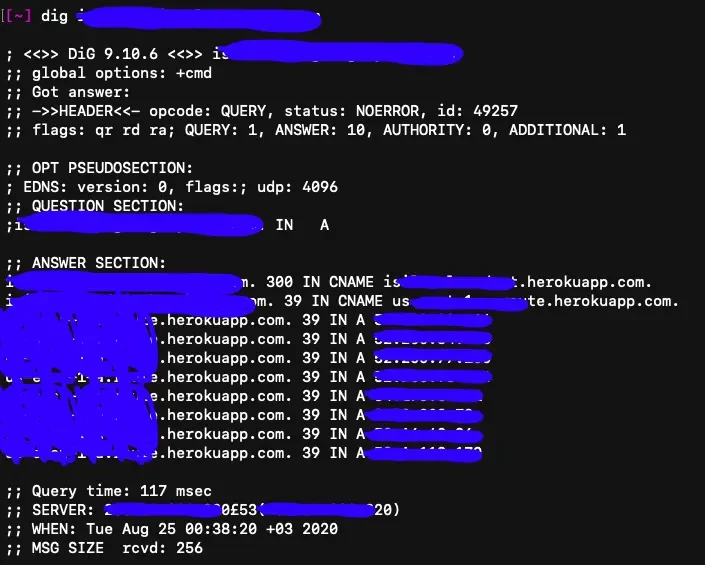
Dig Results
The output of this command is important and is used later. Next you need to see the responses the dead subdomains return. A browser works, but tools such as aquatone take screenshots of the subdomains you specify. Since you can see the contents of dead subdomains, you check whether the subdomain returns a custom error message or something else. If it returns an error message, you take that error message together with the anotherdomain.com seen in the dig output (in this case herokuapp.com) and check whether a takeover is possible, using can-i-take-over-xyz.
Automated method
The method and process are the same, but the tools do all of it for you. I used subjack, which is written in Go and is really fast. It can be downloaded from subjack.
Once I found the bug, I skipped straight to the proof of concept to write and submit the report.
Exploitation
Step 1: Find a dead subdomain with a Heroku app in its dig results
After finding a subdomain with a Heroku app in its dig results, I visited the page. It led me to the following error page:
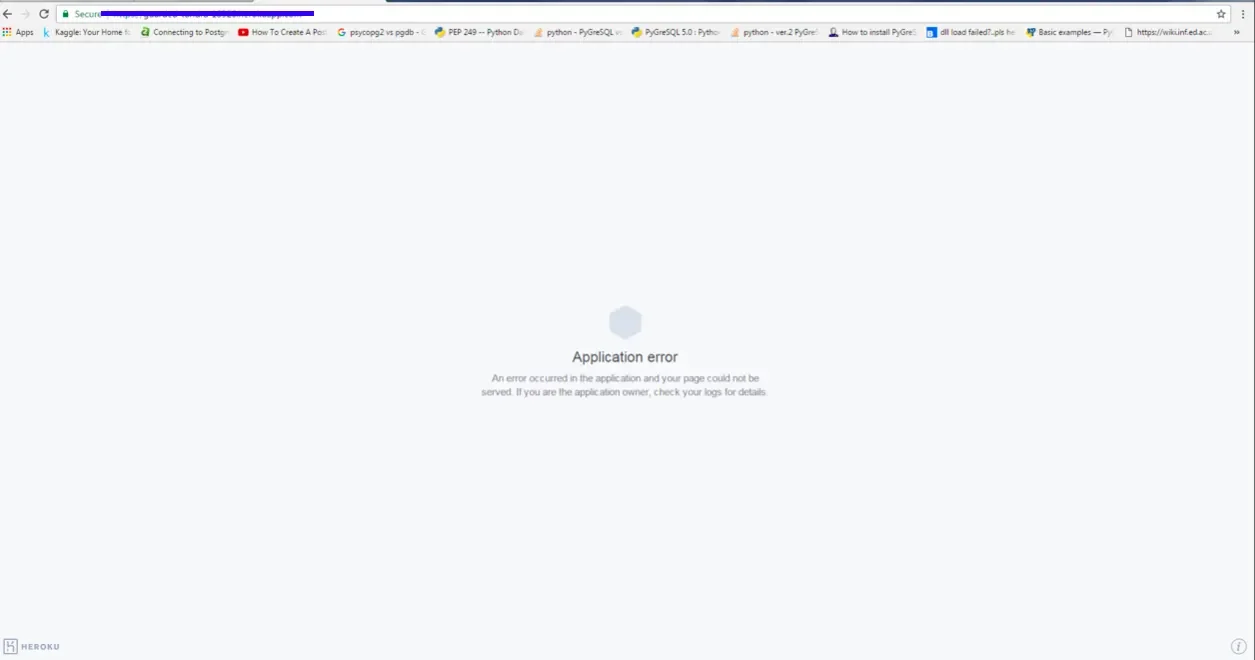
Heroku Error Message
The report notes that this is not the same error page that was encountered during the test, because there was no screenshot taken at the time: I was in a hurry to report it.
Step 2: Confirm the service is takeover-able
I visited can-i-take-over-xyz, looked at the engine column, and found Heroku listed with the error message it returns, "app not found". That was the same error I had seen on the dead subdomain.
Step 3: Claim the app on Heroku
I visited the official website of the Heroku engine and tried to take the subdomain over. I was successful. To prove it, I left a little message on the subdomain:
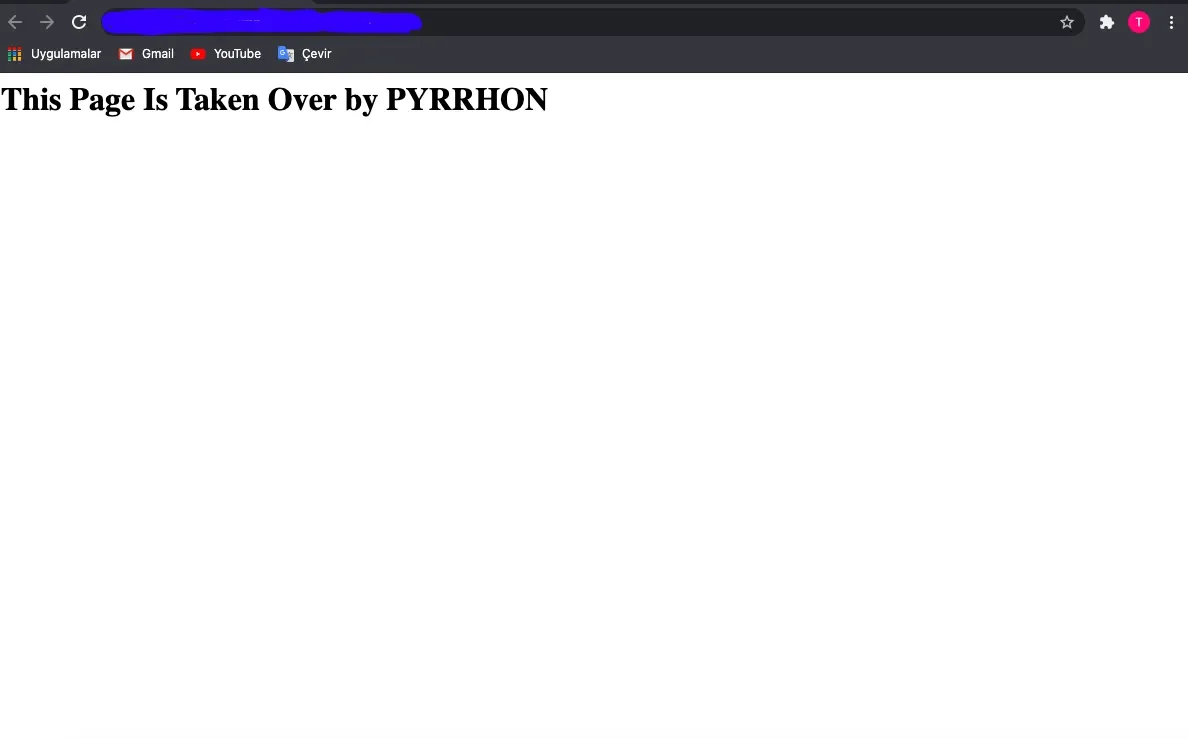
Proof of Concept
The report does not show the exact app name, the message left on the page, or the request that created the Heroku app.
Root cause
The Dell subdomain had a CNAME record pointing at a Heroku app that no longer existed. Heroku answers requests for a missing app with "app not found", which is the signature listed for Heroku on can-i-take-over-xyz. Because the DNS record still pointed at the missing app, anyone who registers an app with the same name on Heroku inherits control of the Dell subdomain. The DNS record itself is what makes the takeover possible.
Impact
An attacker who claims the dangling Heroku app name controls content served on a Dell subdomain. The impact lasts for as long as the CNAME record remains in Dell's DNS zone.
Fix
The general fix for this class of issue is to remove the dangling CNAME record from the DNS zone.
Variants to test
- Run subfinder and httpx on any target, keep only the dead subdomains, and run
digon each to collect CNAME targets. A positive result is a CNAME pointing at a third-party service such asherokuapp.com. - Visit each dead subdomain in a browser or with aquatone and look for a service-specific error page. A positive result is a page such as Heroku's "app not found".
- Cross-check the service and error message against can-i-take-over-xyz. A positive result is the service being listed with that exact error message.
- Run subjack over the dead subdomain list. A positive result is subjack flagging a subdomain as vulnerable.
- Try to register the app name on the third-party service. A positive result is the registration succeeding and the target subdomain then serving your content.
What happened, in plain words
A security researcher found a way to take control of a Dell subdomain. The subdomain's dig results showed a Heroku app that no longer existed, but Dell's DNS still pointed at it. The researcher registered an app with that name on Heroku, and the Dell subdomain then showed the researcher's content. The researcher did exactly that and left a little message on the page to prove it.
This kind of bug is called a subdomain takeover. Before going further, it helps to understand a few everyday ideas.
A domain name is the address you type into a browser, like example.com. A subdomain is a smaller address that belongs to it, like shop.example.com or support.example.com. Companies use subdomains to separate different services: one for the main website, one for help pages, one for internal tools.
DNS (Domain Name System) is the internet's phone book. When you type a name into your browser, DNS tells the browser which server to contact. One of the entries in that phone book is called a CNAME record. A CNAME is a bit like a forwarding note: it says "this name is really just another name, go look that one up instead". For example, a company might set up help.example.com as a CNAME pointing to example-help.herokuapp.com, because the help pages are actually hosted on Heroku.
Heroku is a hosting service where people can create small web apps quickly. Each app gets its own name, and that name appears in a Heroku address ending in herokuapp.com. If the app is deleted, the name becomes free again, and someone else can create a new app with the same name.
That is the whole problem. If a company's DNS still forwards a subdomain to a Heroku app name that no longer exists, and someone else registers that name, the company's subdomain now points at the other person's app. The visitor sees the company's address in the browser bar, but the content comes from the stranger.

The researcher chose Dell's bug bounty program. A bug bounty program is a scheme where a company pays people for reporting security problems responsibly, instead of punishing them. The researcher then started with a subdomain scan: using a tool to discover as many of a company's subdomains as possible. The tool used for this was subfinder.
After the scan, the researcher used another tool called httpx to check which of those subdomains actually responded. This separated the live subdomains (ones that load something) from the dead ones (ones that do not). The research then focused on the dead ones, because a subdomain takeover can only happen on a dead subdomain. The reason is simple: if the subdomain still works normally, the app behind it still exists and nobody else can claim it.
What a subdomain takeover is
The report gives a clear definition. A subdomain takeover is the process of registering a non-existing domain name to gain control over another domain. It generally happens when a domain name such as subdomain.example.com uses a CNAME record pointing to another domain:
subdomain.example.com CNAME anotherdomain.com
At some point, anotherdomain.com expires and becomes available for registration by anyone. If the CNAME record is not deleted from the example.com DNS zone, anyone who registers anotherdomain.com has full control over subdomain.example.com for as long as the DNS record is present.
A useful comparison: imagine a shop that puts a sign on its door saying "we have moved to 12 High Street". If the shop at 12 High Street closes and someone else moves in, customers following the sign end up at the wrong place, but they still trust it because the sign is on the original shop's door. The CNAME record is that sign, and nobody at the original company remembered to take it down.
Because the flaw only exists when an expired subdomain's CNAME records are not deleted, takeovers are only possible on dead subdomains. Live subdomains can be ignored.
The tools used
The researcher lists the tools involved:
- subfinder for finding subdomains.
- httpx for checking which of them respond.
digfor looking at the DNS records of dead subdomains.- aquatone as an example of a tool that takes screenshots of the subdomains you give it, so you can see what a dead subdomain returns.
- subjack, a takeover scanner written in Go, for the automated route.
- can-i-take-over-xyz as the reference for which services can be taken over and what error message each one returns.
The only precondition is a subdomain whose CNAME points at a service that no longer hosts the app.
Finding it
The researcher scanned all the subdomains with subfinder, then probed the output with httpx. The live subdomains were separated from the dead ones, and the research started on the dead set, checking for subdomain takeovers.
There are two ways to do this: manually, or with a script that automates the process. The report shows both.
Manual method
First you need to see every dead subdomain and its CNAME records. dig does that. The report shows the command in the following screenshot:
Dig Results
dig is a command-line tool for asking DNS questions. You give it a name, and it tells you what the phone book says about that name. In this case, the researcher used it to look up the CNAME records of dead subdomains, to see where each one was pointing. The output of this command is important and is used later.
Next you need to see the responses the dead subdomains return. A browser works, but tools such as aquatone take screenshots of the subdomains you specify. Since you can see the contents of dead subdomains, you check whether the subdomain returns a custom error message or something else. If it returns an error message, you take that error message together with the anotherdomain.com seen in the dig output (in this case herokuapp.com) and check whether a takeover is possible, using can-i-take-over-xyz.
The logic here is a bit like checking a lost-property office. The dig output tells you which office the item was sent to (the CNAME target). The error page tells you what that office says when it cannot find the item ("app not found"). If the office says the item is not there, and the office is one where anyone can claim items, then you know the item is up for grabs.
Automated method
The method and process are the same, but the tools do all of it for you. The researcher used subjack, which is written in Go and is really fast. It can be downloaded from subjack.
Go is a programming language, and tools written in it tend to run quickly. Subjack automates the process, so you do not have to run dig and visit each page by hand.
Once the bug was found, the researcher skipped straight to the proof of concept to write and submit the report.
Exploitation
Step 1: Find a dead subdomain with a Heroku app in its dig results
After finding a subdomain with a Heroku app in its dig results, the researcher visited the page. It led to the following error page:
Heroku Error Message
The report notes that this is not the same error page that was encountered during the test, because there was no screenshot taken at the time: the researcher was in a hurry to report it. The screenshot still shows the kind of page Heroku returns when an app does not exist.
Step 2: Confirm the service is takeover-able
The researcher visited can-i-take-over-xyz, looked at the engine column, and found Heroku listed with the error message it returns, "app not found". That was the same error seen on the dead subdomain.
can-i-take-over-xyz is a community-maintained list. For each hosting service, it records whether a missing app can be claimed by someone else, and what error message the service shows when the app is missing. Matching the error message you saw against the list is the confirmation step: it tells you that the service really does hand the name to whoever registers it next.
Step 3: Claim the app on Heroku
The researcher visited the official website of the Heroku engine and tried to take the subdomain over. It worked. To prove it, a little message was left on the subdomain:
Proof of Concept
The report does not show the exact app name, the message left on the page, or the request that created the Heroku app.
Why it worked
The Dell subdomain had a CNAME record pointing at a Heroku app that no longer existed. Heroku answers requests for a missing app with "app not found", which is the signature listed for Heroku on can-i-take-over-xyz. Because the DNS record still pointed at the missing app, anyone who registers an app with the same name on Heroku inherits control of the Dell subdomain. The DNS record itself is what makes the takeover possible.
A comparison: a company changes office and leaves a mail-forwarding instruction at the old address. If a stranger moves into the new address, all the company's post goes to the stranger. The forwarding instruction was meant to help, but nobody cancelled it.
What an attacker could do
An attacker who claims the dangling Heroku app name controls content served on a Dell subdomain. The report does not describe any further use of the takeover beyond leaving a message on the page as proof. The impact lasts for as long as the CNAME record remains in Dell's DNS zone.
Why this matters even without further abuse: visitors trust a company's own subdomain. A page served there could be used to ask for passwords, show fake messages, or redirect people elsewhere, and the address bar would still show the company's name.
How to fix it
The general fix for this class of issue is to remove the dangling CNAME record from the DNS zone.
A practical habit for companies: whenever a service is shut down, delete its DNS records at the same time. Treat the DNS entry as part of the service, not as something left behind.
Other ways to look for the same bug
- Run subfinder and httpx on any target, keep only the dead subdomains, and run
digon each to collect CNAME targets. A positive result is a CNAME pointing at a third-party service such asherokuapp.com. - Visit each dead subdomain in a browser or with aquatone and look for a service-specific error page. A positive result is a page such as Heroku's "app not found".
- Cross-check the service and error message against can-i-take-over-xyz. A positive result is the service being listed with that exact error message.
- Run subjack over the dead subdomain list. A positive result is subjack flagging a subdomain as vulnerable.
- Try to register the app name on the third-party service. A positive result is the registration succeeding and the target subdomain then serving your content.
Glossary
- Bug bounty program: a scheme where a company rewards people for reporting security problems responsibly.
- CNAME record: a DNS entry that says one name is an alias for another name, so lookups are forwarded to the target.
- DNS: the internet's naming system that maps names like
example.comto the servers behind them. - Domain name: the main address of a website, such as
example.com. - Dead subdomain: a subdomain that no longer loads a working service.
- dig: a command-line tool for looking up DNS records.
- Go: a programming language; tools written in it are often fast.
- Heroku: a hosting service where people create small web apps, each with a name ending in
herokuapp.com. - httpx: a tool that checks which subdomains respond.
- Live subdomain: a subdomain that still loads a working service.
- Subdomain: a smaller address under a main domain, such as
shop.example.com. - Subdomain takeover: registering a name that a company's DNS still points at, so that the company's subdomain starts serving your content.
- subfinder: a tool for discovering subdomains.
- subjack: a tool that scans subdomains for takeover patterns automatically.
- aquatone: a tool that takes screenshots of subdomains so you can see what they return.
- can-i-take-over-xyz: a community list of hosting services that can be taken over, with the error message each one returns.




