node.drchrono.com - Information Disclosure and Windows Host Exposed
The host exposes several administrative services to the internet, including FTP and SSH that reveal version information, and Remote Desktop that allows unauthenticated connections and discloses the OS version. An attacker could use this information to plan targeted attacks, such as brute-forcing the local administrator account over SMB and then logging in via RDP with full privileges.

- Triaged in 6 hours
- Fixed in 8 days
- Paid in 8 days
- Disclosed after 18 days
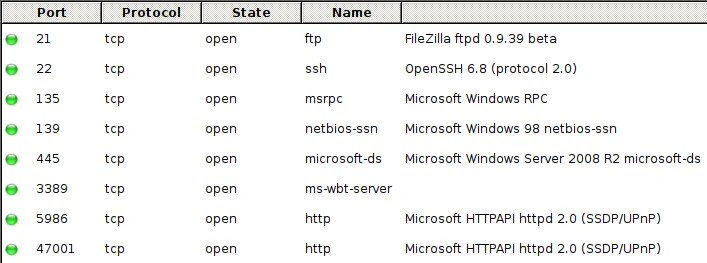
This host has the following TCP ports open;
- 21 - FTP
- 22 - SSH
- 135 - Windows RPC Dynamic
- 445 - Microsoft DS
- 3389 - Remote Desktop
- 5986 - PowerShell Remoting
- 47001 - WinRM
The server appears to be secured well on the whole. However the services SSH and FTP do all give out some information. Please see attached images for the versions given out. This information could be used by a malicious attacker, to create a targeted attack vector, on the underlying server.
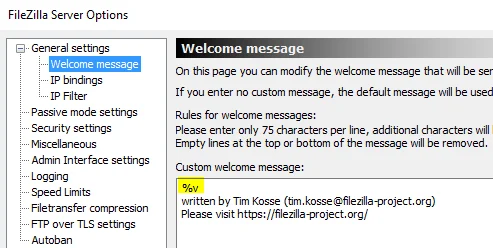
To remove the FileZilla ftp server version go to the options and ensure the %v is removed from the welcome message. See the screenshot named Remove FileZilla version.PNG.
To remove the banner version from the SSH service locate the SSH configuration file and open it up in notepad, find the line with the option named banner and set it to none. The default location for Windows is C:\Program Files\OpenSSH\etc\ssh_config.
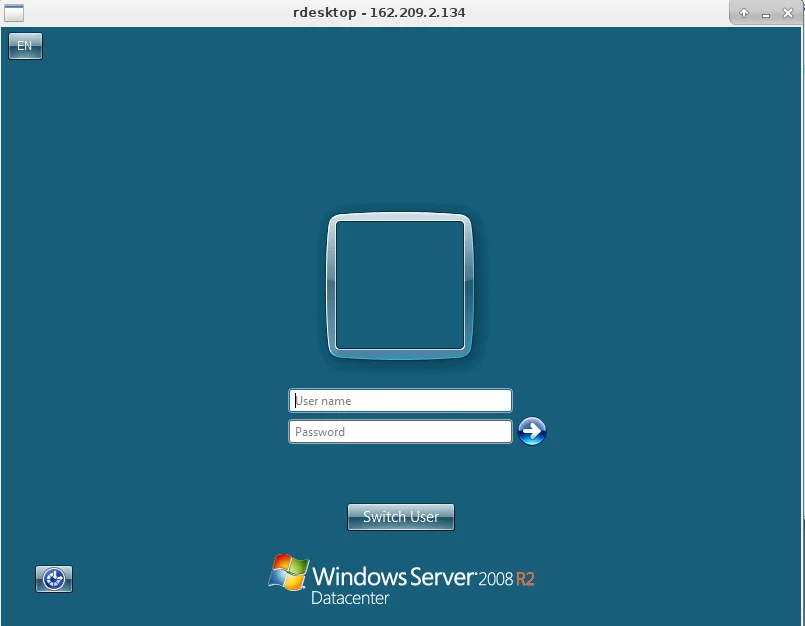
The remote desktop is widely open and does not require any form of authentication to connect. As you will see in the screenshot named Remote Desktop.png it clearly states the OS version running, which again all helps a malicious attacker. You can not remove this information however you can protect against it. It is highly recommended that you enable network level authentication (NLA), this means that you are not able to connect to remote desktop unless you are authenticated first. Also ensure that you have set the remote desktop to use high encryption. More information about this can be found here https://technet.microsoft.com/en-us/library/cc770833(v=ws.11).aspx.
With Microsoft DS (445 SMB) open, ensure you have disabled the local administrator account or at least renamed it from default. This account can not be locked out, allowing for unlimited password guesses against it. This would facilitate an attacker, as they could use this service to brute force the password until obtained. As remote desktop is open they could simply login to the server with full administrative privileges once the password has been revealed.
I would highly recommend ensuring that you have had a build review completed on the server by an experienced security professional as the server is very open to the internet. If money is an issue then ask your administration team to follow the guidance from the CIS benchmarks, available at https://benchmarks.cisecurity.org/downloads/benchmarks/.
Final general advice is to not open the ports to the world when there is no need and to ensure that the FTP/SSH service installed is always fully patched. The ports identified are useful for internal administration only, I would recommend limiting their availability to your trusted subnets or IP addresses. This can be done using the windows firewall or a hardware firewall such as checkpoint.
Attachments


Not written yet. The AI write-up for this report has not been written yet. The Original tab links to the source.
How it worked
Root cause
Likely the server was configured with unnecessary services exposed to the internet and with default banners and settings that reveal version details and allow unauthenticated RDP connections.
Impact
An attacker could gather version information and brute-force the local administrator password over SMB, then log in via RDP with full privileges; the report recommends enabling NLA and high encryption.
What the attacker needed
Network access to the host; no authentication required for RDP connection
The fix
The report recommends removing version strings from FTP and SSH banners, enabling Network Level Authentication and high encryption for RDP, disabling or renaming the local administrator account, restricting administrative ports to trusted networks, and conducting a build review against CIS…
Explained by bugbounty.wiki with AI from the original and checked against quotes from it; it can still be wrong. Read the original before relying on a detail.
Not written yet. The AI write-up for this report has not been written yet. The Original tab links to the source.
This report is about a server that leaves too many doors open to the internet. Some of these doors (like FTP and SSH) tell anyone who knocks what software and version is running, and the remote desktop door lets anyone try to connect and shows the operating system version. That kind of information helps an attacker plan how to break in, for example by guessing passwords or using known flaws in that software.
What is Info disclosure?
Data the application should keep private (personal data, internal details, other users' records) reaches someone it should not.



