Race Condition in Folder Creation Allows Bypassing Folder Limit
The application enforces a limit of ten folders per user in a space, but a race condition allows bypassing this limit by sending many simultaneous folder creation requests after deleting one folder. An attacker could create more folders than allowed, potentially causing resource abuse and performance degradation.

- Disclosed after 7 days
Summary:
The application enforces a hard limit of 10 folders per user under a specific space (Knowledge -> Space -> Folder). However, due to a Race Condition, it is possible to bypass this limit by sending multiple folder creation requests simultaneously after deleting one folder. This leads to creating more than 10 folders, breaking the intended restriction.
Steps to Reproduce
- Navigate to the Knowledge section and enter a specific Space.
- Create folders until you reach the maximum limit of 10.
- Attempt to create an additional folder — you will receive an error indicating the limit has been reached.
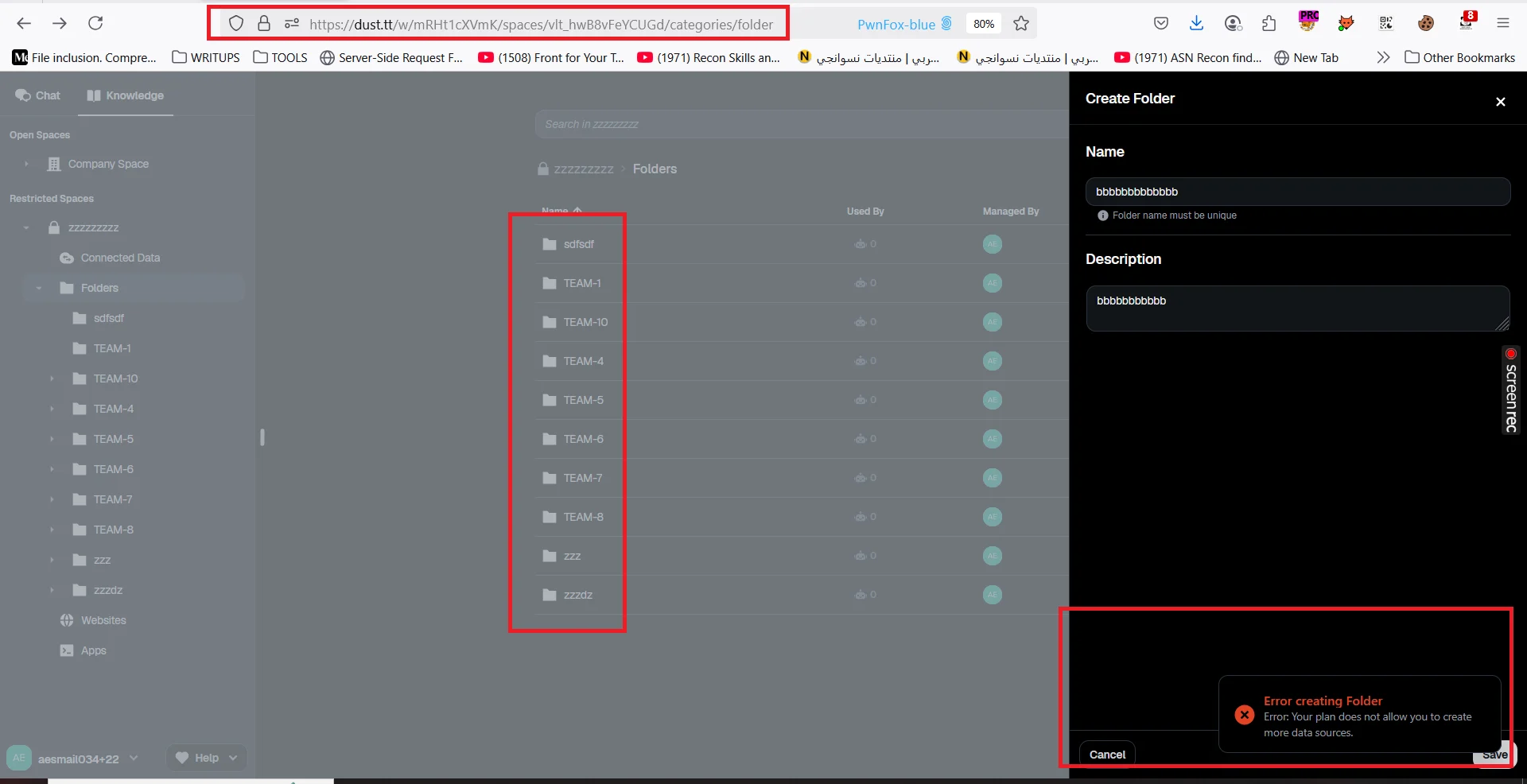
- Delete one folder so the total becomes 9.
- Immediately after deletion, send a large number of simultaneous folder creation requests (e.g., using Burp Suite Intruder or a custom script).
- Observe that more than 10 folders are created — the limit is bypassed successfully.
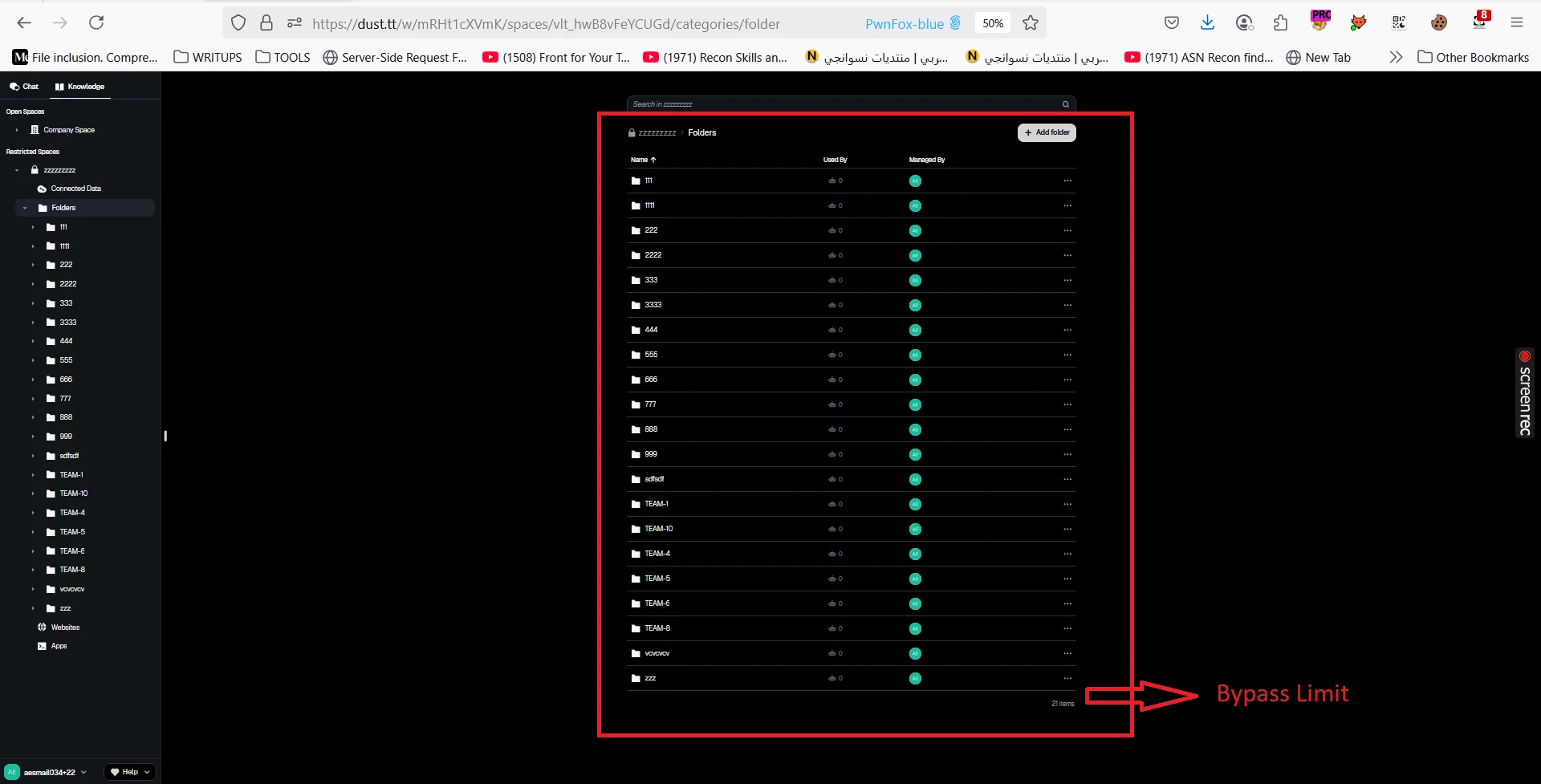
#POC VIDEO:
███████
Impact
This vulnerability allows users to bypass the folder creation limit by sending multiple requests at the same time. As a result, they can create more folders than allowed.
This breaks the platform's rules and can lead to:
- Unfair use of resources.
- Slower performance for other users.
- Abuse of system limits that are meant to keep things stable.
If someone uses this in a large workspace, it could cause serious problems for the whole team.
Context
Dust is a web application reachable at https://dust.tt. Within it, the Knowledge section contains Spaces, and each Space holds Folders. The application enforces a hard limit of 10 folders per user under a specific space, following the path Knowledge -> Space -> Folder. The limit is a business rule rather than a security boundary in the classic sense: it exists to keep resource usage predictable and the workspace stable.
The report describes a race condition that lets a user exceed that limit. After deleting one folder, so that the count drops to 9, a burst of simultaneous folder creation requests results in more than 10 folders being created. The intended restriction is broken.
Setup
The report does not describe any special account, role or version. The precondition is simply a user who can reach a Space in the Knowledge section and create folders there. The tooling named for the burst of requests is Burp Suite Intruder or a custom script; no configuration, payload file or request template is included in the report.
Finding it
The report shows folder creation is capped at 10 per user per space, with an error when the limit is reached. The interesting moment is the window right after a folder is deleted: the count is momentarily below the limit, and several creation requests that all pass the check at the same time can each go on to create a folder. That is the classic check-then-act pattern, and it is what made the behaviour look wrong.
Exploitation
Step 1: Reach the folder list
Navigate to the Knowledge section and enter a specific Space. This is the container whose folder count is limited.
Step 2: Fill the limit
Create folders until you reach the maximum limit of 10.
Step 3: Confirm the limit is enforced
Attempt to create an additional folder. You receive an error indicating the limit has been reached. This confirms the server-side check exists and is applied on the normal, sequential path.
Step 4: Free one slot
Delete one folder so the total becomes 9. This leaves exactly one slot under the limit, which is the condition the race needs.
Step 5: Fire the burst
Immediately after deletion, send a large number of simultaneous folder creation requests, for example using Burp Suite Intruder or a custom script. The report does not include the raw request, so the endpoint, parameters and headers are not reproduced here.
Step 6: Observe the result
More than 10 folders are created and the limit is bypassed successfully.
A proof-of-concept video is referenced in the report but is not available here.
Root cause
The behaviour is consistent with a check that reads the folder count and then allows the creation, without the read and the write being atomic. When several creation requests arrive at once, they may all see room and each create a folder. The single free slot ends up admitting more than one folder.
Likely, the check and the insert are not serialised per user and space, for example by a transaction with appropriate locking, a unique constraint on the slot, or an atomic counter. The report does not describe the implementation, so the exact mechanism is inferred from the behaviour rather than shown.
Impact
A user can create more folders than the platform allows. The report frames this as breaking the platform's rules and lists three consequences:
- Unfair use of resources.
- Slower performance for other users.
- Abuse of system limits that are meant to keep things stable.
The researcher notes that if this is used in a large workspace, it could cause serious problems for the whole team. The severity recorded for the report is medium, with a CVSS score of 6.5, and the weakness is classified as a business logic error.
Fix
The natural remedy follows from the root cause: make the limit check and the folder insertion atomic, so that concurrent requests cannot all observe the same free slot. That can be done with a transaction that locks the relevant scope, an atomic counter, or a database constraint that rejects the insert once the count reaches the limit.
Variants to test
- Other per-user or per-workspace quotas. Any feature with a numeric cap (spaces, folders, saved items, API keys, invites) is a candidate. A positive result is a count above the cap after a concurrent burst that follows a deletion or any other operation that frees a slot.
- Quotas checked on a different resource than the one written. If the count is derived from a list that is updated asynchronously, the window may be wider. A positive result is the same over-count, ideally reproducible with fewer requests.
- Limits combined with soft deletes. If deleted items still count, or stop counting only after a delay, try the burst at different points after deletion. A positive result is over-counting at one of those points.
- Rate-limited endpoints. If the burst is throttled, try spreading requests across connections or sessions belonging to the same user. A positive result is over-counting despite the throttle.
Hunting notes
This kind of bug hides wherever a limit is enforced by a read followed by a write: creation endpoints for user-owned collections, quota checks before uploads, and any place where a deletion or cancellation frees capacity. During recon, look for numeric caps described in the UI or in error messages, and for endpoints that return a count or a list alongside a create action. The signal is an error message that names the limit, which tells you the check exists and gives you a target to race.
The researcher demonstrated impact by showing the limit error at 10, then more than 10 folders after a concurrent burst following a deletion. That before-and-after pairing is what makes a race condition legible to a triage team: the same action is refused sequentially and accepted concurrently.
What happened, in plain words
Dust is a web application you reach in a browser at https://dust.tt. Inside it there is a section called Knowledge, and inside Knowledge there are Spaces. Inside Knowledge there are Spaces, and inside each Space you can make Folders. The platform has a rule: a user can have at most 10 folders in a given Space. Breaking that rule can mean unfair use of resources and slower performance for other users.
The researcher found that this rule can be broken. If you delete one folder so you are down to 9, and then ask the server to create many folders at almost exactly the same moment, the server lets more than one of those requests through. You end up with more than 10 folders. The rule is still there, but it can be slipped past.
This kind of bug is called a race condition. A useful everyday comparison is a set of traffic lights at a crossroads where two cars arrive at the same instant and both drivers think it is their turn to go. Each driver checked the light, each saw green, and both drove. The check was fine on its own; the problem was that two checks happened at the same time and neither knew about the other. Here, each folder creation request checks "is there room?", sees room, and creates a folder, and several of them do this at once.
A few words you will meet throughout, explained from zero:
- Server: the computer somewhere else that runs Dust and stores your folders. Your browser asks it questions and it answers.
- Request: a message your browser sends to the server, for example "create a folder called X". The server sends back a response, which might say "done" or "no, you have reached the limit".
- API: the set of addresses and rules the server accepts requests on. Think of it as the counter of a shop: you can ask for certain things in certain ways, and the assistant behind the counter handles each request.
- Business logic error: a bug where the software does exactly what it was programmed to do, but the programming does not match the rule the business intended. Nothing crashes; the rule is simply not enforced properly.
- Race condition: a bug that appears only when two or more actions happen at nearly the same time, so that each one sees a situation that is already out of date by the time it acts.
Context
Dust is a web application at https://dust.tt. The Knowledge section contains Spaces, and each Space holds Folders. The path to the folders is Knowledge -> Space -> Folder: you go into Knowledge, pick a Space, and there you see and create folders.
The application enforces a hard limit of 10 folders per user under a specific space. This is a business rule, not a security wall in the classic sense. A security wall is something like a login check that stops strangers getting in. A business rule is a policy the product owner chose, here to keep resource usage predictable and the workspace stable. It still matters, because breaking it lets one user consume more than their share.
The report describes a race condition that lets a user exceed that limit. After deleting one folder, so the count drops to 9, a burst of simultaneous folder creation requests results in more than 10 folders being created. The intended restriction is broken.
Setup
The report does not describe any special account, role or version. The precondition is simply a user who can reach a Space in the Knowledge section and create folders there. No special permissions, no administrator account, nothing unusual.
The tooling named for the burst of requests is Burp Suite Intruder or a custom script. Burp Suite is a program that sits between your browser and the server so you can capture a request, look at it, and then send it again many times, possibly all at once. Intruder is the part of Burp that repeats a request in a loop. A custom script is simply a small program you write yourself that sends the same request many times quickly. The report does not include any configuration, payload file or request template, so the exact request used is not shown here.
Finding it
The report shows folder creation is capped at 10 per user per space, with an error when the limit is reached. In other words, the server decides whether to make a new folder based on how many you already have.
The interesting moment is the window right after a folder is deleted. At that instant the count is momentarily below the limit, so there is one free slot. If several creation requests all arrive in that window and all pass the check at the same time, each of them goes on to create a folder. That is the classic check-then-act pattern: the software checks a condition and then acts on it, and between the check and the act the situation can change. It is what made the behaviour look wrong.
Exploitation
Step 1: Reach the folder list
Navigate to the Knowledge section and enter a specific Space. This is the container whose folder count is limited. You do this in the normal browser interface, just clicking around; there is nothing special about it. The point is to be in the right place so that the folder count you are about to test belongs to that Space.
Step 2: Fill the limit
Create folders until you reach the maximum limit of 10. Doing this by hand is the simplest way to set up the situation: you now have exactly the maximum number of folders the rule allows, and you know the rule is being applied to you.
Step 3: Confirm the limit is enforced
Attempt to create an additional folder. You receive an error indicating the limit has been reached. This confirms the server-side check exists and is applied on the normal, sequential path. "Sequential" means one request after another, each finishing before the next starts, which is how a person clicking in a browser normally behaves.
This establishes the baseline behaviour before the race: with normal, one-at-a-time requests, the rule holds.
Step 4: Free one slot
Delete one folder so the total becomes 9. This leaves exactly one slot under the limit, which is the condition the race needs. The reason for deleting is that the race only works when there is a gap to exploit: if the count were already at 10, every request would be refused, and there would be nothing to race for. With 9 folders, the server will say "yes, there is room for one more" to whichever request asks first.
Step 5: Fire the burst
Immediately after deletion, send a large number of simultaneous folder creation requests, for example using Burp Suite Intruder or a custom script. "Simultaneous" is the key word: the requests must overlap in time, not queue up politely one after another. The report does not include the raw request, so the endpoint, parameters and headers are not reproduced here.
Step 6: Observe the result
More than 10 folders are created and the limit is bypassed successfully.
This is the proof that the concurrent requests each passed the check: the single free slot was handed out many times over.
A proof-of-concept video is referenced in the report but is not available here.
Root cause
The behaviour is consistent with a check that reads the folder count and then allows the creation, without the read and the write being atomic. Atomic means "all at once, as a single indivisible step". If the read and the write are not atomic, another request can slip in between them.
When several creation requests arrive at once, they may all see room and each create a folder. The single free slot ends up admitting more than one folder.
Likely, the check and the insert are not serialised per user and space. "Serialised" means forced to happen one after another, so that the second request cannot start until the first has finished. Ways to serialise include a transaction with appropriate locking (a transaction is a group of database operations treated as one unit, and a lock stops others touching the same data meanwhile), a unique constraint on the slot (a database rule that refuses a second row in the same position), or an atomic counter (a number that can be increased in one indivisible step). The report does not describe the implementation, so the exact mechanism is inferred from the behaviour rather than shown.
Impact
A user can create more folders than the platform allows. The report frames this as breaking the platform's rules and lists three consequences:
- Unfair use of resources.
- Slower performance for other users.
- Abuse of system limits that are meant to keep things stable.
The researcher notes that if this is used in a large workspace, it could cause serious problems for the whole team. The severity recorded for the report is medium, with a CVSS score of 6.5, and the weakness is classified as a business logic error. CVSS is a standard scoring system for how serious a vulnerability is; 6.5 sits in the middle band, meaning it is worth fixing but is not an emergency.
Fix
The natural remedy follows from the root cause: make the limit check and the folder insertion atomic, so that concurrent requests cannot all observe the same free slot. That can be done with a transaction that locks the relevant scope, an atomic counter, or a database constraint that rejects the insert once the count reaches the limit.
Variants to test
Once you understand the pattern, you can look for it elsewhere. These are the directions the write-up suggests:
- Other per-user or per-workspace quotas. Any feature with a numeric cap (spaces, folders, saved items, API keys, invites) is a candidate. A positive result is a count above the cap after a concurrent burst that follows a deletion or any other operation that frees a slot.
- Quotas checked on a different resource than the one written. If the count is derived from a list that is updated asynchronously (that is, with a delay, in the background), the window may be wider. A positive result is the same over-count, ideally reproducible with fewer requests.
- Limits combined with soft deletes. A soft delete is when an item is marked as deleted but not actually removed straight away. If deleted items still count, or stop counting only after a delay, try the burst at different points after deletion. A positive result is over-counting at one of those points.
- Rate-limited endpoints. Rate limiting is when the server refuses to answer too many requests in a short time. If the burst is throttled, try spreading requests across connections or sessions belonging to the same user. A positive result is over-counting despite the throttle.
Hunting notes
This kind of bug hides wherever a limit is enforced by a read followed by a write: creation endpoints for user-owned collections, quota checks before uploads, and any place where a deletion or cancellation frees capacity. During recon (the early stage of looking around a target), look for numeric caps described in the UI or in error messages, and for endpoints that return a count or a list alongside a create action. The signal is an error message that names the limit, which tells you the check exists and gives you a target to race.
The researcher demonstrated impact by showing the limit error at 10, then more than 10 folders after a concurrent burst following a deletion. That before-and-after pairing is what makes a race condition legible to a triage team: the same action is refused sequentially and accepted concurrently.
Glossary
- API: the set of addresses and rules a server accepts requests on; the shop counter where you place your order.
- Atomic: happening as one indivisible step, so nothing else can slip in halfway through.
- Business logic error: a bug where the software does what it was programmed to do, but that does not match the rule the business intended.
- Burp Suite: a tool that sits between your browser and a server so you can capture, inspect and resend requests.
- Burp Suite Intruder: the part of Burp Suite that repeats a request many times, optionally all at once.
- Check-then-act: a pattern where software checks a condition and then acts on it, leaving a gap in which the situation can change.
- Concurrent: happening at the same time rather than one after another.
- CVSS: a standard scoring system for the severity of a vulnerability; 6.5 is medium.
- Endpoint: a specific address on the server that accepts a particular kind of request.
- Folder: a container inside a Space in Dust, used to organise items.
- Knowledge: the section of Dust that contains Spaces and Folders.
- Lock: a mechanism that stops other operations touching the same data while one operation is using it.
- Quota: a numeric cap on how much of something a user may have or do.
- Race condition: a bug that appears when actions happen at nearly the same time, so each sees an out-of-date situation.
- Rate limiting: refusing to answer too many requests in a short period.
- Recon: the early stage of exploring a target to find where to look for bugs.
- Request: a message sent from your browser (or a tool) to the server asking it to do something.
- Response: the server's reply to a request.
- Sequential: one after another, each finishing before the next starts.
- Serialised: forced to happen one at a time, so two operations cannot overlap.
- Server: the remote computer that runs the application and stores the data.
- Soft delete: marking an item as deleted without removing it immediately.
- Space: a container inside Knowledge in Dust that holds Folders.
- Transaction: a group of database operations treated as a single unit, so they all succeed or all fail together.