BAC – Bypass chatbot restrictions via unauthorized mention injection
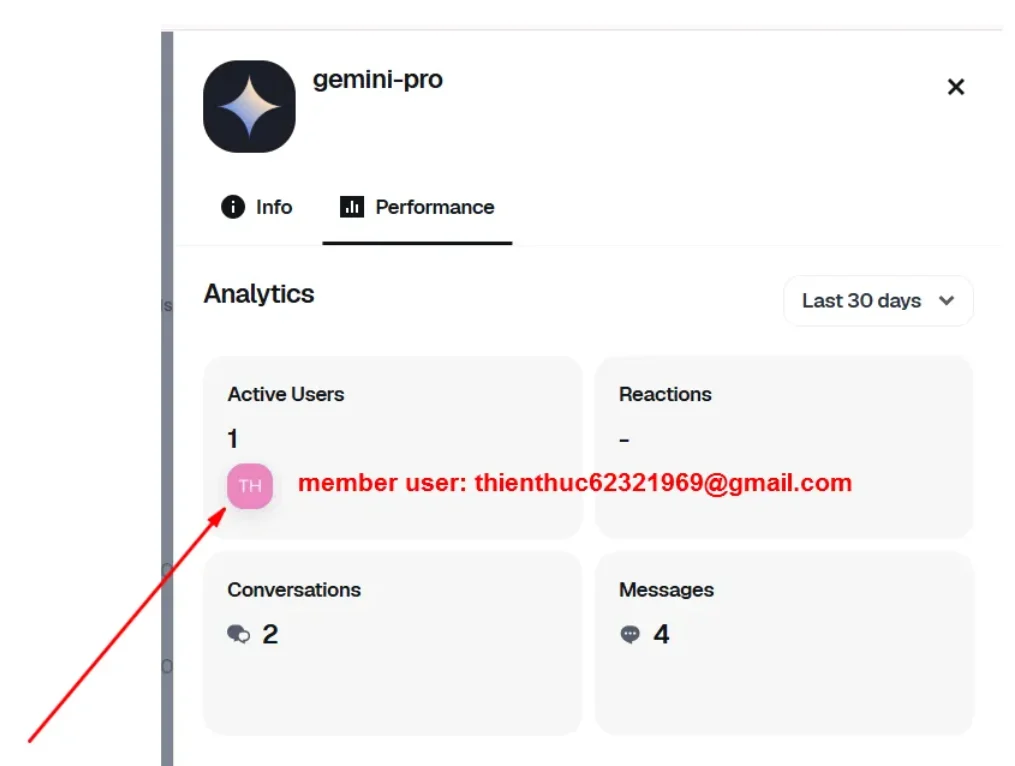
A member user without permission to use the Gemini chatbot could still talk to it by editing the message request to reference the Gemini agent. This let them use a chatbot the admin had disabled or not granted, breaking the intended permission control.

- Triaged in 23 hours
- Fixed in 11 days
- Disclosed after 11 days
Summary:
- A member user who is not authorized to use the Gemini chatbot can still send and receive messages from this chatbot by manually editing the request and changing the
mentionandconfigurationId. This bypasses the permission control from the Admin side, leading to abuse of the chatbot beyond the scope of permission. - Similar to other chatbots, if disabled, members can still use it.
Steps To Reproduce:
- Login admin (████████)
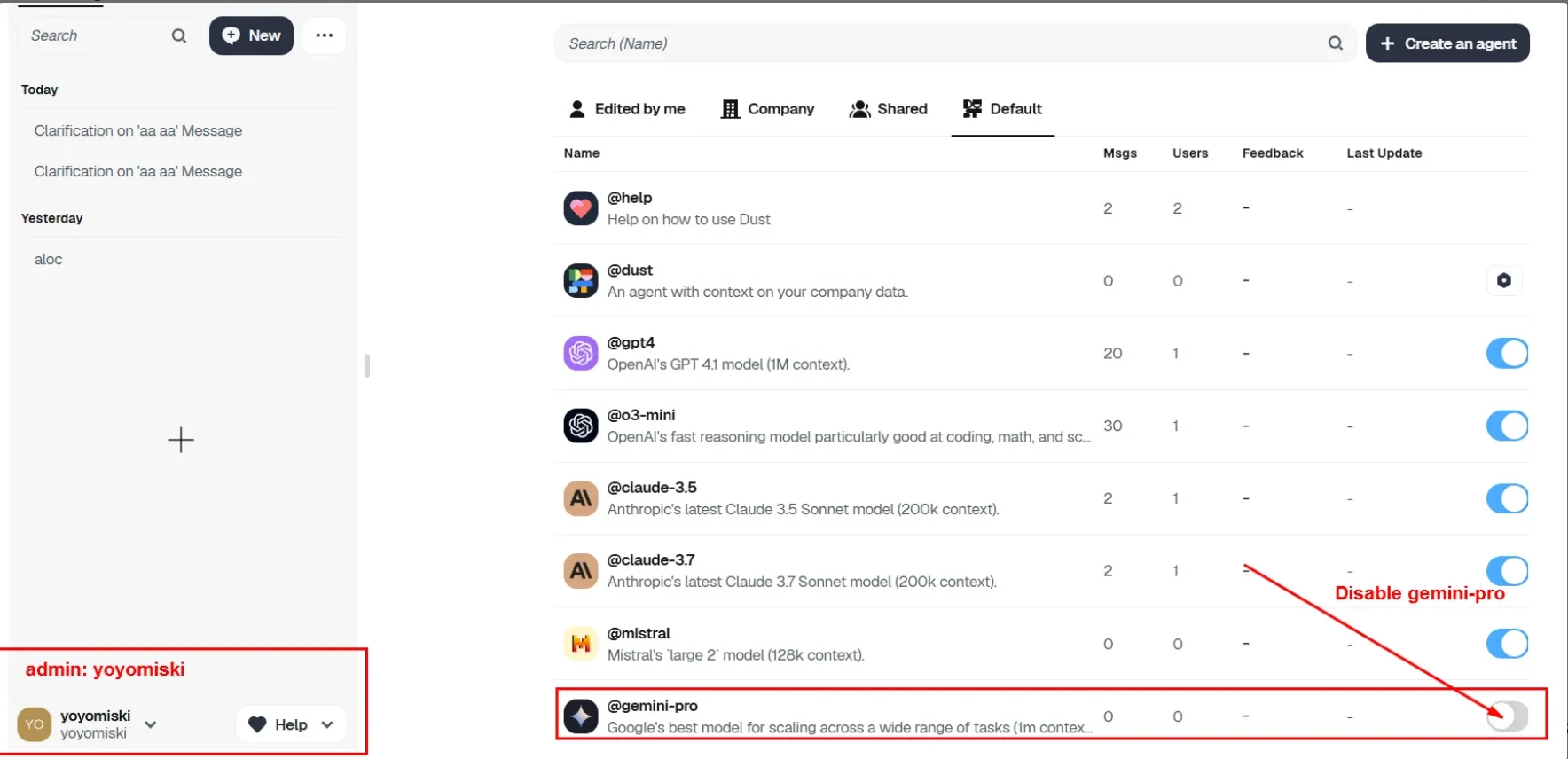
- Go to “Manage Agents”Verify. That the Gemini agent is disabled or not available
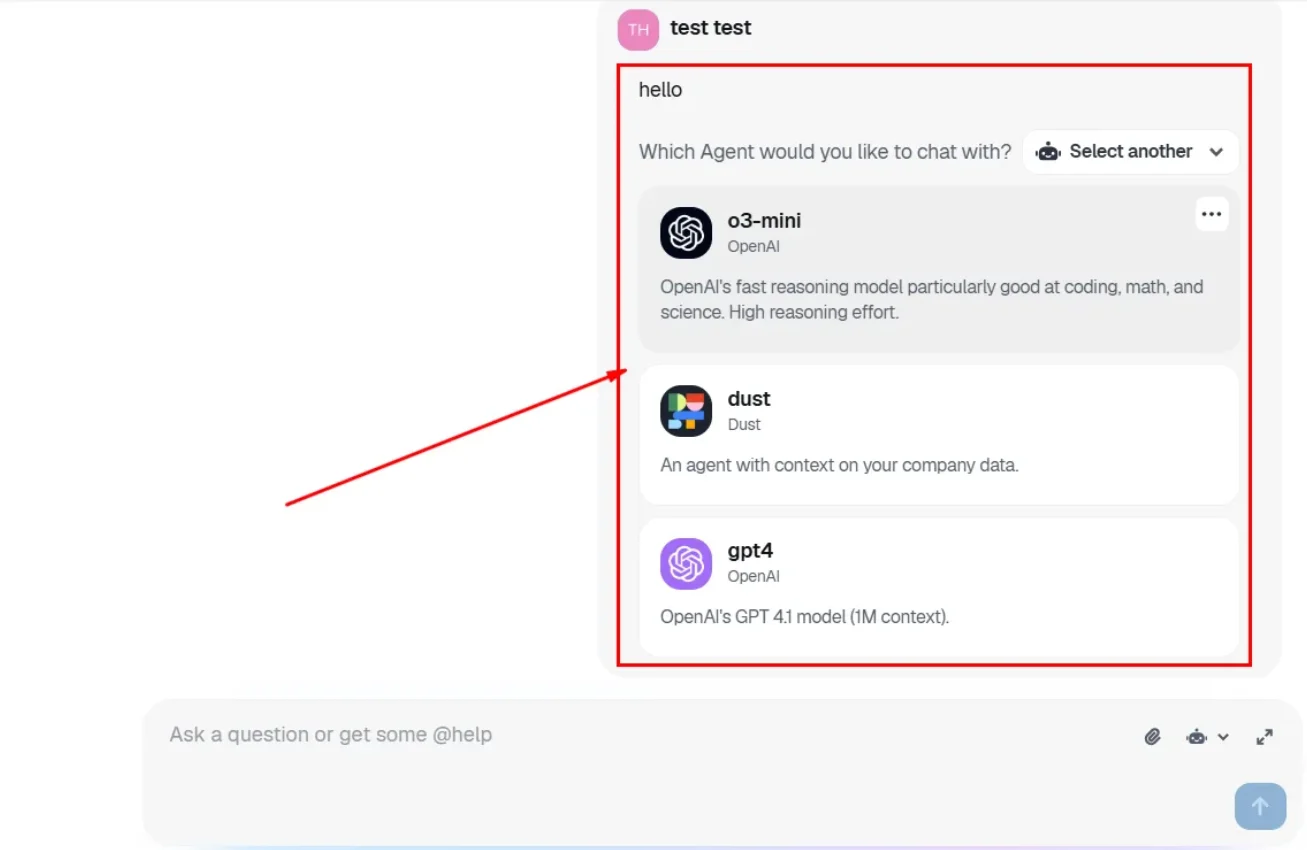
- Now go back to the member account (█████). we make a new chat . When chatting nomally. we select “which agent would you like to chat with?”
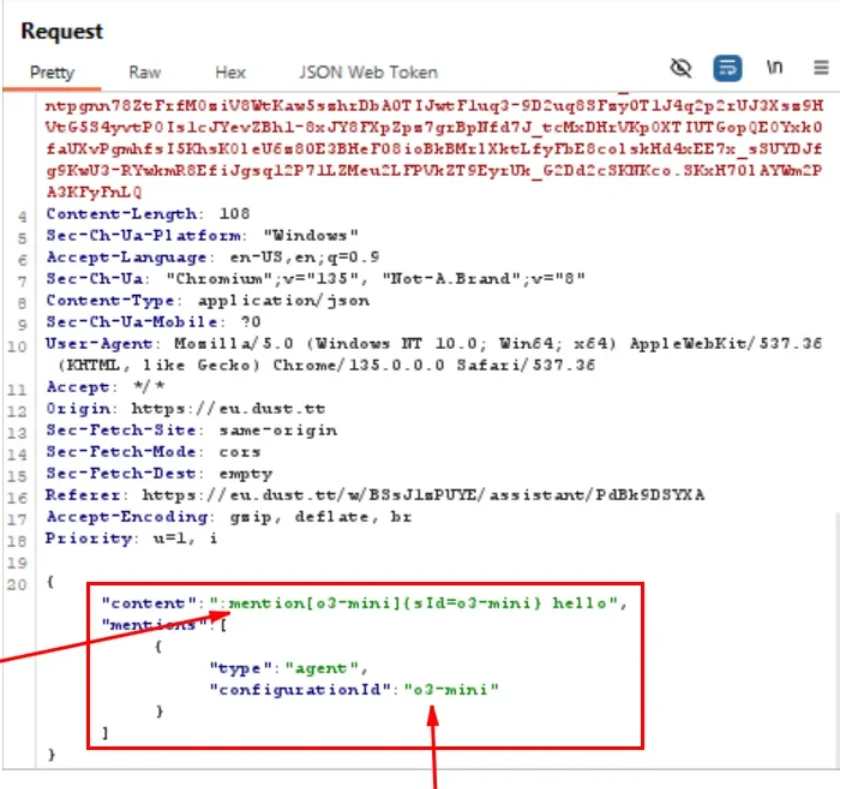
- In the step, turn on Burp and capture the request, we capture the request with API:
POST /api/w/BSsJ1zPUYE/assistant/conversations/PdBk9DSYXA/messages/UyXjPLmW5j/edit
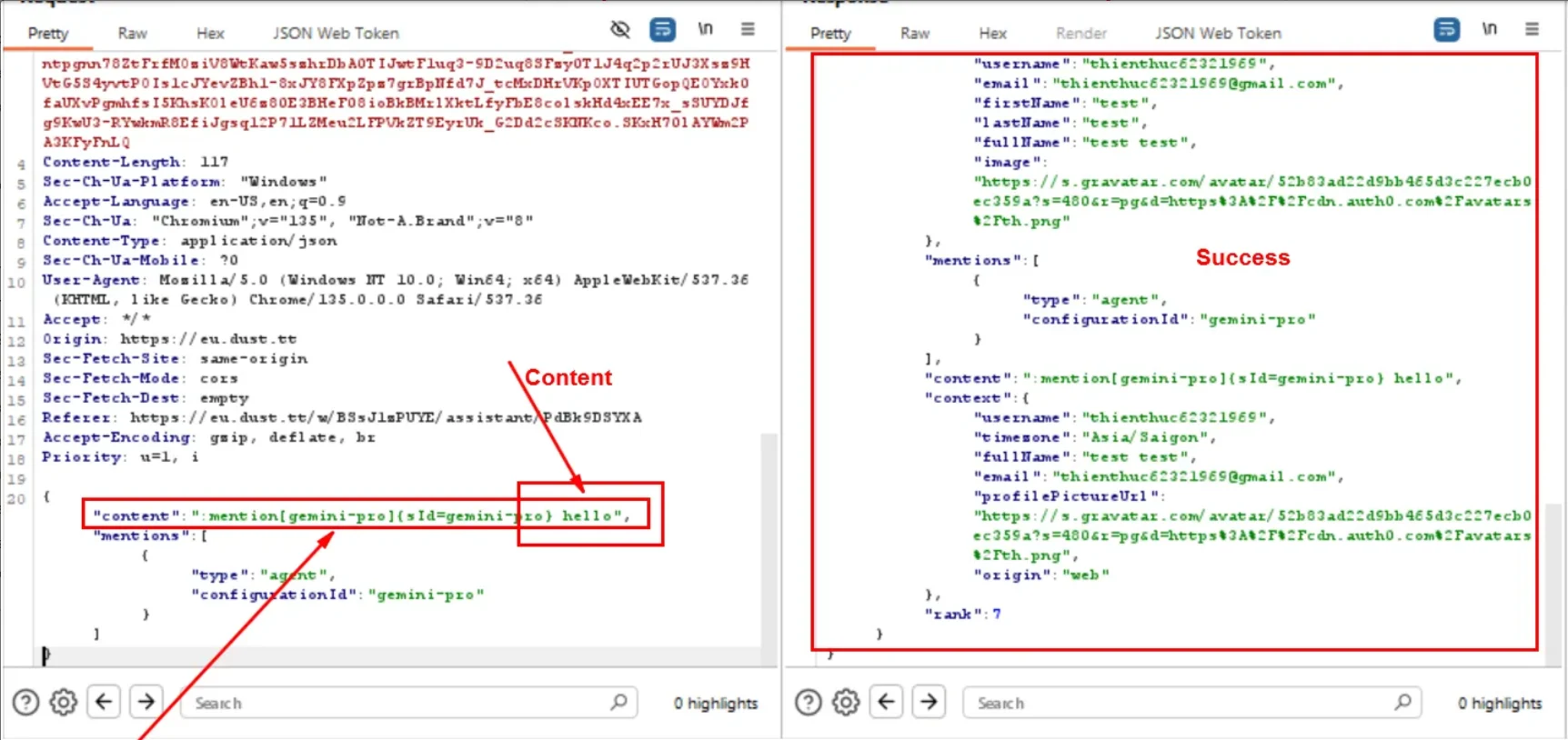
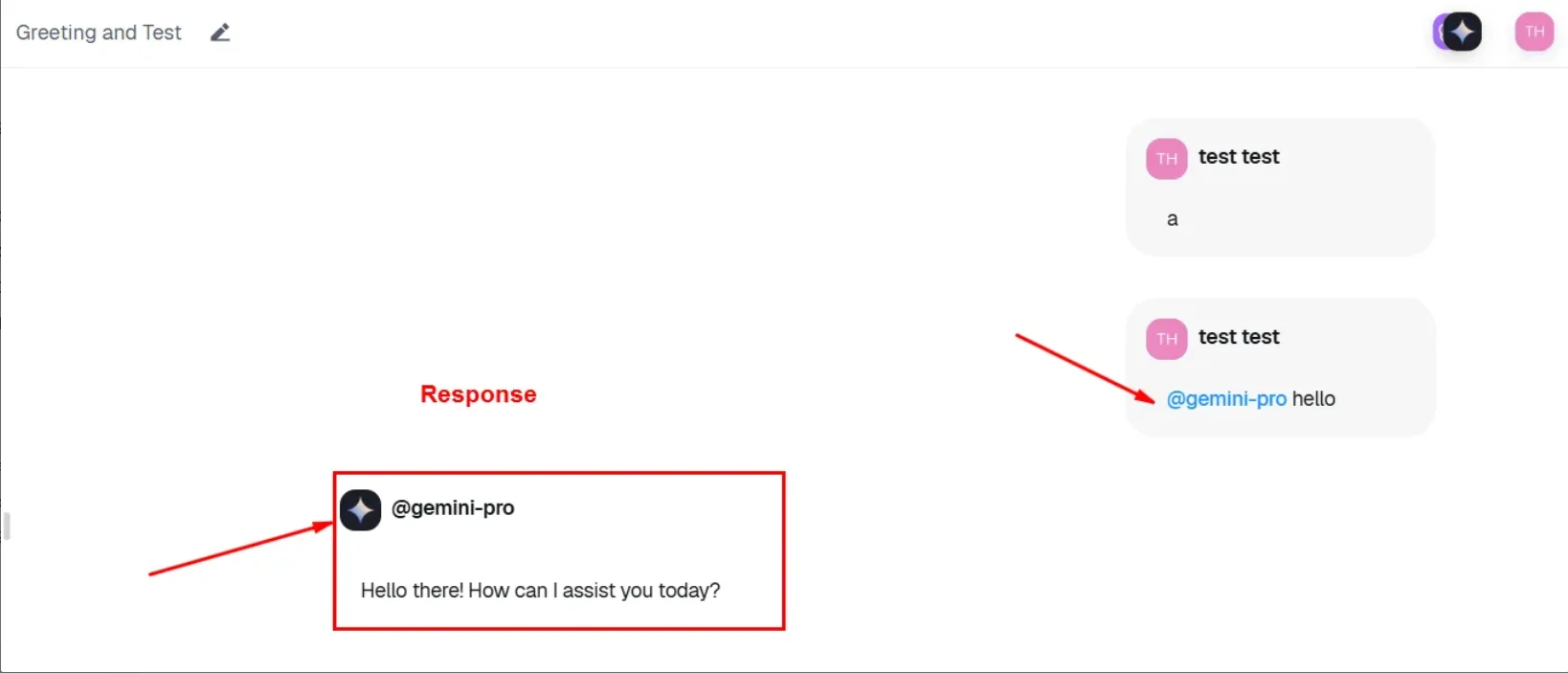
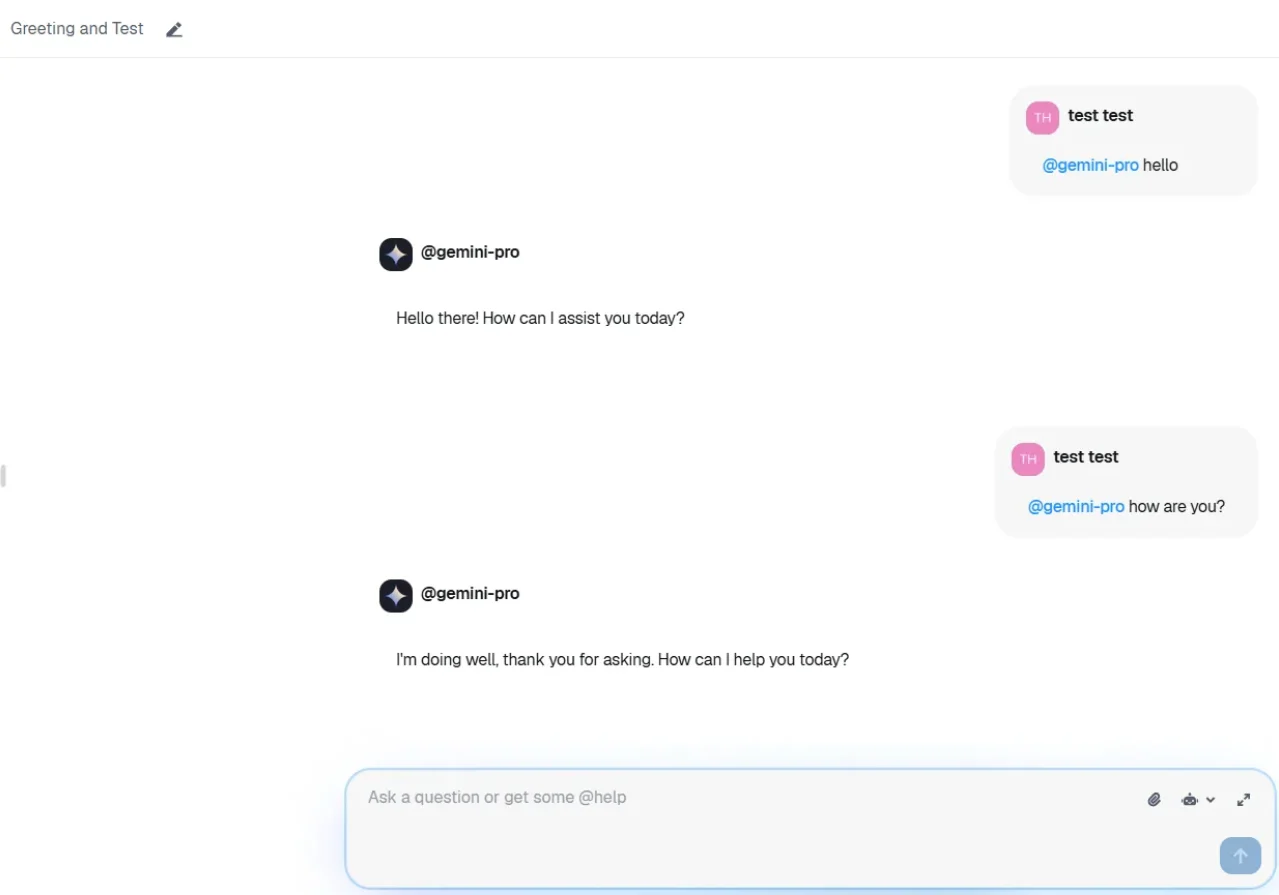
5. This request is passed to mention, we change mention and configurationId to gemini's gemini-pro and forward the request, the result is that we can chat with chatbot gemini even though the admin does not grant us permission to chat with this chatbot
{"content":":mention[gemini-pro]{sId=gemini-pro} how are you?","mentions":[{"type":"agent","configurationId":"gemini-pro"}]}
Response:
##HTTP header:
POST /api/w/BSsJ1zPUYE/assistant/conversations/PdBk9DSYXA/messages/UyXjPLmW5j/edit HTTP/2
Host: eu.dust.tt
Cookie: …
Content-Length: 124
Sec-Ch-Ua-Platform: "Windows"
Accept-Language: en-US,en;q=0.9
Sec-Ch-Ua: "Chromium";v="135", "Not-A.Brand";v="8"
Content-Type: application/json
Sec-Ch-Ua-Mobile: ?0
User-Agent: Mozilla/5.0 (Windows NT 10.0; Win64; x64) AppleWebKit/537.36 (KHTML, like Gecko) Chrome/135.0.0.0 Safari/537.36
Accept: */*
Origin: [https://eu.dust.tt](https://eu.dust.tt/)
Sec-Fetch-Site: same-origin
Sec-Fetch-Mode: cors
Sec-Fetch-Dest: empty
Referer: https://eu.dust.tt/w/BSsJ1zPUYE/assistant/PdBk9DSYXA
Accept-Encoding: gzip, deflate, br
Priority: u=1, i

{"content":":mention[gemini-pro]{sId=gemini-pro} how are you?","mentions":[{"type":"agent","configurationId":"gemini-pro"}]}
Impact
- Member users are not granted permissions, but can still use Gemini chatbot by editing requests → Clear violation of authorization policy
Context
Dust is a product hosted at https://eu.dust.tt/ that lets a workspace run AI agents and chatbots. Within a workspace, an administrator manages which agents are available to members through a "Manage Agents" screen, and members start conversations by choosing which agent they want to talk to. The report concerns the Gemini agent, identified in requests by the configuration id gemini-pro.
The permission model is the interesting part: the admin decides whether a given agent is enabled for members. The finding is that a member can reach a disabled agent by editing the request body.
Setup
Two accounts in the same workspace are needed:
- An administrator account, used to check and change agent availability.
- A member account, used to send the crafted request.
The researcher used Burp to intercept and modify traffic. The workspace and conversation identifiers in the captured request are BSsJ1zPUYE (workspace), PdBk9DSYXA (conversation) and UyXjPLmW5j (message). The browser was Chrome 135 on Windows, as shown in the captured headers.
Finding it
The researcher noticed that the Gemini agent was disabled on the admin side, yet the member account could still get answers from it. The member interface does not offer the agent, but the message edit endpoint accepts a mentions array naming an agent by configurationId, and the request succeeds. Because the mention is just a field in a JSON body, a member can type any agent id into it.
The report also notes that the same behaviour applies to other chatbots: if an agent is disabled, members can still use it.
Exploitation
Step 1: confirm the agent is disabled
Log in as the administrator and open "Manage Agents". The Gemini agent is disabled or otherwise not available to members.
This establishes the precondition: the permission control exists and is set to deny.
Step 2: start a chat as the member
Switch to the member account and create a new chat. When chatting normally, the interface asks "which agent would you like to chat with?", and the Gemini agent is not among the choices offered.
Step 3: capture the message request
With Burp running, send a message and capture the request. The endpoint is:
POST /api/w/BSsJ1zPUYE/assistant/conversations/PdBk9DSYXA/messages/UyXjPLmW5j/edit
The path is scoped to a workspace, a conversation and a specific message, and the operation is an edit of that message.
Step 4: inject the mention and forward
The request body carries the message content and a mentions array. The researcher changes the mention and the configurationId to the Gemini agent's gemini-pro and forwards the request:
{"content":":mention[gemini-pro]{sId=gemini-pro} how are you?","mentions":[{"type":"agent","configurationId":"gemini-pro"}]}
Two parts of the body matter. The content string embeds a mention directive, :mention[gemini-pro]{sId=gemini-pro}, which is how the product represents an agent mention inside message text. The mentions array declares the same agent with "type":"agent" and "configurationId":"gemini-pro". The server accepts both, and the member gets a reply from the Gemini agent even though the admin never granted permission to use it.
The full captured request, including headers, is reproduced below. The Cookie value is omitted here.
POST /api/w/BSsJ1zPUYE/assistant/conversations/PdBk9DSYXA/messages/UyXjPLmW5j/edit HTTP/2
Host: eu.dust.tt
Cookie: …
Content-Length: 124
Sec-Ch-Ua-Platform: "Windows"
Accept-Language: en-US,en;q=0.9
Sec-Ch-Ua: "Chromium";v="135", "Not-A.Brand";v="8"
Content-Type: application/json
Sec-Ch-Ua-Mobile: ?0
User-Agent: Mozilla/5.0 (Windows NT 10.0; Win64; x64) AppleWebKit/537.36 (KHTML, like Gecko) Chrome/[redacted] Safari/537.36
Accept: */*
Origin: [https://eu.dust.tt](https://eu.dust.tt/)
Sec-Fetch-Site: same-origin
Sec-Fetch-Mode: cors
Sec-Fetch-Dest: empty
Referer: https://eu.dust.tt/w/BSsJ1zPUYE/assistant/PdBk9DSYXA
Accept-Encoding: gzip, deflate, br
Priority: u=1, i

{"content":":mention[gemini-pro]{sId=gemini-pro} how are you?","mentions":[{"type":"agent","configurationId":"gemini-pro"}]}
The request is a normal same-origin call from the workspace UI: the Origin and Referer headers point at eu.dust.tt, and the session cookie authenticates the member. Nothing in the request is unusual except the agent id in the body.
Step 5: observe the response
The forwarded request returns a response from the Gemini agent, so the member is now chatting with a chatbot the administrator did not authorise.
The screenshots show the conversation continuing with the Gemini agent despite the admin-side restriction.
Root cause
The message edit endpoint accepts the client-supplied mentions array and the configurationId inside it, and the message reaches the disabled agent. The disabled agent is not offered in the interface, yet the edited request still reaches it.
Because the mention is expressed in two places, the content directive and the mentions array, both need to be validated against the same permission check; the report shows both being accepted for a disabled agent. The report notes the same behaviour applies to other chatbots when they are disabled.
Impact
A member who was not granted permission can still use the Gemini chatbot by editing the request, which the researcher describes as a clear violation of the authorization policy. The same holds for other chatbots when they are disabled. The practical consequence is abuse of a chatbot beyond the scope of the permission the administrator set. The report is rated medium with a CVSS score of 5.4.
Fix
The report does not describe a fix.
Variants to test
- Other agent ids: repeat the edit with the
configurationIdof every agent the workspace knows about, including ones disabled for members. A positive result is a reply from an agent the member cannot select in the UI. - Other message operations: try the same body against message creation and other conversation endpoints, not just the edit path. A positive result is any endpoint that routes to a disabled agent.
- Mention directive alone: send the
:mention[...]directive incontentwithout the matchingmentionsentry, and the reverse. A positive result is routing to the agent when only one of the two fields is supplied, which shows which field the server actually trusts. - Cross-workspace ids: use a workspace or conversation identifier from another workspace with the member's session. A positive result is a response rather than an authorisation error.
- Other tenants of the same product: check whether the same mention and configuration id pattern appears in other deployments and whether the permission check differs between them.
Hunting notes
This kind of bug hides where a UI hides an option but the API still accepts the identifier behind it. Chat and agent products are a good fit because the client sends structured references (agent ids, mention directives, configuration ids) that the server uses for routing. During recon, look for request bodies that name a resource by id and for features with an admin-side enable or disable toggle; the toggle is the permission, and the question is whether the message path re-checks it. Intercepting a normal message and swapping the id for a disabled one is a quick test.
The researcher showed the agent disabled in "Manage Agents", the member interface not offering it, and then a successful reply after the body edit. That contrast, plus the exact request and response, is what makes the missing server-side check unambiguous.
Difficulty: intermediate. The technique is a straightforward body edit, but it requires two accounts, an understanding of the product's agent and mention model, and careful capture of the message request.
What happened, in plain words
Dust is a website (hosted at https://eu.dust.tt/) where a team can set up and use AI chatbots, which Dust calls "agents". Inside a team's space (a "workspace"), an administrator decides which agents the ordinary members are allowed to talk to. There is a screen called "Manage Agents" where the admin can switch an agent on or off for members.
The researcher found that a member can still reach a switched-off agent by editing the message request by hand. So a member can take a normal message they are sending, change one small piece of it by hand so that it names a chatbot the admin has switched off, and the server will happily pass the message to that chatbot and bring back its answer.
The chatbot in question is the Gemini agent, which the requests identify with the name gemini-pro. The researcher showed the admin view with Gemini switched off, the member view where Gemini is not offered as a choice, and then a working conversation with Gemini after editing the request. The report rates this as medium severity with a CVSS score of 5.4.
This kind of bug is called a broken access control (BAC) problem: the rule about who is allowed to do what exists, but it is not enforced where it matters. A simple comparison: a building has a sign saying "staff only", but the door is unlocked. The sign is the interface; the unlocked door is the server.
Background you need first
A few ideas come up again and again, so here they are from zero.
What an API is. When you click around a website, your browser is quietly sending small messages to the website's server and getting answers back. Those messages go to addresses called endpoints, and together they form the site's API (application programming interface). Think of a restaurant: the menu and the waiter are the API. You do not walk into the kitchen yourself; you tell the waiter what you want, and the waiter carries it to the kitchen and brings back your food. In the same way, your browser tells the server what you want, and the server does the work.
What a request is. Each of those messages is a request. It has a method (a verb such as POST, meaning "send this data"), a path (the address of the endpoint), headers (extra information about the request) and usually a body (the data being sent).
What JSON is. The body is often written in JSON, a simple text format for structured data. It uses curly braces {} for an object, square brackets [] for a list, and pairs like "name": "value". It is just a way of writing down labelled pieces of information so a computer can read them reliably.
What a cookie is. When you log in, the server gives your browser a small piece of text called a session cookie. Your browser sends it back with every request, and that is how the server knows who you are. It works like a wristband at an event: you show it once at the entrance, and after that the staff let you in because you are wearing it. In the captured request below, the cookie is the part that proves the member is logged in.
What Burp is. Burp is a tool that sits between your browser and the website and lets you look at, pause and change requests before they reach the server. Normally your browser builds a request and sends it; with Burp in the middle, you can stop it, edit a field, and then let it continue. This is how the researcher changed the message.
What a mention is. In chat products, you can "mention" someone, for example by typing their name so they get pulled into the conversation. Dust represents an agent mention inside the message text with a special directive, and also lists the mentioned agent in a separate field. Both of these are just text in the request body, which is exactly why they can be edited.
What the vulnerability class means. Broken access control means the system has a rule about permissions but does not check it properly on the server. The interface may hide a button, but if the server still accepts the request behind that button, the rule is only decoration.
Setting up
The researcher needed two accounts in the same workspace:
- An administrator account, to check and change which agents are available.
- A member account, to send the edited request.
The workspace, conversation and message in the captured request are identified by BSsJ1zPUYE (the workspace), PdBk9DSYXA (the conversation) and UyXjPLmW5j (the message). The browser was Chrome 135 on Windows, as the captured headers show.
Finding it
The researcher noticed that the Gemini agent was switched off on the admin side, yet the member account could still get answers from it. The member interface simply does not offer the agent, but the endpoint that edits a message accepts a list of mentions that names an agent by its configurationId, and the request succeeds. Because the mention is just a field in a JSON body, a member can type any agent id into it.
The report also notes that the same behaviour applies to other chatbots: if an agent is disabled, members can still use it.
Exploitation
Step 1: confirm the agent is disabled
Log in as the administrator and open "Manage Agents". The Gemini agent is disabled or otherwise not available to members.
This step exists to establish the starting condition: the permission control is present and is set to deny. Without this, there would be nothing to bypass.
Step 2: start a chat as the member
Switch to the member account and create a new chat. When chatting normally, the interface asks "which agent would you like to chat with?", and the Gemini agent is not among the choices offered.
This shows what a normal member sees: the interface hides the disabled agent, so from the browser alone there is no way to pick it. That is the point the researcher is about to get around.
Step 3: capture the message request
With Burp running, send a message and capture the request. The endpoint is:
POST /api/w/BSsJ1zPUYE/assistant/conversations/PdBk9DSYXA/messages/UyXjPLmW5j/edit
Line by line:
POSTis the method, meaning "send data to the server"./api/w/BSsJ1zPUYE/is the workspace part of the path;BSsJ1zPUYEidentifies the workspace.assistant/conversations/PdBk9DSYXA/identifies one conversation,PdBk9DSYXA.messages/UyXjPLmW5j/editidentifies one specific message,UyXjPLmW5j, and says the operation is an edit of that message.
So the whole path is scoped to a workspace, a conversation and a specific message, and the action is editing that message. Capturing it is necessary because the researcher needs to see the exact shape of the request before changing it.
Step 4: inject the mention and forward
The request body carries the message content and a list of mentions. The researcher changes the mention and the configurationId to the Gemini agent's gemini-pro and forwards the request:
{"content":":mention[gemini-pro]{sId=gemini-pro} how are you?","mentions":[{"type":"agent","configurationId":"gemini-pro"}]}
Line by line:
- The outer
{}is one JSON object, the body of the request. "content"holds the text of the message. Inside it,:mention[gemini-pro]{sId=gemini-pro}is the product's way of writing an agent mention in message text, andhow are you?is the ordinary message the member wants to send."mentions"is a list (the square brackets[]) of things being mentioned. It contains one entry, another{}object."type":"agent"says the mentioned thing is an agent rather than, say, a person."configurationId":"gemini-pro"names which agent it is.
Two parts of the body matter. The content string embeds the mention directive, and the mentions list declares the same agent. The server accepts both, and the member gets a reply from the Gemini agent even though the admin never granted permission to use it.
The full captured request, including headers, is reproduced below. The Cookie value is omitted here.
POST /api/w/BSsJ1zPUYE/assistant/conversations/PdBk9DSYXA/messages/UyXjPLmW5j/edit HTTP/2
Host: eu.dust.tt
Cookie: …
Content-Length: 124
Sec-Ch-Ua-Platform: "Windows"
Accept-Language: en-US,en;q=0.9
Sec-Ch-Ua: "Chromium";v="135", "Not-A.Brand";v="8"
Content-Type: application/json
Sec-Ch-Ua-Mobile: ?0
User-Agent: Mozilla/5.0 (Windows NT 10.0; Win64; x64) AppleWebKit/537.36 (KHTML, like Gecko) Chrome/[redacted] Safari/537.36
Accept: */*
Origin: [https://eu.dust.tt](https://eu.dust.tt/)
Sec-Fetch-Site: same-origin
Sec-Fetch-Mode: cors
Sec-Fetch-Dest: empty
Referer: https://eu.dust.tt/w/BSsJ1zPUYE/assistant/PdBk9DSYXA
Accept-Encoding: gzip, deflate, br
Priority: u=1, i

{"content":":mention[gemini-pro]{sId=gemini-pro} how are you?","mentions":[{"type":"agent","configurationId":"gemini-pro"}]}
What the headers mean, in plain words:
- The first line repeats the method, path and protocol version (
HTTP/2). Host: eu.dust.ttsays which website the request is for.Cookie: …is where the session cookie would be; it is the proof that the member is logged in, and it is left out here.Content-Length: 124says how many bytes the body contains.Sec-Ch-Ua-Platform,Sec-Ch-UaandSec-Ch-Ua-Mobileare the browser telling the server about itself: Windows, Chromium 135, not a mobile device.Accept-Languagesays the browser prefers US English.Content-Type: application/jsonsays the body is JSON, which is how the server knows how to read it.User-Agentidentifies the browser and operating system in more detail.Accept: */*says the browser will accept any kind of response.OriginandReferersay the request came from a page oneu.dust.ttitself.Sec-Fetch-Site,Sec-Fetch-ModeandSec-Fetch-Destare extra hints the browser adds about where and how the request was made.Accept-Encodinglists the compression formats the browser can handle.Priority: u=1, iis a hint about how urgent the request is.
After the blank line comes the body, the same JSON shown above. The request is a normal same-origin call from the workspace interface: the Origin and Referer headers point at eu.dust.tt, and the session cookie authenticates the member. Nothing in the request is unusual except the agent id in the body.
Step 5: observe the response
The forwarded request returns a response from the Gemini agent, so the member is now chatting with a chatbot the administrator did not authorise.
The screenshots show the conversation continuing with the Gemini agent despite the admin-side restriction. This is the proof that the edit worked: the member gets real answers from an agent they were never allowed to pick.
Root cause
The message edit endpoint accepts the list of mentions supplied by the browser and the configurationId inside it, and the message reaches the disabled agent. The disabled agent is not offered in the interface, yet the edited request still reaches it.
Because the mention is expressed in two places, the content directive and the mentions list, both need to be validated against the same permission check; the report shows both being accepted for a disabled agent. The report notes the same behaviour applies to other chatbots when they are disabled.
Impact
A member who was not granted permission can still use the Gemini chatbot by editing the request, which the researcher describes as a clear violation of the authorization policy. The same holds for other chatbots when they are disabled. The practical consequence is abuse of a chatbot beyond the scope of the permission the administrator set. The report is rated medium with a CVSS score of 5.4.
Fix
The report does not describe a fix.
Variants to test
- Other agent ids: repeat the edit with the
configurationIdof every agent the workspace knows about, including ones disabled for members. A positive result is a reply from an agent the member cannot select in the interface. - Other message operations: try the same body against message creation and other conversation endpoints, not just the edit path. A positive result is any endpoint that routes to a disabled agent.
- Mention directive alone: send the
:mention[...]directive incontentwithout the matchingmentionsentry, and the reverse. A positive result is routing to the agent when only one of the two fields is supplied, which shows which field the server actually trusts. - Cross-workspace ids: use a workspace or conversation identifier from another workspace with the member's session. A positive result is a response rather than an authorisation error.
- Other tenants of the same product: check whether the same mention and configuration id pattern appears in other deployments and whether the permission check differs between them.
Hunting notes
This kind of bug hides where an interface hides an option but the API still accepts the identifier behind it. Chat and agent products are a good fit because the browser sends structured references (agent ids, mention directives, configuration ids) that the server uses for routing. During recon, look for request bodies that name a resource by id and for features with an admin-side enable or disable toggle; the toggle is the permission, and the question is whether the message path re-checks it. Intercepting a normal message and swapping the id for a disabled one is a quick test.
The researcher showed the agent disabled in "Manage Agents", the member interface not offering it, and then a successful reply after the body edit. That contrast, plus the exact request and response, is what makes the missing server-side check unambiguous.
Difficulty: intermediate. The technique is a straightforward body edit, but it requires two accounts, an understanding of the product's agent and mention model, and careful capture of the message request.
Glossary
- API: the set of addresses and rules a website uses to exchange data with the browser, like a waiter carrying orders to the kitchen.
- Agent: Dust's word for an AI chatbot that a workspace can set up and use.
- Administrator: the account that manages a workspace, including which agents members may use.
- Authorisation: the rule about what a logged-in user is allowed to do.
- Body: the part of a request that carries the data being sent, often in JSON.
- Broken access control (BAC): a bug where a permission rule exists but is not enforced on the server.
- Burp: a tool that sits between the browser and the website so requests can be inspected, paused and edited.
- Chatbot: a program that answers messages in a conversation, here an AI agent.
- Configuration id: the name a request uses to identify a particular agent, here
gemini-pro. - Content: the field in the request body that holds the text of the message.
- Cookie: a small piece of text the browser stores after login and sends with each request so the server knows who you are.
- CVSS: a standard scoring system for the severity of a security issue; 5.4 is in the medium range.
- Endpoint: the address of one specific operation on a server, such as the message edit path.
- Header: extra information attached to a request, such as the browser type or the cookie.
- HTTP/2: the version of the protocol browsers and servers use to exchange requests and responses.
- JSON: a text format for structured data using braces, brackets and
"name": "value"pairs. - Member: an ordinary user of a workspace, without administrator rights.
- Mention: a reference inside a message that pulls in a person or agent; Dust writes it as a
:mention[...]directive and also lists it in amentionsfield. - Method: the verb of a request, such as
POST, meaning send data. - Origin / Referer: headers that say which page the request came from.
- Path: the part of the address after the domain that points at a specific endpoint.
- Permission: the rule about whether a user may use a particular feature or resource.
- Request: a message the browser sends to a server asking it to do something.
- Response: the server's answer to a request.
- Root cause: the underlying reason a bug exists, here the missing server-side check.
- Session: the period during which the server recognises you as logged in, tracked by the cookie.
- Severity: how serious an issue is judged to be, here medium.
- User-Agent: a header describing the browser and operating system.
- Workspace: a team's private space inside Dust, identified here by
BSsJ1zPUYE. configurationId: the JSON field in thementionslist that names which agent is being mentioned.gemini-pro: the identifier of the Gemini agent used in the requests.mentions: the JSON list in the request body that declares which agents or people are mentioned.