Improper input validation in emoji field leads to sidebar UI denial of service
The emoji field in the page emoji update endpoint does not properly validate user input, allowing an attacker to submit an excessively long string with newline characters. This breaks the sidebar layout, causing the malicious page icon to overlap other items and preventing users from clicking or accessing other pages.

- Triaged in 4 days
- Fixed in 3 months
- Paid in 6 months
- Disclosed after 6 months
Summary by the program
Security advisory at https://github.com/nextcloud/security-advisories/security/advisories/GHSA-4vpp-fp9q-9g23
The report
Summary:
The emoji field in the page emoji update endpoint does not properly validate user input. An attacker can submit an excessively long string including newline characters instead of a valid emoji. By injecting long text and line breaks, the sidebar layout becomes broken. As a result, the malicious page icon overlaps other items in the sidebar, preventing users from clicking or accessing other pages.
##Version: ==Collectives app: 4.0.0==
Steps To Reproduce:
- User A creates a page inside a collective.
- User A shares the page with User B and grants edit permission.
- User B sends the following request to update the page emoji:
PUT /ocs/v2.php/apps/collectives/api/v1.0/p/collectives/{collective_id}/pages/{page_id}/emoji
Content-Type: application/json

Example payload:

{
  "emoji": "👍aaaaaaaaaaaaaaaaaaaaaaaaaaaaaaaaaaaaaaaaaaaaaaaaaaaaaaa\naaaaaaaaaaaaaaaaaaaaaaaaaaaaaaaaaaaaaaaaaaaaaaaaaaaa"
}
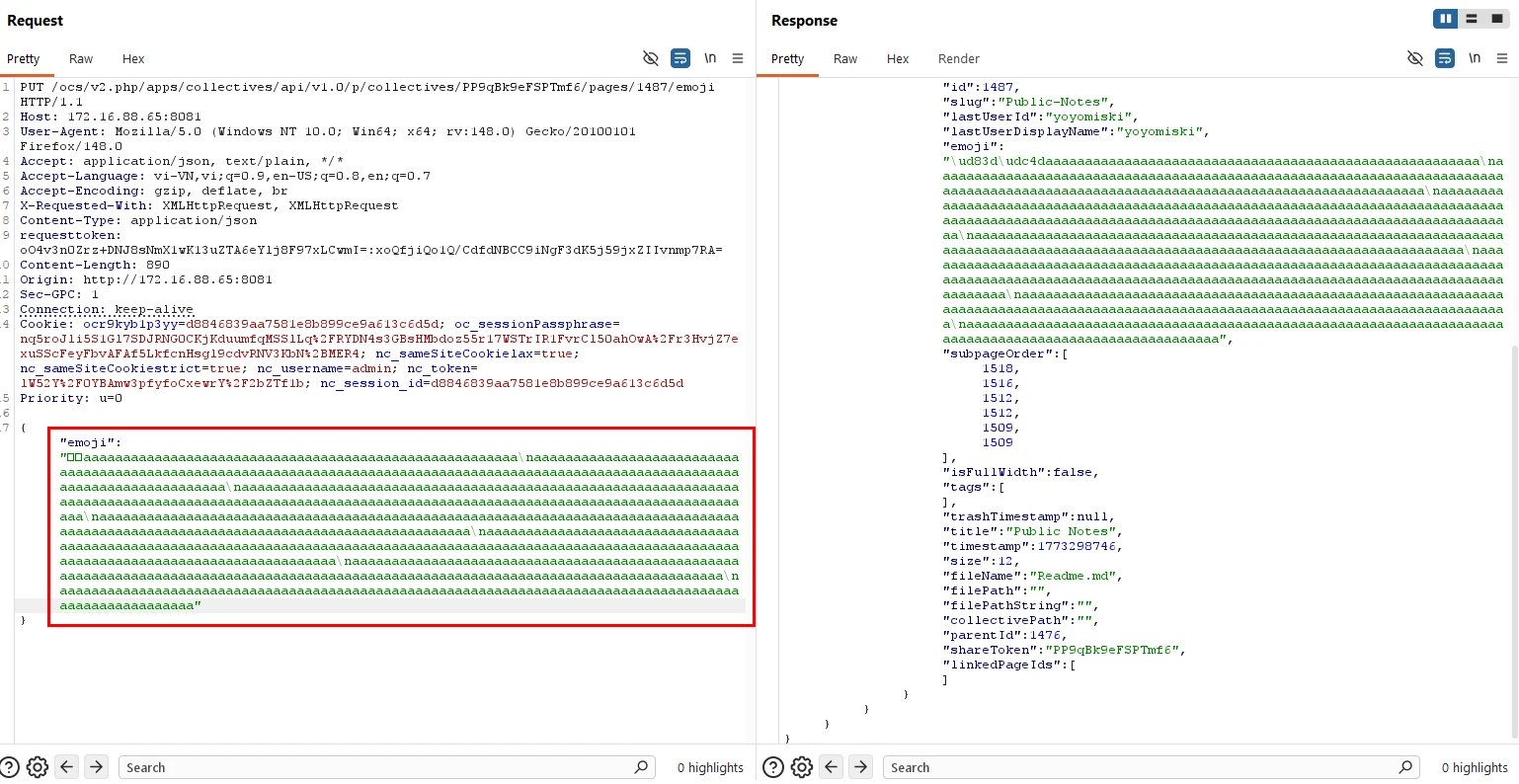
- After the request is processed, open the collective sidebar.
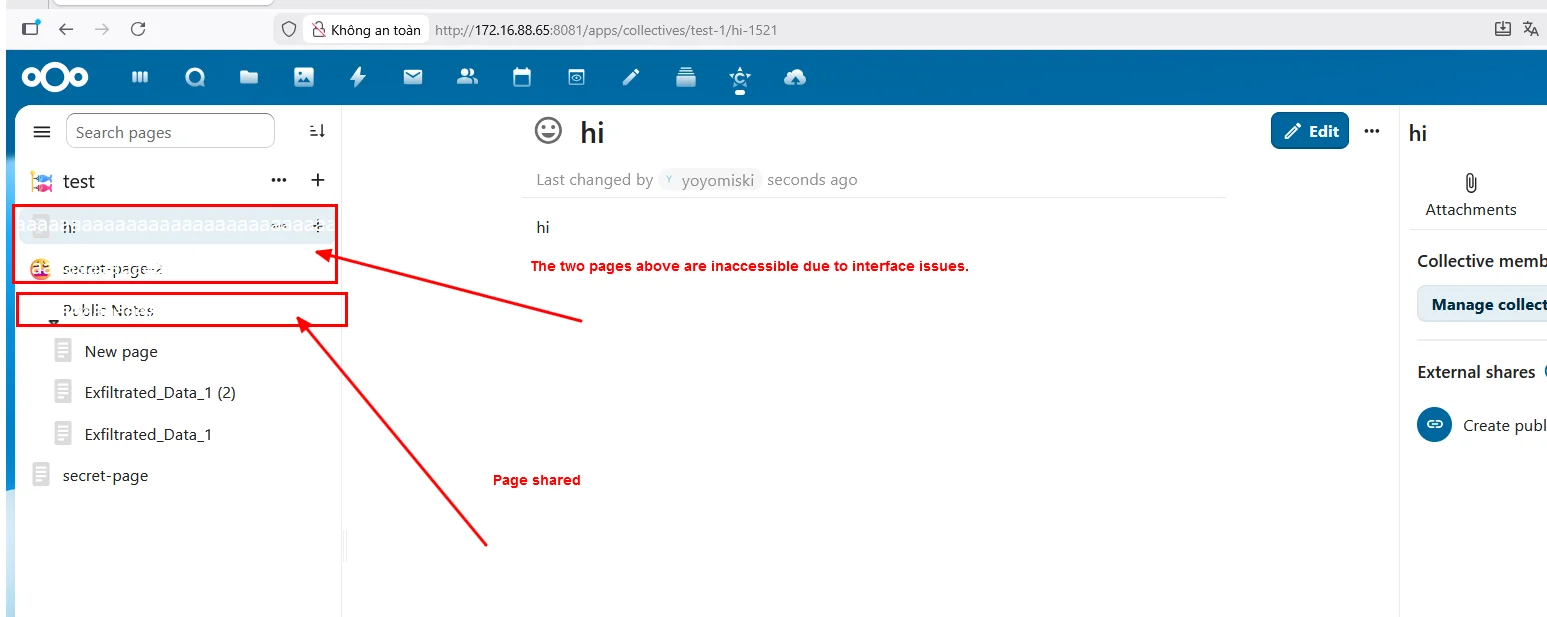
- Observe that the emoji icon becomes extremely large due to the injected content, breaking the sidebar layout.
- The malformed icon overlaps other sidebar items, preventing users from clicking or accessing other pages.
Impact
- An attacker with permission to modify a page emoji can inject long malformed input that breaks the sidebar layout. This may block access to other pages in the collective, effectively causing a UI-based denial of service for users trying to navigate the workspace.
##VideoPoC: ====
Context
Nextcloud Collectives is a collaborative knowledge base app for Nextcloud. Within a collective, users create pages, and each page can carry an emoji that is shown as its icon in the collective sidebar. The emoji is set through an OCS endpoint in the Collectives app, and the sidebar renders whatever value is stored for that page.
The report concerns the emoji update endpoint of Collectives 4.0.0. The endpoint is meant to accept a single emoji and store it as the page icon. The researcher found that the value is not properly validated, so a user who can edit a page can store arbitrary text, including newline characters, in the emoji field. The stored value is then rendered in the sidebar, where a long value with line breaks breaks the layout and overlaps other sidebar entries.
The program published a security advisory for this issue at https://github.com/nextcloud/security-advisories/security/advisories/GHSA-4vpp-fp9q-9g23. The weakness was classified as a business logic error, with low severity and a CVSS score of 3.1.
Setup
The precondition is a collective with at least two users:
- User A creates a page inside a collective.
- User A shares the page with User B and grants edit permission.
User B needs nothing more than edit permission on the page. The request is sent directly to the OCS API rather than through the normal interface, so a tool that can issue arbitrary HTTP requests with an authenticated session is enough. The affected version is Collectives 4.0.0.
Finding it
The emoji field in the page emoji update endpoint does not properly validate user input. Instead of a valid emoji, a client can submit an excessively long string that includes newline characters. The stored value is rendered as the page icon, and the long value with line breaks makes the icon extremely large, breaking the sidebar layout.
Exploitation
Step 1: Create and share a page
User A creates a page inside a collective and shares it with User B, granting edit permission. This establishes the attacker's position: User B is a legitimate editor of the page, not an anonymous outsider.
Step 2: Send the emoji update request
User B sends the following request to update the page emoji:
PUT /ocs/v2.php/apps/collectives/api/v1.0/p/collectives/{collective_id}/pages/{page_id}/emoji
Content-Type: application/json

Example payload:

{
  "emoji": "👍aaaaaaaaaaaaaaaaaaaaaaaaaaaaaaaaaaaaaaaaaaaaaaaaaaaaaaa\naaaaaaaaaaaaaaaaaaaaaaaaaaaaaaaaaaaaaaaaaaaaaaaaaaaa"
}
The request targets the emoji sub-resource of a specific page inside a specific collective, identified by {collective_id} and {page_id}. The JSON body sets the emoji field to a valid emoji followed by a long run of a characters, a newline, and a second long run of a characters. The long text and the line breaks together make the icon extremely large.
Step 3: Open the collective sidebar
After the request is processed, open the collective sidebar. The emoji icon becomes extremely large because of the injected content, which breaks the sidebar layout.
Step 4: Observe the overlap
The malformed icon overlaps other sidebar items, preventing users from clicking or accessing other pages.
Root cause
The endpoint accepts an excessively long string containing newline characters in place of a valid emoji, and the sidebar renders that stored value as the page icon without constraining it to a single emoji or to a bounded size. Because the value is long and contains line breaks, the rendered icon grows and overlaps neighbouring sidebar entries.
The report does not describe any server-side length limit, character allowlist or output encoding that would have stopped the value. The emoji field is not properly validated on input.
Impact
An attacker with permission to modify a page emoji can inject long malformed input that breaks the sidebar layout. This may block access to other pages in the collective, effectively causing a UI-based denial of service for users trying to navigate the workspace.
The impact is bounded by the attacker's permissions: the attacker must already be able to edit the page. The effect is on the interface, not on data or server availability, which is consistent with the low severity and the business logic classification.
Fix
The report does not describe the code change that was made. The program published a security advisory for this issue.
Variants to test
- Other fields that store a short display value, such as page titles, folder icons, status messages or reaction fields. A positive result is a stored value containing newlines or excessive length that visibly distorts a shared list or navigation pane.
- The same emoji endpoint with different payload shapes: a very long single-line string, multiple newlines, or whitespace-only content. A positive result is any value that is accepted and changes the layout of the sidebar.
- Other clients of the same stored value, such as mobile apps or notification summaries. A positive result is the malformed value breaking layout outside the web sidebar.
- Permission boundaries: repeat the request as a user with only the minimum permission needed to edit the page. A positive result confirms the attack needs no elevated role.
Hunting notes
This kind of bug tends to hide in endpoints that accept a small, well-defined value (an emoji, an icon, a colour, a short label) and in the components that render that value in shared navigation. During recon, look for API routes whose path ends in a field name such as emoji or icon, and check whether the client-side rendering constrains the value's length and line count. The signal is a field whose value is not validated before it is stored and rendered.
The researcher showed enough impact by demonstrating the broken sidebar and the overlap that blocks clicks on other pages, and by tying it to a concrete precondition (edit permission on a shared page).
What happened, in plain words
Nextcloud Collectives is an app that turns Nextcloud (a self-hosted file and collaboration platform) into a shared knowledge base. Inside a collective, people write pages, and each page can have a small emoji next to its name, like a bookmark sticker, so you can recognise it in the list on the left of the screen. That list is called the sidebar.
A researcher found that the part of the app that saves this emoji does not check what it is given. It is supposed to receive one emoji, but it happily stores a very long piece of text with line breaks in it. The sidebar then draws that stored text as the page icon. Because the text is long and has line breaks, the icon grows huge and covers the other pages in the list, so people cannot click them any more.
This is a denial of service, but a small and visual one: nothing is deleted, the server keeps running, and the attacker must already have permission to edit the page. That is why it was rated low severity. The weakness was classified as a business logic error, with a CVSS score of 3.1. CVSS is a standard scoring system for how serious a security flaw is; 3.1 out of 10 is in the low range.
The program published a security advisory for the issue at https://github.com/nextcloud/security-advisories/security/advisories/GHSA-4vpp-fp9q-9g23.
The pieces you need to know
Before the steps make sense, here are the few ideas the report relies on.
- API: a way for one program to talk to another over the network, without a human clicking buttons. Think of it as the service counter at a shop: you hand over a written request in a fixed format and get a written answer back. The web page you see in your browser is one customer of the API; a script can be another.
- OCS endpoint: Nextcloud's own style of API address. An endpoint is simply one specific address that accepts one specific kind of request, like one particular counter window.
- HTTP request: the message your browser or script sends to a server. It has a method (a verb such as
GETto read orPUTto replace something), a path (which endpoint), headers (extra information about the request) and sometimes a body (the data you are sending). - JSON: a plain text format for structured data, built from names and values in curly braces. It is how the request body below carries the emoji.
- Session: proof that you are logged in. After you log in, your browser holds a small piece of data (often a cookie) that it sends with every request so the server knows who you are. A script that sends requests directly must carry the same proof, otherwise the server treats it as a stranger.
- Input validation: checking data that arrives from a user before using or storing it. The everyday comparison is a bouncer at a door checking that you have a ticket: if the check is missing, anyone walks in with anything.
- Newline character: the invisible instruction that ends a line of text and starts a new one, the same thing that happens when you press Enter. In JSON it is written as
\n. - Rendering: turning stored data into what you see on screen. If stored text is drawn without limits, the drawing can grow beyond the space meant for it.
- UI-based denial of service: an attack that does not knock a server offline but makes the interface unusable for people, here by covering up parts of the screen so they cannot be clicked.
The setup
The precondition is a collective with at least two users:
- User A creates a page inside a collective.
- User A shares the page with User B and grants edit permission.
Why this matters: the attacker is User B, and User B is not an outsider. They are a normal person who was given the right to edit one page. Nothing more is needed. The request is sent straight to the API rather than through the normal web interface, so all the attacker needs is a tool that can send a custom HTTP request while logged in. The affected version is Collectives 4.0.0.
Finding it
The emoji field in the page emoji update endpoint does not properly validate user input. Instead of a valid emoji, a client can submit an excessively long string that includes newline characters. The researcher noticed that the sidebar renders this stored value as the page icon, so the injected text and line breaks appear in the sidebar instead of being rejected or cut short.
In other words: the API accepts anything in the emoji field, including long text with line breaks. When a check exists only in the interface and not on the server, talking to the API directly walks around the check. That gap is the bug.
Exploitation
Step 1: Create and share a page
User A creates a page inside a collective and shares it with User B, granting edit permission. This establishes the attacker's position: User B is a legitimate editor of the page, not an anonymous outsider. It also shows the limit of the attack: without edit permission on that page, User B could not send the request at all.
Step 2: Send the emoji update request
User B sends the following request to update the page emoji:
PUT /ocs/v2.php/apps/collectives/api/v1.0/p/collectives/{collective_id}/pages/{page_id}/emoji
Content-Type: application/json

Example payload:

{
  "emoji": "👍aaaaaaaaaaaaaaaaaaaaaaaaaaaaaaaaaaaaaaaaaaaaaaaaaaaaaaa\naaaaaaaaaaaaaaaaaaaaaaaaaaaaaaaaaaaaaaaaaaaaaaaaaaaa"
}
Line by line:
PUTis the method. It means "replace the thing at this address with what I am sending". The attacker is replacing the page's emoji./ocs/v2.php/apps/collectives/api/v1.0/p/collectives/{collective_id}/pages/{page_id}/emojiis the path to the endpoint. It names the Collectives app, the API version, one specific collective ({collective_id}) and one specific page inside it ({page_id}), and finally theemojifield of that page. The curly-brace parts are placeholders: the real request fills in the actual numbers of the collective and the page.Content-Type: application/jsonis a header that tells the server the body is JSON, so the server knows how to read it.- The body is a JSON object with one name,
emoji, and one value. The value starts with a real emoji, a thumbs up, then a long run ofacharacters, then\n, which is the newline character, then a second long run ofacharacters.
The newline is the part that matters for the layout: it forces the icon content onto multiple lines. The long runs of letters make it wide. Together they turn a tiny icon into a block of text far bigger than the space reserved for it.
Step 3: Open the collective sidebar
After the request is processed, open the collective sidebar. The emoji icon becomes extremely large because of the injected content, which breaks the sidebar layout. After the request is processed, the emoji icon becomes extremely large and breaks the sidebar layout.
Step 4: Observe the overlap
The malformed icon overlaps other sidebar items, preventing users from clicking or accessing other pages.
Root cause
The endpoint accepts an excessively long string containing newline characters in place of a valid emoji, and the sidebar renders that stored value as the page icon without constraining it to a single emoji or to a bounded size. Because the value is long and contains line breaks, the rendered icon grows and overlaps neighbouring sidebar entries.
The report does not describe any server-side length limit, character allowlist or output encoding that would have stopped the value. The emoji field is not properly validated on input.
Impact
An attacker with permission to modify a page emoji can inject long malformed input that breaks the sidebar layout. This may block access to other pages in the collective, effectively causing a UI-based denial of service for users trying to navigate the workspace.
The impact is bounded by the attacker's permissions: the attacker must already be able to edit the page. The effect is on the interface, not on data or server availability, which is consistent with the low severity and the business logic classification.
Fix
The report does not describe the code change that was made. The program published a security advisory for this issue.
Variants to test
- Other fields that store a short display value, such as page titles, folder icons, status messages or reaction fields. A positive result is a stored value containing newlines or excessive length that visibly distorts a shared list or navigation pane.
- The same emoji endpoint with different payload shapes: a very long single-line string, multiple newlines, or whitespace-only content. A positive result is any value that is accepted and changes the layout of the sidebar.
- Other clients of the same stored value, such as mobile apps or notification summaries. A positive result is the malformed value breaking layout outside the web sidebar.
- Permission boundaries: repeat the request as a user with only the minimum permission needed to edit the page. A positive result confirms the attack needs no elevated role.
Hunting notes
This kind of bug tends to hide in endpoints that accept a small, well-defined value (an emoji, an icon, a colour, a short label) and in the components that render that value in shared navigation. During recon, look for API routes whose path ends in a field name such as emoji or icon, and check whether the client-side rendering constrains the value's length and line count. The signal is a field whose value is not validated before it is stored and rendered.
The researcher showed enough impact by demonstrating the broken sidebar and the overlap that blocks clicks on other pages, and by tying it to a concrete precondition (edit permission on a shared page).
Glossary
- API: a fixed way for programs to send requests to a service and receive answers, without a human using the interface.
- Business logic error: a flaw in how a feature is supposed to work, rather than in low-level code such as memory handling; the rules of the feature are incomplete.
- Collective: a shared workspace inside the Nextcloud Collectives app that holds pages.
- Collectives: a Nextcloud app for collaborative knowledge bases, made of collectives and pages.
- Content-Type: an HTTP header that states the format of the request body, for example JSON.
- CVSS: a standard 0 to 10 score for the severity of a security flaw; 3.1 is low.
- Denial of service: making something unusable for its intended users, whether by overloading a server or, as here, by breaking the interface.
- Endpoint: one specific API address that accepts one specific kind of request.
- HTTP request: the message a client sends to a server, made of a method, a path, headers and an optional body.
- Input validation: checking data received from a user before storing or using it.
- JSON: a text format for structured data using names and values in curly braces.
- Newline character: the invisible character that ends a line of text, written
\nin JSON. - OCS: Nextcloud's own API convention, whose addresses appear under
/ocs/. - Output encoding: preparing stored data so that when it is displayed it cannot be interpreted as anything other than plain content.
- Payload: the data part of a request, here the JSON body.
- PUT: an HTTP method meaning "replace the resource at this address with what I send".
- Rendering: turning stored data into what appears on screen.
- Session: the proof, usually a cookie, that a request comes from a logged-in user.
- Sidebar: the navigation list at the side of the screen that shows the pages of a collective.
- UI-based denial of service: an attack that makes an interface unusable, for example by covering elements so they cannot be clicked, without taking down the server.
- User A / User B: the two accounts in the scenario; User A owns and shares the page, User B is the attacker with edit permission.