Bypassing Ebay XSS Protection to launch XSS by Nirmal Dahal
A search field on eBay's customer service page reflected user input into an HTML attribute without properly escaping quotes, allowing an attacker to inject an event handler. An attacker could craft a link that, when visited, would execute script in the victim's browser and could read cookies.
 Published on medium.com
Hi, there today I want to share small proof of concept regarding “Reflective Cross-Site Scripting [ R-XSS ]” which I had found on eBay back in 2016. I am not an active participant in bug bounty programs, but one day I had finished all my office works so I was surfing on Facebook and received a message from my brother…
The full write-up lives on its author's site
It belongs to its author, so we link to it rather than copy it. The other two tabs are our own rewrites, checked against it.
Context
In 2016 I found a reflected cross-site scripting (R-XSS) issue on eBay. I am not an active bug bounty participant; I came across the feature by chance while browsing. A message from my brother Samir about musical instruments contained an eBay link. I logged into eBay to view the details and noticed the "Help & Contact" menu. Following it took me to the "Customer Service" page, which has a search field. That search field is the feature involved here: it lets a visitor search help topics, keywords or phrases, and it reflects the submitted query back into the page.
Setup
No special tooling or accounts beyond a normal logged-in eBay session are described. The testing was done in the browser against the Customer Service search field, using the page source (View-Source) to inspect how the input was reflected. The report does not name specific browser versions or other software.
Finding it
My usual first probe for input handling is the string '>Test12345<", because it contains a number, a letter and syntax characters. It answers questions such as whether user input is sanitised and how sensitive the input handling is.
I entered that string into the Customer Service search field. The value was reflected without >, < and ". I concluded that eBay was replacing those syntax characters with white space. The View-Source output looked like this:
<input type=”text” id=”query“ role=”combobox” name=”query” value=”***‘ Test12345***” title=”Search by help topic, keywords, or phrases” aria-expanded=”false” aria-autocomplete=”list” aria-activedescendant=”” aria-value=”***‘ Test12345***” autocomplete=”off” aria-owns=”popup” class=”dText3“></input>
The input is reflected into both the value attribute and the aria-value attribute of the same <input> element. The angle brackets and double quote from my probe are gone, which is what made the reflection look filtered rather than exploitable at first glance.
Exploitation
Step 1: try a plain script payload
To test the application further I used this payload:
"/><script>alert(1);</script><input type=”
The syntax was still filtered by eBay, so the payload did not survive as written.
Step 2: URL-encode the payload
I encoded the same payload in URL-encode format:
%22%2f%3E%3Cscript%3Ealert%281%29%3B%3C%2fscript%3E%3Cinput%20type%3D%22
After that, the page source for that part was as follows:
<input type=”text” id=”query“ role=”combobox” name=”query” value=”*” script alert 1 script input type=”*” title=”Search by help topic, keywords, or phrases” aria-expanded=”false” aria-autocomplete=”list” aria-activedescendant=”” aria-value=”*” script alert 1 script input type=”*” autocomplete=”off” aria-owns=”popup” class=”dText3“></input>
This showed that eBay was also filtering URL-encoded syntax, except for %22 and %3D, whose decoded values are " and =. In other words, the double quote and the equals sign got through the filter while the rest of the encoded payload did not.
Step 3: build a payload around the surviving characters
With " and = available, I tweaked the payload to:
%22 onMouseOver=%22prompt(document.cookie)
which decodes to:
" onMouseOver="prompt(document.cookie)
The payload decodes to a double quote followed by a new onMouseOver attribute containing prompt(document.cookie). The XSS attack was then successful. The resulting markup was:
<input type=”text” id=”query“ role=”combobox” name=”query” value=”* ” onMouseOver=”prompt(document.cookie)*” title=”Search by help topic, keywords, or phrases” aria-expanded=”false” aria-autocomplete=”list” aria-activedescendant=”” aria-value=”* ” onMouseOver=”prompt(document.cookie)*” autocomplete=”off” aria-owns=”popup” class=”dText3“></input>
Because the input is reflected into two attributes, the injected event handler appears twice in the element.
Almost all eBay domains were vulnerable at that time, including eBay.in and eBay.com.au.
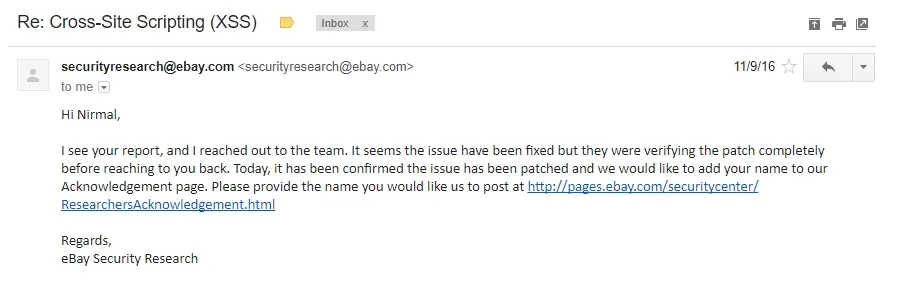
Reply From eBay Security Team
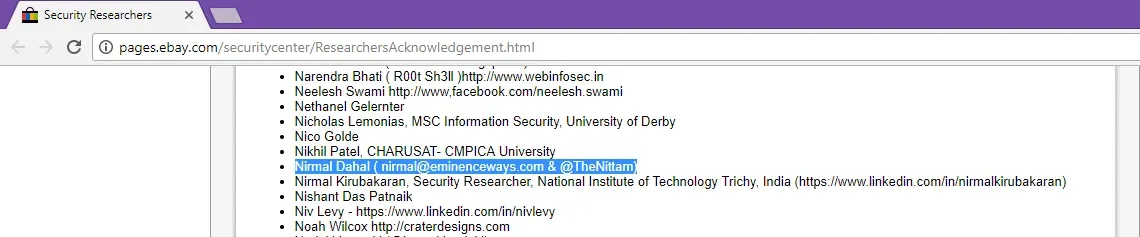
Acknowledgment By eBay
A video proof of concept accompanied the write-up.
Root cause
The search field reflects the submitted query into the value and aria-value attributes of an <input> element without adequate output encoding. The filter removed <, > and " from raw input and also stripped most URL-encoded syntax, but it left %22 (") and %3D (=) untouched. Allowing a double quote through is enough to break out of an attribute context, and allowing = is enough to assign a new attribute. The surviving characters were sufficient to inject an event handler, which suggests the filtering was not context-aware encoding. The report does not describe the server-side implementation, so the exact filtering code is not known.
Impact
An attacker who can get a victim to submit the crafted search input could execute script in the context of the eBay page, as demonstrated by reading document.cookie through prompt. The issue affected almost all eBay domains at the time, including eBay.in and eBay.com.au.
Fix
Variants to test
- Submit a probe such as
'>Test12345<"into any reflected search or filter field and inspect the page source. A positive result is the probe appearing unencoded in an attribute or text context. - Send the same probe URL-encoded and compare which characters survive. A positive result is any encoded character being decoded and reflected, as
%22and%3Dwere here. - Where a double quote survives, try closing the attribute and adding an event handler such as
onMouseOveroronFocus. A positive result is the handler appearing as a real attribute in the rendered markup. - Test the same parameter on regional domains, since the report says almost all eBay domains were vulnerable, including eBay.in and eBay.com.au. A positive result is the same reflection behaviour on those hosts.
- Check every place the parameter is reflected, not just the first. A positive result is the payload appearing in more than one attribute, as it did in
valueandaria-valuehere.
What happened, in plain words
In 2016 I found a security flaw on eBay. The flaw is called reflected cross-site scripting, usually shortened to R-XSS. I am not an active bug bounty participant, meaning I do not spend my time hunting for bugs in exchange for rewards. I found this one by accident.
One day I had finished my office work and was browsing Facebook. My brother Samir sent me a message asking for advice about some musical instruments. The message contained a link to eBay. I opened the link, logged into eBay to look at the details, and then noticed a menu called "Help & Contact". I followed that menu and arrived at the "Customer Service" page. That page has a search field. The search field is the feature involved here: it lets a visitor search help topics, keywords or phrases. Whatever you type into it is submitted to eBay, and the page shows your search term back to you inside the search box itself. That act of showing your input back is called reflection.
I decided to test that search field for cross-site scripting. Unexpectedly, I found a POST type R-XSS. POST is one of the ways a browser can send data to a server: the browser packages the form contents into the body of the request rather than into the address bar. Reflected XSS means the malicious input is not stored on the server; it travels in the request and is echoed straight back into the page that the victim's browser renders.
Testing for XSS
Before going further, it helps to understand what XSS actually is. A web page is built from HTML, a language made of tags such as <input> and attributes such as value="something". The browser reads that HTML and turns it into what you see. If a site takes text you typed and places it into the HTML without cleaning it first, you can type characters that the browser treats as part of the page's structure rather than as plain text. That is the heart of XSS: your input stops being data and becomes code. A short everyday comparison: imagine a form where you write your name, and the clerk copies your name onto a label. If you write "John" all is well. If you write instructions for the clerk on the same line, a careless clerk might follow them. XSS is the web version of that.
As all security researchers do, I also have certain pathways to find vulnerabilities. My usual first probe is the string '>Test12345<". It contains a number, a letter and syntax characters. The idea is simple: send something that mixes ordinary content with characters that have special meaning in HTML, then look at what comes back. This answers questions such as "is the user input sanitised?" and "how sensitive is user input?". Sanitising means cleaning input so that special characters lose their power, for example by turning < into a harmless code that displays as text instead of starting a tag.
Finding XSS
Once I noticed the Customer Service page with a search field, I used that specific text in the field. I noticed that the value was being reflected without >, < and ". In other words, those three characters disappeared from what came back. I immediately figured that eBay must have been replacing those syntaxes with white space. The output in View-Source looked like this:
<input type=”text” id=”query“ role=”combobox” name=”query” value=”***‘ Test12345***” title=”Search by help topic, keywords, or phrases” aria-expanded=”false” aria-autocomplete=”list” aria-activedescendant=”” aria-value=”***‘ Test12345***” autocomplete=”off” aria-owns=”popup” class=”dText3“></input>
View-Source is a browser feature that shows the raw HTML the server sent, before the browser draws it on screen. Reading it is how you see what the site really did with your input.
Line by line, in plain words:
<input ...>is the tag that creates a text box on the page. Everything between the angle brackets describes the box.type=”text”says the box accepts text.id=”query“andname=”query”give the box an internal name,query, so the site can refer to it and so the value is sent under that name when the form is submitted.role=”combobox”,aria-expanded=”false”,aria-autocomplete=”list”,aria-activedescendant=””,autocomplete=”off”andaria-owns=”popup”are accessibility and behaviour hints. They tell the browser and screen readers that this box behaves like a search dropdown. They are not visible to the user.value=”***‘ Test12345***”is the important part. This is where my search term was placed back into the page. The***marks are where the removed characters used to be.aria-value=”***‘ Test12345***”is a second attribute that also received my input. So the same text is reflected twice in the same element.title=”Search by help topic, keywords, or phrases”is the tooltip text.class=”dText3“is a styling label.</input>closes the tag.
The key observation: my probe came back with the angle brackets and the double quote stripped out. That is why the reflection looked filtered, and therefore harmless, at first glance. But the fact that the input lands inside an attribute, in two places, is exactly the kind of situation where a single surviving quote character can matter.
Exploitation
Step 1: try a plain script payload
To test and understand the application further, I used this payload:
"/><script>alert(1);</script><input type=”
A payload is simply the piece of input you send to try to trigger the flaw. This one is built from pieces:
"is a double quote. If the site places your input inside an attribute that is itself wrapped in double quotes, a quote of your own can end that attribute early./>closes the current tag.<script>alert(1);</script>is a script tag. Anything inside it is treated as code by the browser.alert(1)is a built-in browser function that pops up a small dialog showing the number 1. Researchers use it as a harmless signal that code ran.<input type=”starts a new tag, so that the leftover characters from the original page do not break the page.
The syntax was still filtered by eBay, so the payload did not survive as written. The filter caught the raw angle brackets and quote.
Step 2: URL-encode the payload
So I encoded it in URL ENCODE format:
%22%2f%3E%3Cscript%3Ealert%281%29%3B%3C%2fscript%3E%3Cinput%20type%3D%22
URL encoding is a way of writing characters that are awkward to send in a web address or form. Each special character is replaced by a percent sign and two hexadecimal digits. The browser and server understand this code and turn it back into the original character. The idea behind this step: if the filter looks for literal <, > and ", maybe it will not recognise their encoded forms.
Decoding the string piece by piece:
%22is"%2fis/%3Eis>%3Cis<scriptis just the word script%3Eis>alertis the word alert%28is(1is the number 1%29is)%3Bis;%3Cis<%2fis/scriptis the word script%3Eis>%3Cis<inputis the word input%20is a spacetypeis the word type%3Dis=%22is"
After that, the page source for that specific part was as follows:
<input type=”text” id=”query“ role=”combobox” name=”query” value=”*” script alert 1 script input type=”*” title=”Search by help topic, keywords, or phrases” aria-expanded=”false” aria-autocomplete=”list” aria-activedescendant=”” aria-value=”*” script alert 1 script input type=”*” autocomplete=”off” aria-owns=”popup” class=”dText3“></input>
Line by line:
- The overall
<input>tag is the same search box as before, with the same attributes. value=”*” script alert 1 script input type=”*”shows what survived. The angle brackets, slashes, parentheses and semicolons are gone. What remains are the bare wordsscript,alert,1,script,inputandtype, separated by spaces, plus the*marks where characters were removed.aria-value=”*” script alert 1 script input type=”*”shows the same surviving text reflected a second time.
By seeing this, I realised that eBay was also filtering URL encoded syntax, except for %22 and %3D, whose decoded values are " and =. In other words, the double quote and the equals sign got through the filter while the rest of the encoded payload did not. That is a crucial detail. A double quote is what lets you escape an attribute. An equals sign is what lets you assign a value to a new attribute. Together they are enough to add something to the tag that the site never intended.
Step 3: build a payload around the surviving characters
After these research steps were made, I tweaked my payload a little to:
%22 onMouseOver=%22prompt(document.cookie)
which decodes to:
" onMouseOver="prompt(document.cookie)
Decoding it piece by piece:
%22is", the double quote that closes the existingvalueattribute early.onMouseOver=is a space, then the name of an event handler attribute, then an equals sign. An event handler is a piece of code the browser runs when something happens, in this case when the mouse moves over the element.onMouseOveris one of the standard browser events.%22is", which opens the value of that new attribute.prompt(document.cookie)is the code to run.promptis a browser function that shows a dialog box and displays whatever text you give it.document.cookieis the browser's way of reading the cookies that belong to the current page.
A cookie is a small piece of text that a website asks the browser to store and send back with later requests. Cookies are how a site remembers that you are logged in. If an attacker can read a victim's cookies, they may be able to act as that victim. That is why document.cookie is the classic thing to display in an XSS proof of concept: it shows that the attacker's code can reach data the page considers private.
Finally, after this, the XSS attack was successful and all was good to go. The resulting markup was:
<input type=”text” id=”query“ role=”combobox” name=”query” value=”* ” onMouseOver=”prompt(document.cookie)*” title=”Search by help topic, keywords, or phrases” aria-expanded=”false” aria-autocomplete=”list” aria-activedescendant=”” aria-value=”* ” onMouseOver=”prompt(document.cookie)*” autocomplete=”off” aria-owns=”popup” class=”dText3“></input>
Line by line:
value=”* ”is the original value attribute, now closed early by the injected quote. The*marks the removed characters.onMouseOver=”prompt(document.cookie)*”is the new attribute I injected. The browser now treats this as a real instruction: when the mouse moves over the box, runprompt(document.cookie).- The rest of the tag,
title=...,aria-expanded=...and so on, continues as normal. aria-value=”* ” onMouseOver=”prompt(document.cookie)*”shows the same injection in the second attribute, because the input is reflected into two places.
Because the input is reflected into two attributes, the injected event handler appears twice in the element. Moving the mouse over the field triggers the handler and the browser prompts with the value of document.cookie. The injected handler is attached to the search box through the onMouseOver attribute.
Almost all eBay domains were vulnerable at that time, including eBay.in and eBay.com.au etc. A domain is the part of a web address after the www, such as ebay.in for India or ebay.com.au for Australia. The same search feature existed on those regional sites, so the same flaw appeared there too.
Reply From eBay Security Team
Acknowledgment By eBay
A video proof of concept accompanied the write-up.
Why it worked
The search field reflects the submitted query into the value and aria-value attributes of an <input> element without adequate output encoding. Output encoding means converting special characters into a safe form before placing them into the page, so that the browser reads them as text and not as structure. The filter removed <, > and " from raw input and also stripped most URL-encoded syntax, but it left %22 (") and %3D (=) untouched. Allowing a double quote through is enough to break out of an attribute context, and allowing = is enough to assign a new attribute. The surviving characters were sufficient to inject an event handler, which suggests the filtering was not context-aware encoding. A blocklist means "forbid these specific things"; the problem is that there is always another way to write the same thing, and the list is rarely complete. Context-aware encoding means "understand where this value is going and encode it for that place", which is far harder to bypass. The report does not describe the server-side implementation, so the exact filtering code is not known.
What an attacker could do
An attacker who can get a victim to load a crafted search URL could execute script in the context of the eBay page, as demonstrated by reading document.cookie through prompt. In practice, the attacker would need the victim to submit the crafted input, and the victim's browser would run the attacker's code as if eBay had written it. The report does not state which cookies were exposed or whether they were session cookies, nor does it describe any additional impact beyond the proof of concept. The issue affected almost all eBay domains at the time, including eBay.in and eBay.com.au.
The fix
Variants to test
If you want to look for similar issues yourself, here is the same approach in steps. Each step explains what you are looking for and why.
- Submit a probe such as
'>Test12345<"into any reflected search or filter field and inspect the page source. A positive result is the probe appearing unencoded in an attribute or text context. In plain words: type something with special characters, then look at the raw HTML to see whether the site kept them as-is. - Send the same probe URL-encoded and compare which characters survive. A positive result is any encoded character being decoded and reflected, as
%22and%3Dwere here. In plain words: the site may block the literal character but forget the encoded form, so try both. - Where a double quote survives, try closing the attribute and adding an event handler such as
onMouseOveroronFocus. A positive result is the handler appearing as a real attribute in the rendered markup. In plain words: if you can end the attribute early, you can add your own instruction to the tag. - Test the same parameter on regional domains, since the report says almost all eBay domains were vulnerable, including eBay.in and eBay.com.au. A positive result is the same reflection behaviour on those hosts. In plain words: the same code often runs on many country sites, so a fix on one does not always mean a fix on all.
- Check every place the parameter is reflected, not just the first. A positive result is the payload appearing in more than one attribute, as it did in
valueandaria-valuehere. In plain words: a page can echo your input several times, and one of those places may be easier to break than the others.
Glossary
- Attribute: a named setting inside an HTML tag, such as
value="something", that tells the browser how the element should behave or what it contains. - Blocklist: a security approach that forbids a list of known-bad characters or strings, rather than defining what is allowed.
- Bug bounty: a programme where organisations pay researchers for reporting security flaws.
- Context-aware encoding: converting special characters into a safe form based on where the value will appear (text, attribute, script), so the browser treats them as data.
- Cookie: a small piece of text a website asks the browser to store and send back with later requests, often used to keep you logged in.
- Cross-site scripting (XSS): a flaw where an attacker's input is treated as code by the browser, letting the attacker run script in the context of a trusted site.
- Domain: the part of a web address that identifies the site, such as
ebay.in. - Event handler: code attached to an element that runs when something happens, such as
onMouseOverwhen the mouse moves over it. - HTML: the language used to describe the structure of a web page, made of tags and attributes.
- Input: any data a user sends to a website, such as text typed into a search box.
- Output encoding: converting special characters into a safe form before placing them into a page, so they display as text rather than acting as structure.
- Payload: the specific piece of input a researcher sends to try to trigger a vulnerability.
- POST: a way for a browser to send data to a server in the body of the request, rather than in the address bar.
- Prompt: a browser function that shows a dialog box displaying text you give it.
- Reflected XSS (R-XSS): XSS where the malicious input is not stored on the server but is echoed straight back into the page from the request.
- Reflection: when a website shows your input back to you on the page.
- Sanitising: cleaning input so that special characters lose their power to affect the page.
- Script tag: an HTML tag,
<script>, whose contents the browser runs as code. - URL encoding: a way of writing characters as a percent sign plus two hexadecimal digits, so they can travel safely in a web address or form.
- View-Source: a browser feature that shows the raw HTML the server sent, before the browser renders it.




