FileZilla Untrusted Search Path
FileZilla searches for the fzsftp binary in the user's home directory before system paths, so an attacker who tricks a user into downloading a malicious fzsftp file can have it executed when an SFTP connection is made. This allows arbitrary code execution in the context of the current user.
 Published on medium.com
I found a vulnerability in FileZilla 3.40.0 that could allow a remote attacker to execute arbitrary code. FileZilla depends on a specific executable to handle its SFTP operations, but it will happily load the binary from several locations.
The full write-up lives on its author's site
It belongs to its author, so we link to it rather than copy it. The other two tabs are our own rewrites, checked against it.
Context
FileZilla is an open source FTP and SFTP client. Its SFTP support is not implemented in the main binary: the client delegates SFTP operations to a separate helper executable called fzsftp, which is a custom build of PuTTY's psftp. When a user opens an SFTP connection, FileZilla spawns that helper and talks to it over a control socket.
The vulnerability described here is in FileZilla 3.40.0. The helper is looked up by name rather than by an absolute path, and the search order includes locations the current user can write to. An attacker who can get a file named fzsftp into one of those locations can have it executed the next time the victim starts an SFTP connection.
Setup
The research was done through basic dynamic analysis, using a system call trace (strace) to watch how the application behaves at runtime. The account used in the trace is osboxes, whose home directory is /home/osboxes. No special role or server-side access is needed to observe the behaviour: the relevant activity happens locally in the client process.
The precondition for the attack is user interaction. The victim has to be persuaded to download a crafted binary into a directory that FileZilla searches, and FileZilla has to be restarted before the next SFTP connection.
Finding it
While tracing system calls, the researcher saw FileZilla looking for fzsftp in a sequence of directories before finding it in /usr/bin:
10327 getcwd("/home/osboxes", 1024) = 1410327 stat("/home/osboxes/fzsftp", 0x7ffd184b2cd0) = -1 ENOENT (No such file or directory)10327 stat("/home/osboxes/bin/fzsftp", 0x7ffd184b2cd0) = -1 ENOENT (No such file or directory)10327 stat("/home/osboxes/src/putty/fzsftp", 0x7ffd184b2cd0) = -1 ENOENT (No such file or directory)10327 stat("/home/osboxes/putty/fzsftp", 0x7ffd184b2cd0) = -1 ENOENT (No such file or directory)10327 stat("/usr/bin/fzsftp", {st_mode=S_IFREG|0755, st_size=568928, …}) = 0
The important detail is the order: the current user's home directory is searched before /usr/bin. Each stat call returns ENOENT until the last one, which succeeds on /usr/bin/fzsftp. A binary placed in the home directory would therefore win the lookup.
To understand what fzsftp is used for, the researcher searched the code base and found src/engine/sftp/connect.cpp:
int CSftpConnectOpData::Send(){ switch (opState) { case connect_init: { auto executable = fz::to_native(engine_.GetOptions().GetOption(OPTION_FZSFTP_EXECUTABLE)); if (executable.empty()) { executable = fzT("fzsftp"); } LogMessage(MessageType::Debug_Verbose, L"Going to execute %s", executable); // snip if (!controlSocket_.process_->spawn(executable, args)) { LogMessage(MessageType::Debug_Warning, L"Could not create process"); return FZ_REPLY_ERROR | FZ_REPLY_DISCONNECTED;; }// snip
The CSftpConnectOpData::Send() function takes the configured executable name (or the default fzsftp when the option is empty) and passes it to spawn(). That function lives in libfilezilla/lib/process.cpp; on Linux it calls fork() and then execv() to launch the helper:
execv(cmd.c_str(), argV.get()); // noreturn on success
Two facts follow. FileZilla checks several locations for fzsftp, starting with the current user's home directory, and it executes whatever it finds there when an SFTP connection is initiated. The trace shows FileZilla checking several locations for fzsftp, starting with the current user's home directory, before finding it in /usr/bin.
Exploitation
Step 1: get a rogue binary into a searched directory
The attacker needs to place a malicious binary named fzsftp into any of the directories shown in the trace. The report notes that user interaction is required, but that FileZilla makes this easy: when FileZilla loads, the default "local site" is the user's home directory, and that is where downloads are stored.
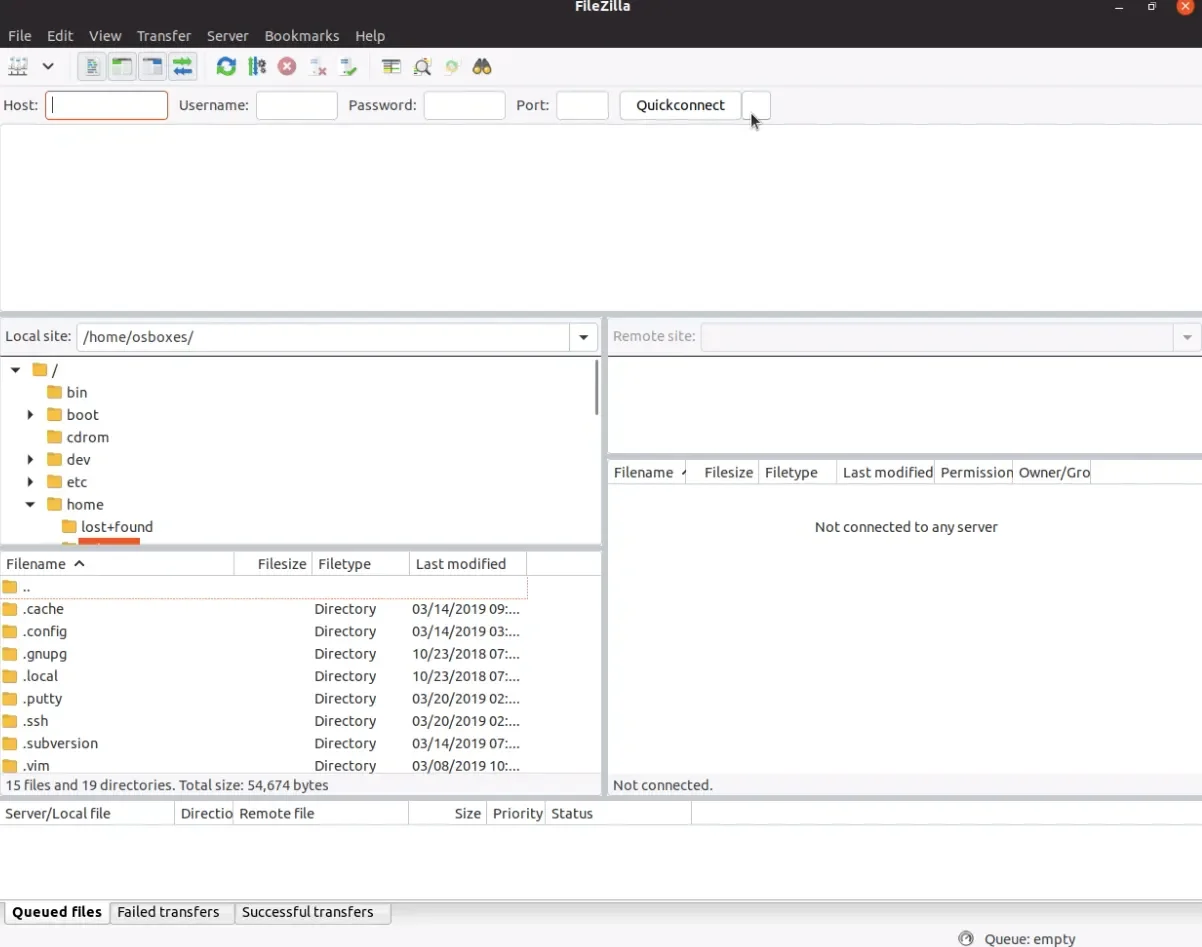
The screenshot shows that the default local site is the user's home directory, the first location in the search order. An attacker therefore only has to convince the FileZilla user to download a crafted fzsftp binary from the attacker's server. No shell exploit or delivery mechanism beyond a normal download is needed.
Step 2: restart FileZilla and open an SFTP connection
After FileZilla is restarted, any new SFTP connection launches the rogue binary instead of the legitimate helper. The report shows the result of the exploitation: a calculator being launched.
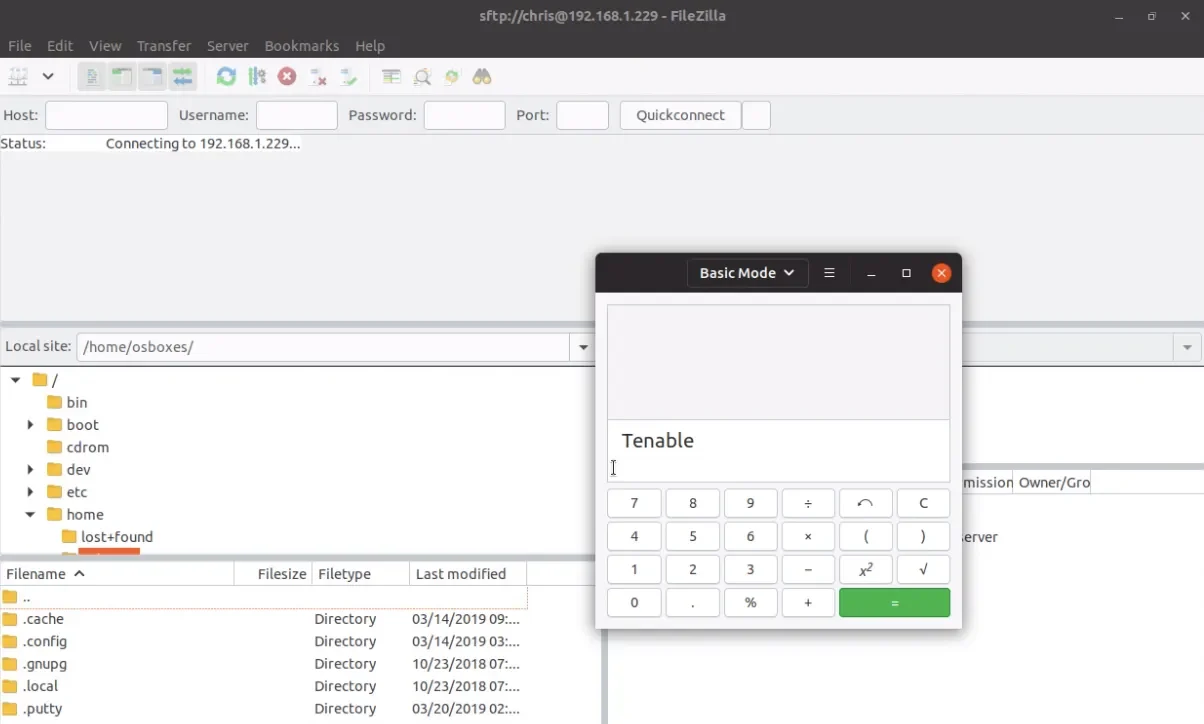
The screenshot shows the calculator that was popped.
Step 3: build the payload
Creating the payload was simple: add an include and a call to execl() in src/putty/psftp.c and recompile, which produces the binary named fzsftp. The call has to sit beneath the first call to fzprintf() in psftp_main() for everything to work:
fzprintf(sftpReply, "fzSftp started, protocol_version=%d", FZSFTP_PROTOCOL_VERSION);execl("/snap/bin/gnome-calculator", "gnome-calculator", "-e", "Tenable", (char *) NULL);
The report says the call has to sit beneath the first call to fzprintf() in psftp_main() for everything to work. The execl() call replaces the running helper with /snap/bin/gnome-calculator, which runs in the context of the current user.
Root cause
The client looks for the helper in several locations, starting with the user's home directory, before /usr/bin, and executes whatever it finds when an SFTP connection is initiated. FileZilla searches several locations for the helper, starting with the user's home directory, and executes the first one it finds. The default local site being the home directory removes most of the difficulty for the attacker, because a downloaded file lands directly in the first directory that is searched.
Impact
A remote attacker who can persuade a FileZilla user to download a crafted fzsftp binary, and who can get the user to restart FileZilla and open an SFTP connection, can execute arbitrary code in the context of that user. The report frames this as a simple attack vector: no complicated shell code or payload delivery mechanism is required, only a small amount of social engineering. The attack depends on user interaction and on the file being placed in one of the searched directories.
Fix
The report points to revision 9112 of the FileZilla SVN repository for the patch details, in src/interface/FileZilla.cpp. The report does not describe the contents of that change.
Variants to test
- Trace helper lookups on other clients that spawn external binaries (SFTP, SCP, GPG, editors, pagers). A positive result is a
statoraccesscall on a relative name that hits a user-writable directory before the system location. - Check whether the default download or working directory of a client is one of the directories in its own search path. A positive result is a download landing in a directory that appears earlier in the lookup order than the legitimate binary.
- Look for configuration options that accept a bare executable name rather than an absolute path. A positive result is an option whose value is passed unchanged to
execv()or an equivalent spawn call. - Test whether the application re-resolves the helper on every connection or only at start-up. A positive result is a rogue binary being picked up after a restart without any further user action beyond opening a connection.
- On Windows and macOS builds of the same class of application, check the equivalent search order (current directory, application directory,
PATH). A positive result is any user-writable location being consulted before the installed binary.
What happened, in plain words
FileZilla is a free program for moving files between your computer and a server. One of the ways it does this is called SFTP, which is a secure way to copy files over the internet. FileZilla does not do the SFTP work itself. It hands that job to a small separate program called fzsftp, which is a modified version of another program called PuTTY's psftp. When you open an SFTP connection, FileZilla starts that helper program and talks to it.
The problem is how FileZilla finds that helper. It does not look in one fixed place. It looks for a file named fzsftp in several folders, one after another, and it starts whichever one it finds first. One of the folders it checks early is your own home folder, the place where your personal files and your downloads live. If someone can get a file called fzsftp into that folder, FileZilla will run it the next time you open an SFTP connection. That file can be any program the attacker wants, and it runs with your permissions, as if you had started it yourself.
So the attack is: trick you into downloading a fake fzsftp, get you to restart FileZilla, and wait for you to connect to an SFTP server. The researcher proved it by making the fake helper open a calculator.
This was found in FileZilla 3.40.0. The researcher is Chris Lyne, and the work was done as part of the EU-FOSSA 2 bug bounty programme on FileZilla.
Some words you will meet
Before going further, a few ideas that come up again and again.
- A binary (or executable) is a file that is a program. On Windows these usually end in
.exe; on Linux they often have no ending at all. Double-clicking it, or another program starting it, runs it. - A process is a program that is currently running. Your browser is a process, and so is FileZilla while it is open.
- A system call is the way a running program asks the operating system to do something for it, such as open a file, read a folder or start another program. Programs cannot touch the disk or the network directly; they ask the operating system through system calls.
- A path is the address of a file or folder, like
/home/osboxes/fzsftp. An absolute path starts from the very top of the disk, so it always means the same file. A relative path is just a name, likefzsftp, and its meaning depends on where the program is looking. When a program asks the system to run a relative name, the system searches a list of folders in a set order until it finds a match. That list is often called the search path. straceis a tool on Linux that prints every system call a program makes. It is like a security camera pointed at the conversation between a program and the operating system. It is used to watch what a program actually does, rather than what its documentation says it does. This kind of watching is called dynamic analysis.fork()andexecv()are two system calls used to start a program on Linux.fork()makes a copy of the current process, andexecv()replaces that copy with a different program. Together they are the normal way one program launches another.spawn()is a function inside a library that FileZilla uses. It wraps the steps above so the rest of the program can simply say "start this program for me".stat()is a system call that asks "does this file exist, and what is it?". If the file is not there, it reports an error code,ENOENT, which means "no such file or directory".- User interaction means the attack only works if the person does something, such as downloading a file or clicking a link. It is not something that happens silently on its own.
- Social engineering means tricking a person rather than breaking a machine. A convincing download link is social engineering.
- Remote code execution (RCE) is the security term for an attacker getting their own program to run on your computer. It is considered one of the most serious kinds of bug, because the attacker is no longer limited to what the original program was meant to do.
- Untrusted search path is the name for this whole class of bug: a program looks for something in a place that an attacker can put files into, and trusts whatever it finds there.
How the researcher found it
The researcher ran FileZilla under strace and watched the system calls. The account used in the trace is osboxes, whose home folder is /home/osboxes. Nothing special is needed to see this: the interesting activity happens on the local machine, inside the FileZilla process, so anyone with the program can repeat the observation.
While tracing, FileZilla was seen looking for fzsftp in a series of folders before finding it in /usr/bin:
10327 getcwd("/home/osboxes", 1024) = 1410327 stat("/home/osboxes/fzsftp", 0x7ffd184b2cd0) = -1 ENOENT (No such file or directory)10327 stat("/home/osboxes/bin/fzsftp", 0x7ffd184b2cd0) = -1 ENOENT (No such file or directory)10327 stat("/home/osboxes/src/putty/fzsftp", 0x7ffd184b2cd0) = -1 ENOENT (No such file or directory)10327 stat("/home/osboxes/putty/fzsftp", 0x7ffd184b2cd0) = -1 ENOENT (No such file or directory)10327 stat("/usr/bin/fzsftp", {st_mode=S_IFREG|0755, st_size=568928, …}) = 0
Line by line, in plain words:
getcwd("/home/osboxes", 1024)asks the operating system for the current working directory, the folder the program is currently "standing in". The answer is/home/osboxes, the user's home folder.stat("/home/osboxes/fzsftp", ...) = -1 ENOENTasks whether there is a file calledfzsftpdirectly in the home folder. The answer is no:-1means failure andENOENTmeans the file does not exist.stat("/home/osboxes/bin/fzsftp", ...) = -1 ENOENTasks the same question about abinsubfolder of the home folder. Again, no file.stat("/home/osboxes/src/putty/fzsftp", ...) = -1 ENOENTchecks asrc/puttysubfolder. No file.stat("/home/osboxes/putty/fzsftp", ...) = -1 ENOENTchecks aputtysubfolder. No file.stat("/usr/bin/fzsftp", {st_mode=S_IFREG|0755, st_size=568928, …}) = 0checks the system folder/usr/bin, where installed programs normally live. This time it succeeds:0means success, and the details say it is a regular file of 568928 bytes with permissions0755.
The number at the start of each line, 10327, is the process ID, the label the operating system gives to this running program. It is the same on every line because it is all one process doing the searching.
The important part is the order. The home folder is checked before /usr/bin. If a file called fzsftp had existed in the home folder, the search would have stopped there and /usr/bin/fzsftp would never have been reached. The system takes the first match, not the "correct" one.
What is fzsftp for?
To understand what the helper does, the researcher searched the source code and found the file src/engine/sftp/connect.cpp:
int CSftpConnectOpData::Send(){ switch (opState) { case connect_init: { auto executable = fz::to_native(engine_.GetOptions().GetOption(OPTION_FZSFTP_EXECUTABLE)); if (executable.empty()) { executable = fzT("fzsftp"); } LogMessage(MessageType::Debug_Verbose, L"Going to execute %s", executable); // snip if (!controlSocket_.process_->spawn(executable, args)) { LogMessage(MessageType::Debug_Warning, L"Could not create process"); return FZ_REPLY_ERROR | FZ_REPLY_DISCONNECTED;; }// snip
This is C++ source code, the instructions that make up FileZilla. In plain words:
int CSftpConnectOpData::Send()is the start of a function calledSend, which belongs to a part of the program that handles starting an SFTP connection. The name contains "Sftp", which is the clue that this is the SFTP code.switch (opState)andcase connect_init:mean "depending on what stage of connecting we are at, do the matching thing".connect_initis the first stage, when the connection is being set up.auto executable = fz::to_native(engine_.GetOptions().GetOption(OPTION_FZSFTP_EXECUTABLE));reads a setting calledOPTION_FZSFTP_EXECUTABLE. This is a configuration option where a user can say which program to use.fz::to_nativeconverts the text into the form the operating system expects.if (executable.empty()) { executable = fzT("fzsftp"); }says: if that setting is empty, use the plain namefzsftp. This is the default, and it is the case that matters here, because a bare name is what triggers the folder search.LogMessage(MessageType::Debug_Verbose, L"Going to execute %s", executable);writes a debug message saying which program is about to be run. This is only for the log; it does not check anything.if (!controlSocket_.process_->spawn(executable, args))is the important line. It asks the process-handling part of the program to start the chosen program, passing along some arguments. If starting fails, the code logs a warning and returns an error.// snipmarks code that was left out of the quoted excerpt because it is not relevant.
So the function takes the configured name, or the default fzsftp, and hands it to spawn(). Nothing here checks where the file came from or whether it is the real helper.
spawn() is defined in libfilezilla/lib/process.cpp. On Linux it calls fork() and then execv() to launch the helper:
execv(cmd.c_str(), argV.get()); // noreturn on success
This single line is the moment the helper is started. execv takes the program to run and the list of arguments. The comment // noreturn on success means that if it works, this line never comes back: the current process is replaced by the new program, so there is no "after". The trace shows FileZilla checking several folders for fzsftp, starting with the current user's home folder, before finding it in /usr/bin.
Two facts follow from all this. FileZilla checks several folders for fzsftp, starting with the current user's home folder, and it runs whatever it finds there when an SFTP connection begins.
How the attack works
Step 1: get a fake helper into a folder FileZilla searches
The attacker needs a malicious program named fzsftp in any of the folders from the trace. The report notes that user interaction is required, but FileZilla makes this easy. When FileZilla starts, the default "local site" is the user's home folder, and that is where downloads are saved.
The screenshot shows that the default local site is the user's home folder, the first folder in the search order. So the attacker only has to convince a FileZilla user to download a crafted fzsftp from the attacker's server. No shell exploit and no special delivery mechanism are needed: a normal download puts the file in the right place.
Step 2: restart FileZilla and open an SFTP connection
After FileZilla is restarted, any new SFTP connection starts the rogue program instead of the real helper. The report shows the result of the exploitation: a calculator being launched.
The screenshot shows the calculator that was opened.
Step 3: build the payload
Making the payload was simple. The researcher added an include and a call to execl() in src/putty/psftp.c and recompiled, which produces the program named fzsftp. The call has to sit below the first call to fzprintf() in psftp_main() for everything to work:
fzprintf(sftpReply, "fzSftp started, protocol_version=%d", FZSFTP_PROTOCOL_VERSION);execl("/snap/bin/gnome-calculator", "gnome-calculator", "-e", "Tenable", (char *) NULL);
Line by line:
fzprintf(sftpReply, "fzSftp started, protocol_version=%d", FZSFTP_PROTOCOL_VERSION);is the normal handshake message the helper sends back to FileZilla to say it has started and which version of the protocol it speaks. It is the helper's way of saying "I am here and ready".execl("/snap/bin/gnome-calculator", "gnome-calculator", "-e", "Tenable", (char *) NULL);replaces the running helper with the calculator program at/snap/bin/gnome-calculator. The first item is the program to run, the rest are the arguments passed to it, and the final(char *) NULLmarks the end of the list.execlis the same idea asexecv: the current program is replaced, and the new one runs with the same permissions as the user.
The report says the call has to sit below the first call to fzprintf() in psftp_main() for everything to work.
Why it works
The client looks up the helper by the bare name fzsftp and passes it to execv(), so the operating system searches a list of folders that includes the user's home folder before /usr/bin. FileZilla searches several folders for the helper, starting with the user's home folder, and runs the first one it finds. The default local site being the home folder removes most of the difficulty, because a downloaded file lands directly in the first folder that is searched.
What an attacker gets
A remote attacker who can persuade a FileZilla user to download a crafted fzsftp, and who can get that user to restart FileZilla and open an SFTP connection, can run any code with that user's permissions. The report describes this as a simple attack vector: no complicated shell code or payload delivery mechanism is required, only a small amount of social engineering. The attack depends on user interaction and on the file landing in one of the searched folders.
The fix
The report points to revision 9112 of the FileZilla SVN repository for the patch details, in src/interface/FileZilla.cpp. The report does not describe what that change contains.
Other places to look for the same pattern
Each one is a question you can ask about a program, and a sign that the answer is "yes".
- Trace how other clients look for external programs they start (for SFTP, SCP, GPG, editors, pagers). A positive result is a
statoraccesscall on a relative name that reaches a folder the user can write to before the system location. - Check whether a client's default download or working folder is one of the folders in its own search path. A positive result is a download landing in a folder that comes earlier in the lookup order than the real program.
- Look for settings that accept a bare program name rather than an absolute path. A positive result is a setting whose value is passed unchanged to
execv()or an equivalent start-up call. - Test whether the program looks for the helper again on every connection or only at start-up. A positive result is a rogue program being picked up after a restart, with no further user action beyond opening a connection.
- On Windows and macOS versions of the same kind of program, check the equivalent search order (current folder, application folder,
PATH). A positive result is any folder the user can write to being consulted before the installed program.
Glossary
- Binary (executable): a file that is a program, which the computer can run.
- Process: a program that is currently running.
- System call: the way a running program asks the operating system to do something, such as open a file or start another program.
- Path: the address of a file or folder on disk.
- Absolute path: a path that starts from the top of the disk and always points to the same file, such as
/usr/bin/fzsftp. - Relative path: a bare name, such as
fzsftp, whose meaning depends on the folders the system searches. - Search path: the ordered list of folders the operating system checks when asked to run a relative name.
strace: a Linux tool that prints every system call a program makes.- Dynamic analysis: watching a program while it runs, rather than only reading its code.
fork(): a system call that makes a copy of the current process.execv(): a system call that replaces the current process with another program.spawn(): a library function that wraps the steps needed to start another program.stat(): a system call that asks whether a file exists and what it is.ENOENT: the error code meaning "no such file or directory".- Process ID: the number the operating system gives to a running program.
- User interaction: the attack only works if the person does something, such as downloading a file.
- Social engineering: tricking a person rather than breaking a machine.
- Remote code execution (RCE): an attacker getting their own program to run on your computer.
- Untrusted search path: a bug where a program looks for something in a place an attacker can put files into, and trusts whatever it finds.
- SFTP: a secure way to copy files between computers over the internet.
- FTP: an older way to copy files between computers.
- Client: the program on your side that connects to a server.
- Helper: a separate program that a main program starts to do part of its work.
- PuTTY / psftp: another program and its file-transfer part, which
fzsftpis based on. - Home folder: your personal folder on the computer, where your files and downloads usually live.
- Local site: in FileZilla, the folder on your own computer that the left-hand pane shows.
- Payload: the program or code an attacker wants to run.
- Handshake: the first exchange of messages when two programs start talking, to agree they are ready.
fzprintf(): the function the helper uses to send a formatted message back to FileZilla.execl(): a function that replaces the current program with another one, given the program and its arguments.- Recompile: turn source code back into a runnable program.
- Source code: the human-readable instructions that make up a program.
- SVN: a system for keeping track of changes to source code, where each change gets a revision number.
- Revision: a numbered version of the code in such a system.
- EU-FOSSA 2: an EU-funded programme that pays for security work on open source software.
- Bug bounty: a programme that rewards people for finding and reporting security bugs.
- Disclosure: making a security bug public, usually after it has been fixed.


