The easiest bug to get a Hall of fame from a Billion dollar company.
A hidden GraphQL endpoint was found on a subdomain that appeared blank, and querying it returned sensitive information. The author does not describe what data was exposed or how the endpoint was protected.

GeHealthcare, is a company that many might not have heard of. This company basically supports Healthcare related electronic machinery.
The full write-up lives on its author's site
It belongs to its author, so we link to it rather than copy it. The other two tabs are our own rewrites, checked against it.
Context
GE Healthcare is a company that supports healthcare related electronic machinery. The author of this write-up set out to hack them, and the target that ended up mattering was a three tier domain discovered during subdomain enumeration: a host under cloud.gehealthcare.com whose name in the published text is redacted, shown as https://Redacted-myinstall.cloud.gehealthcare.com/ while the link itself points at https://uat-middleware-myinstall.cloud.gehealthcare.com/. The host served a blank white page, with no visible application, which is exactly the kind of surface where a hidden service can sit behind an unremarkable root URL.
Setup
The methodology described is tool driven. The author's primary approach revolves around a tool he built himself, published as "Instant Bounties", which he runs to collect subdomains. No account, role or credential is mentioned anywhere in the report, and no version numbers are given for ffuf or any other tool. The only precondition that matters is reachability of the discovered host and the ability to send HTTP requests to it.
Finding it
After running the tool, the author visits most of the discovered subdomains. A few three tier domains stand out, and one of them is the myinstall host above.

Visiting the page returns a white page. The author connects this to previous experience in Microsoft and Adobe bug bounty programmes, where such pages often had hidden locations running a service, so the next step is content discovery against the host.
Exploitation
Step 1: enumerate paths with ffuf
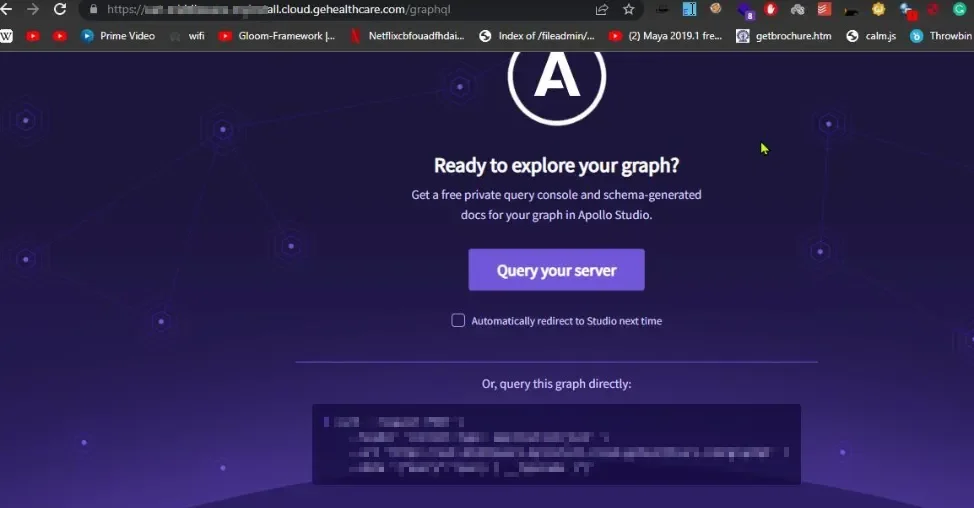
The author runs ffuf to find files on the host. The report does not include the exact ffuf command line, only that ffuf was used to find files. The result of interest is a path:
/graphql
Step 2: recognise the GraphQL endpoint
The author explains that GraphQL helps in querying an API via schemas, and that one can query things through it. The report includes a general list of common GraphQL endpoint paths, reproduced here exactly as given:
/v1/explorer/v1/graphiql/graph/graphql/graphql/console//graphql.php/graphiql/graphiql.php(...)
The report points to SecLists for a more complete list, and notes a second identification method: searching JavaScript files for keywords such as query, mutation and graphql, which can reveal a decommissioned or unofficial GraphQL endpoint.
Step 3: query the endpoint
The author queries the discovered /graphql endpoint and extracts sensitive information. The report does not reproduce the query, the schema, the response, or say which fields or records were returned; it only states that sensitive information was extracted through querying.
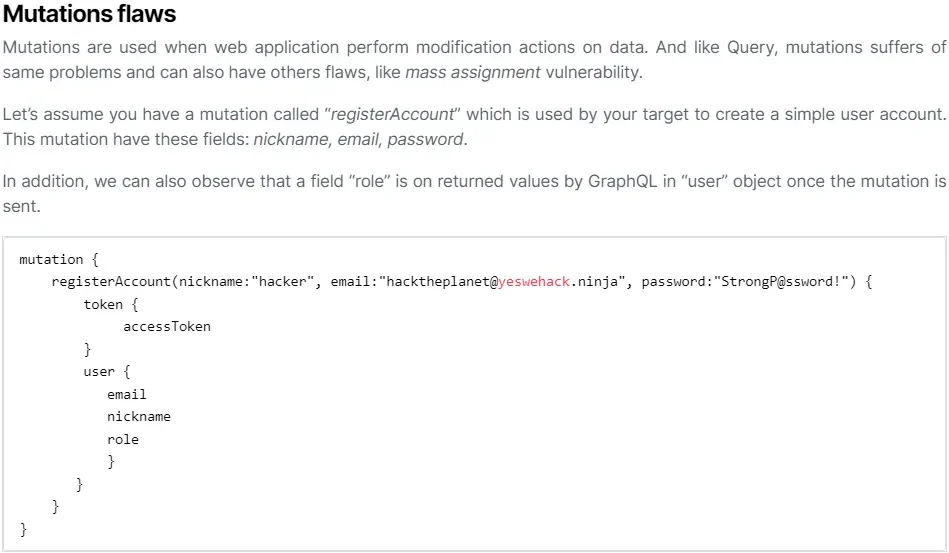
Step 4: explore the schema
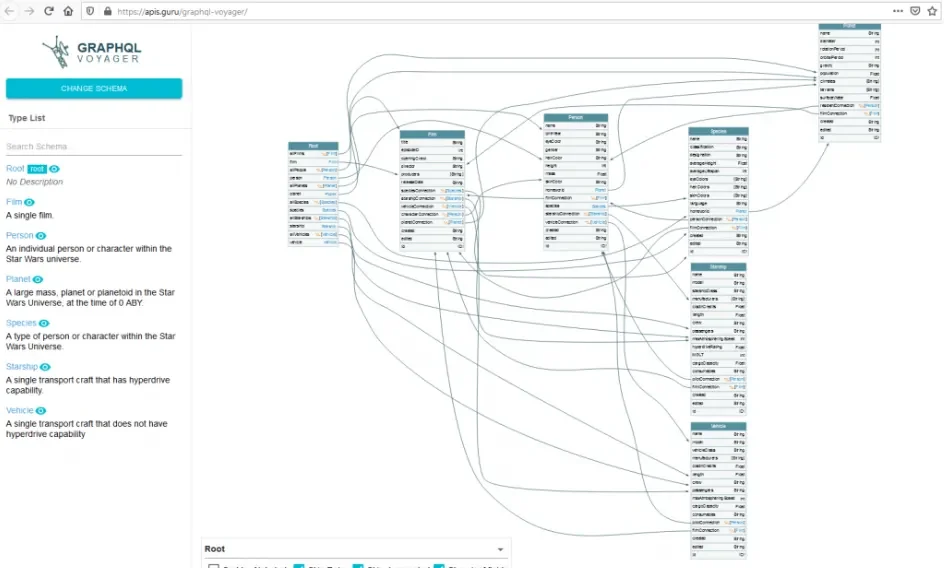
The author mentions GraphQL Voyager as a way to visualise a GraphQL schema, noting that it was not available at that moment. He also refers readers to a separate article explaining the technique and offers to share advanced API hacking material.
Root cause
The report does not analyse the server side cause. What it establishes is that a GraphQL endpoint was reachable at /graphql on a host that presented nothing at its root, and that the endpoint answered queries that returned sensitive information. Whether introspection was enabled, whether authorisation was missing on particular fields, or whether the endpoint was an unofficial or decommissioned one left running, is not stated. The report does not explain why the endpoint was reachable or what protected it.
Impact
The demonstrated impact is information disclosure: sensitive information could be extracted by querying the GraphQL endpoint, without any credential being described. The report does not quantify what data was exposed, how many records, or whose data it was, so the practical severity beyond "sensitive information" cannot be stated from the text. The author also reported another potential issue, which turned out to be a new thing the company was testing; that server was taken down for a few hours and then came back up. No bounty figure is given.
Fix
The report does not describe any remediation applied to the GraphQL endpoint. The only operational change mentioned is that the server was taken down for a few hours after the second issue was reported, then came back up. What should be done, in general terms, is to remove or restrict the endpoint so that it is not reachable anonymously and to limit what an unauthenticated caller can query; the report itself does not say which of these was done.
Variants to test
The approach generalises cleanly, and each step has a clear positive signal:
- Enumerate subdomains with your own pipeline and visit the hosts that look unremarkable. A positive result is a host that returns a blank or default page but resolves and responds.
- Run content discovery against such hosts with a GraphQL specific wordlist, for example the SecLists
graphql.txtlist referenced in the report. A positive result is a 200 or a GraphQL style error on a path such as/graphql,/graphiqlor/v1/explorer. - Grep JavaScript bundles for
query,mutationandgraphql. A positive result is a URL or path string pointing at an endpoint that is not linked from the UI. - Query the endpoint and check whether the response contains data rather than an error.
- Query fields that look sensitive, one at a time, and check whether the response contains data rather than an authorisation error. A positive result is data returned to an unauthenticated caller.
- Load the schema into GraphQL Voyager to map the surface quickly, when it is available.
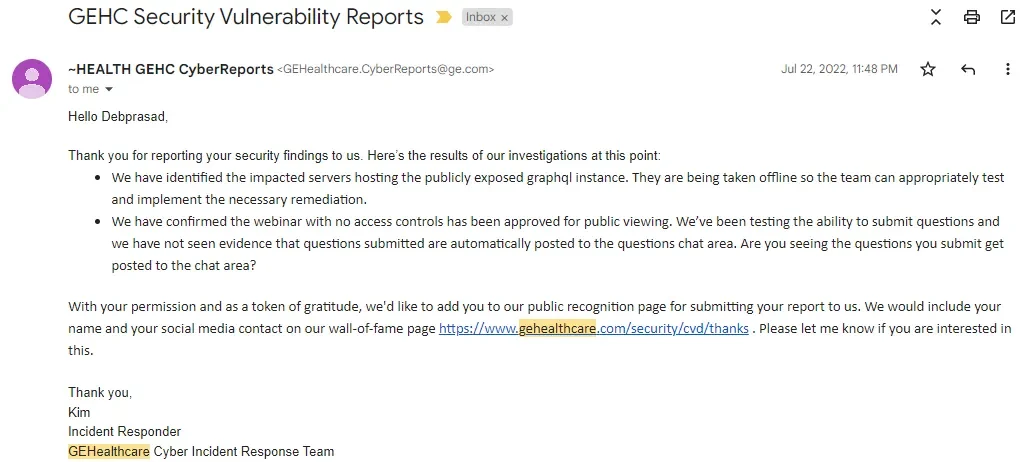
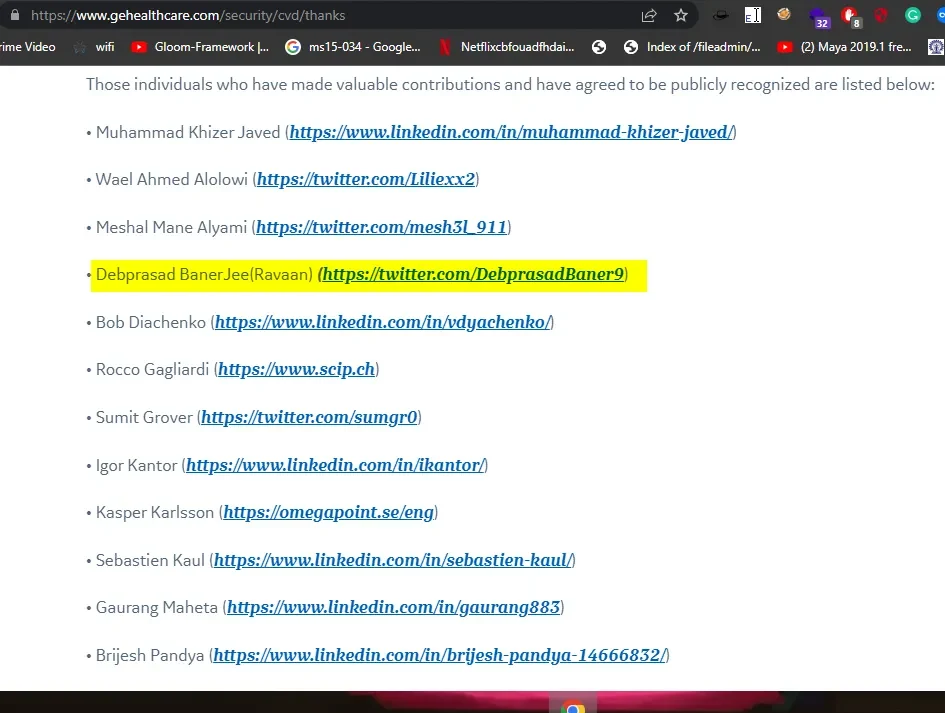
The outcome for the author was a place in the GE Healthcare hall of fame, listed on their coordinated vulnerability disclosure thanks page.
What happened, in plain words
A security researcher decided to look for security problems in GE Healthcare, a company that makes and supports electronic machinery used in healthcare. He did not have any special access, an account or a password. He simply used tools to find computers on the internet that belong to the company, looked at them one by one, and found one that showed a completely blank white page in the browser.
A blank page looks like nothing. But the researcher knew from earlier work on other companies' bug bounty programmes (Microsoft and Adobe) that a blank page can be the front door of a hidden service: the visible page is empty, but other addresses on the same computer answer requests. He used a tool to guess those hidden addresses, found one called /graphql, and discovered that this address let anyone ask the server questions and get back sensitive information.
He reported it, and the company gave him a place in their public hall of fame, a page where companies thank people who reported security problems to them. This article walks through the same steps in the same order, explaining every idea from zero.
The background ideas you need first
Before the steps, a few everyday comparisons for the words that come up again and again.
- A server on the internet is like a building with many doors. Each door has an address (a URL, the thing you type in the browser bar). Most doors are meant to be found; some are not.
- A subdomain is a named door on the company's building. If the company's main address is
gehealthcare.com, then something likecloud.gehealthcare.comis a subdomain: a separate machine or service that belongs to the same company. Companies often have hundreds of them, and some are forgotten or only meant for internal testing. - An API (Application Programming Interface) is a way for one computer program to talk to another. Think of a restaurant: the menu and the waiter are the API. You do not walk into the kitchen yourself; you ask the waiter for a dish by name and the kitchen sends it back. A web API works the same way: you send a request naming what you want, and the server sends back data.
- GraphQL is a particular style of API. Instead of many separate addresses for many separate things, GraphQL has one address and a description of everything the server knows, called a schema. The schema is like the restaurant's full menu with every dish and every ingredient listed. You then write a query, which is a precise order: "give me this field and that field". The server answers with exactly that data. This is very convenient for developers, and also very convenient for anyone who should not be reading the menu.
- A bug bounty programme is a company saying: if you find a security problem in our systems and tell us privately, we will thank you and sometimes pay you. A hall of fame is the public thank-you list.
Step 1: find the company's machines
The researcher's main method is built around a tool he wrote himself, published under the name "Instant Bounties". The report links to it under the name "Instant Bounties". In plain terms, this kind of tool automates two chores: collecting the list of subdomains that belong to a company (GAU gathers addresses from public sources), and then automatically checking those addresses for known weaknesses (nuclei runs a library of checks). The point of automating is scale: a person cannot visit hundreds of addresses by hand, a script can.

He runs the tool and gets a list of all the subdomains. No account, role or credential is mentioned anywhere in the report, and no version numbers are given for any of the tools. The only thing needed to repeat this is being able to reach the discovered machine and send it web requests.
Step 2: visit the machines and notice the odd one
Next he visits most of the subdomains by hand. Among them, a few "three tier" domains stand out. A three tier domain simply means a name with more parts before the company's name, for example something.something.cloud.gehealthcare.com: each extra part narrows down to a more specific machine, often a test or staging environment. One of these was the host below. In the published text its name is redacted and shown as https://Redacted-myinstall.cloud.gehealthcare.com/, while the link itself points at https://uat-middleware-myinstall.cloud.gehealthcare.com/.
He opens the page and gets a white page. Nothing visible, no login form, no logo. This is the moment experience matters: from earlier bug bounty work at Microsoft and Adobe he had seen that such pages often hide locations that run a service. So the next step is not to give up but to look for hidden addresses on that same machine.
Step 3: guess hidden addresses with ffuf
ffuf is a tool that sends a very large number of requests to one machine, each time trying a different guessed path from a wordlist, and reports which guesses got an answer. Think of it as trying every key on a big ring in a lock, very fast. The report does not include the exact ffuf command line, only that ffuf was used to find files on the host.
The result that mattered was a path:
/graphql
In plain words: on the machine that showed a blank page, there is a location called /graphql that answers. The name itself is a strong hint, because it is the conventional address many GraphQL services use.
Step 4: understand what a GraphQL endpoint is
The report explains that GraphQL helps in querying an API via schemas, and that one can query things through it. To find such endpoints, the author gives a general list of common GraphQL paths, reproduced exactly as given:
/v1/explorer/v1/graphiql/graph/graphql/graphql/console//graphql.php/graphiql/graphiql.php(...)
This is a list of guesses, not a working request. Each item is a path someone might try after the machine's name: /v1/explorer, /v1/graphiql, /graph, /graphql, /graphql/console, /graphql.php, /graphiql, /graphiql.php, and so on. The (...) at the end means the list continues. The reason these names repeat is that GraphQL tooling has conventions: graphql is the data address, graphiql is a built-in browser page for writing queries, explorer is a visual browser of the schema. If a developer leaves any of them switched on, a stranger can find them.
The report points to SecLists for a more complete list of these paths. SecLists is a public collection of wordlists used exactly for this kind of guessing. It also gives a second identification method: searching the JavaScript files the site loads for keywords such as query, mutation and graphql. JavaScript files are the code your browser downloads to run a website; developers often leave the address of an API inside them, and a leftover address can reveal a GraphQL endpoint that is decommissioned or unofficial, meaning it is no longer linked from the visible site but still running.
Step 5: ask the endpoint questions
He queries the discovered /graphql endpoint and extracts sensitive information. The report does not reproduce the query, the schema, the response, or say which fields or records were returned; it only states that sensitive information was extracted through querying.
Why does querying work at all? Because GraphQL is designed to answer questions. If the endpoint does not check who is asking, then anyone who knows the shape of the data can ask for it. The schema is the map of that shape, and a feature called introspection lets a client ask the server to describe itself. When introspection is left enabled and no authentication is required, a stranger can first learn every field the server knows and then request the interesting ones. The report does not say whether introspection was enabled or whether authentication was missing; it only shows that queries returned sensitive information.
Step 6: map the schema visually
The author mentions GraphQL Voyager as a way to visualise a GraphQL schema, noting that it was not available at that moment. Voyager is a free tool that takes a schema and draws it as a diagram of boxes and arrows, so you can see at a glance which types exist and how they connect, instead of reading a long text description. He also refers readers to a separate article explaining the technique and offers to share advanced API hacking material.
Why this worked
The report does not analyse the server side cause. What it establishes is that a GraphQL endpoint was reachable at /graphql on a machine that presented nothing at its root, and that the endpoint answered queries that returned sensitive information. Whether introspection was enabled, whether authorisation was missing on particular fields, or whether the endpoint was an unofficial or decommissioned one left running, is not stated. The report does not explain why the endpoint was reachable or what protected it.
What the impact was
The demonstrated impact is information disclosure: sensitive information could be extracted by querying the GraphQL endpoint, without any credential being described. Information disclosure means data that should have stayed private was readable by an outsider. The report does not quantify what data was exposed, how many records, or whose data it was, so the practical severity beyond "sensitive information" cannot be stated from the text. The author also reported another potential issue, which turned out to be a new thing the company was testing; that server was taken down for a few hours and then came back up. No bounty figure is given.
What was fixed
The only operational change mentioned is that the server was taken down for a few hours after the second issue was reported, then came back up. In general terms, the fix for this class of problem is to remove or restrict the endpoint so that it is not reachable anonymously and to limit what an unauthenticated caller can query; the report itself does not say which of these was done.
How to try the same approach yourself
The approach generalises cleanly, and each step has a clear positive signal:
- Enumerate subdomains with your own pipeline and visit the hosts that look unremarkable. A positive result is a host that returns a blank or default page but resolves and responds.
- Run content discovery against such hosts with a GraphQL specific wordlist, for example the SecLists
graphql.txtlist referenced in the report. A positive result is a 200 or a GraphQL style error on a path such as/graphql,/graphiqlor/v1/explorer. - Grep JavaScript bundles for
query,mutationandgraphql. A positive result is a URL or path string pointing at an endpoint that is not linked from the UI. - Query the endpoint and check whether the response contains data rather than an error.
- Query fields that look sensitive, one at a time, and check whether the response contains data rather than an authorisation error. A positive result is data returned to an unauthenticated caller.
- Load the schema into GraphQL Voyager to map the surface quickly, when it is available.
The outcome
The outcome for the author was a place in the GE Healthcare hall of fame, listed on their coordinated vulnerability disclosure thanks page. A coordinated vulnerability disclosure page is the public list a company keeps of people who reported problems responsibly, meaning privately and with time to fix them.
Glossary
- API: a way for one program to ask another for data or actions, like a menu and waiter in a restaurant.
- Authentication: proving who you are, usually with a password or a token, before a server gives you data.
- Authorisation: what a server lets you do once it knows who you are.
- Bug bounty programme: a company's offer to reward people who privately report security problems.
- Content discovery: automatically trying many guessed paths on a web server to find ones that exist.
- Coordinated vulnerability disclosure: reporting a security problem privately and giving the company time to fix it before it is made public.
- ffuf: a tool that sends many requests with different guessed paths and reports which ones get an answer.
- GAU: a tool that collects known subdomains of a company from public sources.
- GraphQL: a style of API with one address and a schema describing all available data, queried by asking for specific fields.
- GraphQL Voyager: a tool that draws a GraphQL schema as a diagram.
- Hall of fame: a public thank-you list of people who reported security problems.
- Information disclosure: a weakness where data that should be private can be read by an outsider.
- Introspection: a GraphQL feature that lets a client ask the server to describe its own schema.
- JavaScript bundle: the code files a website sends to your browser to run it, which can contain API addresses.
- nuclei: a tool that runs a library of automated checks against hosts to find known weaknesses.
- Query: a request for specific data, in GraphQL written as a list of fields you want back.
- Schema: the description of everything a GraphQL server knows, its types and fields.
- SecLists: a public collection of wordlists used for guessing paths, names and other inputs.
- Subdomain: a named machine or service under a company's main domain, such as
cloud.gehealthcare.com. - Three tier domain: a name with extra parts before the company's name, often pointing at a test or staging machine.
- Token: a short piece of text a server gives you to prove who you are on later requests, like a cloakroom ticket.
- URL: the address you type in a browser to reach a page or service.
- Wordlist: a file of guesses, one per line, that a tool tries in order.




