Attack of the clones 2: Git CLI remote code execution strikes back
Git Credential Manager Core in GitHub CLI for Windows searched for git.exe in the current cloned repository before the system PATH, so a malicious git.exe placed in a repository would run when a victim forked and cloned it. An attacker could achieve remote code execution on the victim's machine.
 Published on blog.blazeinfosec.com
This post is the second part of the story of a vulnerability that could be leveraged as a supply chain attack and used to hack millions of software developers around the world.
The full write-up lives on its author's site
It belongs to its author, so we link to it rather than copy it. The other two tabs are our own rewrites, checked against it.
Context
This is the second part of a story about a vulnerability that could be used as a supply chain attack against software developers. The affected component is Git Credential Manager Core (GCM Core), as shipped inside the GitHub CLI tool, gh, on Windows. The issue is tracked as CVE-2020-26233 and affects all versions of Git Credential Manager Core below 2.0.280.
Normally, when Git clones a repository that has submodules, it first clones the top-level repository and then recursively clones the submodules. When it does so, it starts a new Git process from inside the top-level directory. GCM Core is the component that reads Git configuration during that work, and it is the component that was abused here.
Setup
The scenario is a Windows machine running a vulnerable gh build. The attacker needs a repository they control, or the ability to add files to an existing one, and the victim needs to fork that repository. The report does not list any further tooling, accounts or roles beyond that.
Finding it
The starting point is a known Windows behaviour: Windows first checks for the presence of a given binary in the current folder, and only if it is not found does it traverse the directories in the %PATH% environment variable until it finds the executable in question. If a malicious executable named git.exe is placed in the root directory of a repository, that binary will be called by Git Credential Manager Core when it attempts to read configuration. The cloning process completes normally, and there is no visual indication that a malicious binary ran instead of the real Git executable.
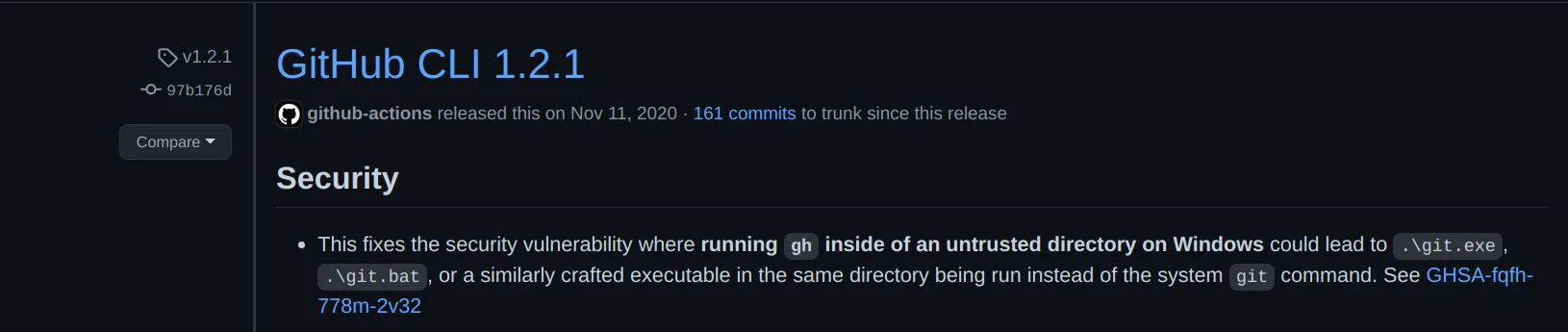
After the earlier report in November 2020, GitHub created a library called SafeExec to mitigate the risks of this discrepancy in the Windows binary search order. In gh version 1.2.1 the function safeexec.LookPath was introduced, which in theory prevents remote code execution when cloning a new repository by abusing the Windows path search order.
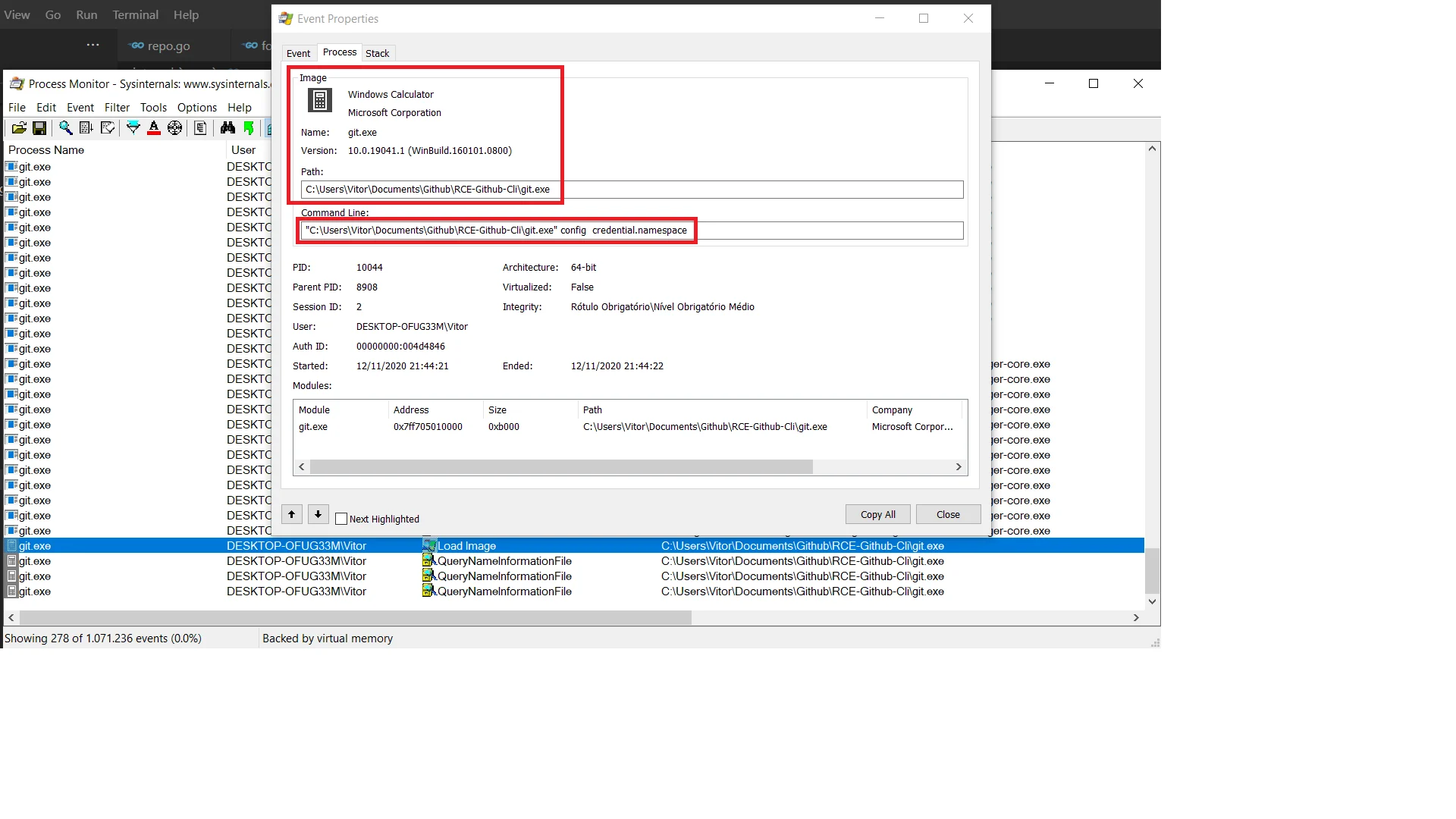
Looking more closely, the researcher found a bypass that still allowed RCE. When forking a new private repository, a remote code execution scenario was still possible because the command git.exe config credential.namespace is called without the safeexec.LookPath function. Windows therefore falls back to its default behaviour and searches for the git.exe binary in the current cloned repository.
Exploitation
Step 1: Prepare a repository
Create a new repository, or obtain the ability to add files to an existing one.
Step 2: Plant the binary
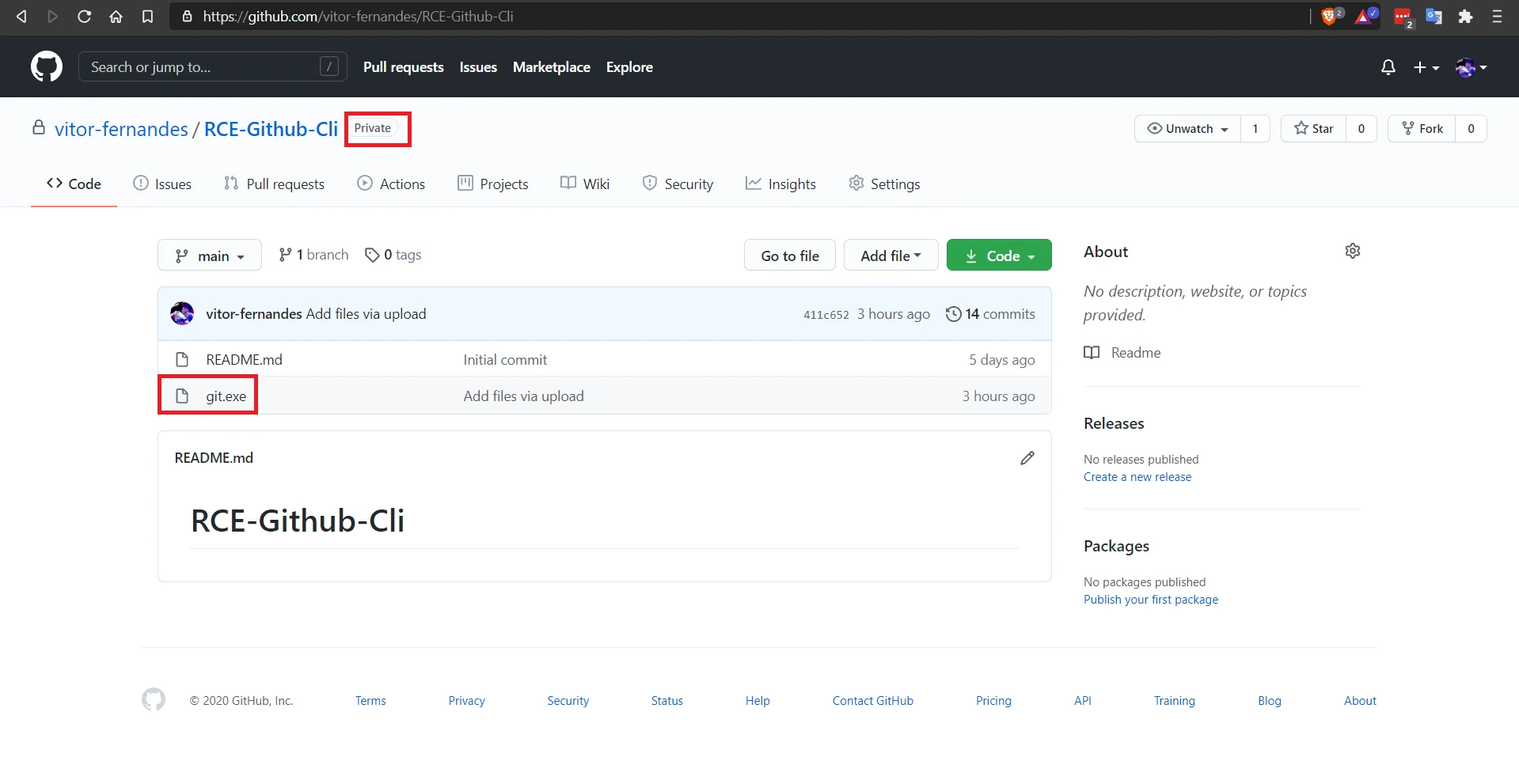
Upload a Windows executable to the repository and rename it to git.exe. In the example, calc.exe was renamed to git.exe and pushed into the repository.
Step 3: Wait for the victim to fork
Wait for the victim to fork the repository. The trigger shown in the report is forking with the clone option:
gh repo fork REPOSITORY_NAME --clone
Upon running that command, the calculator pops up, which demonstrates that the planted binary was executed.
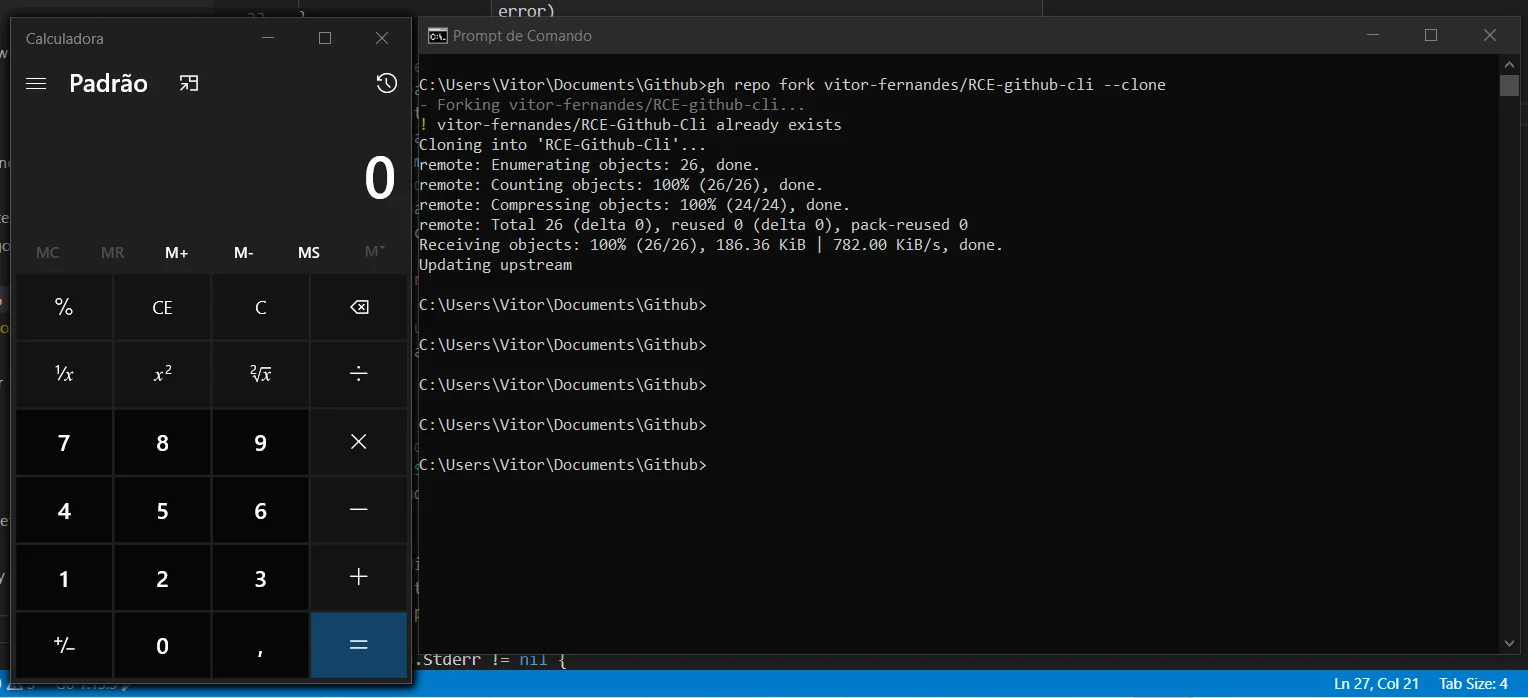
Step 4: Enjoy your shell
With a real payload in place of the calculator, the planted binary runs in the context of the victim's machine.
Root cause
The vulnerable call is in src/shared/Microsoft.Git.CredentialManager/CommandContext.cs. In line 89 a new process is created searching for git.exe, and Environment.LocateExecutable('git.exe') is passed as a directory path argument to the GitProcess() function.
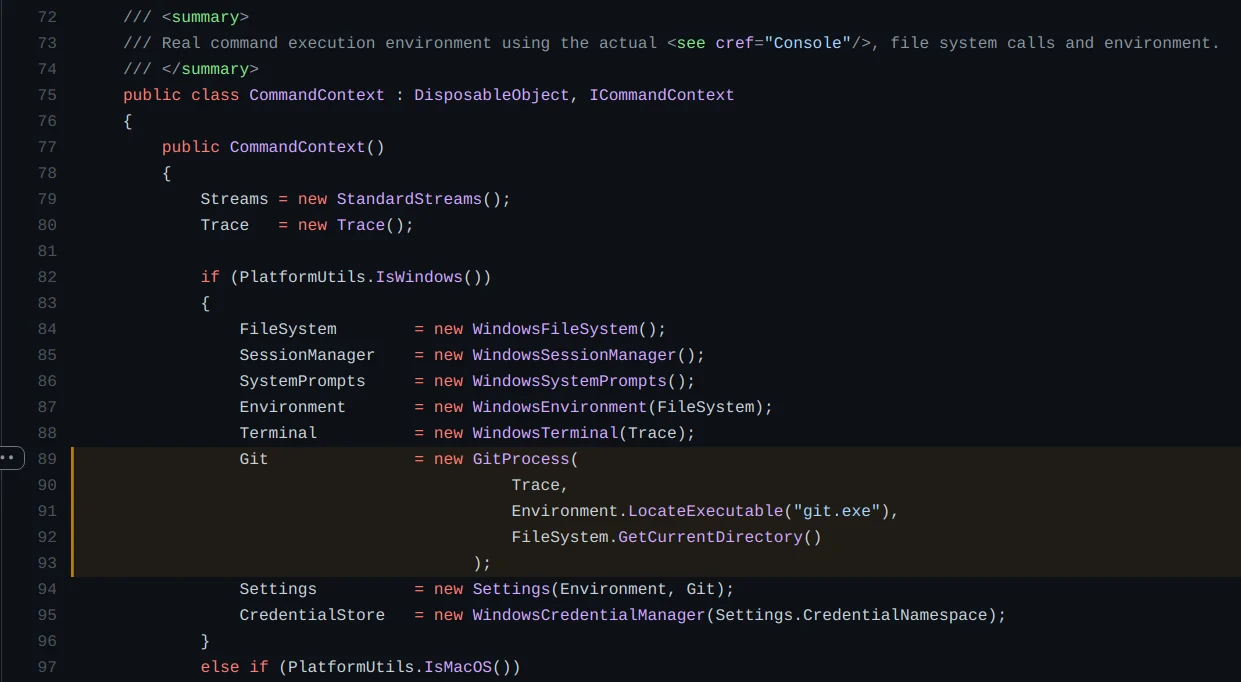
The Environment.LocateExecutable() function is shown next:
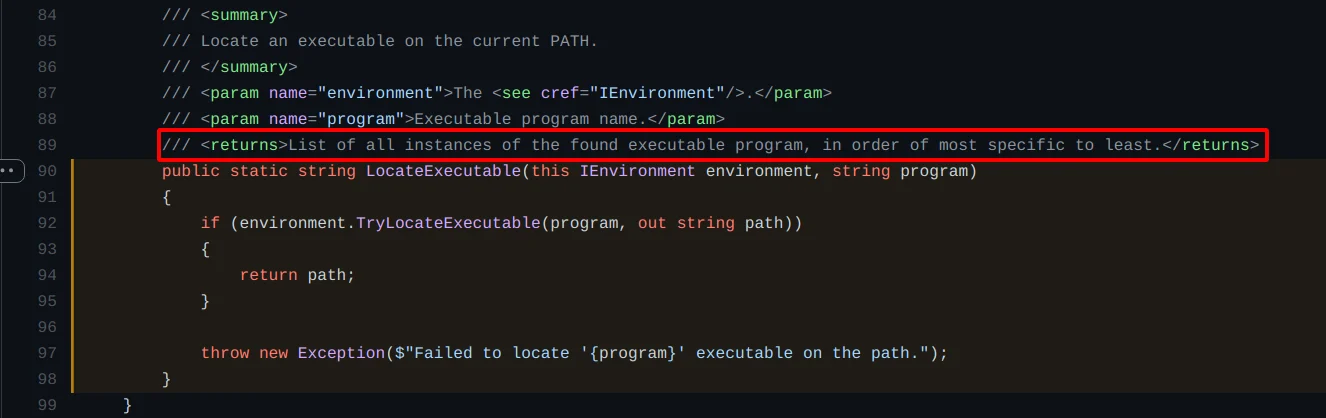
It lives in /src/shared/Microsoft.Git.CredentialManager/EnvironmentBase.cs.
The code for environment.TryLocateExecutable is in the Windows interop layer:
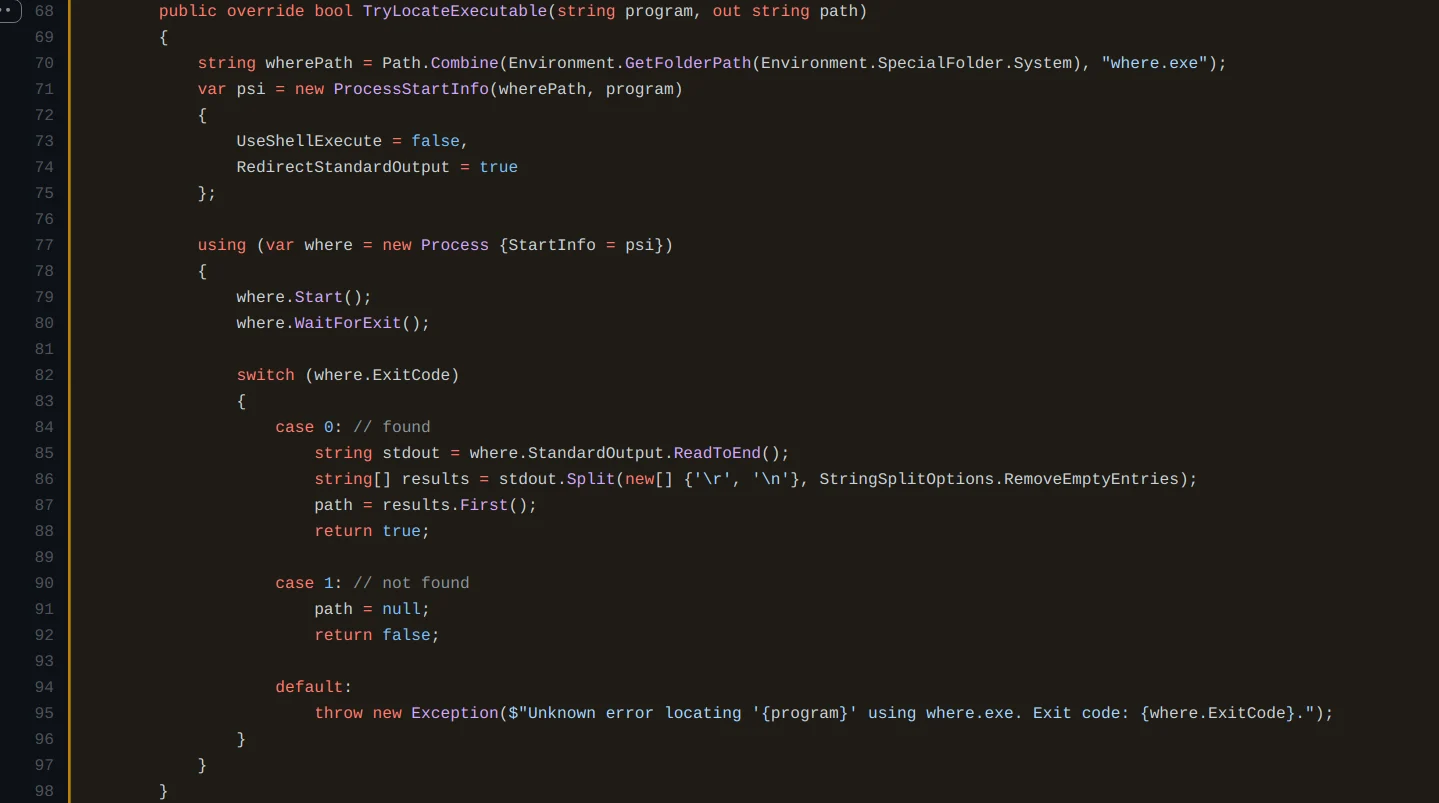
When the Windows utility where.exe is used, it returns all occurrences of a file or command, including the values of %PATH% and the current directory. That is why a git.exe sitting in the freshly cloned repository is found and executed before the legitimate one.
The git.exe config credential.namespace invocation is called without safeexec.LookPath, so the default Windows search order applied to it.
Impact
An attacker who can place a file in a repository and convince a victim to fork it can execute arbitrary code on the victim's Windows machine. Because the cloning completes normally and nothing visible indicates that a different binary ran, the victim has no obvious signal that anything went wrong. The report frames this as a supply chain attack that could be used against software developers, and notes that the same class of issue was previously found in GitHub Desktop.
Fix
GCM Core version 2.0.289 contains the fix for this vulnerability, and it is also bundled in Git for Windows version 2.29.2(3). The commit [redacted] introduces the fix.
As a workaround, users are advised to avoid recursively cloning untrusted repositories using the --recurse-submodules command line switch.
Variants to test
- Look for other Git-related invocations that bypass
safeexec.LookPathon Windows, especially configuration reads performed right after a clone or fork. A positive result is a process spawned from the current directory rather than from%PATH%. - Test other tools that shell out to
git.exefrom inside a working directory, such as credential helpers and GUI clients. A positive result is a plantedgit.exein the repository root being executed when the tool reads configuration. - Check whether
where.exe-style resolution is used anywhere else in the codebase, since it includes the current directory. A positive result is a lookup that returns a path inside the cloned repository. - Try the same planting technique with other executable names that a client may resolve from the current directory during clone or fork. A positive result is any binary from the repository being run without user interaction.
What happened, in plain words
Imagine you order a parcel and the delivery driver knocks on your door. You expect the driver to hand you the parcel. But what if someone had swapped the driver for a stranger who looks identical, and that stranger walks into your house instead? You would not notice anything wrong, because the knock and the uniform looked normal.
That is roughly what this report describes, but for software. A developer uses a tool called gh (the GitHub CLI) on Windows to copy ("clone") a project from GitHub. If the project contains a file that is named like a program the tool expects to run, Windows may run that file instead of the real program. The file can be anything the attacker wants, including a program that gives the attacker control of the developer's computer.
This is the second part of a story about a vulnerability that could be used as a supply chain attack against software developers. A supply chain attack is when an attacker does not break into your house directly, but instead tampers with something you trust and bring inside, such as a delivery, a tool, or a dependency. Here, the thing being tampered with is a project repository that a developer copies onto their machine.
The affected component is Git Credential Manager Core (GCM Core), as shipped inside the GitHub CLI tool, gh, on Windows. The issue is tracked as CVE-2020-26233 and affects all versions of Git Credential Manager Core below 2.0.280. A CVE is a public catalogue number for a known security flaw, so people can refer to the same issue unambiguously.
The pieces involved, explained from zero
Before the details, here are the main pieces, because the rest of the story depends on them.
- Git is a program for keeping track of changes to files, mostly source code. A repository (or repo) is a project folder that Git tracks, together with its history.
- Cloning means making your own copy of a repository from a server such as GitHub onto your computer.
- A submodule is a repository nested inside another repository. When you clone a project that uses submodules, Git first copies the top-level project, then goes into it and copies each submodule as well. This is called cloning recursively.
- Git Credential Manager Core (GCM Core) is a helper that handles usernames, passwords and tokens for Git, so you do not have to type them every time. It reads Git's configuration to know how to do that.
- The GitHub CLI, command name
gh, is a tool that lets you do GitHub things from a terminal window instead of a browser: create repositories, open pull requests, fork projects, and so on. - Forking a repository means making your own copy of someone else's project on GitHub, under your account, so you can work on it without changing the original. With the clone option,
ghalso downloads that copy to your computer straight away. - Remote code execution (RCE) is the security term for the worst kind of bug: the attacker gets their own program to run on your machine. Everything else in this report exists to explain how that happened.
%PATH%is a Windows setting that lists folders where Windows should look for programs. When you type a program name, Windows searches those folders in order.
The Windows search order problem
The starting point is a known Windows behaviour: Windows first checks for the presence of a given binary in the current folder, and only if it is not found does it traverse the directories in the %PATH% environment variable until it finds the executable in question. A binary or executable is simply a program file, such as git.exe on Windows.
In everyday terms: if you ask Windows to run "git", Windows first looks on the desk right in front of it (the current folder) and only then checks the shelves in the storeroom (%PATH%). If someone puts a fake "git" on the desk, Windows picks up the fake one without hesitating.
If a malicious executable named git.exe is placed in the root directory of a repository, that binary will be called by Git Credential Manager Core when it attempts to read configuration. The cloning process completes normally, and there is no visual indication that a malicious binary ran instead of the real Git executable. That last part is what makes it dangerous: the victim sees a normal clone and has no reason to suspect anything.
After the earlier report in November 2020, GitHub created a library called SafeExec to mitigate the risks of this discrepancy in the Windows binary search order. A library here means a reusable piece of code that other programs can call, so the fix could be applied in one place and used everywhere. In gh version 1.2.1 the function safeexec.LookPath was introduced, which in theory prevents remote code execution when cloning a new repository by abusing the Windows path search order. A function is a named block of code that does one job; safeexec.LookPath is meant to find a program safely, ignoring the current folder.
Looking more closely, the researcher found a bypass that still allowed RCE. A bypass means getting around a protection without breaking it: the lock is still there, but there is another door. When forking a new private repository, a remote code execution scenario was still possible because the command git.exe config credential.namespace is called without the safeexec.LookPath function. Windows therefore falls back to its default behaviour and searches for the git.exe binary in the current cloned repository.
In other words, the safe way of finding programs was used in most places, but one particular command still used the old, unsafe way. That one command was enough.
Exploitation
Exploitation means turning a flaw into an actual attack. The steps below are the recipe the report gives.
Step 1: Prepare a repository
Create a new repository, or obtain the ability to add files to an existing one. The attacker needs a place where they can put a file that the victim will later download. This is the equivalent of preparing the fake parcel before the driver arrives.
Step 2: Plant the binary
Upload a Windows executable to the repository and rename it to git.exe. In the example, calc.exe was renamed to git.exe and pushed into the repository. calc.exe is the Windows calculator, a harmless program that is handy for a demonstration because it visibly opens a window when it runs. A real attacker would use something less friendly.
Step 3: Wait for the victim to fork
Wait for the victim to fork the repository. The trigger shown in the report is forking with the clone option:
gh repo fork REPOSITORY_NAME --clone
Line by line, in plain words:
ghis the GitHub command line tool being run.repo forktells it to fork a repository, that is, to make the user's own copy on GitHub.REPOSITORY_NAMEis a placeholder for the name of the repository to fork. It is not a literal value; the user substitutes the real name.--cloneis an option that says: after forking, also download the copy to this computer.
Upon running that command, the calculator pops up, which demonstrates that the planted binary was executed. The victim did nothing unusual: they asked for a fork and a clone, and got a calculator window they never requested.
Step 4: Enjoy your shell
With a real payload in place of the calculator, the planted binary runs in the context of the victim's machine. A payload is the part of an attack that actually does the damage, as opposed to the part that just gets it in. "In the context of the victim's machine" means it runs with the victim's own permissions, as if the victim had started it themselves. A shell is a way for an attacker to type commands on the victim's computer remotely, which is why the step is phrased as "enjoy your shell".
Root cause
The root cause is the underlying reason the bug exists, as opposed to the symptoms it produces. The vulnerable call is in src/shared/Microsoft.Git.CredentialManager/CommandContext.cs. In line 89 a new process is created searching for git.exe, and Environment.LocateExecutable('git.exe') is passed as a directory path argument to the GitProcess() function.
A process is a running program. When one program starts another, it creates a new process. The problem is which file gets started: the code asks for git.exe by name, and on Windows a name alone is not enough to say which file on disk is meant.
The Environment.LocateExecutable() function is shown next:
It lives in /src/shared/Microsoft.Git.CredentialManager/EnvironmentBase.cs.
The code for environment.TryLocateExecutable is in the Windows interop layer. Interop means code that talks to the operating system's own features, in this case Windows-specific behaviour.
When the Windows utility where.exe is used, it returns all occurrences of a file or command, including the values of %PATH% and the current directory. where.exe is a built-in Windows command that answers the question "where is this program?", a bit like asking a librarian to list every copy of a book, including the one left on your own desk. That is why a git.exe sitting in the freshly cloned repository is found and executed before the legitimate one.
The git.exe config credential.namespace invocation is called without safeexec.LookPath, so the default Windows search order applied to it. An invocation is simply a call to run a program. One call that skipped the safe lookup was enough to reopen the hole.
Impact
An attacker who can place a file in a repository and convince a victim to fork it can execute arbitrary code on the victim's Windows machine. "Arbitrary code" means any program the attacker chooses, not just a calculator. Because the cloning completes normally and nothing visible indicates that a different binary ran, the victim has no obvious signal that anything went wrong. The report frames this as a supply chain attack that could be used against software developers, and notes that the same class of issue was previously found in GitHub Desktop.
Fix
GCM Core version 2.0.289 contains the fix for this vulnerability, and it is also bundled in Git for Windows version 2.29.2(3). "Bundled" means the fixed component ships inside a larger installer, so updating the larger package brings the fix along. The commit [redacted] introduces the fix. A commit is a recorded change in a Git repository, identified by a long code, so anyone can look up exactly which change fixed the problem.
As a workaround, users are advised to avoid recursively cloning untrusted repositories using the --recurse-submodules command line switch. A workaround is a temporary way to avoid the danger when you cannot update immediately. The switch --recurse-submodules is the option that tells Git to clone submodules as well, which is the situation in which the malicious file gets run.
Variants to test
These are follow-up ideas for anyone who wants to look for similar problems elsewhere. Each one describes what to try and what a positive result would look like.
- Look for other Git-related invocations that bypass
safeexec.LookPathon Windows, especially configuration reads performed right after a clone or fork. A positive result is a process spawned from the current directory rather than from%PATH%. - Test other tools that shell out to
git.exefrom inside a working directory, such as credential helpers and GUI clients. A positive result is a plantedgit.exein the repository root being executed when the tool reads configuration. - Check whether
where.exe-style resolution is used anywhere else in the codebase, since it includes the current directory. A positive result is a lookup that returns a path inside the cloned repository. - Try the same planting technique with other executable names that a client may resolve from the current directory during clone or fork. A positive result is any binary from the repository being run without user interaction.
Glossary
- Binary / executable: a program file that the computer can run, such as
git.exeon Windows. - Bypass: getting around a protection without removing it, by finding another path that the protection does not cover.
- Clone: to download a copy of a repository from a server onto your own computer.
- Commit: a recorded change in a Git repository, identified by a long code, used to point at exactly which change did something.
- CVE: a public catalogue number for a known security vulnerability, so the same issue can be referred to unambiguously.
- Fork: your own copy of someone else's repository on GitHub, under your account, so you can work on it without changing the original.
- Function: a named block of code that performs one job and can be called from elsewhere.
- Git: a program for tracking changes to files, mostly source code.
- Git Credential Manager Core (GCM Core): a helper that handles credentials for Git and reads Git configuration to do so.
- GitHub CLI (
gh): a command line tool for doing GitHub tasks, such as forking and cloning, from a terminal. - Interop: code that talks to the operating system's own features, here Windows-specific behaviour.
- Invocation: a call that runs a program.
- Library: a reusable piece of code that other programs can call, so a fix can live in one place and be used everywhere.
- Payload: the part of an attack that does the actual damage, as opposed to the part that only delivers it.
%PATH%: a Windows setting listing folders where Windows looks for programs when you type a program name.- Process: a running program. Starting a program creates a new process.
- Remote code execution (RCE): a vulnerability that lets an attacker run their own program on someone else's machine.
- Repository (repo): a project folder tracked by Git, together with its history.
- Root cause: the underlying reason a bug exists, as opposed to the symptoms it produces.
- SafeExec: a GitHub library created to make program lookup on Windows safe by ignoring the current folder.
- Shell: a way to type commands on a computer, in this context remotely on the victim's machine.
- Submodule: a repository nested inside another repository, cloned recursively along with the top-level project.
- Supply chain attack: an attack that tampers with something you trust and bring inside, such as a delivery, a tool or a dependency, instead of attacking you directly.
- Vulnerability: a weakness in software that an attacker can use to make it behave in a way its authors did not intend.
- Workaround: a temporary way to avoid a danger when you cannot apply the proper fix immediately.
where.exe: a built-in Windows command that lists where a program can be found, including the current directory.


