Attack of the clones: Git clients remote code execution
Git LFS, invoked by GitHub Desktop during cloning, executed a 'git' binary from the cloned repository's root directory on Windows because the current directory is searched before PATH. An attacker could commit a malicious git.exe to a repository, and when a victim cloned it with GitHub Desktop, the attacker's code ran with the victim's privileges.
 Published on blog.blazeinfosec.com
This post is a rather unusual story of a vulnerability that could be leveraged as a supply chain attack and used to attack millions of software developers around the world. It is also a tale of a bug collision that paid a bounty to one reporter and assigned the CVE to another!
The full write-up lives on its author's site
It belongs to its author, so we link to it rather than copy it. The other two tabs are our own rewrites, checked against it.
Context
This is a story about a vulnerability that could be leveraged as a supply chain attack against software developers, and about a bug collision: two researchers found the same issue, one collected a bounty and the other was assigned the CVE.
The main focus is GitHub Desktop. As part of its default repository cloning process, among other actions, GitHub Desktop calls the executable git-lfs. Git Large File Storage (LFS), in the project's own description, replaces large files such as audio samples, videos, datasets and graphics with text pointers inside Git, while storing the file contents on a remote server like GitHub.com or GitHub Enterprise.
git-lfs is called on the current cloned repository, which is already present on disk. The vulnerability appears when cloning a repository that contains a specially crafted file in its root directory: upon cloning such a malicious repository, code execution is achieved with the same privileges as the affected user running GitHub Desktop.
Other Git clients, namely GitKraken, Git-Tower and SourceTree, were also found to be vulnerable, but these have different exploitation scenarios that require user interaction.
Setup
The write-up does not describe a lab setup, accounts or specific versions beyond what appears in the analysis. The relevant preconditions are:
- The victim runs GitHub Desktop on Windows.
- The victim clones an attacker-controlled repository through GitHub Desktop's normal cloning process.
- The repository contains a malicious executable named
gitin its root directory.
The researchers inspected the desktop application under Process Monitor to observe what it executes during cloning. The code analysis refers to the git-lfs source on GitHub, in particular commands/command_clone.go, commands/commands.go and git/version.go.
Finding it
When inspecting the desktop application under Process Monitor, the researchers noticed several actions of git-lfs calling a git executable from inside the newly cloned repository.
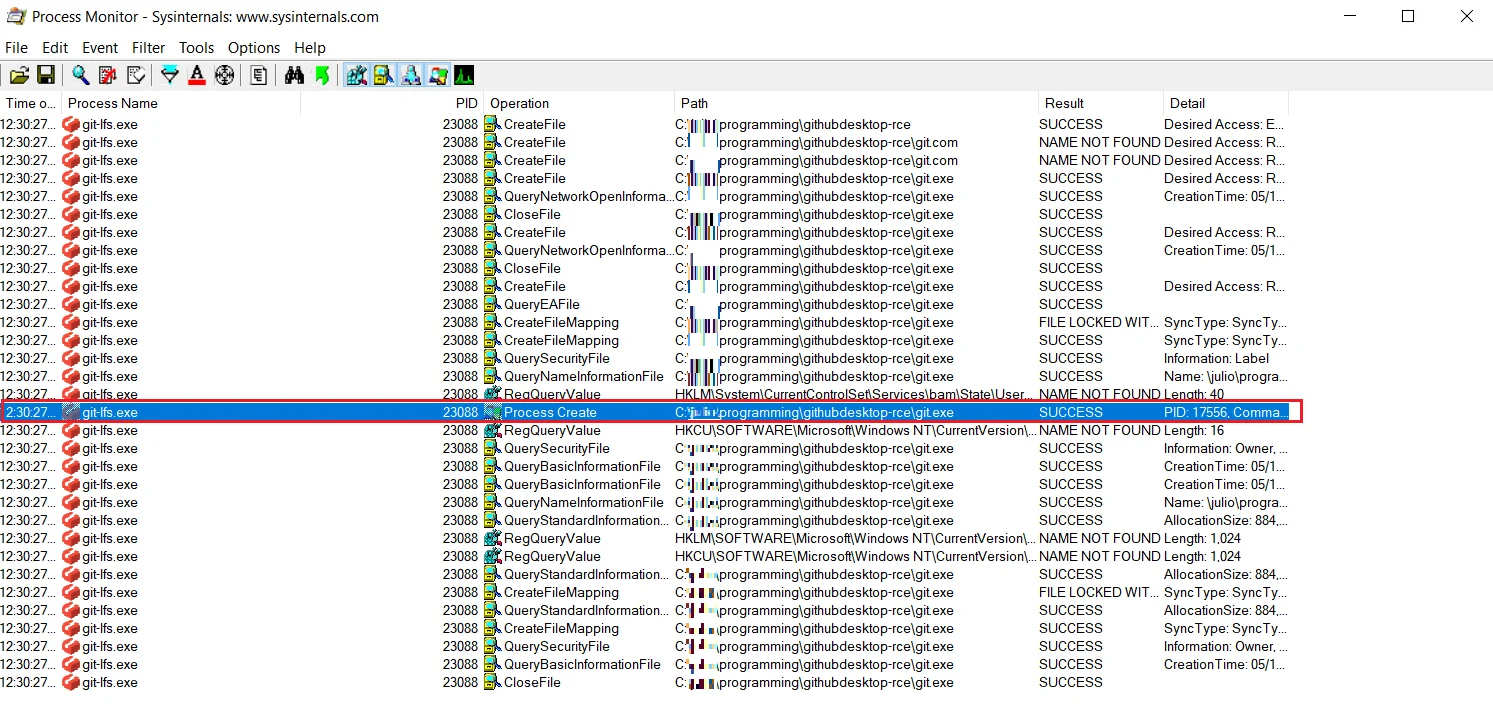
That observation is the whole finding: during cloning, git-lfs resolves and runs git, and on Windows it ends up running the copy that sits in the freshly cloned folder rather than the legitimate one. By placing a malicious git in the root of the malicious repository, a user who clones it will have the malicious git executed by git-lfs, all of this behind the scenes and transparent to the user. The cloning process happens normally and there is no visual indication that a malicious binary was run instead of the original git executable.
Exploitation
Step 1: build the malicious repository
By copying calc.exe, renaming it to git.exe and committing and pushing it into the root of the repository, the attacker sets up the crafted repository that will later be used to exploit users.
Step 2: the victim clones the repository
When a developer clones this repository using GitHub Desktop for Windows, its subcomponent git-lfs works on the cloned folder as its current directory. All subsequent calls to the binary git therefore call the malicious git.exe instead of the one present in PATH.
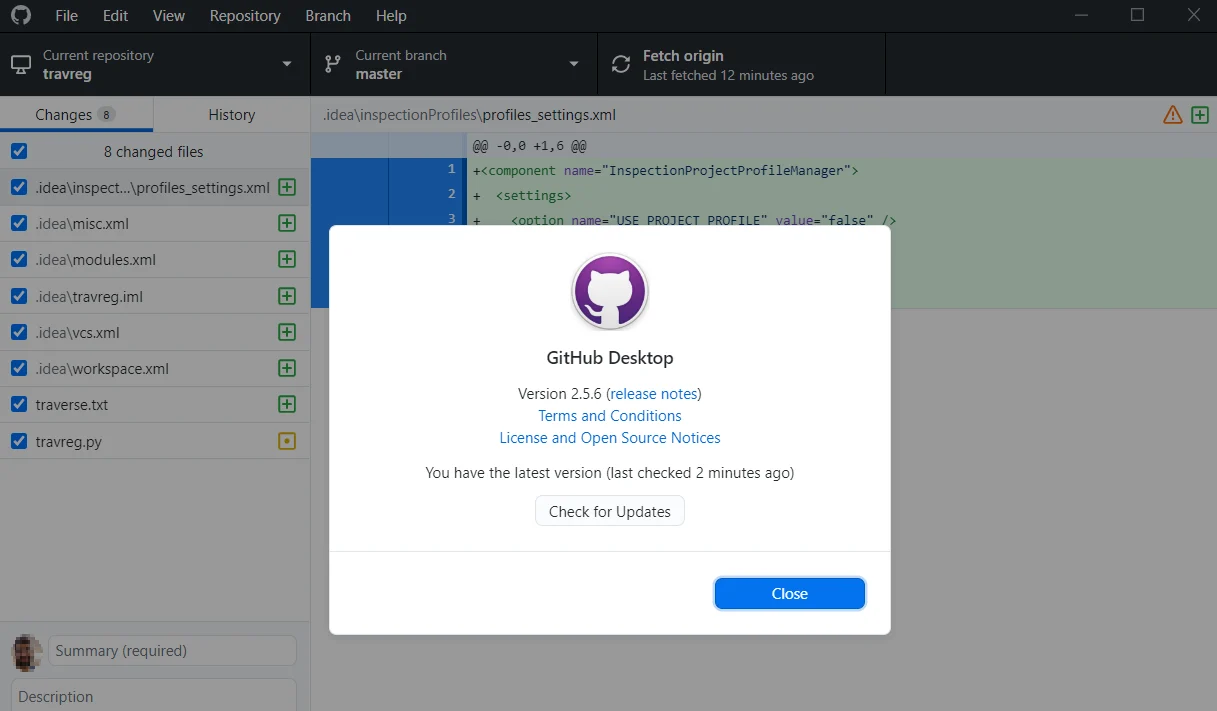
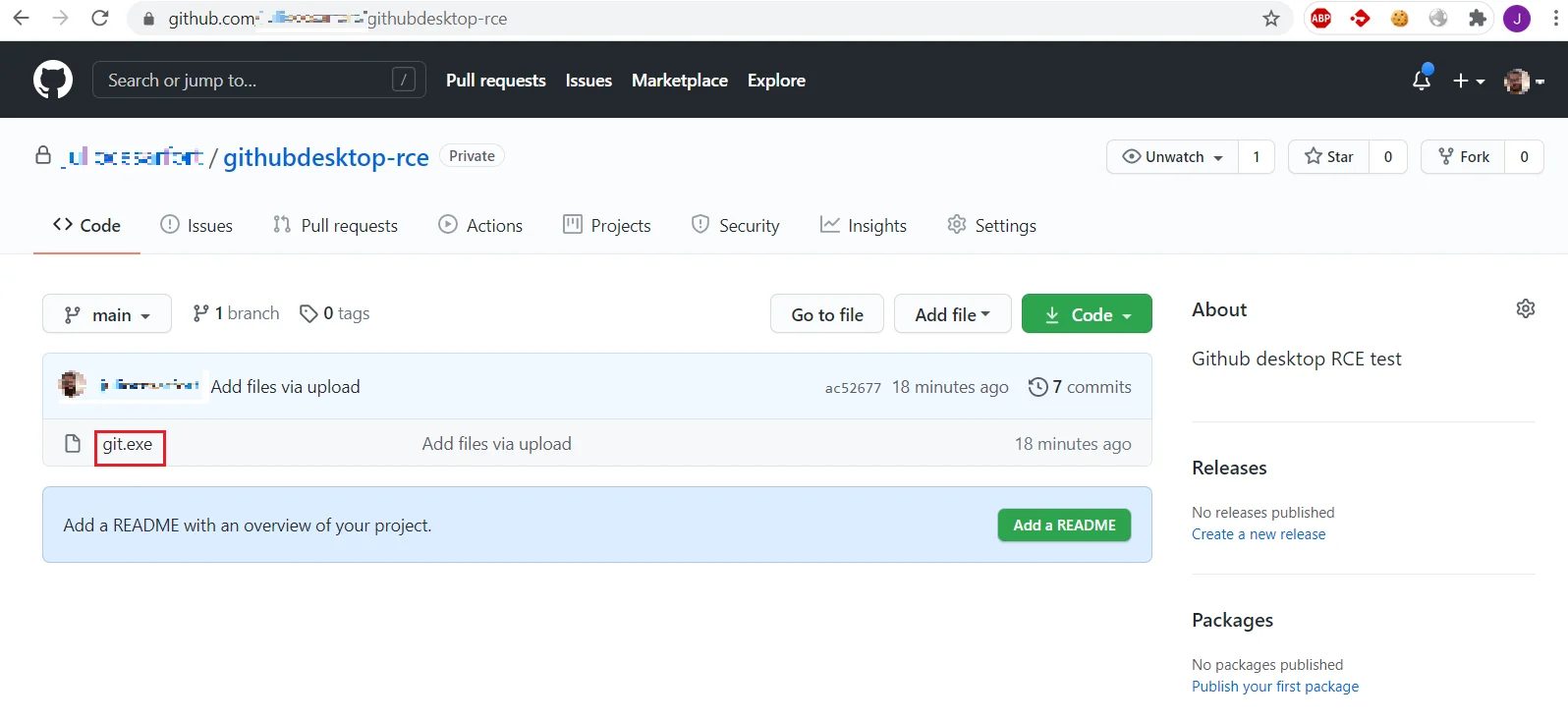
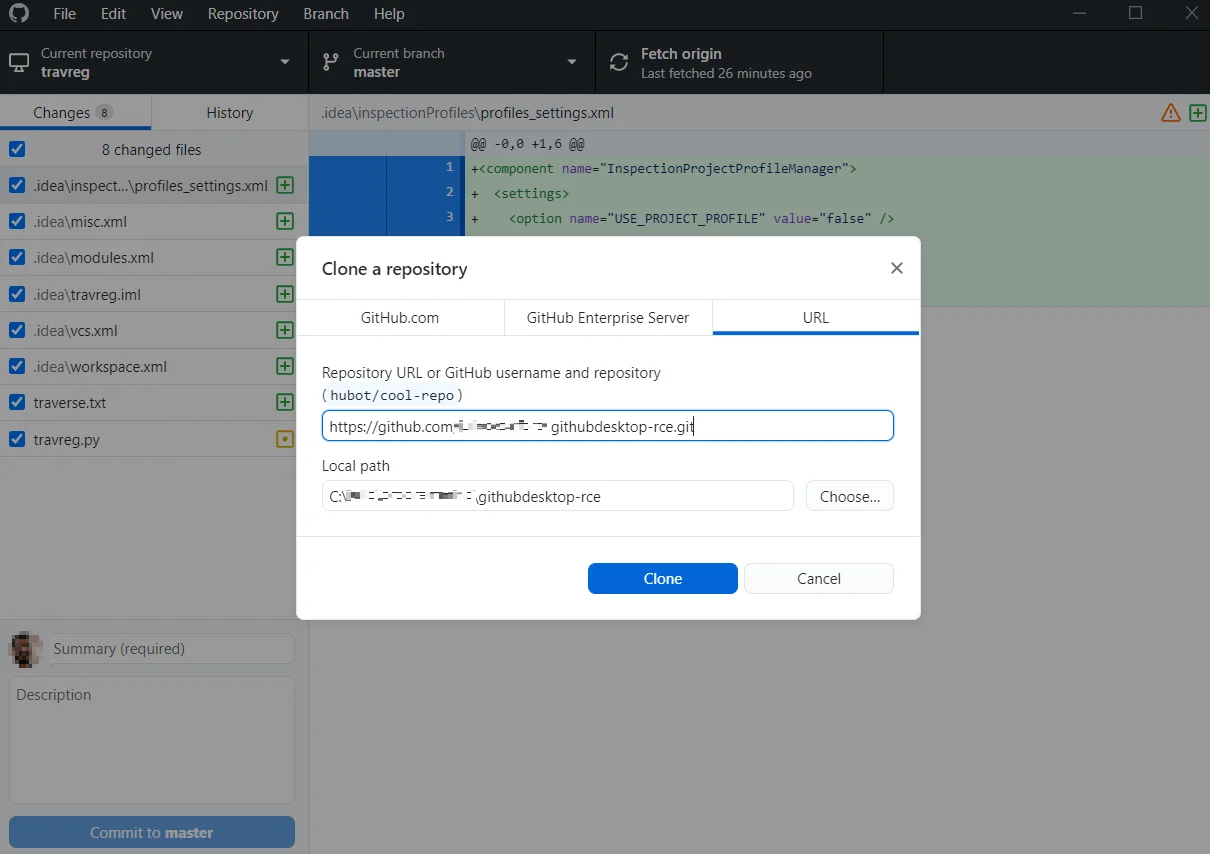
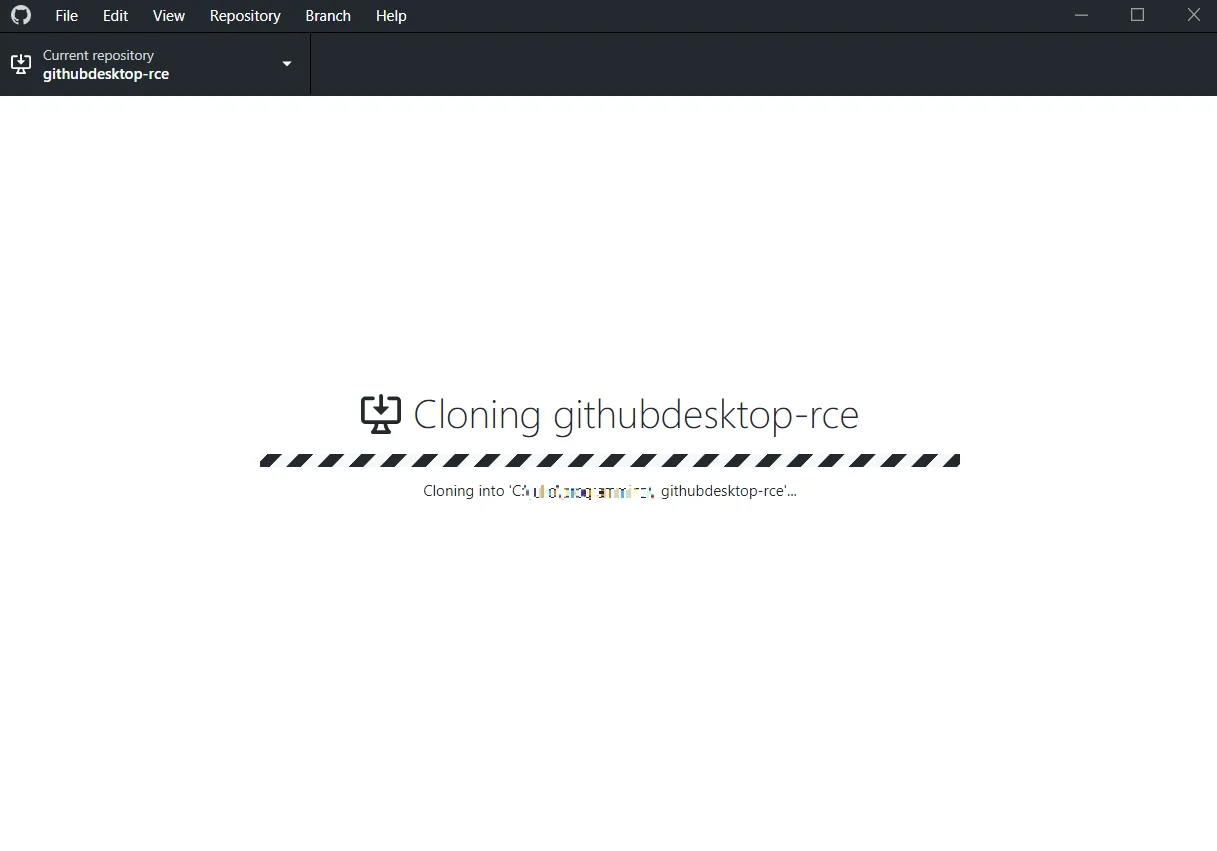
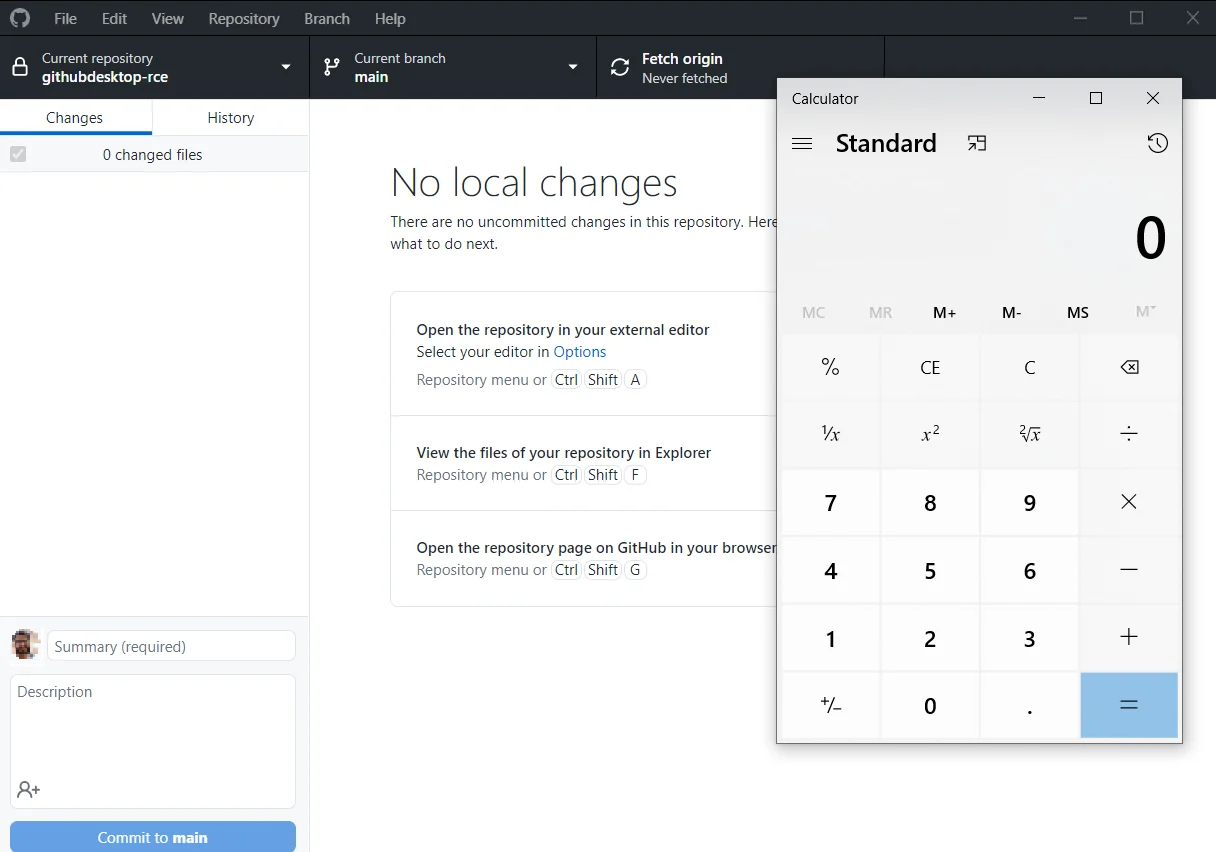
The video below shows the exploitation of this issue on GitHub Desktop for Windows:
Step 3: other clients
During the research the team also noticed SourceTree and GitKraken. The report shows these separately:
- SourceTree
- GitKraken
As stated at the top, these clients have different exploitation scenarios that require user interaction, so they are not drop-in equivalents of the GitHub Desktop case.
Root cause
The researchers traced the problem by reading git-lfs's code. In commands/command_clone.go, from line 23:
func cloneCommand(cmd *cobra.Command, args []string) {
	requireGitVersion()

	if git.IsGitVersionAtLeast("2.15.0") {
		msg := []string{
			"WARNING: 'git lfs clone' is deprecated and will not be updated",
			"          with new flags from 'git clone'",
			"",
			"'git clone' has been updated in upstream Git to have comparable",
			"speeds to 'git lfs clone'.",
		}

		fmt.Fprintln(os.Stderr, strings.Join(msg, "\n"))
	}
This function appears to be called when a clone action takes place. Right at the beginning it calls requireGitVersion() and then checks whether the version is at least 2.15.0. In commands/commands.go, line 537:
func requireGitVersion() {
	minimumGit := "1.8.2"

	if !git.IsGitVersionAtLeast(minimumGit) {
		gitver, err := git.Version()
		if err != nil {
			Exit("Error getting git version: %s", err)
		}
		Exit("git version >= %s is required for Git LFS, your version: %s", minimumGit, gitver)
	}
}
That calls !git.IsGitVersionAtLeast(minimumGit), which lives in git/version.go, from line 28:
func IsGitVersionAtLeast(ver string) bool {
	gitver, err := Version()
	if err != nil {
		tracerx.Printf("Error getting git version: %v", err)
		return false
	}
	return IsVersionAtLeast(gitver, ver)
}
Version() is in the same file, line 18:
func Version() (string, error) {
	gitVersionOnce.Do(func() {
		gitVersion, gitVersionErr =
			subprocess.SimpleExec("git", "version")
	})
	return gitVersion, gitVersionErr
}
The call chain is:
cloneCommand()requireGitVersion()IsGitVersionAtLeast()Version()
Line 21 of version.go shows that inside Version() there is a call to subprocess.SimpleExec(), which executes the git binary with the argument version.
There is an implicit assumption from git-lfs that, when executing an external binary, the operating system will first look it up from the system's PATH environment variable. That assumption is the true root cause of the vulnerability. Calling the subprocess git works as intended in GitHub Desktop for macOS. On Windows, however, the search order favours the current directory first and only then searches in the order specified in PATH.
Impact
An attacker who can get a victim to clone a crafted repository with GitHub Desktop on Windows achieves code execution with the same privileges as the user running GitHub Desktop. The execution is silent: the clone completes normally and nothing in the interface indicates that a different binary ran. Because the trigger is a routine action (cloning a repository), the issue can be used as a supply chain attack against software developers, and the researchers frame the potential reach as millions of developers worldwide.
On macOS the same call resolves git through PATH and behaves as intended. The other clients mentioned (GitKraken, Git-Tower, SourceTree) are affected but need user interaction, so their exploitation scenarios differ from the GitHub Desktop one.
Fix
The report does not describe a patch or a code change. It links the git-lfs security advisory GHSA-4g4p-42wc-9f3m.
Variants to test
- Other Git clients on Windows. Clone a repository containing a
git.exein its root with GitKraken, Git-Tower or SourceTree. A positive result is the payload executing during or after the clone, though the report notes these need user interaction, so expect a different trigger than GitHub Desktop's automatic path. - Other subprocess names. Look for other components that shell out to a bare binary name while the working directory is attacker-controlled (for example a freshly cloned folder). A positive result is Process Monitor showing the executable being resolved from the cloned directory rather than from
PATH. - Same pattern on macOS and Linux. Repeat the clone with a malicious
gitin the repository root. - Any tool that runs commands inside a cloned repository. The general test is to place a binary matching the name a subprocess expects in the repository root and watch which copy is executed. A positive result is the repository copy running with the user's privileges and no visible warning.
What happened, in plain words
Imagine you order a parcel and the delivery person, instead of using the tools in their own van, picks up whatever tool happens to be lying on your doorstep and uses that. If you left a fake tool there, the delivery person uses your fake tool without noticing. That is roughly the shape of the bug described here, except the "parcel" is a code repository and the "delivery person" is a program called GitHub Desktop.
GitHub Desktop is a desktop application made by GitHub. It gives you buttons and windows for the everyday Git tasks: downloading (cloning) a project, saving changes (committing), uploading them (pushing). Git itself is the version control system underneath, a tool that records the history of a project's files. A repository (repo) is a project folder plus that history.
When GitHub Desktop clones a repository, it does not do all the work itself. It calls helper programs. One of those helpers is git-lfs, short for Git Large File Storage. Git LFS exists because Git is bad at storing very large files such as videos, audio samples, datasets and graphics. LFS replaces those large files with small text pointers inside Git and keeps the actual file contents on a remote server such as GitHub.com or GitHub Enterprise. GitHub Enterprise is the self-hosted, company-internal edition of GitHub.
The bug: during cloning, git-lfs needs to know which version of git is installed, so it runs a program literally named git. On Windows, when a program asks the operating system to run a program by name without saying where it lives, Windows looks in the current folder first, and only afterwards in the list of folders stored in an environment variable called PATH. PATH is simply a list of directories the system searches for programs. Because git-lfs is working inside the freshly cloned folder, the current folder is the attacker's repository. So if the repository contains a file called git.exe, that file is what runs.
The result is that cloning a booby-trapped repository runs the attacker's program on the victim's machine, with the same rights as the person who clicked clone. The clone looks completely normal; nothing on screen says a different program ran. The researchers describe this as a supply chain attack: instead of attacking a developer directly, you attack something the developer routinely downloads and trusts. They frame the potential reach as millions of software developers worldwide.
The same issue was found independently by more than one person. The write-up calls this a bug collision: two researchers found the same problem, one collected the bounty (a reward paid by a company for a security report) and the other was assigned the CVE. A CVE is a public catalogue number for a known vulnerability, so people can refer to it unambiguously.
Other Git clients were also found to be vulnerable: GitKraken, Git-Tower and SourceTree. Those have different exploitation scenarios that require user interaction, so they are not identical to the GitHub Desktop case.
The pieces you need to know
Before following the technical part, here are the concepts that come up, explained from zero.
- Executable / binary: a file the operating system can run as a program, such as
calc.exe(the Windows calculator) orgit.exe. - Process: a running program. When you start an executable, the operating system creates a process for it.
- Subprocess: a process started by another process.
git-lfsstartinggitis a subprocess call. - Current working directory: the folder a process is "standing in". Relative file names are resolved against it.
PATHenvironment variable: a list of folders the operating system searches, in order, when you ask it to run a program by name only.- Search order: the rule that decides which copy of a program wins when several copies exist. On Windows, the current directory is searched before
PATH. On macOS, the behaviour described here is different and the call works as intended. - Process Monitor: a Windows tool that records what processes do, including which executables they start and from where. The researchers used it to watch GitHub Desktop during cloning.
- Root cause: the underlying reason a bug exists, as opposed to a symptom.
- Code execution / RCE: making a victim's computer run code of your choosing. RCE stands for remote code execution.
- Privileges: the rights a program runs with. Code running "with the same privileges as the user" can do what that user can do.
- Supply chain attack: compromising something a target trusts and downloads, rather than the target directly.
- Bug collision: two people reporting the same bug independently.
- Bounty: a payment a company makes for a valid security report.
- CVE: a public identifier assigned to a specific vulnerability.
Setup: what has to be true for the attack
The write-up does not describe a lab setup, accounts or specific versions beyond what appears in the analysis. The relevant preconditions are:
- The victim runs GitHub Desktop on Windows.
- The victim clones an attacker-controlled repository through GitHub Desktop's normal cloning process.
- The repository contains a malicious executable named
gitin its root directory.
Why each matters: the Windows part is what makes the search order favour the current folder. The normal cloning process matters because the attack relies on the victim doing something completely routine. The file in the root directory matters because that is the folder git-lfs is standing in when it calls git.
The researchers inspected the desktop application under Process Monitor to observe what it executes during cloning. The code analysis refers to the git-lfs source on GitHub, in particular commands/command_clone.go, commands/commands.go and git/version.go.
Finding it
When inspecting the desktop application under Process Monitor, the researchers noticed several actions of git-lfs calling a git executable from inside the newly cloned repository.
That observation is the whole finding: during cloning, git-lfs resolves and runs git, and on Windows it ends up running the copy that sits in the freshly cloned folder rather than the legitimate one. By placing a malicious git in the root of the malicious repository, a user who clones it will have the malicious git executed by git-lfs, all of this behind the scenes and transparent to the user. The cloning process happens normally and there is no visual indication that a malicious binary was run instead of the original git executable.
Exploitation
Step 1: build the malicious repository
By copying calc.exe, renaming it to git.exe and committing and pushing it into the root of the repository, the attacker sets up the crafted repository that will later be used to exploit users. Committing and pushing are the normal Git actions for saving a change locally and uploading it to the server, so the malicious file becomes part of the repository that anyone can clone.
Step 2: the victim clones the repository
When a developer clones this repository using GitHub Desktop for Windows, its subcomponent git-lfs works on the cloned folder as its current directory. All subsequent calls to the binary git therefore call the malicious git.exe instead of the one present in PATH.
The video below shows the exploitation of this issue on GitHub Desktop for Windows:
Step 3: other clients
During the research the team also noticed SourceTree and GitKraken. The report shows these separately:
- SourceTree
- GitKraken
As stated at the top, these clients have different exploitation scenarios that require user interaction, so they are not drop-in equivalents of the GitHub Desktop case.
Root cause
The researchers traced the problem by reading git-lfs's code. In commands/command_clone.go, from line 23:
func cloneCommand(cmd *cobra.Command, args []string) {
	requireGitVersion()

	if git.IsGitVersionAtLeast("2.15.0") {
		msg := []string{
			"WARNING: 'git lfs clone' is deprecated and will not be updated",
			"          with new flags from 'git clone'",
			"",
			"'git clone' has been updated in upstream Git to have comparable",
			"speeds to 'git lfs clone'.",
		}

		fmt.Fprintln(os.Stderr, strings.Join(msg, "\n"))
	}
Line by line, in plain words:
func cloneCommand(cmd *cobra.Command, args []string) {declares a function namedcloneCommand. It takes the command object and the arguments typed on the command line. This is the code that runs when a clone action takes place.requireGitVersion()calls a helper that checks the installed Git version. This is the first thing the function does, before anything else.if git.IsGitVersionAtLeast("2.15.0") {asks whether the installed Git is at least version 2.15.0.- The
msg := []string{ ... }block builds a list of text lines: a warning thatgit lfs cloneis deprecated and will not be updated with new flags fromgit clone, and a note that upstreamgit clonenow has comparable speeds. fmt.Fprintln(os.Stderr, strings.Join(msg, "\n"))prints those lines to the error output, joined with newlines. This is only a warning shown to the user.
The important part for the vulnerability is the very first call, requireGitVersion(). In commands/commands.go, line 537:
func requireGitVersion() {
	minimumGit := "1.8.2"

	if !git.IsGitVersionAtLeast(minimumGit) {
		gitver, err := git.Version()
		if err != nil {
			Exit("Error getting git version: %s", err)
		}
		Exit("git version >= %s is required for Git LFS, your version: %s", minimumGit, gitver)
	}
}
Line by line:
func requireGitVersion() {declares the helper that enforces a minimum Git version.minimumGit := "1.8.2"sets the minimum acceptable version to 1.8.2.if !git.IsGitVersionAtLeast(minimumGit) {runs the block below only when the installed Git is older than the minimum. The!means "not".gitver, err := git.Version()asks for the version string and an error value.if err != nil { Exit("Error getting git version: %s", err) }stops with an error message if the version could not be obtained.Exit("git version >= %s is required for Git LFS, your version: %s", minimumGit, gitver)stops with a message saying the minimum version is required and showing the version found.
That calls !git.IsGitVersionAtLeast(minimumGit), which lives in git/version.go, from line 28:
func IsGitVersionAtLeast(ver string) bool {
	gitver, err := Version()
	if err != nil {
		tracerx.Printf("Error getting git version: %v", err)
		return false
	}
	return IsVersionAtLeast(gitver, ver)
}
Line by line:
func IsGitVersionAtLeast(ver string) bool {declares a function that takes a version string and answers yes or no (bool).gitver, err := Version()obtains the installed version by callingVersion().if err != nil { tracerx.Printf("Error getting git version: %v", err); return false }logs the error and answers "no" if the version could not be read.return IsVersionAtLeast(gitver, ver)compares the installed version with the required one and returns the result.
Version() is in the same file, line 18:
func Version() (string, error) {
	gitVersionOnce.Do(func() {
		gitVersion, gitVersionErr =
			subprocess.SimpleExec("git", "version")
	})
	return gitVersion, gitVersionErr
}
Line by line:
func Version() (string, error) {declares a function that returns a version string and an error.gitVersionOnce.Do(func() { ... })makes sure the work inside the block happens only once, even ifVersion()is called several times. The result is remembered.gitVersion, gitVersionErr = subprocess.SimpleExec("git", "version")is the critical line: it starts a subprocess by the namegitwith the argumentversion, and stores the output and any error. This is the call that runs whatevergitthe operating system finds first.return gitVersion, gitVersionErrhands the stored result back to the caller.
The call chain is:
cloneCommand()requireGitVersion()IsGitVersionAtLeast()Version()
Line 21 of version.go shows that inside Version() there is a call to subprocess.SimpleExec(), which executes the git binary with the argument version.
There is an implicit assumption from git-lfs that, when executing an external binary, the operating system will first look it up from the system's PATH environment variable. That assumption is the true root cause of the vulnerability. Calling the subprocess git works as intended in GitHub Desktop for macOS. On Windows, however, the search order favours the current directory first and only then searches in the order specified in PATH. Because git-lfs runs with the cloned folder as its current directory, the attacker's git.exe wins.
Impact
An attacker who can get a victim to clone a crafted repository with GitHub Desktop on Windows achieves code execution with the same privileges as the user running GitHub Desktop. The execution is silent: the clone completes normally and nothing in the interface indicates that a different binary ran. Because the trigger is a routine action (cloning a repository), the issue can be used as a supply chain attack against software developers, and the researchers frame the potential reach as millions of developers worldwide.
On macOS the same call resolves git through PATH and behaves as intended. The other clients mentioned (GitKraken, Git-Tower, SourceTree) are affected but need user interaction, so their exploitation scenarios differ from the GitHub Desktop one.
Fix
The report does not describe a patch or a code change. It links the git-lfs security advisory GHSA-4g4p-42wc-9f3m.
Variants to test
- Other Git clients on Windows. Clone a repository containing a
git.exein its root with GitKraken, Git-Tower or SourceTree. A positive result is the payload executing during or after the clone, though the report notes these need user interaction, so expect a different trigger than GitHub Desktop's automatic path. - Other subprocess names. Look for other components that shell out to a bare binary name while the working directory is attacker-controlled (for example a freshly cloned folder). A positive result is Process Monitor showing the executable being resolved from the cloned directory rather than from
PATH. - Same pattern on macOS and Linux. Repeat the clone with a malicious
gitin the repository root. - Any tool that runs commands inside a cloned repository. The general test is to place a binary matching the name a subprocess expects in the repository root and watch which copy is executed. A positive result is the repository copy running with the user's privileges and no visible warning.
Glossary
- Binary / executable: a file the operating system can run as a program.
- Code execution (RCE): making a victim's computer run code of your choosing; RCE stands for remote code execution.
- Commit: the Git action of saving a change to the local history.
- Current working directory: the folder a running program is "standing in"; relative file names are resolved against it.
- Environment variable: a named value the operating system keeps for programs, such as a list of folders to search.
- Git: the version control system that records the history of a project's files.
- GitHub Desktop: a desktop application from GitHub that provides a graphical interface for Git tasks such as cloning, committing and pushing.
- GitHub Enterprise: the self-hosted, company-internal edition of GitHub.
- Git LFS (git-lfs): Git Large File Storage, an add-on that replaces large files with small text pointers in Git and stores the actual contents on a remote server.
- macOS: Apple's desktop operating system.
- PATH: the environment variable listing the folders the operating system searches, in order, when asked to run a program by name only.
- Privileges: the rights a program runs with; code running with a user's privileges can do what that user can do.
- Process: a running program.
- Push: the Git action of uploading local commits to a remote server.
- Repository (repo): a project folder together with its recorded history.
- Search order: the rule deciding which copy of a program wins when several copies exist.
- Windows: Microsoft's desktop operating system.


