Hijacking GitHub Repositories by Deleting and Restoring Them
GitHub's popular repository namespace retirement, which blocks creation of retired repository names, could be bypassed by deleting a repository under a temporary account, renaming that account to the target username, and restoring the deleted repository. An attacker could thus gain control of a retired repository and serve malicious code to downstream packages that reference it.

Recently, we encountered an obscure security measure while researching GitHub repositories: the popular repository namespace retirement. This security measure was implemented by GitHub to protect (popular) repositories against repo jacking (i.e. hijacking attacks).
The full write-up lives on its author's site
It belongs to its author, so we link to it rather than copy it. The other two tabs are our own rewrites, checked against it.
GitHub repository names are not unique: they live under the namespace of their owner. The repository of this blog is uniquely identified as joren485/blog, even though many other repositories are called blog. When a GitHub user renames their account, the namespace of all their repositories changes with it. A user boring-github-user with a repository boring-github-user/repo who renames to fancy-new-github-user now owns fancy-new-github-user/repo.
To keep downstream processes that depend on the repository (packages, build processes, CI pipelines and so on) working, GitHub sets up a redirect from the old repository name to the new one. Anyone cloning boring-github-user/repo would actually clone fancy-new-github-user/repo instead.
GitHub frees up the old username after a name change and lets other users claim it. When another account takes the username, it can break the redirect by creating a repository with the same name as the redirected repository. That is the basis of repo jacking: an attacker can hijack repositories owned by renamed users.
Context
The target is GitHub's repository namespace handling, and specifically a security measure called the popular repository namespace retirement. GitHub implemented it to protect popular repositories against repo jacking. The feature blocks a user from creating a repository if that repository existed previously and got 100 clones in the week before the name change.
Using the example above: if victim/python-package got 100 clones in the week that victim changed their username, an attacker could still register a new account with the username victim, but could not create a new repository victim/python-package.
GitHub also lets users restore deleted repositories for 90 days after deletion. A user can restore a repository through the "deleted repositories" tab on the "Repositories" page in their settings, as long as the repository was not forked and was deleted between 1 hour and 90 days ago. The research question was what happens when a restore is attempted on a repository that is protected by namespace retirement.
Setup
The preconditions are:
- A repository protected by the popular repository namespace retirement, whose owner account has been renamed so that the old username is free.
- A newly registered account that claims that old username.
- The ability to create, delete and restore repositories on that account, and to rename the account.
For the test, the researcher used blacksphere/blackmagic. The blacksphere account had been renamed to blackmagic-debug, so blacksphere/blackmagic now redirects to blackmagic-debug/blackmagic. The researcher states no affiliation with the previous owners of the blacksphere account and chose it because it was the first repository protected by the popular repository namespace retirement that they found.
Finding it
Because the account was renamed, blacksphere was an available username. The researcher registered a new blacksphere account. Trying to create a repository called blackmagic on it produced an error saying that the repository is retired:

That is the protection working as intended. The interesting part is what happens around it. A repository blackmagic can be created if the account is renamed, for example to blacksphere1, because blacksphere1/blackmagic is not retired. As with any standard repository, blacksphere1/blackmagic can then be deleted and restored.
It turned out that blacksphere1/blackmagic could still be restored after renaming the account back to blacksphere:
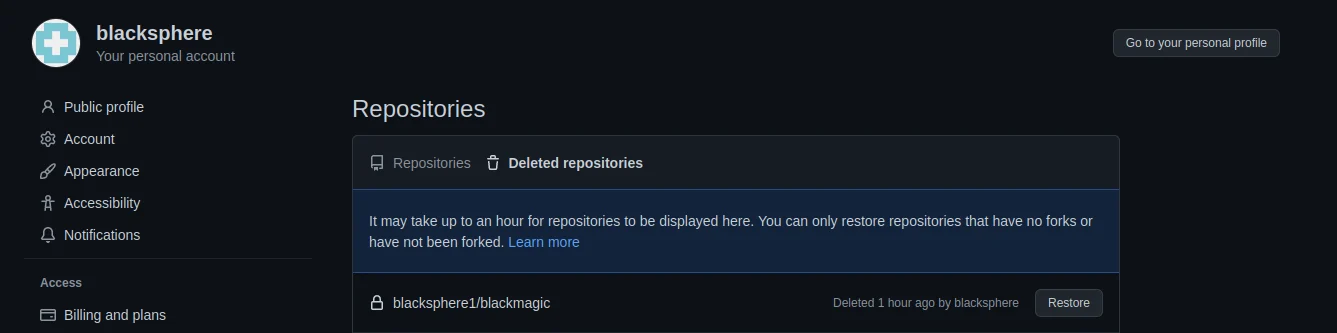
At that point the account is no longer named blacksphere1, so the repository cannot be restored as blacksphere1/blackmagic any more. The restore instead used the current username, producing blacksphere/blackmagic:
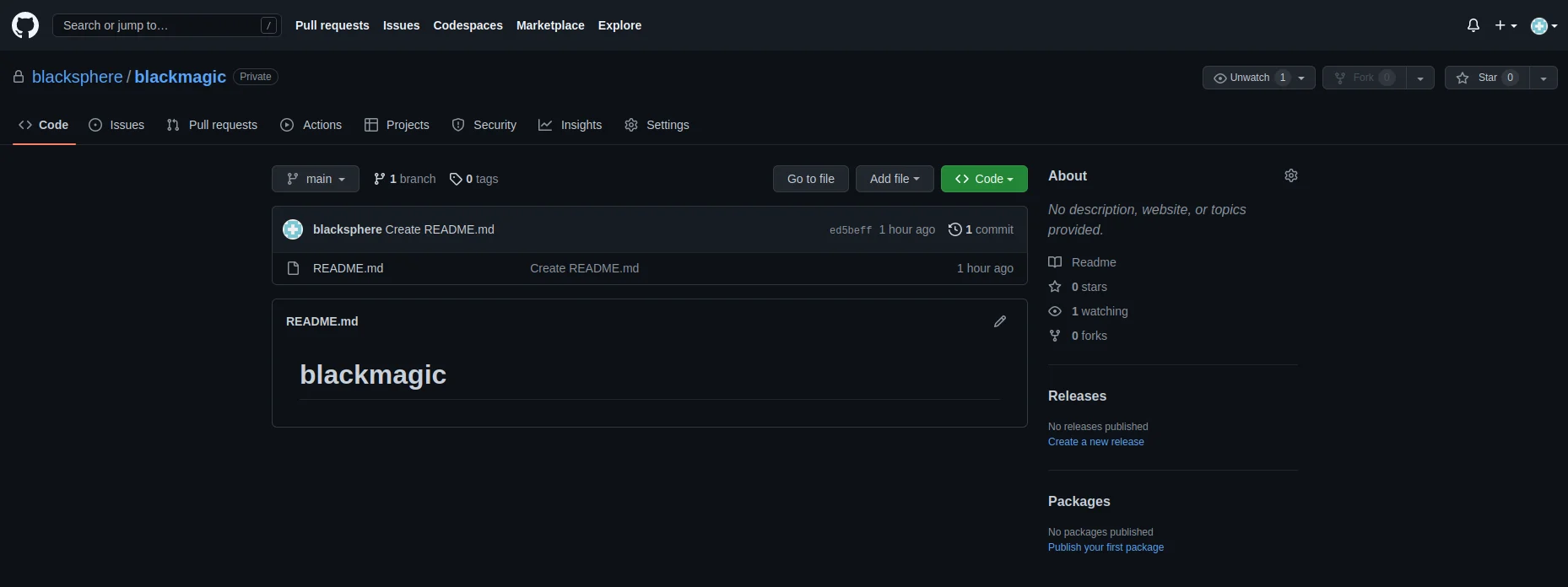
A repository that is retired had been created, fully bypassing the popular repository namespace retirement. Because blacksphere/blackmagic now exists, it no longer redirects to blackmagic-debug/blackmagic. The redirect is restored when blacksphere/blackmagic is deleted.
Exploitation
The bypass becomes a repo jacking attack in the following steps.
Step 1: find a retired repository
The attacker finds a repository that falls under the popular repository namespace retirement, for example victim/python-package.
Step 2: register a new account
They register a new GitHub account with another name than the target, for example victim1.
Step 3: create the target repository under the new account
They create the target repo as the new account: victim1/python-package. This name is not retired, so creation succeeds.
Step 4: delete it
They delete the victim1/python-package repository.
Step 5: rename the account to the target username
They rename victim1 to victim. This is possible because python-package is no longer a repository of victim1.
Step 6: wait one hour
Repositories are only restorable one hour after their deletion.
Step 7: restore the deleted repository
They restore victim1/python-package. As the account is no longer named victim1 but victim, the deleted repository is restored as victim/python-package.
Step 8: control the target
They now have full control over victim/python-package.
Root cause
The restore used the account's current username rather than the name the repository had when it was deleted, so the repository landed in the retired namespace. The deleted repository was created under a non-retired namespace (blacksphere1/blackmagic), so nothing blocked its creation, and the restore then materialised it under the retired namespace (blacksphere/blackmagic).
This is the third bypass of the popular repository namespace retirement. The earlier two, published by Checkmarx, also relied on non-standard ways to create repositories:
- Renaming an account: create
victim2, createvictim2/repo, renamevictim2tovictim, and you ownvictim/repo. - Transferring a repository: create
victim, createvictim-helper, createvictim-helper/repo, transfer it tovictim, and you ownvictim/repo.
GitHub fixed both of those after Checkmarx reported them. According to the researcher, the fact that all three bypasses rely on non-standard ways to create repositories indicates that there is no central check verifying that a repository is not retired when it is created. If that assumption is correct, other bypasses may still exist.
Impact
Popular repository namespace retirement is an obscure mechanism but it matters: tens of thousands of GitHub repositories are vulnerable to repo jacking. It is already a relatively weak mechanism, because the vast majority of repositories do not meet its requirements; the researcher ventures that 90+% of GitHub repositories get fewer than 100 clones a week. Being able to bypass it means popular repositories also become vulnerable to repo jacking, and these types of bypasses are being actively used by malicious actors to deploy malicious content.
When a repo jacking attack succeeds, all packages that use the repository will use malicious code. As with all supply chain vulnerabilities, this applies not only to packages that use the hijacked repository directly but also to all packages that use it indirectly, so an attacker can impact many downstream packages by hijacking a single vulnerable repository. The redirects GitHub sets up on name changes make repo jacking even more potent, because name changes happen transparently to downstream packages.
The best protection is to always reference GitHub repositories directly and not rely on GitHub redirects. Unfortunately, users are not warned when they follow a redirect.
Fix
GitHub resolved the issue and rewarded the researcher $4000. The report does not describe the code change that was made.
Variants to test
-
Restore after rename, as in this report: create a repository under a temporary account, delete it, rename the account to the retired username, wait an hour and restore. A positive result is a repository appearing under the retired namespace.
-
Restore with a name change in between: create
helper/repo, delete it, rename the account, then restore and observe which owner the restored repository gets. A positive result is the current username being used as owner rather than the original one. A positive result is a repository existing under a name that the create form rejects as retired.
Disclosure timeline
All times are in CEST.
| Time | Event |
|---|---|
| 2022-11-11 23:52 | Notified GitHub through their HackerOne program |
| 2022-11-14 20:06 | First response from GitHub |
| 2022-11-17 00:42 | GitHub confirmed the bug |
| 2022-12-01 21:18 | GitHub reported the issue resolved and rewarded $4000 |
What happened, in plain words
GitHub is a website where people keep software projects, called repositories, and share them with the world. Many other websites and tools download code from GitHub automatically. If someone could quietly swap the code in a popular repository for their own, every tool that downloads it would run the attacker's code instead of the real thing.
GitHub has a safety feature that is meant to stop one particular trick for doing exactly that. The trick is called repo jacking. The safety feature is called popular repository namespace retirement. This article is about a way to get around that safety feature, found by Joren Vrancken, reported to GitHub, fixed by GitHub, and rewarded with $4000.
To follow along you only need to understand a few ideas: what a repository is, what a username is, what a redirect is, and what it means to delete and restore something. Each of those is explained below the first time it appears.
Repo Jacking
Every repository on GitHub has a two-part name: the owner's username, a slash, and the repository name. For example, the repository for this blog is joren485/blog. The part before the slash is the account that owns it. The part after the slash is the repository name itself.
Repository names are not unique. There are many repositories called blog on GitHub. What makes each one unique is the combination of owner and name. Think of it like a street address: many streets have a number 10, but only one "10 Main Street". The owner is the street, the repository name is the number.
When a GitHub user renames their account, everything they own moves with them. A user called boring-github-user who owns boring-github-user/repo and renames to fancy-new-github-user now owns fancy-new-github-user/repo. The repository itself did not change; only the address did.
That creates a problem. Other software out there may still be asking for the old address, boring-github-user/repo. Packages, build processes and CI pipelines (automated systems that build and test software) may have that old name written down. To keep them working, GitHub sets up a redirect from the old repository name to the new one. A redirect is the web's way of saying "that address has moved, go here instead". Anyone cloning boring-github-user/repo would actually clone fancy-new-github-user/repo instead. Cloning means making a copy of a repository on your own computer.
Here is where the danger starts. GitHub frees up the old username after a name change and lets other users claim it. When another account takes the username, it can break the redirect by creating a repository with the same name as the redirected repository. The redirect only works while the old address is empty. Put something at the old address and the redirect is gone.
That is the basis of repo jacking: an attacker can hijack repositories owned by renamed users. The attacker registers the abandoned username, creates a repository with the same name, and now everyone who still uses the old address gets the attacker's code.
Let's look at how such attacks work with an example:
- A victim user has a GitHub account
victimand a repositoryvictim/python-package. - The victim decides to change their GitHub username to
fancy-victim. The name of the repository now also changes tofancy-victim/python-package. - To help downstream packages find
victim/python-packageafter the name change, GitHub sets up a redirect fromvictim/python-packagetofancy-victim/python-package. - An attacker notices the name change of
victimand deliberately registers a new account with the namevictim. - The attacker creates a repository
victim/python-package. This removes the redirect that GitHub set up in step 3. - Now all downstream packages that reference
victim/python-packagewill reference code that the attacker controls and not the original, legitimate repository.
Step by step in plain words:
- Someone owns a project under their username.
- They pick a new username, and their project moves with them.
- GitHub leaves a forwarding note at the old address so old links still work.
- An attacker sees the old username is now free and takes it.
- The attacker puts a project at the old address, which wipes out the forwarding note.
- Everyone still using the old address now gets the attacker's project.
If you want to learn more about repo jacking attacks, the report suggests reading Repo Jacking: Exploiting the Dependency Supply Chain.
Popular Repository Namespace Retirement
To protect users against repo jacking attacks, GitHub implemented a security mechanism called the "popular repository namespace retirement".
A namespace here simply means the space of names owned by one account. Retirement means the name is put out of use, like a phone number that is disconnected so nobody can be given it again. The feature blocks users from creating a repository if the repository existed previously and got 100 clones in the week before the name change. A clone is one copy of the repository being downloaded, so 100 clones means the project was being used by other people.
Using the example above: if victim/python-package got 100 clones in the week that victim changed their username, the attacker would still be able to register a new account with the username victim, but would not be able to create a new repository victim/python-package. The old address stays empty, so the redirect keeps working, so everyone keeps getting the real code.
The idea is simple: if a project is popular enough that people are actively downloading it, its old address is locked so nobody can squat there. Less popular projects do not get this protection, which matters later.
Previously Found Bypasses
Earlier that year, Checkmarx published two ways to bypass the popular repository namespace retirement. Both of these bypasses allow attackers to get full control over a repository that should be retired. A bypass is a way around a protection: the lock is still there, but you get in through a different door.
-
GitHub RepoJacking Weakness Exploited in the Wild by Attackers (2022-05-27)
The first bypass they found involved renaming an account:
- Let's say we want to create a repository
victim/repothat is protected by namespace retirement. - Create a new GitHub account
victim2. - Create a repository
victim2/repo. - Rename
victim2tovictim. - We are now the owner of
victim/repo.
In plain words: the repository is created under a different username first, where nothing is retired, and then the account is renamed. Then you rename the account, and the repository comes along to the protected address. The check never got a chance to say no.
- Let's say we want to create a repository
-
Attacking the Software Supply Chain with a Simple Rename (2022-10-26)
The second bypass they found involved transferring a repository:
- Create the target GitHub account
victim. - Create another GitHub account
victim-helper. - Create a repository
victim-helper/repo. - Transfer
victim-helper/repotovictim. - We are now the owner of
victim/repo.
Transferring a repository means handing it from one account to another. Again the repository is created somewhere harmless first, and only later transferred to the protected address.
- Create the target GitHub account
GitHub fixed both bypasses after Checkmarx reported them.
Deleted Repositories
In 2019, GitHub added a feature that allows GitHub users to restore deleted repositories, for 90 days after deletion. Deleting a repository removes it from GitHub. Restoring brings it back, like taking a file out of the bin on your computer, except GitHub keeps it recoverable for up to 90 days.
When a user deletes a repository, they are able to restore it by going to the "deleted repositories" tab on the "Repositories" page in their settings, as long as the repository was not forked and was deleted between 1 hour and 90 days ago. A fork is a personal copy of someone else's repository; a repository that was forked cannot be restored this way.
Restoring Retired Repositories
What happens if we try to restore a repository that is protected by namespace retirement? Let's find out!
To test this, we need a repository that is retired. We will use blacksphere/blackmagic for this. The blacksphere account was renamed to blackmagic-debug, so blacksphere/blackmagic now redirects to blackmagic-debug/blackmagic.
Disclaimer: I am in no way affiliated with the previous owners of the blacksphere GitHub account and choice blacksphere/blackmagic because it was the first repository protected by the popular repository namespace retirement that I found.
In plain words: the researcher needed a real example of a retired address to experiment with. They picked one that happened to be the first they found, and made clear they have no connection to its owners.
Because the account was renamed, blacksphere is now an available username. We registered a new blacksphere account. When we try to create a repository called blackmagic, we get an error that tells us that the repository is retired:
Trying to create blackmagic on the newly registered blacksphere account produced an error saying the repository is retired. This is the protection doing its job. It is also the baseline for the experiment: we now know what "blocked" looks like.
We can, of course, create a repository blackmagic if we rename our account (e.g. to blacksphere1), because blacksphere1/blackmagic is not retired. As with any standard repository, we are also able to delete blacksphere1/blackmagic and restore it.
Why do this? Because the goal is to see whether the delete-and-restore path checks the retirement rule the same way the create form does. To test that, we first need a deleted repository that we are allowed to create, and the only way to create one with this name is under a different username.
It turns out, we are still able to restore blacksphere1/blackmagic if we rename our account back to blacksphere:
The screenshot shows that blacksphere1/blackmagic could still be restored after the account was renamed to blacksphere. In other words, the restore option does not disappear when the account name changes.
This is interesting! What happens if we restore this repository? Our account is not named blacksphere1 anymore, so the repository cannot be restored as blacksphere1/blackmagic anymore. Well, it turns out the repository is restored using our current username (i.e. blacksphere/blackmagic):
The repository was restored using the current username, blacksphere/blackmagic. That is the retired address. The restore path built the address from the username the account has now, not from the username it had when the repository was deleted.
We have created a repository that is retired, fully bypassing the protected by popular repository namespace retirement.
Because we have created blacksphere/blackmagic it no longer redirects to blackmagic-debug/blackmagic. Luckily, the redirect is restored when we delete blacksphere/blackmagic.
That last point matters for anyone testing this: the experiment is reversible. Deleting the squatted repository puts the redirect back, so the real project is reachable again through the old address.
The Attack in Steps
Let's look at how an attacker would use this bypass to hijack GitHub repositories.
-
The attacker finds a repository that falls under the popular repository namespace retirement. For example,
victim/python-package. -
They register a new GitHub account (with another name than the target). For example,
victim1. -
They create the target repo as the new GitHub account. In our example,
victim1/python-package. -
They delete the
victim1/python-packagerepository. -
They Rename
victim1tovictim- This is possible, because
python-packageis no longer a repo ofvictim1.
- This is possible, because
-
Wait for 1 hour.
- Repositories are only restorable after one hour after their deletion.
-
Restore
victim1/python-package.- As the account is not named
victim1anymore, butvictim, the deleted repository gets restored asvictim/python-package.
- As the account is not named
-
They now have full control over
victim/python-package.
Why each step is needed:
- The target must be a retired address, otherwise the protection is not in play and there is nothing to bypass.
- The account cannot be called
victimyet, because the repository name would then be retired and step 3 would fail. - Creating the repository under a harmless username is allowed, because that address is not retired.
- The repository has to be deleted so that the restore feature becomes available.
- Renaming to
victimis only possible oncepython-packageis no longer a repository ofvictim1; otherwise the account would still own a retired name. - GitHub only allows restores one hour after deletion, so the attacker waits.
- The restore uses the current username, which is now
victim, so the repository lands at the retired address. - The attacker now owns the address that other software still points at.
Discussion
This is the third bypass of popular repository namespace retirement. All three bypasses rely on non-standard ways to create repositories. This indicates that there is no central check to verify a repository isn't retired when it is created. If this assumption is correct, there may well be other bypasses still out there.
A central check would be one place in the code that every creation path goes through. The fact that three different paths each slipped past suggests there may be no such central check.
While popular repository namespace retirement is an obscure security mechanism, it is important, because tens of thousands of GitHub repositories are vulnerable to repo jacking. It is already a relatively weak security mechanism, because the vast majority of repositories do not fall within its requirements. For example, the researcher ventures that 90+% of GitHub repositories get less than 100 clones a week. Being able to bypass it means that popular repositories also become vulnerable to repo jacking. These types of bypasses are being actively used by malicious actors to deploy malicious content.
When an attacker is able to successfully perform a repo jacking attack, all packages that use the repository will now use malicious code. As with all supply chain vulnerabilities, this does not only apply to packages that use the hijacked repository directly, but also for all packages that use the hijacked repository indirectly. This allows an attacker to impact many downstream packages by only hijacking one vulnerable repository.
A supply chain here means the chain of software that depends on other software. If your app uses a library, and that library uses another library, you are affected by problems in both, even the one you never heard of. Downstream means everything that comes after the hijacked repository in that chain.
What makes repo jacking even more potent, are the redirects that GitHub sets up when users change their name. Because of these redirects, name changes happen transparently to any downstream packages. Transparently means nobody notices: the old address keeps working, so no alarm is raised and no one updates their settings.
The best way to protect yourself against repo jacking attacks is to always reference GitHub repositories directly and not rely on GitHub redirects. Unfortunately, users are not warned when they follow a redirect.
In practice: if a tool of yours downloads from a GitHub address, check that the address is the current, real one, not an old one that happens to forward somewhere.
Disclosure Timeline
All times are in CEST.
- 2022-11-11 23:52: I Notified GitHub (through their HackerOne program).
- 2022-11-14 20:06: First response from GitHub.
- 2022-11-17 00:42: GitHub confirmed the bug.
- 2022-12-01 21:18: GitHub notified me that they resolved the issue and rewarded me $4000.
HackerOne is a website where security researchers report bugs to companies, and companies pay rewards called bounties for useful reports. The researcher thanks the GitHub team for the pleasant bug bounty experience.
Glossary
- Repository: a project stored on GitHub, containing files and their history.
- Username / account name: the name that identifies a GitHub user and forms the first half of every repository address they own.
- Namespace: the set of names owned by one account; renaming the account moves the whole namespace.
- Repo jacking: taking over an old repository address after its owner renamed, so that other software downloading from the old address gets the attacker's code.
- Redirect: an automatic forwarding from an old web address to a new one.
- Clone: downloading a copy of a repository to your own computer.
- Downstream: everything that depends on, or downloads from, a given repository or package.
- Popular repository namespace retirement: GitHub's protection that blocks creating a repository at an old address if that repository got 100 clones in the week before the name change.
- Retired: said of a repository name that GitHub refuses to let anyone create again.
- Bypass: a way around a protection that leaves the protection in place but reaches the same result by another route.
- Transfer (a repository): handing a repository from one account to another.
- Fork: a personal copy of someone else's repository; forked repositories cannot be restored through the deleted repositories page.
- Restore: bringing back a deleted repository, possible between 1 hour and 90 days after deletion.
- CI pipeline: an automated system that builds and tests software, often downloading repositories by name.
- Supply chain: the chain of software components that depend on each other; a weakness anywhere in it affects everything after it.
- Transparent: happening without anyone being warned or noticing.
- HackerOne: a platform where researchers report security bugs to companies and receive bounty payments.
- Bug bounty: a reward paid by a company for a valid security report.
- CEST: Central European Summer Time, the time zone used in the timeline.




