How images on Github will leak your private information

I was browsing a github repository where a guy posted its food travel pictures and while the pics were very appetizing, my mind wondered if there was information associated with the pictures he posted.
The full write-up lives on its author's site
It belongs to its author, so we link to it rather than copy it. The other two tabs are our own rewrites, checked against it.
Context
GitHub lets users attach images to content in several places. Two of them matter here: the Social preview image in a repository's settings, and the Leave a comment box used when writing an issue. In both cases the uploaded image is stored on GitHub's image hosts and served back from a public URL. The researcher, fuomag9, noticed that the files served from those URLs still carried their original EXIF metadata, including device details, GPS coordinates, timestamps and the software used to produce the image.
The write-up was published on 24 November 2020 and classified as information disclosure. No severity score or bounty is recorded.
Setup
No special accounts, roles or tooling are needed beyond a GitHub account and a browser. The only external tool used is an online EXIF viewer at http://exif-viewer.com/, which takes an image URL and displays the metadata embedded in the file. The precondition is simply that the uploaded image contains EXIF data, which is the default for photos taken on phones and many cameras.
Finding it
The researcher was browsing a GitHub repository where a user had posted food and travel pictures. The pictures themselves were not the point; the question was whether information travelled with them. Putting the image URLs into the EXIF viewer returned information about the device, GPS data, time and software used.
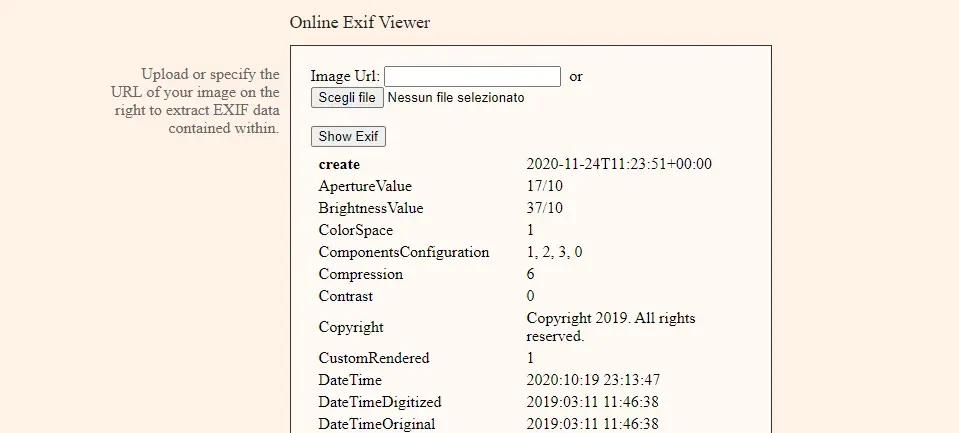
The screenshot shows the volume of metadata recovered from a single image. From there the researcher searched GitHub for every place that accepts an image upload and identified two: the Leave a comment functionality and the Social preview feature in repository settings.
Further testing turned up a second behaviour: images uploaded through the comments interface but never actually sent were not immediately deleted from the servers.
Exploitation
The researcher documented two proofs of concept in the HackerOne report.
Social preview
- Create a repository.
- Go to the repository settings page, for example:
https://github.com/fuomag9/POC/settings
- Upload a social preview image through the GUI that contains EXIF data.
- Obtain the image URL by page inspection or another method, for example:
https://repository-images.githubusercontent.com/305512860/cf5bea80-1260-11eb-9c8c-b3654d358e62
- Put the image URL into an EXIF viewer such as
http://exif-viewer.com/. - The metadata is shown.
The important part is step 4: the social preview is served from repository-images.githubusercontent.com, and putting that URL into an EXIF viewer shows the metadata.
GitHub issues
- Create a repository.
- Create an issue.
- Drop an image that contains EXIF data into the
Leave a commenttextbox from your device. - Wait for the upload to complete.
- Copy the image URL, for example:
https://user-images.githubusercontent.com/1580624/96513784-f74c4d80-1262-11eb-94b9-3715dc68e388.jpg
- The metadata is shown.
Here the image is hosted on user-images.githubusercontent.com, and the EXIF viewer shows the metadata from that URL. The same upload path is what leaves orphaned images on the servers when a comment is never submitted.
Root cause
Uploaded images keep their EXIF metadata, which can be read from the image URL with an EXIF viewer. Anyone who obtains an image URL can put it into an EXIF viewer and read the embedded device, GPS, time and software information. The report does not describe any server-side code, so the exact implementation is not shown; the behaviour is consistent with a straight pass-through of the uploaded bytes.
Impact
The exposure is to anyone who can reach the image URL, which in practice means anyone with the link. What leaks depends entirely on what the camera or phone wrote into the file: device model, GPS coordinates, capture time and software. For a photo taken at home or on a trip, GPS data can tie a GitHub account to a physical location. The researcher notes that GitLab treats the same class of issue as confirmed, while GitHub rated it a known low risk issue and did not consider it eligible for reward.
Fix
No fix was made. GitHub's response to the report was:
Thanks for the submission! We have reviewed your report and validated your findings. After internally assessing the finding we have determined it is a known low risk issue. We may make this functionality more strict in the future, but don’t have anything to announce right now. As a result, this is not eligible for reward under the Bug Bounty program.
The report was closed as informative shortly after submission, and the researcher had to wait a month for a response about disclosure. The obvious remediation, which the report does not state GitHub implemented, is to strip EXIF metadata from uploaded images on the server before serving them, and to delete images that are uploaded but never attached to submitted content.
Variants to test
- Other GitHub upload surfaces beyond the two named here: any place that accepts an image and returns a public URL is worth checking with the same EXIF viewer workflow. A positive result is metadata appearing for an image you uploaded.
- Orphaned uploads: start an upload in a comment box, let it finish, then abandon the comment. A positive result is the image URL remaining reachable after the draft is discarded.
- Other code hosting and issue trackers with comment attachments or repository preview images. A positive result is the same unmodified EXIF block served from a public URL.
- Images embedded in other content types, such as profile pictures or documentation pages, where the platform may reuse the same storage pipeline. A positive result is metadata surviving the upload and being readable from the public URL.
What happened, in plain words
GitHub lets people upload pictures in several places. Two of those places are the focus here: the Social preview image in a repository's settings, and the Leave a comment box you use when writing an issue. In both cases the picture you upload is stored on GitHub's image servers and handed back to the world at a public web address (a URL).
The researcher, fuomag9, noticed that the files served from those addresses still carried their original EXIF metadata. EXIF is a small block of extra information that phones and cameras write into a photo file when you take the picture. It can include the device model, GPS coordinates, the time the photo was taken and the software used to produce it. Think of it like the label on a parcel: the photo is the contents, and EXIF is the label stuck to the outside that tells anyone who picks it up where it came from and when.
The write-up was published on 24 November 2020 and classified as information disclosure. That term means a system reveals information to someone who should not have it. No severity score or bounty is recorded.
Setup
You do not need special accounts, roles or tools beyond a GitHub account and a browser. The only outside tool used is an online EXIF viewer at http://exif-viewer.com/. You give it the web address of an image, and it shows you the metadata hidden inside that file. It is like a website that reads the label on the parcel for you.
The one precondition is that the uploaded image actually contains EXIF data. That is the default for photos taken on phones and many cameras, so most people who upload a holiday snap are uploading the label along with the picture.
Finding it
The researcher was browsing a GitHub repository where a user had posted food and travel pictures. The pictures themselves were not the point. The question was whether information travelled with them. Putting the image addresses into the EXIF viewer returned information about the device, GPS data, time and software used.
The screenshot shows how much metadata came back from a single image. From there the researcher searched GitHub for every place that accepts an image upload and found two: the Leave a comment functionality and the Social preview feature in repository settings.
Further testing turned up a second behaviour: images uploaded through the comments interface but never actually sent were not immediately deleted from the servers. In everyday terms, you started writing a comment, attached a photo, then changed your mind and walked away, but the photo stayed on the shelf.
Exploitation
The researcher documented two proofs of concept in the HackerOne report. A proof of concept is a small, repeatable set of steps that shows a problem is real rather than theoretical.
Social preview
- Create a repository.
- Go to the repository settings page, for example:
https://github.com/fuomag9/POC/settings
This is the settings page for a repository called POC. The address is just the normal GitHub web address for that repository with /settings on the end. You reach it by clicking through the site, not by typing anything special.
- Upload a social preview image through the GUI that contains EXIF data. The GUI is the graphical interface, the normal clickable web page. A social preview image is the thumbnail GitHub shows when someone shares a link to your repository on social media or in a chat app.
- Obtain the image URL by page inspection or another method, for example:
https://repository-images.githubusercontent.com/305512860/cf5bea80-1260-11eb-9c8c-b3654d358e62
Page inspection means using the browser's built-in developer tools to look at the page's source and find the address the image is loaded from. The address above points at repository-images.githubusercontent.com, one of GitHub's image servers. The long string of numbers and letters is an identifier for that particular file.
- Put the image URL into an EXIF viewer such as
http://exif-viewer.com/. - The metadata is shown.
The important part is step 4. The social preview is served from repository-images.githubusercontent.com, and putting that address into an EXIF viewer shows the metadata.
GitHub issues
- Create a repository.
- Create an issue. An issue is GitHub's built-in way to report a problem or start a discussion about a repository.
- Drop an image that contains EXIF data into the
Leave a commenttextbox from your device. - Wait for the upload to complete.
- Copy the image URL, for example:
https://user-images.githubusercontent.com/1580624/96513784-f74c4d80-1262-11eb-94b9-3715dc68e388.jpg
This address points at user-images.githubusercontent.com, a different GitHub image server, the one used for pictures attached to comments and issues.
- The metadata is shown.
As with the social preview, the file is served unmodified, so the EXIF block survives the upload. The same upload path is what leaves orphaned images on the servers when a comment is never submitted. Orphaned here means the image exists on the server but is not attached to anything you can see.
Root cause
Uploaded images keep their EXIF metadata, which can be read from the image address with an EXIF viewer. Anyone who obtains an image address can put it into an EXIF viewer and read the embedded device, GPS, time and software information. The report does not describe any server-side code, so the exact implementation is not shown. The behaviour is consistent with a straight pass-through of the uploaded bytes.
Impact
The exposure is to anyone who can reach the image address, which in practice means anyone with the link. What leaks depends entirely on what the camera or phone wrote into the file: device model, GPS coordinates, capture time and software. For a photo taken at home or on a trip, GPS data can tie a GitHub account to a physical location. The researcher notes that GitLab treats the same class of issue as confirmed, while GitHub rated it a known low risk issue and did not consider it eligible for reward.
Fix
No fix was made. GitHub's response to the report was:
Thanks for the submission! We have reviewed your report and validated your findings. After internally assessing the finding we have determined it is a known low risk issue. We may make this functionality more strict in the future, but don’t have anything to announce right now. As a result, this is not eligible for reward under the Bug Bounty program.
The report was closed as informative shortly after submission, and the researcher had to wait a month for a response about disclosure. The obvious remediation, which the report does not state GitHub implemented, is to strip EXIF metadata from uploaded images on the server before serving them, and to delete images that are uploaded but never attached to submitted content.
Variants to test
- Other GitHub upload surfaces beyond the two named here: any place that accepts an image and returns a public address is worth checking with the same EXIF viewer workflow. A positive result is metadata appearing for an image you uploaded.
- Orphaned uploads: start an upload in a comment box, let it finish, then abandon the comment. A positive result is the image address remaining reachable after the draft is discarded.
- Other code hosting and issue trackers with comment attachments or repository preview images. A positive result is the same unmodified EXIF block served from a public address.
- Images embedded in other content types, such as profile pictures or documentation pages, where the platform may reuse the same storage pipeline. A positive result is metadata surviving the upload and being readable from the public address.
Glossary
- EXIF: a block of extra information that cameras and phones write into a photo file, such as device model, GPS coordinates, capture time and software used.
- Metadata: data about data. Here, the information stored inside an image file that describes the image rather than being part of the picture.
- URL: the web address of a file or page, the thing you type into a browser to reach it.
- Information disclosure: a weakness where a system reveals information to someone who should not have it.
- Proof of concept (POC): a small, repeatable set of steps that demonstrates a problem is real.
- GUI: graphical user interface, the normal clickable web page rather than a command line.
- Social preview: the thumbnail image GitHub shows when a repository link is shared on social media or in a chat app.
- Issue: GitHub's built-in way to report a problem or start a discussion about a repository.
- Orphaned image: an image that exists on a server but is not attached to any visible content, for example because a comment was never submitted.
- Root cause: the underlying reason a problem exists, as opposed to its visible symptoms.
- Remediation: the change made to fix a problem.
- Severity score: a number that rates how serious a vulnerability is.
- Bounty: a reward paid to a researcher for reporting a valid vulnerability.
- HackerOne: a platform where security researchers report vulnerabilities to companies.
- Disclosure: making the details of a reported vulnerability public.




