My first report on HackerOne: A logic flaw in npm
A logic flaw in npm's URL routing allowed an attacker to claim a package name that matched a deleted top-level page, causing the documentation link to redirect to the attacker's package. An unsuspecting user might then install the malicious package.

I submitted my first-ever report on HackerOne after discovering a logic flaw in www.npmjs.com’s URL routing fallback handler. The report was triaged and later accepted by GitHub’s bug bounty programme.
The full write-up lives on its author's site
It belongs to its author, so we link to it rather than copy it. The other two tabs are our own rewrites, checked against it.
Context
www.npmjs.com is the website that fronts the npm registry. Besides the registry itself, the site serves a set of top-level pages that belong to npm as a product, for example https://www.npmjs.com/about. Alongside those pages, the application supports a convenience route: a request to https://www.npmjs.com/<package-name>, or to https://npmjs.com/<package-name>, is redirected to the package's page on the registry at https://www.npmjs.com/package/<package-name>.
The feature therefore has to decide, for any top-level path, whether it is a real site page or a package name. The flaw described here lives in that decision, in the URL routing fallback handler.
Setup
No special account, role or tooling is described beyond a normal npm publishing workflow. The researcher was reading the npm documentation and had the ability to publish packages to the public registry under names that were not yet claimed. The analysis of the routing behaviour was based on an outdated version of npm's source code that was still served on the npm registry under the package name newww.
Finding it
While reading the npm documentation, the researcher noticed that the top-level directory of www.npmjs.com mixed two kinds of paths: package names on the registry, and actual website pages belonging to npm. Because the fallback redirect treated any top-level path as a package name, a path that used to be an npm page but had since been archived or deleted would fall through to the package redirect.
The concrete example came from the front page of npm's documentation, https://docs.npmjs.com/about-npm, which contained this snippet (emphasis the author's):
"To learn more about npm as a product, upcoming new features, and interesting uses of npm, sign up for our newsletter at npm-weekly, and be sure to follow @npmjs on Twitter."
, Snippet from npm documentation
The npm-weekly link pointed to https://www.npmjs.com/npm-weekly, a page that had since been deleted. As a result, https://www.npmjs.com/npm-weekly redirected to https://www.npmjs.com/package/npm-weekly, which was an unclaimed package name. The documentation was still linking to the old path, but the site no longer owned that path as a page, so whoever claimed the package name would receive the traffic.
Exploitation
Step 1: Claim the namespace left behind by the deleted page
The researcher uploaded a package to the npm registry under the npm-weekly namespace. The publish output was:
❯ npm publish
npm notice
npm notice 📦  [email protected]
npm notice === Tarball Contents ===
npm notice 5B   README.md
npm notice 169B package.json
npm notice === Tarball Details ===
npm notice name:          npm-weekly
npm notice version:       3.9.9
npm notice filename:      npm-weekly-3.9.9.tgz
npm notice package size:  253 B
npm notice unpacked size: 174 B
npm notice shasum:        [redacted]
npm notice integrity:     sha512-QdDg5uXIv5Fej[...]o6/jWFgy2fCoQ==
npm notice total files:   2
npm notice
npm notice Publishing to https://registry.npmjs.org/
+ [email protected]
The important parts are the package name (npm-weekly), which matches the deleted top-level path, and the version (3.9.9). Once published, the redirect from https://www.npmjs.com/npm-weekly landed on a package page controlled by the researcher.
Step 2: The documentation now points at the attacker's package
With the package claimed, the npm documentation's link to https://www.npmjs.com/npm-weekly resolved to a "malicious" placeholder package under the researcher's control. An unsuspecting user could have inferred from the documentation that they had to install the npm-weekly package.
Root cause
The redirect logic was handled by passing the path to the fallback handler, handlers/fallback.js. Based on the outdated newww source code still available on the registry, the handler looked like this:
if (!validatePackageName(route).validForOldPackages) {
  return reply.view("errors/not-found", opts).code(404);
}

return reply.redirect("/package/" + route).code(302);
In other words, any top-level path that was a valid old-style package name was redirected to /package/<route> with a 302. The handler had no knowledge of which top-level paths were npm's own pages, so a path that had once been a page but had been archived or deleted was indistinguishable from an unclaimed package name.
The existing validation did not help here: validatePackageName() only rejects names that are not valid package names, and a deleted page's slug such as npm-weekly is a perfectly valid package name. The only paths that were rejected were those containing a /, because package names cannot contain that character, which is why only top-level routes needed to be considered.
Impact
An attacker could plant a package in the namespace of an archived or deleted npm page and have npm's own documentation link to it. The victim is any user who follows an outdated link from npm's documentation and assumes the package is the one the documentation refers to. The impact depends on the user actually installing the package; the researcher describes it as a placeholder package under their control and notes that GitHub's security team did not consider it a high-impact issue. The bug required the precondition that npm had archived or deleted a page from the top-level directory and that the corresponding package name was unclaimed.
Fix
The researcher recommended that npm create a routes list consisting of all current pages on www.npmjs.com. If the top-level path matched one of the routes in the list, the redirect would never occur and the application could present npm's generic 404 page instead.
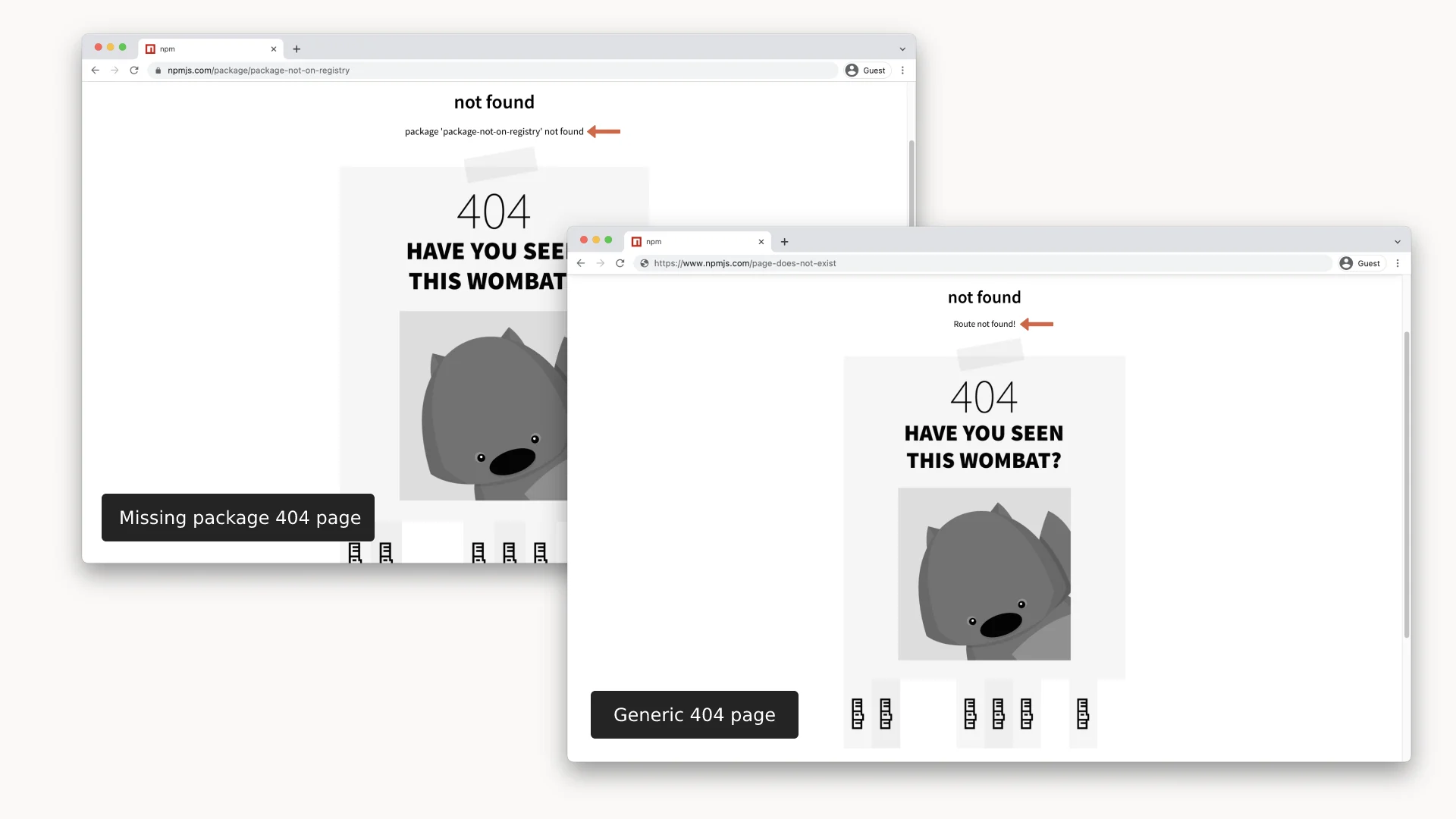
Using the newww codebase, the researcher suggested ensuring that the path passed from routes/public.js to handlers/fallback.js did not match any of the previous top-level paths. The following pseudocode-ish JavaScript roughly illustrates how this could have been done in the fallback handler:
var routes = [
  "private-npm",
  "org",
  "contact",
  "send-contact",
  "support",
  "whoshiring",
  // ...
  "login",
  "logout",
  "ping",
  "status",
  "csplog",
];

if (!validatePackageName(route).validForOldPackages || routes.includes(route)) {
  return reply.view("errors/not-found", opts).code(404);
}

return reply.redirect("/package/" + route).code(302);
On npm's side, the reference to npm-weekly was removed from the official npm documentation in commit 710924e (pull request #64). The report was triaged and accepted by GitHub's bug bounty programme, and the researcher was awarded a bounty and some GitHub merchandise despite the bug not being a high-impact issue. GitHub's security team do not disclose low-severity bugs, but gave permission to share the findings.
Variants to test
- Deleted or archived pages on any site with a catch-all package or user redirect. Look for documentation or marketing pages that link to top-level paths which now redirect to a claimable namespace. A positive result is a link in official documentation that resolves to an unclaimed package, username or similar namespace you can register.
- Fallback handlers that validate the shape of a name but not its ownership. Check whether the handler only runs a format validator (such as
validatePackageName) before redirecting. A positive result is a path that passes validation and redirects even though it was previously a reserved site route. - Outdated source code still published on a package registry. Search the registry for the application's own package name (here
newww) and read the routing and fallback code. A positive result is a fallback handler whose only guard is a name-format check. - Forked repositories of a now closed-source project. When the original repository has been deleted, search GitHub for forks, since deleting a repository does not remove previously forked repositories. A positive result is a fork containing the routing code from before the fix.
- Route lists that are incomplete. If a fix uses an allow-list of routes, compare it against the site's sitemap and historical links. A positive result is a top-level path that is still linked but missing from the list and therefore still redirects to a claimable namespace.
What happened, in plain words
A security researcher found a small logic mistake on the website www.npmjs.com, the website that sits in front of the npm registry. The npm registry is the big public library where JavaScript developers download and publish reusable pieces of code called packages. The website has two jobs: it shows npm's own pages (like an About page), and it also lets you jump to a package by typing a short address.
The mistake was in how the site decided whether a short address like https://www.npmjs.com/something meant "one of our own pages" or "a package called something". When npm deleted one of its own pages, the short address for that page did not stop working. Instead it started pointing at a package with the same name. If nobody had claimed that package name yet, anyone could publish a package under it, and npm's own documentation would then link visitors straight to that stranger's package.
The researcher proved this with a real example, reported it to GitHub's bug bounty programme on HackerOne, and GitHub accepted it. A bug bounty programme is a scheme where a company pays people for reporting security problems responsibly instead of exploiting them. HackerOne is a platform that hosts these programmes.
The pieces you need to know first
Before the details make sense, here are a few everyday ideas.
- A package is a bundle of code that other people can install and reuse. Think of it like a recipe card in a public recipe box: anyone can read it, and anyone can add a new card as long as the title is not already taken.
- A package name is the title on that card. Names are unique on the registry, so only one person can own a given name at a time.
- A URL path is the part of a web address after the site name. In
https://www.npmjs.com/about, the path is/about. The top level of a site is the set of all such single-word paths directly under the site name. - A redirect is what happens when a web server tells your browser "the page you asked for is actually over there, go look at this other address instead". It is like a receptionist pointing you to a different desk.
- A fallback handler is a piece of code that runs when no specific rule matched the request. It is the catch-all at the end of the queue: "if nothing else handled this, do this instead".
- A logic flaw is not a crash or a broken password. It is a case where the program does exactly what it was written to do, but the rule itself is wrong for some situations. The code is working; the thinking behind it has a gap.
- Source code is the human-readable text that a program is built from. If you can read it, you can often understand exactly how a site behaves.
The setup
The researcher did not need any special account or tool beyond the normal way of publishing packages to npm. They were reading the npm documentation, which is the official set of help pages for npm, and they had the ordinary ability to publish a package under a name that nobody had claimed yet.
To understand the routing, they looked at an old version of npm's own source code. That old code was still published on the npm registry itself, as a package called newww. This is a useful habit: even when a company stops publishing its code openly, old copies can survive in package registries, in forks (personal copies of a code repository), and in caches.
Finding it
While reading the npm documentation, the researcher noticed that the top level of www.npmjs.com mixed two kinds of paths together:
- Package names on the registry.
- Real website pages that belong to npm as a company, such as
https://www.npmjs.com/about.
The site had a convenience feature: if you typed https://www.npmjs.com/<package-name>, or https://npmjs.com/<package-name>, the site redirected you to the package's real page at https://www.npmjs.com/package/<package-name>. That is handy for users, because they can skip typing /package/.
The problem is what happens when a path used to be an npm page but has since been archived or deleted. The fallback redirect did not know about npm's own pages. It treated every top-level path as a package name. So a deleted page's address fell straight through to the package redirect.
The concrete example came from the front page of npm's documentation, https://docs.npmjs.com/about-npm. That page contained this snippet (the emphasis is the author's):
"To learn more about npm as a product, upcoming new features, and interesting uses of npm, sign up for our newsletter at npm-weekly, and be sure to follow @npmjs on Twitter."
, Snippet from npm documentation
The link text npm-weekly pointed to https://www.npmjs.com/npm-weekly. That page had since been deleted. Because of the fallback behaviour, https://www.npmjs.com/npm-weekly now redirected to https://www.npmjs.com/package/npm-weekly, and that package name was unclaimed. The documentation was still linking to the old path, but the site no longer owned that path as a page. Whoever claimed the package name would receive the traffic.
Exploitation
Step 1: Claim the namespace left behind by the deleted page
A namespace here simply means a name that is free to register. The researcher published a package to the npm registry under the name npm-weekly, matching the deleted page's path. The publish output looked like this:
❯ npm publish
npm notice
npm notice 📦  [email protected]
npm notice === Tarball Contents ===
npm notice 5B   README.md
npm notice 169B package.json
npm notice === Tarball Details ===
npm notice name:          npm-weekly
npm notice version:       3.9.9
npm notice filename:      npm-weekly-3.9.9.tgz
npm notice package size:  253 B
npm notice unpacked size: 174 B
npm notice shasum:        [redacted]
npm notice integrity:     sha512-QdDg5uXIv5Fej[...]o6/jWFgy2fCoQ==
npm notice total files:   2
npm notice
npm notice Publishing to https://registry.npmjs.org/
+ [email protected]
Line by line, in plain words:
❯ npm publishis the command the researcher typed.npmis the package manager tool, andpublishtells it to upload the current folder as a new package.- The
npm noticelines are progress messages printed by the tool, not errors. 📦 [email protected]is the tool announcing the package it is about to upload. The name isnpm-weeklyand the version is3.9.9.=== Tarball Contents ===lists the files inside the package. A tarball is just a compressed archive, like a zip file. Here it contains aREADME.md(5 bytes) and apackage.json(169 bytes).=== Tarball Details ===gives the package's metadata: its name, version, filename, size, a checksum calledshasum, and anintegrityhash. A checksum is a short fingerprint of the file contents, used to detect changes.Publishing to https://registry.npmjs.org/confirms the destination: the public npm registry.+ [email protected]is the final confirmation that the package was published.
The important parts are the package name (npm-weekly), which matches the deleted top-level path, and the version (3.9.9). Once published, the redirect from https://www.npmjs.com/npm-weekly landed on a package page controlled by the researcher.
Step 2: The documentation now points at the attacker's package
With the package claimed, the npm documentation's link to https://www.npmjs.com/npm-weekly resolved to a "malicious" placeholder package under the researcher's control. A placeholder here means a package with no real purpose, just enough to exist and be visible. An unsuspecting user could have inferred from the documentation that they had to install the npm-weekly package. That is the danger: the user trusts the documentation, and the documentation now points at code the user did not expect.
Root cause
The redirect logic was handled by passing the path to the fallback handler, handlers/fallback.js. Based on the outdated newww source code still available on the registry, the handler looked like this:
if (!validatePackageName(route).validForOldPackages) {
  return reply.view("errors/not-found", opts).code(404);
}

return reply.redirect("/package/" + route).code(302);
Line by line:
if (!validatePackageName(route).validForOldPackages) {asks a helper function,validatePackageName, whether the requested path (route) is a valid old-style package name. The!means "not", so the whole condition is true when the name is not valid.return reply.view("errors/not-found", opts).code(404);is what happens in that case: the server shows the "not found" page and sends the HTTP status code 404, which is the standard code for "this page does not exist".return reply.redirect("/package/" + route).code(302);is what happens otherwise: the server sends a redirect to/package/followed by the requested name, with the HTTP status code 302, which means "temporary redirect, look over there".
In other words, any top-level path that was a valid old-style package name was redirected to /package/<route> with a 302. The handler had no knowledge of which top-level paths were npm's own pages, so a path that had once been a page but had been archived or deleted was indistinguishable from an unclaimed package name.
The existing validation did not help here. validatePackageName() only rejects names that are not valid package names, and a deleted page's slug such as npm-weekly is a perfectly valid package name. A slug is the short, readable part of a web address. The only paths that were rejected were those containing a /, because package names cannot contain that character, which is why only top-level routes needed to be considered.
Impact
An attacker could plant a package in the namespace of an archived or deleted npm page and have npm's own documentation link to it. The victim is any user who follows an outdated link from npm's documentation and assumes the package is the one the documentation refers to. The impact depends on the user actually installing the package. The researcher describes it as a placeholder package under their control and notes that GitHub's security team did not consider it a high-impact issue.
The bug required a precondition: npm had to have archived or deleted a page from the top level, and the corresponding package name had to be unclaimed. That combination is what made it exploitable.
Fix
The researcher recommended that npm create a routes list consisting of all current pages on www.npmjs.com. If the top-level path matched one of the routes in the list, the redirect would never occur, and the application could present npm's generic 404 page instead.
Using the newww codebase, the researcher suggested ensuring that the path passed from routes/public.js to handlers/fallback.js did not match any of the previous top-level paths. The following pseudocode-ish JavaScript roughly illustrates how this could have been done in the fallback handler:
var routes = [
  "private-npm",
  "org",
  "contact",
  "send-contact",
  "support",
  "whoshiring",
  // ...
  "login",
  "logout",
  "ping",
  "status",
  "csplog",
];

if (!validatePackageName(route).validForOldPackages || routes.includes(route)) {
  return reply.view("errors/not-found", opts).code(404);
}

return reply.redirect("/package/" + route).code(302);
Line by line:
var routes = [starts a list (an array) of known site paths. Each quoted string is one of npm's own top-level pages, such ascontact,support,loginandlogout.// ...is a comment meaning "more entries follow, omitted here for brevity".];closes the list.if (!validatePackageName(route).validForOldPackages || routes.includes(route)) {is the new condition. It is true if the name is not a valid package name, or if the requested path is in therouteslist. The||means "or".return reply.view("errors/not-found", opts).code(404);shows the 404 page in either case.return reply.redirect("/package/" + route).code(302);only runs when the path is a valid package name and is not one of npm's own routes.
On npm's side, the reference to npm-weekly was removed from the official npm documentation in commit 710924e (pull request #64). A commit is a saved change in a code repository, and a pull request is a proposed change that gets reviewed before it is merged. The report was triaged and accepted by GitHub's bug bounty programme, and the researcher was awarded a bounty and some GitHub merchandise despite the bug not being a high-impact issue. GitHub's security team do not disclose low-severity bugs, but gave permission to share the findings.
Variants to test
If you want to look for similar problems yourself, here are starting points. Each one is a way of asking the same question: does this site confuse "a name we own" with "a name anyone can register"?
- Deleted or archived pages on any site with a catch-all package or user redirect. Look for documentation or marketing pages that link to top-level paths which now redirect to a claimable namespace. A positive result is a link in official documentation that resolves to an unclaimed package, username or similar namespace you can register.
- Fallback handlers that validate the shape of a name but not its ownership. Check whether the handler only runs a format validator (such as
validatePackageName) before redirecting. A positive result is a path that passes validation and redirects even though it was previously a reserved site route. - Outdated source code still published on a package registry. Search the registry for the application's own package name (here
newww) and read the routing and fallback code. A positive result is a fallback handler whose only guard is a name-format check. - Forked repositories of a now closed-source project. When the original repository has been deleted, search GitHub for forks, since deleting a repository does not remove previously forked repositories. A positive result is a fork containing the routing code from before the fix.
- Route lists that are incomplete. If a fix uses an allow-list of routes, compare it against the site's sitemap and historical links. A positive result is a top-level path that is still linked but missing from the list and therefore still redirects to a claimable namespace.
Glossary
- Bug bounty programme: a scheme where a company pays people for reporting security problems responsibly instead of exploiting them.
- Commit: a saved change in a code repository, with a reference such as
710924e. - Fallback handler: the code that runs when no specific rule matched a request; the catch-all at the end of the queue.
- Fork: a personal copy of someone else's code repository, which survives even if the original is deleted.
- HackerOne: a platform that hosts bug bounty programmes.
- HTTP status code: a number a web server sends with its response, such as 404 for "not found" and 302 for "temporary redirect".
- Integrity hash: a fingerprint of a file's contents, used to detect changes.
- Logic flaw: a bug where the program does what it was written to do, but the rule itself is wrong for some situations.
- Namespace: a name that is free to register, such as an unclaimed package name.
- npm: the package manager tool and public registry for JavaScript packages.
- Package: a bundle of reusable code published to a registry.
- Package name: the unique title of a package on the registry.
- Placeholder package: a package with no real purpose, just enough to exist and be visible.
- Pull request: a proposed change to a code repository that gets reviewed before it is merged.
- Redirect: a server response telling the browser to go to a different address instead.
- Registry: the public library where packages are published and downloaded.
- Route: a path that a web application knows how to handle.
- Shasum: a checksum, a short fingerprint of a file's contents.
- Slug: the short, readable part of a web address, such as
npm-weekly. - Source code: the human-readable text a program is built from.
- Tarball: a compressed archive of files, like a zip file.
- Top level: the set of single-word paths directly under a site name, such as
/about. - URL path: the part of a web address after the site name.
- Validator: a function that checks whether a value has the right shape or format.




