Bypassing Identity-Aware Proxy - Google Cloud Vulnerability
An attacker could create an IAP-secured application using the victim's OAuth client ID and a random secret, then use query parameter-based routing to capture redirect tokens sent to a non-IAP backend. These tokens could be exchanged for session cookies, allowing the attacker to access the victim's IAP-secured application.
I discovered a way, how an attacker could leak tokens from other users who are authorized to access an IAP-secured web application (Identity-Aware Proxy). This allows an attacker to hijack sessions and hence access IAP-secured web applications.
The full write-up lives on its author's site
It belongs to its author, so we link to it rather than copy it. The other two tabs are our own rewrites, checked against it.
Context
Identity-Aware Proxy (IAP) is a security component in Google Cloud Platform (GCP) that lets you establish a more granular, application-level access control model instead of simply relying on network-level firewall rules. It can secure web applications hosted on Compute Engine VMs, App Engine and similar, and it can also tunnel TCP connections through IAP. Either way, IAP enforces an OAuth authentication flow before access to the actual application is granted, and the OAuth token information is then used to enforce granular access rules for authorisation, based on user identity but also on context-aware parameters.
This research focused on the web application part. The request flow for an IAP-secured web application is worth spelling out in detail, because it is both the key to the rest of the research and the reason I picked IAP as a target in the first place:
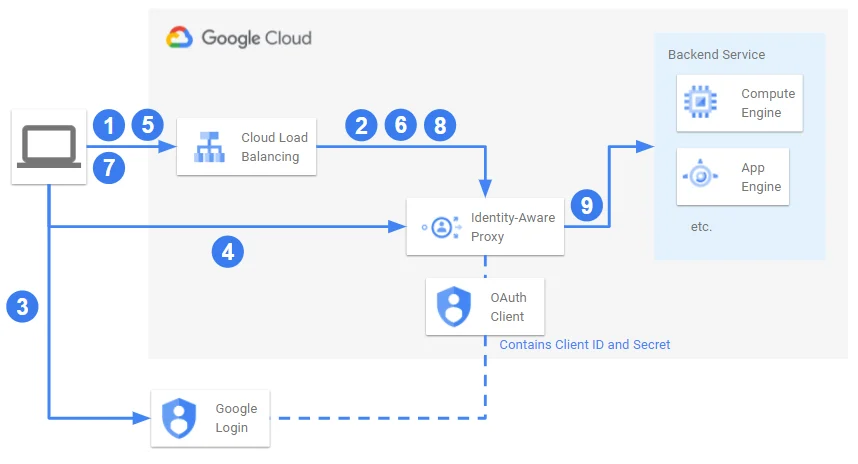
- A client tries to access the web application (e.g.
https://my-secure-app.com/). This request goes to an External HTTPS Load Balancer. - The Load Balancer routes the request to the configured Backend Service. However, as Identity-Aware Proxy is enabled for the backend service, the request is intercepted by IAP and checked for a valid authorisation token in the cookies.
- As the request did not contain a valid token, IAP redirects the client to the Google Login for OAuth (
https://accounts.google.com/o/oauth2/v2/auth?client_id=${CLIENT_ID}...), using the OAuth client ID configured for Identity-Aware Proxy. - After successful authentication the client is redirected to the IAP API (
https://iap.googleapis.com/v1/oauth/clientIds/${CLIENT_ID}:handleRedirect?...), exchanging the OAuth auth code for a redirect token. - Now the client is redirected back to the initial web application, but including additional query parameters (e.g.
https://my-secure-app.com/?gcp-iap-mode=AUTHENTICATING&redirect_token=...), especially the exchanged redirect token. - The Load Balancer once again forwards this request to the backend service but is intercepted by IAP. IAP now notices the additional query parameters and exchanges both for a cookie containing the final valid token (only if the authenticated user fulfils the configured authorisation requirements).
- Finally the client is redirected to the web application and the initially requested URL (e.g.
https://my-secure-app.com/). - The Load Balancer forwards the request to the backend service where it is once again intercepted by IAP and checked for a valid authorisation token in the cookies.
- As the token is valid, the request passes through IAP and reaches the backend service and hence the actual web application.
This list of redirects and components illustrates several things. IAP is a good way of adding an additional layer of security in front of an application: only authorised clients, in terms of identity and context-aware parameters, can reach the application network-wise, and implemented properly it can reduce the attack surface of an application tremendously. The complexity is handled by Google, so it is easy for Google Cloud customers to use IAP. Those same features also make IAP a good target for bug hunting: the number of components and redirects involved provides quite some surface for potential attacks, and being a security component increases the likelihood that applications hiding behind IAP are sensitive. So I decided to dig further.
Setup
When searching for a way to access an application secured via IAP, there are two main categories of potential attack scenarios:
- Bypassing the IAP without valid credentials.
- Bypassing the IAP with valid credentials leaked from another user.
Because the first approach does not require any interaction with another user, it was my first area of research. I tried fiddling around with the various requests involved, changing some parameters (slightly modified or utter nonsense), sending invalid tokens (for example tokens for a different IAP-secured application), and so on. Apart from getting a good feeling for the causes of the various IAP error codes, nothing seemed interesting, let alone a potential attack vector. Getting to know the target is always a valuable first step, though, and you never know which low-hanging fruit you might stumble over.
After these failed attempts I focused on the second approach and looked for potential attack vectors for stealing valid credentials from authorised users. It took some time until I stumbled over a convenience feature for Identity-Aware Proxy: Sharing OAuth Clients. By default, each IAP-secured application creates its own OAuth client, consisting of client ID and secret; this feature allows you to reduce the number of OAuth clients created by reusing them for multiple applications.
For the lab work I used two Google accounts and two GCP projects. Using a victim Google Account and GCP project, I created a dummy target application consisting of a simple nginx webserver running on a Compute Engine VM which I added to an Instance Group. Then I created an External HTTPS Load Balancer, added the Instance Group as a new Backend Service and activated Identity-Aware Proxy on the Backend Service. The automatically created OAuth client ID was:
1016913171751-[redacted].apps.googleusercontent.com
I granted the victim Google Account the "IAP-secured Web App User" role, making this account the only one allowed to access the target application. Let's say this application is reachable under https://victim.app/.
Then, using another attacker Google Account and GCP project, I did basically the same thing again (a simple webserver VM exposed via an External HTTPS Load Balancer), but skipped the IAP setup initially. Let's say this application is reachable under https://attacker.app/.
Finding it
The Sharing OAuth Clients feature caused a sudden shift in perspective and led to a breakthrough: what would happen if I tried to create an IAP-secured application as the attacker, but specified the targeted OAuth client using the sharing feature?
First I had to check which information I needed in order to use the feature. These were the Client ID and Client Secret for the OAuth client. The Client ID was easy to get, as it is included in the query parameters of the initial redirect when trying to access the target application. However, there was simply no way to get or guess the Client Secret. Either way, I decided to give it a try.
I activated IAP on the attacker's backend service using the Client ID from the victim's application. As the attacker had no clue about the Client Secret, I simply used a random and incorrect value (1234567890):
gcloud compute backend-services update my-attacker-backend --global --iap=enabled,oauth2-client-id=1016913171751-[redacted].apps.googleusercontent.com,oauth2-client-[redacted]
Even with the incorrect secret value, and with the OAuth client existing in a completely different GCP organisation, the command succeeded.
Then I tried to access https://attacker.app/ and got successfully redirected to the sign-in page along with the targeted client ID (https://accounts.google.com/o/oauth2/v2/auth?client_id=1016913171751-[redacted].apps.googleusercontent.com&...).
After logging in I was redirected to the IAP API (https://iap.googleapis.com/v1/oauth/clientIds/1016913171751-[redacted].apps.googleusercontent.com:handleRedirect?...) and afterwards back to https://attacker.app/ including the redirect_token as a query parameter. However, here I received an IAP error code: Error Code 11, "Your OAuth client ID is incorrectly configured". So this was the location where the incorrect client secret caused an issue. The redirect_token was related to the client secret, and my attacker's IAP configuration threw an error because the OAuth flow was not completed using the configured client secret (1234567890).
However, I figured that if the attacker lured the victim to https://attacker.app/, a somewhat valid redirect_token would at least end up at the Load Balancer under the attacker's control. The Error Code 11 was only thrown after the Load Balancer forwarded the request to the backend service where it was intercepted by IAP, which caused the error. Hence, if I could find a way to extract the redirect_token before it reached Identity-Aware Proxy, an attacker could steal a victim's token.
Exploitation
Step 1: Route the authenticating request away from IAP
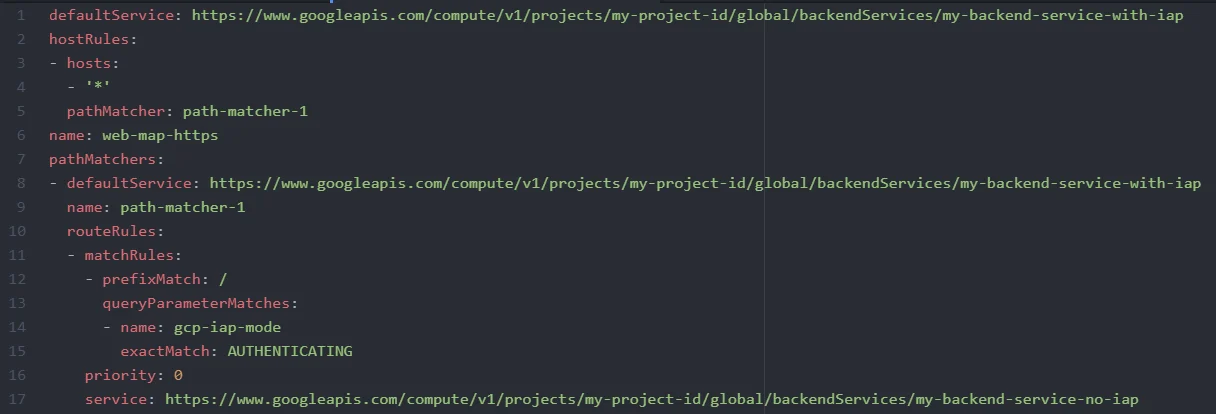
A more or less recent feature of HTTPS Load Balancers is query parameter-based routing. Using this method, the attacker could route the requests in question, containing the query parameter gcp-iap-mode=AUTHENTICATING and the redirect_token, to another backend service, obviously without IAP activated so the request would actually reach the backend.
So, as the attacker, I created a second backend service pointing to the same instance group but skipped the IAP configuration part entirely. I modified the Load Balancer to use the following URL Map configuration, making use of query parameter-based routing:
Step 2: Trigger the flow with the victim's session
Using a browser session with the victim's Google Account I navigated to https://attacker.app/ and the typical IAP redirect sequence happened (accounts.google.com, iap.googleapis.com and back to https://attacker.app/). However, due to the additional URL Map configuration, the final redirect no longer got intercepted by IAP and actually ended up on the backend, a Compute Engine instance under the attacker's control.
This seemed like the final puzzle piece, as it would allow an attacker to simply lure a victim to a URL (which should be less suspicious than https://attacker.app/). After a bunch of redirects, without any further interaction by the victim as long as the Google Account was already signed in in the browser session, the attacker would have extracted a valid redirect_token created with the same OAuth client used by https://victim.app/.
Step 3: Decode the token and lose hope
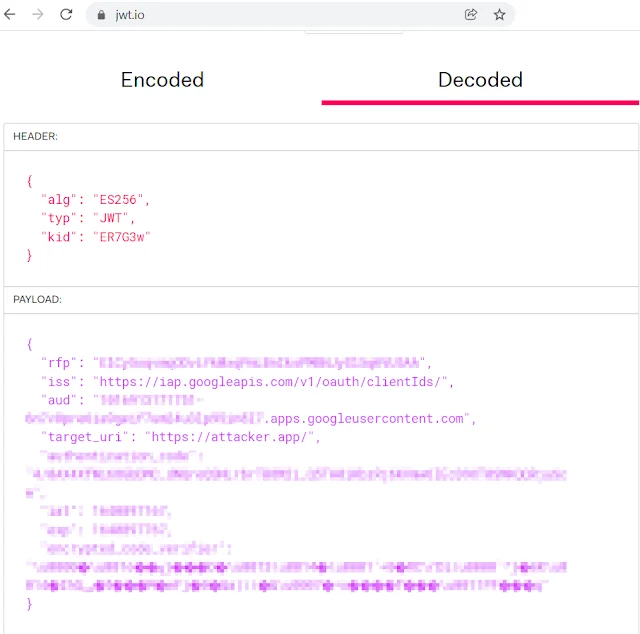
Then it occurred to me, probably a little late in the research, that it could make sense to check the actual contents of such a redirect_token, for example using https://jwt.io/ or any other way of decoding JWT tokens. This is when my initial feeling of having found a vulnerability in IAP broke, for the moment. The decoded redirect_token contained https://attacker.app in the target_uri:
Step 4: Replay the token against the real application
Without much hope, I crafted a request using curl to https://victim.app/?gcp-iap-mode=AUTHENTICATING&redirect_token=${REDIRECT_TOKEN}. Basically I sent the exact request, including the same headers, that my attacker's backend received, but to https://victim.app/.
The response was a redirect (code 302) as I feared; however, the response contained GCP_IAAP_AUTH_TOKEN and GCP_IAP_UID cookies.
Step 5: Use the cookies
In a new incognito browser session I navigated to https://victim.app/ and used the Chrome DevTools to create GCP_IAAP_AUTH_TOKEN and GCP_IAP_UID cookies with the retrieved values. A quick refresh of the page and I had access to the IAP-secured web application https://victim.app/.
End-to-end scenario
After finding multiple puzzle pieces an end-to-end scenario seemed possible. It is always worth taking a step back and putting the individual pieces together step by step: on the one hand it might help find flaws in your own reasoning, on the other hand additional vulnerabilities sometimes become apparent during the process. In this case the research was a little convoluted from my perspective and I wanted to re-ensure myself of the findings.
For an end-to-end attack scenario, an attacker would have to perform the following steps to access an IAP-secured web application:
- Find the OAuth Client ID for the target application (looking at the redirect parameters).
- Create an own GCP HTTPS Load Balancer with two Backend Services pointing to the same web server (they could be different, but it does not make a difference).
- Create an unsuspicious URL with a DNS record pointing to this Load Balancer. Or use services like nip.io and/or tinyurl.com to obfuscate it.
- Ensure the first backend service has IAP enabled using the target OAuth Client ID and a random Client Secret (using Sharing OAuth Clients).
- Ensure requests containing
?gcp-iap-mode=AUTHENTICATING&redirect_tokenare routed to the second, non-IAP-enabled backend service (using query parameter-based routing). - On the backend server ensure that requests are properly persisted, especially the
redirect_tokens. To further hide the attack, it makes sense to also redirect to an unsuspicious website after storing the request data. - Finally, try to lure a victim who is allowed to access the target application onto the prepared attacker URL. Think of any social engineering approach here. One entry point may be the admin email displayed on the error screen after a failed attempt to log in to the target application, which is always present for IAP-secured web applications.
- Once a victim clicks the URL, a bunch of redirects happen in quick succession. When the browser is logged in with a Google Account permitted in the target application, no user interaction is required at all. Finally the redirect progression ends on the unsuspicious website the attacker's web server redirects to.
- During the redirects, the victim's
redirect_tokenhas been captured by the attacker's web server. The attacker can use this to retrieve valid session cookies and create an authorised session for the target application.
Root cause
Re-ensured that I had indeed found a valid and exploitable security issue, I opened a bug report with Google including the three security flaws that led to this exploit when combined:
- OAuth clients can be shared across GCP organisations without further authorisation checks; not knowing the OAuth client secret is an insufficient hurdle.
- Query parameter-based routing can be abused to intercept the IAP OAuth flow, allowing an attacker to capture intermediate states, i.e.
redirect_tokens. - IAP backend services create
IAAP_AUTH_TOKENcookies even when thetarget_uriin theredirect_tokendoes not match the requested hostname.
Individually, these three issues probably do not pose significant risk, but combined they create an end-to-end attack scenario. The third one is what turned the captured token, whose target_uri pointed at the attacker's host, into working session cookies on the victim's host.
Impact
An attacker who can get a user authorised for an IAP-secured application to visit a prepared URL can leak that user's redirect_token and use it to obtain valid session cookies for the targeted application, hijacking the session and gaining access to the IAP-secured web application. No interaction is required beyond the victim clicking the link, provided the browser is already signed in with a Google Account permitted in the target application. The victim must be a user who is authorised to access the targeted application, and the attacker needs the target's OAuth Client ID, which is exposed in the redirect parameters.
Fix
The issue was fixed by Google in June 2021. The report does not describe the specific change that was made.
Variants to test
- OAuth client sharing across organisations. Try configuring an IAP-protected backend in your own project with another organisation's OAuth client ID and an arbitrary secret. A positive result is the
gcloud compute backend-services updatecommand succeeding and the login redirect carrying the foreign client ID. - Query parameter-based routing on the authenticating request. Add a URL Map rule that sends requests containing
gcp-iap-mode=AUTHENTICATINGto a backend without IAP. A positive result is the final redirect, includingredirect_token, arriving at that backend instead of being intercepted by IAP. - Token binding to host. Decode a captured
redirect_tokenand check thetarget_uri. A positive result is a token whosetarget_urinames a different host than the one you replay it against. - Cookie issuance on mismatched host. Replay a captured token to the victim host as
https://victim.app/?gcp-iap-mode=AUTHENTICATING&redirect_token=${REDIRECT_TOKEN}. A positive result is a 302 response carryingGCP_IAAP_AUTH_TOKENandGCP_IAP_UIDcookies that grant access when set in a fresh session. - Error screen information leak. Trigger a failed login to an IAP-secured application and inspect the error screen. A positive result is an admin email address that gives you a social engineering entry point.
What happened, in plain words
Google Cloud has a security product called Identity-Aware Proxy, or IAP. You can think of it as a very strict receptionist sitting in front of a building. Before anyone is allowed through the door, the receptionist checks who they are and whether their name is on the guest list. If you are not on the list, you never reach the rooms inside.
I found a way to trick that receptionist. An attacker could set up their own building with a receptionist who uses the same guest list as the real building, then lure a legitimate visitor to the fake building. During the check-in process, the visitor's browser carries a small piece of proof, a token, that the real building would accept. By arranging things so that this proof landed on a server the attacker controls, the attacker could copy it, take it to the real building, and be let in as the victim.
Three separate small weaknesses had to line up for this to work. On their own, none of them looked serious. Together, they allowed an attacker to take over a user's session on an IAP-protected web application. I reported it to Google, the report was accepted, and Google paid a reward of 5,000 USD and fixed the issue in June 2021.
The target: what Identity-Aware Proxy is
Identity-Aware Proxy is a security component in Google Cloud Platform (GCP). GCP is Google's collection of rented computing services: you can run virtual machines, host websites, store data and so on, all in Google's data centres. IAP lets you build access control at the level of the application itself, rather than relying only on network-level firewall rules.
A firewall rule is like a bouncer who only checks which street you came from. If you are on the right street, you get in, no matter who you are. IAP instead checks your identity: it asks you to log in with a Google account and then decides, person by person, whether you may see the application.
IAP can protect web applications hosted on Compute Engine virtual machines (rented servers), on App Engine (a service for running web apps), and similar. It can also tunnel TCP connections through IAP. TCP is the basic protocol that carries most internet traffic; tunnelling it means wrapping another kind of connection inside it. Either way, IAP forces an OAuth authentication flow before access to the actual application is granted.
OAuth is the mechanism behind the familiar "Sign in with Google" button. Instead of giving a website your password, you are sent to Google, you log in there, and Google hands the website a token: a short, signed piece of text that says who you are. The website can show that token to Google to confirm it is genuine, without ever seeing your password. IAP uses this flow to learn your identity, and then uses the token information to enforce granular access rules: not just who you are, but also context-aware parameters, which are extra conditions such as where you are connecting from or what time it is.
This research focused on the web application part of IAP.
The request flow, step by step
To explain my approach, the vulnerability, and why I chose IAP as a target in the first place, I need to spell out the request flow for an IAP-secured web application in detail. A request is what your browser sends to a server when you visit a page; a redirect is the server's way of saying "not here, go to this other address instead", and the browser follows it automatically, often several times in a row.
The diagram shows the components involved and the sequence of redirects. Here is what happens at each step:
- A client tries to access the web application, for example
https://my-secure-app.com/. This request goes to an External HTTPS Load Balancer. A load balancer is a traffic director: it receives all incoming requests and forwards each one to one of several servers behind it, so that no single server is overwhelmed. "External HTTPS" means it faces the public internet and speaks the encrypted web protocol. - The Load Balancer routes the request to the configured Backend Service. A backend service is the load balancer's description of where to send traffic and how to treat it. Because Identity-Aware Proxy is enabled for the backend service, the request is intercepted by IAP and checked for a valid authorisation token in the cookies. A cookie is a small piece of data that a website asks your browser to store and to send back with every later request to that site. It is how websites remember that you are logged in.
- As the request did not contain a valid token, IAP redirects the client to the Google Login for OAuth (
https://accounts.google.com/o/oauth2/v2/auth?client_id=${CLIENT_ID}...), using the OAuth client ID configured for Identity-Aware Proxy. An OAuth client ID is a public identifier for an application registered with Google; it tells Google which application is asking the user to log in. The${CLIENT_ID}part is a placeholder that gets replaced with the real value. - After successful authentication the client is redirected to the IAP API (
https://iap.googleapis.com/v1/oauth/clientIds/${CLIENT_ID}:handleRedirect?...), exchanging the OAuth auth code for a redirect token. An API is a defined way for one piece of software to talk to another over the network: a set of addresses and rules for asking a service to do something. Here the browser is asking Google's IAP service to finish the login. The auth code is a short-lived value Google gives the browser after login; the redirect token is the next-stage proof that comes back in exchange. - Now the client is redirected back to the initial web application, but including additional query parameters (e.g.
https://my-secure-app.com/?gcp-iap-mode=AUTHENTICATING&redirect_token=...), especially the exchanged redirect token. Query parameters are thename=valuepairs after the?in a URL; they are a way of passing extra information in the address itself. - The Load Balancer once again forwards this request to the backend service but is intercepted by IAP. IAP now notices the additional query parameters and exchanges both for a cookie containing the final valid token (only if the authenticated user fulfils the configured authorisation requirements).
- Finally the client is redirected to the web application and the initially requested URL (e.g.
https://my-secure-app.com/). - The Load Balancer forwards the request to the backend service where it is once again intercepted by IAP and checked for a valid authorisation token in the cookies.
- As the token is valid, the request passes through IAP and reaches the backend service and hence the actual web application.
This list of redirects and components illustrates several things. IAP is a good way of adding an additional layer of security in front of an application: only authorised clients, in terms of identity and context-aware parameters, can reach the application network-wise, and implemented properly it can reduce the attack surface of an application tremendously. The attack surface is the total set of ways an attacker could try to get in; the smaller it is, the fewer doors there are to rattle. The complexity is handled by Google, so it is easy for Google Cloud customers to use IAP.
Those same features also make IAP a good target for bug hunting. Bug hunting, or bug bounty, is the practice of security researchers looking for flaws in a company's products and reporting them, often for a reward. The number of components and redirects involved provides quite some surface for potential attacks, and being a security component increases the likelihood that applications hiding behind IAP are sensitive. So I decided to dig further.
Two ways in, and the setup
When searching for a way to access an application secured via IAP, there are two main categories of potential attack scenarios:
- Bypassing the IAP without valid credentials.
- Bypassing the IAP with valid credentials leaked from another user.
Credentials here means whatever proves who you are: a password, a token, a cookie. The first approach does not require any interaction with another user, so it was my first area of research. I tried fiddling around with the various requests involved, changing some parameters (slightly modified or utter nonsense), sending invalid tokens (for example tokens for a different IAP-secured application), and so on. Apart from getting a good feeling for the causes of the various IAP error codes, nothing seemed interesting, let alone a potential attack vector. An attack vector is a specific route an attacker can take. Getting to know the target is always a valuable first step, though, and you never know which low-hanging fruit you might stumble over.
After these failed attempts I focused on the second approach and looked for potential attack vectors for stealing valid credentials from authorised users. It took some time until I stumbled over a convenience feature for Identity-Aware Proxy: Sharing OAuth Clients. By default, each IAP-secured application creates its own OAuth client, consisting of client ID and secret; this feature allows you to reduce the number of OAuth clients created by reusing them for multiple applications. The client secret is the private half of the pair: the ID is public and appears in URLs, while the secret is meant to stay with the application owner and proves the application really is who it claims to be.
For the lab work I used two Google accounts and two GCP projects. A GCP project is a container inside Google Cloud that holds your resources and separates them from everyone else's. Using a victim Google Account and GCP project, I created a dummy target application consisting of a simple nginx webserver running on a Compute Engine VM which I added to an Instance Group. nginx is a common web server program; a VM, or virtual machine, is a rented computer running in Google's data centre; an Instance Group is a way of treating one or more VMs as a single unit that a load balancer can send traffic to.
Then I created an External HTTPS Load Balancer, added the Instance Group as a new Backend Service and activated Identity-Aware Proxy on the Backend Service. The automatically created OAuth client ID was:
1016913171751-[redacted].apps.googleusercontent.com
This is the public identifier Google generated for the victim application's OAuth client. It is not a secret: as we will see, it travels in the address bar during login.
I granted the victim Google Account the "IAP-secured Web App User" role, making this account the only one allowed to access the target application. A role is a named bundle of permissions in Google Cloud. Let's say this application is reachable under https://victim.app/.
Then, using another attacker Google Account and GCP project, I did basically the same thing again (a simple webserver VM exposed via an External HTTPS Load Balancer), but skipped the IAP setup initially. Let's say this application is reachable under https://attacker.app/.
Finding it: sharing an OAuth client
The Sharing OAuth Clients feature caused a sudden shift in perspective and led to a breakthrough: what would happen if I tried to create an IAP-secured application as the attacker, but specified the targeted OAuth client using the sharing feature?
First I had to check which information I needed in order to use the feature. These were the Client ID and Client Secret for the OAuth client. The Client ID was easy to get, as it is included in the query parameters of the initial redirect when trying to access the target application. However, there was simply no way to get or guess the Client Secret. Either way, I decided to give it a try.
I activated IAP on the attacker's backend service using the Client ID from the victim's application. As the attacker had no clue about the Client Secret, I simply used a random and incorrect value (1234567890):
gcloud compute backend-services update my-attacker-backend --global --iap=enabled,oauth2-client-id=1016913171751-[redacted].apps.googleusercontent.com,oauth2-client-[redacted]
This is a command for gcloud, Google's command-line tool for managing cloud resources. Line by line:
gcloud compute backend-services updatesays: change the settings of a backend service (the thing a load balancer sends traffic to).my-attacker-backendis the name of the backend service being changed.--globalmeans the resource is global rather than tied to one region.--iap=enabledswitches Identity-Aware Proxy on for this backend.oauth2-client-id=1016913171751-[redacted].apps.googleusercontent.comtells IAP to use the victim application's OAuth client ID.- `oauth2-client-[redacted] supplies a made-up secret, because the real one was unknown.
Even with the incorrect secret value, and with the OAuth client existing in a completely different GCP organisation, the command succeeded. A GCP organisation is the top-level container that groups projects belonging to one company or account; the attacker's project and the victim's client lived in different ones, and Google still accepted the pairing.
Then I tried to access https://attacker.app/ and got successfully redirected to the sign-in page along with the targeted client ID (https://accounts.google.com/o/oauth2/v2/auth?client_id=1016913171751-[redacted].apps.googleusercontent.com&...).
After logging in I was redirected to the IAP API (https://iap.googleapis.com/v1/oauth/clientIds/1016913171751-[redacted].apps.googleusercontent.com:handleRedirect?...) and afterwards back to https://attacker.app/ including the redirect_token as a query parameter. However, here I received an IAP error code: Error Code 11, "Your OAuth client ID is incorrectly configured". So this was the location where the incorrect client secret caused an issue. The redirect_token was related to the client secret, and my attacker's IAP configuration threw an error because the OAuth flow was not completed using the configured client secret (1234567890).
However, I figured that if the attacker lured the victim to https://attacker.app/, a somewhat valid redirect_token would at least end up at the Load Balancer under the attacker's control. The Error Code 11 was only thrown after the Load Balancer forwarded the request to the backend service where it was intercepted by IAP, which caused the error. Hence, if I could find a way to extract the redirect_token before it reached Identity-Aware Proxy, an attacker could steal a victim's token.
Exploitation
Step 1: Route the authenticating request away from IAP
A more or less recent feature of HTTPS Load Balancers is query parameter-based routing. Normally a load balancer decides where to send a request based on the path, the part of the URL after the domain. Query parameter-based routing lets it also look at the name=value pairs after the ? and choose a backend based on those. Using this method, the attacker could route the requests in question, containing the query parameter gcp-iap-mode=AUTHENTICATING and the redirect_token, to another backend service, obviously without IAP activated so the request would actually reach the backend.
So, as the attacker, I created a second backend service pointing to the same instance group but skipped the IAP configuration part entirely. I modified the Load Balancer to use the following URL Map configuration, making use of query parameter-based routing:
The screenshot shows the URL Map settings in the Google Cloud console. A URL Map is the load balancer's rulebook: it lists rules that match parts of a request and say which backend service should receive it. The rule here matches requests carrying the authenticating query parameter and sends them to the second backend, the one without IAP.
Step 2: Trigger the flow with the victim's session
Using a browser session with the victim's Google Account I navigated to https://attacker.app/ and the typical IAP redirect sequence happened (accounts.google.com, iap.googleapis.com and back to https://attacker.app/). However, due to the additional URL Map configuration, the final redirect no longer got intercepted by IAP and actually ended up on the backend, a Compute Engine instance under the attacker's control.
This seemed like the final puzzle piece, as it would allow an attacker to simply lure a victim to a URL (which should be less suspicious than https://attacker.app/). After a bunch of redirects, without any further interaction by the victim as long as the Google Account was already signed in in the browser session, the attacker would have extracted a valid redirect_token created with the same OAuth client used by https://victim.app/.
Step 3: Decode the token and lose hope
Then it occurred to me, probably a little late in the research, that it could make sense to check the actual contents of such a redirect_token, for example using https://jwt.io/ or any other way of decoding JWT tokens. A JWT, or JSON Web Token, is a token format made of three text parts separated by dots: a header, a payload with claims (statements such as who the token is for), and a signature. The payload is only encoded, not encrypted, so anyone holding the token can read it; the signature is what stops people from changing it.
This is when my initial feeling of having found a vulnerability in IAP broke, for the moment. The decoded redirect_token contained https://attacker.app in the target_uri:
The screenshot shows the decoded token contents, with the target_uri field naming the attacker's host. That looked like a dead end, and my initial feeling of having found a vulnerability broke for the moment.
Step 4: Replay the token against the real application
Without much hope, I crafted a request using curl to https://victim.app/?gcp-iap-mode=AUTHENTICATING&redirect_token=${REDIRECT_TOKEN}. curl is a command-line tool for sending HTTP requests by hand, which lets you reproduce exactly what a browser or server sent. Basically I sent the exact request, including the same headers, that my attacker's backend received, but to https://victim.app/. Headers are the extra lines of metadata that travel with a request, such as what kind of content the browser accepts.
The response was a redirect (code 302) as I feared; however, the response contained GCP_IAAP_AUTH_TOKEN and GCP_IAP_UID cookies. A 302 status code is the standard "found elsewhere, go there" answer that makes a browser follow a redirect. The two cookies are the session credentials IAP hands out once it is satisfied.
Step 5: Use the cookies
In a new incognito browser session I navigated to https://victim.app/ and used the Chrome DevTools to create GCP_IAAP_AUTH_TOKEN and GCP_IAP_UID cookies with the retrieved values. Chrome DevTools is the built-in toolkit in Google's browser for inspecting and editing what a page does, including its cookies. Incognito is a fresh browser session with no existing logins, which proves the access came from the stolen cookies and not from an existing session. A quick refresh of the page and I had access to the IAP-secured web application https://victim.app/.
End-to-end scenario
After finding multiple puzzle pieces an end-to-end scenario seemed possible. It is always worth taking a step back and putting the individual pieces together step by step: on the one hand it might help find flaws in your own reasoning, on the other hand additional vulnerabilities sometimes become apparent during the process. In this case the research was a little convoluted from my perspective and I wanted to re-ensure myself of the findings.
For an end-to-end attack scenario, an attacker would have to perform the following steps to access an IAP-secured web application:
- Find the OAuth Client ID for the target application (looking at the redirect parameters).
- Create an own GCP HTTPS Load Balancer with two Backend Services pointing to the same web server (they could be different, but it does not make a difference).
- Create an unsuspicious URL with a DNS record pointing to this Load Balancer. Or use services like nip.io and/or tinyurl.com to obfuscate it. DNS is the internet's address book, translating a name like example.com into the numeric address of a server; a URL shortener like tinyurl.com hides the real address behind a short link.
- Ensure the first backend service has IAP enabled using the target OAuth Client ID and a random Client Secret (using Sharing OAuth Clients).
- Ensure requests containing
?gcp-iap-mode=AUTHENTICATING&redirect_tokenare routed to the second, non-IAP-enabled backend service (using query parameter-based routing). - On the backend server ensure that requests are properly persisted, especially the
redirect_tokens. To further hide the attack, it makes sense to also redirect to an unsuspicious website after storing the request data. Persisting means saving the data somewhere it survives, such as a log file or database. - Finally, try to lure a victim who is allowed to access the target application onto the prepared attacker URL. Think of any social engineering approach here. Social engineering means manipulating people rather than machines, for example by sending a convincing message. One entry point may be the admin email displayed on the error screen after a failed attempt to log in to the target application, which is always present for IAP-secured web applications.
- Once a victim clicks the URL, a bunch of redirects happen in quick succession. When the browser is logged in with a Google Account permitted in the target application, no user interaction is required at all. Finally the redirect progression ends on the unsuspicious website the attacker's web server redirects to.
- During the redirects, the victim's
redirect_tokenhas been captured by the attacker's web server. The attacker can use this to retrieve valid session cookies and create an authorised session for the target application.
Root cause
Re-ensured that I had indeed found a valid and exploitable security issue, I opened a bug report with Google including the three security flaws that led to this exploit when combined:
- OAuth clients can be shared across GCP organisations without further authorisation checks; not knowing the OAuth client secret is an insufficient hurdle.
- Query parameter-based routing can be abused to intercept the IAP OAuth flow, allowing an attacker to capture intermediate states, i.e.
redirect_tokens. - IAP backend services create
IAAP_AUTH_TOKENcookies even when thetarget_uriin theredirect_tokendoes not match the requested hostname.
Individually, these three issues probably do not pose significant risk, but combined they create an end-to-end attack scenario. The third one is what turned the captured token, whose target_uri pointed at the attacker's host, into working session cookies on the victim's host.
Impact
An attacker who can get a user authorised for an IAP-secured application to visit a prepared URL can leak that user's redirect_token and use it to obtain valid session cookies for the targeted application, hijacking the session and gaining access to the IAP-secured web application. No interaction is required beyond the victim clicking the link, provided the browser is already signed in with a Google Account permitted in the target application. The victim must be a user who is authorised to access the targeted application, and the attacker needs the target's OAuth Client ID, which is exposed in the redirect parameters.
Fix
The issue was fixed by Google in June 2021. The report does not describe the specific change that was made.
Variants to test
- OAuth client sharing across organisations. Try configuring an IAP-protected backend in your own project with another organisation's OAuth client ID and an arbitrary secret. A positive result is the
gcloud compute backend-services updatecommand succeeding and the login redirect carrying the foreign client ID. - Query parameter-based routing on the authenticating request. Add a URL Map rule that sends requests containing
gcp-iap-mode=AUTHENTICATINGto a backend without IAP. A positive result is the final redirect, includingredirect_token, arriving at that backend instead of being intercepted by IAP. - Token binding to host. Decode a captured
redirect_tokenand check thetarget_uri. A positive result is a token whosetarget_urinames a different host than the one you replay it against. - Cookie issuance on mismatched host. Replay a captured token to the victim host as
https://victim.app/?gcp-iap-mode=AUTHENTICATING&redirect_token=${REDIRECT_TOKEN}. A positive result is a 302 response carryingGCP_IAAP_AUTH_TOKENandGCP_IAP_UIDcookies that grant access when set in a fresh session. - Error screen information leak. Trigger a failed login to an IAP-secured application and inspect the error screen. A positive result is an admin email address that gives you a social engineering entry point.
Timeline and reward
May 5, 2021: bug report issued. May 10, 2021: bug report triaged. May 20, 2021: "Nice catch!" and the report accepted. June 1, 2021: the VRP panel decided to issue a reward of 5,000 USD. On June 3, 2022 the report was selected for the GCP VRP Prize 2021, and an additional 133,337 USD was rewarded on top.
Lessons
- Minor flaws can add up to bigger ones. When stumbling over some minor curiosity, it is always worth digging deeper and trying to find the next puzzle piece.
- When searching for vulnerabilities, it might be worth taking a reverse approach. In this case, instead of trying to make a target application accept malicious authentication attempts, the vulnerability became apparent when trying to make a malicious application accept valid credentials.
Glossary
- API: a defined way for one piece of software to talk to another over the network, with set addresses and rules.
- Attack surface: the total set of ways an attacker could try to get into a system.
- Attack vector: a specific route an attacker can take to reach a target.
- Authentication: proving who you are, for example by logging in.
- Authorisation: deciding what an identified user is allowed to do or see.
- Backend service: the load balancer's description of where to send traffic and how to treat it.
- Bug bounty / bug hunting: the practice of researchers looking for flaws in products and reporting them, often for a reward.
- Client ID: the public identifier of an OAuth application, visible in login URLs.
- Client secret: the private half of an OAuth client pair, meant to stay with the application owner.
- Compute Engine: Google Cloud's service for renting virtual machines.
- Cookie: a small piece of data a site asks your browser to store and send back with later requests, used to remember logins.
- Credentials: whatever proves your identity, such as a password, token or cookie.
- curl: a command-line tool for sending HTTP requests by hand.
- DNS: the internet's address book, translating names into server addresses.
- Firewall rule: a network-level filter that allows or blocks traffic based on where it comes from or goes to.
- GCP: Google Cloud Platform, Google's collection of rented computing services.
- GCP organisation: the top-level container grouping the projects of one company or account.
- GCP project: a container inside Google Cloud that holds resources and separates them from others.
- gcloud: Google's command-line tool for managing cloud resources.
- Header: extra metadata sent with an HTTP request or response.
- HTTPS: the encrypted version of the web protocol.
- IAP (Identity-Aware Proxy): a Google Cloud security component that checks a user's identity before letting them reach an application.
- Instance Group: a way of treating one or more virtual machines as a single unit for a load balancer.
- JWT (JSON Web Token): a token format with a readable header and payload plus a signature that prevents tampering.
- Load balancer: a traffic director that receives requests and forwards them to servers behind it.
- nginx: a common web server program.
- OAuth: the mechanism behind "Sign in with Google", where a provider issues a token instead of sharing your password.
- OAuth client: an application registered with Google for OAuth, identified by a client ID and a client secret.
- Persisting: saving data somewhere it survives, such as a log file or database.
- Query parameter: a
name=valuepair after the?in a URL, passing extra information in the address. - Redirect: a server's instruction to the browser to go to another address instead.
- Redirect token: the intermediate proof IAP receives during login before it issues session cookies.
- Role: a named bundle of permissions in Google Cloud.
- Session: the period during which a site remembers you as logged in, usually via cookies.
- Social engineering: manipulating people rather than machines, for example with a convincing message.
- Status code 302: the standard HTTP answer meaning "found elsewhere, go there".
- TCP: the basic protocol carrying most internet traffic.
- Token: a short, signed piece of text proving identity or permission.
- URL Map: the load balancer's rulebook saying which requests go to which backend service.
- Virtual machine (VM): a rented computer running in a data centre.
- VRP: Google's Vulnerability Reward Program, which pays for reported security flaws.

