DOM XSS in Google VRView library
The VRView library inserted the value of the 'url' or 'image' URL parameter into the page's HTML without encoding it when displaying an error for a missing resource. An attacker could supply a malicious value that executes JavaScript in the context of the page, affecting Google domains and two WordPress plugins that use the library.
 Published on blog.mindedsecurity.com
While testing the VRViewweb application we discovered a DOM Based Cross-Site Scripting Vulnerability in the handling of errors through an inappropriate use of the "innerHTML" property. The use of this property must be combined with the encoding of the data before it is used for data assignment, and in this case it…
The full write-up lives on its author's site
It belongs to its author, so we link to it rather than copy it. The other two tabs are our own rewrites, checked against it.
Context
VR view is a library developed by Google for embedding immersive media into traditional websites. As the project describes it, VR view allows developers to embed 360 degree VR media into websites on desktop and mobile, and into native apps on Android and iOS, so that traditional apps can be enhanced with immersive content: a travel app offering an underwater scuba diving tour, or a home builder giving prospective buyers a virtual walk-through before the home is built.
The library takes the media to display from URL parameters. During testing of the VRView web application, the researcher found a DOM-based cross-site scripting vulnerability in the way the library handles errors, caused by an inappropriate use of the innerHTML property. The same flaw was found to affect two widely used WordPress VR view plugins.
Setup
The report does not describe any account, role or tooling. The testing was done against public VRView pages, and the analysis also covered two WordPress plugins. The vulnerable code lives in the library source at https://github.com/googlevr/vrview/blob/master/src/embed/main.js.
Finding it
The researcher focused on the error handling path of the library. When a resource specified through the URL parameters url or image does not exist, the library returns an error, and the error message includes the resource name taken from the request. That value is written into the page without output encoding.
The screenshot shows the error path: a resource supplied through the url or image parameter does not exist, and the library returns an error that includes the resource specified in the request, without applying output encoding.
This is suspicious because the value is attacker-controlled through a GET parameter and is reflected into the DOM. The next step was to read the code and confirm how the message reaches the page.
Exploitation
Step 1: read the vulnerable code
The relevant part of src/embed/main.js is the error display logic:
/* [...] */

function onSceneError(message) {
    showError('Loader: ' + message);
}

function onRenderError(message) {
    showError('Render: ' + message);
}

/* [...] */

function showError(message, opt_title) {
   // Hide loading indicator.
   loadIndicator.hide();

   var error = document.querySelector('#error');
   error.classList.add('visible');
   error.querySelector('.message').innerHTML = message;

   var title = (opt_title !== undefined ? opt_title : 'Error');
   error.querySelector('.title').innerHTML = title;
}
Both onSceneError and onRenderError pass their message to showError, which assigns it to the innerHTML property of the .message element inside #error. The title is assigned to innerHTML in the same way. No encoding is applied to the message before the assignment, so any markup contained in the error text is parsed and executed by the browser.
Step 2: supply a payload as the resource
The user input arrives through the GET parameters url or image. If the value names a resource that does not exist, the library builds an error message containing that value and hands it to showError. An attacker can therefore put an XSS payload where the resource name is expected: the library treats the resource as non-existent, responds with an error that includes the payload, and the payload is parsed as HTML, producing arbitrary JavaScript execution.
Step 3: confirm on a Google domain
The first proof of concept targets the VRView page under vr.google.com:
https://vr.google.com/earth/vrview/?url=%3Cimg%20src=x%20onerror=alert(document.domain)%3E
The url parameter is URL-encoded and decodes to <img src=x onerror=alert(document.domain)>. The image source x fails to load, the onerror handler fires, and the JavaScript runs in the origin of the page.
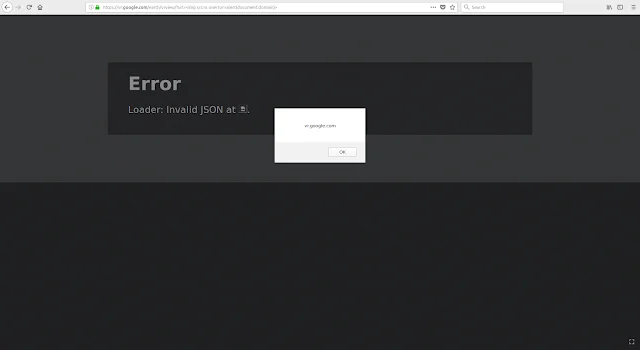
The screenshot accompanies the first proof of concept on the vr.google.com page. The researcher notes that the vulnerability also includes other subdomains that were not mentioned, such as storage.googleapis.com.
Step 4: confirm on the project page with the other parameter
The second proof of concept uses the image parameter on the GitHub Pages copy of the library:
http://googlevr.github.io/vrview/index.html?image=%3Cimg%20src=x%20onerror=alert(document.domain)%3E
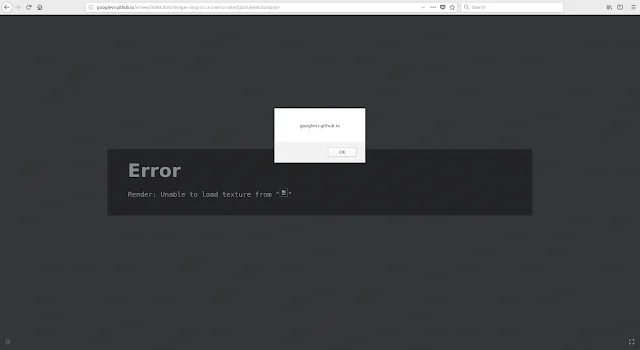
The report notes that the links above contain a patched version of the library.
Step 5: the WordPress plugins
Two WordPress plugins were found to be vulnerable during the analysis.
1) WP-VR-view (https://it.wordpress.org/plugins/wp-vr-view/), described as a plugin that allows you to display Photo Sphere images and 360 video on WordPress pages, posts, etc. lets website visitors navigate through panoramas, and lets smartphone users use Google Cardboard to look through in virtual reality way. Proof of concept:
http://example.org/wordpress/wp-content/plugins/wp-vr-view/asset/?image=<img%20src=x%20onerror=alert(document.domain)>
2) VRView (https://it.wordpress.org/plugins/vrview/), described as making it easy to embed Google's VRView into a WordPress installation, including 360 degree videos, VR videos and panorama photos. Proof of concept:
http://example.org/wordpress/wp-content/plugins/vrview/vrview/?image=<img%20src=x%20onerror=alert(document.domain)>
The report states that an attacker could take control of the remote system that uses these plugins, either through code analysis or through automated tools.
Root cause
The mistake is the use of the innerHTML property to render error messages that contain user input. The use of this property must be combined with encoding of the data before it is used for data assignment, and in this case it was not used safely. Because the resource name from the url or image parameter is concatenated into the error message and assigned to innerHTML, the browser parses it as markup rather than displaying it as text. The same pattern applies to the error title. The report does not describe any other defence that was present and bypassed; the encoding step is simply missing.
Impact
The vulnerability allows arbitrary JavaScript execution in the origin of the affected page. On the Google side, the researcher notes that it affects not only sandboxed domains but also google.com, and that other subdomains such as storage.googleapis.com are included. On the WordPress side, any site running one of the two plugins exposes the same execution path through the plugin's asset URL.
Depending on the type of vulnerability and the role of the vulnerable component within the system, the report states that it can lead to trivial effects up to complete ownership of the server and compromise of any data contained in it. The aspect to keep in mind is that for the execution of external components the principle of least privilege is almost never applied. The report frames this under OWASP Top 10 A9, Using Components with Known Vulnerabilities, and points readers to check whether their applications use external components, libraries, frameworks and dependencies affected by known vulnerabilities.
Fix
The vulnerability was fixed on 16 March 2018 in pull request https://github.com/googlevr/vrview/pull/308.
Variants to test
-
Try both parameters. On any page embedding VRView, replace the media URL with a non-existent resource in
urland inimage, using a payload such as<img src=x onerror=alert(document.domain)>. A positive result is the alert firing in the page origin. -
Check WordPress installations for the two plugins. Request the plugin asset paths with the
imageparameter set to the payload, as in the proof of concept URLs. A positive result is execution on the WordPress site's origin.
Disclosure timeline
- 19-01-2017: report to the Google Security Team.
- 20-01-2017: first feedback, the report was triaged.
- 20-01-2017: second feedback, the vulnerability exists.
- 14-02-2017: reply from the Google Security Bot, the panel decided to issue a reward of $3133,7.
- 16-03-2018: the vulnerability was fixed (
https://github.com/googlevr/vrview/pull/308). - 23-04-2018: public disclosure.
The Google VRP panel decided to reward with a high reward because the vulnerability is included not only in sandboxed domains but also in google.com. The vulnerability was found and reported by Federico Fazzi.
What happened, in plain words
Google makes a free piece of software called VR view. A library, in this context, is a bundle of ready-made code that a website can load so it does not have to write a feature from scratch. VR view lets a normal website show 360 degree photos and videos, the kind you can drag around with your mouse or look at through a phone-based headset. Google describes it as a way to put immersive media into websites on desktop and mobile, and into apps on Android and iOS, so that an ordinary app can be improved with immersive content: a travel app offering an underwater scuba diving tour, or a home builder giving prospective buyers a virtual walk-through before the home is built.
The library needs to know which photo or video to show. It gets that from the address of the page, in the part after the question mark. That part is called the query string, and each named value in it is a URL parameter. For example, a page address might end in ?image=myphoto.jpg, and the library reads myphoto.jpg and displays it.
While testing the VR view web application, the researcher found a DOM-based cross-site scripting vulnerability. Cross-site scripting, usually shortened to XSS, means that an attacker manages to get their own JavaScript code to run inside someone else's web page, as if the site itself had written that code. JavaScript is the programming language that browsers run to make pages interactive. "DOM-based" means the problem happens entirely inside the browser, in the page's in-memory model of itself, rather than on the server. The DOM, or Document Object Model, is the browser's live representation of the page: every heading, image and text box is an object in it, and JavaScript can read and change those objects.
The cause was an inappropriate use of the innerHTML property. innerHTML is a way for JavaScript to set the contents of an element on the page. The catch is that it treats whatever you give it as HTML, the markup language pages are written in, so any tags inside the value become real elements. If the value contains a script or an image with an event handler, the browser will run it. The safe pattern is to encode the data first, that is, to convert characters like < and > into harmless placeholders so they are shown as text instead of being interpreted as markup. In this case that encoding was not applied.
The same flaw was found in two widely used WordPress VR view plugins. WordPress is a popular system for building websites, and a plugin is an add-on that adds a feature to it. Because the vulnerable code sits inside the plugin, any WordPress site that installed one of these plugins carried the same weakness.
Setup
The report does not describe any account, role or tooling. The testing was done against public VR view pages, and the analysis also covered two WordPress plugins. The vulnerable code lives in the library source at https://github.com/googlevr/vrview/blob/master/src/embed/main.js. GitHub is a website where software projects publish their code, and a file like this one can be read by anyone.
Finding it
The researcher focused on the part of the library that handles errors. An error path is simply the code that runs when something goes wrong, for example when a requested file cannot be found. When a resource named through the URL parameters url or image does not exist, the library returns an error, and the error message includes the resource name taken from the request. That value is written into the page without output encoding.
The screenshot shows this error path: a resource supplied through the url or image parameter does not exist, and the library returns an error that includes the resource specified in the request, without applying output encoding.
Why is that suspicious? Because the value comes from the visitor, through a GET parameter. GET is the ordinary way a browser asks a server for a page, and the parameters are the name and value pairs in the address bar. Anyone can type any value there. If that value is then placed into the page as markup, the visitor controls what the page displays and runs. The next step was to read the code and confirm exactly how the message reaches the page.
Exploitation
Step 1: read the vulnerable code
The relevant part of src/embed/main.js is the error display logic:
/* [...] */

function onSceneError(message) {
    showError('Loader: ' + message);
}

function onRenderError(message) {
    showError('Render: ' + message);
}

/* [...] */

function showError(message, opt_title) {
   // Hide loading indicator.
   loadIndicator.hide();

   var error = document.querySelector('#error');
   error.classList.add('visible');
   error.querySelector('.message').innerHTML = message;

   var title = (opt_title !== undefined ? opt_title : 'Error');
   error.querySelector('.title').innerHTML = title;
}
Line by line, in plain words:
function onSceneError(message)declares a small routine namedonSceneErrorthat receives one piece of text, calledmessage. It is called when the scene, meaning the 360 degree content, fails to load.showError('Loader: ' + message);passes that text on to another routine,showError, with the wordLoader:glued to the front. The+joins two pieces of text into one.function onRenderError(message)does the same for a different kind of failure, when the content cannot be drawn on screen.showError('Render: ' + message);again prefixes the text and hands it over.function showError(message, opt_title)is the routine that actually puts the error on the page. It takes the message and an optional title.loadIndicator.hide();hides the spinning loading symbol, because loading has finished, badly.var error = document.querySelector('#error');finds the element on the page whose identifier iserror.querySelectoris a lookup function, and#errormeans "the element with id error".error.classList.add('visible');adds a style label calledvisibleto that element, which makes it appear on screen.error.querySelector('.message').innerHTML = message;finds the element with classmessageinside the error box and sets its contents to the message text usinginnerHTML. This is the dangerous line: the browser will interpret anything that looks like HTML inmessageas real markup.var title = (opt_title !== undefined ? opt_title : 'Error');chooses the title: if a title was supplied, use it, otherwise use the wordError.error.querySelector('.title').innerHTML = title;sets the title element's contents the same way, again throughinnerHTML.
So both onSceneError and onRenderError pass their message to showError, which assigns it to the innerHTML property of the .message element inside #error. The title is assigned to innerHTML in the same way. No encoding is applied to the message before the assignment, so any markup contained in the error text is parsed and executed by the browser.
Step 2: supply a payload as the resource
The user input arrives through the GET parameters url or image. If the value names a resource that does not exist, the library builds an error message containing that value and hands it to showError. An attacker can therefore put an XSS payload where the resource name is expected. A payload here is simply the piece of text that does the damage. The library treats the resource as non-existent, responds with an error that includes the payload, and the payload is parsed as HTML, producing arbitrary JavaScript execution.
Step 3: confirm on a Google domain
The first proof of concept targets the VR view page under vr.google.com. A proof of concept is a small, repeatable demonstration that the problem is real:
https://vr.google.com/earth/vrview/?url=%3Cimg%20src=x%20onerror=alert(document.domain)%3E
Reading this address piece by piece:
https://vr.google.com/earth/vrview/is the page being visited, a VR view page on a Google domain.?url=starts the query string and names the parameterurl, the one the library reads as the media address.%3Cimg%20src=x%20onerror=alert(document.domain)%3Eis the value. The percent signs are URL encoding: characters that are not allowed in an address are written as a percent sign plus a code. Decoded, this value is<img src=x onerror=alert(document.domain)>.<img ...>is an HTML tag that tells the browser to display an image.src=xsays the image file is atx, which does not exist.onerror=alert(document.domain)is an event handler: a piece of JavaScript the browser runs when the image fails to load.alertopens a pop-up box, anddocument.domainis the site's own name, so the box proves which site the code is running on.
Because the image source x fails to load, the onerror handler fires, and the JavaScript runs in the origin of the page. The origin is the combination of protocol, host and port, for example https://vr.google.com, and it is the boundary browsers use to decide which pages may touch each other's data. Running code in the page's origin means the code is treated as if the site itself had written it.
The screenshot accompanies the first proof of concept on the vr.google.com page. The researcher notes that the vulnerability also includes other subdomains that were not mentioned, such as storage.googleapis.com.
Step 4: confirm on the project page with the other parameter
The second proof of concept uses the image parameter on the GitHub Pages copy of the library. GitHub Pages is a free hosting service that publishes project files as a website:
http://googlevr.github.io/vrview/index.html?image=%3Cimg%20src=x%20onerror=alert(document.domain)%3E
This address is the same idea with two changes: the page is googlevr.github.io/vrview/index.html, and the parameter is image instead of url. The value decodes to the same <img src=x onerror=alert(document.domain)> payload. The report notes that the links above contain a patched version of the library, meaning the code has since been corrected, so the demonstration may no longer fire today.
Step 5: the WordPress plugins
Two WordPress plugins were found to be vulnerable during the analysis.
1) WP-VR-view (https://it.wordpress.org/plugins/wp-vr-view/), described as a plugin that allows you to display Photo Sphere images and 360 video on WordPress pages, posts, etc. lets website visitors navigate through panoramas, and lets smartphone users use Google Cardboard to look through in virtual reality way. Google Cardboard is a low-cost cardboard holder that turns a phone into a simple VR viewer. Proof of concept:
http://example.org/wordpress/wp-content/plugins/wp-vr-view/asset/?image=<img%20src=x%20onerror=alert(document.domain)>
Here example.org stands for any WordPress site, and the path points at a file inside the plugin's folder. The image parameter carries the same payload, with spaces written as %20. The proof of concept requests the plugin's asset path with the payload in the image parameter.
2) VRView (https://it.wordpress.org/plugins/vrview/), described as making it easy to embed Google's VR view into a WordPress installation, including 360 degree videos, VR videos and panorama photos. Proof of concept:
http://example.org/wordpress/wp-content/plugins/vrview/vrview/?image=<img%20src=x%20onerror=alert(document.domain)>
This is the same pattern against the second plugin's own path. The report states that an attacker could take control of the remote system that uses these plugins, either through code analysis or through automated tools. Code analysis means reading the plugin's source to find the flaw; automated tools means scanners that try many payloads without a human reading anything.
Root cause
The mistake is the use of the innerHTML property to render error messages that contain user input. The use of this property must be combined with encoding of the data before it is used for data assignment, and in this case it was not used safely. Because the resource name from the url or image parameter is concatenated into the error message and assigned to innerHTML, the browser parses it as markup rather than displaying it as text. The same pattern applies to the error title. The report does not describe any other defence that was present and bypassed; the encoding step is simply missing.
A useful comparison: innerHTML is like handing a note to a printer that also understands formatting instructions. If the note says "make this bold", the printer obeys. If you only wanted the words shown, you should have used a method that prints the note literally, or rewritten the instructions so they read as plain characters.
Impact
The vulnerability allows arbitrary JavaScript execution in the origin of the affected page. On the Google side, the researcher notes that it affects not only sandboxed domains but also google.com, and that other subdomains such as storage.googleapis.com are included. A sandboxed domain is a separate hostname that Google uses to isolate content, so a problem there is contained; google.com itself is not such a boundary. On the WordPress side, any site running one of the two plugins exposes the same execution path through the plugin's asset URL.
Depending on the type of vulnerability and the role of the vulnerable component within the system, the report states that it can lead to trivial effects up to complete ownership of the server and compromise of any data contained in it. The aspect to keep in mind is that for the execution of external components the principle of least privilege is almost never applied. The principle of least privilege means giving each part of a system only the access it truly needs; when third-party components are run with more power than necessary, a small flaw in one of them can reach much further.
The report frames this under OWASP Top 10 A9, Using Components with Known Vulnerabilities. The OWASP Top 10 is a widely used list of the most common categories of web security risk, and A9 covers the danger of building on external components, libraries, frameworks and dependencies that have known vulnerabilities. The report points readers to check whether their applications use such components.
Fix
The vulnerability was fixed on 16 March 2018 in pull request https://github.com/googlevr/vrview/pull/308. A pull request is a proposed change to a code repository, which maintainers review before merging.
Variants to test
-
Try both parameters. On any page embedding VR view, replace the media URL with a non-existent resource in
urland inimage, using a payload such as<img src=x onerror=alert(document.domain)>. A positive result is the alert firing in the page origin. -
Check WordPress installations for the two plugins. Request the plugin asset paths with the
imageparameter set to the payload, as in the proof of concept URLs. A positive result is execution on the WordPress site's origin.
Disclosure timeline
- 19-01-2017: report to the Google Security Team.
- 20-01-2017: first feedback, the report was triaged. Triaged means it was reviewed and given a priority.
- 20-01-2017: second feedback, the vulnerability exists.
- 14-02-2017: reply from the Google Security Bot, the panel decided to issue a reward of $3133,7.
- 16-03-2018: the vulnerability was fixed (
https://github.com/googlevr/vrview/pull/308). - 23-04-2018: public disclosure, meaning the details were made available to everyone.
The Google VRP panel decided to reward with a high reward because the vulnerability is included not only in sandboxed domains but also in google.com. VRP stands for Vulnerability Reward Program, a scheme where companies pay researchers for reporting security problems. The vulnerability was found and reported by Federico Fazzi.
Glossary
- API: a defined way for one piece of software to ask another for something, like a menu of requests a program accepts.
- Cross-site scripting (XSS): a flaw that lets an attacker's JavaScript run inside another site's page, as if the site had written it.
- DOM: the browser's live, in-memory model of a page, made of objects that JavaScript can read and change.
- DOM-based XSS: XSS where the harmful handling happens entirely in the browser's DOM, not on the server.
- Encoding (output encoding): converting special characters into harmless placeholders so they are shown as text rather than interpreted as markup.
- Event handler: a piece of JavaScript attached to an element that runs when something happens, such as an image failing to load.
- GET parameter: a name and value pair in the query string of a web address, sent when the browser asks for a page.
- GitHub: a website where software projects publish and manage their code.
- GitHub Pages: a free GitHub service that publishes project files as a website.
- HTML: the markup language web pages are written in, using tags such as
<img>to describe elements. - innerHTML: a JavaScript property that sets an element's contents as HTML, so tags in the value become real elements.
- JavaScript: the programming language browsers run to make pages interactive.
- Library: a bundle of ready-made code a website can load to get a feature without writing it from scratch.
- Origin: the combination of protocol, host and port, such as
https://vr.google.com, used by browsers to decide which pages may access each other's data. - OWASP Top 10: a widely used list of the most common categories of web security risk.
- Payload: the piece of text or code an attacker supplies to trigger a vulnerability.
- Plugin: an add-on that adds a feature to an existing system such as WordPress.
- Principle of least privilege: giving each part of a system only the access it truly needs.
- Proof of concept: a small, repeatable demonstration that a vulnerability is real.
- Pull request: a proposed change to a code repository, reviewed by maintainers before it is merged.
- Query string: the part of a web address after the question mark, carrying parameters.
- Sandboxed domain: a separate hostname used to isolate content so a problem there stays contained.
- URL encoding: writing characters that are not allowed in an address as a percent sign plus a code.
- VR view: a Google library for embedding 360 degree photos and videos into websites and apps.
- VRP: Vulnerability Reward Program, a scheme where companies pay researchers for reporting security problems.
- WordPress: a popular system for building and running websites.



