UPDATE: The Next Web wrote a story about my findings…
Public Google Groups mailing lists can be used to receive signup and password reset emails for services like Slack and Yammer, allowing an attacker to join a company's workspace or network. The attacker can then access sensitive information shared within that workspace.
 Published on medium.com
One: How I hacked hundreds of companies through their helpdesk — aka “Ticket Trick” by Inti De Ceukelaire
The full write-up lives on its author's site
It belongs to its author, so we link to it rather than copy it. The other two tabs are our own rewrites, checked against it.
Context
Google Groups for G Suite organisations lets a company create mailing lists under its own domain, for example $listname@$domain. Each list has its own access controls, and the researcher focuses on two of them: "Anyone can view content." and "Anyone can post." When both are set, an external party can read the emails sent to the list and can also send email to it.
The write-up combines two earlier pieces of research. The first is Inti De Ceukelaire's "Ticket Trick", where an attacker signs up to a target service with a special email address and then logs into the target's helpdesk through SSO. The second is Kenna Security's research on a widespread Google Groups misconfiguration affecting thousands of instances, including Fortune 500 organisations, hospitals, universities, newspapers and television stations, and US government agencies. The researcher's insight is that the components of Ticket Trick can be replaced by Google Groups mailing lists.

Setup
The precondition is a G Suite domain with at least one public mailing list. For Method A the list needs "Anyone can view content." and "Anyone can post." enabled. For Method B the list only needs to leak email content through search results, even when the list itself appears locked down.
The tools used were:
EdOverflow / googlegroups.sh, to look for public Google Groups domains.maaaaz / webscreenshot, for visual recon of Google Groups pages, because the HTTP responses are obfuscated and hard to read.EdOverflow / contact.sh, to find contact information for affected domains.emtunc / SlackPirate, to dump information from a breached Slack workspace.
The researcher used the Alexa top 1 million sites as the domain list:
 wget http://s3.amazonaws.com/alexa-static/top-1m.csv.zip
 unzip top-1m.csv.zip
 sed -i.bak ‘s/.*,//’ top-1m.csv
 ./googlegroups.sh top-1m.csv
To save time, domains known to be false positives were removed. For example, there are over 100 *.lpages.co sites:
 grep ‘lpages.co$’ top-1m.csv | wc -l
 101

vim top-1m.csv
 :%! grep -v ‘lpages.co$’
 ZZ
For webscreenshot, the default timeout for the PhantomJS renderer was increased and an option to change it manually was added in v2.8, because in many cases the Google Groups pages did not fully load before the screenshot was taken. Labels were added to the images in v2.7 so the URL belonging to each screenshot is visible. A bug with the security@ email address lookup in contact.sh was also fixed.
Finding it
The researcher was looking at the emails inside a company's Google Groups instance and noticed that some were related to various account registrations. That prompted a re-read of the Ticket Trick paper, which turned out to be directly relevant.
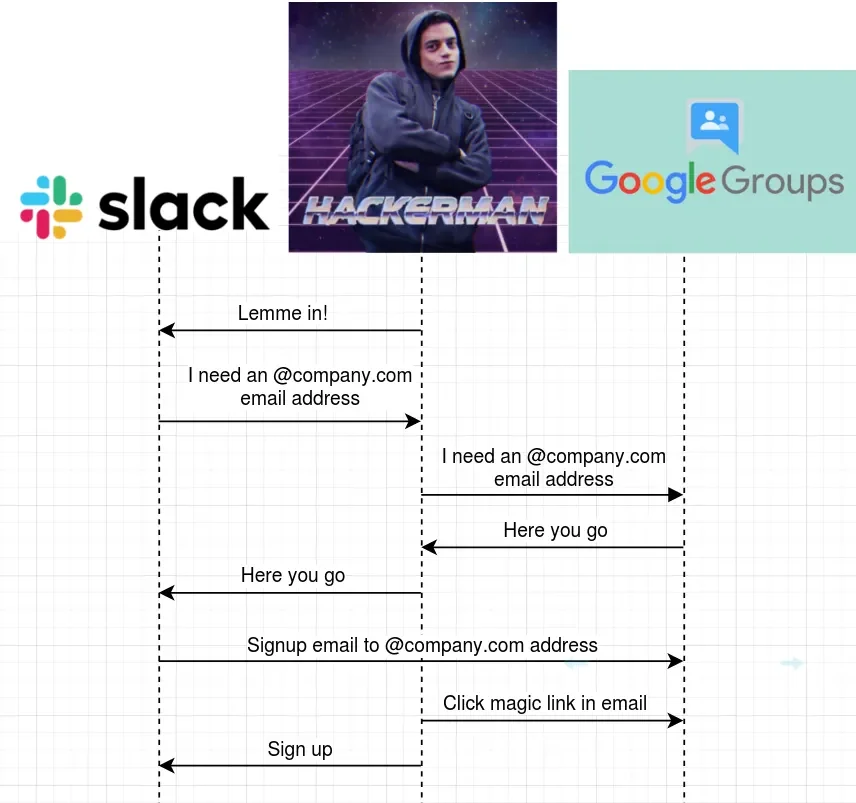
In Ticket Trick, the attacker signs up to the target's main service with a special email address, exploiting missing or weak address validation, and then logs into the target's helpdesk through SSO. Here, the helpdesk is replaced by Google Groups mailing lists. The sequence diagram of the bug:
Exploitation
Method A: public list with open posting
This method works when the mailing list has "Anyone can view content." and "Anyone can post." permissions. The first is needed to see and open the email; the second lets Slack and other external services post to the mailing list.
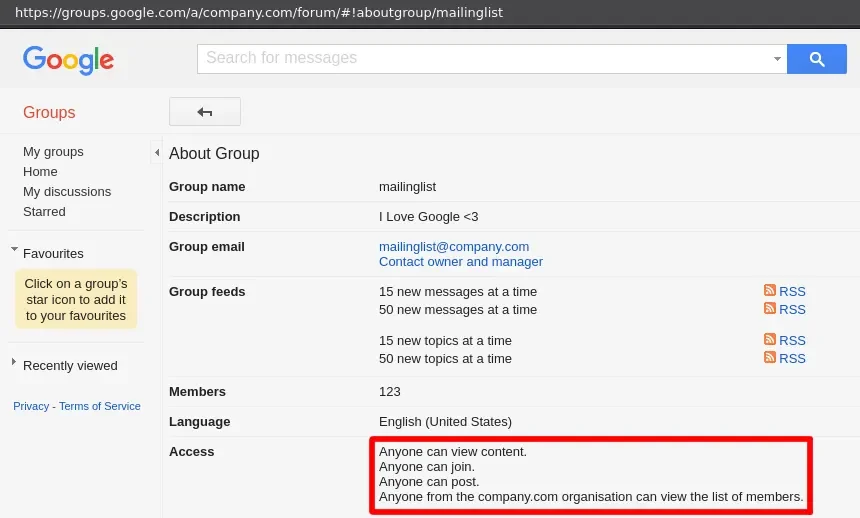
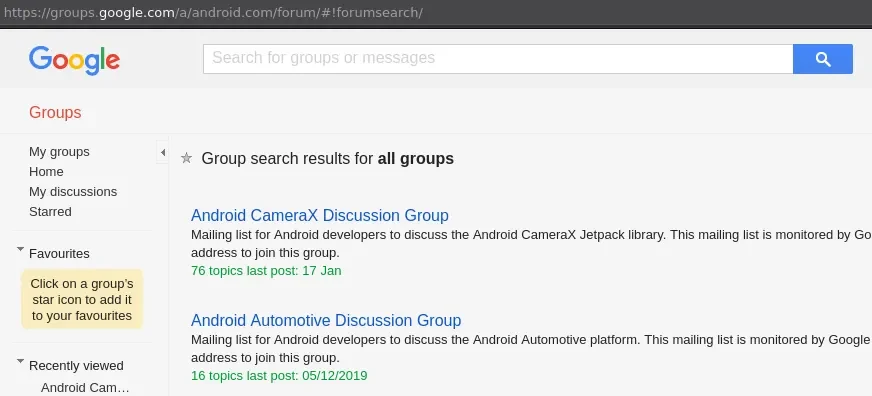
In the screenshot below, the green text under the mailing list indicates that you have at least view access to the topics and emails.
- Visit
https://groups.google.com/a/$domain/forum/#!forumsearch/and look for a public mailing list. - Clicking the list takes you to
https://groups.google.com/a/$domain/forum/#!forum/$listname. - Visit one of these pages in another tab and enter the email address
$listname@$domain:
https://slack.com/signin/find
https://www.yammer.com/signup/
https://work.workplace.com/
https://twitter.com/account/begin_password_reset
https://www.facebook.com/login/identify/
https://www.instagram.com/accounts/password/reset/
- Refresh the mailing list from step 2 and open the email you got from the service in step 3.
- Click the confirmation link, or copy the account recovery code or other roughly six digit code from the email's subject or body.
Method B: search snippets leak private emails
In this case the Google Groups instance is misconfigured so that all mailing lists seem locked off at first glance, but search results disclose snippets of private emails around the search keywords.
In the example, none of the mailing lists have the green "#XY topics last post: $DATE" indicator, so emails sent to them should not be readable. The domain owner is probably confident that unauthorised parties do not have access to internal communication.
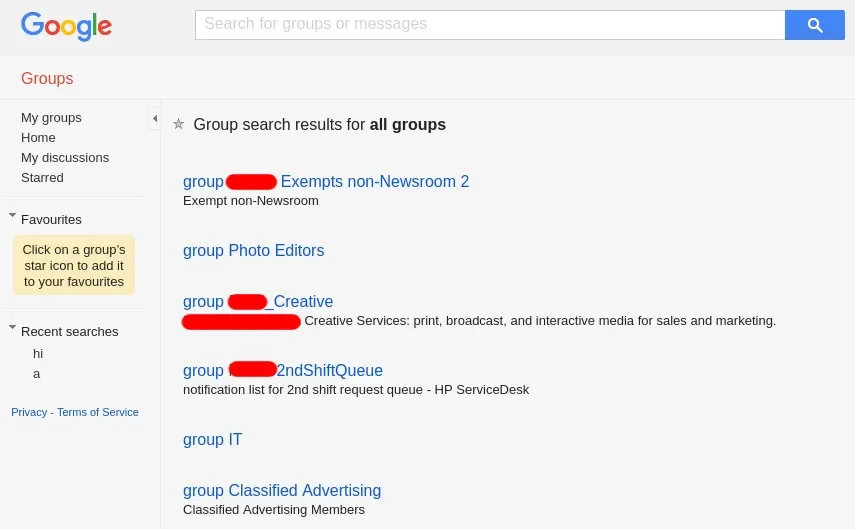
But searching for "password", for example, discloses sensitive emails:
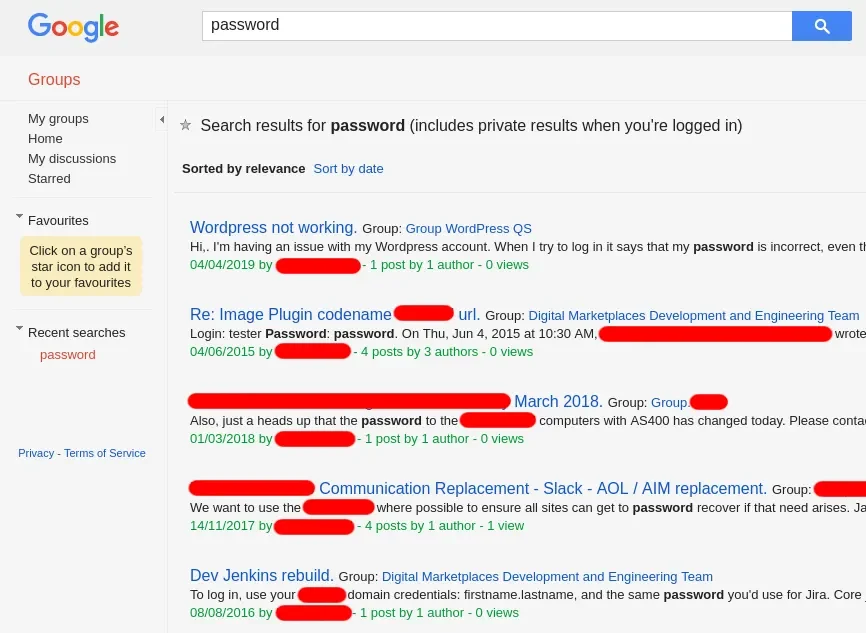
The researcher notes that Google has known about this since at least Kenna Security's research in 2018, and that Google Groups access controls remain as foggy as they were years ago. The GDPR wiki page states that "Controllers and processors of personal data must put in place appropriate technical and organizational measures to implement the data protection principles." In the researcher's view, Google should at least alert customers when those appropriate technical measures are not in place.
The steps differ from Method A:
- You do not know the name of the misconfigured mailing list, so first search for something likely to appear in an email's subject or body, such as the letter 'a', "hi" or "hello".
- Hover over the group's name in a search result to see the URL it points to.
https://groups.google.com/a/$domain/forum/#!forum/$listnamecorresponds to the$listname@$domainemail address. - Send a test email, or directly a signup or password reset email from Method A's step 3, and hope it appears in your search results. You could not confirm the "Anyone can post" permission because you do not have access to the "About Group" page either.
- Search for your test email to confirm that external senders are allowed, or search for a string that is part of the target service's signup or password reset email.
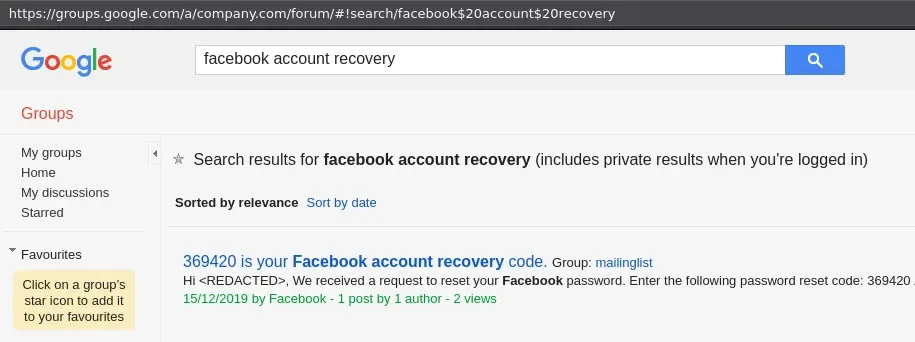
Addresses such as support@, contactus@, brand@ and [redacted] can easily be an unwittingly misconfigured public mailing list, and are also convenient addresses to use when signing up for Facebook, Twitter or Instagram.
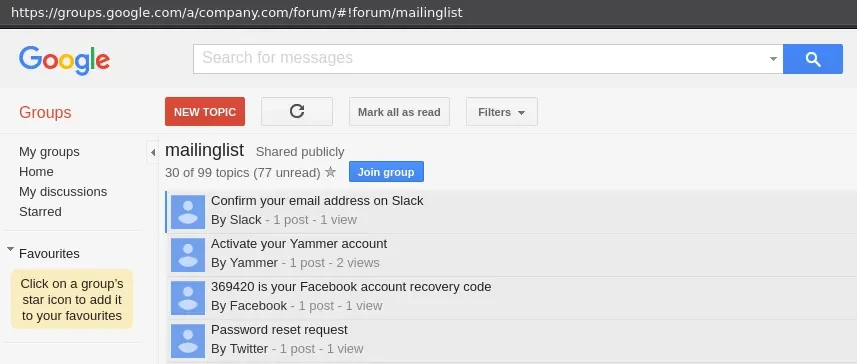
Password reset flows usually include the code or token in the email's subject or body, so clicking a link is not necessary. Some registration emails also offer to "copy and paste this URL into your browser's address bar" if the link cannot be clicked.
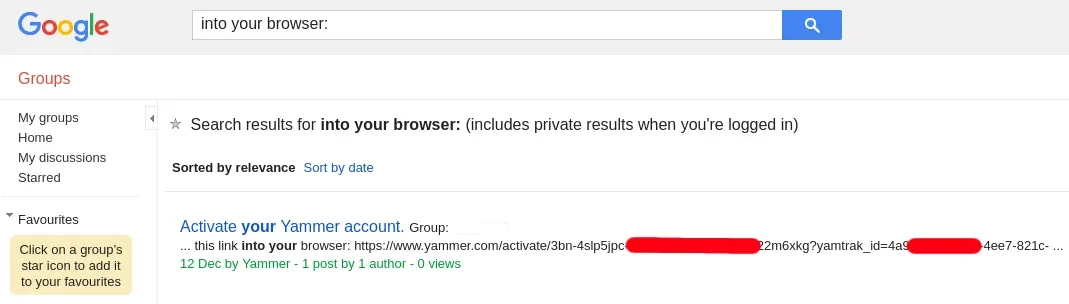
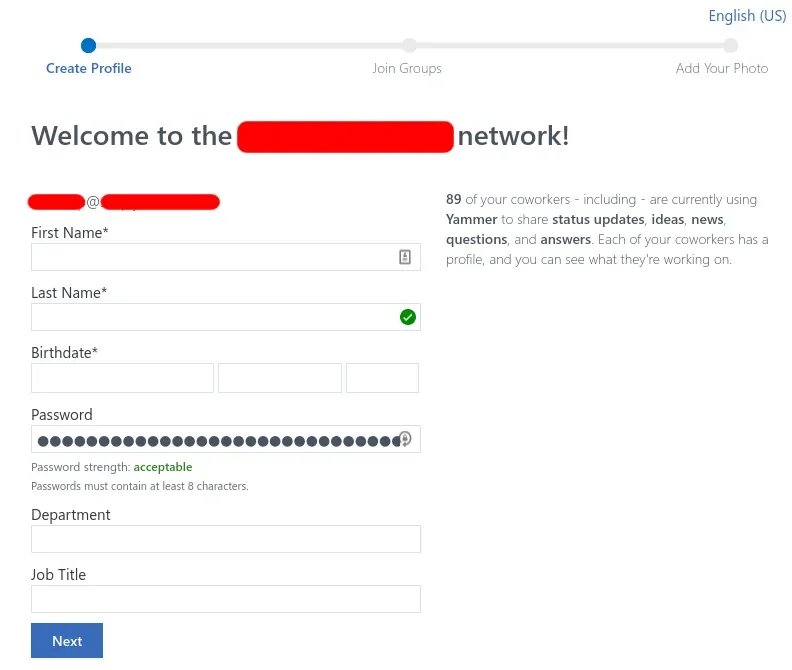
As an example, the researcher joined an organisation's Yammer network purely through Google Groups search results. The organisation did not have "View Topics" set to "Anyone on the Internet", so the signup email could not be opened or even seen in a list of topics (there was no list), but the search feature disclosed private emails and revealed the Yammer activation URL. The GET parameters are not needed for the signup process, so everything after the question mark can be discarded.
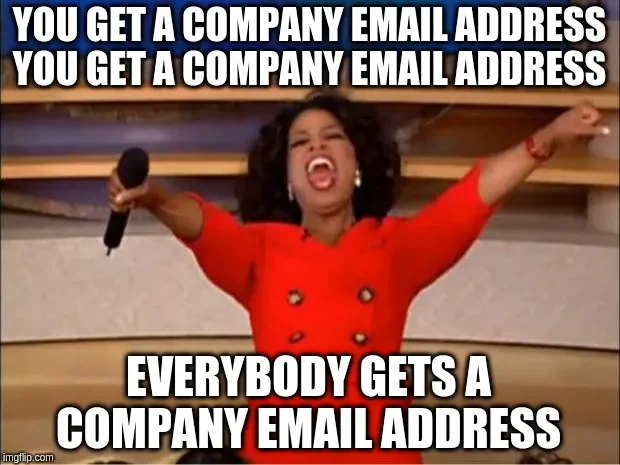
Virtually infinite new accounts can be created with the same email address: [redacted] and [redacted] are the same account on Google's side, but treated as different in Slack and other services.
SlackPirate
Sending a signup or password reset email to a mailing list used by, in some cases, hundreds of people is suspicious, and an admin might notice and deactivate the accounts. But an attacker can use a tool like SlackPirate to quickly dump sensitive information from the breached workspace through Slack's API: private keys, passwords, API keys, links to GCP and S3 buckets, link-only Google Docs and similar. Once inside the company's perimeter, these things are generally shared without much regard to security or authorisation.
Root cause
Google Groups lets a domain owner create a mailing list that is publicly readable and accepts mail from anyone. Any external service that treats receipt of an email at an address as proof of ownership of that address will therefore accept the mailing list address as a valid company address. The mailing list acts as an email service provider that hands out free @company.com addresses to the public.
In Method B the list itself is not publicly readable, but the search feature still returns snippets of private emails around the search keywords, so the same proof-of-ownership emails leak through search.
Existing defences did not stop it. Google closed the first report as "Won't fix (Intended Behaviour)":
"The decision to prevent signups on Yammer or Slack via email confirmations coming from public Google Groups should be determine (sic) by those providers and not Google. I would recommend reaching out to both companies about this issue."
Microsoft closed the Yammer report, claiming it relied on social engineering. Slack closed its issue:
"While the behaviour you described in your report is quite interesting, we feel that this is a case where improved user education rather than a technical fix of some type would be a more appropriate action. Ultimately, users are responsible for ensuring that the domain they are using to sign up for their Workspace does not have a publicly readable email inbox."
"You suggested attempting to check Google Groups itself for an existing mailing list, and while this may be a useful method of finding a potential target, it's impractical to prevent such an attack at scale. Google Groups is certainly not the only existing service that can create an open inbox in this way. Surely you're not suggesting that Slack check every mailing list service on the Internet with each new Team sign-up to determine if it's an unsafe email address?"
Google closed the second report as "Won't fix (Intended Behaviour)":
"As I mentioned, we have shared your report with the [PROJECT] team for their review. Unfortunately, this is not a technical bug that would be in scope of our program and that is why we made the decision not to track it as a security bug."
The researcher points out that Google's Vulnerability Reward Program does have a category for "Logic flaw bugs bypassing significant security controls", so scope is not a valid argument for rejecting the report. Facebook (and Workplace), Twitter and other vendors were left out of the timeline, but essentially everyone blamed the users for having a "publicly readable email inbox".
Impact
An attacker can join a company's Slack workspace, Yammer network, Workplace or other service that allows signup with a company email address, using only a public mailing list. From there they can read internal communication and, with tools like SlackPirate, dump private keys, passwords, API keys, bucket links and link-only documents.
The flaw also bypasses Slack's mandatory workspace 2FA: the researcher set it up for themselves when joining the Google project's workspace. The researcher asked Slack to consider mandatory review of new accounts for workspaces where mandatory 2FA is on.
The vulnerability exists if the organisation has at least one public mailing list and its Slack allows signup with an @company.com email address, or it uses Yammer, Workplace and similar services. Companies with a bug bounty program usually already have a private Google Groups domain or properly configured mailing lists; organisations with less security awareness are at higher risk, and ironically they are also the ones without a dedicated security contact, which makes the issue hard to report. In some cases finding a contact took more time than confirming the vulnerability.
Fix
No fix was applied by any vendor. The researcher's recommendations for affected organisations:
- Review settings in G Suite and make sure publicly visible mailing lists restrict posting to
@company.comaddresses or to members only. - Set the Slack workspace to use SSO (for example Okta) or make it invite-only.
Ideally https://groups.google.com/a/[DOMAIN]/forum/#!forumsearch/ should show the following:
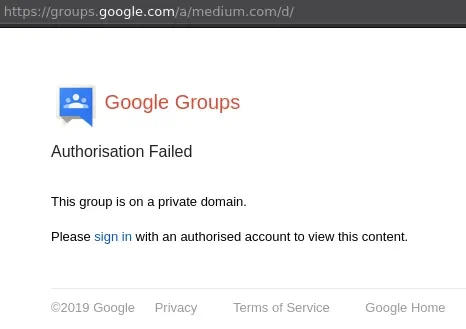
If it displays anything else, the settings need review. The researcher also argues that companies above a certain size should be legally required to adopt security.txt and use a dedicated security@ email address.
Variants to test
- Public list with open posting (Method A). Search
https://groups.google.com/a/$domain/forum/#!forumsearch/for a list with the green "#XY topics last post: $DATE" indicator, then send a signup or password reset email to$listname@$domainfrom a service that allows email signup. A positive result is the confirmation email appearing in the list, with a usable link or code. - Search snippet leak (Method B). Search the domain's forum search for common strings such as 'a', "hi", "hello" or "password". A positive result is a snippet of a private email around the keyword, with the group name in the result pointing to
https://groups.google.com/a/$domain/forum/#!forum/$listname. - Activation URL in a snippet. Search for "into your browser:" and check whether the activation URL that follows the search string is disclosed. A positive result is an activation URL disclosed in a snippet, whose GET parameters are not needed for signup.
- Plus-addressing. Try
[redacted]alongside[redacted]. A positive result is the service treating them as different accounts while Google treats them as the same mailbox. - Workspace with mandatory 2FA. Attempt to join a Slack workspace that enforces mandatory 2FA through a mailing list signup. A positive result is joining the workspace through a mailing list signup despite mandatory 2FA being enabled.
Timeline
- Dec 13th: first report to a company with a VDP.
- Dec 15th: report to Google (first report) and Slack.
- Dec 16th: a major Google project found vulnerable; second report opened as a PoC for the first.
- Dec 17th: Google closes the first report as "Won't fix (Intended Behaviour)". The researcher comments on the second report, noting the bypass of Slack's mandatory workspace 2FA, and asks Slack to consider mandatory review of new accounts for workspaces with mandatory 2FA.
- Dec 18th: report to Microsoft (Yammer).
- Dec 19th: Microsoft closes the report, claiming it relied on social engineering.
- Dec 20th: Slack closes the issue.
- Dec 31st: Google says the second report has been shared with the team working on [PROJECT], with delays expected over the holiday period.
- Jan 8th: Google closes the second report as "Won't fix (Intended Behaviour)".
- Jan 20th: the blog post is published.
What happened, in plain words
A company can use a service called Google Groups to create email addresses that end in its own domain, for example $listname@$domain. These addresses are called mailing lists: one address that many people can read and, depending on the settings, many people can send to. Think of it as a shared letterbox in the lobby of an office building. If the letterbox is open to the street, anyone walking past can drop a letter in and anyone can look inside.
Many websites prove that you own an email address by sending a message to it and asking you to click a link or type a code from that message. The researcher noticed that if a company's shared letterbox is open to the street, a stranger can ask a website to send the proof message to the company's mailing list, then simply read the proof out of the shared letterbox. With that proof, the stranger can create an account on the website as if they were an employee of the company. If the website is the company's Slack (a chat tool for workplaces), Yammer (a similar internal social network) or Workplace, the stranger is now inside the company's internal conversations.
The researcher combined two earlier pieces of work. The first is Inti De Ceukelaire's "Ticket Trick", where an attacker signs up to a target service with a special email address and then logs into the target's helpdesk through SSO. The second is Kenna Security's research on a widespread Google Groups misconfiguration affecting thousands of instances, including Fortune 500 organisations, hospitals, universities, newspapers and television stations, and US government agencies. The researcher's insight is that the helpdesk and issue tracker parts of Ticket Trick can be replaced by Google Groups mailing lists.
The image is the article's own name and logo, which the researcher added with the caption "Yes, a name and a logo. I had to."
The two settings that matter
Google Groups for G Suite organisations lets a company create mailing lists under its own domain, for example $listname@$domain. Each list has its own access controls, and the researcher focuses on two of them: "Anyone can view content." and "Anyone can post." When both are set, an external party can read the emails sent to the list and can also send email to it.
In plain terms, the first setting decides who may open the letters in the shared letterbox, and the second decides who may drop letters in. If both say "anyone", the letterbox is open in both directions.
What you need before you start
The precondition is a G Suite domain with at least one public mailing list. For Method A the list needs "Anyone can view content." and "Anyone can post." enabled. For Method B the list only needs to leak email content through search results, even when the list itself appears locked down.
The tools used were:
EdOverflow / googlegroups.sh, to look for public Google Groups domains.maaaaz / webscreenshot, for visual recon of Google Groups pages, because the HTTP responses are obfuscated and hard to read.EdOverflow / contact.sh, to find contact information for affected domains.emtunc / SlackPirate, to dump information from a breached Slack workspace.
A few of those words need unpacking. A domain is the part of an address after the @ sign, such as company.com; it is the company's name on the internet. A script is a small program you run from a command line, a text window where you type commands instead of clicking. Visual recon means looking at pictures of many websites instead of reading their code. An HTTP response is what a web server sends back when your browser asks for a page; it is the raw content behind what you see on screen. Obfuscated means deliberately made hard for a human to read. A breached workspace means a chat workspace that an outsider has managed to get into.
The researcher used the Alexa top 1 million sites as the domain list. Alexa was a public ranking of popular websites, so this is simply a long list of company domains to test.
 wget http://s3.amazonaws.com/alexa-static/top-1m.csv.zip
 unzip top-1m.csv.zip
 sed -i.bak ‘s/.*,//’ top-1m.csv
 ./googlegroups.sh top-1m.csv
Line by line:
wgetdownloads a file from a web address. Here it fetches a zipped list of the top one million sites.unzipopens the zip archive, producing a plain text file calledtop-1m.csv. A CSV file is a list where values are separated by commas.sededits text. The-i.bakpart means edit the file in place and keep a backup copy. The expressions/.*,//removes everything up to and including the last comma on each line, leaving just the domain name. The list originally had a rank number and a domain on each line, and only the domain is useful here../googlegroups.sh top-1m.csvruns the script, feeding it the cleaned list so it can check each domain for public Google Groups.
To save time, domains known to be false positives were removed. A false positive is a result that looks interesting but is not actually the thing you are hunting. For example, there are over 100 *.lpages.co sites:
 grep ‘lpages.co$’ top-1m.csv | wc -l
 101

vim top-1m.csv
 :%! grep -v ‘lpages.co$’
 ZZ
Line by line:
grep ‘lpages.co$’ top-1m.csvsearches the list for lines ending inlpages.co. The$means end of line.| wc -lpasses those lines towc -l, which counts them. The answer is101, so there are 101 such domains.vim top-1m.csvopens the list in a text editor called vim.:%! grep -v ‘lpages.co$’replaces the whole file with the result of a filter. The-vmeans keep only lines that do not match, so all 101lpages.codomains are dropped.ZZis vim's command to save and quit.
For webscreenshot, the default timeout for the PhantomJS renderer was increased and an option to change it manually was added in v2.8, because in many cases the Google Groups pages did not fully load before the screenshot was taken. A timeout is how long a tool waits before giving up; a renderer is the part that draws the page into an image. Labels were added to the images in v2.7 so the URL belonging to each screenshot is visible. A bug with the security@ email address lookup in contact.sh was also fixed.
Finding it
The researcher was looking at the emails inside a company's Google Groups instance and noticed that some were related to various account registrations. That prompted a re-read of the Ticket Trick paper, which turned out to be directly relevant.
In Ticket Trick, the attacker signs up to the target's main service with a special email address, exploiting missing or weak address validation, and then logs into the target's helpdesk through SSO. Address validation is the check a website does to confirm an email address really belongs to you. SSO, short for single sign-on, is a login system where one account gets you into several services at once, like one office badge that opens the front door and the server room. Here, the helpdesk is replaced by Google Groups mailing lists. The sequence diagram of the bug:
The diagram, captioned "My finest work in GIMP so far", shows the sequence of the bug.
Exploitation
Method A: public list with open posting
This method works when the mailing list has "Anyone can view content." and "Anyone can post." permissions. The first is needed to see and open the email; the second lets Slack and other external services post to the mailing list.
In the screenshot below, the green text under the mailing list indicates that you have at least view access to the topics and emails.
The caption notes that only @android.com email addresses can post on the lists shown, so those particular mailing lists are not vulnerable. In other words, the letterbox is readable but not writable from outside, so the proof email could never be delivered.
- Visit
https://groups.google.com/a/$domain/forum/#!forumsearch/and look for a public mailing list. This is Google Groups' search page for a company's domain;$domainis a placeholder for the company's domain name. - Clicking the list takes you to
https://groups.google.com/a/$domain/forum/#!forum/$listname. This is the page for one specific list;$listnameis the part of the email address before the @ sign. - Visit one of these pages in another tab and enter the email address
$listname@$domain:
https://slack.com/signin/find
https://www.yammer.com/signup/
https://work.workplace.com/
https://twitter.com/account/begin_password_reset
https://www.facebook.com/login/identify/
https://www.instagram.com/accounts/password/reset/
These are the "forgot your password" and "sign up" pages of six services. Each one will send an email to whatever address you type in. The trick is to type the company's mailing list address instead of your own, so the proof message lands in the shared letterbox you can read.
- Refresh the mailing list from step 2 and open the email you got from the service in step 3. Refreshing reloads the page so the new message appears.
- Click the confirmation link, or copy the account recovery code or other roughly six digit code from the email's subject or body. A confirmation link is a web address that, when opened, tells the service "yes, this person received the email". A recovery code is a short number that does the same job when typed in by hand.
Method B: search snippets leak private emails
In this case the Google Groups instance is misconfigured so that all mailing lists seem locked off at first glance, but search results disclose snippets of private emails around the search keywords. A snippet is the short piece of text a search engine shows under each result, usually the words around your search term.
In the example, none of the mailing lists have the green "#XY topics last post: $DATE" indicator, so emails sent to them should not be readable. The domain owner is probably confident that unauthorised parties do not have access to internal communication.
But searching for "password", for example, discloses sensitive emails:
The researcher notes that Google has known about this since at least Kenna Security's research in 2018, and that Google Groups access controls remain as foggy as they were years ago. The GDPR wiki page states that "Controllers and processors of personal data must put in place appropriate technical and organizational measures to implement the data protection principles." GDPR is the European data protection law; a controller is the organisation that decides why personal data is used, and a processor is one that handles it on the controller's behalf. In the researcher's view, Google should at least alert customers when those appropriate technical measures are not in place.
The steps differ from Method A:
- You do not know the name of the misconfigured mailing list, so first search for something likely to appear in an email's subject or body, such as the letter 'a', "hi" or "hello". Common words are used because almost every email contains at least one of them.
- Hover over the group's name in a search result to see the URL it points to.
https://groups.google.com/a/$domain/forum/#!forum/$listnamecorresponds to the$listname@$domainemail address. Hovering means resting the mouse pointer over a link so the browser shows where it leads. - Send a test email, or directly a signup or password reset email from Method A's step 3, and hope it appears in your search results. You could not confirm the "Anyone can post" permission because you do not have access to the "About Group" page either. The "About Group" page is the list's settings page, which tells you who may post.
- Search for your test email to confirm that external senders are allowed, or search for a string that is part of the target service's signup or password reset email. A string here just means a piece of text.
Addresses such as support@, contactus@, brand@ and [redacted] can easily be an unwittingly misconfigured public mailing list, and are also convenient addresses to use when signing up for Facebook, Twitter or Instagram. Unwittingly means the company did not realise it had made the list public.
Password reset flows usually include the code or token in the email's subject or body, so clicking a link is not necessary. A token is a long random string that acts like a temporary key: whoever presents it is treated as the owner of the account. Some registration emails also offer to "copy and paste this URL into your browser's address bar" if the link cannot be clicked.
As an example, the researcher joined an organisation's Yammer network purely through Google Groups search results. The organisation did not have "View Topics" set to "Anyone on the Internet", so the signup email could not be opened or even seen in a list of topics (there was no list), but the search feature disclosed private emails and revealed the Yammer activation URL. The GET parameters are not needed for the signup process, so everything after the question mark can be discarded. GET parameters are the extra pieces of information after a question mark in a web address, such as ?id=123; they often carry tracking data that the signup does not actually need.
Virtually infinite new accounts can be created with the same email address: [redacted] and [redacted] are the same account on Google's side, but treated as different in Slack and other services. The +123 part is called plus-addressing: Google ignores it when delivering mail, but many websites treat the two addresses as separate, so one letterbox can produce many signups.
SlackPirate
Sending a signup or password reset email to a mailing list used by, in some cases, hundreds of people is suspicious, and an admin might notice and deactivate the accounts. An admin is someone with control over the workspace. But an attacker can use a tool like SlackPirate to quickly dump sensitive information from the breached workspace through Slack's API: private keys, passwords, API keys, links to GCP and S3 buckets, link-only Google Docs and similar. An API is the set of doors a program uses to talk to a service on your behalf, like a service counter at a bank where you hand over a request and get an answer. A private key is a secret file that proves identity in encrypted communication. GCP and S3 are cloud storage services, and a link to a bucket is a web address that may open a whole store of company files. A link-only Google Doc is a document that is not public but can be opened by anyone who has the link. Once inside the company's perimeter, these things are generally shared without much regard to security or authorisation.
Root cause
Google Groups lets a domain owner create a mailing list that is publicly readable and accepts mail from anyone. Any external service that treats receipt of an email at an address as proof of ownership of that address will therefore accept the mailing list address as a valid company address. The mailing list acts as an email service provider that hands out free @company.com addresses to the public.
In Method B the list itself is not publicly readable, but the search feature still returns snippets of private emails around the search keywords, so the same proof-of-ownership emails leak through search.
Existing defences did not stop it. Google closed the first report as "Won't fix (Intended Behaviour)":
"The decision to prevent signups on Yammer or Slack via email confirmations coming from public Google Groups should be determine (sic) by those providers and not Google. I would recommend reaching out to both companies about this issue."
Microsoft closed the Yammer report, claiming it relied on social engineering. Social engineering means tricking a person rather than breaking a machine. Slack closed its issue:
"While the behaviour you described in your report is quite interesting, we feel that this is a case where improved user education rather than a technical fix of some type would be a more appropriate action. Ultimately, users are responsible for ensuring that the domain they are using to sign up for their Workspace does not have a publicly readable email inbox."
"You suggested attempting to check Google Groups itself for an existing mailing list, and while this may be a useful method of finding a potential target, it's impractical to prevent such an attack at scale. Google Groups is certainly not the only existing service that can create an open inbox in this way. Surely you're not suggesting that Slack check every mailing list service on the Internet with each new Team sign-up to determine if it's an unsafe email address?"
Google closed the second report as "Won't fix (Intended Behaviour)":
"As I mentioned, we have shared your report with the [PROJECT] team for their review. Unfortunately, this is not a technical bug that would be in scope of our program and that is why we made the decision not to track it as a security bug."
The researcher points out that Google's Vulnerability Reward Program does have a category for "Logic flaw bugs bypassing significant security controls", so scope is not a valid argument for rejecting the report. A logic flaw is a mistake in how a system decides things, rather than a broken piece of code: the rules themselves allow the wrong outcome. Facebook (and Workplace), Twitter and other vendors were left out of the timeline, but essentially everyone blamed the users for having a "publicly readable email inbox".
Impact
An attacker can join a company's Slack workspace, Yammer network, Workplace or other service that allows signup with a company email address, using only a public mailing list. From there they can read internal communication and, with tools like SlackPirate, dump private keys, passwords, API keys, bucket links and link-only documents.
The flaw also bypasses Slack's mandatory workspace 2FA: the researcher set it up for themselves when joining the Google project's workspace. 2FA, short for two-factor authentication, means logging in with two things, usually a password plus a code from a phone, like a bank card plus a PIN. The researcher asked Slack to consider mandatory review of new accounts for workspaces where mandatory 2FA is on.
The vulnerability exists if the organisation has at least one public mailing list and its Slack allows signup with an @company.com email address, or it uses Yammer, Workplace and similar services. Companies with a bug bounty program usually already have a private Google Groups domain or properly configured mailing lists; organisations with less security awareness are at higher risk, and ironically they are also the ones without a dedicated security contact, which makes the issue hard to report. A bug bounty program is a scheme where a company pays people for reporting security problems. In some cases finding a contact took more time than confirming the vulnerability.
Fix
No fix was applied by any vendor. The researcher's recommendations for affected organisations:
- Review settings in G Suite and make sure publicly visible mailing lists restrict posting to
@company.comaddresses or to members only. - Set the Slack workspace to use SSO (for example Okta) or make it invite-only.
Ideally https://groups.google.com/a/[DOMAIN]/forum/#!forumsearch/ should show the following:
If it displays anything else, the settings need review. The researcher also argues that companies above a certain size should be legally required to adopt security.txt and use a dedicated security@ email address. security.txt is a small standard file a company puts on its website to say how to report a security problem.
Variants to test
- Public list with open posting (Method A). Search
https://groups.google.com/a/$domain/forum/#!forumsearch/for a list with the green "#XY topics last post: $DATE" indicator, then send a signup or password reset email to$listname@$domainfrom a service that allows email signup. A positive result is the confirmation email appearing in the list, with a usable link or code. - Search snippet leak (Method B). Search the domain's forum search for common strings such as 'a', "hi", "hello" or "password". A positive result is a snippet of a private email around the keyword, with the group name in the result pointing to
https://groups.google.com/a/$domain/forum/#!forum/$listname. - Activation URL in a snippet. Search for "into your browser:" and check whether the activation URL that follows the search string is disclosed. A positive result is an activation URL disclosed in a snippet, whose GET parameters are not needed for signup.
- Plus-addressing. Try
[redacted]alongside[redacted]. A positive result is the service treating them as different accounts while Google treats them as the same mailbox. - Workspace with mandatory 2FA. Attempt to join a Slack workspace that enforces mandatory 2FA through a mailing list signup. A positive result is joining the workspace through a mailing list signup despite mandatory 2FA being enabled.
Timeline
- Dec 13th: first report to a company with a VDP. A VDP, or vulnerability disclosure policy, is a company's public statement of how it wants security problems reported.
- Dec 15th: report to Google (first report) and Slack.
- Dec 16th: a major Google project found vulnerable; second report opened as a PoC for the first. A PoC, or proof of concept, is a working demonstration that the problem is real.
- Dec 17th: Google closes the first report as "Won't fix (Intended Behaviour)". The researcher comments on the second report, noting the bypass of Slack's mandatory workspace 2FA, and asks Slack to consider mandatory review of new accounts for workspaces with mandatory 2FA.
- Dec 18th: report to Microsoft (Yammer).
- Dec 19th: Microsoft closes the report, claiming it relied on social engineering.
- Dec 20th: Slack closes the issue.
- Dec 31st: Google says the second report has been shared with the team working on [PROJECT], with delays expected over the holiday period.
- Jan 8th: Google closes the second report as "Won't fix (Intended Behaviour)".
- Jan 20th: the blog post is published.
Glossary
- 2FA (two-factor authentication): logging in with two separate proofs, usually a password plus a code from a phone.
- Admin: a person with control over a workspace or service.
- API: the set of doors a program uses to talk to a service on your behalf.
- Breached workspace: a chat workspace that an outsider has managed to get into.
- Bug bounty program: a scheme where a company pays people for reporting security problems.
- Controller: under GDPR, the organisation that decides why personal data is used.
- CSV: a plain text list where values are separated by commas.
- Domain: the part of an email address or web address after the @ sign or before the first slash, such as
company.com. - False positive: a result that looks interesting but is not actually the thing you are hunting.
- GDPR: the European data protection law.
- GET parameters: the extra pieces of information after a question mark in a web address, such as
?id=123. - Google Groups: a Google service that lets an organisation create mailing lists under its own domain.
- HTTP response: what a web server sends back when your browser asks for a page.
- Logic flaw: a mistake in how a system decides things, where the rules themselves allow the wrong outcome.
- Mailing list: one email address that many people can read and, depending on settings, send to.
- Obfuscated: deliberately made hard for a human to read.
- PhantomJS: the renderer used by webscreenshot to draw web pages into images.
- Plus-addressing: adding
+somethingto an email address; Google ignores it, but many websites treat it as a different address. - PoC (proof of concept): a working demonstration that a problem is real.
- Private key: a secret file that proves identity in encrypted communication.
- Processor: under GDPR, an organisation that handles personal data on a controller's behalf.
- Recovery code: a short number sent by email that proves you received it.
- Script: a small program you run from a command line.
- security.txt: a small standard file a company puts on its website to say how to report a security problem.
- Snippet: the short piece of text a search engine shows under each result.
- Social engineering: tricking a person rather than breaking a machine.
- SSO (single sign-on): a login system where one account gets you into several services at once.
- String: a piece of text.
- Timeout: how long a tool waits before giving up.
- Token: a long random string that acts like a temporary key.
- VDP (vulnerability disclosure policy): a company's public statement of how it wants security problems reported.
- Visual recon: looking at pictures of many websites instead of reading their code.




