Hacking the Giant: How I Discovered Google’s Vulnerability and Hall of Fame Recognition
A reflected cross-site scripting vulnerability existed in the 'q' parameter of a Google subdomain, which could be triggered intermittently and on any URL of that subdomain. An attacker could execute scripts in a victim's browser to hijack sessions, phish, or steal data.
 Published on medium.com
Xss
The full write-up lives on its author's site
It belongs to its author, so we link to it rather than copy it. The other two tabs are our own rewrites, checked against it.
Context
The target was a URL under aihub.cloud.google.com, a Google sub-domain. The feature in question is the /url endpoint, which takes a q parameter holding a URL, for example:
https://aihub.cloud.google.com/url?q=https://cidadesmineradoras.com.br
The report describes this as an unassuming sub-domain and URL linked to Google that the researcher came across while exploring sub-domains of popular websites, and says he had a gut feeling it might be vulnerable. The report does not describe what the endpoint normally does beyond accepting the q URL value.
Setup
No accounts, roles or specific tool versions are given. The tools mentioned in the report are:
- A browser, used to load the crafted URLs and observe the alert.
- Burp Suite, used to record a video of the XSS triggering.
curl, used inside a Bash script to request the vulnerable URL repeatedly and count reflected responses.- A text file named
valid_aihub_urls.txt, holding re-crawledaihubURLs.
The only precondition described is that the payload had to be encoded, and eventually double-encoded, before it would work. The report also notes that the vulnerability did not trigger on every request.
Finding it
The researcher picked the q parameter as the injection point and tried various payloads without success. The payload that was eventually used was:
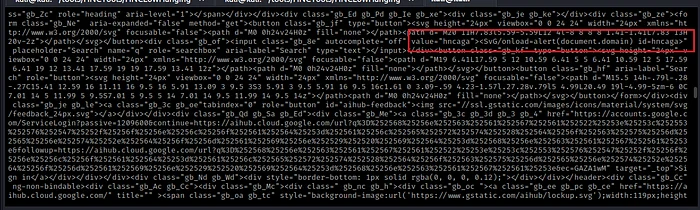
"><SvG/onload=alert(document.domain) id=hncaga>
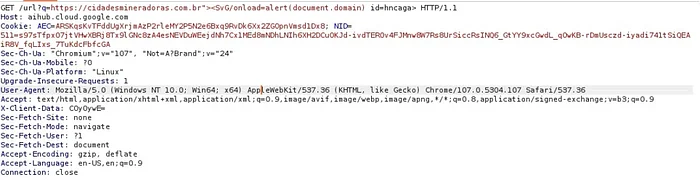
The report states that special characters such as spaces and parentheses need to be URL encoded for this to work. The complete URL with the payload was:
https://aihub.cloud.google.com/url?q=https://cidadesmineradoras.com.br%22%3E%3CSvG/onload=alert(document.domain)%20id=hncaga%3E
This did not work; the author notes the payload had already been included in his previous tests on this target URL. The next attempt was to URL encode every character of the payload:
https://aihub.cloud.google.com/url?q=%68%6e%63%61%67%61%22%3e%3c%53%76%47%2f%6f%6e%6c%6f%61%64%3d%61%6c%65%72%74%28%64%6f%63%75%6d%65%6e%74%2e%64%6f%6d%61%69%6e%29%20%69%64%3d%68%6e%63%61%67%61%3e
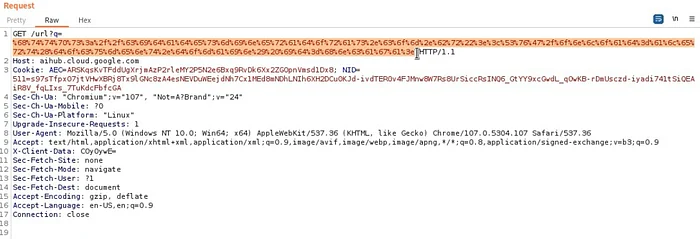
This was still unsuccessful. The author then encoded the already encoded payload a second time, producing a double-encoded value:
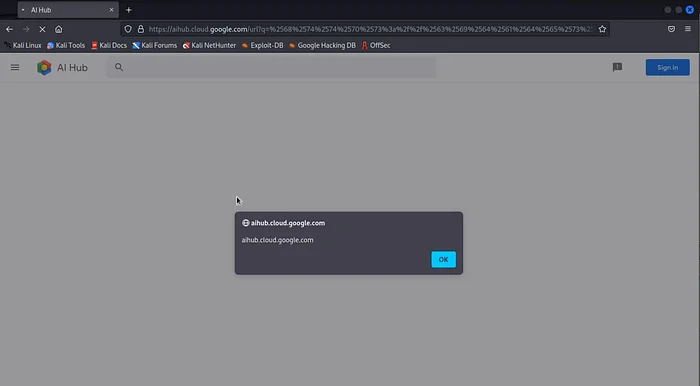
https://aihub.cloud.google.com/url?q=%25%36%38%25%36%65%25%36%33%25%36%31%25%36%37%25%36%31%25%32%32%25%33%65%25%33%63%25%35%33%25%37%36%25%34%37%25%32%66%25%36%66%25%36%65%25%36%63%25%36%66%25%36%31%25%36%34%25%33%64%25%36%31%25%36%63%25%36%35%25%37%32%25%37%34%25%32%38%25%36%34%25%36%66%25%36%33%25%37%35%25%36%64%25%36%35%25%36%65%25%37%34%25%32%65%25%36%34%25%36%66%25%36%64%25%36%31%25%36%39%25%36%65%25%32%39%25%32%30%25%36%39%25%36%34%25%33%64%25%36%38%25%36%65%25%36%33%25%36%31%25%36%37%25%36%31%25%33%65
Loading this URL produced an XSS alert. The author recorded the trigger in Burp Suite to document the process.
Exploitation
Step 1: Confirm the payload and encoding
The working input was the double-encoded form of the payload above, placed in the q parameter. The first encoding turns each character into its percent-encoded form; the second encoding encodes the result again. The report does not state which layer decoded the value or where the reflection occurred in the response; it only shows that the alert fired.
Step 2: Deal with the intermittent trigger
After submitting the first report, the Google security team replied that they could not reproduce the XSS.
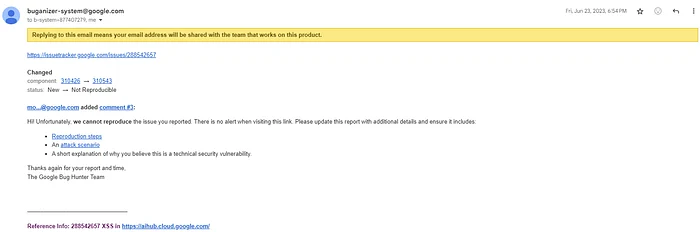
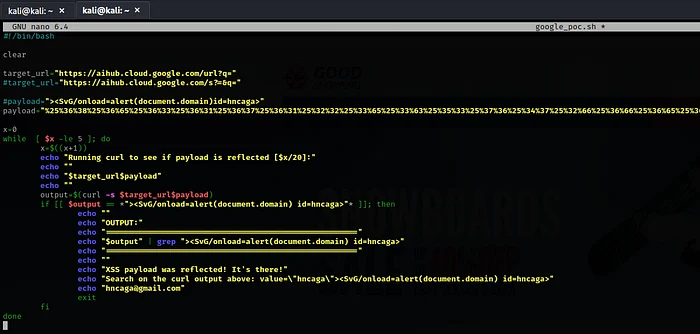
The author then investigated and found that the vulnerability triggers only sometimes, after 2 or 3 attempts. To measure this, a Bash script using curl requested the vulnerable URL with the payload 5 times and counted how many responses reflected the payload.

Out of 5 responses, 3 contained the payload, so the trigger rate was 3 in 5 requests.
The report includes the Bash script used for this check.
Step 3: Find the wider pattern
Further investigation showed that all URLs from aihub.cloud.google.com trigger the XSS when the q parameter is appended. Appending &q= together with the double-encoded payload still triggered the exploit. To verify this, the author re-crawled the aihub URLs and saved them in valid_aihub_urls.txt, then modified the Bash script to iterate over every URL in that file, sending curl requests 5 times to each URL and checking whether the XSS triggered.
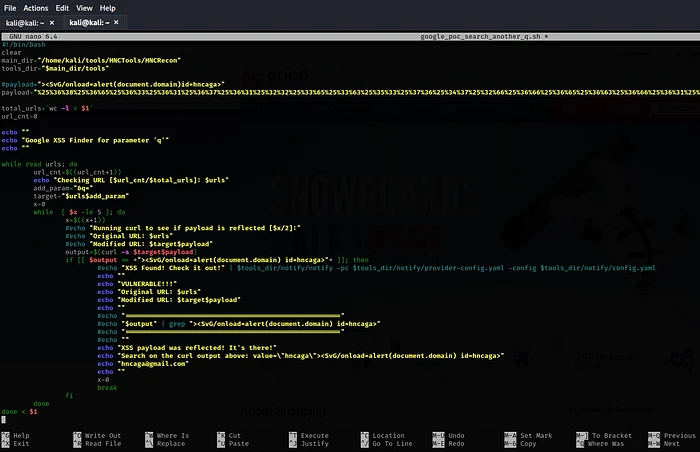
The script was run with:
./google_poc_search_another_q.sh valid_aihub_urls.txt
Every valid URL in the file triggered the XSS. The author also tried a non-existing directory with the q parameter appended, and it still triggered the vulnerability.
Step 4: Report and triage
The findings were reported again to Google's security team with detailed documentation of the vulnerability, its potential impact, reproduction steps and the Bash scripts. The report was triaged.
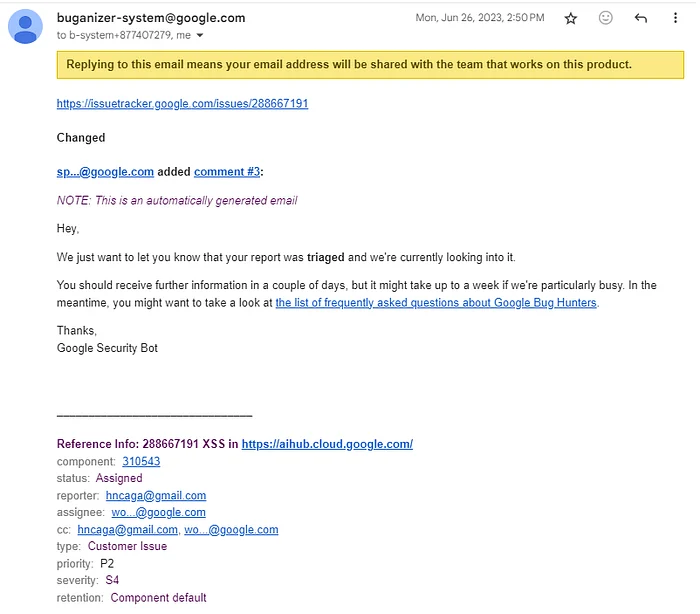
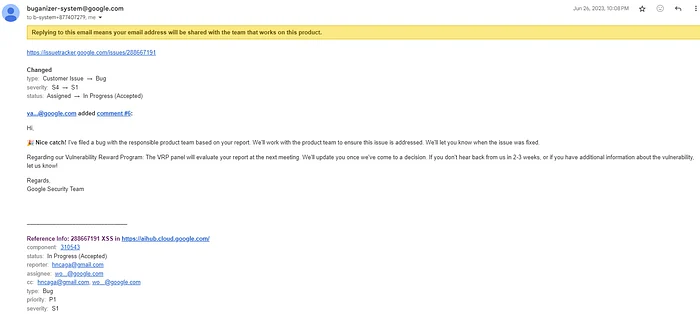
Google's security team acknowledged the issue, verified it, changed the priority from P2 to P1 and the severity from S4 to S1, and replied with a "Nice Catch!" message.
Step 5: Reward
A couple of days later, Google rewarded the report.
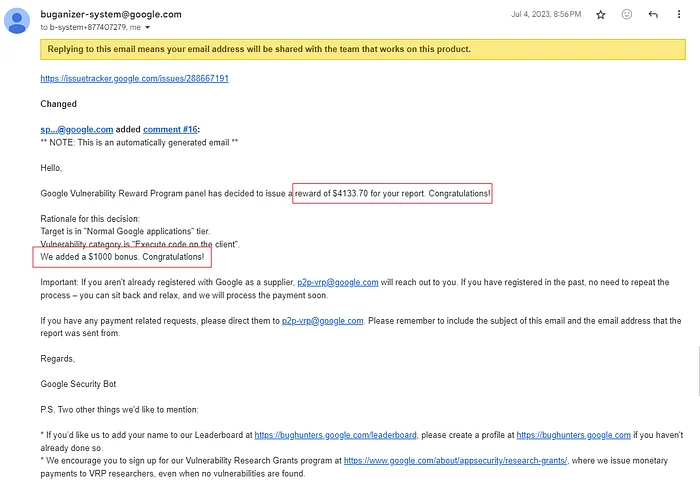
The total was $4,133.70: a $3,133.70 reward plus a $1,000 bonus.

Step 6: Fix and follow-up
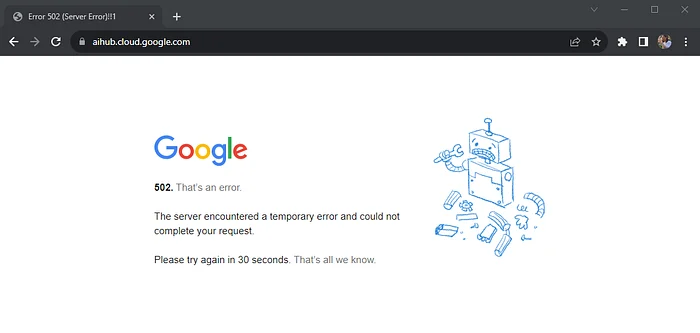
On 15 March 2024, Google updated the author that the vulnerability had been fixed and the sub-domain secured. The author replied that the website was now returning a 502 error.
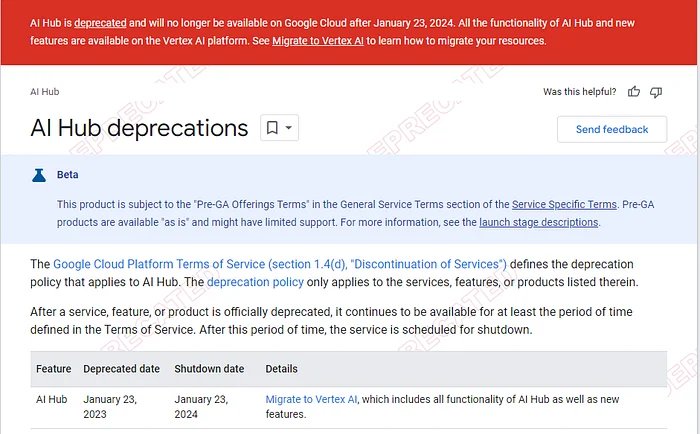
Google responded that aihub had been deprecated and migrated to Vertex AI since January 2024.
Root cause
What it shows is that the q parameter value is reflected into the response, and that a payload which survives one round of URL decoding is neutralised while the double-encoded form is not. That pattern is consistent with the application decoding the parameter once and then reflecting the result without adequate output encoding, so a value that is still percent-encoded after the first decode passes whatever filtering exists and is decoded again later, likely by the browser or by a second decoding step. The report does not identify the filter or the decoding layer, so this part is inferred rather than stated. The intermittent behaviour (3 of 5 requests) is also not explained in the report.
Impact
The author lists the following potential impacts of the XSS on a Google sub-domain, framed as possibilities rather than demonstrated outcomes:
- Session hijacking: script execution could let an attacker take over user sessions and reach accounts and sensitive information.
- Phishing: malicious scripts could render convincing phishing pages inside the sub-domain to collect credentials or other data.
- Malware distribution: scripts could redirect users to sites hosting malware.
- Data theft: cookies, tokens or other authentication data could be stolen.
- Reputation damage: trust in Google's services could be eroded.
These depend on a victim loading a crafted URL and on the script executing in the context of the sub-domain.
Fix
Google stated on 15 March 2024 that the vulnerability had been fixed and the sub-domain secured. The author later reported a 502 error on the site, and Google replied that aihub had been deprecated and migrated to Vertex AI since January 2024, so the endpoint was retired rather than patched in place, as far as the report shows.
Variants to test
- Double encoding on other reflection points. Take any parameter that reflects input and try the same payload with one and two rounds of URL encoding. A positive result is the payload appearing decoded in the response and executing in the browser.
- Appending the parameter to arbitrary paths. On the same host, append
&q=with the double-encoded payload to URLs that do not normally take aqparameter, including non-existent directories. A positive result is the payload reflecting and executing on paths outside the original endpoint. - Repeated requests to measure reliability. Send the same request 5 times with
curland count how many responses contain the payload, as the author did. A positive result is a non-zero, inconsistent count, which needs to be documented before reporting. - Full-character encoding. Encode every character of the payload rather than only the special ones. A positive result is execution where the partially encoded version failed, which points to a filter that inspects decoded characters.
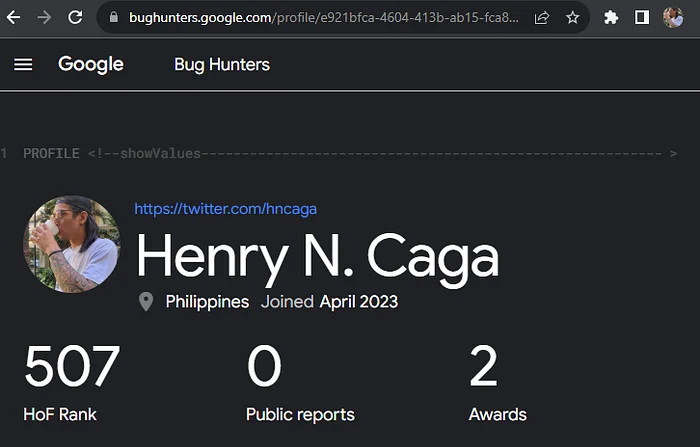
Google Hall of Fame Rank: 507 (As of March 23, 2024)
What happened, in plain words
A security researcher found a bug on a Google website. The bug let him make a web page run a small piece of code that he wrote, alongside the code the page was supposed to run. Bugs like this are called cross-site scripting, or XSS for short. He reported it to Google, Google paid him $4,133.70 and recognised him in its Hall of Fame.
The interesting part is not the bug itself. It is the story around it. His first report ran into trouble because Google could not make the bug happen on their side. He then worked out that the bug only appears some of the time, wrote a small program to prove it, found that the bug was much wider than he first thought, and sent a second report. That second report was accepted, its priority and severity were raised, and he was paid.
This article walks through the whole thing from zero. You only need to know how to use a browser and a computer. Every technical word is explained the first time it appears, and there is a glossary at the end.
The pieces you need to understand first
Before the story makes sense, here are a few ideas. Each one is simple on its own.
A URL is an address. When you type https://example.com/page into your browser, you are giving it an address, just like a postal address. The part after the ? is extra information sent along with the request. It is called the query string. In https://example.com/search?q=cats, the query string is q=cats. The q is the name of a parameter (a named value), and cats is its value. Websites use parameters to pass things like search terms, page numbers or links.
A server is the computer that answers. Your browser asks a server for a page, and the server sends one back. Sometimes the server takes something you sent (like the value of q) and puts it into the page it sends back. That is called reflection: your input is echoed back to you. Reflection is normal and useful. It becomes dangerous when the server echoes your input without cleaning it, because then you can send not just words but instructions that the browser will follow.
A browser runs code. Every web page you visit contains code, mostly in a language called JavaScript. That code is what makes menus open, forms validate and pages update without reloading. Your browser runs that code automatically, because it trusts the page it came from. That trust is the whole basis of the web.
XSS (cross-site scripting) is what happens when an attacker manages to get their own JavaScript into a page that other people visit. The browser cannot tell the difference between the site's code and the attacker's code, so it runs both. The attacker's code then runs with the same permissions as the site: it can read what the page can read, act as the logged-in user, and change what the page shows. The classic demonstration is a pop-up box that says alert, which proves code ran. That is what the researcher used here.
Encoding is a way of writing characters so they survive being sent through systems that only expect certain characters. In a URL, characters like spaces, quotes and angle brackets are not allowed as-is, so they are written as a percent sign followed by two characters. A space becomes %20, a double quote becomes %22, and so on. This is called URL encoding. If you encode something that is already encoded, you get double encoding: the % of %22 itself becomes %25, so %22 turns into %25%32%25%32. Decoding reverses the process, one layer at a time.
Why encoding matters for XSS. Filters that try to block XSS look for dangerous characters like <, > and quotes. If you send those characters encoded, the filter may not recognise them. If the application decodes your input once and then puts it into the page, the browser may decode it again and end up seeing the dangerous characters after all. That is the trick at the heart of this story.
curl is a command-line tool for fetching a URL without a browser. It prints the server's response as text. It is useful because you can run it many times in a row and inspect exactly what came back.
Bash is the command language of the terminal on Linux and macOS. A script is a text file full of commands that you can run as one program. A loop is a way of repeating the same command for each item in a list.
Burp Suite is a tool that sits between your browser and a website and records every request and response. Researchers use it to capture proof of a bug.
Triage is the first review a security team does on a report. They check whether the bug is real, how serious it is, and whether it is a duplicate of something already known. A report that passes triage is accepted for fixing.
Priority and severity. Bug bounty programmes usually label reports on two scales. Priority (P1, P2 and so on) says how urgently the team wants to fix it. Severity (S1, S2 and so on) says how damaging the bug could be. Lower numbers mean more serious. P1 and S1 are the top of the scale.
A bug bounty programme is a scheme where a company invites outsiders to look for bugs and pays them for good reports. Google runs one of the largest. The Hall of Fame is a public list of researchers who have reported valid bugs.
Where the bug was
The target was a URL under aihub.cloud.google.com, which is a sub-domain of Google. A sub-domain is a section of a company's website with its own name in front of the main domain, like a department inside a large building. The feature in question is the /url endpoint. An endpoint is a specific address on a server that does one job, like a counter in a shop that handles one kind of request.
This endpoint takes a q parameter that holds a URL. For example:
https://aihub.cloud.google.com/url?q=https://cidadesmineradoras.com.br
Read that as: "go to the /url counter on the aihub server and hand over the value https://cidadesmineradoras.com.br under the name q." The report describes this as an unassuming sub-domain and URL that the researcher came across while exploring sub-domains of popular websites. The author says he had a gut feeling the URL might be vulnerable. The report does not describe what the endpoint normally does beyond accepting the q URL value.
Why start here? Because a parameter that takes a URL and echoes it back is a classic place to look. If the server puts your value into the page without cleaning it, you can put more than a URL in there.
What tools were used
No accounts, roles or specific tool versions are given. The tools mentioned in the report are:
- A browser, used to load the crafted URLs and observe the alert.
- Burp Suite, used to record a video of the XSS triggering.
curl, used inside a Bash script to request the vulnerable URL repeatedly and count reflected responses.- A text file named
valid_aihub_urls.txt, holding re-crawledaihubURLs.
The only precondition described is that the payload had to be encoded, and eventually double-encoded, before it would work. The report also notes that the vulnerability did not trigger on every request.
Finding it
The researcher picked the q parameter as the injection point, meaning the place where he would put his test input. He tried various payloads without success. A payload is the piece of input you send to try to trigger a bug. The payload that was eventually used was:
"><SvG/onload=alert(document.domain) id=hncaga>
This is worth reading slowly, because every part has a job.
">closes whatever attribute or tag the page had already opened, so the browser stops treating what follows as ordinary text.<SvGopens a new HTML element.SvGis the same assvg, a drawing element; the odd capitalisation is deliberate, because some filters match exact spellings and miss variants./onload=alert(document.domain)attaches an event handler.onloadmeans "when this element finishes loading, do this". The thing to do isalert(document.domain), which shows a pop-up box containing the domain of the current page. If the box shows the Google sub-domain, the code ran in Google's context.id=hncaga>gives the element a name and closes the tag. The name is the researcher's handle, a kind of signature.
The report states that special characters such as spaces and parentheses need to be URL encoded for this to work. The complete URL with the payload was:
https://aihub.cloud.google.com/url?q=https://cidadesmineradoras.com.br%22%3E%3CSvG/onload=alert(document.domain)%20id=hncaga%3E
Here the quote became %22, the > became %3E, the < became %3C and the space became %20. The rest was left alone. This did not work; the author notes the payload had already been included in his previous tests on this target URL.
The next attempt was to URL encode every character of the payload, not just the special ones:
https://aihub.cloud.google.com/url?q=%68%6e%63%61%67%61%22%3e%3c%53%76%47%2f%6f%6e%6c%6f%61%64%3d%61%6c%65%72%74%28%64%6f%63%75%6d%65%6e%74%2e%64%6f%6d%61%69%6e%29%20%69%64%3d%68%6e%63%61%67%61%3e
Every letter is now written as % plus two characters. h is %68, n is %6e, and so on. The idea was to hide the payload from any filter that looks at the raw characters. This was still unsuccessful.
The author then encoded the already encoded payload a second time, producing a double-encoded value:
https://aihub.cloud.google.com/url?q=%25%36%38%25%36%65%25%36%33%25%36%31%25%36%37%25%36%31%25%32%32%25%33%65%25%33%63%25%35%33%25%37%36%25%34%37%25%32%66%25%36%66%25%36%65%25%36%63%25%36%66%25%36%31%25%36%34%25%33%64%25%36%31%25%36%63%25%36%35%25%37%32%25%37%34%25%32%38%25%36%34%25%36%66%25%36%33%25%37%35%25%36%64%25%36%35%25%36%65%25%37%34%25%32%65%25%36%34%25%36%66%25%36%64%25%36%31%25%36%39%25%36%65%25%32%39%25%32%30%25%36%39%25%36%34%25%33%64%25%36%38%25%36%65%25%36%33%25%36%31%25%36%37%25%36%31%25%33%65
Notice that every % from the previous version has become %25. That is the signature of double encoding: the encoding itself got encoded. Loading this URL produced an XSS alert. The author recorded the trigger in Burp Suite to document the process.
Why did this work when the single encoding did not? The likely explanation is that the site decodes the parameter once before using it. After one decode, the double-encoded value still looks like harmless percent-encoded text, so any filter sees nothing dangerous. Later, something else decodes it again, and only then do the real characters appear. The report does not state which layer decoded the value or where the reflection occurred in the response; it only shows that the alert fired.
Exploitation
Step 1: Confirm the payload and encoding
The working input was the double-encoded form of the payload above, placed in the q parameter. The first encoding turns each character into its percent-encoded form; the second encoding encodes the result again.
Step 2: Deal with the intermittent trigger
After submitting the first report, the Google security team replied that they could not reproduce the XSS.
This is a common and frustrating moment in bug hunting. A bug that works for you but not for the person reviewing it looks like a mistake or an exaggeration. The researcher could have argued. Instead he went back to investigate.
He found that the vulnerability triggers only sometimes, after 2 or 3 attempts. To measure this, a Bash script using curl requested the vulnerable URL with the payload 5 times and counted how many responses reflected the payload.
A single curl request is just a way of asking the server for a page and printing the answer. Running it five times and comparing the answers turns a vague feeling ("it works sometimes") into a number.
Out of 5 responses, 3 contained the payload, so the trigger rate was 3 in 5 requests.
The report includes the Bash script used for this check.
Why does this matter so much? Because a report that says "it works 3 times out of 5" is far more convincing than one that says "it worked for me". It tells the reviewer exactly what to expect, and it explains why their first attempt may have failed. It also shows the bug is real and not a fluke of one browser or one moment.
Step 3: Find the wider pattern
Further investigation showed that all URLs from aihub.cloud.google.com trigger the XSS when the q parameter is appended. Appending &q= together with the double-encoded payload still triggered the exploit. The & is how you add a second parameter to a query string, so this means the bug was not limited to the /url endpoint: any page on that host would do it if you tacked the parameter on.
To verify this, the author re-crawled the aihub URLs and saved them in valid_aihub_urls.txt, then modified the Bash script to iterate over every URL in that file, sending curl requests 5 times to each URL and checking whether the XSS triggered.
A crawler is a program that follows links and collects addresses. Re-crawling means running it again to get a fresh list. The modified script does the same five-request check, but for every address in the list instead of just one.
The script was run with:
./google_poc_search_another_q.sh valid_aihub_urls.txt
Read this as: run the script file google_poc_search_another_q.sh and give it valid_aihub_urls.txt as its input. The ./ just means "the file in the current folder".
Every valid URL in the file triggered the XSS. The author also tried a non-existing directory with the q parameter appended, and it still triggered the vulnerability. That last detail is significant: it means the bug was not tied to any particular page's content, but to the way the host handled the parameter itself.
Step 4: Report and triage
The findings were reported again to Google's security team with detailed documentation of the vulnerability, its potential impact, reproduction steps and the Bash scripts. The report was triaged.
Google's security team acknowledged the issue, verified it, changed the priority from P2 to P1 and the severity from S4 to S1, and replied with a "Nice Catch!" message.
Going from P2 to P1 and S4 to S1 means the team decided the bug was much more serious than first assessed. That is unusual.
Step 5: Reward
A couple of days later, Google rewarded the report.
The total was $4,133.70: a $3,133.70 reward plus a $1,000 bonus.
The bonus is worth noting. The author's own advice in the report is to submit a comprehensive report and to invest effort in proof-of-concept scripts, because that can lead to a bonus. The scripts in this story are exactly that.
Step 6: Fix and follow-up
On 15 March 2024, Google updated the author that the vulnerability had been fixed and the sub-domain secured. The author replied that the website was now returning a 502 error.
A 502 error is a message from a server saying that it received a request but could not get a valid answer from whatever was behind it. In plain terms, the site was broken.
Google responded that aihub had been deprecated and migrated to Vertex AI since January 2024.
Deprecated means the company has decided to stop using something. Migrated means its users and functions were moved somewhere else. So the endpoint was not patched in place; it was retired, as far as the report shows.
Why the bug happened
What it shows is that the q parameter value is reflected into the response, and that a payload which survives one round of URL decoding is neutralised while the double-encoded form is not. That pattern is consistent with the application decoding the parameter once and then reflecting the result without adequate output encoding, so a value that is still percent-encoded after the first decode passes whatever filtering exists and is decoded again later, likely by the browser or by a second decoding step. The report does not identify the filter or the decoding layer, so this part is inferred rather than stated. The intermittent behaviour (3 of 5 requests) is also not explained in the report.
A useful comparison: imagine a security guard who checks bags at the door. You put a forbidden item inside a locked box, and the guard only looks at what is visible. Once you are inside, someone else opens the box for you. The guard was not wrong about what they saw; they were checking the wrong layer.
What the bug could have been used for
The author lists the following potential impacts of the XSS on a Google sub-domain, framed as possibilities rather than demonstrated outcomes:
- Session hijacking: script execution could let an attacker take over user sessions and reach accounts and sensitive information. A session is the state of being logged in; a session cookie is a small piece of data your browser holds to prove who you are. If someone else gets it, they can act as you.
- Phishing: malicious scripts could render convincing phishing pages inside the sub-domain to collect credentials or other data. Phishing is tricking someone into typing their password into a fake page. A fake page on a real Google address is far more convincing than one on a strange address.
- Malware distribution: scripts could redirect users to sites hosting malware. Malware is software designed to harm or spy.
- Data theft: cookies, tokens or other authentication data could be stolen. A token is a short string that proves identity, similar to a ticket.
- Reputation damage: trust in Google's services could be eroded.
These depend on a victim loading a crafted URL and on the script executing in the context of the sub-domain.
How it was fixed
Google stated on 15 March 2024 that the vulnerability had been fixed and the sub-domain secured. The author later reported a 502 error on the site, and Google replied that aihub had been deprecated and migrated to Vertex AI since January 2024, so the endpoint was retired rather than patched in place, as far as the report shows.
Things to try if you want to practise
These are the same ideas the researcher used, written so you can apply them elsewhere. Only test systems you own or that explicitly invite testing through a bug bounty programme.
- Double encoding on other reflection points. Take any parameter that reflects input and try the same payload with one and two rounds of URL encoding. A positive result is the payload appearing decoded in the response and executing in the browser.
- Appending the parameter to arbitrary paths. On the same host, append
&q=with the double-encoded payload to URLs that do not normally take aqparameter, including non-existent directories. A positive result is the payload reflecting and executing on paths outside the original endpoint. - Repeated requests to measure reliability. Send the same request 5 times with
curland count how many responses contain the payload, as the author did. A positive result is a non-zero, inconsistent count, which needs to be documented before reporting. - Full-character encoding. Encode every character of the payload rather than only the special ones. A positive result is execution where the partially encoded version failed, which points to a filter that inspects decoded characters.
Google Hall of Fame Rank: 507 (As of March 23, 2024)
What to take away
Three lessons stand out from this story, and none of them require deep technical knowledge.
- A rejected report is not the end. The first report failed because the bug was intermittent. Measuring the intermittency turned a rejection into an acceptance.
- Look wider than the first hit. The bug was not confined to one endpoint. Finding that it worked on every URL, and even on non-existent ones, made the bug much wider than first thought.
- Show your work. The scripts, the counts and the recorded proof are what made the report convincing, and they are what earned the bonus.
Glossary
- 502 error: a server message saying it could not get a valid answer from the system behind it; in practice, the site is broken.
- Bash: the command language of the terminal on Linux and macOS.
- Bug bounty programme: a scheme where a company invites outsiders to find bugs and pays them for good reports.
- Burp Suite: a tool that sits between your browser and a website and records requests and responses.
- Cookie: a small piece of data a website stores in your browser, often to remember that you are logged in.
- Crawler: a program that follows links and collects web addresses.
- Cross-site scripting (XSS): a bug where an attacker gets their own JavaScript into a page other people visit, so the browser runs it as if it were the site's own code.
- curl: a command-line tool that fetches a URL and prints the server's response.
- Deprecated: officially no longer recommended or supported, usually because something has replaced it.
- Double encoding: encoding something that is already encoded, so the encoding characters themselves get encoded.
- Endpoint: a specific address on a server that performs one job.
- Hall of Fame: a public list of researchers who have reported valid bugs to a company.
- Injection point: the place in a request where you put your test input.
- JavaScript: the programming language that web pages use to run code in your browser.
- Loop: a way of repeating the same command for each item in a list.
- Malware: software designed to harm or spy on a user.
- Migrated: moved from one system to another.
- Parameter: a named value passed in a URL, such as
qin?q=cats. - Payload: the piece of input you send to try to trigger a bug.
- Percent encoding (URL encoding): writing characters as a percent sign plus two characters so they can travel safely in a URL.
- Phishing: tricking someone into giving away credentials by pretending to be a trusted site.
- Priority (P1, P2, ...): a label for how urgently a bug should be fixed; lower numbers are more urgent.
- Query string: the part of a URL after the
?, carrying parameters. - Reflection: when a server puts your input back into the page it sends you.
- Script: a text file of commands that can be run as one program.
- Session: the state of being logged in to a site.
- Severity (S1, S2, ...): a label for how damaging a bug could be; lower numbers are more serious.
- Sub-domain: a section of a company's website with its own name in front of the main domain.
- Token: a short string that proves identity, like a ticket.
- Triage: the first review of a bug report, checking whether it is real and how serious it is.
- URL: the address of something on the web.
- Vertex AI: the Google service that
aihubwas migrated to, according to the report.




