Hey Google ! - Delete my Data Properly — #GoogleVRP
When a Blogger blog had two administrators, deleting the Google account of one admin did not delete the blog; instead, ownership was transferred to the other admin, leaving the blog and its content publicly accessible. An attacker who gained access to the second admin account could retain control of the blog and its data after the original owner deleted their account.
 Published on medium.com
Hello y’all it was a long break. Some burnouts, depression and blah blah.
The full write-up lives on its author's site
It belongs to its author, so we link to it rather than copy it. The other two tabs are our own rewrites, checked against it.
Context
This is a write-up of a logic flaw in Blogger, reported through the Google Vulnerability Reward Program (Google VRP). Blogger is Google's blogging service, and the feature in question is the interaction between blog ownership and Google Account deletion. A blog can have more than one administrator, and a Google Account can be deleted, which is supposed to remove the data associated with it.
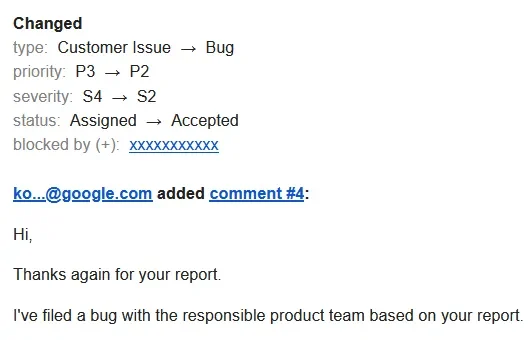
The researcher describes the find as accidental. The report header says reported May 05, 2021, while the text says it was reported on May 28, 2021 and accepted on May 31, 2021. The issue is marked as fixed. The write-up was published on 23 August 2021.
Setup
The researcher used Blogger blogs set to Private, which were used to store confidential data such as passwords. The blogs were created with Gmail accounts that were later deleted. The researcher also had a habit of pinning browser tabs, so a blog tab stayed open and visible after the account behind it had been removed.
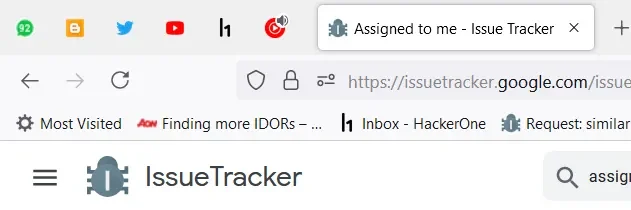
No special tools are described. The precondition that matters is a blog with more than one administrator: the original owner plus a second account added as an admin.
Finding it
After deleting some Gmail IDs that had been used to create private blogs, the researcher noticed, a couple of days later, that one of the pinned tabs still showed a blog that was still accessible to all users, even though the Gmail ID behind it had been deleted. The first suspicion was browser cache, but that was ruled out.
To reproduce, the researcher created a blog named testblog1.blogspot.com from an existing account, posted some random images, and then deleted the Gmail account used to create it. After a couple of hours the blog was gone, including the images that were requested directly from the CDN. That path behaved correctly.
The difference was found by recalling the old settings of the blog that held the passwords: another account had been added to it as an author. The researcher restored the deleted blog, which can be done within 30 days, and added a new user as Admin to manage the blog. Now two people managed the blog instead of one.
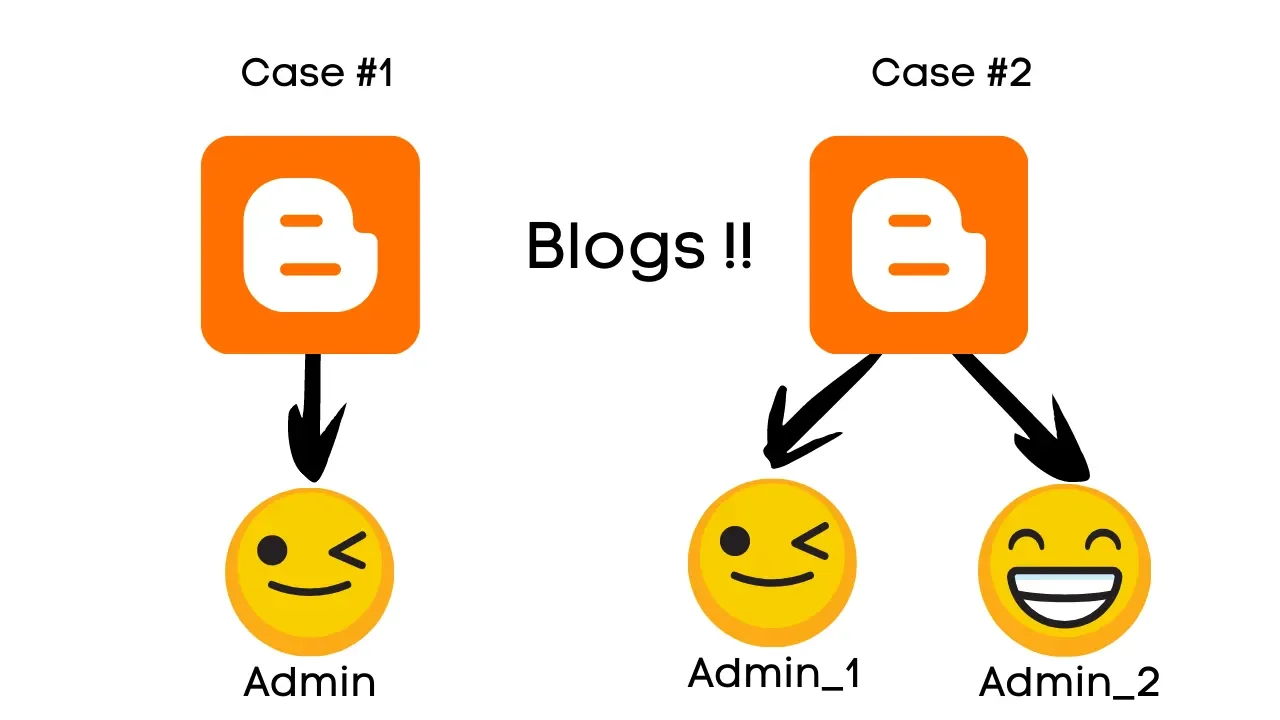
- In case#1 there is only one person to manage the blog.
- In case#2 there are two people to manage the blog.
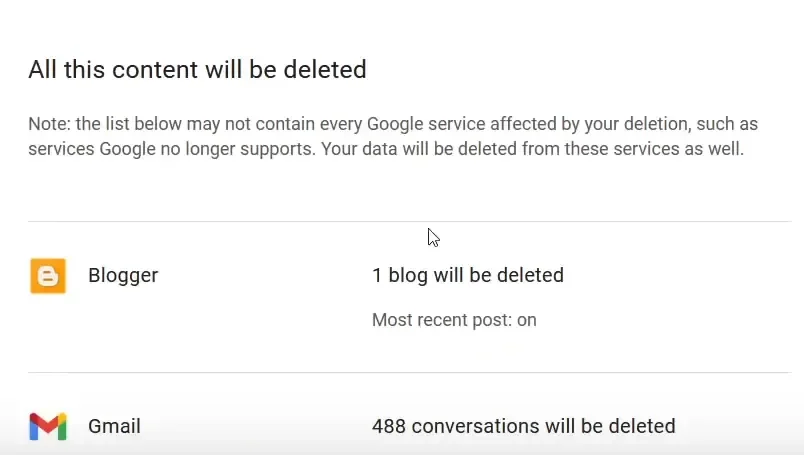
When the admin in case#1 deletes their entire account, the data is properly deleted. When there are two admins, the blog is not deleted: ownership is transferred to Admin2 instead. What made the researcher suspicious was that, while deleting the account, there was no proper message saying whether blog ownership would be transferred. The application failed to notify the user properly.
Exploitation
Step 1: Create a blog with a single owner
Create a blog from an account and post content to it. In the reproduction this was testblog1.blogspot.com with some random images.
Step 2: Delete the owning account
Delete the Gmail account that created the blog. With a single owner, the blog and its images, including those fetched directly from the CDN, are deleted properly after a couple of hours.
Step 3: Restore and add a second admin
Restore the deleted blog, which is possible within 30 days, and add a new user as Admin. The blog now has two administrators.
Step 4: Delete the original owner's account again
Delete the account of the admin who originally owned the blog. Instead of deleting the blog, ownership is transferred to Admin2. The account deletion flow gives no message that this transfer will happen.
Root cause
When a blog has a second admin, deleting the owner's account transfers ownership to that admin rather than deleting the blog. The flaw is that the user deleting their account is not told that their blog, and the data in it, will survive under someone else's control. The report does not describe the code or the exact check behind the transfer; the behaviour is inferred from the two cases above.
The researcher connects the reward to the Google VRP rules page, which states:
~ Any design or implementation issue that substantially affects the confidentiality or integrity of user data is likely to be in scope for the program. ( Privacy Dudes !! )
Impact
A user who deletes their Google Account expecting their private blog and its contents to be removed can leave that data accessible under another administrator. In the researcher's case the blog was private and held passwords. The condition is that a second admin exists on the blog at the time of deletion. The report does not describe any way for an attacker to add themselves as admin; the second admin is one the owner added.
Fix
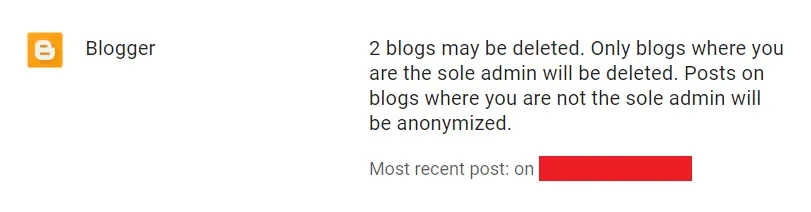
The issue is now patched by adding a couple of lines during Google Account deletion.
Variants to test
- Delete an account that owns a shared resource (a blog, a shared drive, a site) with a second admin present, and check whether the deletion flow warns that ownership will move. A positive result is a silent transfer with no notice.
- Repeat with a private resource holding sensitive data and confirm whether the data remains reachable by the other admin after the owner's account is gone.
- Test the restore window: restore a deleted resource, add an admin, delete the owner again, and observe whether the resource survives. A positive result is the resource staying live after the owner's account is deleted.
- Check direct CDN URLs for images in the resource after the owner's deletion. A positive result is the images still being served when the resource was expected to be removed.

What happened, in plain words
A security researcher found that when you delete your Google Account, a blog you own on Blogger (Google's blogging service) does not always get deleted with it. If the blog has a second administrator, the blog is quietly handed over to that other person instead of being removed. The person deleting their account is never told this will happen. In the researcher's case the blog was set to Private and was used to store passwords, so data the owner expected to disappear stayed online under someone else's control.
The researcher reported it through the Google Vulnerability Reward Program (Google VRP), a scheme where Google pays people for finding and reporting security problems in its products. The report header says reported May 05, 2021, while the text says it was reported on May 28, 2021 and accepted on May 31, 2021. The issue is marked as fixed. This write-up was published on 23 August 2021.
A few words before we start, because this story uses them a lot:
- Blogger is a website where anyone can create a blog (an online diary or article page) at an address like something.blogspot.com. You sign in with a Google Account.
- A Google Account is the login (usually a Gmail address) that gives you access to Google services. Deleting it is supposed to remove the data tied to it.
- An administrator (admin) of a blog is a person who can manage it: write posts, change settings, add other people. A blog can have more than one admin.
- A CDN (Content Delivery Network) is a network of servers that store copies of files such as images so they load quickly. Each image gets its own direct web address on the CDN, which anyone can open in a browser.
- A browser cache is a copy of a web page your browser keeps on your own computer so it opens faster next time. It can make you see an old version of a page even after the site has changed.
Setup
The researcher kept several Blogger blogs set to Private and used them to store confidential data, including passwords. Those blogs had been created with Gmail accounts that were later deleted. The researcher also had a habit of pinning browser tabs. A pinned tab is a tab you keep permanently open in the browser, so the page stays visible every time you open the browser.
No special tools are described. The one condition that matters for the bug is a blog with more than one administrator: the original owner plus a second account added as an admin.
Finding it
After deleting some Gmail IDs that had been used to create private blogs, the researcher noticed a couple of days later that one of the pinned tabs still showed a blog that was still accessible to all users, even though the Gmail ID behind it had been deleted. The first suspicion was the browser cache, but that was ruled out.
To reproduce, the researcher created a blog named testblog1.blogspot.com from an existing account, posted some random images, and then deleted the Gmail account used to create it. After a couple of hours the blog was gone, including the images that were requested directly from the CDN. That path behaved correctly.
So a blog with a single owner is deleted properly. Something else had to explain the blog that survived. The difference was found by recalling the old settings of the blog that held the passwords: another account had been added to it as an author. The researcher restored the deleted blog, which can be done within 30 days, and added a new user as Admin to manage the blog. Now two people managed the blog instead of one.
- In case#1 there is only one person to manage the blog.
- In case#2 there are two people to manage the blog.
When the admin in case#1 deletes their entire account, the data is properly deleted. When there are two admins, the blog is not deleted: ownership is transferred to Admin2 instead. What made the researcher suspicious was that, while deleting the account, there was no proper message saying whether blog ownership would be transferred. The application failed to notify the user properly.
Exploitation
Step 1: Create a blog with a single owner
Create a blog from an account and post content to it. In the reproduction this was testblog1.blogspot.com with some random images. This gives a baseline: one owner, no second admin, so we can see what normal deletion looks like.
Step 2: Delete the owning account
Delete the Gmail account that created the blog. With a single owner, the blog and its images, including those fetched directly from the CDN, are deleted properly after a couple of hours. This confirms the service does clean up correctly when nobody else is involved.
Step 3: Restore and add a second admin
Restore the deleted blog, which is possible within 30 days, and add a new user as Admin. The blog now has two administrators. The restore window is a grace period during which a deleted blog can be brought back; the researcher used it to rebuild the exact situation that had survived earlier.
Step 4: Delete the original owner's account again
Delete the account of the admin who originally owned the blog. Instead of deleting the blog, ownership is transferred to Admin2. The account deletion flow gives no message that this transfer will happen. This is the bug: the same action that removed everything in Step 2 now leaves the blog alive under a different person.
Root cause
When a blog has a second admin, deleting the owner's account transfers ownership to that admin rather than deleting the blog. The flaw is that the user deleting their account is not told that their blog, and the data in it, will survive under someone else's control. The report does not describe the code or the exact check behind the transfer; the behaviour is inferred from the two cases above.
This kind of problem is called a logic flaw: the software does exactly what it was programmed to do, but the rule it follows is wrong for the situation. Nothing crashes and no attacker breaks in; the design simply produces a result the user would never expect. A useful comparison is a bank that closes your account but quietly moves your savings into a joint account you had forgotten about, without telling you.
The researcher connects the reward to the Google VRP rules page, which states:
~ Any design or implementation issue that substantially affects the confidentiality or integrity of user data is likely to be in scope for the program. ( Privacy Dudes !! )
In plain words: if a design decision can seriously affect whether user data stays private (confidentiality) or stays correct and under the owner's control (integrity), Google wants to hear about it. That is why a bug with no attacker and no crash still counted.
Impact
A user who deletes their Google Account expecting their private blog and its contents to be removed can leave that data accessible under another administrator. In the researcher's case the blog was private and held passwords. The condition is that a second admin exists on the blog at the time of deletion. The report does not describe any way for an attacker to add themselves as admin; the second admin is one the owner added.
Fix
The issue is now patched by adding a couple of lines during Google Account deletion.
Variants to test
These are follow-up checks in the same spirit, useful if you want to look for similar behaviour elsewhere:
- Delete an account that owns a shared resource (a blog, a shared drive, a site) with a second admin present, and check whether the deletion flow warns that ownership will move. A positive result is a silent transfer with no notice.
- Repeat with a private resource holding sensitive data and confirm whether the data remains reachable by the other admin after the owner's account is gone.
- Test the restore window: restore a deleted resource, add an admin, delete the owner again, and observe whether the resource survives. A positive result is the resource staying live after the owner's account is deleted.
- Check direct CDN URLs for images in the resource after the owner's deletion. A positive result is the images still being served when the resource was expected to be removed.
Glossary
- Admin (administrator): a person with permission to manage a blog or service, including its settings and other users.
- Blog: a website made of dated posts, here hosted on Blogger.
- Blogger: Google's blogging service, where blogs live at name.blogspot.com.
- Browser cache: a local copy of web pages and files your browser keeps to load them faster, which can show you outdated content.
- CDN (Content Delivery Network): servers that store and serve copies of files such as images, each reachable by its own direct web address.
- Confidentiality: keeping data readable only by the people allowed to see it.
- Google Account: the login (usually a Gmail address) that gives access to Google services.
- Google VRP (Vulnerability Reward Program): Google's scheme that pays researchers for reporting security problems.
- Gmail ID: a Gmail address used as a Google Account login.
- Integrity: keeping data correct and under the control of its owner, not silently changed or moved.
- Logic flaw: a bug where the software follows its programmed rules correctly but the rules produce a wrong or unsafe result.
- Patch: a change to the software that fixes a bug.
- Pinned tab: a browser tab kept permanently open so the page is always visible.
- Private (blog setting): a blog setting that restricts who can view the blog.
- Restore window: a period (here 30 days) during which a deleted blog can be brought back.
- Root cause: the underlying reason a bug happens, as opposed to its visible symptom.
- Transfer of ownership: moving control of a resource from one account to another.




