How did I earn $3133.70 from Google Translator?
The Google Translate feature did not filter or encode HTML tags when the primary language was set to Vietnamese, allowing an attacker to inject an iframe with an onload handler that executed JavaScript. An attacker could send a crafted link to a victim to run arbitrary script in the context of translate.google.com.

You’ve probably read through the write-up series about a company X’s bug through Prisma GraphQL.
The full write-up lives on its author's site
It belongs to its author, so we link to it rather than copy it. The other two tabs are our own rewrites, checked against it.
Context
The target was translate.google.com, specifically the Google Translator feature, with Vietnamese as the primary language. The researcher's primary language in the Translator was Vietnamese, and the translation direction was Vietnamese into English. The report's point is that Google did not filter or encode HTML tags in this feature, so entered HTML was executed.
The write-up opens with the observation that a bug may look simple but is not at all simple when you have to be Vietnamese to find it.

Setup
The work was done in a normal browser on translate.google.com, using the browser's DevTools (F12) to inspect what the page did with the entered text. The proof of concept video is labelled as being on the latest versions of Chrome and Firefox. No accounts, roles or special tooling are described beyond the browser and its developer tools.
The precondition that mattered was the primary language setting: the behaviour appeared only when the primary language was Vietnamese. Changing the primary language to another language did not reproduce it, because there the HTML tags were encoded and filtered out.
Finding it
The discovery was accidental. Late at night, while translating a film title from Vietnamese into English on translate.google.com, the researcher noticed that the Translator feature, with Vietnamese as the main language, was caught by the input. The report shows this in figure 2.
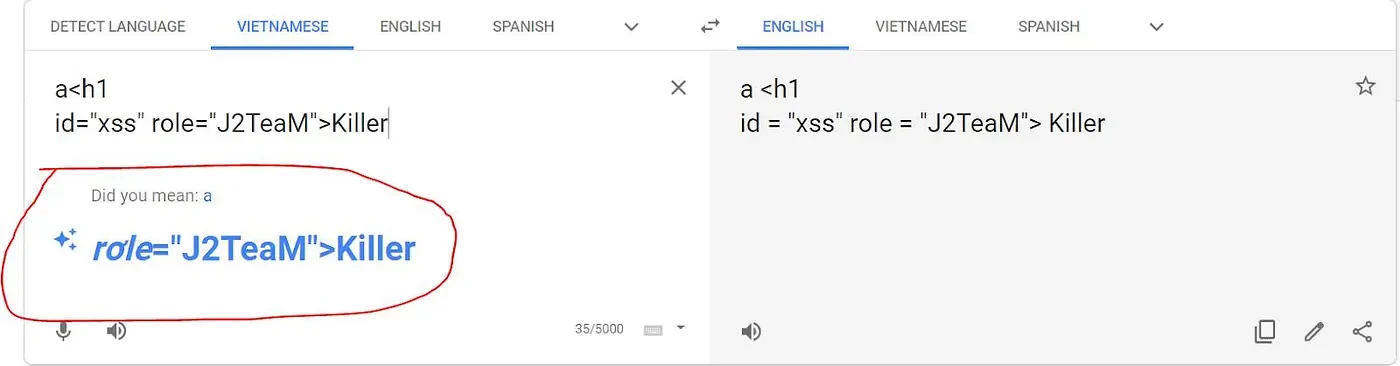
Opening DevTools and inspecting the page showed that the HTML that had been inserted was being executed. Picture 3 shows this.
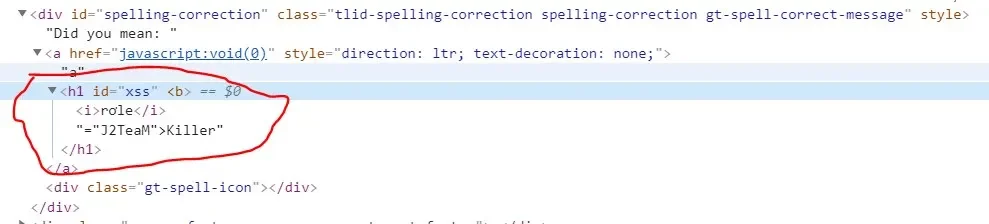
So Google was not filtering or encoding HTML tags in this feature, which meant XSS could be exploited there. The researcher tried other primary languages and the tags were encoded and filtered, so the error was specific to selecting Vietnamese as the primary language.
Exploitation
Step 1: Confirm execution in DevTools
With Vietnamese as the primary language, HTML entered into the Translator was executed rather than displayed as text. Inspecting the page in DevTools confirmed it, as shown in picture 3 above.
Step 2: Build a payload that survives the suggestion feature
The next step was to craft HTML to display the domain name and the user's cookies. The report notes the difficulty: the length and the characters had to be kept properly aligned so that the Translator would display its word suggestions. The payload used was:
<iframe onload=”javascript:prompt(document.domain, document.cookie)” id=”xss” role=”xss”>hello xss
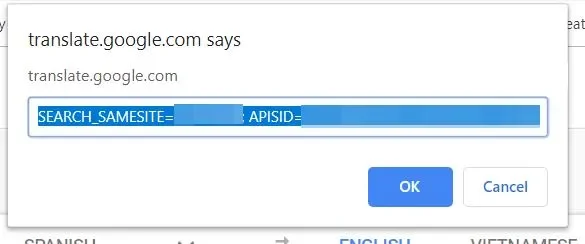
The onload handler runs JavaScript when the iframe loads, and the handler calls prompt with document.domain and document.cookie, so the dialog shows the domain and the cookies of the page. The id and role attributes are set to xss, and the iframe body contains the text hello xss. Figure 4 shows the message box produced when the XSS executed.
A proof of concept video was recorded on the latest versions of Chrome and Firefox:
Step 3: Put the payload in the URL
The URL displayed in the browser was:
https://translate.google.com/?hl=en#view=home&op=translate&sl=vi&tl=en&text=%3Ciframe%20onload=%22javascript:alert(document.domain)%22%20id=%22xss%22%20role=%22xss%22%3Ehello%20xss
Looking at the parameters passed in the URL:
& sl = en => Primary language& tl = en => Language after translation& text => Paragraphs
That is, sl is the primary language, tl is the language after translation, and text carries the paragraphs. The reasoning was that the payload only needed to be encoded and passed in the text parameter, and the link sent to the victim. The author also wondered whether Google's use of POST instead of GET to fetch the suggested results would prevent this, since the code has to be sent to the victim for it to execute.
Root cause
Google did not filter or encode HTML tags in the Translator's suggestion feature when the primary language was Vietnamese. The entered text was rendered as HTML, so an onload handler on an element such as an iframe ran as JavaScript in the page. The same input in other primary languages was encoded and filtered, so the missing encoding was specific to the Vietnamese path. The report does not describe the server-side code, so the exact location of the mistake is not stated; The report does not describe the server-side code, so the exact location of the mistake is not stated.
Impact
The author reasoned that a crafted translate.google.com link with the payload in the text parameter and Vietnamese as the primary language would run JavaScript in the context of translate.google.com. The payload shown reads document.domain and document.cookie, so the impact demonstrated is disclosure of the domain and the user's cookies for that origin. The report does not go further into what those cookies allow or what else could be done from that origin.
Fix
Google's first response was that the domain was in the sandbox domains and that the report was invalid, and the status was changed to Won't Fix (Intended Behaviour), as shown in picture 5.
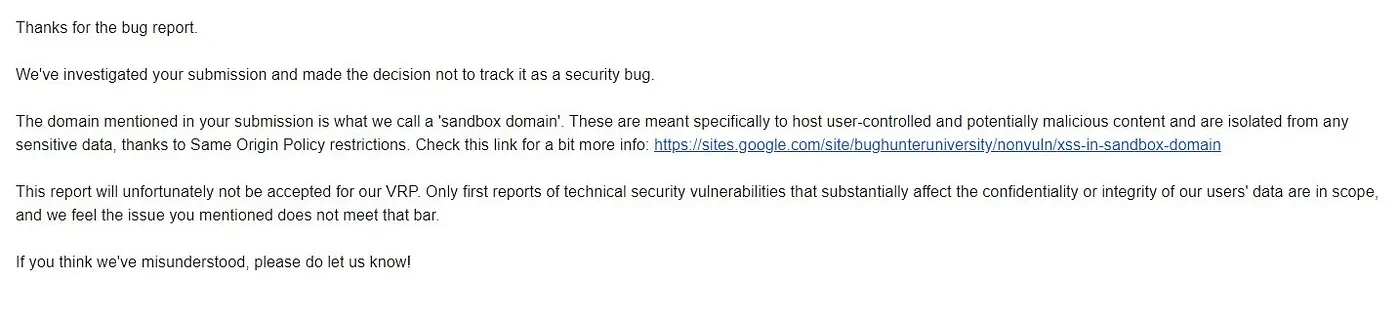
The researcher looked into what sandbox domains are, as shown in figure 6.
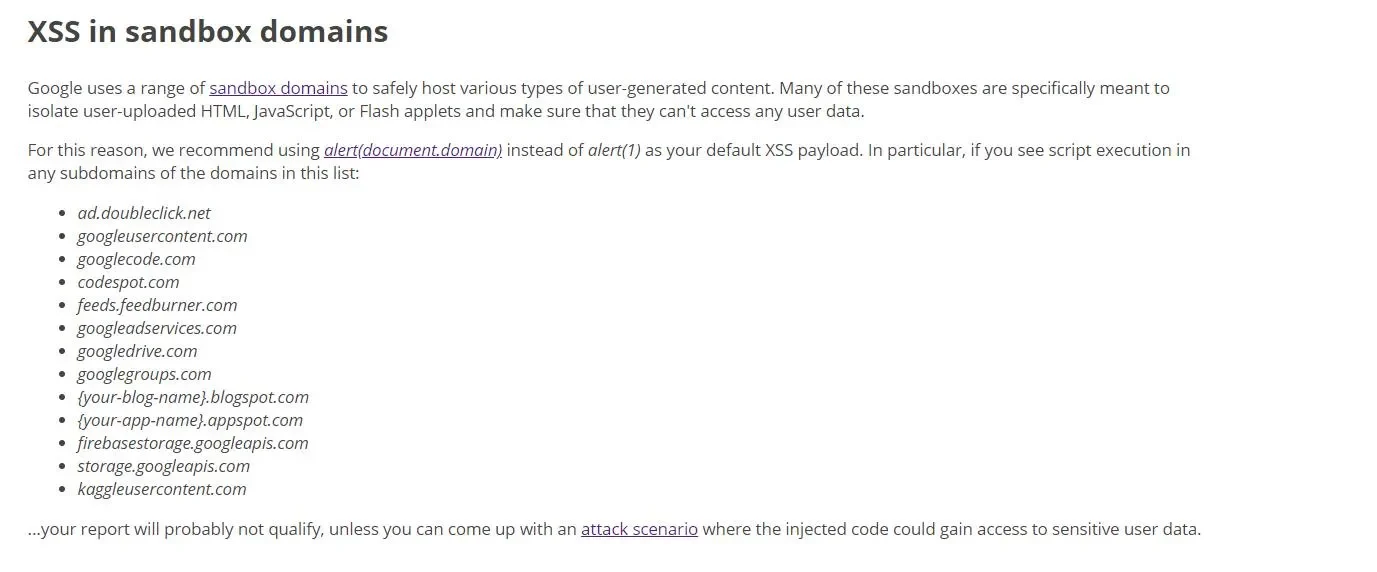
Sandbox domains are often used to contain all content, including viruses, malware and trojans, and do not affect other servers. They are separate from the main server that holds the user's data, so they are safe. But translate.google.com is not on that list, and the researcher was sure it was valid. Two feedbacks were sent to prove the mistake. After 7 days without a response to the two replies, the researcher kept responding, and Google reviewed the status change, accepted it as a bug, and the team met to assess the level and offer a bonus. The report does not say what code change fixed it; it only records that Google's feedback on 23/12/2019 03:47 said the bug had been fixed.
Timeline
| Date and time | Event |
|---|---|
| 14/11/2019 14:05 | Report sent |
| 14/11/2019 20:29 | Google responded with Won't Fix (Intended Behaviour) |
| 14/11/2019 21:29 | More information provided |
| 15/11/2019 00:36 | Proved the domain name is valid |
| 21/11/2019 23:23 | Continued to prove the domain is valid and attached a PoC video |
| 22/11/2019 00:12 | Google changed the status, confirmed and re-evaluated the bug |
| 28/11/2019 01:20 | Google announced a bonus of $3133.70 |
| 23/12/2019 03:47 | Google feedback said the bug was fixed |
Variants to test
- Try other Google Translate language pairs as the primary language, not just Vietnamese, and enter HTML with an
onloadhandler. A positive result is the handler running and a dialog showingdocument.domainanddocument.cookie. - Try the same payload in the
textparameter of the URL withsl=viandtl=en, as in the report's URL. A positive result is the iframe loading and the prompt appearing when the link is opened. - Try other HTML elements with event handlers, keeping the length and characters aligned so the suggestion feature still displays them. A positive result is the handler executing in the page context.
- Try the same input in other Google products that render user text as suggestions. A positive result is the same execution of the handler in the product's origin.
What happened, in plain words
A security researcher found that Google Translate ran HTML entered into the translation box as code instead of showing it as text. The trick was to type a piece of HTML into the translation box while the main language was set to Vietnamese. Instead of showing that HTML as harmless text, the page ran it as if it were part of the site. That kind of flaw is called Cross-Site Scripting, or XSS for short.
To understand why this matters, imagine a noticeboard where visitors can pin notes. If the board simply reads whatever is pinned and follows any instruction written on it, then someone can pin a note saying "hand over your keys" and the board will do it. A website that takes text from a visitor and treats it as instructions rather than as plain text has the same problem. The visitor's text should always be shown as text, never obeyed as code.
The researcher reported the issue to Google. Google first said the domain was a "sandbox domain" and closed the report as intended behaviour. The researcher pushed back with evidence that translate.google.com is not a sandbox domain, and Google changed the status, accepted it as a bug, and paid a bounty of $3133.70. Google's feedback on 23 December 2019 said the bug had been fixed.
The write-up opens with the observation that a bug may look simple but is not at all simple when you have to be Vietnamese to find it.
The pieces involved
Before the steps, here are the things the researcher used, explained from zero.
- Google Translate is a website that converts text from one language to another. You type or paste text, choose a source language and a target language, and it shows the translation.
- The suggestion feature is the part of Google Translate that, while you type, offers words and phrases it thinks you might want. It is meant to help you type faster. The report's point is that Google did not filter or encode HTML tags in this feature, so entered HTML was executed.
- HTML is the language web pages are written in. It uses tags such as
<iframe>to describe parts of a page. A browser reads HTML and draws the page from it. - JavaScript is a programming language that runs inside the browser. It can read information from the page, such as the address and the cookies, and it can show dialog boxes.
- DevTools (also called developer tools) is a panel built into browsers. You open it with the F12 key. It lets you look at the page's HTML and see what the browser is doing. It is a normal, built-in feature, not a hacking tool.
- A cookie is a small piece of data a website stores in your browser so it can recognise you on later visits, for example to keep you logged in. If someone else can read your cookies for a site, they may be able to act as you on that site.
- A URL parameter is a piece of information attached to a web address after a
?or&. For example, inexample.com/?colour=blue, the parametercolourhas the valueblue. Websites use parameters to pass settings and content between pages. - Encoding means replacing characters that have a special meaning with a safe representation. For example,
<becomes%3Cin a URL, and"becomes%22. This lets a value travel through a URL without being mistaken for part of the address. - XSS (Cross-Site Scripting) is a flaw where a website lets an attacker's text be treated as code by a visitor's browser. The attacker's code then runs as if the website itself had written it, which means it can read things the website is allowed to read, such as cookies.
- A sandbox domain is a domain kept separate from the main service, often used to hold untrusted content such as viruses, malware and trojans, so that anything harmful stays contained and does not affect the servers that hold user data.
Setting up
The work was done in a normal browser on translate.google.com, using the browser's DevTools (F12) to inspect what the page did with the entered text. The proof of concept video is labelled as being on the latest versions of Chrome and Firefox. No accounts, roles or special tooling are described beyond the browser and its developer tools.
The precondition that mattered was the primary language setting: the behaviour appeared only when the primary language was Vietnamese. Changing the primary language to another language did not reproduce it, because there the HTML tags were encoded and filtered out.
Finding it
The discovery was accidental. Late at night, while translating a film title from Vietnamese into English on translate.google.com, the researcher noticed that the Translator feature, with Vietnamese as the main language, was caught by the input. The report shows this in figure 2.
Opening DevTools and inspecting the page showed that the HTML that had been inserted was being executed. Picture 3 shows this.
So Google was not filtering or encoding HTML tags in this feature, which meant XSS could be exploited there. The researcher tried other primary languages and the tags were encoded and filtered, so the error was specific to selecting Vietnamese as the primary language.
Exploitation
Step 1: Confirm execution in DevTools
With Vietnamese as the primary language, HTML entered into the Translator was executed rather than displayed as text. Inspecting the page in DevTools confirmed it, as shown in picture 3 above. This step matters because it separates a guess from a fact: the researcher could see the browser acting on the entered HTML, not merely displaying it.
Step 2: Build a payload that survives the suggestion feature
The next step was to craft HTML to display the domain name and the user's cookies. The report notes the difficulty: the length and the characters had to be kept properly aligned so that the Translator would display its word suggestions. The payload used was:
<iframe onload=”javascript:prompt(document.domain, document.cookie)” id=”xss” role=”xss”>hello xss
Line by line, in plain words:
<iframe ...>starts an iframe, which is a small window embedded inside a page. The browser loads it and then fires an event calledonloadwhen it has finished loading.onload=”javascript:prompt(...)”is the part that does the work. When the iframe finishes loading, the browser runs the JavaScript inside the quotes.promptopens a small dialog box that shows a message and waits for the user to click OK.document.domainis the address of the page, for exampletranslate.google.com.document.cookieis the cookie data the browser holds for that page. Putting both insidepromptmeans the dialog shows the domain and the cookies, which demonstrates that the attacker's code can read them.id=”xss”androle=”xss”are labels attached to the iframe. They do not change what the code does; they are just names the researcher chose.hello xssis the text placed inside the iframe. It is there so the element has content and so the researcher can see it on the page.
Figure 4 shows the message box produced when the XSS executed.
A proof of concept video was recorded on the latest versions of Chrome and Firefox:
Step 3: Put the payload in the URL
The URL displayed in the browser was:
https://translate.google.com/?hl=en#view=home&op=translate&sl=vi&tl=en&text=%3Ciframe%20onload=%22javascript:alert(document.domain)%22%20id=%22xss%22%20role=%22xss%22%3Ehello%20xss
Reading this address from left to right:
https://translate.google.com/is the site being visited.?hl=ensets the interface language to English.#view=home&op=translate&sl=vi&tl=en&text=...is the part after the#, which the page reads to know what to show.sl=vimeans the source language is Vietnamese,tl=enmeans the target language is English, andtext=carries the content to translate.- The value after
text=is the payload, but written in encoded form.%3Cis<,%20is a space,%22is a double quote, and%3Eis>. So the browser receives the same iframe with anonloadhandler, this time callingalert(document.domain)instead ofprompt.
Looking at the parameters passed in the URL:
& sl = en => Primary language& tl = en => Language after translation& text => Paragraphs
This line is the researcher's own note mapping each parameter to its meaning: sl is the primary language, tl is the language after translation, and text carries the paragraphs. The reasoning was that the payload only needed to be encoded and passed in the text parameter, and the link sent to the victim. The author also wondered whether Google's use of POST instead of GET to fetch the suggested results would prevent this, since the code has to be sent to the victim for it to execute.
Root cause
Google did not filter or encode HTML tags in the Translator's suggestion feature when the primary language was Vietnamese. The entered text was rendered as HTML, so an onload handler on an element such as an iframe ran as JavaScript in the page. The same input in other primary languages was encoded and filtered, so the missing encoding was specific to the Vietnamese path. The report does not describe the server-side code, so the exact location of the mistake is not stated; The report does not describe the server-side code, so the exact location of the mistake is not stated.
Impact
The author reasoned that a crafted translate.google.com link with the payload in the text parameter and Vietnamese as the primary language would run JavaScript in the context of translate.google.com. The payload shown reads document.domain and document.cookie, so the impact demonstrated is disclosure of the domain and the user's cookies for that origin. The report does not go further into what those cookies allow or what else could be done from that origin.
Fix
Google's first response was that the domain was in the sandbox domains and that the report was invalid, and the status was changed to Won't Fix (Intended Behaviour), as shown in picture 5.
The researcher looked into what sandbox domains are, as shown in figure 6.
Sandbox domains are often used to contain all content, including viruses, malware and trojans, and do not affect other servers. They are separate from the main server that holds the user's data, so they are safe. But translate.google.com is not on that list, and the researcher was sure it was valid. Two feedbacks were sent to prove the mistake. After 7 days without a response to the two replies, the researcher kept responding, and Google reviewed the status change, accepted it as a bug, and the team met to assess the level and offer a bonus. The report does not say what code change fixed it; it only records that Google's feedback on 23/12/2019 03:47 said the bug had been fixed.
Timeline
| Date and time | Event |
|---|---|
| 14/11/2019 14:05 | Report sent |
| 14/11/2019 20:29 | Google responded with Won't Fix (Intended Behaviour) |
| 14/11/2019 21:29 | More information provided |
| 15/11/2019 00:36 | Proved the domain name is valid |
| 21/11/2019 23:23 | Continued to prove the domain is valid and attached a PoC video |
| 22/11/2019 00:12 | Google changed the status, confirmed and re-evaluated the bug |
| 28/11/2019 01:20 | Google announced a bonus of $3133.70 |
| 23/12/2019 03:47 | Google feedback said the bug was fixed |
Variants to test
- Try other Google Translate language pairs as the primary language, not just Vietnamese, and enter HTML with an
onloadhandler. A positive result is the handler running and a dialog showingdocument.domainanddocument.cookie. - Try the same payload in the
textparameter of the URL withsl=viandtl=en, as in the report's URL. A positive result is the iframe loading and the prompt appearing when the link is opened. - Try other HTML elements with event handlers, keeping the length and characters aligned so the suggestion feature still displays them. A positive result is the handler executing in the page context.
- Try the same input in other Google products that render user text as suggestions. A positive result is the same execution of the handler in the product's origin.
Glossary
- Bounty: a reward a company pays to someone who reports a security problem to it.
- Browser: the program you use to open websites, such as Chrome or Firefox.
- Cookie: a small piece of data a website stores in your browser so it can recognise you on later visits, for example to keep you logged in.
- Cross-Site Scripting (XSS): a flaw where a website lets an attacker's text be treated as code by a visitor's browser, so the attacker's code runs as if the website had written it.
- DevTools: a panel built into browsers, opened with F12, that lets you inspect the page's HTML and see what the browser is doing.
- Domain: the name of a website, such as
translate.google.com. - Encoding: replacing characters that have a special meaning with a safe representation, such as
%3Cfor<, so a value can travel through a URL without being mistaken for part of the address. - Event handler: an attribute on an HTML element that tells the browser to run some code when something happens, such as
onloadwhen the element finishes loading. - HTML: the language web pages are written in, using tags such as
<iframe>to describe parts of a page. - iframe: a small window embedded inside a page, which loads its own content.
- JavaScript: a programming language that runs inside the browser and can read information from the page and show dialog boxes.
- Parameter: a piece of information attached to a web address after a
?or&, used to pass settings and content between pages. - Payload: the piece of code or text an attacker sends to a target to make it do something.
- Proof of concept (PoC): a small demonstration that shows a problem is real, often a video or a set of steps.
- Sandbox domain: a domain kept separate from the main service, often used to hold untrusted content such as viruses, malware and trojans, so that anything harmful stays contained and does not affect the servers that hold user data.
- Suggestion feature: the part of Google Translate that, while you type, offers words and phrases it thinks you might want.
- URL: the address of a page on the web, such as
https://translate.google.com/. - Won't Fix (Intended Behaviour): a status a company uses to close a report, saying the behaviour is deliberate and not a bug.




