How I was able to see likes count even though is hidden by victim | YouTube
A YouTube Shorts creator can hide the like count on their video, but the reporter found that the hidden count could still be viewed by opening the video's URL. This let an attacker see a number the victim had chosen to keep private.

The original lives on bloggerrando.blogspot.com
We do not hold its text, so we link to it rather than copy it. The other two tabs are our own rewrites, checked against it.
What the report shows
The target is YouTube Shorts and the like counter that a video owner can hide from viewers. The researcher reports that the hidden count can still be read from the mobile web version of the site.
The reproduction is short. The owner side of the feature is set up like this:
- Upload video. (Shorts)
- Edit video.
- Show how many viewers like this video ---> Don't show how many viewers like this video.
- Save.
So the video is published with the like count hidden. The researcher then opens the same video as a viewer, using either of these URLs:
https://www.youtube.com/shorts/victim_video_id or https://m.youtube.com/shorts/victim_video_id
According to the report, the like count of the victim's Short is leaked this way. The screenshot below is placed right after that sentence.
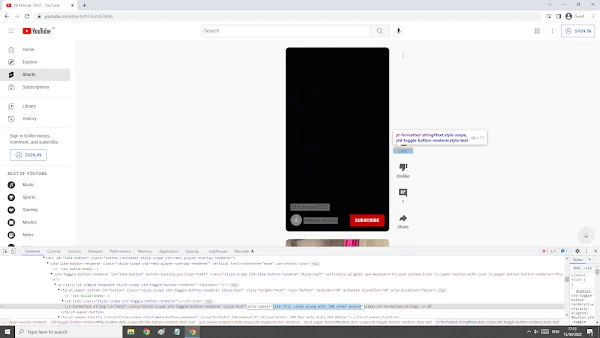
The report gives no bounty amount, no severity rating, no CVSS score, no weakness classification and no confirmation that a fix was shipped. It also does not say which of the two URLs produced the leak, whether both did, or what the response looked like beyond the screenshot. Treat the finding as a single observation.
Root cause
The report does not analyse the cause. What it implies is a mismatch between where the visibility preference is applied and where the like data is served. The owner's choice not to show the count is presumably stored as a per-video setting, and some surface returns or renders the number without consulting it. In other words, the preference is enforced at the presentation layer of one client rather than at the data layer that all clients share. That reading is likely rather than confirmed, because the report contains no request or response showing where the number came from.
Impact
A viewer can learn a number that the video owner chose to conceal. A viewer can learn a number that the video owner explicitly chose to conceal. The report makes no claim beyond that: it does not say the technique works for other hidden metrics, for private videos, or at scale, and it does not describe any automation. The report itself only states that the count can be leaked.
How this kind of bug works
This is a broken access control problem applied to a field rather than to an object. A user-controlled visibility preference creates two classes of viewer: those allowed to see a value and those not. Correct enforcement means every code path that produces the value checks the preference and the viewer's relationship to the content before including it. Bugs appear when the same data is exposed through several surfaces, such as the desktop site, the mobile site, a native app API, embedded players, feeds, search results, notifications, or server-rendered pages, and the check is implemented in only some of them. They also appear when the check lives in the client: a template hides the number, but the number is still present in the JSON or HTML delivered to the browser, so anyone reading the raw response sees it.
A second common variant is caching. A response generated for a viewer who is allowed to see the value is cached and served to viewers who are not, or the reverse. A third is aggregation: the individual value is hidden, but a total, a ranking, a ratio or a rounded figure derived from it is not, and the hidden value can be inferred.
Defences follow from this. The authorisation decision belongs on the server, close to the data, and should be expressed once and reused by every surface. Responses that vary by viewer must carry appropriate cache directives or be keyed on the viewer. Fields that a viewer may not see should be omitted from the payload entirely rather than blanked in the template.
How to test for it
- Identify features with a per-object privacy toggle: like and view counts, subscriber counts, follower lists, playlists, membership, read receipts, profile fields.
- Create two accounts and a piece of content owned by one of them. Set the restrictive option and confirm through the normal interface that the second account cannot see the value.
- Enumerate every surface that renders the same content: the main web page, the mobile web host, the API endpoints the clients call, embedded players, RSS or feed endpoints, search, notifications, and any share or preview link. Compare what each returns for the restricted object.
- Inspect raw responses, not just the rendered page. Look in the HTML source, in JSON bodies, in inline bootstrap data, and in any GraphQL or REST response for the field name or its value.
- Repeat with the owner account and with an unauthenticated session, and check whether the value appears in cached or shared responses.
- A positive result is the restricted value appearing, in any form, to a viewer who should not receive it, reproducibly and without relying on a stale cache from your own privileged session.
Common false positives: the value was visible because the setting had not propagated yet; the second account was actually the owner or a moderator; the number came from a cached response generated while logged in as the owner; the figure was an estimate or a rounded aggregate rather than the hidden value; or the field was present but always null for viewers. Re-test in a fresh session and, where possible, from a different network before reporting.
How it is fixed
Enforce the visibility preference server-side in the shared data layer so that every client and endpoint applies it. Remove the field from responses to unauthorised viewers instead of hiding it in the template. Make sure caches are keyed on viewer authorisation or that personalised responses are marked private. Audit derived values, totals and rankings that could reveal the hidden number, and apply the same rule to them. Add regression tests that request the restricted object through each surface as an unauthorised viewer.
Hunting notes
Privacy toggles are most often broken on secondary surfaces: mobile web hosts, older API versions, embedded and oEmbed-style endpoints, feeds, and server-rendered variants of a single-page app. Recon signals worth watching are multiple hostnames serving the same content, client bundles that reference a visibility flag alongside a count field, and endpoints that return richer objects than the page needs. When you find a leak, show it with two accounts and a clear before-and-after: the setting as configured, the normal view proving the value is hidden, and the alternate surface proving it is not. Keep the proof minimal and reproducible, and state plainly what the owner loses, since privacy bugs are often triaged on demonstrated impact rather than on the mechanism alone.
What happened, in plain words
YouTube Shorts are short vertical videos, the kind you swipe through in a feed. Every Short has a like counter, the number of people who pressed the thumbs-up button. The person who uploads a Short can choose to hide that counter from everyone else. The report describes a way to read the hidden number anyway, through the video's Shorts page.
To understand the finding you need one idea: a web page is not a single thing. The same video is shown to you by several different parts of YouTube, the desktop site, the mobile site, the apps, embedded players and so on. Each of those parts asks YouTube's servers for the video's data and then draws it on your screen. A privacy setting only works if every one of those parts respects it.
The researcher set the feature up from the owner's side like this:
- Upload video. (Shorts)
- Edit video.
- Show how many viewers like this video ---> Don't show how many viewers like this video.
- Save.
Step 3 is the privacy toggle. The owner switches it from showing the count to hiding it, and step 4 stores that choice. After that, anyone who opens the video in the normal way should see no number at all.
The researcher then opened the same video as an ordinary viewer, using either of these addresses:
https://www.youtube.com/shorts/victim_video_id or https://m.youtube.com/shorts/victim_video_id
victim_video_id is a placeholder for the real identifier of the video, the code that tells YouTube which Short you mean. The first address is the normal desktop site. The second, m.youtube.com, is the mobile web version, the site your phone's browser loads when you visit YouTube without the app. The report says the like count of the victim's Short can be leaked this way, and the screenshot below is placed right after that sentence as evidence of the leaked count.
The screenshot is placed right after that sentence. That is the whole finding: a number the owner chose to conceal could still be read.
The report does not say which of the two addresses produced the leak, or whether both did. It gives no bounty amount, no severity rating, no score, no classification of the weakness, and no confirmation that a fix was shipped. It also shows no request or response, so we cannot see where the number came from. Treat it as one observation.
The owner made a deliberate choice to hide the count, and the report states that the count can still be leaked.
In general, how this kind of bug works
This is a broken access control problem, but applied to a single field rather than to a whole page or account. Access control is the part of a system that decides who may see or do what. Normally we think of it as guarding an object, such as a private photo. Here it guards one value inside an object that is otherwise public: the like count on a video anyone can watch.
A visibility preference splits viewers into two groups: those allowed to see the value and those not. Correct enforcement means every piece of code that produces the value checks the preference first. Bugs appear when the same data is served through several surfaces and the check is implemented in only some of them. Surfaces include the desktop site, the mobile site, the apps' data feeds, embedded players, search results, notifications and server-rendered pages.
A related variant is a check that lives only in the browser. The page template hides the number, but the number is still inside the data delivered to your browser, so anyone who looks at the raw response sees it. Think of a shop that puts the price tag inside the box instead of on it: the label is hidden, the price is not.
Caching causes another variant. A response built for a viewer who is allowed to see the value gets stored and then handed to viewers who are not, or the reverse. A third is aggregation: the exact number is hidden, but a total, a ranking or a rounded figure derived from it is not, and the hidden value can be worked out from that.
The defences follow. The decision belongs on the server, close to the data, written once and reused by every surface. Responses that differ by viewer must be marked so caches do not share them. And a field a viewer may not see should be left out of the response entirely, not blanked in the template.
How to test for it
- Find features with a per-object privacy toggle: like and view counts, subscriber counts, follower lists, playlists, read receipts, profile fields.
- Create two accounts and a piece of content owned by one. Set the restrictive option and confirm through the normal interface that the second account cannot see the value.
- List every surface that shows the same content: main site, mobile site, the data endpoints the apps call, embedded players, feeds, search, notifications, share and preview links. Compare what each returns.
- Look at raw responses, not just the drawn page: the page source, the data blocks, any response containing the field name or its value.
- Repeat as the owner and as a logged-out visitor, and check whether the value appears in cached or shared responses.
- A positive result is the restricted value appearing, in any form, to a viewer who should not receive it, reproducibly, without relying on a stale cache from your own privileged session.
Common false positives: the setting had not taken effect yet; the second account was actually the owner or a moderator; the number came from a cached response generated while logged in as the owner; the figure was an estimate rather than the hidden value; or the field was present but always empty for viewers. Re-test in a fresh session and, if possible, from a different network before reporting.
How it is fixed
Enforce the preference on the server in the shared data layer, so every client and endpoint applies it. Remove the field from responses to unauthorised viewers instead of hiding it in the template. Make sure caches are keyed on who is asking, or mark personalised responses private. Audit totals and rankings that could reveal the hidden number, and apply the same rule to them. Add regression tests that request the restricted object through each surface as an unauthorised viewer.
Hunting notes
Privacy toggles break most often on secondary surfaces: mobile web hosts, older versions of an interface, embedded and preview endpoints, feeds, and server-rendered variants of a single-page app. Signals worth watching are several hostnames serving the same content, page code that mentions a visibility flag next to a count field, and endpoints that return richer data than the page needs. When you find a leak, show it with two accounts and a clear before and after: the setting as configured, the normal view proving the value is hidden, and the alternate surface proving it is not. Keep the proof minimal and reproducible, and state plainly what the owner loses, because privacy bugs are often judged on demonstrated impact rather than on the mechanism alone.
Glossary
- YouTube Shorts: YouTube's short vertical video format, shown in a swipeable feed.
- Like count: the number of viewers who pressed the thumbs-up button on a video.
- Privacy toggle: a setting that lets an owner hide or show a piece of information.
- Surface: any one of the ways a service presents the same content, such as the desktop site, mobile site, app or embedded player.
- Mobile web host: the address of the mobile version of a website, here
m.youtube.com. - Video ID: the unique code that identifies one video, shown here as
victim_video_id. - Request and response: the message your browser sends to a server asking for something, and the message the server sends back.
- Access control: the part of a system that decides who may see or do what.
- Broken access control: a flaw where that decision is missing or wrong, so someone gets data they should not.
- Field: a single named value inside a larger block of data, such as a like count inside a video's details.
- Server-side: done on the server, where the data lives, rather than in the browser.
- Client-side: done in the browser or app on the viewer's device.
- Payload: the body of data a server sends back, which may contain more than the page displays.
- Caching: storing a response so it can be reused, which can accidentally share one viewer's data with another.
- Aggregation: a combined figure such as a total or ranking that can reveal an individual hidden value.
- False positive: a result that looks like a bug but is not, for example because of a stale cache.
- Regression test: an automated check that a fixed bug stays fixed.
- Severity and CVSS: a rating of how serious a bug is; CVSS is a standard scoring system for it.
- Bounty: a payment a company makes to a researcher who reports a valid bug.